H20-100 / H20-600 CE Release Notes

Scott Greczkowski

Welcome HOME!
Original poster
Staff member
HERE TO HELP YOU!
Cutting Edge
Sep 7, 2003
104,494
31,913
Newington, CT
Systems in this CE
H20-100 • H20-600

Window of opportunity to download:
Friday, May 1, 2009 11:00PM - 2:30AM ET
Saturday, May 2, 2009 11:00PM - 2:30AM ET


PLEASE READ THIS FIRST! DirecTV Cutting Edge Program: Terms, FAQ, How-To, Hidden Features, and More

If you have any issues with this CE release, please post them in this thread. We'll try to help, and DirecTV will see / be aware of your issue :)


For the latest updates, check out the Satelliteguys CE Chat on Friday nights:
chat.satelliteguys.us

-----------------


H20-100 and H20-600 v411C

Fixes
  • Improved Stability
Quote:
Previous Release Notes
New feature(s)
  • 01 - DASH in full screen displays last 6 digits of RID
  • 01 - New Guided Setup screens
  • 01 - New music channel background and DMX channel logo
Improved/Updated
  • 01 - Improved Caller ID
  • 01 - UI Polishing
  • 01 - Interactive channel fixes
  • 01 - Stability

    [*]02 - UI Polishing
    [*]02 - Stability
03 - UI Polishing
03 - Video Stretching Corrections
03 - Improved Stability
 
Last edited:
no HR notes yet, when we get em we post them :)

Jason Crandall is off this week, hes off in the Bahamas somewhere drinking a drink with a tiny umbrella in it. :D
 
No HRs this time around?

Damn, again I will miss out on doing my first CE.

DK wait at least after 8pm for notes on the HR's. sometimes it takes longer than that.

PLEASE LOG IN TO GET RID OF THESE ADS!
 
For some reason, all my "HD" logo's in the guide are now colored black instead of white... it's looks really weird. Anyone else have this issue?
 
Yes, and there is a slight yellow edge to the D in HD. Also, when selecting a channel from the guide, the banner background turns black before viewing the channel.

H20-100
 
Yes, and there is a slight yellow edge to the D in HD. Also, when selecting a channel from the guide, the banner background turns black before viewing the channel.

H20-100

Mine too. Also, I have the new hd channel logos. Is that from a previous CE I missed, or new to this one?
 
Mine too. Also, I have the new hd channel logos. Is that from a previous CE I missed, or new to this one?

What do you mean new HD logos? I don't notice any difference except for them being black with the yellow tint.

PLEASE LOG IN TO GET RID OF THESE ADS!
 
What do you mean new HD logos? I don't notice any difference except for them being black with the yellow tint.

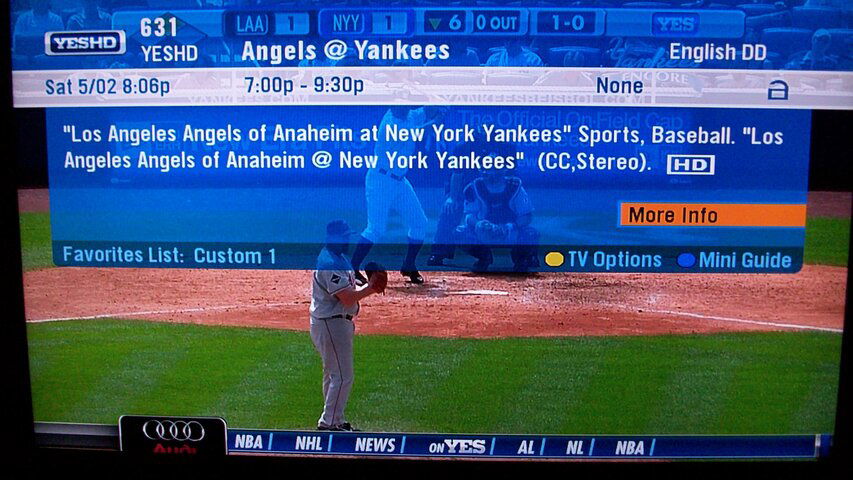
I mean the channel logos, not in the grid guide, but at the top left of the id banner
 
chip, do you have a way to post a picture of this? it be great to see this. :)

Here you go, Rey. I am talking about the YESHD logo in the upper left. It used to be just cheesy white block lettering.
 

Attachments

  • 100_0112.JPG
    100_0112.JPG
    813.7 KB · Views: 249
Here you go, Rey. I am talking about the YESHD logo in the upper left. It used to be just cheesy white block lettering.

thanks for posting that. yes, at times when we do a ce download it will include some new channel logos.
 
Looks like if i download the CE it will not install without the Receiver being activated and recieving programming :(
but oh well

That doesn't seem right since when a tech does a new install they can force a new software install without the STB being activated.

PLEASE LOG IN TO GET RID OF THESE ADS!
 
Maybe I'll give it a try since I have a deactivated H20-600 sitting in the closet next time there's a CE for it.
 
Well yeah when i download it wont install shows the same Firmware version as before
no matter how many CE weekends i try

Just an FYI, I took my unsubscribed H20-600, connected it back up and did the 5/15 CE download, it installed it just fine.
 
if i missed the download for the H20-100 can i pick it up the next weekend, or no ?

if it's available, yes you can.

PLEASE LOG IN TO GET RID OF THESE ADS!
 

Play list between a H23 and a R22

CE's for Memorial Day Weekend

Users Who Are Viewing This Thread (Total: 0, Members: 0, Guests: 0)

Who Read This Thread (Total Members: 2)