Social Feed

InstigatorX
Last reply · posted in DISH Network Support Forum
Suffice to say I have a TV and Receiver that support 1080p...does anyone have the problem where switching the 1080p through the receiver doesn't work, but going direct to the TV does? Even if its forced (ala just saying "Yes, I would still like to purchase even though the 1080p test fails).

Receiver is a Denon AVR-888 and TV is Samsung LNT4661.

Yes, yes, yes...1080p is supported on both (receiver and TV) and DOES work when going direct.
19 Replies · 4379 views
harshness
Yes, yes, yes...1080p is supported on both (receiver and TV) and DOES work when going direct.
If the Denon can't positively identify the Samsung TV a 1080p terminal device, it must report back to the DVR that the TV isn't capable.

Given the rather large number of HDMI issues with Samsung displays, it is ill-advised to summarily pin the problem on Denon.
E*Dude
He, he. I love the finger pointing, even though no one really knows what device is causing the issue.

I've done custom installs for many years and have seen this many times since the introduction of HDCP. Regardless of what devices are in the system, whether it be sat receivers, cable boxes, blu-ray or whatever, adding a third HDMI device (receiver, switcher, etc) to the chain is problematic 70% of the time.

What generally has cured issues like these in the past with my clients is the power-up sequence. If you power-up all source devices first (Sat receiver, DVD player, X-box), then power-up the monitor / TV and give it approximately 15 seconds so it can begin querying HDMI sources, THEN power-up your RECEIVER LAST and you might have better success.

I can't say that'll work for everyone, but it has saved me many times. Please let me know success / failures using this technique.
K
Suffice to say I have a TV and Receiver that support 1080p...does anyone have the problem where switching the 1080p through the receiver doesn't work, but going direct to the TV does? Even if its forced (ala just saying "Yes, I would still like to purchase even though the 1080p test fails).

Receiver is a Denon AVR-888 and TV is Samsung LNT4661.

Yes, yes, yes...1080p is supported on both (receiver and TV) and DOES work when going direct.
HDMI/HDCP being what it is, passing the signal through the A/V receiver increases the handshake time. In some cases, the time it takes to get a picture doubles! I can't believe it takes a data link capable of 3 Gb/s 3-6 seconds per device to sync up but it's true.

I suspect what's happening is the Dish receiver gives up before the connection stabilizes.

You can probably respond OK blindly if you know what the dialog box looks like and what the default button is. E.g., if the buttons are YES, CANCEL, NO like most and the default is CANCEL, press the left arrow then SELECT even before you see a picture!

BTW, there's little difference between 1080p24 and 1080i if your TV does a good job detecting 3:2 pulldown. 1080i provides at least two fields for ever film frame so the entire 24 FPS frame can be reconstructed for display. This reconstruction relies on the TV's ability to detect motion between film frames and this can sometimes fail. 1080p24 eliminates the need to reconstruct the film frame since it's sent at film frame rate not video rate. The TV then needs to insert it's own 3:2 pulldown sequence for display (unless the TV can run the display at 72 HZ or 120 Hz).
H
If the Denon can't positively identify the Samsung TV a 1080p terminal device, it must report back to the DVR that the TV isn't capable.

Given the rather large number of HDMI issues with Samsung displays, it is ill-advised to summarily pin the problem on Denon.


I have the same samsung as the original poster and a Onyko 605 and it works fine, so don't blame the TV...
rglore
You can probably respond OK blindly if you know what the dialog box looks like and what the default button is. E.g., if the buttons are YES, CANCEL, NO like most and the default is CANCEL, press the left arrow then SELECT even before you see a picture!
You don't have to do that, just press left or right arrow to reset the timeout every few seconds to give your equipment more time to sync to the 1080p rent confirmation message.
S
HDMI/HDCP being what it is, passing the signal through the A/V receiver increases the handshake time. In some cases, the time it takes to get a picture doubles! I can't believe it takes a data link capable of 3 Gb/s 3-6 seconds per device to sync up but it's true.
<...>

You should think about I2C bus speed when observing EDID.
DishSatUser
Problem is, some receivers don't do just a straight "switching" of the HDMI signals. Instead they'll do internal processing as well.

A large number of the home theater magazines that review the equipment include a chart of the features supported, how well the feature functions (Pass or Fail) and it's amazing how many of the really expensive gear still "fail" some of the video processing features.

As 1080P is a newer specification, and some home theater equipment makers are still having problems with the original specifications, it doesn't suprise me you encounter difficulties.

I do see that the Denon is well reviewed at Home Theater: Denon AVR-888 A/V Receiver

The reviewer does use "Pure Direct mode" instead that has the original source passed through with no processing. Have you tried that mode with your ViP DVR?
allargon
I've done custom installs for many years and have seen this many times since the introduction of HDCP. Regardless of what devices are in the system, whether it be sat receivers, cable boxes, blu-ray or whatever, adding a third HDMI device (receiver, switcher, etc) to the chain is problematic 70% of the time.

What generally has cured issues like these in the past with my clients is the power-up sequence. If you power-up all source devices first (Sat receiver, DVD player, X-box), then power-up the monitor / TV and give it approximately 15 seconds so it can begin querying HDMI sources, THEN power-up your RECEIVER LAST and you might have better success.

I can't say that'll work for everyone, but it has saved me many times. Please let me know success / failures using this technique.

That's almost good advice. However, it's been my experience that one should power up the TV/display/monitor FIRST, then the source devices. Quite a few upconverting players will default to 480p if they power-on before the display. (Granted with an inactive receiver in the middle, they might not see each other. I would power on the display, the receiver, then the source devices.)
Peter Parker
Supporting Founder Lifetime Supporter
Last reply · posted in DISH Network Support Forum
No idea what improvements might be involved.
24 Replies · 1025 views
  • Like
Reactions: LQQK and reubenray
N
I'm getting fabulous picture on Ch. 148 4k, but zero audio with H713. This is with a recorded show (Notre Dame game). Anyone else have this? Audio is fine on every other channel.
  • Like
Reactions: charlesrshell
jsmit86
I'm getting fabulous picture on Ch. 148 4k, but zero audio with H713. This is with a recorded show (Notre Dame game). Anyone else have this? Audio is fine on every other channel.
It's a known issue.
For a temporary fix, go into the menu, Audio, and turn Dolby Audio "OFF". You will have PCM stereo audio.

I was able to give the tech ops team some data logs so they could diagnose the problem, and they rolled me back to H708 temporarily. It fixed that issue.

They let me know that they understand what caused the issue, and it will be fixed within a few weeks in a new update.
long_time_Dish
They let me know that they understand what caused the issue, and it will be fixed within a few weeks in a new update.
Oh, you mean "soon"? :biggrin
Almighty1
It's a known issue.
For a temporary fix, go into the menu, Audio, and turn Dolby Audio "OFF". You will have PCM stereo audio.

I was able to give the tech ops team some data logs so they could diagnose the problem, and they rolled me back to H708 temporarily. It fixed that issue.

They let me know that they understand what caused the issue, and it will be fixed within a few weeks in a new update.
I guess they will be busy when lots of people start asking for rollbacks to H708 now that you mention that downgrades of software does exist because it will likely fix the OTA Single Tuner and the IR Remote problems in H710-H713.
navychop
it will likely fix the OTA Single Tuner

:popcorn
  • Like
Reactions: charlesrshell
dishstaller
it will likely fix the OTA Single Tuner
🤣

Oh....you were serious
teachsac
Staff member HERE TO HELP YOU!
Last reply · posted in TV Shows
Hondo is back with a new squad 9/25 only on Starz.


View: https://m.youtube.com/shorts/b0gPzA8KHEQ
7 Replies · 96 views
  • Like
Reactions: dfergie
K
Never watched the previous shows, so doubtful.
teachsac
Started watching yesterday. Not too bad.
Scott Greczkowski
Wife likes it.
  • Like
Reactions: teachsac
teachsac
I like Zyra from La Brea (one with the prosthetic).
Scott Greczkowski
Staff member HERE TO HELP YOU! Cutting Edge
Last reply · posted in The Chit Chat Club
Sometimes a thread gets so many posts in it that is can cause issues for the server so that why today we introduce The Song Name Game Part 3!

So let the game continue!

The last song was added by Bobby who posted...

One Meat Ball - Andrews Sisters

CONTINUE ON AND HAVE FUN! WELCOME HOME TO SATELLITEGUYS.US!

Here are the original rules for the game as posted by WebbyDude back in 2006. http://www.satelliteguys.us/threads/68645-Song-Name-Game

Just name a song title and the band who performed it. The next person does the same thing, but needs to list a song title or band name which includes a word from the previous entry. Pick songs from any genre.

Example:

Long Live Rock and Roll -- Rainbow

Rainbow in the Dark -- Dio

Another example:

Ride the Lightning -- Metallica

Lightning Strikes -- Ozzy Osbourne


Get it?


An additional note: we all know that song titles, sometimes, use profane words. Because this is a family friendly website it is advised that you clean up that title up a bit. This is accomplished by using something like sh!t instead of the real word. Thanks....
68536 Replies · 2673434 views
  • Like
Reactions: c-spand
Bobby
I Saw The Light - Todd Rundgren
long_time_Dish
Little Bit Of Light - Strange Weather
  • Like
Reactions: dishstaller
EatMyVolts
A Little Bit of Soap -- The Jarmels
long_time_Dish
Give A Little Bit - Supertramp
dishstaller
Little Wing - Jimi Hendrix
meStevo
Lifetime Supporter
Last reply · posted in The Sports Section
Schedule drops tomorrow. Mandatory mini camps in June. Hall of Fame game August 6th.
115 Replies · 1816 views
  • Like
Reactions: Jimbo and dfergie
meStevo
Browns lead the AFC North 🤣

Seth Meyers What GIF by Late Night with Seth Meyers
Foxbat
I guess even the patience of us laid-back Hoosiers has its limits:
rvvaquero
I guess even the patience of us laid-back Hoosiers has its limits:
Be nice to see a Cowboy headline like that.
M
I guess even the patience of us laid-back Hoosiers has its limits:

Can we expect to see a new coach if we say "pretty please?"
dfergie
Staff member HERE TO HELP YOU!
Last reply · posted in TV Shows
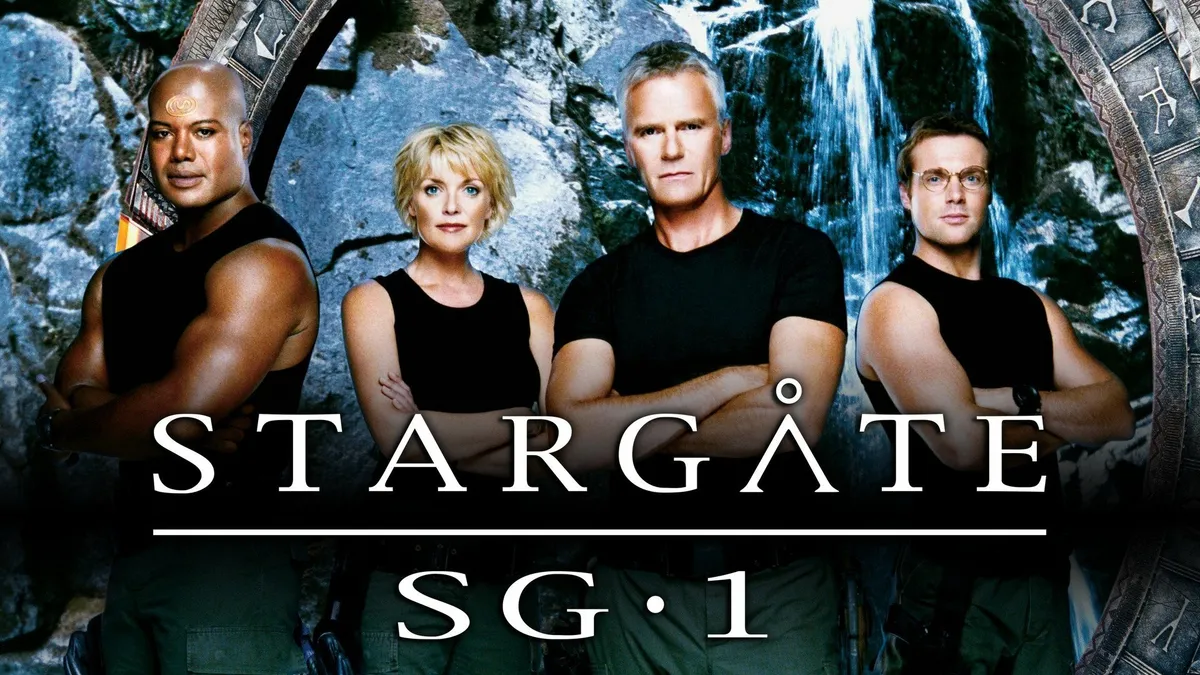
Stargate SG-1 cancelled, Atlantis renewed
clear.gif

Monday - August 21, 2006 | by Darren Sumner
clear.gif

The future of Stargate is in question today, as SCI FI Channel has cancelled the long-running Stargate SG-1, Multichannel News reported today and a GateWorld source has confirmed. The news regrettably follows the airing of the show's milestone two-hundredth episode on Friday.

Stargate Atlantis, meanwhile, has been renewed for a fourth season, with the network hoping to see that the spin-off series can stand alone, according to a source.
Source Gateworld
2033 Replies · 184127 views
R
I have gotten back into watching SG-1 and I have recorded most of the episodes to binge watch. What episodes are about the Antarctic or was this a movie? Also where could I watch the SG-1 movies?
osu1991
long_time_Dish
I have gotten back into watching SG-1 and I have recorded most of the episodes to binge watch. What episodes are about the Antarctic or was this a movie? Also where could I watch the SG-1 movies?
Well, there are a couple involving the Antarctic. "Solitudes", S1 E17 (one of my favorites), Then, "Lost City', S7 E21 and E22. Then, in the SGA pilot, "Rising", S1 E1 and E2, it starts out in the Antarctic for about the first 20 minutes or so.
R
Well, there are a couple involving the Antarctic. "Solitudes", S1 E17 (one of my favorites), Then, "Lost City', S7 E21 and E22. Then, in the SGA pilot, "Rising", S1 E1 and E2, it starts out in the Antarctic for about the first 20 minutes or so.
Which one has O'Neil being Ancients? I am at the end of Season 8 now.
long_time_Dish
Which one has O'Neil being Ancients? I am at the end of Season 8 now.
If I understand your question, O'Neill had the Ancient's knowledge in the "Lost City" two-part episode. That was when Anubis attacked Earth and there was a big battle over Antarctica.
Ramy
Supporting Founder
Last reply · posted in The Sports Section
Really excited for this season with Kentucky having a new coach and some really exciting recruits. Probably won't last long, but here's hoping this season is great.
152 Replies · 1925 views
  • Haha
Reactions: Mike0616
Foxbat
Best fan sign I saw during the ND-BYU game: "Bear ate your Lucky Charms!" (Bear being the Cougars' QB). I was going to suggest, "Have you or your team been involved in a Carr crash?"
  • Haha
Reactions: Jimbo and Mike0616
M


They get cruel sometimes, very very cruel.😈. Hated to see my dawgs go down but I still say being ranked #1 is a hex on you!
  • Like
Reactions: Howard Simmons
Jimbo
They get cruel sometimes, very very cruel.😈. Hated to see my dawgs go down but I still say being ranked #1 is a hex on you!
Yup, I agree, I'd rather be 2 or 3 till the last few weeks.
  • Like
Reactions: Mike0616