

Social Feed

I started this thread, as more and more used out of warranty SV HD receivers are getting sold for a lot less on EBay, Craiglist and such, and new owners can do easy mods described below to expand the STBs legit functionality and extend trouble free lifespan. Anyone with good links or suggestions is invited to join. Remember, its illegal to try using this nice HD receiver to decrypt encrypted signals, if at all possible, but completely legal to use it for clear channels viewing. 
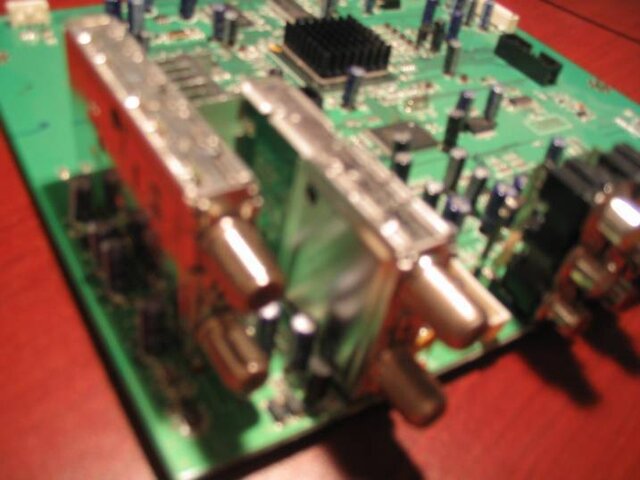
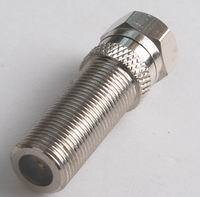
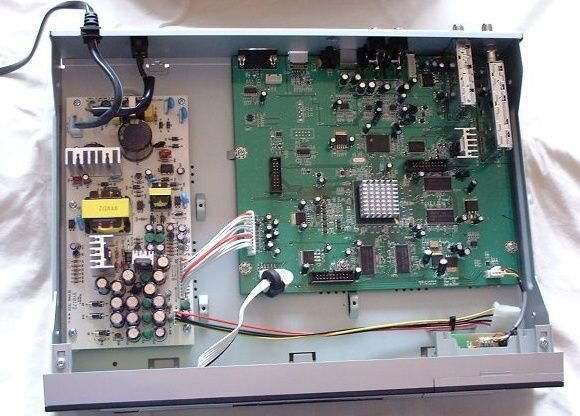
Recently I came across a used Sonicview 8000HD receiver to play with for some time, until another interesting cheapi comes alone. First thing I did was clearing up its memory from whatever was their before and loading legit factory software to it. When I then looked under the hood, I found that its internal ATSC integrated NIM tuner is made by Samsung, specs of which are given here. This tuner is also capable of decoding NTSC and Clear QAM Cable signals, but these its capabilities aren't used in Sonicview 8000HD. I found that the tuner has 2 ports: In and Loop Through Out, but in a standard receiver only ATSC In port protrudes through the receiver's back panel allowing to attach coax cable to it. Full of good intentions to fix this sudden "design deficiency", I removed all PCBs from the box, drilled a hole in its back panel for the Loop Out port, and ordered an extended non-standard F-connector on EBay to let this newly discovered port out of the box.
That's when the story began to unfold. The EBay Chinese store selling that connector confirmed shipping instantly... only to send me another email 2 weeks later saying they are out of stock on these connectors, but expect more at some unspecified happy-go-lucky hour. And instead...offered me a standard short F-connector plentiful everywhere. After some mulling of the issue and usual mumble-jumble that almost lost forever long F-connector was magically found, and I even received the shipment tracking number this time around. After waiting just a little more than a month, I finally got one in my mailbox...from Singapore.
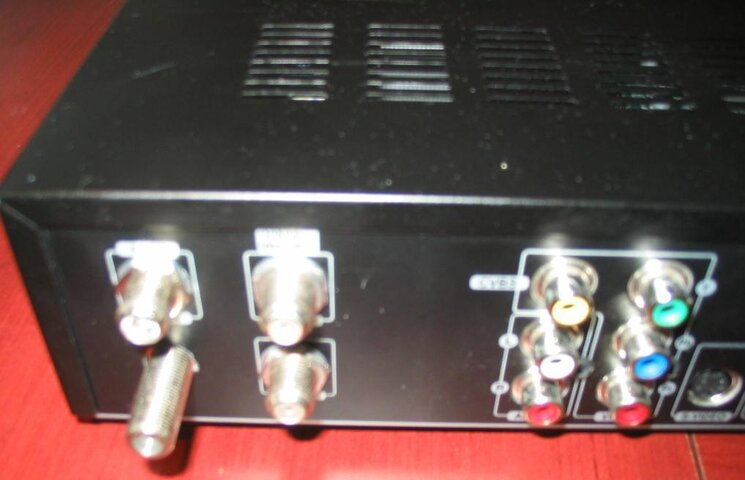
Now it was time to check my Sonicview ATSC Tuner ports performance! I connected the extended F-connector to its hidden Loop Out port, mounted all PCBs back into the receiver's case, closed the cover, hooked up coax cable to the new port, switched the STB and my second TV On, and...vu a la. A strong signal appeared on my second HDTV. The Loop Out port is not powered, it passes through signal beautifully regardless of Sonicview being hooked to a power outlet or not. I scanned OTA channels, and got the same channels showing up on both Sonicview connected TV and my other HDTV with an integrated ATSC tuner. The list of OTA channels scanned was the same, regardless whether I hooked a coax to SW ATSC Loop Out port or not, so signal loss on the Loop Out is negligible. Great! Now I don't need to buy an expensive OTA Pre-amp and a set of splitters to get OTA channels showing up on our new HDTV in the bedroom! :sob:
Recently I came across a used Sonicview 8000HD receiver to play with for some time, until another interesting cheapi comes alone. First thing I did was clearing up its memory from whatever was their before and loading legit factory software to it. When I then looked under the hood, I found that its internal ATSC integrated NIM tuner is made by Samsung, specs of which are given here. This tuner is also capable of decoding NTSC and Clear QAM Cable signals, but these its capabilities aren't used in Sonicview 8000HD. I found that the tuner has 2 ports: In and Loop Through Out, but in a standard receiver only ATSC In port protrudes through the receiver's back panel allowing to attach coax cable to it. Full of good intentions to fix this sudden "design deficiency", I removed all PCBs from the box, drilled a hole in its back panel for the Loop Out port, and ordered an extended non-standard F-connector on EBay to let this newly discovered port out of the box.
That's when the story began to unfold.
The EBay Chinese store selling that connector confirmed shipping instantly... only to send me another email 2 weeks later saying they are out of stock on these connectors, but expect more at some unspecified happy-go-lucky hour. And instead...offered me a standard short F-connector plentiful everywhere. After some mulling of the issue and usual mumble-jumble that almost lost forever long F-connector was magically found, and I even received the shipment tracking number this time around. After waiting just a little more than a month, I finally got one in my mailbox...from Singapore. Now it was time to check my Sonicview ATSC Tuner ports performance! I connected the extended F-connector to its hidden Loop Out port, mounted all PCBs back into the receiver's case, closed the cover, hooked up coax cable to the new port, switched the STB and my second TV On, and...vu a la. A strong signal appeared on my second HDTV. The Loop Out port is not powered, it passes through signal beautifully regardless of Sonicview being hooked to a power outlet or not. I scanned OTA channels, and got the same channels showing up on both Sonicview connected TV and my other HDTV with an integrated ATSC tuner. The list of OTA channels scanned was the same, regardless whether I hooked a coax to SW ATSC Loop Out port or not, so signal loss on the Loop Out is negligible. Great! Now I don't need to buy an expensive OTA Pre-amp and a set of splitters to get OTA channels showing up on our new HDTV in the bedroom! :sob:

7 Replies
·
14702 views



Over the past few weeks, I have had problems connecting to streaming services (Netflix, HBO et al). When I go to the TV's native Channels, I have no problem. The Dish internet troubleshooter shows I have a good internet connection. I'm wondering whether it's an issue with my internet provider or a problem with the Dish software on the Hopper Plus. Anyone else seeing this?
5 Replies
·
200 views


TWiT Tech Podcast Network
Time for another AWESOME video from the TWIT Network!
View: https://www.youtube.com/shorts/nKMpQ3UNenY
Direct YouTube Link - Meta Muse Privacy Flaw Exposed Sensitive Shared Links #shorts
TWIT's Website
TWIT Live Feed
View: https://www.youtube.com/shorts/nKMpQ3UNenY
Direct YouTube Link - Meta Muse Privacy Flaw Exposed Sensitive Shared Links #shorts
TWIT's Website
TWIT Live Feed
0 Replies
·
2 views
TWiT Tech Podcast Network
Time for another AWESOME video from the TWIT Network!
View: https://www.youtube.com/shorts/I_zmwUPcv50
Direct YouTube Link - AI Is Turning Wannabe Hackers Into Cybercriminals #shorts
TWIT's Website
TWIT Live Feed
View: https://www.youtube.com/shorts/I_zmwUPcv50
Direct YouTube Link - AI Is Turning Wannabe Hackers Into Cybercriminals #shorts
TWIT's Website
TWIT Live Feed
0 Replies
·
5 views
TWiT Tech Podcast Network
Time for another AWESOME video from the TWIT Network!
View: https://www.youtube.com/watch?v=mGXuqH0DqDs
Direct YouTube Link - AI in the NYTimes Cooking App
TWIT's Website
TWIT Live Feed
View: https://www.youtube.com/watch?v=mGXuqH0DqDs
Direct YouTube Link - AI in the NYTimes Cooking App
TWIT's Website
TWIT Live Feed
0 Replies
·
8 views
TWiT Tech Podcast Network
Time for another AWESOME video from the TWIT Network!
View: https://www.youtube.com/watch?v=psVDWmJn7e8
Direct YouTube Link - Responses to PHP Flash Alert
TWIT's Website
TWIT Live Feed
View: https://www.youtube.com/watch?v=psVDWmJn7e8
Direct YouTube Link - Responses to PHP Flash Alert
TWIT's Website
TWIT Live Feed
0 Replies
·
1 views
TWiT Tech Podcast Network
Time for another AWESOME video from the TWIT Network!
View: https://www.youtube.com/watch?v=rLJZNojY-Os
Direct YouTube Link - Apple's Jump Into the Touchscreen Laptop Market
TWIT's Website
TWIT Live Feed
View: https://www.youtube.com/watch?v=rLJZNojY-Os
Direct YouTube Link - Apple's Jump Into the Touchscreen Laptop Market
TWIT's Website
TWIT Live Feed
0 Replies
·
7 views
Lon.TV
Time for another AWESOME video from Lon Seidman of LON.TV!
View: https://www.youtube.com/watch?v=pYnl79ronhs
Direct YouTube Link - Pre-CES Tech Dispatch! 14 Gadgets in 11 Minutes !
The Official LON.TV Website
Lon on Facebook
View: https://www.youtube.com/watch?v=pYnl79ronhs
Direct YouTube Link - Pre-CES Tech Dispatch! 14 Gadgets in 11 Minutes !
The Official LON.TV Website
Lon on Facebook
0 Replies
·
7 views

Staff member
HERE TO HELP YOU!
Cutting Edge
Sometimes a thread gets so many posts in it that is can cause issues for the server so that why today we introduce The Song Name Game Part 3!
So let the game continue!
The last song was added by Bobby who posted...
One Meat Ball - Andrews Sisters
CONTINUE ON AND HAVE FUN! WELCOME HOME TO SATELLITEGUYS.US!
Here are the original rules for the game as posted by WebbyDude back in 2006. http://www.satelliteguys.us/threads/68645-Song-Name-Game
Just name a song title and the band who performed it. The next person does the same thing, but needs to list a song title or band name which includes a word from the previous entry. Pick songs from any genre.
Example:
Long Live Rock and Roll -- Rainbow
Rainbow in the Dark -- Dio
Another example:
Ride the Lightning -- Metallica
Lightning Strikes -- Ozzy Osbourne
Get it?
An additional note: we all know that song titles, sometimes, use profane words. Because this is a family friendly website it is advised that you clean up that title up a bit. This is accomplished by using something like sh!t instead of the real word. Thanks....
So let the game continue!
The last song was added by Bobby who posted...
One Meat Ball - Andrews Sisters
CONTINUE ON AND HAVE FUN! WELCOME HOME TO SATELLITEGUYS.US!
Here are the original rules for the game as posted by WebbyDude back in 2006. http://www.satelliteguys.us/threads/68645-Song-Name-Game
Just name a song title and the band who performed it. The next person does the same thing, but needs to list a song title or band name which includes a word from the previous entry. Pick songs from any genre.
Example:
Long Live Rock and Roll -- Rainbow
Rainbow in the Dark -- Dio
Another example:
Ride the Lightning -- Metallica
Lightning Strikes -- Ozzy Osbourne
Get it?
An additional note: we all know that song titles, sometimes, use profane words. Because this is a family friendly website it is advised that you clean up that title up a bit. This is accomplished by using something like sh!t instead of the real word. Thanks....
68663 Replies
·
2680644 views


Staff member
Pub Member / Supporter
Cutting Edge
The TPN Map Excel Presents all DIRECTV Channels:
Understanding the TPN Map
Making Sense of the TPN Map Display Conventions
National (50-States or wide/NAT+PR beams)
Local (Local-Into-Local or narrow/Spot beams)
Local (Local-Into-Local or narrow/Spot beams)
Additional tabs provide:
OTA the (Over-The-Air) Database
VOD (Video On_Demand) Records
Offline Records
Engr Records
Net Decoder a graphic presentation of all satellites and transponders
VOD (Video On_Demand) Records
Offline Records
Engr Records
Net Decoder a graphic presentation of all satellites and transponders
Domestic Satellites
@99W...... D11, D14
@101W.... D16
@103W.... D12, D15
@110W.... D5
@119W.... D8
@99W...... D11, D14
@101W.... D16
@103W.... D12, D15
@110W.... D5
@119W.... D8
Understanding the TPN Map
Making Sense of the TPN Map Display Conventions
2171 Replies
·
946028 views


Supporting Founder
Patrick Stewart died yesterday, October 28th at the age of 86. We lost yet another great actor. 

 www.hollywoodreporter.com
Patrick Stewart, ‘Star Trek’ Captain and ‘X-Men’ Superhero, Dies at 86
He’s forever known for playing Jean-Luc Picard and Charles Xavier, whom he “admired for their morality, for their kindness, for their sensitivity, for their compassion.”
www.hollywoodreporter.com
9 Replies
·
107 views

