

Social Feed

patrick80639
Last reply · posted in DISH Network Support Forum
Does google tv replace the dish network guide interface? Would love to have a better way to organize my channels, and I just can't stand the ancient looking guide on my 612.
7 Replies · 2562 views
K
I was wondering on the revue "what's on" tv doesn't bring up a guide or any info, is this normal? I do have it set up with a 622 as my video source.
patrick80639
Frank7004 said:
No. Ancient looking, please elaborate. You want ancient, get a 381 rcvr. Lol.

A more "futuristic" guide is a 922 perk.

Ancient as in old, outdated, e.g. no transparent graphics, no logos, 480p resolution. The guide on my 612 is identical to my 311 and old 301 receiver, and now that I think about it, it's also the same as the 381hd.
J
Ancient as in old, outdated, e.g. no transparent graphics, no logos, 480p resolution. The guide on my 612 is identical to my 311 and old 301 receiver, and now that I think about it, it's also the same as the 381hd.

For transparent graphics you would need to press the Info button only once; press the right blue arrow(Browse) for single channel information that is transparent.;)
patrick80639
Jhon69 said:
For transparent graphics you would need to press the Info button only once; press the right blue arrow(Browse) for single channel information that is transparent.;)

Yeah, that's not the guide. Thanks anyway.
J
The Google TV doesn't totally replace your 722's guide. You can search through the Google TV interface for programs, and if you pay the integration fee it will then schedule a recording from the Google TV box, but you don't get a grid that you could realistically say replaces the 722's guide. There is a "what's on" menu on Google TV that lists the current program on each channel, but it's more or less useless, because it only shows the current channel and you can't go forward even to the next program.
Scott Greczkowski
Staff member HERE TO HELP YOU! Cutting Edge
Last reply · posted in The Chit Chat Club
Sometimes a thread gets so many posts in it that is can cause issues for the server so that why today we introduce The Song Name Game Part 3!

So let the game continue!

The last song was added by Bobby who posted...

One Meat Ball - Andrews Sisters

CONTINUE ON AND HAVE FUN! WELCOME HOME TO SATELLITEGUYS.US!

Here are the original rules for the game as posted by WebbyDude back in 2006. http://www.satelliteguys.us/threads/68645-Song-Name-Game

Just name a song title and the band who performed it. The next person does the same thing, but needs to list a song title or band name which includes a word from the previous entry. Pick songs from any genre.

Example:

Long Live Rock and Roll -- Rainbow

Rainbow in the Dark -- Dio

Another example:

Ride the Lightning -- Metallica

Lightning Strikes -- Ozzy Osbourne


Get it?


An additional note: we all know that song titles, sometimes, use profane words. Because this is a family friendly website it is advised that you clean up that title up a bit. This is accomplished by using something like sh!t instead of the real word. Thanks....
68714 Replies · 2683362 views
  • Like
Reactions: c-spand
gms49ers
Funk #49 - James Gang
long_time_Dish
Back On The Chain Gang - The Pretenders
dishstaller
My City Was Gone - The Pretenders
  • Love
Reactions: gms49ers
long_time_Dish
Already Gone - The Eagles
H
Where Have You GONE-Alan Jackson
osu1991
Pub Member / Supporter
Last reply · posted in The Chit Chat Club
:mad::mad::mad::mad:

Pissed off at the crappy healthcare costs

My health Insurance renewal for 2027 just came in. Going from $827 a month to $1,187 a month. Deductible going up a $1k to $9,350. Max out of pocket also going up $1k to $11,000. Doctor co-pay of $40. Urgent Care co-pay $50. ER 50% coinsurance after deductible. That's all in network. Out of network is double, should it be needed.

Have to think about this. I'm really tempted to just go without now. I only go to the doctor once or twice a year. I pay out of pocket for Tirzepitide and can do without the Rosuvastatin (crestor) now. Really tired of spending over $10k a year and getting nothing out of it.

After years with Blue Cross I switched last year to Ambetter as my Blue Cross premium was going from $1200 to $1800 for a Silver plan and the Bronze plan was still going to be $1300 at BCBS. Ambetter was $827 for the same coverage with a Bronze plan. Didn't think it would jump this much so soon.

I'm guessing a Silver plan is probably over $2,000 a month for 2027.
50 Replies · 715 views
  • Sad
Reactions: AZ.
osu1991
Such a scam. Healthcare.gov shows me cheaper individual plans available for 2027 from ambetter that ambetter doesn't show on their website. Looked it up. I've spent $68,000 in premiums the last 5 years and got nothing out of it except a few doctors visits and labs. 😡
  • Wow
Reactions: dishstaller
dishstaller
I've spent $68,000 in premiums the last 5 years
That's why I cancelled ours and just started saving the money. We're about to do the same thing with our home insurance.....not cancel it outright but do away with the portion which covers wind damage. We're paying over $5k right now and that is AFTER I dumbed things down...and it keeps going up. Got a couple trees I want to have taken down first before I do that however. After we do that, it will knock about $3k off our annual premium.
  • Like
Reactions: osu1991
harshness
not cancel it outright but do away with the portion which covers wind damage.
Other than fire, what other kinds of damage do you guys get down there?
dishstaller
Other than fire, what other kinds of damage do you guys get down there?
Not much else. Fire is the only thing I really worry about. I honestly didn't know I could remove wind coverage until someone told that they had....dropped their annual rate from $6,500 to $1,800. I'm currently paying $5,160.
Jimbo
Not much else. Fire is the only thing I really worry about. I honestly didn't know I could remove wind coverage until someone told that they had....dropped their annual rate from $6,500 to $1,800. I'm currently paying $5,160.
Does the Wind portion cover Hurricanes ?
dishstaller
Does the Wind portion cover Hurricanes ?
Yes. I covers ANYTHING wind related. If the wind blows down a tree on my roof...that is wind related.
That is why I want to take out a few trees first before I drop it.

I'm not worried about my roof. House was very solidly built and has hurricane straps. I put the metal roof on myself with the help of a friend and I recently replaced all of the outer screws with #12 2 in screws which I also dipped the tip in silicone before driving them in. Any other damage I'll fix myself like I did after Michael gave us a visit in 2018.
dishdude
The other thing you can look at are deductibles. I bumped my homeowners up to $10k and it dropped my premium in half - I'm not filing a claim unless the damage is catastrophic.
Jimbo
Yes. I covers ANYTHING wind related. If the wind blows down a tree on my roof...that is wind related.
That is why I want to take out a few trees first before I drop it.

I'm not worried about my roof. House was very solidly built and has hurricane straps. I put the metal roof on myself with the help of a friend and I recently replaced all of the outer screws with #12 2 in screws which I also dipped the tip in silicone before driving them in. Any other damage I'll fix myself like I did after Michael gave us a visit in 2018.
So, the Roof will stay, hopefully the rest of the house stays as well ... if the Hurricane decides to take the house and move it down the street, well at least the roof will go with it !
meStevo
The other thing you can look at are deductibles. I bumped my homeowners up to $10k and it dropped my premium in half - I'm not filing a claim unless the damage is catastrophic.

Yeah, I made our homeowners insurance deductible tied to a percentage of value or something - basically will only use it if the place burns down.
dishstaller
So, the Roof will stay, hopefully the rest of the house stays as well ... if the Hurricane decides to take the house and move it down the street, well at least the roof will go with it !
Why be such a smartbutt.
We went through a cat 5 hurricane.....the foundation is sound. Trees hitting the house are the only thing I am worried about when it comes to wind related damage.
IF you had actually been through multiple hurricanes like I have, you would know that most of the damage, unless you were stupid enough to build along the coast.....something ALL of our ancestors knew better than to do, is roof related. In a lot of cases the roof gives way and then the house suffers water damage due to the heavy rain.
M
Last reply · posted in DISH Network Support Forum
Over the past few weeks, I have had problems connecting to streaming services (Netflix, HBO et al). When I go to the TV's native Channels, I have no problem. The Dish internet troubleshooter shows I have a good internet connection. I'm wondering whether it's an issue with my internet provider or a problem with the Dish software on the Hopper Plus. Anyone else seeing this?
11 Replies · 560 views
S
Over the past few weeks, I have had problems connecting to streaming services (Netflix, HBO et al). When I go to the TV's native Channels, I have no problem. The Dish internet troubleshooter shows I have a good internet connection. I'm wondering whether it's an issue with my internet provider or a problem with the Dish software on the Hopper Plus. Anyone else seeing this?
Buy a roku and dump the hopper plus you'll be better off. If you have a smart tv you don't need either one. No hopper plus here and no issues!!!
Almighty1
Buy a roku and dump the hopper plus you'll be better off. If you have a smart tv you don't need either one. No hopper plus here and no issues!!!
The Roku costs $$$, Hopper Plus is free. That may not be the only costs as it depends if the TV in question still has available HDMI ports and if not, it will require a HDMI switch and HDMI cable which adds more to the cost.

I have a LG 3D OLED Smart TV and I still need either of them because it does not have Android TV built in. Add a Hopper Plus and see if you actually have issues or not as until you actually tried it, it means nothing.
  • Like
Reactions: charlesrshell
jsmit86
If the OP has a router and a managed switch, that could be the problem.
I have a Hopper 3 and 5 Joey 4s. I recently updated my Router, Switch and access points with Ubiquiti UniFi gear. I had an issue where the switch interpreted the communication between the hopper internet connection and one of the Joeys as a data loop. I had to change some settings in the switch to re-enable that port. Your router could possibly be doing the same thing blocking the connection.

If your router has a malware connection setting, try disabling it temporarily, and see if the internet comes back. Contact your ISP and see if there is a block happening at the router or switch level, or via the ISP's threat protection.
  • Like
Reactions: charlesrshell
Almighty1
If the OP has a router and a managed switch, that could be the problem.
I have a Hopper 3 and 5 Joey 4s. I recently updated my Router, Switch and access points with Ubiquiti UniFi gear. I had an issue where the switch interpreted the communication between the hopper internet connection and one of the Joeys as a data loop. I had to change some settings in the switch to re-enable that port. Your router could possibly be doing the same thing blocking the connection.

If your router has a malware connection setting, try disabling it temporarily, and see if the internet comes back. Contact your ISP and see if there is a block happening at the router or switch level, or via the ISP's threat protection.
Can you share what settings you had to change?

Required Inbound & Outbound Network Ports
The standard ports designated for DISH Hopper configurations include:
    • TCP Port 80 – HTTP communication
    • TCP Port 443 – HTTPS secure communication
    • TCP Port 5678 – Neighbor Discovery / Device Sync
    • UDP Port 80 – Alternative streaming/network data
    • UDP Port 443 – Alternative secure media streams
    • UDP Port 5678 – Remote pairing and network discovery
Critical Network & Security Considerations
    • UPnP (Universal Plug and Play): Enabling UPnP on your router is the easiest way to allow the Hopper to automatically handle its own port maps.
    Internal Communication (MoCA & Local LAN): The Hopper Plus and Joeys communicate internally over your local home network using router's default internal traffic policies. Local firewall software or strict internal VLAN isolation can block the Hopper 3 from seeing the Hopper Plus or Joey extensions.

    The other thing is that these are streaming channels which was why I asked if they have worked correctly even without the Hopper Plus as checking the post history of the OP, it appears that the Hopper Plus was added around 1/2 a year ago and from looking at my own Internet settings portion, all the Hopper 3 does is really measure signal strenth for WiFi and probably just check ping times to show it is connected or not to the internet, it does not check the actual speed or latency. Since the OP has a Hopper Plus, OP can always install the Speedtest app for diagnostics and then take a photo of the results and post it here. Before 2017, I used tȯhave 6Mbps/768Kbps ADSL and even though the Hopper 1 and Hopper 3 also showed internet connectivity is okay, everytime my Ring Doorbell is uploading, it would knock the entire internet connection off-line as the upload pipe would be 100% filled by the Ring Door bell uploading the video because the ACKnowledgement packets would not have priority being sent back in time which was fixed with QoS traffic shaping but that still does not mean streaming will work as it requires at least 25Mbps minimum or more if there are other devices on the same connection sharing the bandwidth.


    ​
  • Like
Reactions: charlesrshell
jsmit86
Can you share what settings you had to change?

Required Inbound & Outbound Network Ports
The standard ports designated for DISH Hopper configurations include:
    • TCP Port 80 – HTTP communication
    • TCP Port 443 – HTTPS secure communication
    • TCP Port 5678 – Neighbor Discovery / Device Sync
    • UDP Port 80 – Alternative streaming/network data
    • UDP Port 443 – Alternative secure media streams
    • UDP Port 5678 – Remote pairing and network discovery
Critical Network & Security Considerations
    • UPnP (Universal Plug and Play): Enabling UPnP on your router is the easiest way to allow the Hopper to automatically handle its own port maps.
    • Internal Communication (MoCA & Local LAN): The Hopper Plus and Joeys communicate internally over your local home network using router's default internal traffic policies. Local firewall software or strict internal VLAN isolation can block the Hopper 3 from seeing the Hopper Plus or Joey extensions.The other thing is that these are streaming channels which was why I asked if they have worked correctly even without the Hopper Plus as checking the post history of the OP, it appears that the Hopper Plus was added around 1/2 a year ago and from looking at my own Internet settings portion, all the Hopper 3 does is really measure signal strenth for WiFi and probably just check ping times to show it is connected or not to the internet, it does not check the actual speed or latency. Since the OP has a Hopper Plus, OP can always install the Speedtest app for diagnostics and then take a photo of the results and post it here. Before 2017, I used tȯhave 6Mbps/768Kbps ADSL and even though the Hopper 1 and Hopper 3 also showed internet connectivity is okay, everytime my Ring Doorbell is uploading, it would knock the entire internet connection off-line as the upload pipe would be 100% filled by the Ring Door bell uploading the video because the ACKnowledgement packets would not have priority being sent back in time which was fixed with QoS traffic shaping but that still does not mean streaming will work as it requires at least 25Mbps minimum or more if there are other devices on the same connection sharing the bandwidth.
This was for port settings for the switch, not the router.

Originally was recommended to use EDGE vs. Infrastructure, but had to change that back to Infrastructure.

Had to leave STP (Spanning tree protocol) ON, but disable BPDU guard, and also had to disable Non-STP loop protection.

The previous settings were flagging normal dish system packets as a data loop, and fully blocked that port on the UniFI Pro Max 16 POE switch.

These were specific to my managed switch, and may not apply to the OP's issue.
  • Like
Reactions: charlesrshell
Almighty1
This was for port settings for the switch, not the router.

Originally was recommended to use EDGE vs. Infrastructure, but had to change that back to Infrastructure.

Had to leave STP (Spanning tree protocol) ON, but disable BPDU guard, and also had to disable Non-STP loop protection.

The previous settings were flagging normal dish system packets as a data loop, and fully blocked that port on the UniFI Pro Max 16 POE switch.

These were specific to my managed switch, and may not apply to the OP's issue.
Yes, a switch unlike what the consumer calls a router does not use NAT (Network Address Translation. There could be other settings in the router itself that may have a effect as well. A router does contain a Layer 2/Layer 3 switch as well. A Managed switch does contain a Layer 2/Layer 3 router as well, just not the NAT type of router.

I have both HP/Aruba and Cisco Managed 1GBit and 10Gbit switches and never had any of the issues mentioned as my modem goes into the switch first while the router(s) all are connected to the switches. As for the OP, until we know his configuration and whether it ever worked with the Hopper Plus or without the Hopper Plus and just the Hopper 3 only, it would be hard to know where the issue lies since it could be a issue with the provider, bandwidth or the network hardware configuration among other things.
  • Like
Reactions: charlesrshell
R
Last reply · posted in Computers and Gadgets
After having continuing trouble with my eight+ year old Dell Inspiron laptop I am looking to hopefully catch a good deal on new one. My options to buy is Costco and Sam's Club. It seems like a lot of new laptops are 2 in 1 which I do not need. I use the laptop to mainly surf the web and keep up with my finances, money and bills. I would like to have at least a 15" screen and having a touchscreen is a plus. The keyboard would need to lighted also. I don't game any. It would have to be Windows instead of and not Mac. The brands I see the most are Asus, Dell and HP. My two last laptops has been Dell's. Of these brands are there any standouts over the other brands. My budget (hopefully) is $600+-. Also while researching I noticed that do not have ethernet ports.
12 Replies · 267 views
arlo
Can't really help with an exact set of suggestions. I can say that if you have a set budget. And $600 these days wont get you much. One thing I can say is check out Dell Refurbished.
I've suggested and even configured, ordered a few for friends who were a bit iffy in deciding what they needed and wanted.
Refurbished doesn't mean that they came back defective and were repaired. Companies and organizations who order quantities of the same computers often cancel or modify their requirements.
Dell builds usually on demand. Their direct refurbished line will be brand new, unused. Perhaps not exactly the "today" specifications of the latest-greatest. And you can get a nice pc for quite a bit less with full warranty.
Just a suggestion.
"I use the laptop to mainly surf the web and keep up with my finances, money and bills. I would like to have at least a 15" screen and having a touchscreen is a plus".

As far as Asus, HP goes. And others you may consider. I'd think $600 (new) would get you a laptop. A quality, long lasting one? Not so sure. Now. If you could get a $1000 lappy for $600. Good deal, don't you think?
Surf the web doesn't need a killer Nvidia graphics chip. Nor a pinnacle, top of the line Intel, AMD processor.
12-16 gigs of memory will get you by just fine.
I'm personally an Asus fan. Brands aside. The one thing is the batteries. We discussed that here someplace else.
I repair these critters. Batteries. Cheap laptops have cheap batteries. Asus suggests that you don't keep the charger plugged in all of the time to make them last. Like you see on phones where 85% vs full charge is suggested to preserve battery life.
Foxbat
GB is the new MB (remember when Windows used to be happy with 8 MB of RAM?)

I had great experiences with Dell's Refurbished systems in the past. I ended up getting Business desktops instead of the Home PCs since they didn't come loaded with bloatware and the one Desktop I got for Mrs. Foxbat even had a license for MS Office Professional included.
arlo
Can't really help with an exact set of suggestions. I can say that if you have a set budget. And $600 these days wont get you much. One thing I can say is check out Dell Refurbished.
I've suggested and even configured, ordered a few for friends who were a bit iffy in deciding what they needed and wanted.
Refurbished doesn't mean that they came back defective and were repaired. Companies and organizations who order quantities of the same computers often cancel or modify their requirements.
Dell builds usually on demand. Their direct refurbished line will be brand new, unused. Perhaps not exactly the "today" specifications of the latest-greatest. And you can get a nice pc for quite a bit less with full warranty.
Just a suggestion.
"I use the laptop to mainly surf the web and keep up with my finances, money and bills. I would like to have at least a 15" screen and having a touchscreen is a plus".

As far as Asus, HP goes. And others you may consider. I'd think $600 (new) would get you a laptop. A quality, long lasting one? Not so sure. Now. If you could get a $1000 lappy for $600. Good deal, don't you think?
Surf the web doesn't need a killer Nvidia graphics chip. Nor a pinnacle, top of the line Intel, AMD processor.
12-16 gigs of memory will get you by just fine.
I'm personally an Asus fan. Brands aside. The one thing is the batteries. We discussed that here someplace else.
I repair these critters. Batteries. Cheap laptops have cheap batteries. Asus suggests that you don't keep the charger plugged in all of the time to make them last. Like you see on phones where 85% vs full charge is suggested to preserve battery life.
Just an edit. I did look on Dell's refurb site. To me I didn't really see anything approaching the six-hundred dollar range that I'd even consider owning. That's me though. Marginally in the $700 range.
Upwards of $1000, sure. Me? I'd save up a little more. I think their warranty is 100 days. Not that you'll need it. Square Trade is a viable option too.
The other guys replies after my first post here are viable. All I can say is that my friends and folks who chose refurbished over new have been entirely happy.

Just beware of cheap. It might just bite you. We do have tariffs now since when you bought your lappy 8 years ago.

Harshness' comment of on-cpu gpu. Intel Integrated Graphics is usually accompanied with and Nvidia gpu also.
Low power drain, good graphics and when needed, the Nvidia kicks in.


2 in 1 goes along with touch screen. Fold the display over and use it as a tablet. They go hand in hand. The keyboard shuts off. Normally open, the touch screen works as is should. I never use the touch screen when opened normally on mine. Kind of clumsy. In tablet configuration, does as it should.
harshness
In a world where Chromebooks are retailing for upwards of $600, that probably isn't enough for a self-respecting Windows laptop.

Come to think of it, it is barely enough for a reasonable mini PC with a monitor, keyboard, and mouse these days.

If a laptop is a mandate, you're looking in the used market, and that's a complete crap shoot unless you can get a factory refurb with a >90-day warranty.
R
After checking on new laptops and not liking the prices I checked to see when I replaced the battery in mine. It was about five years ago. I also installed a bigger 1TB SSD drive a few years ago. It already has 12GB of RAM which was more than most new laptops I looked at. I plan on replacing the battery to see what happens. The laptop is a Dell Inspiron 5570. Is there anything else I need to replace?
primestar31
After checking on new laptops and not liking the prices I checked to see when I replaced the battery in mine. It was about five years ago. I also installed a bigger 1TB SSD drive a few years ago. It already has 12GB of RAM which was more than most new laptops I looked at. I plan on replacing the battery to see what happens. The laptop is a Dell Inspiron 5570. Is there anything else I need to replace?
Maybe replace the CMOS battery? Power on while taping the F2 key to get into the Setup screen, then take photos of all your cmos settings before replacement, so you can easily restore them after replacement.
R
Last reply · posted in DISH Network Support Forum
I had an old Wireless Joey replaced by a Wireless Joey 4 (Android TV) - still have a Hopper 3 without the Hopper Plus. What do I have to do to get the EPG to show channel logos instead of "Dish"? This is annoying as hell and it's been this way for over a month…
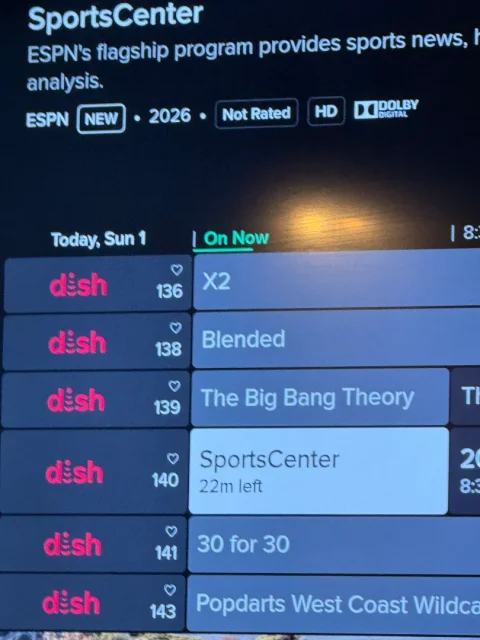
4 Replies · 123 views
B
That kind of crap annoys me to no end.
That is one reason I haven't switched to h3and the same wireless joey 4
Hope you get it resolved.
KAB
KAB
Just so you know, my WJ4 (with no Hopper+) shows all the logos. I can't think of why yours isn't. I'll do some digging in the settings.
  • Like
Reactions: charlesrshell
Scott Greczkowski
They "should" appear after a few days. If not reboot the hopper and joey. Sometimes it needs a kick.
Almighty1
There are some channels that would not show the logos but the ones you listed should all have logos as I have a Hopper 3 + Hopper Plus here. You might try forcing a Guide Update first before doing what Scott mentioned.
  • Like
Reactions: charlesrshell
dishstaller
Pub Member / Supporter Lifetime Supporter
Last reply · posted in The Chit Chat Club
Was raining yesterday so I went to Sams up in Dothan to stock up on some things. Haven't been there in quite a while. I was amazed at how large most of the TVs were. When I walked in they had a 100 in Vizio (I think it was Vizio) that was marked down to something like $1,200. The first rows of TVs were all in the 80 in + sizes. The next couple of rows had the "smaller" models....those 75 and under. I was amazed at how small the 75s looked when lined up with the larger screens.
7 Replies · 121 views
Foxbat
I'm at a limit for TV sizes at this time. My Father-in-Law crafted a custom entertainment center for our family room and we were restricted from going too big based on the side cabinets and central bridge fitting in the width of the room. It turns out to be where a 55" screen with bezels fits but no 65" bezel-less screen can fit. I think there was a brief period where 58" screens where a thing, but no more.

So, no huge screens for the Foxbat's…
TRG
TRG
I'm at a limit for TV sizes at this time. My Father-in-Law crafted a custom entertainment center for our family room and we were restricted from going too big based on the side cabinets and central bridge fitting in the width of the room. It turns out to be where a 55" screen with bezels fits but no 65" bezel-less screen can fit. I think there was a brief period where 58" screens where a thing, but no more.

So, no huge screens for the Foxbat's…

55" is plenty big.
  • Like
Reactions: Foxbat
dishstaller
55" is plenty big.
And to think....I was SO proud of myself when I bought a 27 in TV in the late 80s. Everyone just had a 25 in so I was really in high cotton.
Jimbo
And to think....I was SO proud of myself when I bought a 27 in TV in the late 80s. Everyone just had a 25 in so I was really in high cotton.
I remember buying my 1st Sony .... a whopping Big 27" CRT XBR .... $1200. :)
Bobby
I bought my 50" Mitsubishi rear projection in 1981!
dishstaller
I remember buying my 1st Sony .... a whopping Big 27" CRT XBR .... $1200. :)
Yep....because they weren't going to get any bigger and the CERTAINLY weren't going to get any cheaper.

I remember MANY years ago I went into Sams Club and saw a thumb drive on sale for $49.88....the storage capacity was a whopping 256mb....yes, MB. I just KNEW that was as cheap as they could ever go and there was simply NO way they could fit any more memory into something that small.
  • Haha
  • Like
Reactions: navychop and Jimbo
dfergie
Staff member HERE TO HELP YOU!
Last reply · posted in The Sports Section
161 Replies · 3785 views
  • Like
Reactions: Foxbat and meStevo
Foxbat
Weird F1 weekend is already over with a Saturday race.
dfergie
Tried to watch the truck race but the stage c**p is why I don't watch NASCAR anymore…
  • Like
Reactions: Yespage
Y
Today is the anniversary of Dan Wheldon's passing at Las Vegas in a dreadful crash that luckily didn't take more drivers' lives. I vaguely remember the crash, but I more strongly remember Paul Tracy trying to keep it together as he left the Medical Center knowing that Dan most likely wasn't going to.

The safety in these vehicles is beyond incomprehensible, especially relative to what it was 60 years ago, when dying wasn't unexpected. But it is still very dangerous. I always scoff at the prayer invocations, but never scoff at the risks these drivers take and the emergency workers out there who might need to pull short of a miracle to save a driver's life.
Tried to watch the truck race but the stage c**p is why I don't watch NASCAR anymore…
HBO Max has the live in car streaming without commercials, which provides an interesting take, but you are driving blind, knowing only what the team is telling the driver about what is happening on the track. The stages definitely ruin the NASCAR set up.
  • Like
Reactions: dfergie
Y
NASCAR is an abject mess, but at least it has Kyle Larson. Guy had the lead on the green/white checker, fell back to 12th or the like, kept his cool, and charged back to win with room to spare at the line. And win very cleanly!

NASCAR needs to stop racing at Talladega. Especially if they are going for elderly Sunday drives at the track! Stage racing is real stupid, but NASCAR should consider one half point a second per group gap as a bonus.
Foxbat
Congratulations to the youngest Formula 1 World Champion, 20-year old Kimi Antonelli! The podium at the Mexican Grand Prix featured three World Champions with 4-time World Champion Max Verstappen, 7-time World Champion Lewis Hamilton, and newly-crowned World Champion Kimi Antonelli. A dozen World Championships represented!
  • Like
Reactions: dfergie and meStevo
osu1991
Pub Member / Supporter
Last reply · posted in TV Shows

View: https://youtu.be/nK0HytQwrw8


Coming December 20, 2023
7 Replies · 988 views
Foxbat
Still enjoying the show.
  • Like
Reactions: osu1991
osu1991
Ive got to find time to get back to it. Watched the first episode and been too busy to squeeze it into out watch schedule.
Foxbat
The latest trailer for Season 3 starting November 20th just came out:
​
  • Like
Reactions: osu1991
Ramy
Supporting Founder
Last reply · posted in The Sports Section
Really excited for this season with Kentucky having a new coach and some really exciting recruits. Probably won't last long, but here's hoping this season is great.
184 Replies · 3239 views
  • Haha
Reactions: Mike0616
Y
Parity is growing in College Football. Making it even harder to tell who is better than each other.
rvvaquero
Parity is growing in College Football. Making it even harder to tell who is better than each other.
I agree to a point. The transfer policy is creating parity, but only for the top 20-25 teams. The other 110+ teams in the FBS are just breeding grounds for the bigger schools which have more money and more recruiting appeal.

If a smaller school recruits, trains, and matures a quality player, they can't keep them past their sophomore year because the bigger schools snatch them up. Example: LSU didn't cultivate Sam Leavitt, they just harvested him from other schools. LSU is a top contender, in large part because of Leavitt. Michigan State and Arizona State.................are not. If either of those schools had been able to retain his services, who knows where they would be now.
TWiT Tech Podcast Network
· posted in TWiT Tech Podcast Network
0 Replies · 20 views