Social Feed

Hi,
I have a few questions about this PVR, bear with me a minute while I explain.
First off, I am NOT a "gamer", I do not own or use game machines, at all. I bought this to record from Dish...
I am a subscriber to Dish, I get AT250 and a few of the premium channels.
For the past year and a half I have had a 2tb disk on my VIP211k and I had recorded a LOT of stuff.
A few weeks ago my HD dish (I use three separate and very large dishes, loooooong story) had lost alignment because the ground dried out and the dish drooped.
So I needed to take my tuner outside to the dish and realign the dish. I went to the tuner and entered the menu utilities and told that to remove the disk from the system.
I followed the on screen prompts and did what the tuner told me to do. I powered everything down, took the tuner outside, re-aligned the dish, took the tuner back inside and reconnected everything.
The disk was never recognized by the tuner again.
I tried and tried everything imaginable to get the tuner to recognize the disk. Nothing would work at all. I even plugged it into a little laptop I have that runs Mint Linux.
In the past, out of curiosity I plugged the disk into that laptop and it recognized it and I could browse the contents however the contents are encrypted and I couldn't do anything other than view proprietary, encrypted files.
I reconnected the disk to the tuner and it saw it just fine and I was able to use it for more than a year.
So, after losing a LOT of stuff I really wanted to keep, I got MAD!
I decided this would never happen again. Everything else I own, I can make backup copies of. But not my Dish disk! And if there was ever a reason to back it up, this was the reason!
So I went and purchased a very small disk, the smallest I could find, 160gb. I wish I could have found one even smaller but this was about the bottom. It was only $29 so that's fine.
I also bought the Hauppauge HD PVR 2 Gaming Edition Plus from Amazon.
The reason I bought the smallest disk possible was to prevent me from stockpiling a bazillion recordings, again. It also goes through the mandatory daily disk check in a matter of minutes. With the 2tb disk it was taking TWO HOURS every morning. It was pretty much full though.
The reason I bought this specific PVR is because it was the only model that came with a Mac OS X app AND it can do HDMI pass-through. Or so they claim. It also was the only one that came with all the cables to connect to ~anything~.
I installed the app on my Mac and that part of it seems to work just fine. I like that I can click on stuff in Titan and schedule recordings however, it does not have the IR blaster option and I have to also create a timer in the tuner to auto-tune the show. The bad this is, while it's doing it's thing, I can not press anything on the remote control because it will also record any info pop-ups that the tuner would display onscreen.
I also have to cause the tuner to auto-tune the channel rather than record the channel because it will often record the channel in the background while it plays a local OTA channel on screen.
So here's my real problem with it. They claim that the device will record via HDMI pass-through. Ok, so I tried that. Not so much, no worky-worky...
What happens when I put the Hauppauge recorder inline between the Dish tuner and my TV is that the video plays just fine but on the TV, there's a horrific sputtering noise that is unbearable and makes it totally impossible to use in this way. I tried all sorts of different setups and different cables but it was always the same horrible noise. However, I did try to make some test recordings while connected in this way and they came out just fine. The video was great and the audio was great too. So as a recorder, it did as it was advertised to do. But it just would not pass the audio through without ruining it at the TV end.
Is this due to something Dish is doing to prevent people from trying to do what I tried to do? I know they want you to be locked into their little garden, that they don't want you to be able to take recordings and save them in the way YOU want to save them, that they don't allow you to back up your disks to recover from disaster. I wouldn't be surprised if they are doing something to prevent recording on your terms.
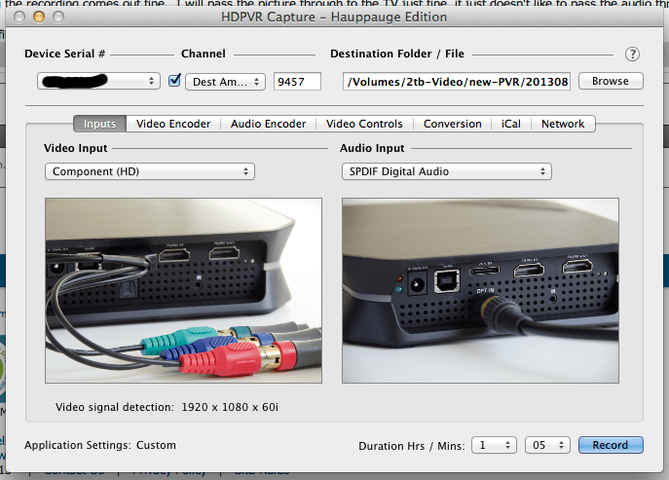
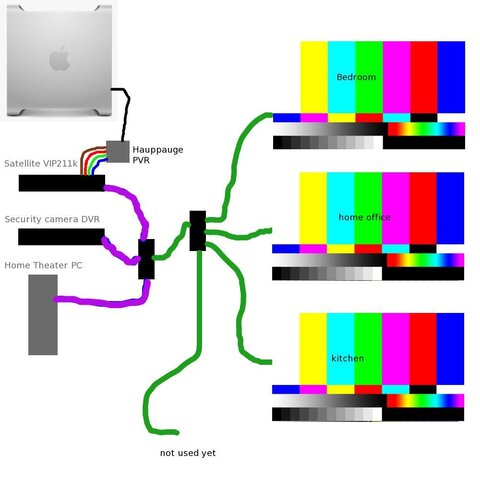
What I ended up having to do is connect the Hauppauge recorder to the component video of the on the VIP211k which is limited to 1080i/60. But as I understand it, Dish broadcasts only in "HD Lite" and that there are no 1080p broadcasts anywhere in the US anyway, everything in the US is either 720p or 1080i so connecting to the component shouldn't be an issue.
For audio, I used the red laser wire, I can't ever remember what it's called, optical something, it's the little fiber wire with a red light.
Is there any way to use the HDMI pass through on D* or is it just forbidden by them?
The other question is about recording and bit rates. The Hauppauge app has a lot of options to select when recording.
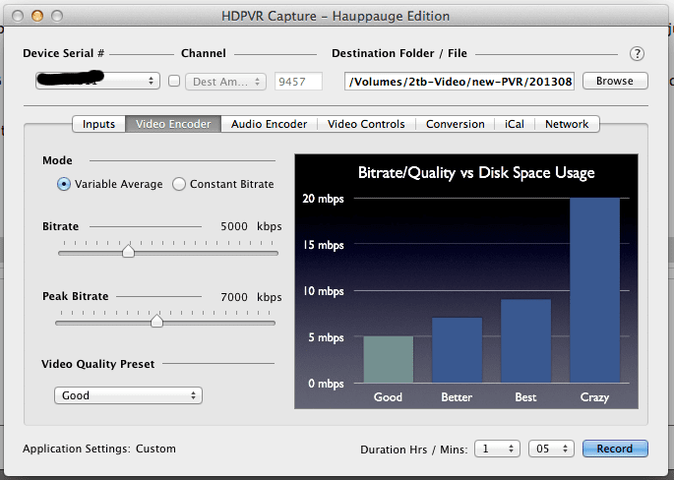
They are, using variable rate in the kbps range,
1. Good - 5 to 7
2. Better - 7 - 9
3. Best - 9 -10
4. Insanely Good - 14 - 14
Of course the faster it goes, the more it burns up disk.
Ultimately I will end up editing out the commercials and scaling them down from 1080i/60 to 720p/24. Doing that will save disk space. But I want to maintain a balance between the best possible quality but still keep a focus on saving disk space..
Here's some info I took from a recording log.
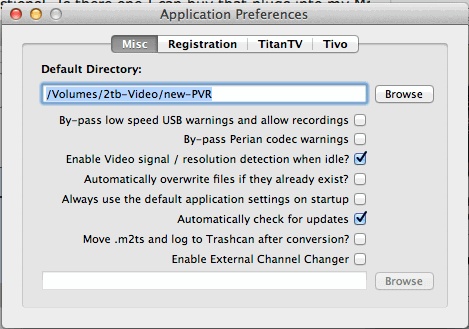
Input #0, mpegts, from '/Volumes/2tb-Video/new-PVR/20130806_161020.m2ts':
Duration: 00:00:01.61, start: 1.490078, bitrate: 5183 kb/s
Program 1
Stream #0.0[0x1011]: Video: h264, yuv420p, 1920x1080 [PAR 1:1 DAR 16:9], 59.92 fps, 59.94 tbr, 90k tbn, 59.94 tbc
Stream #0.1[0x1100]: Audio: ac3, 0 channels
Output #0, mp4, to '/Volumes/2tb-Video/new-PVR/20130806_161020.m2ts.mp4':
Stream #0.0: Video: 0x0021, yuv420p, 1920x1080 [PAR 1:1 DAR 16:9], q=2-31, 60k tbn, 29.97 tbc
Stream #0.1: Audio: aac, 48000 Hz, 2 channels, s16, 128 kb/s
What would be the suggested bit rate to record using the Hauppauge PVR?
I have searched high and low but I can not find anywhere that tells what bit rate Dish Network transmits their HD content.. I mean, are they using a low bit rate? If they are using a low bit rate then it's my thinking that I won't gain anything by recording in a higher bit rate than they transmit, right? Like if they are only using 3.5kbps for HD(lite) then it would not help me to record it at 5kbps or higher, right?
In other works, if they are using 3.5kbps I could set it for variable bit rate between 3.5 to 5kbps and still get a good quality recording. That's what I'm thinking.
I don't really know the working of Dish equipment as they have a "hands off" policy and don't allow people to explore or peek inside what they are doing.
I am a professional photographer, I own a Canon EOS 5D Mark II so I know about image compression and how BAD it is. I shoot and work in RAW mode so that I can always have the very best results.
I only use jpg when I publish stuff online for others to see because most people can't view RAW images, they are very large and most people wouldn't know the difference or care anyway. But I do.
I want to have good video recordings but I know very little about Dish technical and this new Hauppauge PVR, well it's new to me. My thing is still photography, I don't have a whole lot of knowledge about video. Except watching them. I have a LOT of experience with that..
Any advice would be appreciated!
?Thanks!
I have a few questions about this PVR, bear with me a minute while I explain.
First off, I am NOT a "gamer", I do not own or use game machines, at all. I bought this to record from Dish...
I am a subscriber to Dish, I get AT250 and a few of the premium channels.
For the past year and a half I have had a 2tb disk on my VIP211k and I had recorded a LOT of stuff.
A few weeks ago my HD dish (I use three separate and very large dishes, loooooong story) had lost alignment because the ground dried out and the dish drooped.
So I needed to take my tuner outside to the dish and realign the dish. I went to the tuner and entered the menu utilities and told that to remove the disk from the system.
I followed the on screen prompts and did what the tuner told me to do. I powered everything down, took the tuner outside, re-aligned the dish, took the tuner back inside and reconnected everything.
The disk was never recognized by the tuner again.
I tried and tried everything imaginable to get the tuner to recognize the disk. Nothing would work at all. I even plugged it into a little laptop I have that runs Mint Linux.
In the past, out of curiosity I plugged the disk into that laptop and it recognized it and I could browse the contents however the contents are encrypted and I couldn't do anything other than view proprietary, encrypted files.
I reconnected the disk to the tuner and it saw it just fine and I was able to use it for more than a year.
So, after losing a LOT of stuff I really wanted to keep, I got MAD!
I decided this would never happen again. Everything else I own, I can make backup copies of. But not my Dish disk! And if there was ever a reason to back it up, this was the reason!
So I went and purchased a very small disk, the smallest I could find, 160gb. I wish I could have found one even smaller but this was about the bottom. It was only $29 so that's fine.
I also bought the Hauppauge HD PVR 2 Gaming Edition Plus from Amazon.
The reason I bought the smallest disk possible was to prevent me from stockpiling a bazillion recordings, again. It also goes through the mandatory daily disk check in a matter of minutes. With the 2tb disk it was taking TWO HOURS every morning. It was pretty much full though.
The reason I bought this specific PVR is because it was the only model that came with a Mac OS X app AND it can do HDMI pass-through. Or so they claim. It also was the only one that came with all the cables to connect to ~anything~.
I installed the app on my Mac and that part of it seems to work just fine. I like that I can click on stuff in Titan and schedule recordings however, it does not have the IR blaster option
and I have to also create a timer in the tuner to auto-tune the show. The bad this is, while it's doing it's thing, I can not press anything on the remote control because it will also record any info pop-ups that the tuner would display onscreen.I also have to cause the tuner to auto-tune the channel rather than record the channel because it will often record the channel in the background while it plays a local OTA channel on screen.
So here's my real problem with it. They claim that the device will record via HDMI pass-through. Ok, so I tried that. Not so much, no worky-worky...
What happens when I put the Hauppauge recorder inline between the Dish tuner and my TV is that the video plays just fine but on the TV, there's a horrific sputtering noise that is unbearable and makes it totally impossible to use in this way. I tried all sorts of different setups and different cables but it was always the same horrible noise. However, I did try to make some test recordings while connected in this way and they came out just fine. The video was great and the audio was great too. So as a recorder, it did as it was advertised to do. But it just would not pass the audio through without ruining it at the TV end.
Is this due to something Dish is doing to prevent people from trying to do what I tried to do? I know they want you to be locked into their little garden, that they don't want you to be able to take recordings and save them in the way YOU want to save them, that they don't allow you to back up your disks to recover from disaster. I wouldn't be surprised if they are doing something to prevent recording on your terms.
What I ended up having to do is connect the Hauppauge recorder to the component video of the on the VIP211k which is limited to 1080i/60. But as I understand it, Dish broadcasts only in "HD Lite" and that there are no 1080p broadcasts anywhere in the US anyway, everything in the US is either 720p or 1080i so connecting to the component shouldn't be an issue.
For audio, I used the red laser wire, I can't ever remember what it's called, optical something, it's the little fiber wire with a red light.
Is there any way to use the HDMI pass through on D* or is it just forbidden by them?
The other question is about recording and bit rates. The Hauppauge app has a lot of options to select when recording.
They are, using variable rate in the kbps range,
1. Good - 5 to 7
2. Better - 7 - 9
3. Best - 9 -10
4. Insanely Good - 14 - 14
Of course the faster it goes, the more it burns up disk.
Ultimately I will end up editing out the commercials and scaling them down from 1080i/60 to 720p/24. Doing that will save disk space. But I want to maintain a balance between the best possible quality but still keep a focus on saving disk space..
Here's some info I took from a recording log.
Input #0, mpegts, from '/Volumes/2tb-Video/new-PVR/20130806_161020.m2ts':
Duration: 00:00:01.61, start: 1.490078, bitrate: 5183 kb/s
Program 1
Stream #0.0[0x1011]: Video: h264, yuv420p, 1920x1080 [PAR 1:1 DAR 16:9], 59.92 fps, 59.94 tbr, 90k tbn, 59.94 tbc
Stream #0.1[0x1100]: Audio: ac3, 0 channels
Output #0, mp4, to '/Volumes/2tb-Video/new-PVR/20130806_161020.m2ts.mp4':
Stream #0.0: Video: 0x0021, yuv420p, 1920x1080 [PAR 1:1 DAR 16:9], q=2-31, 60k tbn, 29.97 tbc
Stream #0.1: Audio: aac, 48000 Hz, 2 channels, s16, 128 kb/s
What would be the suggested bit rate to record using the Hauppauge PVR?
I have searched high and low but I can not find anywhere that tells what bit rate Dish Network transmits their HD content.. I mean, are they using a low bit rate? If they are using a low bit rate then it's my thinking that I won't gain anything by recording in a higher bit rate than they transmit, right? Like if they are only using 3.5kbps for HD(lite) then it would not help me to record it at 5kbps or higher, right?
In other works, if they are using 3.5kbps I could set it for variable bit rate between 3.5 to 5kbps and still get a good quality recording. That's what I'm thinking.
I don't really know the working of Dish equipment as they have a "hands off" policy and don't allow people to explore or peek inside what they are doing.
I am a professional photographer, I own a Canon EOS 5D Mark II so I know about image compression and how BAD it is. I shoot and work in RAW mode so that I can always have the very best results.
I only use jpg when I publish stuff online for others to see because most people can't view RAW images, they are very large and most people wouldn't know the difference or care anyway. But I do.
I want to have good video recordings but I know very little about Dish technical and this new Hauppauge PVR, well it's new to me. My thing is still photography, I don't have a whole lot of knowledge about video. Except watching them. I have a LOT of experience with that..
Any advice would be appreciated!
?Thanks!
12 Replies
·
6241 views



Staff member
HERE TO HELP YOU!
Cutting Edge
Sometimes a thread gets so many posts in it that is can cause issues for the server so that why today we introduce The Song Name Game Part 3!
So let the game continue!
The last song was added by Bobby who posted...
One Meat Ball - Andrews Sisters
CONTINUE ON AND HAVE FUN! WELCOME HOME TO SATELLITEGUYS.US!
Here are the original rules for the game as posted by WebbyDude back in 2006. http://www.satelliteguys.us/threads/68645-Song-Name-Game
Just name a song title and the band who performed it. The next person does the same thing, but needs to list a song title or band name which includes a word from the previous entry. Pick songs from any genre.
Example:
Long Live Rock and Roll -- Rainbow
Rainbow in the Dark -- Dio
Another example:
Ride the Lightning -- Metallica
Lightning Strikes -- Ozzy Osbourne
Get it?
An additional note: we all know that song titles, sometimes, use profane words. Because this is a family friendly website it is advised that you clean up that title up a bit. This is accomplished by using something like sh!t instead of the real word. Thanks....
So let the game continue!
The last song was added by Bobby who posted...
One Meat Ball - Andrews Sisters
CONTINUE ON AND HAVE FUN! WELCOME HOME TO SATELLITEGUYS.US!
Here are the original rules for the game as posted by WebbyDude back in 2006. http://www.satelliteguys.us/threads/68645-Song-Name-Game
Just name a song title and the band who performed it. The next person does the same thing, but needs to list a song title or band name which includes a word from the previous entry. Pick songs from any genre.
Example:
Long Live Rock and Roll -- Rainbow
Rainbow in the Dark -- Dio
Another example:
Ride the Lightning -- Metallica
Lightning Strikes -- Ozzy Osbourne
Get it?
An additional note: we all know that song titles, sometimes, use profane words. Because this is a family friendly website it is advised that you clean up that title up a bit. This is accomplished by using something like sh!t instead of the real word. Thanks....
68497 Replies
·
2670736 views


TWiT Tech Podcast Network
Time for another AWESOME video from the TWIT Network!
View: https://www.youtube.com/shorts/vdi0y_S8a_0
Direct YouTube Link - AI Agents: Can We Trust Today's LLM Technology? #shorts
TWIT's Website
TWIT Live Feed
View: https://www.youtube.com/shorts/vdi0y_S8a_0
Direct YouTube Link - AI Agents: Can We Trust Today's LLM Technology? #shorts
TWIT's Website
TWIT Live Feed
0 Replies
·
3 views

Supporting Founder
Really excited for this season with Kentucky having a new coach and some really exciting recruits. Probably won't last long, but here's hoping this season is great.
142 Replies
·
1388 views


Pub Member / Supporter
Lifetime Supporter
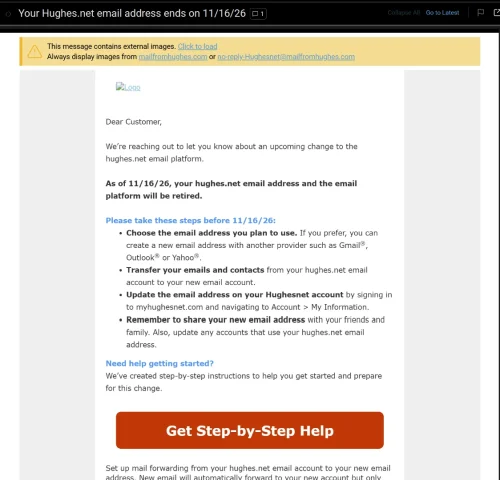
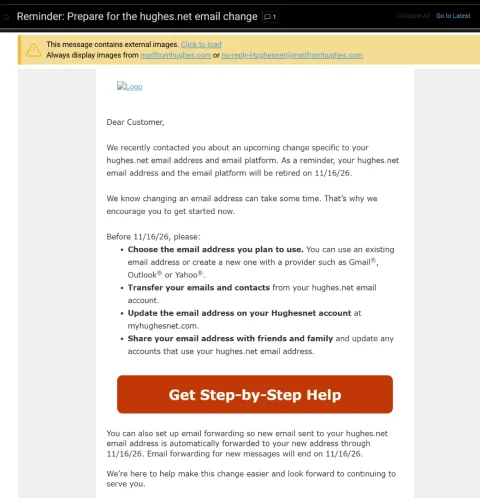
Wasn't exactly sure where to post this. Just had a customer come in inquiring about internet. He has HughesNet and had heard good things about mine. He asked if we provided email addresses and it kinda caught me off guard. I said he should be able to keep whatever email he had been using....my sister in law is still using a BellSouth email addy and they haven't been around here for many years. He said he had gotten a letter from HughesNet stating that they had until Nov 16th to save, move, forward, whatever, their Hughesnet emails because they would lose them after that date.
I have never heard of a company simply mass-deleting email accounts (the customer still has his HughesNet service). From what I understand, in the past, the company who was ditching their email service simply sold the customer base to a company like Google.
Anyone else getting this letter. He said he would show it to me tomorrow when I go out there and set up his internet.
I have never heard of a company simply mass-deleting email accounts (the customer still has his HughesNet service). From what I understand, in the past, the company who was ditching their email service simply sold the customer base to a company like Google.
Anyone else getting this letter. He said he would show it to me tomorrow when I go out there and set up his internet.
9 Replies
·
176 views




Staff member
Pub Member / Supporter
Cutting Edge
The TPN Map Excel Presents all DIRECTV Channels:
Understanding the TPN Map
Making Sense of the TPN Map Display Conventions
National (50-States or wide/NAT+PR beams)
Local (Local-Into-Local or narrow/Spot beams)
Local (Local-Into-Local or narrow/Spot beams)
Additional tabs provide:
OTA the (Over-The-Air) Database
VOD (Video On_Demand) Records
Offline Records
Engr Records
Net Decoder a graphic presentation of all satellites and transponders
VOD (Video On_Demand) Records
Offline Records
Engr Records
Net Decoder a graphic presentation of all satellites and transponders
Domestic Satellites
@99W...... D11, D14
@101W.... D16
@103W.... D12, D15
@110W.... D5
@119W.... D8
@99W...... D11, D14
@101W.... D16
@103W.... D12, D15
@110W.... D5
@119W.... D8
Understanding the TPN Map
Making Sense of the TPN Map Display Conventions
2140 Replies
·
927942 views


Supporting Founder
Lifetime Supporter
For the naysayers who did not think this service would make it, just added another 4.9M subscribers and that was after the removal of 1.2M Russia subscribers.
This is even better, Paramount+ revenue grew 120% and Subscription revenue grew 74% year-over-year ( 2nd quarter 2021/ 2nd quarter 2022) to $830M, principally reflecting paid subscriber growth on Paramount+.
Now compare that to Peacock with only 13 million paid, 13 million free.
This is even better, Paramount+ revenue grew 120% and Subscription revenue grew 74% year-over-year ( 2nd quarter 2021/ 2nd quarter 2022) to $830M, principally reflecting paid subscriber growth on Paramount+.
Now compare that to Peacock with only 13 million paid, 13 million free.
665 Replies
·
61587 views


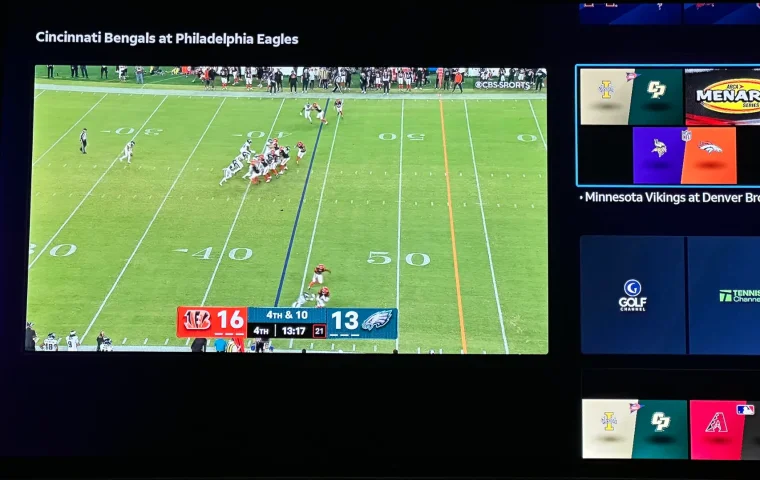
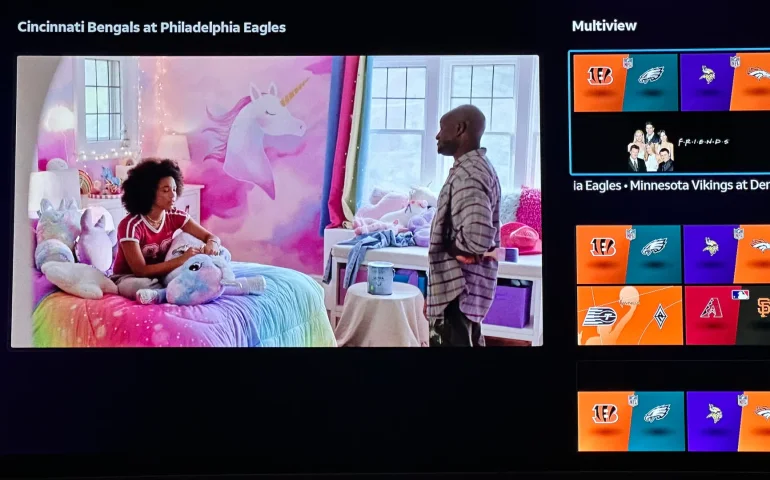
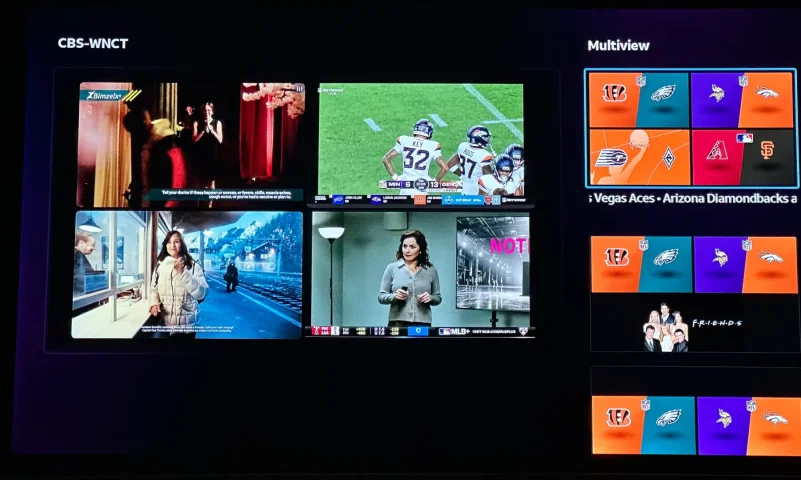
The new curated multiview is now live.
While on many of the sports channels and non sports channels there is a multi view option button. It will pull up a side bar with many different multi view options.
While on many of the sports channels and non sports channels there is a multi view option button. It will pull up a side bar with many different multi view options.
5 Replies
·
197 views


Supporting Founder
Pub Member / Supporter
Lifetime Supporter
Apple has finally released their Apple TV 4K with built-in Siri and a microphone so it can respond to your queries even if you don't have the remote. It also increases in price, to $299. I had been planning on updating my current Apple TV 4K streamers, but that's $600 for the two of them, and that's a pass at this point.
At $299, it had better come with 256 GB of Storage, Gigabit (or better) Ethernet, the latest HDMI tech and standards, and one year of free Apple One. But it probably won't…

At $299, it had better come with 256 GB of Storage, Gigabit (or better) Ethernet, the latest HDMI tech and standards, and one year of free Apple One. But it probably won't…
Apple TV 4K
Apple TV 4K. New Siri AI and hands-free control. Stunning picture and immersive HomePod surround sound. Works with your Apple and smart home devices.
www.apple.com
16 Replies
·
218 views


 . apple's been making money off of software and not hardware for a while
Linus Tech Tips
Time for another AWESOME video from Linus Tech Tips!
View: https://www.youtube.com/watch?v=aV81SqB6HQg
Direct YouTube Link - NVIDIA Told me How to Benchmark RTX Spark
Linus on Facebook
The LTT Store
View: https://www.youtube.com/watch?v=aV81SqB6HQg
Direct YouTube Link - NVIDIA Told me How to Benchmark RTX Spark
Linus on Facebook
The LTT Store
0 Replies
·
7 views

Pub Member / Supporter
Cutting Edge
I created this thread on the original Edgecutter Cutting Edge Forums site. It's simply a place for those to review the latest software available for those using Windows 10 and Windows 11. To date it has received 112,559 views. I have been asked by staff to continue this thread here.
522 Replies
·
47259 views