Social Feed

rockymtnhigh
Supporting Founder
Last reply · posted in Computers and Gadgets
So, I needed a throw-away laptop. I am traveling abroad this winter (back to Israel), and federal export control regulations do not allow me to bring my normal laptop, since it has state data (nothing of any consequence, but university stuff). So I started thinking about ways around it. And I also liked the idea of not having my primary macbook with me on such a trip.

So, I looked at CHromebooks and the sub-compact Win 10 machines. THere were machines to be had for $150. I looked first at a Lenovo WIn 10 ideapad for $159, but could not pull the trigger on Microsoft. Been out of that world too long. So I started exploring the chromebooks. Debated between an Acer 11.6" machine for $159, a Samsung 11.6" for $199, and a Toshiba Chromebook 2 13" for $269. the Toshiba had the advantage of a 13" screen, 4GB of ram, instead of 2GB, a full SD card reader rather than a micro-SD reader, and a full 1080p resolution. THe keyboard feels a lot like my mac. The trackpad is mac-like. Chrome is easy to use. It feels just like I am using chrome on a mac.

Yesterday I bought it. And so far, I am impressed. This thing is fast. Boots in 8 seconds. Has 80211AC wireless, Bluetooth 4, a USB3 port, a HDMI output. SKullcandy sound. And decent onboard speakers. Fanless intel celeron machine.

I turned it on, it asked me to login with my google account. I did, and all of my chrome on OSX extensions and setup transferred. The first ten minutes or so was a little sluggish, but it was downloading stuff to do my setup. Now, it is lightning fast.

Is it limited? Sure. But dang, it is a nice little machine, that I think will get much more use than just when I am travelling. Sure, its not a mac. But for $269 (and really I had some rewards, so it cost me $50 less), it is a steal. Highly recommend it. And the screen on this bad boy is stunning.
16 Replies · 1588 views
lparsons21
Check your zoom settings in ChromeOS, you might find something you like better and the zoom functions quite well in ChromeOS. Or you can change the resolution to something that might fit you better too. Both work quite well.

And you are correct about the 2 vs 4Gb ram. The 2Gb machines are a little constrained as you add tabs and/or windows and can get quite doggy. My first Chromebook was one of those and was really only suitable for fairly light uses. The 4Gb version like you have can run a full Linux too, even inside a tab. If you find yourself needing something that just isn't there for ChromeOS, google 'crouton' and do a little research. It isn't difficult to do and works quite well.
  • Like
Reactions: rockymtnhigh
EarDemon
I purchased an HP Chromebook about 2 1/2 years ago. 14" 1366 x 768 display, Celeron 1.1 GHz I think, 8GB RAM, 16 GB SSD, full size SD and a couple USB ports. I turned it on for the first time in almost a year last night to do some updates. I never really use browser extensions, most of the Chrome 'apps' are just icons that take you to that 'apps' specific website. Not a big fan of small laptops, the HP was one of the biggest Chromebooks offered at the time, and I find it too small to do anything with. It's fine for basic viewing of Word or Excel files with Docs or Sheets but I really don't enjoy typing on something so small and the lack of a dedicated number pad is annoying. Sure it boots up in a few seconds, but my desktop with an SSD, Intel Ivy Bridge-E hex core and 32GB of DDR3 doesn't take that much longer and that with fast boot disabled in Windows 10, and my desktop is much more capable.

I mainly purchased the thing as a toy and to see if Google would ever merge Android and ChromeOS. But a while back I saw Dell released a ChromeOS 'app' for SonicWall SSL VPN. If I can connect to my VPN at work, and use a VNC app, that will give me more options to work from home, if I get snowed in again and lose power. Battery life is the least important thing to me in laptops, and my normal laptop only gives me about 90 minutes of run time and that's with the extended battery. The chromebook can give me about 6 hours last time I checked. I can't remember what I paid for it, but I got it when HP had a $50 off sale if it was purchased directly though them. In retrospect I probably should have used that money for the new Pixel C tablet...maybe...

It didn't bother me since I had nothing stored on the internal drive of the Chromebook but this is something keep in mind. Like I said it was almost a year since I last used it, and between then and now I changed my Google password and couldn't remember my old one. It knew my password was changed and wanted me to enter both my previous password and my new one, since I didn't remember my old one, all of the data on the drive had to be deleted.
rockymtnhigh
I purchased an HP Chromebook about 2 1/2 years ago. 14" 1366 x 768 display, Celeron 1.1 GHz I think, 8GB RAM, 16 GB SSD, full size SD and a couple USB ports. I turned it on for the first time in almost a year last night to do some updates. I never really use browser extensions, most of the Chrome 'apps' are just icons that take you to that 'apps' specific website. Not a big fan of small laptops, the HP was one of the biggest Chromebooks offered at the time, and I find it too small to do anything with. It's fine for basic viewing of Word or Excel files with Docs or Sheets but I really don't enjoy typing on something so small and the lack of a dedicated number pad is annoying. Sure it boots up in a few seconds, but my desktop with an SSD, Intel Ivy Bridge-E hex core and 32GB of DDR3 doesn't take that much longer and that with fast boot disabled in Windows 10, and my desktop is much more capable.

I mainly purchased the thing as a toy and to see if Google would ever merge Android and ChromeOS. But a while back I saw Dell released a ChromeOS 'app' for SonicWall SSL VPN. If I can connect to my VPN at work, and use a VNC app, that will give me more options to work from home, if I get snowed in again and lose power. Battery life is the least important thing to me in laptops, and my normal laptop only gives me about 90 minutes of run time and that's with the extended battery. The chromebook can give me about 6 hours last time I checked. I can't remember what I paid for it, but I got it when HP had a $50 off sale if it was purchased directly though them. In retrospect I probably should have used that money for the new Pixel C tablet...maybe...

It didn't bother me since I had nothing stored on the internal drive of the Chromebook but this is something keep in mind. Like I said it was almost a year since I last used it, and between then and now I changed my Google password and couldn't remember my old one. It knew my password was changed and wanted me to enter both my previous password and my new one, since I didn't remember my old one, all of the data on the drive had to be deleted.

Well, I'd say there has been a massive change in the machines being used for chromebooks in the last 2-3 years. And this has a 13" display, so it isn't a tiny screen or keyboard. But I'm not certain the comparisons with a desktop with 32GB of ram is telling much. Sure this is not a work horse. But as I said in my first post, I bought it as a throw-away laptop for travel. And it is demonstrating to me that I can get a lot more out of if. Plus the apps are not just extensions anymore. There are real applications.

My google password is not in jeopardy of being forgotten, as I have used gmail for more than a decade. :)
rockymtnhigh
Check your zoom settings in ChromeOS, you might find something you like better and the zoom functions quite well in ChromeOS. Or you can change the resolution to something that might fit you better too. Both work quite well.

And you are correct about the 2 vs 4Gb ram. The 2Gb machines are a little constrained as you add tabs and/or windows and can get quite doggy. My first Chromebook was one of those and was really only suitable for fairly light uses. The 4Gb version like you have can run a full Linux too, even inside a tab. If you find yourself needing something that just isn't there for ChromeOS, google 'crouton' and do a little research. It isn't difficult to do and works quite well.

I've tried the zoom settings. The problem is it doesn't work for everything, and some of the apps seem to have their own settings. The 1536x864 seems to be a bit better in general. But I'll keep playing with it. THANKS!
rockymtnhigh
I am amazed by the battery of this thing. My macbook air is 4 years old, and I can get maybe 4 hours out of it. I have basically been running this on battery since yesterday, even watched Netflix for an hour on it, and still have 40%.
  • Like
Reactions: TheKrell
EarDemon
Well, I'd say there has been a massive change in the machines being used for chromebooks in the last 2-3 years. And this has a 13" display, so it isn't a tiny screen or keyboard. But I'm not certain the comparisons with a desktop with 32GB of ram is telling much. Sure this is not a work horse. But as I said in my first post, I bought it as a throw-away laptop for travel. And it is demonstrating to me that I can get a lot more out of if. Plus the apps are not just extensions anymore. There are real applications.

My google password is not in jeopardy of being forgotten, as I have used gmail for more than a decade. :)

Wow, you don't think 13" is tiny? I can barley stand to use my 17.3" laptop as that's too small for my liking, using my 14" Chromebook is a massive downgrade, which is why I probably don't use it much. It doesn't sound like the hardware that drives Chromebooks has changed much. I lack a 1080p display, 802.11ac, and USB 3 compared to the more current versions, and that sounds like that is it. Which makes sense since ChromeOS and it's actual apps aren't that demanding What are some good real apps to check out? The stuff I installed when I first got it, like The Weather Channel, IMDB and Google Map apps just took you to their websites. A calculator app just took me to a web page that had a calculator on it. I'd love to find a use for this thing.

And yes, I've been using GMail since the very beginning as well. A guy that I went to college with had a relative that somehow was involved with Google and was part of the inital beta. As soon as he could he invited me and a few of our classmates in. But, with GMail, my other webmail services that I use and my online banking, I change my passwords twice a year. Super Bowl Sunday and the final game of the Stanley Cup, and would hope you change yours every so often as well. My point was if you change your Google password in between longer periods of inactivity of the Chromebook, you better remember your previous password.
rockymtnhigh
Wow, you don't think 13" is tiny? I can barley stand to use my 17.3" laptop as that's too small for my liking, using my 14" Chromebook is a massive downgrade, which is why I probably don't use it much. It doesn't sound like the hardware that drives Chromebooks has changed much. I lack a 1080p display, 802.11ac, and USB 3 compared to the more current versions, and that sounds like that is it. Which makes sense since ChromeOS and it's actual apps aren't that demanding What are some good real apps to check out? The stuff I installed when I first got it, like The Weather Channel, IMDB and Google Map apps just took you to their websites. A calculator app just took me to a web page that had a calculator on it. I'd love to find a use for this thing.

And yes, I've been using GMail since the very beginning as well. A guy that I went to college with had a relative that somehow was involved with Google and was part of the inital beta. As soon as he could he invited me and a few of our classmates in. But, with GMail, my other webmail services that I use and my online banking, I change my passwords twice a year. Super Bowl Sunday and the final game of the Stanley Cup, and would hope you change yours every so often as well. My point was if you change your Google password in between longer periods of inactivity of the Chromebook, you better remember your previous password.

Some apps take you to websites, many do not today. Lots of decent apps out there. Its not the same world from when Chromebooks first came out. I am remarkably pleased with the capabilities of this device. The calculator app is an app. Not particularly high end, but an app. And the main google page now has voice search.

I only use a 13.3" macbook. So, nah, I don't think it is tiny. I use it on my lap too. :) The only difference between the Chromebook screen and the macbook, in terms of size is the Chromebook is 16x9, whereas the macbook is 4:3. Very similar. I do connect the macbook to a 27" monitor at the office. But spend far more time just on the laptop itself.
rockymtnhigh
I realized that the Chromebook 2 from Toshiba was the 2014 model, and the 2015 model includes both a backlit keyboard, and an actual celeron processor, plus its speed ratings about about 30% faster than the 2014 model (both devices are called the Chromebook 2). I was still in the return window from Best Buy, and had a $55 gift card from Amazon, from a christmas return, which covered the difference, so I made the switch. A couple days in, and wow, I am really happy I did. The keyboard is not only backlit, but it has such an incredible feel.

A month of chromebook usage has also convinced me that this is a very useful device, sure it isn't my macbook pro, but it does a lot, and I could not be more pleased with it. Even more so with the new device.
Foxbat
Supporting Founder Pub Member / Supporter Lifetime Supporter
Last reply · posted in Internet Television (IPTV) Discussion Forum
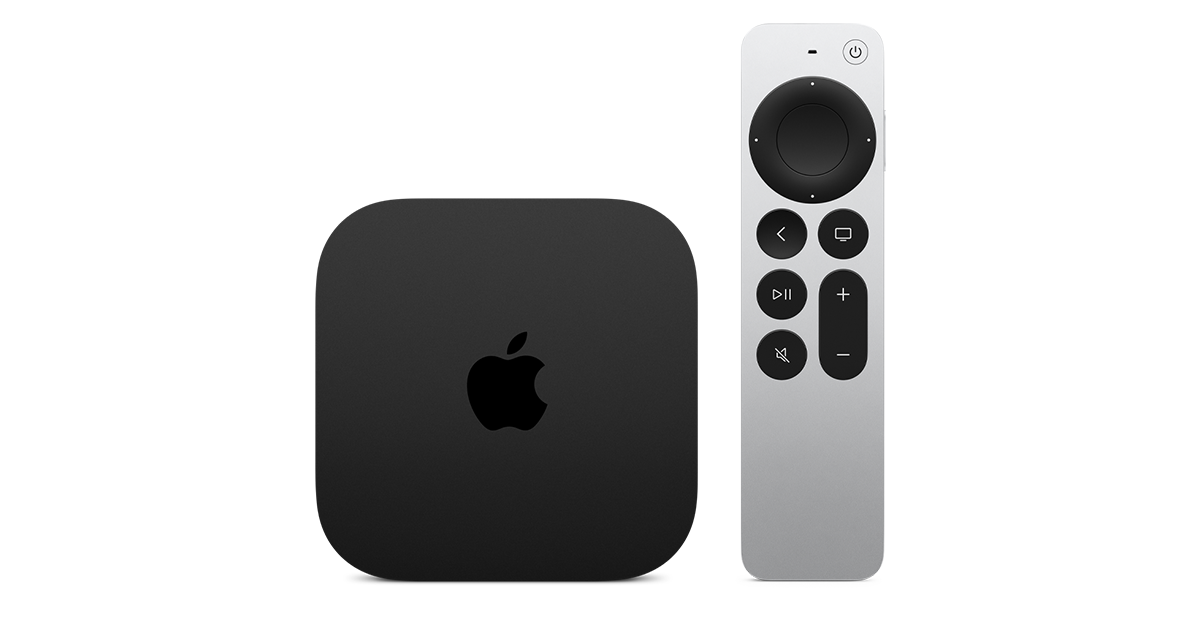
Apple has finally released their Apple TV 4K with built-in Siri and a microphone so it can respond to your queries even if you don't have the remote. It also increases in price, to $299. I had been planning on updating my current Apple TV 4K streamers, but that's $600 for the two of them, and that's a pass at this point.

At $299, it had better come with 256 GB of Storage, Gigabit (or better) Ethernet, the latest HDMI tech and standards, and one year of free Apple One. But it probably won't…
14 Replies · 166 views
Ronnie-
Meh. The 4Ks I have will do everything that these do that I need them to do.


Which that's most tech these days for anything released the last four to five years.


It's honestly a testament to how good the previous gen Apple TVs were and are.
navychop
It's honestly a testament to how good the previous gen Apple TVs were and are.

Don't tell them that. They'll adopt planned obsolescence.
Foxbat
The only thing I can see that is compelling is the AV1 decoding done in the A19's hardware instead of the current ATV4K's processor.
navychop
Outside of gaming, would Joe Sixpack notice any difference?
KAB
KAB
Outside of gaming, would Joe Sixpack notice any difference?
Not a bit. IMO, apple's are slow to boot up. Time is about the same with 1st gen and 3rd. Roku runs rings around them in that department. I only stick I with the Apple tv's is the Apple infrastructure, which has it's definite advantages. But $300 is not worth sticking with it. Later, Apple!
S
Don't tell them that. They'll adopt planned obsolescence.
they all do that anyways.. ever notice your cell phone slows down when you come up for an upgrade.. :what. apple's been making money off of software and not hardware
cpdretired
Supporting Founder
Last reply · posted in DISH Network Support Forum
Several Dish offers showed up today in my account. Once you choose one the rest are removed. Offers were Showtime, Starz, AMC and others.
31 Replies · 1527 views
  • Like
Reactions: ewindowman and LQQK
B
Just checked my account and it shows mgm+ at 8.00 per month, but that has red line drawn thru it and shows 0.00 per month. But it doesn't say how long this lasts,...... 1 month, 3 months, forever. I called customer service to get an answer, and they said nothing like that exists. Should I add the offer or not? Already paying them too much, but want to take advantage of something free.
S
i went into my acct on the hooper and to my offers and everything turned back up as if i was a new customer!!! has anyone tried looking on the my dish app via there hoppers lately.. there was a strange update yesterday affternoon my hopper has never done updates during the day.
  • Like
Reactions: charlesrshell
cpdretired
i went into my acct on the hooper and to my offers and everything turned back up as if i was a new customer!!! has anyone tried looking on the my dish app via there hoppers lately.. there was a strange update yesterday affternoon my hopper has never done updates during the day.
Yes the offers are back again.
bookworm370
Yes the offers are back again.
Where? I signed on to Dish and can't find any
  • Like
Reactions: charlesrshell
S
Where? I signed on to Dish and can't find any
what cpdretired said
  • Like
Reactions: charlesrshell
ewindowman
Lots of offers on the hopper account app . On the website there are only a few.
Almighty1
Lots of offers on the hopper account app . On the website there are only a few.
Never had time to use the Hopper 3 account app yet. I also have a Hopper Plus so it's not the same as the Hopper 3 standalone. Will try it when I have more time, need to beat the taxes extension filing deadline first as I am still working on entering the data into the tax software.
Almighty1
This is what I see when it comes to offers on My Account on the Hopper 3 with Hopper Plus and dish.com:

AMC+ 50% off for 3 months (My Account Hopper 3 with Hopper Plus)
AMC+ Free for 3 months (My Account Hopper 3 with Hopper Plus and dish.com)
AMC+ 1 month free (My Account Hopper 3 with Hopper Plus)

Cine y Entretenimie 50% off for 3 months

DOGTV 1 month free (My Account Hopper 3 with Hopper Plus)

DISH Movie Pack 50% off for 6 months (My Account Hopper 3 with Hopper Plus and dish.com)

DOGTV 50% off for 6 months (My Account Hopper 3 with Hopper Plus)
DOGTV 1 month free (My Account Hopper 3 with Hopper Plus)

Gallery First Month Free (My Account Hopper 3 with Hopper Plus)

Heartland Pack 50% off for 6 months (My Account Hopper 3 with Hopper Plus and dish.com)

Mexico y Mas 50% off for 3 months (My Account Hopper 3 with Hopper Plus)

MGM+ $0.00/Month not saying how long (My Account Hopper 3 with Hopper Plus)

Multi-Sport Pack 50% off for 6 months (My Account Hopper 3 with Hopper Plus)

Netflix Standard with Ads, $7.99/month credit toward Netflix Standard with Ads ($.99) month with 24 month DISH commitment
(Only on My Account Hopper 3 with Hopper Plus)

Outdoor Pack 50% off for 6 months (My Account Hopper 3 with Hopper Plus)

Paramount+ with SHOWTIME 50% off for three months (My Account Hopper 3 with Hopper Plus and dish.com)
Paramount+ with SHOWTIME 2 months free (My Account Hopper 3 with Hopper Plus)

Playboy TV 50% off for 6 months (My Account Hopper 3 with Hopper Plus)

Republica Dominicana 50% off for 3 months (My Account Hopper 3 with Hopper Plus)

STARZ 50% off for 3 months (My Account Hopper 3 with Hopper Plus)
STARZ $1.99/month for 2 months (My Account Hopper 3 with Hopper Plus and dish.com)

Sudamerica y Mas 50% off for 3 months (My Account Hopper 3 with Hopper Plus)

UP Faith & Family 1 month free (My Account Hopper 3 with Hopper Plus)
S
Just checked my account and it shows mgm+ at 8.00 per month, but that has red line drawn thru it and shows 0.00 per month. But it doesn't say how long this lasts,...... 1 month, 3 months, forever. I called customer service to get an answer, and they said nothing like that exists. Should I add the offer or not? Already paying them too much, but want to take advantage of something free.
look again mine says free for 1 month
jamieh1
Last reply · posted in DIRECTV Programming Forum
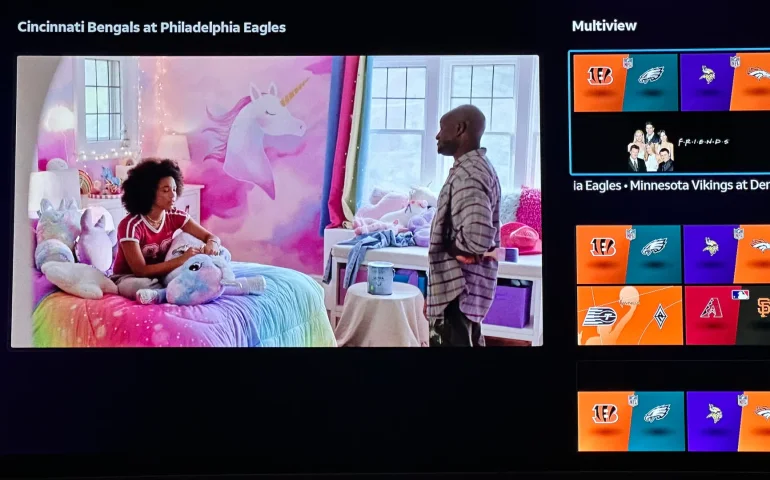
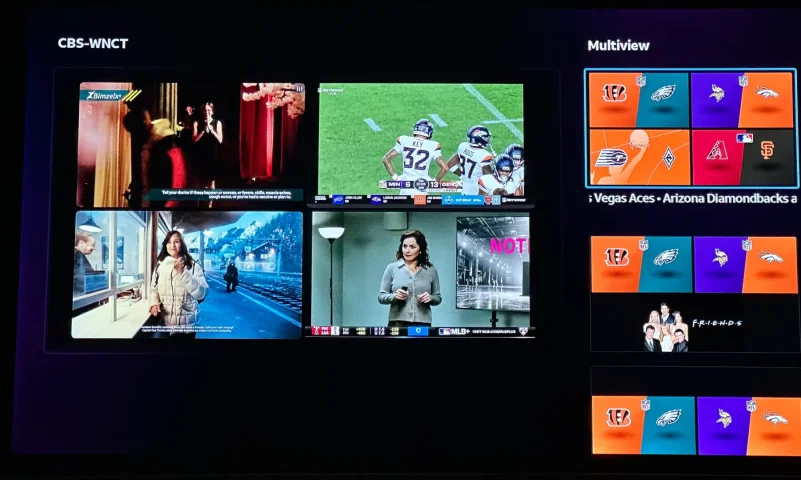
The new curated multiview is now live.
While on many of the sports channels and non sports channels there is a multi view option button. It will pull up a side bar with many different multi view options.
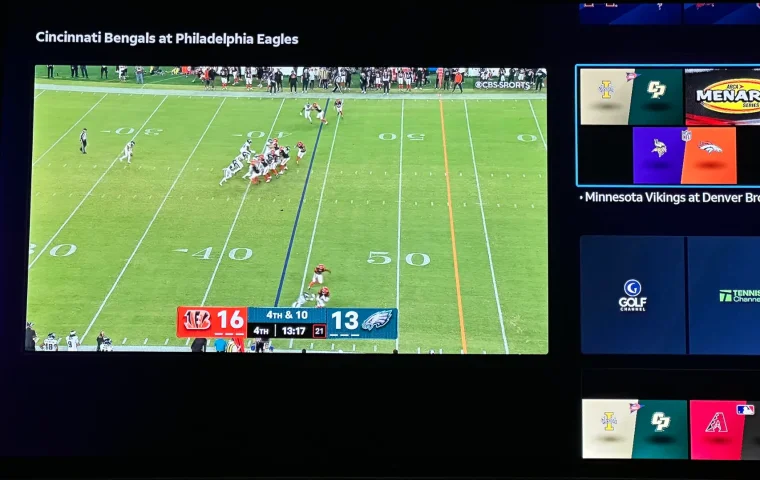
3 Replies · 151 views
K
It's now expanded to a Build Your Own Multiview, currently available to streaming customers with Geminis and Roku, and coming soon to Android TV, Fire TV, Vizio, LG, Apple TV and Tizen.
b4pjoe
It's now expanded to a Build Your Own Multiview, currently available to streaming customers with Geminis and Roku, and coming soon to Android TV, Fire TV, Vizio, LG, Apple TV and Tizen.
But not on the only device they ship out right now which is the Gemini Air.
  • Sad
Reactions: Jimbo
TheRatPatrol
It's now expanded to a Build Your Own Multiview, currently available to streaming customers with Geminis and Roku, and coming soon to Android TV, Fire TV, Vizio, LG, Apple TV and Tizen.
How soon will it be available on Apple TV? Thanks
Ramy
Supporting Founder
Last reply · posted in The Sports Section
Really excited for this season with Kentucky having a new coach and some really exciting recruits. Probably won't last long, but here's hoping this season is great.
141 Replies · 1340 views
  • Haha
Reactions: Mike0616
Y
24 team playoff seems to be real close.

Are we really that far from a 64-team tournament?

The benefit of the 24 team playoff:
  • All the cartel teams that cartels want in playoff are in playoff
    • Independent of record too! Bonus.
  • MONEY!!!!! for the cartels.
  • I'm out of ideas.
Cons
  • Regular season really doesn't matter now other than the rivalry games
    • Top cartel teams can lose three games and still make the playoff
  • Going to start resting players?
    • The playoff is going to be *checks notes* several games!
    • Resting players could make games dumb.
    • Maybe even restrict NIL players from games played.
  • How much are streaming sub costs going up a month to pay for this?!
AZ.
AZ.
24 team playoff seems to be real close.

Are we really that far from a 64-team tournament?

The benefit of the 24 team playoff:
  • All the cartel teams that cartels want in playoff are in playoff
    • Independent of record too! Bonus.
  • MONEY!!!!! for the cartels.
  • I'm out of ideas.
Cons
  • Regular season really doesn't matter now other than the rivalry games
    • Top cartel teams can lose three games and still make the playoff
  • Going to start resting players?
    • The playoff is going to be *checks notes* several games!
    • Resting players could make games dumb.
    • Maybe even restrict NIL players from games played.
  • How much are streaming sub costs going up a month to pay for this?!
One of the pro's I see is in a year with so many undefeated teams they have a good chance of an opening. Few years back you had lower divisions that didnt get a shot. I love collage football and I have no problem with that addition.

We are in what week 5 now? Been two real good ranked games to watch.....Other than that top 25 teams are playing nothing.
Jimbo
One of the pro's I see is in a year with so many undefeated teams they have a good chance of an opening. Few years back you had lower divisions that didnt get a shot. I love collage football and I have no problem with that addition.

We are in what week 5 now? Been two real good ranked games to watch.....Other than that top 25 teams are playing nothing.
There are 68 Power 4 teams, so eventually they will get there I wouldn't imagine ...
AZ.
AZ.
There are 68 Power 4 teams, so eventually they will get there I wouldn't imagine ...
Far from it but you know that....You dont like the larger playoff.....Its ok.....
Jimbo
Far from it but you know that....You dont like the larger playoff.....Its ok.....
Oh, I Hate the idea ...

It would be different if it was a game that you could play 2 or games each week, but when you only play 1 game a week, the larger playoff is Not a good thing ...

The season has how many games now, is it 14 ... then you want to play another 5 (with more to come) against Top 12 (eventually 24 teams) ... remember, the 5 games in the playoffs will be the hardest games all year and back to back.

For example, IF Ohio State should win it all this year ... they play 5 teams in the Top 25, plus they would play 5 more to win it all, depending on how the ranking shake out and if Bye weeks are given.

Thats 10 Ranked teams ... in one year ...
I don't see that happening very often ...
Edit, Bama plays 4, Georgia plays 3, But Ole Miss plays 5 (didn't expect to see that)

That said, I don't see the Buckeyes winning it all this year.
  • Like
Reactions: AZ.
AZ.
AZ.
Oh, I Hate the idea ...

It would be different if it was a game that you could play 2 or games each week, but when you only play 1 game a week, the larger playoff is Not a good thing ...

The season has how many games now, is it 14 ... then you want to play another 5 (with more to come) against Top 12 (eventually 24 teams) ... remember, the 5 games in the playoffs will be the hardest games all year and back to back.

For example, IF Ohio State should win it all this year ... they play 5 teams in the Top 25, plus they would play 5 more to win it all, depending on how the ranking shake out and if Bye weeks are given.

Thats 10 Ranked teams ... in one year ...
I don't see that happening very often ...

That said, I don't see the Buckeyes winning it all this year.
Yes anyone here knows you 100%....Astros failed no posting...Ohio state loses we hear it.....Its ok....Its called an opinion....I have one so do you.....Problem is?
Jimbo
Yes anyone here knows you 100%....Astros failed no posting...Ohio state loses we hear it.....Its ok....Its called an opinion....I have one so do you.....Problem is?
Seeing theres very little activity in the MLB threads, it wouldn't matter if I posted that the Astros didn't make the Playoffs ...

Theres more NFL info in the Pub section than in the Sports/NFL thread.
  • Like
Reactions: AZ.
Jimbo
IF they go to 24 teams, and it looks like they will soon ....
Do we Really want Teams with 3 and 4 losses in the Playoffs ?
Is a 3-4 Loss team one thats able to win 4-5 more games against Top teams ?
Bobby
Supporting Founder Lifetime Supporter
Last reply · posted in DISH Network Support Forum
This thread is a place to discuss the 4K events that appear on channel 540. We are getting, at this point, one college football game a week. Let's hope there is more coming.
1931 Replies · 298837 views
long_time_Dish
148-04 says the NASCAR race on at noon on Sunday. Be interesting to see if it is.
  • Like
Reactions: charlesrshell
Bobby
MLB, Brewers at Dodgers, Thursday 10-15, 6PM PDT, Channel 148-02.
  • Like
Reactions: charlesrshell
Foxbat
MLB, Brewers at Dodgers, Thursday 10-15, 6PM PDT, Channel 148-02.
CFB, Notre Dame at BYU, Saturday 10-27, 4:30PM PDT, Channel 148-03.
CFB, Ohio State at Indiana, Saturday 10-17, 9AM PDT, Channel 148-01.
CFB, Arizona State at Texas Tech, Saturday 10-17, 12:30PM PDT, Channel 148-01.
Hmmm, I'm not seeing anything like those events in our Hopper 3 guide for tonight or Saturday.🙁

I went into the Tools menu and requested a Guide Update. I'll try looking at it after the update completes.

edit — I now have the 148-01 4KFox events for Saturday, but not anything for 148-02 or 148-03 which don't even show as available channels. I do have 148-04 4KUSA.
  • Like
Reactions: charlesrshell
Bobby
Hmmm, I'm not seeing anything like those events in our Hopper 3 guide for tonight or Saturday.🙁

I went into the Tools menu and requested a Guide Update. I'll try looking at it after the update completes.

edit — I now have the 148-01 4KFox events for Saturday, but not anything for 148-02 or 148-03 which don't even show as available channels. I do have 148-04 4KUSA.
As I recall you have the Flex package. Do you sub to multisport? -02 is FS1 and -03 is ESPN. -01 is Fox so you would get that if you sub to locals.
Bobby
As I recall you have the Flex package. Do you sub to multisport? -02 is FS1 and -03 is ESPN. -01 is Fox so you would get that if you sub to locals.
As an edit, you need to sub to the National Action Pack at $12 a month to receive those channels.
Foxbat
Which is what is interesting, I see the 4KFox channel on 148-01 but we're not subscribed to our Locals. So why it's coming in is puzzling. I thought that maybe it was a perk for Dish subscribers for the MLB Postseason.

I set a Timer for the Indiana - Ohio State game on Saturday. I'll take advantage of it while I can.
ppappas
Pub Member / Supporter
Last reply · posted in DISH Network Support Forum
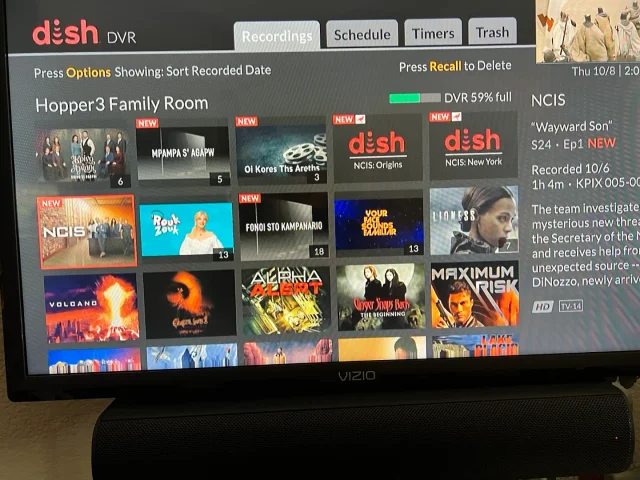
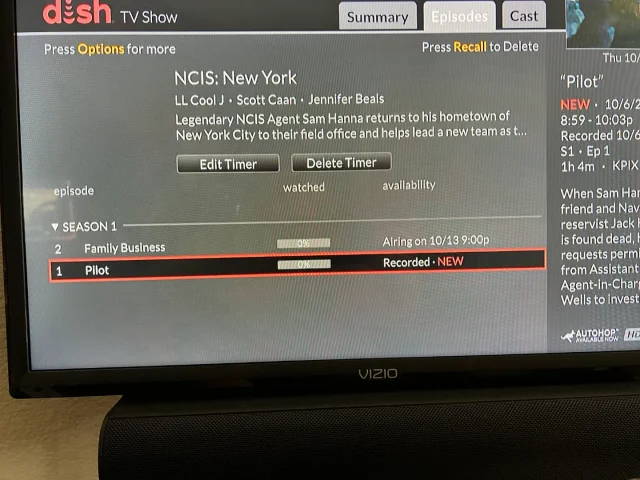
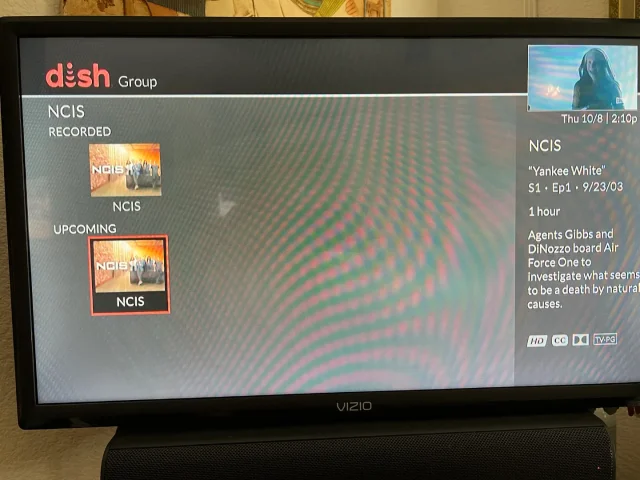
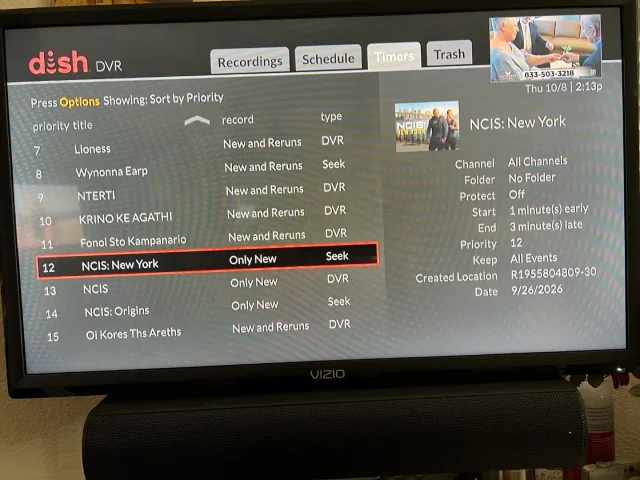
On Tuesday, I recorded the first episodes of the new season's NCIS shows on CBS (Dish provided, not OTA). The new New York series and Origins will both do Auto Skip, but the original, now season 24 does not. What's stranger, when I do a search for NCIS, Origins and New York show the current recording and the next episode it will record, but the original show only shows the current recording and some other channel showing the very first episode of season one. It makes no sense. When I set up the timers, I was able to use search for Origins and New York, but for the original, I had to scroll ahead in the guide until last Tuesday when the show was airing. Then set the timer from there. You can see its timer type is DVR where the other two are Seek. What am I missing?
Thanks!
20 Replies · 382 views
Nebugeater
It is obviose some people do not know the diffornece between auto skip and FF
  • Like
Reactions: charlesrshell
Jimbo
It is obviose some people do not know the diffornece between auto skip and FF
IF you were referring to my post ...
Thats why I do all my Streaming Commercial FREE.
  • Like
Reactions: charlesrshell
Bobby
It is obviose some people do not know the diffornece between auto skip and FF
And there is a difference between fast forward and skip forwad....
tanman
With both CBS and Fox autohop (as we know) is not enabled for a week..But after 24 hours if you mash the FF button until the red kangaroo shows up in the bottom right you wont overshoot the program. No need to try to figure how long the break is.
  • Like
Reactions: charlesrshell
Cold Irons
With both CBS and Fox autohop (as we know) is not enabled for a week..But after 24 hours if you mash the FF button until the red kangaroo shows up in the bottom right you wont overshoot the program. No need to try to figure how long the break is.
Yep. We do this all the time, but we use the 30-sec skip forward button until the red kangaroo shows up. Love this feature.
  • Like
Reactions: charlesrshell
Jim5506
I'm a bit confused about the recording methods.
Do you havePrime Time Anytime enabled, by doing that you don't have to set recordings for Prime time programs on ABC, CBS, NBC or Fox stations, it's done daily, 7 days a week.
And only 2 weeks recordings are saved, no deletions either.
  • Like
Reactions: charlesrshell
"MysteryMan"
Pub Member / Supporter Cutting Edge
Last reply · posted in Computers and Gadgets
I created this thread on the original Edgecutter Cutting Edge Forums site. It's simply a place for those to review the latest software available for those using Windows 10 and Windows 11. To date it has received 112,559 views. I have been asked by staff to continue this thread here.
520 Replies · 47170 views
EarDemon
If it wasn't for what I want, I wouldn't need any of this.

Do I need a collection of handheld radios, scanners and speed enforcement countermeasures? Nope, but I want them. Very little, if any of the software used to interface with these devices is available on Linux.
WhiteBeard
If it wasn't for what I want, I wouldn't need any of this.

Do I need a collection of handheld radios, scanners and speed enforcement countermeasures? Nope, but I want them. Very little, if any of the software used to interface with these devices is available on Linux.
To each there own but I've found that Windows can't do much more than Linux can. Can't have everything. ☹️
  • Haha
Reactions: meStevo
EarDemon
To each there own but I've found that Windows can't do much more than Linux can. Can't have everything. ☹️
For niche use cases, yes I agree. Kali for ethical hacking and security testing, and running a Cacti server for network monitoring are the two things I have experience in. Plus thousands and thousands of other things, but for every day use I just can't see it. The owner of the GMRS repeater that I pay to access is changing the Tx DPL tones tomorrow, while Chirp is available on Linux, the software to program my MXT500 is not.

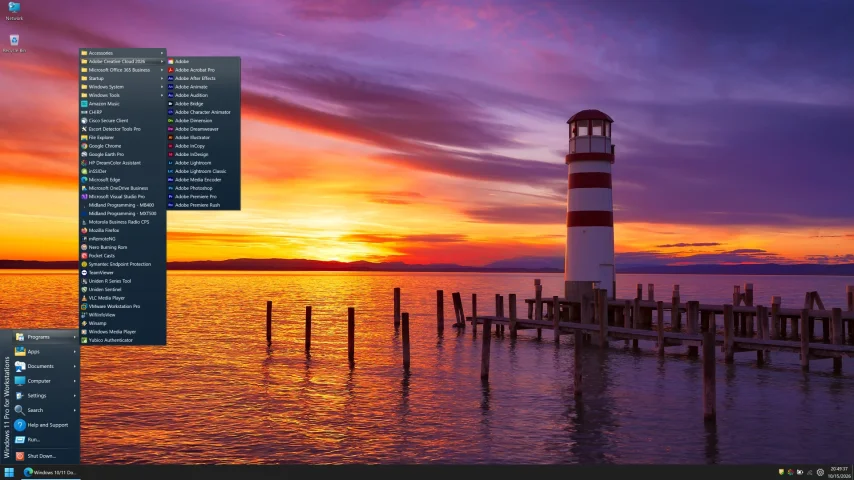
I run Fedora and Ubuntu in VMWare, honestly I don't care much for the UI of either of them and I don't feel like spending days/weeks to customize the UI to make it look Windows-like when I could just use Windows. The cartoonish dock at the bottom of the screen reminds me of Apple products.
EarDemon
I have no OEM bloat, on CTO devices where I can access the drive, I order it with the smallest allowed drive and crack the device open throw the factory drive in the garbage and put in my own WD Black and install Windows from bootable media. For Windows bloat, I install Windows using the English - World option which limits preinstalled MS bloat.

Windows and Office features I wish to block, like CoPilot and Cortana, macro enabled Office files and others are blocked with GPOs.

Between keeping all software up to date, doing firmware updates, putting IoT devices on a separate VLAN, running Symantec Endpoint (say what you want about it, it's been good to me) and practicing safe hex, I'm vigilant but not paranoid about security.

With NVMe SSDs, my cold boot up time on all devices is under 30 secs as well. Fast boot disabled, BitLocker drive encryption enabled.

I have nothing against Linux, been paying with it on and off since 2004ish, it's just not the right solution for me.
HipKat
it's just not the right solution for me.
As I said above, and, FWIW, I run Win11 Pro and Arch on separate 250 GB NVME drives, using F8 to select which I boot to, with a 1TB SSD for storage, accessible to both OSs and a third formatted Nvme I want to use to learn Kali. It was much faster to setup Arch than it was to strip down Windows. Windows still takes much longer to boot.

1792104425403.webp
harshness
I don't care much for the UI of either of them and I don't feel like spending days/weeks to customize the UI to make it look Windows-like when I could just use Windows.
What is so fantabulous about the Windows UI? By many accounts, it has been going downhill since Windows 7.

There are Linux desktops that offer Windows or Mac UIs, yet you don't hear much chatter about them outside of questions about when the creators might get sued.
  • Like
Reactions: HipKat
EarDemon
What is so fantabulous about the Windows UI?
Because it's what I prefer. I know I've said this a few times, I use Open Shell to give me the cascading start menu a la WIN 95 and NT4.0. The only reason I went from Windows Vista to 7 back in the day was because of Classic Shell. I cannot stand anything other than the OG start menu from 30+ years ago. I'm using ExplorerPatcher to give me Windows 10 UI elements of the taskbar and right click context menus.

If you could take a look at how I set up Windows 95, you'd find many similarities to how I use 11.
  • Like
Reactions: cp2k
EarDemon
I could probably use that as a starting point, but I don't like the full size icons. If you have to click on each folder that's also a no-go for me, it has to be cascading.

I used to have Peppermint Linux in a VM, that was about as close as I could get to recreating a Windows NT4.0 style of menu structure, but I could never get it to scale properly in VMWare on a 4K display and eventually gave up.

Whatever the boot up time it's fine with me. The longest part of my bootup is the HP SureStart BIOS integrity check. Once that is done, it's only a few more seconds. I haven't done this reg tweak yet since the reformat, but I switched the bootup animation to the Windows 10 style spinning circle of dots, and it's two and a half rotations. I can live with that.
dfergie
Staff member HERE TO HELP YOU!
Last reply · posted in TV Shows
Hard getting used to the new younger Gibbs, Mark Harmons son had the right look but I understand he didn't want the role.
Still I'm enjoying, pretty good job with Franks.
66 Replies · 4209 views
  • Like
Reactions: MikeD-C05
dfergie
Really good one with OG Gibbs bookending it...
R
Really good one with OG Gibbs bookending it...
Will the OG Gibbs be on NCIS or will Tony be on NCIS Origins?
dfergie
Tony was there at the end of the episode with Gibbs.
R
Tony was there at the end of the episode with Gibbs.
I saw Gibbs walk into the door, but I did not see Tony.
Jimbo
Tony was there at the end of the episode with Gibbs.
Tony was Not in this episode ... you may remember Gibbs walking into the office and those around Welcomed him home, Voices only.

If you also watch the Mothership, Tony has been in that one ...
dfergie
Tony was Not in this episode ... you may remember Gibbs walking into the office and those around Welcomed him home, Voices only.

If you also watch the Mothership, Tony has been in that one ...
I must have seen that in previews
.
  • Like
Reactions: Jimbo
osu1991
Pub Member / Supporter
· posted in TV Shows
0 Replies · 17 views