

Social Feed

ewindowman
Lifetime Supporter
Last reply · posted in DISH Network Support Forum
Looks like dish is Bankrupt. Filling tomorrow Tuesday June 30th
584 Replies · 23816 views
Almighty1

I won't even consider Starlink until they deliver competitive pricing and matching performance, meaning a symmetrical 1Gbps connection. Paying a higher premium for worse speeds, less bandwidth, and higher latency makes absolutely no sense.
S
.I won't even consider Starlink until they deliver competitive pricing and matching performance, meaning a symmetrical 1Gbps connection. Paying a higher premium for worse speeds, less bandwidth, and higher latency makes absolutely no sense.
either would i seeings how i pay 29.99 for a 5 gig fiber pipe with free sunday ticket :). and i pay 19.99 for att internet air for travel. and BTW how long has elon been touting gig speeds :rolleyes: :rolleyes:
fmj77
either would i seeings how i pay 29.99 for a 5 gig fiber pipe with free sunday ticket :). and i pay 19.99 for att internet air for travel. and BTW how long has elon been touting gig speeds :rolleyes: :rolleyes:
The new version 3 satellites going up now are the ones capable of providing gig speeds. I couldn't care less about having 1 Gbps though. It's overkill for the vast majority of households.
Almighty1
The new version 3 satellites going up now are the ones capable of providing gig speeds. I couldn't care less about having 1 Gbps though. It's overkill for the vast majority of households.
Saying 1 Gbps is 'overkill' completely ignores both the physics of satellite bandwidth and how internet usage evolves.
First, when SpaceX or Amazon talks about 'gigabit speeds' on newer low Earth orbit networks, they are referring to the total aggregate bandwidth of the beam shared across an entire cell sector, not individual user speeds. Because satellite is a shared medium, that capacity is split among hundreds of active users simultaneously, causing speeds to fluctuate heavily during peak hours. In fact, for Amazon's newly rebranded satellite network (Amazon Leo, formerly Project Kuiper), true gigabit performance is explicitly locked behind their massive 'Leo Ultra' enterprise-grade terminal (measuring 19x30 inches) and tested under empty, ideal conditions. The standard residential terminal that average home users will actually get is capped at a maximum download speed of around 400 Mbps.
Second, only looking at downloads misses the real bottleneck: upload speeds. Starlink's uploads are notoriously weak (often hovering between 10–25 Mbps). Symmetrical gigabit connections aren't about overkill; they are about eliminating asymmetrical choking when running high-bandwidth applications, heavy multi-device smart homes, or massive data uploads concurrently.
Finally, the 'overkill' argument never ages well. Decades ago, people thought a DS1/T1 line at 1.544 Mbps was an absurd amount of overkill that a single household could never saturate. Then companies moved to massive DS3/T3 lines at 45 Mbps, which were meant to support entire corporate headquarters with hundreds of employees. Today, a single 4K video stream and a couple of active smart home devices will completely choke a 45 Mbps pipe. Bandwidth demands scale exponentially. Settling for lower bandwidth, weak uploads, and high latency at a higher premium makes zero sense when symmetrical terrestrial networks deliver far better performance for less money.
  • Like
Reactions: charlesrshell
fmj77

Oh well, but 300Mbps down/100Mbps up for $40 is still significantly cheaper than 400Mbps down/10Mbps-25Mbps up Starlink for $130 as you already have 75Mbps(650%)-90Mbps(800%) more on the upload side and 75% or 100Mbps(25%) less on the download side paying 31% of the $130 price. The 100Mbps upload is already good since the best here is 1.2Gbps down/35Mbps up when it comes to cable broadband which is the best around here. 1Gbps is the minimum here needed to get anything above 10Mbps for upload and with things like DISH Anywhere and the Ring Video Doorbells that meets the 25Mbps requirement would be at 35Mbps upload which is either 1Gbps or 1.2Gbps but in reality, the provisioning is always 20% higher in speeds so 1Gbps is really 1.2GBps and 1.2Gbps is really 1.44Gbps with the upload speeds being 42Mbps in actual use provided one has a 2.5Gbps or higher LAN beyond the router/modem as 1Gbps Gigabit Ethernet will max out at 940Mbps due to overhead.
Not all fiber and cable providers are created equal. Infrastructure varies wildly where in some areas it might be very reliable, but in the next town over customers experience constant outages and downtime. Many of those customers favor reliability over cost and end up switching to Starlink because of that.
Almighty1
Not all fiber and cable providers are created equal. Infrastructure varies wildly where in some areas it might be very reliable, but in the next town over customers experience constant outages and downtime. Many of those customers favor reliability over cost and end up switching to Starlink because of that.
The problem with that argument is it treats Starlink like a premium, guaranteed service just because it carries a premium price tag.
In reality, standard Starlink is a consumer-grade connection, not a business-grade service with a Service Level Agreement (SLA). Even if you step up to Starlink's formal Business tier (Local Priority) to secure their 99.9% network availability SLA, you aren't buying true performance consistency. You are just paying a massive premium—from $55 all the way up to $530+ a month—to buy a financial safety net for a connection that handles data limits poorly. The moment you exhaust your monthly Priority Data allotment, Starlink brutally throttles your business line down to a practically unusable 1 Mbps download and 0.5 Mbps upload unless you pay overages.
An SLA cannot rewrite the laws of physics. If a customer actually wants guaranteed reliability at a high standard—like a 400Mbps symmetrical line with locked-in latency and zero packet loss—they cannot rely on a satellite dish. They need a dedicated terrestrial enterprise circuit from a high-volume telecom provider known to be reliable, which easily costs $500 to over $1,000 a month. Otherwise, they are just paying a 225% premium to play a different residential lottery, or overpaying for a satellite SLA that only offers a small billing credit when the sky is blocked or the network is congested.
Whether you pay $40 for consumer-grade cable/fiber broadband or $130 for Starlink Residential, you are buying a "best-effort" consumer tier. The provider owes you absolutely nothing in terms of guaranteed uptime, packet loss, or repair speeds, and performance speeds are entirely unguaranteed except for the minimum speed. Even on the Business plans, the priority data only puts you at the front of the line; it cannot magically create bandwidth out of thin air if a satellite beam is completely oversaturated.

Because there are no physical performance guarantees, the infrastructure lottery applies across the board. It can also easily work in reverse—where someone buys the expensive $130 Starlink connection only to find it completely unreliable, ultimately switching back to the $40 option for stability.
  • The Starlink Lottery: One person pays the premium, has completely clear sightlines, low local user density, and gets a decent connection. Another person pays the exact same amount, but because of a single tree branch, weather degradation, or a congested suburban cell, they experience severe evening jitter and constant micro-drops.
  • The Terrestrial Lottery: One person pays $40 on a newly upgraded wired node and gets flawless uptime. A mile away, another customer pays $40 but suffers constant drops because of water in a legacy junction box or line noise from a neighbor.
Worse yet, switching to satellite actively breaks specific high-demand applications. For example, trying to use DISH Anywhere will choke severely on Starlink. Because DISH Anywhere relies entirely on the home internet's upload pipe to stream place-shifted video out to your mobile devices, it will completely saturate Starlink's narrow, volatile upload pipe. When that upload capacity is entirely filled, it triggers severe network starvation—blocking critical inbound acknowledgment packets (ACKs) and blowing out latency until the entire internet connection drops and becomes completely unavailable for any other device in the household. Because an unavailable connection is the exact same thing as an unreliable connection, this saturation breaks the utility of your entire setup.
Switching to Starlink isn't a magical fix for unreliability; it's just paying triple the price to swap a ground-based gamble for a space-based gamble. If a user truly cannot afford a single drop for their livelihood or their high-end streaming applications, they shouldn't be looking at a satellite dish—they need to be paying the real enterprise rates of $500+ a month for a dedicated terrestrial business line with a contractual multi-nine percent uptime guarantee.

Ultimately, instead of overpaying for a different set of tech headaches, one should just get a service that meets all of their technical needs and remains stable at the lowest cost possible. If a standard $40 wired broadband line works reliably for what you do, throwing an extra 225% at a satellite provider—SLA or not—is a complete waste of money.
  • Like
Reactions: charlesrshell
S
The problem with that argument is it treats Starlink like a premium, guaranteed service just because it carries a premium price tag.
In reality, standard Starlink is a consumer-grade connection, not a business-grade service with a Service Level Agreement (SLA). Even if you step up to Starlink's formal Business tier (Local Priority) to secure their 99.9% network availability SLA, you aren't buying true performance consistency. You are just paying a massive premium—from $55 all the way up to $530+ a month—to buy a financial safety net for a connection that handles data limits poorly. The moment you exhaust your monthly Priority Data allotment, Starlink brutally throttles your business line down to a practically unusable 1 Mbps download and 0.5 Mbps upload unless you pay overages.
An SLA cannot rewrite the laws of physics. If a customer actually wants guaranteed reliability at a high standard—like a 400Mbps symmetrical line with locked-in latency and zero packet loss—they cannot rely on a satellite dish. They need a dedicated terrestrial enterprise circuit from a high-volume telecom provider known to be reliable, which easily costs $500 to over $1,000 a month. Otherwise, they are just paying a 225% premium to play a different residential lottery, or overpaying for a satellite SLA that only offers a small billing credit when the sky is blocked or the network is congested.
Whether you pay $40 for consumer-grade cable/fiber broadband or $130 for Starlink Residential, you are buying a "best-effort" consumer tier. The provider owes you absolutely nothing in terms of guaranteed uptime, packet loss, or repair speeds, and performance speeds are entirely unguaranteed except for the minimum speed. Even on the Business plans, the priority data only puts you at the front of the line; it cannot magically create bandwidth out of thin air if a satellite beam is completely oversaturated.

Because there are no physical performance guarantees, the infrastructure lottery applies across the board. It can also easily work in reverse—where someone buys the expensive $130 Starlink connection only to find it completely unreliable, ultimately switching back to the $40 option for stability.
  • The Starlink Lottery: One person pays the premium, has completely clear sightlines, low local user density, and gets a decent connection. Another person pays the exact same amount, but because of a single tree branch, weather degradation, or a congested suburban cell, they experience severe evening jitter and constant micro-drops.
  • The Terrestrial Lottery: One person pays $40 on a newly upgraded wired node and gets flawless uptime. A mile away, another customer pays $40 but suffers constant drops because of water in a legacy junction box or line noise from a neighbor.
Worse yet, switching to satellite actively breaks specific high-demand applications. For example, trying to use DISH Anywhere will choke severely on Starlink. Because DISH Anywhere relies entirely on the home internet's upload pipe to stream place-shifted video out to your mobile devices, it will completely saturate Starlink's narrow, volatile upload pipe. When that upload capacity is entirely filled, it triggers severe network starvation—blocking critical inbound acknowledgment packets (ACKs) and blowing out latency until the entire internet connection drops and becomes completely unavailable for any other device in the household. Because an unavailable connection is the exact same thing as an unreliable connection, this saturation breaks the utility of your entire setup.
Switching to Starlink isn't a magical fix for unreliability; it's just paying triple the price to swap a ground-based gamble for a space-based gamble. If a user truly cannot afford a single drop for their livelihood or their high-end streaming applications, they shouldn't be looking at a satellite dish—they need to be paying the real enterprise rates of $500+ a month for a dedicated terrestrial business line with a contractual multi-nine percent uptime guarantee.

Ultimately, instead of overpaying for a different set of tech headaches, one should just get a service that meets all of their technical needs and remains stable at the lowest cost possible. If a standard $40 wired broadband line works reliably for what you do, throwing an extra 225% at a satellite provider—SLA or not—is a complete waste of money.
You forgot the dynamic pricing scheme also and the reactivation fee if ones in a high demand area. It's been said on fb a reactivation fee is 1,500.00 f that
Foxbat
The Mobile Plans are based on Data Consumption where the Residential Plans are based on Data Rates. Most people can get by with 100 Mbps if they're coming from an older DSL or ancient cable ISP.
  • Like
Reactions: charlesrshell
Almighty1
You forgot the dynamic pricing scheme also and the reactivation fee if ones in a high demand area. It's been said on fb a reactivation fee is 1,500.00 f that
You're 100% right, it is a sliding scale. It's officially called their 'Demand Surcharge,' and it hits you on a tiered system anywhere from $100, $250, $500, $750, all the way up to that $1,500 ceiling depending on how congested the cell is. [1]
That actually highlights the point even more—I was intentionally profiling Starlink's absolute minimum floor costs to give it the best possible scenario. The fact that an ordinary subscriber can get slapped with an unexpected tiered penalty up to $1,500 just to reactivate service, verify an address, or replace a broken dish from a retail store proves how unpredictable consumer satellite tracking really is. It makes rolling the dice on a stable, flat-rate $40 landline an even easier choice." [1, 2]
  • Like
Reactions: charlesrshell
comfortably_numb
Whether you pay $40 for consumer-grade cable/fiber broadband or $130 for Starlink Residential, you are buying a "best-effort" consumer tier. The provider owes you absolutely nothing in terms of guaranteed uptime, packet loss, or repair speeds, and performance speeds are entirely unguaranteed except for the minimum speed

I have a guarantee on my Comcast/Xfinity broadband. First, they over-provision by 25% to account for congestion periods. And if there is an outage I can click a button and apply a $5 credit.

So in reality, I typically see speeds of 350/125 which is a good deal for $40 a month.
  • Like
Reactions: charlesrshell
Almighty1
The Mobile Plans are based on Data Consumption where the Residential Plans are based on Data Rates. Most people can get by with 100 Mbps if they're coming from an older DSL or ancient cable ISP.
Most people look at the download rates, but people usually do not complain about download speed—it's the upload speed that causes issues. Modern applications require a healthy outbound pipe. If you run Ring cameras uploading video clips or use a DISH Hopper to stream video out via DISH Anywhere, you are bottlenecked entirely by your upload capacity.

In fact, that was the real reason I had to upgrade from my old 6Mbps/768Kbps ADSL line about 10 years ago in 2016. It wasn't because of the download rate at all; it was entirely because the 768Kbps upload pipe would choke, even with fair queue QoS traffic shaping active. Whenever my original Ring Video Doorbell (Generation 1) detected motion—which happened every few minutes—and started uploading a video clip, it would completely flood that narrow pipe and make the entire network unavailable. When I upgraded, I specifically looked at the lowest download speed tier available that provided the highest possible upload speeds—which maxed out at a 35Mbps upload profile (provisioned to realistically give you 42Mbps available).

Starlink's upload speeds are highly volatile and narrow compared to a stable wired line. The second you saturate that fragile upload pipe, the whole connection chokes and becomes unusable for everyone and all other devices in the house, no matter how much download speed you have left.
  • Like
Reactions: Foxbat
M
Last reply · posted in FTA Receiver / Equipment Support
Hello Folks...

I'm a complete newbi to all this, so please forgive me if I ask FAQs, or seem out in the weeds.
My neighbor recently moved and gave me his FTA set-up before he left.
We installed it on/in my house. The equipment consistes of:
GTMedia V8x STB/Receiver
Foretec Star Ku dish & rotor

According to him and a sky view map I found online I can see Sats in the range:
Start: 22.0W Ku-band SES 4
End: 133.0W Ku-band Galaxy 33

These are all programmed into the STB and I have confirmed I can point to each of the sats in the range.

Here's where I am confused and need some help:
I deleted all the "channels", set the unit to 22.0W Ku-band SES 4,
and started a multi-sat Blind scan (FTA only, TV only) of all the sats that are programmed in the arc.
However, when it was done it only showed "channels" for a hand full of the sats that are programmed, and
only a few signals per sat.

When I look online at the published sat guides (line Lyngsat and others) they are listing oodles of stas/channes/transpondes/etc.
But, I sure don't seem to be seeing any/all of this stuff.

Do I need to program all of these individual TP frequencies, SRs, polarities listed for each of these sats into my STB
in order for me to see this, OR does the "Blind Scan" just automatically look for all of this, and add it if something is found?

If I DO need to hand enter all this stuff into my STB, is there an autoated way to do it, or a download I can get/load that does
it for me?? For example my STB has:

22.0W Ku-band SES 4
TP: 10986 SR: 45000 Polarity: V
In it's on screen list of sat/TP

BUT, I see the following when I look online:
22.0W Ku-band SES 4
TP: 10986 SR: 45000 Polarity: V or 13 DVB-S2
TP: 11051 SR: 45000 Polarity: V or 13 DVB-S2
TP: 11111 SR: 45000 Polarity: V or 13 DVB-S2
TP: 11171 SR: 45000 Polarity: V or 13 DVB-S2
TP: 11534 SR: 7200 Polarity: H or 18 DVB-S2
TP: 11544 SR: 7200 Polarity: H or 18 DVB-S2
TP: 11551 SR: 45000 Polarity: V or 13 DVB-S2
TP: 11611 SR: 45000 Polarity: V or 13 DVB-S2
TP: 11671 SR: 30000 Polarity: V or 13 DVB-S
TP: 12002 SR: 2500 Polarity: V or 13 DVB-S2
TP: 12530 SR: 30000 Polarity: V or 13 DVB-S2
TP: 12539 SR: 4800 Polarity: H or 18 DVB-S2
TP: 12570 SR: 30000 Polarity: V or 13 DVB-S2
TP: 12610 SR: 30000 Polarity: V or 13 DVB-S2
TP: 12650 SR: 30000 Polarity: V or 13 DVB-S2
TP: 12672 SR: 27500 Polarity: H or 18 DVB-S
TP: 12690 SR: 30000 Polarity: V or 13 DVB-S2
TP: 12730 SR: 30000 Polarity: V or 13 DVB-S2

Am I not seeing anything on this sat because I don't have this long list of TPs programmed in?
Should the "Blind Scan" be finding these regardless, assuming there's a signal there?
Is there a eazy way to get these into my STB, assuming I need to add them, that doesn't
require me to spend 3 days punching them in by hand from the remote?? (e.g. download from net and upload to STB??)

Again, sorry this is so long, and If I'm asking something obvious and super newbi. Forgive me if this is posted to the wrong forum,
or if there is someplace I need to go where this is already laid ot.
I really appreciate your time to consider my question!

MK - MrQRO
1 Replies · 25 views
mc6809e
According to Lyngsat, it looks like SES 4 Ku is aimed at Europe, the Middle East and West Africa with nothing aimed at North America.
Ramy
Supporting Founder
Last reply · posted in The Sports Section
Really excited for this season with Kentucky having a new coach and some really exciting recruits. Probably won't last long, but here's hoping this season is great.
233 Replies · 7070 views
  • Haha
Reactions: Mike0616
Tom Speer
Staff member Pub Member / Supporter Cutting Edge
Last reply · posted in DIRECTV Cutting Edge Information
We are looking to find DirecTV Stream customers who are interested in pre-beta testing new Stream hardware and software, and who enjoy the testing process. You must agree to provide rigoorous feedback to DIRECTV on a regular basis. See the Welcome to the Cutting Edge message.
3 Replies · 883 views
litzdog911
Hi Tom, looks like my Satelliteguys account is still good. I'm here and ready to help.

Jim
Caoimhin
I am the new guy and signed up for this reason and other discussions. I am very interested in testing.

I have extensive experience in testing consumer products for multiple companies. If you want to reach out, please PM me. I am unable to access the Welcome link.

Thanks
KL
Tom Speer
I beleive I have reponded to everyone who has expressed an interest so far via a DM. The group is growing rapidly.
  • Like
Reactions: Jimbo
Gary Toma
Staff member Pub Member / Supporter Cutting Edge
Last reply · posted in DIRECTV Programming Forum
We finally have the word: Fox will be providing the the Sunday Eagles vs Cowboys in 4K . On DIRECTV, it will be aired on channel 104 or channel 105.

Finally !!
7 Replies · 264 views
  • Like
Reactions: dfergie
K
Take it up with the NFL who still insists on having the same teams host games every Thanksgiving instead of rotating it every year because of some tradition that started 50 years ago when there was only 3 networks.

FOX is the only one who supplies some of their national NFL games in 4K to MVPDs, the rest only do it for the Super Bowl.
Jimbo
Take it up with the NFL who still insists on having the same teams host games every Thanksgiving instead of rotating it every year because of some tradition that started 50 years ago when there was only 3 networks.

FOX is the only one who supplies some of their national NFL games in 4K to MVPDs, the rest only do it for the Super Bowl.
Actually, Thats why the Late game became a thing, so they could have another game on Thanksgiving... also a case of GREED.
And a Game the Day BEFORE and After, talk about GREED.

Are these other games in 4k ?

This game on Fox in 4k, is it actual 4k, or Upconverted 1080 like it use to be ?

Is the Fox 4k going to All Fox outlets or just D* ?

Just asking ...
cp2k
This game on Fox in 4k, is it actual 4k, or Upconverted 1080 like it use to be ?
Unless something has changed very recently it'll be upconverted 1080p like all their other productions. The issue as I understand it is their SDI video routing technology can't handle a large number of 4K SDI feeds at one time in addition to the cost of using real 4K equipment, etc.
K
Is the Fox 4k going to All Fox outlets or just D* ?
It will be available to the providers that already carry FOX's Big Noon college football in 4K on weekends, and available to stream via the FOX One app on compatible TVs. So YTTV, FiOS, Fubo, Dish, Optimum and Xfinity should have it too on their 4K channels.
R
It will be available to the providers that already carry FOX's Big Noon college football in 4K on weekends, and available to stream via the FOX One app on compatible TVs. So YTTV, FiOS, Fubo, Dish, Optimum and Xfinity should have it too on their 4K channels.
And most likely will be on Tubi too like last time
K
It's now on the schedule for channel 105 LIVE4K
Marques Brownlee
· posted in Marques Brownlee
0 Replies · 23 views
meStevo
Lifetime Supporter
Last reply · posted in The Chit Chat Club
Continuing the Kilauea thread in the Pub here. Perhaps the Iceland one too next time there's remarkable activity.

Currently there is precursory lava flowing into the crater, leading to the next episode that'll probably start within the next day.

You can see the pace of inflation / deflation here. It serves as the primary predictor for when the expect the eruptions, which coincide w/ inflation turning into significant deflation and last for several hours on average with significant fountaining.
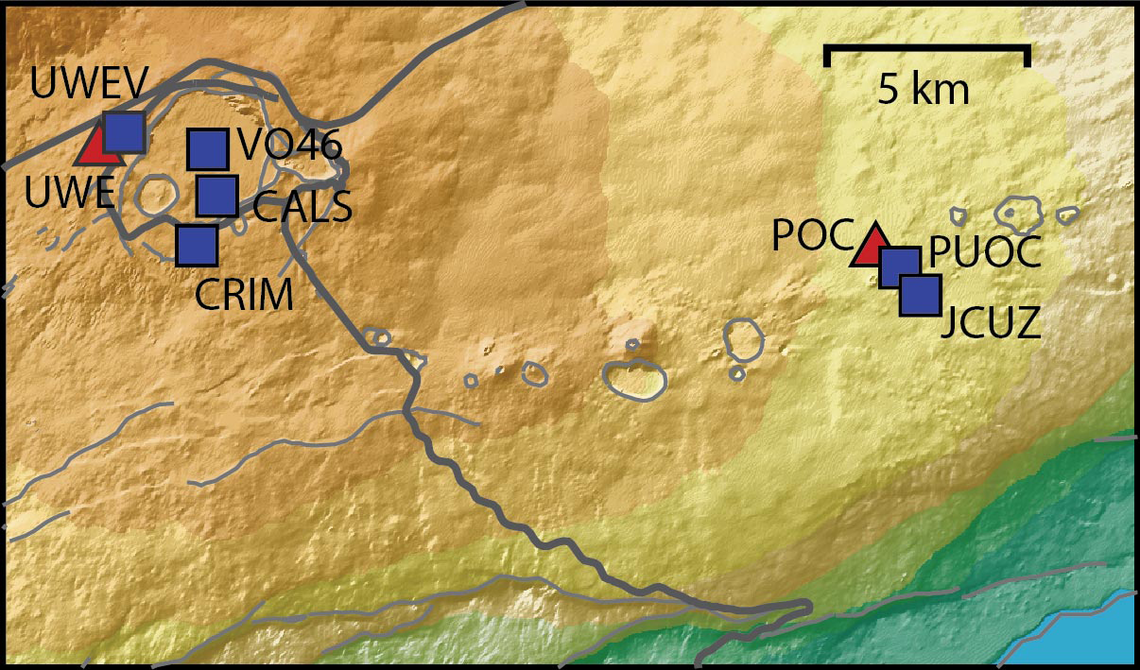


View: https://youtu.be/Uecu2seh4b4


Wife and I like the AfarTV feeds, for the discussion along w/ them, though they're otherwise just mirrors of the official USGS feeds.


View: https://youtu.be/iws3rh5vLAQ
126 Replies · 4098 views
  • Like
Reactions: osu1991
Foxbat
Sorry, I should have posted these earlier:

​

We're still waiting on the start of Episode 56.
  • Like
Reactions: RaiderPower
Foxbat
At 08:01 HST 11/05/2026, the North Vent produced what I would call a "wet burp" after the precursory "pistoning" events, small amounts of lava pouring out of the vent for a few seconds to minutes and then everything recedes. There must have been a gas bubble holding thing back because two minutes later the lava started flowing out of the vent in all directions. Then, at 08:25, it stopped. What a tease! I thought this was how Episode 56 started.

About 12 minutes later at 08:38, the North vent once again started overflowing and picked up steam at 08:42. By 09:00, slight doming could be seen in the pool of lava in the vent. Surely this is it!

But, 09:50 and things wind down again. By 09:57 HST there's just fumes coming out of the vent. Phooey.

But then 10:00 comes and the heavy lava flows kick in again. This time seems like the real deal. At 10:30 HST there's little spurts of lava flying up in the air over the vent, but more from gas than a steady fountain of lava. This looks promising!

11:30 HST and the color of the lava is definitely hotter, and the intensity has picked up to a definite dome and precursor to fountaining. The USGS calls Episode 56 as officially starting at 12:10 HST:

Alert Level: WATCH, Color Code: ORANGE 2026-11-05 22:29:12 UTC
HVO/USGS Volcanic Activity Notice

Volcano: Kilauea (VNUM #332010)

Current Volcano Alert Level: WATCH
Current Aviation Color Code: ORANGE

Issued: Thursday, November 5, 2026, 12:29 PM HST
Source: Hawaiian Volcano Observatory
Notice Number: 2026/H514
Location: N 19 deg 25 min W 155 deg 17 min
Elevation: 4091 ft (1247 m)
Area: Hawaii

Summary: Episode 56 of the ongoing Halemaʻumaʻu eruption began at 12:10 PM HST on November 5, 2026.

Volcanic Activity:
Episode 56 of lava fountaining in Halemaʻumaʻu began at the summit of Kīlauea began at 12:10 PM HST on November 5, 2026.

Lava fountain heights are relatively low at about 100 ft (30 meters), but will likely increase. Ground-level sensors near the eruptive vents indicate that winds are blowing from the northeast direction, which suggests that volcanic gas emissions and volcanic material may be distributed to the southwest direction from Halemaʻumaʻu.
  • Like
Reactions: meStevo
Foxbat
​
  • Like
Reactions: RaiderPower
Foxbat
Scott Greczkowski
Staff member HERE TO HELP YOU! Cutting Edge
Last reply · posted in DIRECTV General Forum
The following is from Reddit. -
View: https://www.reddit.com/r/DirectvStream/s/orzHBkmqQW


gemini.webp

There appears to be a new DIRECTV Gemini OTT box, the C81KW-650.

The FCC listing is partially available, and a Geekbench entry confirms it uses an Amlogic S905X5, a solid SoC for a set-top box.

I also see 4GB of RAM, and the manufacturer is SEI Robotics.

DIRECTV C81KW OTT Box - Android TV Guide

Ok found a picture of the Box too on Reddit:


View: https://www.reddit.com/r/DirectvStream/comments/1twlex0/comment/opzeqi1/
35 Replies · 2781 views
  • Like
Reactions: dtv757
R
I don't mind HDR being on as long as its adaptive. I don't need HDR on non-HDR content

Also, God only knows how much it'll cost to get this per month. 10 bucks a month for 3 TVs in my apartment is not worth it if I can just use my android boxes and appletv to watch
J
I don't mind HDR being on as long as its adaptive. I don't need HDR on non-HDR content

Also, God only knows how much it'll cost to get this per month. 10 bucks a month for 3 TVs in my apartment is not worth it if I can just use my android boxes and appletv to watch
Supposedly the HDR on or off issue has been addressed with the addition of a " match content" switch in the Display menu.
Tom Speer
Supposedly the HDR on or off issue has been addressed with the addition of a " match content" switch in the Display menu.
I don't know if that is true or not, but the memory limits and processor speeds of the first Osprey and Gemini devices limited some features. The specs fo this new device indicate that may not be such a problem.
J
I don't know if that is true or not, but the memory limits and processor speeds of the first Osprey and Gemini devices limited some features. The specs fo this new device indicate that may not be such a problem.
Saw on Reddit. Someone had the new box and said they added an add content switch and auto detect was working.
J
Saw on Reddit. Someone had the new box and said they added an add content switch and auto detect was working.
Click on link below photo.
4KMediaTV
That Reddit report is encouraging — a Match Content switch would fix the one thing that annoyed me most about the older Gemini boxes, HDR being forced on for everything.

If anyone gets the new box, the test I'd run before judging it is:
- Turn on the Match Content switch in the Display menu, then watch a known HDR title and a regular SDR channel back to back. With matching on, the SDR channel should look normal instead of washed out or overly bright, and the HDR title should still switch the TV into HDR.
- Check what the TV itself reports for each one — most TVs show the picture mode or an HDR badge when you press Info or Display — so you're not just guessing from how it looks.
- If your TV handles HDR poorly, as Tom mentioned, leave HDR off on the Gemini entirely. A good SDR picture beats a bad HDR picture every time.
- After changing the HDR or Match Content setting, reboot the box once before testing. On the older boxes those display changes sometimes didn't stick properly until a restart.

If auto-detect is actually working on this one, that's a real improvement over the Osprey and the first Gemini.
J
That Reddit report is encouraging — a Match Content switch would fix the one thing that annoyed me most about the older Gemini boxes, HDR being forced on for everything.

If anyone gets the new box, the test I'd run before judging it is:
- Turn on the Match Content switch in the Display menu, then watch a known HDR title and a regular SDR channel back to back. With matching on, the SDR channel should look normal instead of washed out or overly bright, and the HDR title should still switch the TV into HDR.
- Check what the TV itself reports for each one — most TVs show the picture mode or an HDR badge when you press Info or Display — so you're not just guessing from how it looks.
- If your TV handles HDR poorly, as Tom mentioned, leave HDR off on the Gemini entirely. A good SDR picture beats a bad HDR picture every time.
- After changing the HDR or Match Content setting, reboot the box once before testing. On the older boxes those display changes sometimes didn't stick properly until a restart.

If auto-detect is actually working on this one, that's a real improvement over the Osprey and the first Gemini.
The current Gemini Air stream dongle isn't bad, the big frustration is the no HDR match content auto detect switch. It doesn't matter what kind of TV you have, forced HDR on SD video just doesn't work. It's inconvenient to go and switch back and forth between HDR on and HDR off so you can watch something on Paramount Plus in HDR. The ability to have all your apps in one place is convenient. The new box would be nice with this fixed as well as adding some updated video codecs.
I've been back and forth with DirecTV techs since June of '25 regarding this HDR issue. Can't tell you have many service tickets were put in regarding the HDR issue. If they were ever put in. It's been a known issue even before the Gemini Air Stream Dongle.
If they do what they say they're going to do, they'll have one heck of a streaming device.
Tom Speer
I'm sorry for all of you having trouble with the HDR on all the time. With my TCL QM7 TV the HDR looks great all the time. The new QLED models seem to handle this better. But it sounds like they are addressing the issue.
b4pjoe
I'm sorry for all of you having trouble with the HDR on all the time. With my TCL QM7 TV the HDR looks great all the time. The new QLED models seem to handle this better. But it sounds like they are addressing the issue.
As I have said before...everything on my TV's look better with HDR on all of the time. Hopefully that will still be an option and not be stuck with HDR only being on when viewing HDR content.