

Social Feed

Staff member
HERE TO HELP YOU!
Cutting Edge
Verizon Expands FiOS TV Availability in North Texas
Verizon has launched Verizon FiOS TV in six more North Texas communities, which join Keller as Dallas/Fort Worth suburbs where consumers can order the new service that provides a competitive alternative to existing cable and satellite services. FiOS TV and FiOS Internet Service are transmitted over the company's industry-leading, 100-percent fiber-optic network.
Effective immediately, Verizon local telephone customers in portions of northern Carrollton, eastern Coppell, central Flower Mound, northern Fort Worth nearest Keller, northern Irving and central Lewisville can have a new choice for television -- Verizon FiOS TV. Verizon launched the service in Keller in September, and customer sales there are brisk. The company also recently began offering FiOS TV in Herndon, Va., and Temple Terrace, Fla.
Acting under a new Texas law that granted Verizon a state-issued video franchise in October, Verizon will make FiOS TV available to the rest of its service territory in Carrollton, Coppell, Flower Mound, Fort Worth, Irving and Lewisville as it completes construction of its fiber-optic network there. In addition, Verizon plans to introduce FiOS TV in 2006 to its local telephone customers in Allen, Colleyville, Denton, Double Oak, Garland, Grapevine, Hebron, Highland Village, Lucas, Murphy, Parker, Plano, Rowlett, Sachse, Southlake, St. Paul, Westlake and Wylie.
By the end of 2006, FiOS TV will be available to nearly 400,000 North Texas households, or 33 percent of Verizon's landline customers in Texas, with over 1 million potential viewers.
Information on packages and prices is available at www.verizon.net/fiostv. North Texas customers also can call 1-877-4-FIOS-TV (1-877-434-6788) to see if they can order FiOS TV.
"FiOS TV gives North Texans an outstanding, superior alternative for their video entertainment," said Steve Banta, Verizon Southwest region president. "Customers who liked what FiOS did for their Internet connection will love what it does for their TV.
"We've harnessed the speed and capacity of fiber-based broadband with the power of broadcast to create a revolutionary, new entertainment experience," said Banta.
FiOS TV is designed to be a formidable competitor to cable and satellite. It is delivered over Verizon's fiber-to-the-premises network, which has industry-leading quality and reliability. By the end of the year, Verizon will have placed about 17 million feet of fiber throughout its North Texas communities in order to offer FiOS services, resulting in the creation of more than 700 new full-time jobs and more than 800 full-time contractor positions. Verizon intends to add several hundred more North Texas positions in early 2006 to keep up with consumer demand for FiOS services.
Fiber delivers amazingly sharp pictures and sound, and has the capacity to transmit a wide array of high-definition programming that is so clear and intense it seems to leap from the TV screen. Verizon's network design includes backup facilities not common to traditional cable systems, such as duplicate super head ends where the TV service receives national programming. (More information about FiOS TV and fiber optics is available in Verizon's online News Center at www.verizon.com/news.)
Service highlights include:
A broad collection of all-digital programming and compelling consumer choice - with more than 330 total channels now and more on the way.
A lead offer with more than 180 digital video and music channels, for $34.95 a month with Verizon FiOS Internet Service or a qualifying voice product.
More than 20 high-definition channels, with extraordinary clarity and theater-quality sound.
1,640 video-on-demand titles available to customers now, with 1,800 by year-end.
Channels grouped by genres such as entertainment, sports, news, shopping, movies and family, making it easy for audiences to find their favorite programming.
An easy-to-use interactive programming guide that integrates HD programming, video-on-demand and the digital video recorder along with broadcast television into a seamless user experience.
A dual-tuner digital video recorder (DVR) that gives customers the freedom to pause and rewind live TV, record one show while watching another, and fast forward to their favorite part of the program - all without a VCR, tapes or DVDs.
Following the service rollout in the additional six Texas cities, Verizon will expand FiOS TV to additional households in other states where, under current law, the company has obtained video franchises from local governments. The company has secured video franchises with municipalities in California, Florida, Massachusetts, New York, Texas and Virginia.
FiOS TV subscribers can choose from three simple-to-understand service offerings, each with built-in choice and value. They can then choose from packages and premium channels with programming that meets their special interests. Verizon offers three set-top boxes: standard definition for $3.95 per month; high definition (HD), which includes HD channels, for $9.95 per month; and a DVR set-top box with HD channels for $12.95 per month.
The services include:
Basic, with access to 15-35 local broadcast weather and community channels for $12.95 per month. The service is all-fiber, all-digital with a set-top box, which also provides access to on-demand programming. Basic is also available as an analog service that does not require a set-top box for viewing.
Expanded Basic, Verizon's lead offer, delivers more than 180 digital video and music channels for $34.95 a month with Verizon FiOS Internet Service or a qualifying voice product. This tier includes access to 1,640 on-demand titles now, with 1,800 by year-end. This service requires a standard-definition set-top box or a high-definition set-top box for HD channels. HD channels are included in this tier at no extra charge.
La Conexión, an alternative to Expanded Basic service designed for bilingual consumers who enjoy TV programs in English and Spanish, for $32.95 per month. The package includes nearly 140 channels with English and Spanish-language programming and access to video on demand. This service requires a standard-definition set-top box or a high-definition set-top box for HD channels. HD channels are included in this tier at no extra charge.
Consumers with a passion for sports or movies can add a 15-channel sports package for $5.95 a month, and a movie package -- with 45 channels of Starz, Encore, Showtime and The Movie Channel -- for $11.95 a month. The movie package includes access to each channel's video-on-demand titles. Or, they can buy both for $14.95 a month. In addition, for wrestling fans, Verizon offers World Wrestling Entertainment's WWE 24/7, a new subscription video-on-demand service, for $7.95 a month.
Verizon also offers 14 HBO channels and 12 Cinemax channels as premium services, with each set of channels available for $14.95. The price includes access to each channel's subscription video-on-demand library. Subscribers who want both HBO and Cinemax will pay $24.95 per month.
Programming choices for African-American, Asian, Russian and other multicultural and ethnic audiences will be available in every market. Because FiOS TV has so much capacity, it will also be an outlet for emerging and independent networks to showcase their diverse programming.
FiOS TV also offers thousands of hours of on-demand programming, including hundreds of titles of free video-on-demand programs across topics such as sports, news, information and education, home and leisure, family, children's shows and movies. Customers can order new movie releases for $3.95 each and selections from a movie library for $2.95 each.
The value of FiOS TV extends to the installation and customer support. Specially trained Verizon technicians will install the service and acquaint subscribers with FiOS TV features and services. Verizon is waiving the installation fee for up to three existing TV outlets, and there is no charge to install a needed optical network terminal at the subscriber's home. Charges for other installation services, such as additional outlets, may apply. Verizon provides 24x7 technical assistance by phone from its Fiber Solutions Centers in Dallas and other cities.
Verizon FiOS Internet Service, offering broadband speeds of up to 5, 15 and 30 megabits per second (mbps), with the potential for even higher speeds, continues to become more widely available throughout North Texas as the company's fiber construction expands.
Verizon has launched Verizon FiOS TV in six more North Texas communities, which join Keller as Dallas/Fort Worth suburbs where consumers can order the new service that provides a competitive alternative to existing cable and satellite services. FiOS TV and FiOS Internet Service are transmitted over the company's industry-leading, 100-percent fiber-optic network.
Effective immediately, Verizon local telephone customers in portions of northern Carrollton, eastern Coppell, central Flower Mound, northern Fort Worth nearest Keller, northern Irving and central Lewisville can have a new choice for television -- Verizon FiOS TV. Verizon launched the service in Keller in September, and customer sales there are brisk. The company also recently began offering FiOS TV in Herndon, Va., and Temple Terrace, Fla.
Acting under a new Texas law that granted Verizon a state-issued video franchise in October, Verizon will make FiOS TV available to the rest of its service territory in Carrollton, Coppell, Flower Mound, Fort Worth, Irving and Lewisville as it completes construction of its fiber-optic network there. In addition, Verizon plans to introduce FiOS TV in 2006 to its local telephone customers in Allen, Colleyville, Denton, Double Oak, Garland, Grapevine, Hebron, Highland Village, Lucas, Murphy, Parker, Plano, Rowlett, Sachse, Southlake, St. Paul, Westlake and Wylie.
By the end of 2006, FiOS TV will be available to nearly 400,000 North Texas households, or 33 percent of Verizon's landline customers in Texas, with over 1 million potential viewers.
Information on packages and prices is available at www.verizon.net/fiostv. North Texas customers also can call 1-877-4-FIOS-TV (1-877-434-6788) to see if they can order FiOS TV.
"FiOS TV gives North Texans an outstanding, superior alternative for their video entertainment," said Steve Banta, Verizon Southwest region president. "Customers who liked what FiOS did for their Internet connection will love what it does for their TV.
"We've harnessed the speed and capacity of fiber-based broadband with the power of broadcast to create a revolutionary, new entertainment experience," said Banta.
FiOS TV is designed to be a formidable competitor to cable and satellite. It is delivered over Verizon's fiber-to-the-premises network, which has industry-leading quality and reliability. By the end of the year, Verizon will have placed about 17 million feet of fiber throughout its North Texas communities in order to offer FiOS services, resulting in the creation of more than 700 new full-time jobs and more than 800 full-time contractor positions. Verizon intends to add several hundred more North Texas positions in early 2006 to keep up with consumer demand for FiOS services.
Fiber delivers amazingly sharp pictures and sound, and has the capacity to transmit a wide array of high-definition programming that is so clear and intense it seems to leap from the TV screen. Verizon's network design includes backup facilities not common to traditional cable systems, such as duplicate super head ends where the TV service receives national programming. (More information about FiOS TV and fiber optics is available in Verizon's online News Center at www.verizon.com/news.)
Service highlights include:
A broad collection of all-digital programming and compelling consumer choice - with more than 330 total channels now and more on the way.
A lead offer with more than 180 digital video and music channels, for $34.95 a month with Verizon FiOS Internet Service or a qualifying voice product.
More than 20 high-definition channels, with extraordinary clarity and theater-quality sound.
1,640 video-on-demand titles available to customers now, with 1,800 by year-end.
Channels grouped by genres such as entertainment, sports, news, shopping, movies and family, making it easy for audiences to find their favorite programming.
An easy-to-use interactive programming guide that integrates HD programming, video-on-demand and the digital video recorder along with broadcast television into a seamless user experience.
A dual-tuner digital video recorder (DVR) that gives customers the freedom to pause and rewind live TV, record one show while watching another, and fast forward to their favorite part of the program - all without a VCR, tapes or DVDs.
Following the service rollout in the additional six Texas cities, Verizon will expand FiOS TV to additional households in other states where, under current law, the company has obtained video franchises from local governments. The company has secured video franchises with municipalities in California, Florida, Massachusetts, New York, Texas and Virginia.
FiOS TV subscribers can choose from three simple-to-understand service offerings, each with built-in choice and value. They can then choose from packages and premium channels with programming that meets their special interests. Verizon offers three set-top boxes: standard definition for $3.95 per month; high definition (HD), which includes HD channels, for $9.95 per month; and a DVR set-top box with HD channels for $12.95 per month.
The services include:
Basic, with access to 15-35 local broadcast weather and community channels for $12.95 per month. The service is all-fiber, all-digital with a set-top box, which also provides access to on-demand programming. Basic is also available as an analog service that does not require a set-top box for viewing.
Expanded Basic, Verizon's lead offer, delivers more than 180 digital video and music channels for $34.95 a month with Verizon FiOS Internet Service or a qualifying voice product. This tier includes access to 1,640 on-demand titles now, with 1,800 by year-end. This service requires a standard-definition set-top box or a high-definition set-top box for HD channels. HD channels are included in this tier at no extra charge.
La Conexión, an alternative to Expanded Basic service designed for bilingual consumers who enjoy TV programs in English and Spanish, for $32.95 per month. The package includes nearly 140 channels with English and Spanish-language programming and access to video on demand. This service requires a standard-definition set-top box or a high-definition set-top box for HD channels. HD channels are included in this tier at no extra charge.
Consumers with a passion for sports or movies can add a 15-channel sports package for $5.95 a month, and a movie package -- with 45 channels of Starz, Encore, Showtime and The Movie Channel -- for $11.95 a month. The movie package includes access to each channel's video-on-demand titles. Or, they can buy both for $14.95 a month. In addition, for wrestling fans, Verizon offers World Wrestling Entertainment's WWE 24/7, a new subscription video-on-demand service, for $7.95 a month.
Verizon also offers 14 HBO channels and 12 Cinemax channels as premium services, with each set of channels available for $14.95. The price includes access to each channel's subscription video-on-demand library. Subscribers who want both HBO and Cinemax will pay $24.95 per month.
Programming choices for African-American, Asian, Russian and other multicultural and ethnic audiences will be available in every market. Because FiOS TV has so much capacity, it will also be an outlet for emerging and independent networks to showcase their diverse programming.
FiOS TV also offers thousands of hours of on-demand programming, including hundreds of titles of free video-on-demand programs across topics such as sports, news, information and education, home and leisure, family, children's shows and movies. Customers can order new movie releases for $3.95 each and selections from a movie library for $2.95 each.
The value of FiOS TV extends to the installation and customer support. Specially trained Verizon technicians will install the service and acquaint subscribers with FiOS TV features and services. Verizon is waiving the installation fee for up to three existing TV outlets, and there is no charge to install a needed optical network terminal at the subscriber's home. Charges for other installation services, such as additional outlets, may apply. Verizon provides 24x7 technical assistance by phone from its Fiber Solutions Centers in Dallas and other cities.
Verizon FiOS Internet Service, offering broadband speeds of up to 5, 15 and 30 megabits per second (mbps), with the potential for even higher speeds, continues to become more widely available throughout North Texas as the company's fiber construction expands.
1 Replies
·
4957 views


Pub Member / Supporter

Pissed off at the crappy healthcare costs
My health Insurance renewal for 2027 just came in. Going from $827 a month to $1,187 a month. Deductible going up a $1k to $9,350. Max out of pocket also going up $1k to $11,000. Doctor co-pay of $40. Urgent Care co-pay $50. ER 50% coinsurance after deductible. That's all in network. Out of network is double, should it be needed.
Have to think about this. I'm really tempted to just go without now. I only go to the doctor once or twice a year. I pay out of pocket for Tirzepitide and can do without the Rosuvastatin (crestor) now. Really tired of spending over $10k a year and getting nothing out of it.
After years with Blue Cross I switched last year to Ambetter as my Blue Cross premium was going from $1200 to $1800 for a Silver plan and the Bronze plan was still going to be $1300 at BCBS. Ambetter was $827 for the same coverage with a Bronze plan. Didn't think it would jump this much so soon.
I'm guessing a Silver plan is probably over $2,000 a month for 2027.
50 Replies
·
701 views


Over the past few weeks, I have had problems connecting to streaming services (Netflix, HBO et al). When I go to the TV's native Channels, I have no problem. The Dish internet troubleshooter shows I have a good internet connection. I'm wondering whether it's an issue with my internet provider or a problem with the Dish software on the Hopper Plus. Anyone else seeing this?
11 Replies
·
553 views


After having continuing trouble with my eight+ year old Dell Inspiron laptop I am looking to hopefully catch a good deal on new one. My options to buy is Costco and Sam's Club. It seems like a lot of new laptops are 2 in 1 which I do not need. I use the laptop to mainly surf the web and keep up with my finances, money and bills. I would like to have at least a 15" screen and having a touchscreen is a plus. The keyboard would need to lighted also. I don't game any. It would have to be Windows instead of and not Mac. The brands I see the most are Asus, Dell and HP. My two last laptops has been Dell's. Of these brands are there any standouts over the other brands. My budget (hopefully) is $600+-. Also while researching I noticed that do not have ethernet ports.
12 Replies
·
259 views


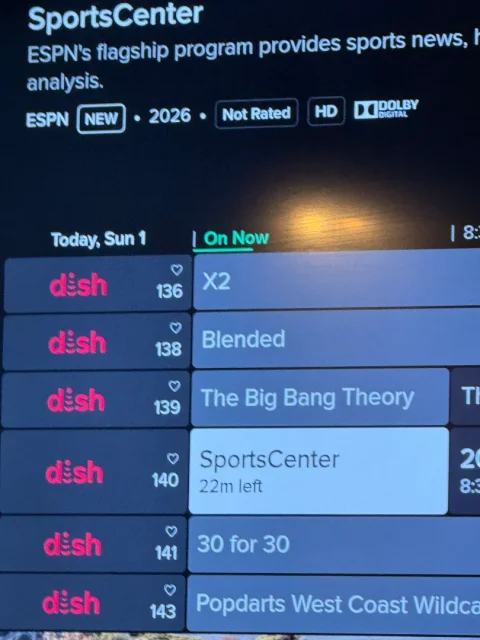
I had an old Wireless Joey replaced by a Wireless Joey 4 (Android TV) - still have a Hopper 3 without the Hopper Plus. What do I have to do to get the EPG to show channel logos instead of "Dish"? This is annoying as hell and it's been this way for over a month…
4 Replies
·
118 views


Staff member
HERE TO HELP YOU!
Cutting Edge
Sometimes a thread gets so many posts in it that is can cause issues for the server so that why today we introduce The Song Name Game Part 3!
So let the game continue!
The last song was added by Bobby who posted...
One Meat Ball - Andrews Sisters
CONTINUE ON AND HAVE FUN! WELCOME HOME TO SATELLITEGUYS.US!
Here are the original rules for the game as posted by WebbyDude back in 2006. http://www.satelliteguys.us/threads/68645-Song-Name-Game
Just name a song title and the band who performed it. The next person does the same thing, but needs to list a song title or band name which includes a word from the previous entry. Pick songs from any genre.
Example:
Long Live Rock and Roll -- Rainbow
Rainbow in the Dark -- Dio
Another example:
Ride the Lightning -- Metallica
Lightning Strikes -- Ozzy Osbourne
Get it?
An additional note: we all know that song titles, sometimes, use profane words. Because this is a family friendly website it is advised that you clean up that title up a bit. This is accomplished by using something like sh!t instead of the real word. Thanks....
So let the game continue!
The last song was added by Bobby who posted...
One Meat Ball - Andrews Sisters
CONTINUE ON AND HAVE FUN! WELCOME HOME TO SATELLITEGUYS.US!
Here are the original rules for the game as posted by WebbyDude back in 2006. http://www.satelliteguys.us/threads/68645-Song-Name-Game
Just name a song title and the band who performed it. The next person does the same thing, but needs to list a song title or band name which includes a word from the previous entry. Pick songs from any genre.
Example:
Long Live Rock and Roll -- Rainbow
Rainbow in the Dark -- Dio
Another example:
Ride the Lightning -- Metallica
Lightning Strikes -- Ozzy Osbourne
Get it?
An additional note: we all know that song titles, sometimes, use profane words. Because this is a family friendly website it is advised that you clean up that title up a bit. This is accomplished by using something like sh!t instead of the real word. Thanks....
68713 Replies
·
2683300 views


Pub Member / Supporter
Lifetime Supporter
Was raining yesterday so I went to Sams up in Dothan to stock up on some things. Haven't been there in quite a while. I was amazed at how large most of the TVs were. When I walked in they had a 100 in Vizio (I think it was Vizio) that was marked down to something like $1,200. The first rows of TVs were all in the 80 in + sizes. The next couple of rows had the "smaller" models....those 75 and under. I was amazed at how small the 75s looked when lined up with the larger screens.
7 Replies
·
115 views


Staff member
HERE TO HELP YOU!
161 Replies
·
3778 views
Pub Member / Supporter
7 Replies
·
985 views

Supporting Founder
Really excited for this season with Kentucky having a new coach and some really exciting recruits. Probably won't last long, but here's hoping this season is great.
184 Replies
·
3231 views

TWiT Tech Podcast Network
Time for another AWESOME video from the TWIT Network!
View: https://www.youtube.com/watch?v=-Vc6LXyvmmE
Direct YouTube Link - Home Theater Geeks 556
TWIT's Website
TWIT Live Feed
View: https://www.youtube.com/watch?v=-Vc6LXyvmmE
Direct YouTube Link - Home Theater Geeks 556
TWIT's Website
TWIT Live Feed
0 Replies
·
16 views