Social Feed

mkygod
Last reply · posted in Free To Air (FTA) Discussion
High, I'm very new to FTA (getting my first FTA receiver soon, Viewsat Platinum) and I've also been building up my HTPC w/ Media center.

Media Center is great and I'm able to use it for lots of things, however one thing I never got to do was record video from broadcasts and use the media center guide. Since my house did not have satallite or even cable, I never bothered buying PVR card. I figure once we get satellite or digital cable, then I will dive into that.

So my question is how or if the FTA receiver works together with an HTPC and what limitations are there. Will i be able to record programs? schedule when to record? Access the EPG via my PC? Control the FTA receiver with media center? things like that.

Does anyone here have an FTA receiver integerated in their HTPC home theater?
12 Replies · 5061 views
Shawn95GT
I just wanted to add to KS's remarks as Tivo seem to have some kind of a bad rap.

Yes the monthly fee sucks. $300 for a lifetime sub solves that problem. The hardware is next to free (I paid less than $5 for the last one I bought a couple months ago, after rebate). I have all of $305 invested for a lifetime of Tivo. If and when I decide I need more space, IDE hard drives are cheap. I have a 120 Gig drive chomping at the bit to go in my 40 hour Tivo.

As far as the .tivo format is concerned - it's not a codec, it's DRM on MPG2. Tivo would like you to use the Sonic software who they've partnered with for .tivo --> DVD conversion. The Sonic software won't even install on my machine :(.

It took about 2 seconds on google to find the software to get the files into .MPG. It's REALLY fast too.

Tivo's software is what makes it such a benefit. It's hard to explain why it's better than the normal run of the mill DVR. It just is. Using Tivo provided software (no hacks) I can:

Record shows by name having no idea when they actually are on.
I can search for shows and schedule recordings from anywhere via the web (Tivo.com).
Transfer shows between the Tivos and play them back in real time (or darn close to it)
Transfer shows from any of the Tivos to any of my PCs
I can access shows stored on any of my PCs from any of the Tivos

I've almost forgot what the guide on my cable box looks like - I never use it.

After having bought my first Tivo, I had to have another. The one thing the stand alone Tivos can't do is record more than one thing at once. I have all but quit watching live TV aside from FTA / 4DTV.

If and when a standalone HD Tivo comes to be, I'll be first in line for one.

What kills Tivo for FTA is that you can't do up a custom guide - at least not that I know of. This means no guide, and when you do record a program manually, the program description will be wrong. So you record the Space Shuttle launch feed and the description says whatever show is on the channel you told the Tivo it was tuning to. This also means that the Tivo will not be changing the channels on yout FTA box which kills all the automation which makes Tivo usage painless / seamless.

So in short, I love Tivo. In the case of FTA though, a well-setup HTPC seems to be the way to go. I might give MythTV a whirl if I ever get a PCI / USB DVB box. The big advantages I see with a HTPC vs a Tivo are being able to record full rez HD / play it back and being able to build a custom guide.
pappapump
Thats pretty much what I was saying earlier.
If youre not into tech stuff, always go with easy.
But if you want complete control over your video, recording etc then PC is the only way to go.
Having already spent the money on the media center box, buying a Tivo is pretty much a slap in the face, since your talking what? An extra $300?
I take all that back though if Tivo can work well with FTA which I know basically bupkiss about.
And from what you wrote at the top I assume you WANT to play?
My opinion is pretty pat though.Want easy? Get a Tivo to start with.
Want complete control? Use a PC.
When you think it through, all that specialized stuff is just a spinoff of a PC in 1 form or another.
The software running the Tivo was made on a Computer, the instructions embedded into DVD's and VCR's were created on a PC. Basically, whatever has a program had to get it from a software engineer, who used a PC to make it.
So, I tend to go to the source for the newest stuff. Thats pretty much what I did with Divx and Ogg Vorbis.
I mean, I used to be a hippie, but the world didn't stop and wait while I stayed high till i croaked.
So I evolved with it and learned as I grew.
The wheelbarrow analogy doesn't work simply because it was never designed to transport people to begin with.
But the PC was designed to do anything your little heart desires that software and hardware, working side by side can do.
Microsoft had digital Video before We had DVD.

I just realized that none of this really addressed your earlier question.

So my question is how or if the FTA receiver works together with an HTPC and what limitations are there. Will i be able to record programs? schedule when to record? Access the EPG via my PC? Control the FTA receiver with media center? things like that.

Does anyone here have an FTA receiver integerated in their HTPC home theater?

The Media Center Software is just too limited for FTA, I don't know how or if tivo is set up for it, but at this point and time MC is designed mainly for TV,Radio, Internet Broadcast,DVD and most Media Codecs, as well as HDTV ready video cards.
Try this, It may point you in the right direction.
http://www.htpcnews.com/
Tron
PSB said:
I think a Blind Scan is a must have feature!
This is a good point as well. I would never want my ONLY satellite receiver to be a PCI card or USB box. These cannot do blind scan, so you can't find new transponders and channels. So, in the ideal world, you'd want both a set-top box and the computer-based solution. You'd use the STB to find transponders and channels and the PCI card or USB box to record them to your PC.

Or you could use the STB and a Tivo, but as Shawn pointed out, some of the Tivo guide functionality would be lost with FTA.
mkygod
You guys have some real good points. But since my computer is already an HTPC and running Media Center, I might as well by a PVR card for it and make into a fully featured HTPC to use w/ the Viewsat fta.

I don't really feel like paying 300 bux for a TIVO subscription, and I feel it is much more convenient to have the recordings on my comptuer where I can easily access it, edit it, convert it to whatever format i want, and copy it to dvd on a whim. Copying it to dvd can be done easily w/o leaving the MediaCenter environment and just using the MCE remote.

It's just having everything integrated inside MediaCenter is less of a hassle than dealing with 2 interfaces (MCE and TIVO) and switching between them. OFC, that is what Microsoft would have you believe, but I do like the idea of the home theater migrating towards one main peripheral or interface.

Only thing that bothers me a bit is how the MediaCenter guide (as good as it is) will be virtually useless, since you can't use it with FTA receivers. Same goes for TIVO's guide with a FTA receiver. This means I can't schedule programs to automatically record, is that correct?
Tron
mkygod said:
Only thing that bothers me a bit is how the MediaCenter guide (as good as it is) will be virtually useless, since you can't use it with FTA receivers. Same goes for TIVO's guide with a FTA receiver. This means I can't schedule programs to automatically record, is that correct?
Well, I think that you could possibly use something like TitanTV (somebody correct me if I'm wrong) to schedule recording from certain channels like the Equity network affiliates on G-10R, for example. But I doubt that would work for other channels such as the foreign broadcasters on IA-5...

Most of my recording is attended (i.e., I am there and controlling the interface in real time). I never have been much of a time-shifter, or someone who would find a service such as Tivo's "Season Pass" recording feature very useful. This is probably why I personally prefer to use a PC with a tuner card such as the Twinhan or the Hauppauge.
dishstaller
Pub Member / Supporter Lifetime Supporter
Last reply · posted in The Chit Chat Club
He was 71 yrs old. One of my favorite songs is Seminole Wind....the violin is killer.


View: https://www.youtube.com/watch?v=W8sh9P3X33w
4 Replies · 12 views
FTA4PA
Rest In Peace
M
I Wish I Could Have Been There is an amazing song. Rest in peace Mr Anderson.
Bobby
Rest in peace.
comfortably_numb
Hope you're out there Swingin', John.
SuperDish_Fan23
Last reply · posted in DISH Network Support Forum
Why are ViP922s So rare? like its crazy how ebay has none, i checked everywhere, also, i got a ViP222k now, which is actually activated!
19 Replies · 447 views
S
That's not really unusual. Cable companies like to the provide the box too. The phone company provided the phones in until the government forced them to allow third-party phones.
  • Like
Reactions: charlesrshell
Almighty1
That's not really unusual. Cable companies like to the provide the box too. The phone company provided the phones in until the government forced them to allow third-party phones.
Yes, the Western Electric phones that says "Bell System Property, NOT FOR SALE, Western Electric".
Bobby
Yes, the Western Electric phones that says "Bell System Property, NOT FOR SALE, Western Electric".
In my very early work life I installed and repaired those phones.
AZ.
AZ.
Yes, the Western Electric phones that says "Bell System Property, NOT FOR SALE, Western Electric".
someone is showing their age
Almighty1
someone is showing their age
LOL. It depends if the person saw it during the years when they were actually still available which is 1968 to 1983 meaning the person could be 43-58 years old or they can even be a few years old if they learned to read and write at a young age and actually saw a telephone with that label somewhere recently just like even here in San Francisco, payphone still exist physically in public places but whether they can be used or not is a different issue. It still looks like this even today:
1792633296785.webp
  • Like
Reactions: charlesrshell
dishstaller
I opened my Radio Shack in Sept 1984 and right about that time they did the whole deregulation thing with the phone companies. I bought TONS of those phones that had been refurbished with a new outer shell. You could throw one of those out of a 3 story high window and it would still work.
That was an interesting time in history. I would have older customers come in and ask about phones.....they were terrified that they were going to get into trouble hooking up a second phone without the phone company knowing about it. One of the funniest episodes of WKRP was the one where Johnny thought the cops were showing up because they had an unregistered phone. I guess younger folks can't conceive of a time when you were limited to the number of phones you could have in your house....and limited to the length of the cord 🤣
navychop
someone is showing their age

You should hear his stories about when rocks were soft and pterodactyls were the new kid on the block!
  • Haha
Reactions: Bobby
M
Last reply · posted in Over the Air Television By RabbitEars.Info
Interesting article about the work being done to develope an ATSC 3 converter box. Yes it does mention affordable.
6 Replies · 192 views
navychop
DEATH TO NEXGEN!
TRG
TRG
17 years ago the US turned off analog OTA signals in favor of digital broadcasting. Now the push is ATSC 3 "Nextgen TV". But nobody seems to be able to agree on DRM implementation protocols. People don't want to hook their TV up to the internet in order to watch over the air TV. At least I don't. With all the data they collect about your viewing habits the box should be given away at no cost.
navychop
Comb your hair.
primestar31
DEATH TO NEXGEN!
star trek GIF


It's dead, they just don't know it yet. They killed it by forcing DRM on it, and that TOTALLY botched implementing it.

There is absolutely NO compelling reason for anybody to switch to ATSC3.0. They only want it as a total and complete money grab.
  • Like
Reactions: FTA4PA and navychop
navychop
I truly hope you are right.
  • Like
Reactions: FTA4PA
R
Last reply · posted in DISH Network Support Forum
Every time my Dish contract comes up I weigh the options of keeping Dish or switch to streaming. Right now I can watch/record the OTA channels vis my HDHomerun. I also can stream CBS and NBC via the Paramount+ and Peacock apps. What I would need to find is how to watch the Food Network, HGTV, Syfy, USA, Hallmark channels, Great American Family, Lifetime channels plus a few more with an app or two. My current Dish bill is $118, so I should be able to get a few apps for a lot less.

Any suggestions? I would want the best picture quality and audio quality I could get.
4 Replies · 130 views
Bruce
Every time my Dish contract comes up I weigh the options of keeping Dish or switch to streaming. Right now I can watch/record the OTA channels vis my HDHomerun. I also can stream CBS and NBC via the Paramount+ and Peacock apps. What I would need to find is how to watch the Food Network, HGTV, Syfy, USA, Hallmark channels, Great American Family, Lifetime channels plus a few more with an app or two. My current Dish bill is $118, so I should be able to get a few apps for a lot less.

Any suggestions? I would want the best picture quality and audio quality I could get.
USA and SyFy content is on Peacock, you can receive the rest of those channels via Philo, only $25 a month.

Almighty1
Every time my Dish contract comes up I weigh the options of keeping Dish or switch to streaming. Right now I can watch/record the OTA channels vis my HDHomerun. I also can stream CBS and NBC via the Paramount+ and Peacock apps. What I would need to find is how to watch the Food Network, HGTV, Syfy, USA, Hallmark channels, Great American Family, Lifetime channels plus a few more with an app or two. My current Dish bill is $118, so I should be able to get a few apps for a lot less.

Any suggestions? I would want the best picture quality and audio quality I could get.
This is what Google Search AI says, let's see how good AI can really solve problems.


To perfectly cover your specific channel checklist while saving significantly on your $118 Dish Network bill, you can leverage your existing HDHomerun setup alongside a live TV streaming service or app combination.
Since you require USA and Syfy, budget entertainment-only streaming apps like Philo ($28/mo) or Frndly TV ($7–$11/mo) will not work as standalone solutions because they exclude NBCUniversal networks. [1, 2]
Here are the best ways to get all your channels, optimized for high picture and audio quality:

Option 1: Hulu + Live TV (The All-In-One Match)
Hulu + Live TV ($89.99–$99.99/mo) is the most seamless replacement because its base tier natively carries every single channel on your list: [1, 2, 3]
  • Channel Checklist: Food Network, HGTV, Syfy, USA, Hallmark Channel, Hallmark Mystery, Great American Family, Lifetime, and Lifetime Movies. [1]
  • Quality & Audio: Hulu + Live TV is widely praised by cord-cutters for its excellent high-bitrate 1080p video quality at 60 frames per second (fps) on compatible streaming hardware. It supports 5.1 Dolby Digital surround sound on most live channels and compatible home theater systems.
  • Bonus Value: The price automatically bundles the entire on-demand libraries of Hulu, Disney+, and ESPN+, which gives you a massive amount of additional content. [1, 2]

Option 2: YouTube TV (The Premium Interface Alternative)
YouTube TV ($82.99/mo) is highly regarded for its robust streaming stability, unlimited DVR, and highly polished user interface. [1, 2, 3]
  • Channel Checklist: It includes Food Network, HGTV, Syfy, USA, Hallmark channels, and Lifetime.
  • The Catch: Great American Family is not in the base lineup and requires the Sports Plus or Entertainment Plus add-on package, which increases the monthly cost.
  • Quality & Audio: It streams in 1080p/60fps with an advanced compression codec that minimizes buffering. It features native 5.1 surround sound audio across major streaming hardware platforms.

Option 3: The Maximum Savings "App Stack" Combination
If you want to maximize your financial savings by skipping a massive live TV guide, you can split your checklist across a few dedicated streaming apps. Because you already pay for Peacock, you can cross USA and Syfy content off your list, as Peacock hosts most of those networks' premium shows next-day or live.
By adding the following, you can build a highly customized tier:
  • Frndly TV ($6.99–$10.99/mo): This affordable live app brings you all 3 Hallmark channels, Great American Family, and the Lifetime networks with a classic cloud DVR.
  • Discovery+ ($4.99–$8.99/mo): This gives you the full, deep on-demand libraries and live feeds for Food Network and HGTV. [1]
Total Estimated Stack Cost: Around $12 to $20/mo combined on top of what you already pay.
  • Quality Note: Frndly TV maxes out at 720p/1080p high-definition with stereo audio, while Discovery+ supports highly optimized crisp 1080p and selective 4K video playback with strong digital audio depth on high-end streaming sticks. [1]

Cord-Cutting Tips for Peak Quality
  • Streaming Hardware Matters: To get the best possible image processing and audio passthrough, use dedicated streaming hardware like an Apple TV 4K or a high-end Roku Ultra rather than relying on the built-in smart TV operating systems.
  • Check Your Bandwidth: Ensure your home network has a stable downstream speed of at least 25–50 Mbps dedicated to your main television device to ensure the streaming apps auto-negotiate to their highest available bitrate and frame rates without dropping down to lower resolutions.
R
This is what Google Search AI says, let's see how good AI can really solve problems.


To perfectly cover your specific channel checklist while saving significantly on your $118 Dish Network bill, you can leverage your existing HDHomerun setup alongside a live TV streaming service or app combination.
Since you require USA and Syfy, budget entertainment-only streaming apps like Philo ($28/mo) or Frndly TV ($7–$11/mo) will not work as standalone solutions because they exclude NBCUniversal networks. [1, 2]
Here are the best ways to get all your channels, optimized for high picture and audio quality:

Option 1: Hulu + Live TV (The All-In-One Match)
Hulu + Live TV ($89.99–$99.99/mo) is the most seamless replacement because its base tier natively carries every single channel on your list: [1, 2, 3]
  • Channel Checklist: Food Network, HGTV, Syfy, USA, Hallmark Channel, Hallmark Mystery, Great American Family, Lifetime, and Lifetime Movies. [1]
  • Quality & Audio: Hulu + Live TV is widely praised by cord-cutters for its excellent high-bitrate 1080p video quality at 60 frames per second (fps) on compatible streaming hardware. It supports 5.1 Dolby Digital surround sound on most live channels and compatible home theater systems.
  • Bonus Value: The price automatically bundles the entire on-demand libraries of Hulu, Disney+, and ESPN+, which gives you a massive amount of additional content. [1, 2]

Option 2: YouTube TV (The Premium Interface Alternative)
YouTube TV ($82.99/mo) is highly regarded for its robust streaming stability, unlimited DVR, and highly polished user interface. [1, 2, 3]
  • Channel Checklist: It includes Food Network, HGTV, Syfy, USA, Hallmark channels, and Lifetime.
  • The Catch: Great American Family is not in the base lineup and requires the Sports Plus or Entertainment Plus add-on package, which increases the monthly cost.
  • Quality & Audio: It streams in 1080p/60fps with an advanced compression codec that minimizes buffering. It features native 5.1 surround sound audio across major streaming hardware platforms.

Option 3: The Maximum Savings "App Stack" Combination
If you want to maximize your financial savings by skipping a massive live TV guide, you can split your checklist across a few dedicated streaming apps. Because you already pay for Peacock, you can cross USA and Syfy content off your list, as Peacock hosts most of those networks' premium shows next-day or live.
By adding the following, you can build a highly customized tier:
  • Frndly TV ($6.99–$10.99/mo): This affordable live app brings you all 3 Hallmark channels, Great American Family, and the Lifetime networks with a classic cloud DVR.
  • Discovery+ ($4.99–$8.99/mo): This gives you the full, deep on-demand libraries and live feeds for Food Network and HGTV. [1]
Total Estimated Stack Cost: Around $12 to $20/mo combined on top of what you already pay.
  • Quality Note: Frndly TV maxes out at 720p/1080p high-definition with stereo audio, while Discovery+ supports highly optimized crisp 1080p and selective 4K video playback with strong digital audio depth on high-end streaming sticks. [1]

Cord-Cutting Tips for Peak Quality
  • Streaming Hardware Matters: To get the best possible image processing and audio passthrough, use dedicated streaming hardware like an Apple TV 4K or a high-end Roku Ultra rather than relying on the built-in smart TV operating systems.
  • Check Your Bandwidth: Ensure your home network has a stable downstream speed of at least 25–50 Mbps dedicated to your main television device to ensure the streaming apps auto-negotiate to their highest available bitrate and frame rates without dropping down to lower resolutions.
WOW! Thanks for this info. I have Roku Ultra and I have a 300mbps internet plan.
dishstaller
WOW! Thanks for this info. I have Roku Ultra and I have a 300mbps internet plan.
You'll see the Friendly TV app on your Roku....it's preloaded. If you pay by the year it is under $100 for the entire year. Nice mix of channels.
  • Like
Reactions: charlesrshell
dishstaller
Pub Member / Supporter Lifetime Supporter
Last reply · posted in The Chit Chat Club
I'm surprised Walmart hasn't banned this guy from all of their stores. He has been on their CASE the past few months.


View: https://www.youtube.com/shorts/f3zr37ekgKM?feature=share
20 Replies · 171 views
  • Wow
Reactions: NYDutch
Juan
I'm surprised Walmart hasn't banned this guy from all of their stores. He has been on their CASE the past few months.


View: https://www.youtube.com/shorts/f3zr37ekgKM?feature=share

When walmart set a price...they weigh the container and the product...the product label only shows the weight of the product...I am sure if you brought your own plastic baggies to bring the product home you could get the cheaper price
dishstaller
When walmart set a price...they weigh the container and the product...
Then they are stupid. Everyone knows that the price per ounce should be the price per ounce of actual product.
  • Like
Reactions: Jimbo
Juan
Then they are stupid. Everyone knows that the price per ounce should be the price per ounce of actual product.
You are paying for the whole thing
T
You are paying for the whole thing
Well, the bag can't weigh that much, right? But by law food product packaging must display the actual net weight of the product, i.e., the contents of the container, so by any logic, if not law, a store's stated per-ounce cost should reflect that figure. But since there's not any law regulating shelf statements, a store can say whatever it wants without violating any rules. So I guess the answer is more consumer legislation. Or simply caveat emptor.
Jimbo
Well, the bag can't weigh that much, right? But by law food product packaging must display the actual net weight of the product, i.e., the contents of the container, so by any logic, if not law, a store's stated per-ounce cost should reflect that figure. But since there's not any law regulating shelf statements, a store can say whatever it wants without violating any rules. So I guess the answer is more consumer legislation. Or simply caveat emptor.
I would think that the Vendor/Maker of the product would have a say in it, showing the Correct weight ...
You would think it would be in the contract.

I do look at the ounces of items, but unless its way off, I don't check the math, may have to start now.

Remember when you use to get a 13.5 oz bag of Chips .... Thats a PARTY Size now.
  • Like
Reactions: AZ.
TRG
TRG
I would think that the Vendor/Maker of the product would have a say in it, showing the Correct weight ...
You would think it would be in the contract.

I do look at the ounces of items, but unless its way off, I don't check the math, may have to start now.

Remember when you use to get a 13.5 oz bag of Chips .... Thats a PARTY Size now.
I remember when a pound of coffee was 16oz. Now its 12oz, they don't call it a pound anymore and its three times the cost of the 16oz pound.
Jimbo
I remember when a pound of coffee was 16oz. Now its 12oz, they don't call it a pound anymore and its three times the cost of the 16oz pound.
Well, they don't call it a pound anymore ....

Ice cream is that way too, use to be a half gallon, now its 1.5 quart or some say 48 oz
  • Sad
Reactions: Bobby
NYDutch
Well, they don't call it a pound anymore ....

Ice cream is that way too, use to be a half gallon, now its 1.5 quart or some say 48 oz
We have a regional ice cream company here that advertises that their ice cream containers are still a full half gallon.
Jimbo
We have a regional ice cream company here that advertises that their ice cream containers are still a full half gallon.
Now check and see if any of them (probably a few) are actual Ice Cream ...

Most Ice Creams are Not actual Ice Cream.
Bryers for example, call Most of thiers "Frozen Dairy Dessert"
NYDutch
Now check and see if any of them (probably a few) are actual Ice Cream ...

Most Ice Creams are Not actual Ice Cream.
Bryers for example, call Most of thiers "Frozen Dairy Dessert"
All of their traditional flavors are ice cream, only some of the specialty mixes are are labeled frozen dairy. They also have frozen yogurt flavors that are labeled as such.
dishstaller
I remember when a pound of coffee was 16oz. Now its 12oz, they don't call it a pound anymore and its three times the cost of the 16oz pound.
All through high school I worked at the local home-owned grocery store. I never cease to be amazed at how packing has shrunk through the years. I worked 1978-end of school 1982 so I worked right through all the inflation that was taking place then. Taught me life-lessons that still are with me. My primary job on Saturdays was doing all the price changes....back then you used a price gun, so I had a front row seat. Sugar REALLY went through the roof which is why we now have high fructose corn syrup in just about everything we eat nowadays .
  • Like
Reactions: Jimbo and navychop
N
Last reply · posted in DISH Network Support Forum
My OTA is not working anymore. This started after the latest update. I have the OTA dongle with a OTA antenna that I've been using for years. My hopper does not recognize the dongle anymore and when I go to the OTA setting, it has a screen that says to plug a dongle into the USB. I tried unplugging and plugging back, in the same usb port and other ports. The Hopper does not recognize it. Anyone have same issue?
200 Replies · 5067 views
  • Like
Reactions: charlesrshell
Scott Greczkowski
Did you people having this issue contact Brittany yet? Shes trying to keep track of things and it would be good for you to contact her as maybe she can get this somewhere and get fixed.

Now while unofficial, I am hearing this issue wasn't caused by DISH's software team, but was caused by a chipset driver update that seemes to have hosed some older USB devices. If this is indeed the case I can see why DISH didn't know and why they are slow in fixing it as they need the chipset company to fix its drivers and release them to DISH so they can be pushed out to all.

DISH does not hate you guys nor do they want you to buy new USB dongles. I am rather sure they didn't even know this was an issue until they saw it posted.

Again contact Brittany if you are having this issue, so she has your info and hopefully she can do something for you to keep you happy. :)
bookworm370
Did you people having this issue contact Brittany yet? Shes trying to keep track of things and it would be good for you to contact her as maybe she can get this somewhere and get fixed.

Now while unofficial, I am hearing this issue wasn't caused by DISH's software team, but was caused by a chipset driver update that seemes to have hosed some older USB devices. If this is indeed the case I can see why DISH didn't know and why they are slow in fixing it as they need the chipset company to fix its drivers and release them to DISH so they can be pushed out to all.

DISH does not hate you guys nor do they want you to buy new USB dongles. I am rather sure they didn't even know this was an issue until they saw it posted.

Again contact Brittany if you are having this issue, so she has your info and hopefully she can do something for you to keep you happy. :)
Thanks, but until they do, can't Dish just revert to the old driver that worked? Then test the new driver when delivered,d before pushing it again.

But then what does an old CIO know! I've only reamed quite a few buttholes from my people that didn't do that! ;)
S
Thanks, but until they do, can't Dish just revert to the old driver that worked? Then test the new driver when delivered,d before pushing it again.

But then what does an old CIO know! I've only reamed quite a few buttholes from my people that didn't do that! ;)
dish can't revert back to older drivers or updates. although just one reason not to buy the ota dongle!!!
  • Like
Reactions: charlesrshell
ppappas
dish can't revert back to older drivers or updates. although just one reason not to buy the ota dongle!!!
They can absolutely put the old driver back if they wanted. This is an embedded software environment in which they have total control. All they have to do if build a new version of firmware with the old OTA driver and test it of course. They just don't want to spend the resources doing so. If they are not going to continue supporting the single tuner adapter, then they have to say so.
navychop
This Chipset s/w is not controlled by Dish.
Almighty1
They can absolutely put the old driver back if they wanted. This is an embedded software environment in which they have total control. All they have to do if build a new version of firmware with the old OTA driver and test it of course. They just don't want to spend the resources doing so. If they are not going to continue supporting the single tuner adapter, then they have to say so.
Unless of course they didn't keep a copy of the old drivers and can no longer get it. Then there is always the their support for the product is EOL after a x amount of time so it will make the consumer have to buy the current product offering.
B
Anyone heard any updates on this, I'm still having the issue so thought I'd check in.
  • Like
Reactions: charlesrshell
Almighty1
Anyone heard any updates on this, I'm still having the issue so thought I'd check in.
No updates but if you can get DISH Technical Operations to roll you back to H710 or earlier even though H708 would be best because it also eliminates another problem like in this comment, you will also no longer have the problem as long as you don't update manually or forced to any new version until the problem is fixed as the problem started in H711 and still exist in H712 and H713.
  • Like
Reactions: charlesrshell
dishstaller
Installed an off-air antenna a couple days ago for a customer who had just cancelled his Dish service. He had a dual off-air adapter and gave it to me. Cool. I'll keep it on the truck....might come in handy. Got to admit I don't watch anything as far as live tv goes anymore. Even if we have severe weather, our local channels will have a live feed on Youtube.
  • Like
Reactions: charlesrshell
Gary Toma
Staff member Pub Member / Supporter Cutting Edge
Last reply · posted in DIRECTV Technical Resources Forum
The TPN Map Excel Presents all DIRECTV Channels:
​
National (50-States or wide/NAT+PR beams)
Local (Local-Into-Local or narrow/Spot beams)
​
Additional tabs provide:​
OTA the (Over-The-Air) Database
VOD (Video On_Demand) Records
Offline Records
Engr Records
Net Decoder a graphic presentation of all satellites and transponders
​
Domestic Satellites
@99W...... D11, D14
@101W.... D16
@103W.... D12, D15
@110W.... D5
@119W.... D8​

Understanding the TPN Map

Making Sense of the TPN Map Display Conventions
2153 Replies · 935414 views
K
HAWKS, HORNETS, GRZZLIES, HEAT, MAGIC, CAVLIERS, TWOLVES, BUCKS, PACERS and SPURS channels have also been added, however they are pointing to a TV Promise slate, which says they are working with DAZN and others to strike a deal for those teams.

Some more TPN swaps
coolman302003
HAWKS, HORNETS, GRZZLIES, HEAT, MAGIC, CAVLIERS, TWOLVES, BUCKS, PACERS and SPURS channels have also been added, however they are pointing to a TV Promise slate, which says they are working with DAZN and others to strike a deal for those teams.

Some more TPN swaps
It appears we are not getting both home & away feeds out of market on League Pass for these teams either…

I've been watching the Spurs home feed on channel 676-1 (was part time San Antonio specific feed) out of market with NBALP for YEARS on satellite (through the multiple iterations of Fox Sports SW, Bally Sports SW, FanDuel Sports SW) Looks like that will not happen unless a deal is reached with DAZN. I do see the placeholder channel on 680 if it happens.
  • Like
Reactions: Nate.O’Brien
K
It appears we are not getting both home & away feeds out of market on League Pass for these teams either…
Center Ice does have the non-carried feeds, including the Hurricanes, Wild, Blues and Blue Jackets and spotbeam local only teams like the Panthers, Mammoth and Golden Knights. So it probably depends on the available part time bandwidth each night as things they are able to provide to in market viewers in the 600s, PPV Events in the 100s and commercial events in the 9000s get priority first, along with games where neither team has a remappable feed.
coolman302003
League Pass tonight for example (it is almost a full slate tonight):
Hawks @ Magic (only Hawks feed which is easy to insert since its OTA this season and simulcast across multiple Gray Television markets, Magic signed a non- exclusive streaming deal with DAZN and also OTA)
Bucks @ Wizards (only Wizards feed easy to remap, Bucks are OTA & there own streaming service Bucks+)
Hornets @ Nets (only Nets feed which DirecTV already carries so simply YES remap, Hornets signed non-exclusive streaming deal with DAZN, also OTA)
Bulls @ Raptors (Bulls only feed via CHSN remap, its common that we don't get Raptors feeds that often)
Jazz @ Grizzlies (Jazz only feed OTA easy to insert, Grizzlies signed streaming deal with DAZN)
Pacers @ Pelicans (Pelicans only feed which is OTA easy to insert, Pacers signed streaming deal with DAZN)

Maybe it will change but it looks like DirecTV may only carry DAZN feeds on NBA LP when there is no other option, such as when two teams (either Cavaliers, Pacers, Grizzlies, Timberwolves, Spurs) that are both DAZN exclusive are playing each other, we shall see as the season goes on I guess.

This NBA season will be the first in a long time where many League Pass games are carried on feeds DirecTV doesn't normally carry or are only available through OTA spot beams. It'll be interesting to see how it plays out, especially whether we eventually get both home and away feeds for these teams out of market again.
  • Like
Reactions: Mr Tony
jamieh1
Now in the Hornets and Hurricanes markets we just get the TV promise screen. But Directv still charges sports fee I am assuming.
Luckily my DTV stream package doesn't have a rsn fee. Figure DTV that always says is the leader in sports would have come to an agreement by now.
  • Like
Reactions: Mr Tony
K
Now in the Hornets and Hurricanes markets we just get the TV promise screen. But Directv still charges sports fee I am assuming.
Greenville-New Bern is $11.99 for MASN (Orioles) and Nationals
Raleigh is $11.99 for MASN and Nationals
Charlotte is $12.99 for BravesVision, MASN, Nationals and Reds

The fee in NC also includes the higher in state rate they have to pay for ACCN. Down in SC the fee is $15.99 as they are also a SEC state.
I'm not sure if they're doing it with those teams, but in some markets they also use the fee to cover the additional cost they have to pay for independents and MyNet stations that picked up full season NHL and NBA rights.

If you go to the TVPromise site, you'll likely be able to get a credit for not getting the Hurricanes and additional Hornets games that air on WITN-D2

Figure DTV that always says is the leader in sports would have come to an agreement by now.
Part of the hold out might be the packaging and price for outer areas like how the Thunder needs sports pack for other states. Hopefully they are also pushing for a guarantee from the teams that they would require whoever wins their local broadcasting rights in 2028 to negotiate with MVPDs as most of the DAZN, Prime and NBA.tv streaming deals are just for the current season. Commercial distribution rights are probably a factor too.

I'm guessing they got a deep discount for ClipperVision based on how long it took them to announce their TV deal after they were basically handed a multi-year draft death sentence.

The Predators and Pistons channels are using feeds supplied by Scripps Sports

The Heat likely depends on whoever they sign for the Fort Myers DMA, as there's no point in paying a high price for the Heat just for that DMA when WPLG is streaming it for free on their app and website for viewers in the Miami DMA, and they already carry the West Palm Beach station.
Foxbat
Supporting Founder Pub Member / Supporter Lifetime Supporter
Last reply · posted in Computers and Gadgets
I've been using APC UPS units to protect my computer and Home Theater equipment for many years, but now there are a number of companies producing "Glamping" power accessories that can provide hours of 120 VAC power for off-grid use at a camp site or a few hours of power when severe weather knock out the power. I had mentioned elsewhere that I picked up a Jackery HomePower 3000 to use instead of a gasoline generator to provide emergency power for our refrigerator. The 3.0 kWh of Lithium Iron Phosphate battery cells can supply power for over 24 hours and is "light" enough that I can move it into the kitchen to allow it to power the fridge. However, it's not an automatic operation, as I need to move it from its home in the closet to the kitchen, in addition to rolling the refrigerator out from its alcove so I can plug it in.
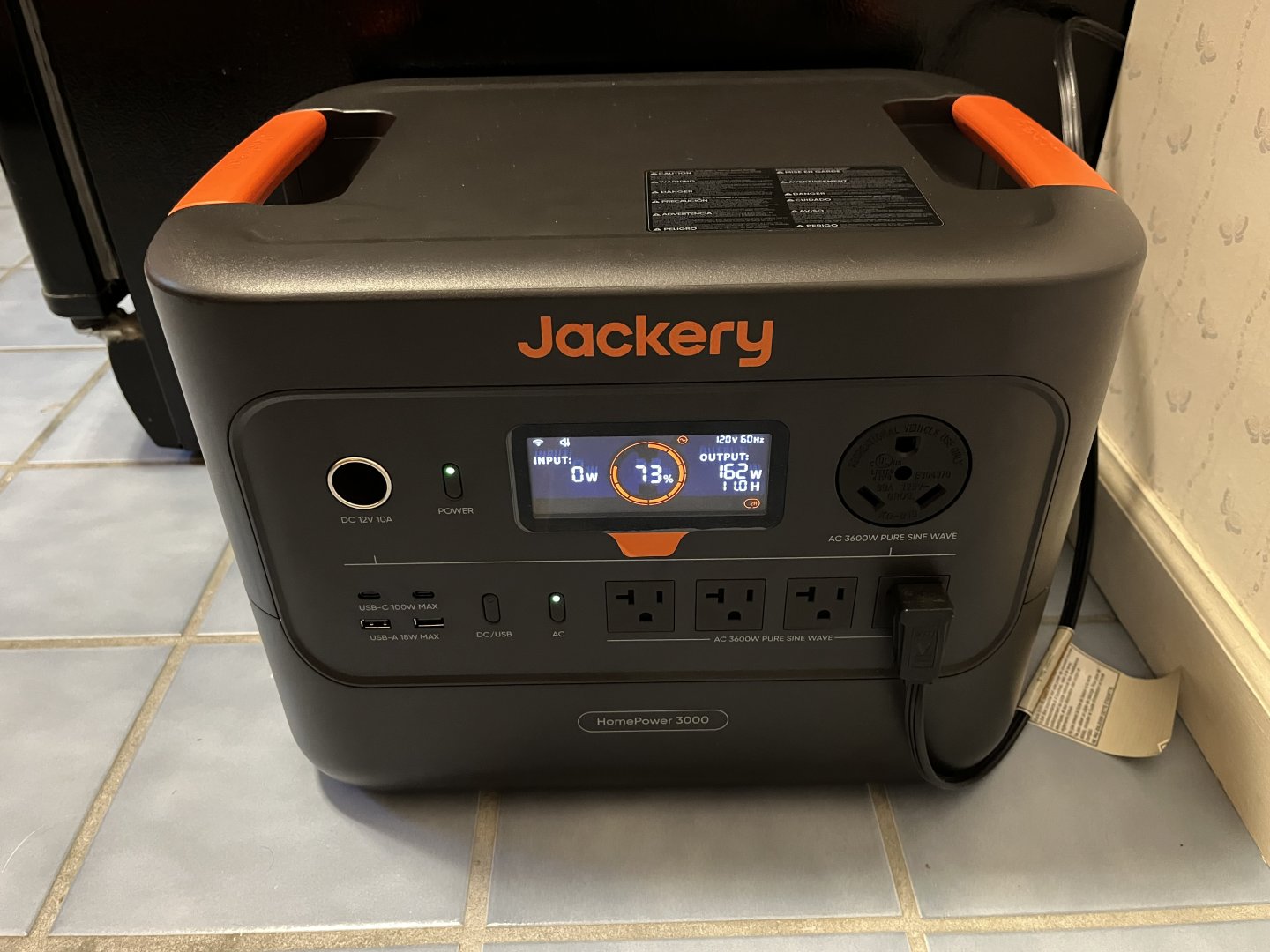
IMG_3276.jpeg
The Jackery wasn't my first LFP Power Bank; I had purchased an EcoFlow River 2 unit with 512 Wh of capacity. I had purchased this to use on our Home LAN to give it a longer run time than the three hours that I had with the APC UPS I had been using. This isn't an odd use case, EcoFlow advertises this capability on its website and a transfer time of 16 mS. I used this River 2 to supply power to a 16-port Cisco gigabit switch, the AT&T router, Printer Server, MoCA adapter, and surveillance camera NAS. All told, about 35 W of load. With the EcoFlow River 2, it reported approximately 12-13 hours of run time. So far, so good.

After it had been in use for a month or so, I was down in the basement and heard a whirling sound. Turns out the State of Charge was 24% and it appeared the River 2 was off-grid even though it was still plugged in. Well, turns out that the firmware had a big bug in it for people that were using it like I was. I communicated with EcoFlow and eventually they sent a newer firmware that fixed this problem. But before they fixed it, I decided that I had such a good experience with the Jackery, that I bought their Explorer 1000 (1,070 Wh capacity) which should run our home network for over a day. It worked great right out of the box, and even when it was charging, the cooling fan was practically silent.

After the River 2 was patched, I put it to work, replacing the APC UPS powering the bedroom TV with Dish 4K Joey and Apple TV. The LG OLED uses quite a lot more power than I expected, depending on the scene, it can have a 120 Watt power draw. With the River 2, that might limit power-out watching to 4-5 hours. Also, the River 2 still had the issue with its cooling fan, I find it disturbing the quiet bedroom environment.

EcoFlow had one of the Spring sales and have a new EcoFlow Delta 3 1000 Air which was on sale for $299. That's a 960 Wh capacity power bank with a 10 ms power switching, so this seemed like a perfect solution. Well, except for two things: 1) It has one grounded NEMA 5-15 receptacle; 2) even though EcoFlow claims "35 dB @ 1m" quietness, it was even louder that the River 2 was. Not optimal!

So, I ended up swapping the Jackery Explorer 1000 with the EcoFlow Delta 3 1000 Air since the power demands for the Home LAN are less, and the loud fan noise won't bother anyone. The bedroom TV setup says it should be good for approximately 7 hours:
Image 5-14-26 at 13.58.jpeg
IMG_0336.jpeg
IMG_0337.jpeg​

I realize that at some point the amount of money spent on these individual long-term Power Backup solutions will be more expensive than if we just bought a whole-house power solution. Those are coming down in price, but we're still looking at $16,000 at a minimum for a LFP solution, and $10,000 or so for a home LP generator solution. (With the LP generator solution, we would need to also pay the Gas utility to increase the size of our gas line, so that tilts me towards a the battery solution.)

Finally, I tried an Amazon 12 VDC LFP battery that replaces the Lead Acid Gel Cell in a normal UPS with an equivalent set of LFP cells. The price was roughly the same as a 12 VDC battery from Batteries+, and it's been running for about a year now with no difficulty. But these APC UPS units won't run for long, and are really intended to allow the powered equipment to be shut down in an orderly manner.

So, am I weird to use these Camping power banks for Home emergency power solutions? I haven't even touched the idea of Solar panels to supplement the run time in an Outage.
3 Replies · 108 views
navychop
I would not trust a UPS designed for lead acid to properly charge, discharge and maintain a LFP battery.

Sounds like it'd be cheaper to move where the power is more dependable. Like near me. Quite a few houses in this neighborhood go for less than $1M.

Are you weird? If you seriously consider moving for this - YES!

;)
Foxbat
I would not trust a UPS designed for lead acid to properly charge, discharge and maintain a LFP battery.
As I understand the LFP replacement, it has its own BMS that is designed to mimic the Lead Acid battery characteristics. The UPS thinks it's a Lead Acid battery, and provides the appropriate voltage when charging.

Like I said, it was a one-off to test the product, but I prefer to look at the Jackery power products at this point. I'm unhappy with the EcoFlow misrepresenting their noise level. The Jackery is a much better choice for co-existing with people. The EcoFlow works (once the firmware is debugged) in uninhabited areas like garages or basements. I have used Anker cables and small battery packs, but they also have larger capacity power banks and whole-house solutions.

Moving to a different state to solve a power issue? I think you're more prone to hurricanes in Virginia than we are here in Indiana. Sure, you don't get the blizzards and snowfall like we do, but when you do, it's a much bigger deal than it is here.
  • Like
Reactions: navychop
Foxbat
Added an Anker Solix S2000 for the Internet / Home LAN power which should provide well over a day with the current load. Since I'm looking at replacing the AT&T 2Wire DSL setup with Starlink, the power requirements might increase, so I wanted something that would work for an extended power outage.

Picked it up from Amazon during the October Prime Days for $649. Slightly better $/kWh than the Jackery Home 3000 I got for the refrigerator.

The EcoFlow Air 1000 is now providing uninterrupted power to the Family Room TV and entertainment center (Hopper 3, Denon AVR, Apple TV, etc.) In use, it's reporting about 300 Watts, so it should be able to run for three hours in an outage. Anything longer and we won't be watching movies.