

Social Feed

G
Last reply · posted in Broadband Internet
I have a Hughes DW6000 system that was installed 4 years ago (Direcway then). DSL was coming 'soon', and I was willing to accept Direcways throughly average service while i waited. DSL is still 'coming soon', but the dates have always been pushed back for the last 5 years - i have given up on Qwest DSL. I have the $59/mo rate, and have been moderatly happy witht the service. It's a bit flakey and the speeds can drop to 100-200 form time to time, but I generally get 450-700 out of it. I know have three high school age kids who love to IM and surf. I have a WiFi router accessed by (up to) four computers. When I am the only one surfing or downloading all is good (most of the time). As the kids join in, things get gummed up.

I'm contemplating moving up to the business level 'ProPlan Plus w/o IP' which moves up to 1.5Mbps. @ $79/mo. Does it actually do much better DURING PEAK HOURS? I'm sure that on any given Wednesday night at 1am, it will get 1.5Mbps, but will i get more bandwidth at 7pm on Friday etc. Or. . . . do all of the users (no matter what plan) slow to a crawl at peak hours?

Do any of you out there have this plan and can quote speed numbers at peak hours?

Hughes offers a ProPlan Plus w/IP for $10 more - will that help me any, or is just for business website stuff.

I've also seen reference in the forums to buying the 7000 router and the bigger dish on ebay. I figured that Hughes would require me to buy it from, and have it installed by them ($300 or $150 w/15 month contract). Can i buy it on eBay and install it myself? Will Hughes give me a hard time? If i mount it where the 6000 Dish was, can I target it, or do i need Hughes to do that?


Thanks for any help!
7 Replies · 4483 views
G
Hughes 7000 vs. 6000 system performance

Before I read your reply, I called Hughes and asked about upgrading to the ProPlus plan and the guy suggested I try the 1.0 Mbps on my existing DW6000 system for only $10/mo more. - I have not done that yet.

You said that "ALL of the 7000 plans will, on average, run circles around ALL of the 6000 plans". So, basicaly the DW6000 system hardware is the problem, and therefore all of the plans are slow? If I upgrade to the HN7000 hardware, and move up to the 1.0Mbps or the 1.5Mbps (I have the 700kbps planon the DEW6000 now) should that be significantly faster and more reliable? The real question is how low does the speed go during peak hours? Off-Peak is acceptable at 700kbps, but much lower than that and i start to get frustrated. I have an on-line class that has a webcast lecture on Saturdays from 4-9pm. As a rule i have taken to going down to an internet cafe to watch it - my Hughes connection likes to drop or hang to often.

Do you konw if their 30 day warranty covers upgrades? I could test the HN7000 system and see how it does.

. . . . I'd love to go up to true Business Class, but $80 is already over budget, $200 is out of the question.

Thanks again for all of your input
SatAdam
I have the Pro plan with my 6000... I think most of the problem is with Hughes. I've noticed lately that 99% of my problems are with their accelleration junk failing.

and lately I've had a lot of problems since my contract ran out. I've put a power switch inline with my TX so I can reboot it with my toe. DSL is a definate for the end of this year, so I only have another year and if it craps out I'll get Wild Blue or something else. Hughes has dissappointed me for the last time.
tonyp56
Well, for comparison, I have the 7000 modem and am on the basic Home plan (700Kbps download and 128Kbps upload). Going to www.testmy.net I can run a speed test that during off-peak hours I am usually 840Kbps download and 100-128Kbps upload.

:::.. testmy.net test results ..:::
Download Connection is:: 856 Kbps about 0.86 Mbps (tested with 748 kB)
Download Speed is:: 104 kB/s
Upload Connection is:: 127 Kbps about 0.1 Mbps (tested with 386 kB)
Upload Speed is:: 16 kB/s
Tested From:: http://testmy.net (Server 1)
Test Time:: 2007/01/07 - 11:29pm
D-Validation Link:: http://testmy.net/stats/id-5F2KM3PRZ
U-Validation Link:: http://testmy.net/stats/id-I6BLMHFV3
User Agent:: Mozilla/4.0 (compatible; MSIE 6.0; Windows NT 5.1; SV1; .NET CLR 1.1.4322) [!]

See above results!

Anyways that is what I see with same plan as you. Now of course, I'm on 89W satellite and 1150 transponder. So there can be a difference with speeds on different satellite. Go to testmy.net about the same time and run a dual test--both download and upload--, and this will give you an idea of the difference in speed between 7000 and 6000. (just remember, if you aren't on the same satellite as me, you can't really compare 100%, because different satellites I am sure will be different, one slower and one faster etc. but should still give you an idea).

As far as the more expensive packages go, you might only slow down to 400-500Kbps instead of 100-200Kbps. But honestly, I think the slow down(s) will be the same, that everyone is affected, no matter how much they pay.

Except for the buisness plans that cost $1000 to get installed and cost $200 a month for service. Those would likely not see as much of a slow down as the consumer plans, like Dbirdman said. But still would see it, just not anything like consumer plan customers. For one, buisness plans cost more money, have better Dish, transponder, etc. and typically are used by big buisnesses. So Hughes wouldn't want to piss those customers off. LOL
G
Regarding the modems. I just upgraded from the DW7000 to HN7000S Pro Plan and am Not impressed. I had better download speeds with the DW7000 and it was at least consistent. The HN7000S speeds are jumping all over the place. With the DW 7000 I always had at least an 800 download. With the HN7000S, and the proplan, I typically run in the 500 to 600 range. I have spent many hours on the line with Hughes, they have changed my radio and repointed me to 99W 1250 and nothing is getting better. Bottom line is I would stick with the DW 7000 rather then use the HN7000S. Along that line, going from the DW6000 to DW7000 was an improvement for me.
KE4EST
With your situation, I think you might want to try Wildblue. You'll have to sign another contract. But since they say your DSL is still a few years away. You could even keep Directway/HN and get WB installed try it for a week or two and cancel if you don't like. AFAIK WB still lets you cancel in 30 days before your stuck to contract. WB is $299 installed or $199 if you u are a DishNetwork Sub, and go through Dish.
dbirdman
You said that "ALL of the 7000 plans will, on average, run circles around ALL of the 6000 plans". So, basicaly the DW6000 system hardware is the problem, and therefore all of the plans are slow?
"Slow" is relative - at any given moment there will be people with each modem type that are slower than snails, and others with the same modem that are getting very decent speeds. All sorts of factors, but the biggest one in those variations is the particular mix of users on your gateway - the small segment of a transponder that you share with a couple of hundred other users. People often talk about overloaded satellites and transponders, but the truth is that each and every satellite and transponder is massively overloaded to the same level, so that never has to do with any particular user's slow speeds. Get on a gateway with 10 power users and you will all suffer greatly, with those 10 being the biggest complainers!

The 7000 does have a major hardware advantage, which is on the upload side. Upload speeds on a 7000 are normally at least 3 times as fast as on a 6000. Since all internet communications are bi-directional, upload speeds affect everything you do, not just uploading something.

I see that someone in this thread fell for the nonexistent "upgrade" from a 7000 to a 7000S. Too bad. From the user end, a 7000 and 7000S are the same thing, and neither is an upgrade from the other. Since all changes (satellite, service, modem, etc) with Hughes involve a gateway change, you have a roughly equal chance of having speeds drop, or rise, when switching from 7000 to 7000S or vice-versa.
Gary Toma
Staff member Pub Member / Supporter Cutting Edge
Last reply · posted in DIRECTV Programming Forum
We finally have the word: Fox will be providing the the Sunday Eagles vs Cowboys in 4K . On DIRECTV, it will be aired on channel 104 or channel 105.

Finally !!
7 Replies · 252 views
  • Like
Reactions: dfergie
K
Take it up with the NFL who still insists on having the same teams host games every Thanksgiving instead of rotating it every year because of some tradition that started 50 years ago when there was only 3 networks.

FOX is the only one who supplies some of their national NFL games in 4K to MVPDs, the rest only do it for the Super Bowl.
Jimbo
Take it up with the NFL who still insists on having the same teams host games every Thanksgiving instead of rotating it every year because of some tradition that started 50 years ago when there was only 3 networks.

FOX is the only one who supplies some of their national NFL games in 4K to MVPDs, the rest only do it for the Super Bowl.
Actually, Thats why the Late game became a thing, so they could have another game on Thanksgiving... also a case of GREED.
And a Game the Day BEFORE and After, talk about GREED.

Are these other games in 4k ?

This game on Fox in 4k, is it actual 4k, or Upconverted 1080 like it use to be ?

Is the Fox 4k going to All Fox outlets or just D* ?

Just asking ...
cp2k
This game on Fox in 4k, is it actual 4k, or Upconverted 1080 like it use to be ?
Unless something has changed very recently it'll be upconverted 1080p like all their other productions. The issue as I understand it is their SDI video routing technology can't handle a large number of 4K SDI feeds at one time in addition to the cost of using real 4K equipment, etc.
K
Is the Fox 4k going to All Fox outlets or just D* ?
It will be available to the providers that already carry FOX's Big Noon college football in 4K on weekends, and available to stream via the FOX One app on compatible TVs. So YTTV, FiOS, Fubo, Dish, Optimum and Xfinity should have it too on their 4K channels.
R
It will be available to the providers that already carry FOX's Big Noon college football in 4K on weekends, and available to stream via the FOX One app on compatible TVs. So YTTV, FiOS, Fubo, Dish, Optimum and Xfinity should have it too on their 4K channels.
And most likely will be on Tubi too like last time
K
It's now on the schedule for channel 105 LIVE4K
Marques Brownlee
· posted in Marques Brownlee
0 Replies · 17 views
meStevo
Lifetime Supporter
Last reply · posted in The Chit Chat Club
Continuing the Kilauea thread in the Pub here. Perhaps the Iceland one too next time there's remarkable activity.

Currently there is precursory lava flowing into the crater, leading to the next episode that'll probably start within the next day.

You can see the pace of inflation / deflation here. It serves as the primary predictor for when the expect the eruptions, which coincide w/ inflation turning into significant deflation and last for several hours on average with significant fountaining.
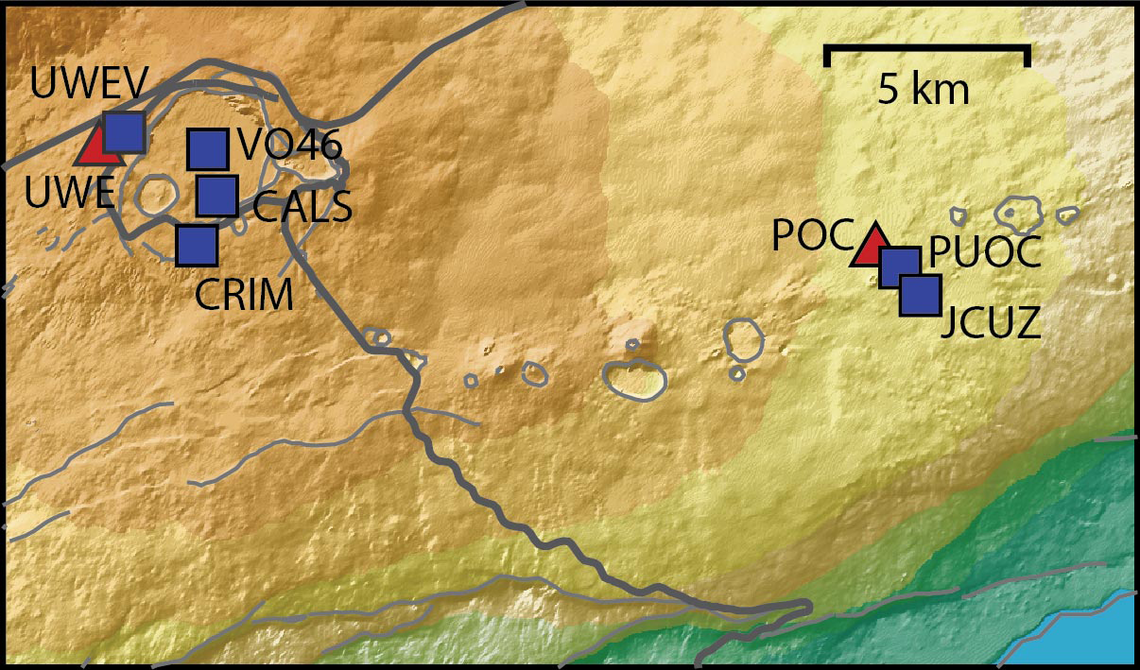


View: https://youtu.be/Uecu2seh4b4


Wife and I like the AfarTV feeds, for the discussion along w/ them, though they're otherwise just mirrors of the official USGS feeds.


View: https://youtu.be/iws3rh5vLAQ
126 Replies · 4091 views
  • Like
Reactions: osu1991
Foxbat
Sorry, I should have posted these earlier:

​

We're still waiting on the start of Episode 56.
  • Like
Reactions: RaiderPower
Foxbat
At 08:01 HST 11/05/2026, the North Vent produced what I would call a "wet burp" after the precursory "pistoning" events, small amounts of lava pouring out of the vent for a few seconds to minutes and then everything recedes. There must have been a gas bubble holding thing back because two minutes later the lava started flowing out of the vent in all directions. Then, at 08:25, it stopped. What a tease! I thought this was how Episode 56 started.

About 12 minutes later at 08:38, the North vent once again started overflowing and picked up steam at 08:42. By 09:00, slight doming could be seen in the pool of lava in the vent. Surely this is it!

But, 09:50 and things wind down again. By 09:57 HST there's just fumes coming out of the vent. Phooey.

But then 10:00 comes and the heavy lava flows kick in again. This time seems like the real deal. At 10:30 HST there's little spurts of lava flying up in the air over the vent, but more from gas than a steady fountain of lava. This looks promising!

11:30 HST and the color of the lava is definitely hotter, and the intensity has picked up to a definite dome and precursor to fountaining. The USGS calls Episode 56 as officially starting at 12:10 HST:

Alert Level: WATCH, Color Code: ORANGE 2026-11-05 22:29:12 UTC
HVO/USGS Volcanic Activity Notice

Volcano: Kilauea (VNUM #332010)

Current Volcano Alert Level: WATCH
Current Aviation Color Code: ORANGE

Issued: Thursday, November 5, 2026, 12:29 PM HST
Source: Hawaiian Volcano Observatory
Notice Number: 2026/H514
Location: N 19 deg 25 min W 155 deg 17 min
Elevation: 4091 ft (1247 m)
Area: Hawaii

Summary: Episode 56 of the ongoing Halemaʻumaʻu eruption began at 12:10 PM HST on November 5, 2026.

Volcanic Activity:
Episode 56 of lava fountaining in Halemaʻumaʻu began at the summit of Kīlauea began at 12:10 PM HST on November 5, 2026.

Lava fountain heights are relatively low at about 100 ft (30 meters), but will likely increase. Ground-level sensors near the eruptive vents indicate that winds are blowing from the northeast direction, which suggests that volcanic gas emissions and volcanic material may be distributed to the southwest direction from Halemaʻumaʻu.
  • Like
Reactions: meStevo
Foxbat
​
  • Like
Reactions: RaiderPower
Foxbat
Scott Greczkowski
Staff member HERE TO HELP YOU! Cutting Edge
Last reply · posted in DIRECTV General Forum
The following is from Reddit. -
View: https://www.reddit.com/r/DirectvStream/s/orzHBkmqQW


gemini.webp

There appears to be a new DIRECTV Gemini OTT box, the C81KW-650.

The FCC listing is partially available, and a Geekbench entry confirms it uses an Amlogic S905X5, a solid SoC for a set-top box.

I also see 4GB of RAM, and the manufacturer is SEI Robotics.

DIRECTV C81KW OTT Box - Android TV Guide

Ok found a picture of the Box too on Reddit:


View: https://www.reddit.com/r/DirectvStream/comments/1twlex0/comment/opzeqi1/
35 Replies · 2770 views
  • Like
Reactions: dtv757
R
I don't mind HDR being on as long as its adaptive. I don't need HDR on non-HDR content

Also, God only knows how much it'll cost to get this per month. 10 bucks a month for 3 TVs in my apartment is not worth it if I can just use my android boxes and appletv to watch
J
I don't mind HDR being on as long as its adaptive. I don't need HDR on non-HDR content

Also, God only knows how much it'll cost to get this per month. 10 bucks a month for 3 TVs in my apartment is not worth it if I can just use my android boxes and appletv to watch
Supposedly the HDR on or off issue has been addressed with the addition of a " match content" switch in the Display menu.
Tom Speer
Supposedly the HDR on or off issue has been addressed with the addition of a " match content" switch in the Display menu.
I don't know if that is true or not, but the memory limits and processor speeds of the first Osprey and Gemini devices limited some features. The specs fo this new device indicate that may not be such a problem.
J
I don't know if that is true or not, but the memory limits and processor speeds of the first Osprey and Gemini devices limited some features. The specs fo this new device indicate that may not be such a problem.
Saw on Reddit. Someone had the new box and said they added an add content switch and auto detect was working.
J
Saw on Reddit. Someone had the new box and said they added an add content switch and auto detect was working.
Click on link below photo.
4KMediaTV
That Reddit report is encouraging — a Match Content switch would fix the one thing that annoyed me most about the older Gemini boxes, HDR being forced on for everything.

If anyone gets the new box, the test I'd run before judging it is:
- Turn on the Match Content switch in the Display menu, then watch a known HDR title and a regular SDR channel back to back. With matching on, the SDR channel should look normal instead of washed out or overly bright, and the HDR title should still switch the TV into HDR.
- Check what the TV itself reports for each one — most TVs show the picture mode or an HDR badge when you press Info or Display — so you're not just guessing from how it looks.
- If your TV handles HDR poorly, as Tom mentioned, leave HDR off on the Gemini entirely. A good SDR picture beats a bad HDR picture every time.
- After changing the HDR or Match Content setting, reboot the box once before testing. On the older boxes those display changes sometimes didn't stick properly until a restart.

If auto-detect is actually working on this one, that's a real improvement over the Osprey and the first Gemini.
J
That Reddit report is encouraging — a Match Content switch would fix the one thing that annoyed me most about the older Gemini boxes, HDR being forced on for everything.

If anyone gets the new box, the test I'd run before judging it is:
- Turn on the Match Content switch in the Display menu, then watch a known HDR title and a regular SDR channel back to back. With matching on, the SDR channel should look normal instead of washed out or overly bright, and the HDR title should still switch the TV into HDR.
- Check what the TV itself reports for each one — most TVs show the picture mode or an HDR badge when you press Info or Display — so you're not just guessing from how it looks.
- If your TV handles HDR poorly, as Tom mentioned, leave HDR off on the Gemini entirely. A good SDR picture beats a bad HDR picture every time.
- After changing the HDR or Match Content setting, reboot the box once before testing. On the older boxes those display changes sometimes didn't stick properly until a restart.

If auto-detect is actually working on this one, that's a real improvement over the Osprey and the first Gemini.
The current Gemini Air stream dongle isn't bad, the big frustration is the no HDR match content auto detect switch. It doesn't matter what kind of TV you have, forced HDR on SD video just doesn't work. It's inconvenient to go and switch back and forth between HDR on and HDR off so you can watch something on Paramount Plus in HDR. The ability to have all your apps in one place is convenient. The new box would be nice with this fixed as well as adding some updated video codecs.
I've been back and forth with DirecTV techs since June of '25 regarding this HDR issue. Can't tell you have many service tickets were put in regarding the HDR issue. If they were ever put in. It's been a known issue even before the Gemini Air Stream Dongle.
If they do what they say they're going to do, they'll have one heck of a streaming device.
Tom Speer
I'm sorry for all of you having trouble with the HDR on all the time. With my TCL QM7 TV the HDR looks great all the time. The new QLED models seem to handle this better. But it sounds like they are addressing the issue.
b4pjoe
I'm sorry for all of you having trouble with the HDR on all the time. With my TCL QM7 TV the HDR looks great all the time. The new QLED models seem to handle this better. But it sounds like they are addressing the issue.
As I have said before...everything on my TV's look better with HDR on all of the time. Hopefully that will still be an option and not be stuck with HDR only being on when viewing HDR content.
K
Pub Member / Supporter Lifetime Supporter
Last reply · posted in TV Shows
'Rockford Files' Reboot Gets NBC Pilot Order

I grow tired of all the reboots. Most I don't bother with but will depend on the actor chosen.
30 Replies · 1677 views
K
January? OK.

I'm sure I will check it out. Not getting my hopes up but I did enjoy the actor in SEAL Team. Never saw any of his earlier work.
M
January? OK.

I'm sure I will check it out. Not getting my hopes up but I did enjoy the actor in SEAL Team. Never saw any of his earlier work.
He was the the series TV Bones years ago. From 2005 to 2017. He was F.B.I. Special Agent Seeley Booth.
From Wikipedia: Bones is a police procedural drama based on forensic anthropology and archaeology, starring Emily Deschanel and David Boreanaz. The series ran for 12 seasons and 246 episodes, and was loosely inspired by the novels of Kathy Reichs.
I thought it was a good series. You can find on Hulu and probably other streaming services. I even think you can find it Dish Satellite.
KAB
KAB
He was the the series TV Bones years ago. From 2005 to 2017. He was F.B.I. Special Agent Seeley Booth.
From Wikipedia: Bones is a police procedural drama based on forensic anthropology and archaeology, starring Emily Deschanel and David Boreanaz. The series ran for 12 seasons and 246 episodes, and was loosely inspired by the novels of Kathy Reichs.
I thought it was a good series. You can find on Hulu and probably other streaming services. I even think you can find it Dish Satellite.
You forgot Angel (5 seasons), and Buffy the Vampire Slayer (as Angel, better part of 3 seasons, then off and on the next 4).
Howard Simmons
You forgot Angel (5 seasons), and Buffy the Vampire Slayer (as Angel, better part of 3 seasons, then off and on the next 4).
Good catch👍
long_time_Dish
Watched an episode of Rockford this past weekend that always makes me laugh - when Angel fakes being a hitman as a scam to make money (cuz who's gonna report that they lost their money on a fake "hit"?). Jimmy gets so upset at Angel that he nearly strangles him as he recites Angel's lame scams "year after year"! 🤣
satjay
Going to give it a try, not much else on Network TV :)
long_time_Dish
Going to give it a try, not much else on Network TV :)
I'll give it a try as well. The networks are mostly a wasteland of reality and/or game shows for which I'd prefer leprosy over watching them.
  • Like
Reactions: reubenray
Scott Greczkowski
Staff member HERE TO HELP YOU! Cutting Edge
Last reply · posted in The Chit Chat Club
Sometimes a thread gets so many posts in it that is can cause issues for the server so that why today we introduce The Song Name Game Part 3!

So let the game continue!

The last song was added by Bobby who posted...

One Meat Ball - Andrews Sisters

CONTINUE ON AND HAVE FUN! WELCOME HOME TO SATELLITEGUYS.US!

Here are the original rules for the game as posted by WebbyDude back in 2006. http://www.satelliteguys.us/threads/68645-Song-Name-Game

Just name a song title and the band who performed it. The next person does the same thing, but needs to list a song title or band name which includes a word from the previous entry. Pick songs from any genre.

Example:

Long Live Rock and Roll -- Rainbow

Rainbow in the Dark -- Dio

Another example:

Ride the Lightning -- Metallica

Lightning Strikes -- Ozzy Osbourne


Get it?


An additional note: we all know that song titles, sometimes, use profane words. Because this is a family friendly website it is advised that you clean up that title up a bit. This is accomplished by using something like sh!t instead of the real word. Thanks....
68952 Replies · 2705211 views
  • Like
Reactions: c-spand
harshness
Light Up - Styx
  • Like
Reactions: gms49ers
Bobby
Up A Lazy River - Si Zentner & His Orchestra
  • Like
Reactions: EatMyVolts
FTA4PA
Song For A River - The Badlees
EatMyVolts
Cry Me A River -- Joe Cocker
long_time_Dish
Ride Across The River - Dire Straits
  • Like
Reactions: gms49ers