

Problem with Espn channels
- Thread starter jsz1002
- Start date
- Latest activity Latest activity:
- Replies 8
- Views 1K
You are using an out of date browser. It may not display this or other websites correctly.
You should upgrade or use an alternative browser.
You should upgrade or use an alternative browser.
Advertisements
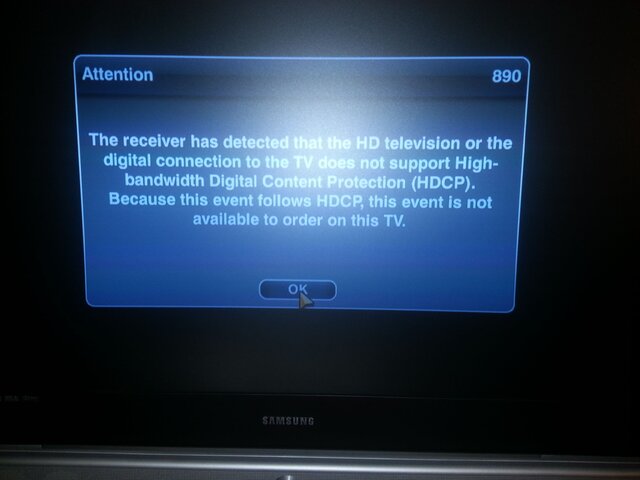

The 890 error is the HDCP protocol that was put into place about 6 years ago by the MPAA and adopted by several distributors like HBO, and Disney. Reasons for the error occurring can be older HDTV's that were made prior to the adoption of HDCP. I have also seen older HDMI cables cause the error.

I unplugged the HDMI cable and plugged it back in and this fixed the issue! Thanks for pointing to the HDMI.


We've been having this problem with a few customers ever since Dish made their new agreement with Disney. The latest issue we had was from a customer I sold a TV to and upgraded his Dish to HD. The HDMI cable that came with the receiver had the issue and so did a new one that we tried. We ended up taking out the HDMI cable and connecting it with Component cables.

I've seen this problem cause a TroubleCall or chargeback for a bunch of techs in my old office. Apparently a bunch of CSR's are not as smart as JasonS is here or you have customers that are just too hard headed to listen or would rather have a tech come back out and bring a new HDMI cable or wave a magic wand to fix it.

Users Who Are Viewing This Thread (Total: 0, Members: 0, Guests: 0)
Who Read This Thread (Total Members: 1)
Latest posts
-
-
TSpaceX Seeks to Conduct 450 Starship Launches a Year in Texas!
- Latest: TWiT Tech Podcast Network
-
-
M
-
I