Social Feed

O
Last reply · posted in DISH Network Support Forum
I'm glad I found this forum!

I had Dish installed yesterday, and when the install guy completed everything, I asked him why I was getting faint vertical (and sometimes slight diagnal) lines over solid colors and patterns on screen. It's especially visible in that 1 second pause where you see a black screen while switching channels. However, you also see the faint pattern quite visibly when watching shows with a lot of solid colored backgrounds. The install guy claimed he had no idea what to do and I should call the Dish people up. This problem is only happening on the tv with the 522 receiver attached, btw.

I waited a few hours and it stayed the same, no improvement (desperation and hope!), so I called Dish up. They weren't able to fix anything over the phone, so I made a tech appt for next Saturday.

In the meantime, I played around with a few things this morning just to make sure it wasn't my electronics setup that creates the problem. I have an international (multisystem) tv, and my vcrs/dvd player are all multisystems as well. They are all built for use in the United States, so they are "standard" machines. The only weird part of the setup is that the tv works off of channel 1 and not channel 3 or 4 (it's impossible to change this option). But it works the same as any other tv despite this.

To be sure it wasn't the tv, I brought in a smaller, regular old US tv and hooked it up to the receiver. The lines were still there. The only difference is that because the tv was smaller, sometimes the lines were more "hidden" than they are on my regular larger tv. But when there was a really solid background on screen, the line pattern popped out again. And it was always visible in between channels while surfing.

I also tried taping things on both my receiver-attached tv and the secondary tv (in the living room) to see how tapes play on various machines. I used a non-hooked up to anything tv for the viewing of the tapes. The tapes recorded off of the receiver connected tv have the lines on them. But oddly enough, the tapes taped off of the living room tv have horizontal lines during the time you have the black channel changing screen (that doesn't show up on the tv I taped it on). Also, the video quality was terrible. The vcr in that room is not broken and is in good shape, so I was shocked at the picture quality. I checked all connections, and nothing is wrong.

Dish is really my last hope. I left DirecTV after many years due to their not honoring a service contract I was paying them for after power surges destroyed equipment. Then I tried digital cable, and while the quality wasn't bad at all for most channels, it was so horrible on some channels (and the customer service sooooo horrible), that I decided to just get Dish. I've spent the last 2 months dealing with cable/satellite issues and feel like I'm stuck on some horrible merry go round!

Does anyone know anything about these vertical lines? Any suggestions/help/experiences?

Jennifer
35 Replies · 7563 views
D
found the problem with my setup

My problem turned out to be the S-video cable from the 522 to my TV. When I unhooked the S-video and plugged in the yellow RCA cable, the video was perfect. You can see every pixel. No more coming and going of diagonal lines according to the program or the color of the background. I've had problems with diagonal lines (herringbone pattern) before when the connection wasn't solid with coax or RCA cables. That's why they sell the more expensive gold plated connectors, to keep the connection from deteriorating. In this case, I used the S-video cable that came with the 522 and no amount of re-seating the connectors cleared it up. I'm not sure where the problem was. The S-video cable, my TV or the 522. When S-video is used, both the 522 and TV instructions state that the yellow RCA cable must be disconnected at both ends. This to keep from getting a transmission line stub which will create reflections and give diagonal lines. I did read on an S-video web site that the "ordinary S-video cables included in the box are of poor quality with inferior shielding and can result in poor picture quality". I'll try a new S-video cable with gold connectors and good shielding to see if it behaves any differently. In the mean time I am happy to see that there are no more diagonal lines when using RCA jacks. My setup has the 522 into one video input of my TV, my VCR into a second video input of the TV and the attic antenna into the TV coax input. The video quality is the best on the 522, a close second on the attic antenna and noticeably less good, but still OK, through the VCR.
D
Great picture with well shielded S-Video cable

After reading a few web sites I began to suspect that my poor picture and diagonal lines were due to the cheap S-Video cable supplied with the 522. I located a couple of likely good cables made by Velocity and Monster. They both use 75 ohm coax in them with an additional outer metal foil shield. I picked up a Monster 3.3 ft S-Video cable at Radio shack for $24.99. What a difference from the E* cable. The picture is wonderfully sharp and clear. If an S-Video connection is supposed to better than the RCA connection, why do they include a crappy cable that ruins it? When I called CRS, one time they told me to reboot the box and another time they wanted to swap out my 522. It would save a lot of time and frustration if they would just say the supplied S-Cable is poorly shielded and low-quality, and to go buy a good one.
O
:mad: Well, I'm back from vacation, and it's now officially 2 weeks since I sent my letter to Dish...... they ignored it. I'll be resending it before the weekend.
O
So much for tech support.

After 2 1/2 weeks they sent me the same damn cookie cutter response that they did a month ago. They didn't read my letter at all. Nice.

I just wrote to them again asking that they please read my email or have a supervisor read it.

After this, what's the next step? Sending a letter to corporate? I can't believe I've been paying for this horrible reception and horrendous service from Dish. I must be certifiably crazy by now.


Subject: RE: Technical Support,
Date: Tue Nov 9 14:41:12 2004
From: (Tech) tech@echostar.com
To: 'orangeneko

Dear Ms. ,

Thank you for your email correspondence. There is a few things that can cause this, electrical interference, your televisions scan rate may be different, the aspect ratio may be different or there could be so kind of local terrestrial interference such as power lines, airports, military bases, hospitals, police departments, fire stations or an in house motor just to mention a few.

Sincerely,

Mark H.

Technical Support

Dish Network

********** Original Message **********

Full Name:

Account Number:

Question: Hello,

I sent this to Dish Technical support on October 20th (luckily I emailed a

copy to myself as well!). On the 25th I left on a trip. I returned late

this past week and was dismayed to see that in two weeks there was no

response to my email.

This situation is still ongoing and I'm desperate to get it fixed.

Jennifer


Subject: dish

Date: Wed, 20 Oct 2004 14:41:34 -0400

Hello,

I'm writing about an ongoing nightmare of a problem. I've exhausted every avenue I can to try and solve this and am at my wit's end!

About a month ago I had a dish and a Dish DVR 522 installed in my house. The DVR box is in my bedroom, and the secondary tv is in the living room. The moment the installer got a picture on screen, I noticed something funny. There were vertical (slightly diagonal) lines going across the screen whenever a solid colored background or fairly solid colored pattern was on screen. It was also noticable when changing channels during that black screen during the pause. (if you tape this to a videotape, the lines will be on the videotape no matter what tv you play it back on).

I asked the installation guy what was going on and if he could fix it. He claimed to have no idea about it and said I'd have to call Dish about it; he couldn't help me. I thought this to be odd, but I had no choice in the matter if he wasn't going to help.

So I called Dish and the DVR was reset...at least twice. Nothing helped. I had to make a service appointment for the next Saturday.

After this I went about researching this problem online. I discovered on a DISH forum that a few others have had this problem with the 522, but none could figure out what causes it.

After researching and posting about this, I tried playing around with a few simple things with my tv's setup, but nothing helped. I figured the problem was probably the receiver and there was nothing I could really do about this until the repairmen showed up the following weekend. Disappointing for a brand new service, but what could I do?

Before I go further, I'll explain my tv setup. I have a JVC 20 inch multisystem television (it will play any format -- PAL, NTSC or SECAM). This television is made for use within the United States and works as any regular tv would. The only quirk is that on this tv, channel 1 acts as channel 3 or 4 would on other tvs. This cannot be changed.

I also have a Samsung multisystem vcr attached to the tv and satellite receiver. The multisystem vcr is made for use within the United States, plays tapes in any format and automatically converts signals to NTSC. This is quite a popular model among multisystems.

Also hooked up to my (through the Samsung vcr) are another multisystem vcr (for dubbing tapes) and a DVD player. The setup runs perfectly and has for many years. I had DirecTV for 5 years with this setup and had no problem. I also had Cablevision for a month in between DirecTV and Dish Network and had no problem with that service either.

When my Saturday appointment came, the techs were over for at least two hours. These techs told me at first that I was imagining the lines across the screen! This took up nearly half the visit, and while I'm used to male techs talking down to me because I'm a female, this was ridiculous. It was only after they got rid of the lines with the quickie fix that they admitted to it -- they also started telling me about how I had lines before (oh, did I?) and acted as if they had discovered the problem. They were quite self congratulatory.

Back to the problem, however... The quickie fix they came up with was just that! They "fixed" the picture quality by attaching an RCA cable from the back fo the DVR box directly to the front of my tv set. Then they set the tv to "video". This gives me a clear picture...but it makes using the vcr or anything else impossible! In order to view a videotape or TAPE ANYTHING FROM TV, I need to remove this RCA cable...thus bringing me back to the picture with the lines going across it. The only reason I have satellite tv is for the picture quality so if I want to tape something to keep, I can have a clear copy.

At one point they put another model receiver in -- a 700something model I believe -- and that one also had the lines over solid colors on screen.

Because they couldn't fix the problem, they told me to call Dish later on. I called Dish later, and to my shock, was told that the techs closed out the service call as "solved". I was shocked. I hung up and tried several things. I'll get into this in a moment.

After trying and failing to get a clear picture on my own, I called Dish back again. I was eventually told by a tech over the phone that since I was able to get a clear picture when they put the cables in the front of my tv (very attractive, btw!), that it was considered fixed...then I was told in so many words that it was "tough luck" that my vcr is unusable with the Dish Network service. As vcrs have been a basic component with tvs and cable systems for years (antennas are hooked right into them!), I was shocked by this. Upon hanging up, out of sheer frustration from having spent the ENTIRE day on this, I began to sob. When I say entire day, I mean that my Dish Network odessey that Saturday lasted from 2pm when the techs showed up until 12:30 at night. This isn't even counting about 4 hours spent the next day.

In a nutshell, what I did during those two days is this -- none of these things helped get rid of the lines:

I unhooked everything and replaced ALL cables with new, high quality ones (I only use gold plated RCA cables). I still had the line problem.

I brought a regular (non multisystem) Sony tv into my room and hooked the Dish "antenna" cable into it -- I still had the line problem.

I brought a regular (non multisystem) Samsung tv into my room and hooked the Dish "antenna" cable into it -- I still had the line problem.

I brought a regular (non multisystem) vcr into my room and hooked it into both my JVC multisystem tv and also tried it with both other "regular" tvs -- I still had the line problem.

I tried every button/option/hookup....everything! combination with all these tvs and vcrs, and I still had the line problem. I've tried things that are logical and I've tried things that are crazy...all out of hopes that it'd somehow get rid of the lines. But no dice.

I wrote to Dish tech support but when I received a reply later on, they told me to check something on my equipment (tv and vcr). The scan rate or something like that. Unfortunately, since I'd tried all these hookups and different pieces of equipment before they responded to me, I knew that the problem was not to do with my equipment. And if it was, then neither DirecTV or Cablevision would have ever worked properly.

Something else that's been a result of this problem is that the living room reception is horrible as well. That's understandable, as that's the secondary tv controlled by the 522 receiver. Every channel on the secondary tv looks grainy and horrible. This was noted but not checked into or fixed by the techs who were over that Saturday afternoon.

At this point since it's known that any of my equipment that has the problem (since the lines show up on EVERYTHING and I never had this problem with any other satellite or cable service), the only logical thing to assume is that this is a Dish problem. And since the 700something model Dish Receiver that the tech hooked up also had the lines, the logical place to look next is to question whether or not there is something wrong with the dish itself or the installation.

I'm at my wit's end. I enjoy the Dish service, but not being able to use a vcr with it defeats the purpose of having it for me! The options I've been left with are: having tv reception and a DVR ONLY, or having poor tv reception and a DVR (fun, but not a necessity!) and all my other equipment be unusable. Neither are acceptable. I expect clear reception and to have all my equipment hooked up as it has been for years.

I have left this problem alone for the past 2 weeks out of sheer frustration. It's always in the back of my mind, however, nudging at me! However, I needed some "distance" from this frustration!!! I'm also due to leave on a trip this coming Monday, so I've been preparing for that and trying not to think about the ongoing Dish saga.

However, this has gone on long enough, and something needs to be done. If this problem can't be fixed, then I have to think about going back to cable tv, as much as I do not want to. At least most of the channels there are clear, and there are no constant lines going across the screen. My tv stand is STILL in the same position the techs and myself left it in that Saturday about 3 weeks ago, and I've also still got everything unhooked from the setup except for the one vcr. It's a mess (in every way!). I need it fixed...somehow!
O
IT'S FIXED!!!! IT'S FIXED!!!!!!!!!!

And it wasn't Dish that did a damn thing to fix it (in fact, I've yet to hear back from them again...what great tech support they've got...).

It was me that fixed it -- grasping at straws and brainstorming. I will definitely be writing Dish's Corporate office after all -- mainly to tell them how horrible their techs are.

I had been thinking about all the things I tried already to fix the quality/vcr problem, and what I theorized is that since both the vcr and the Dish receiver had RCA cables that HAD to be input into the tv, that perhaps both cables were causing some sort of conflict (which blocked the vcr from working).

So, as a last ditch effort, I bought a $50 switchbox at Radio Shack, hoping that I could allow the box to handle the signals into the tv and I could "fool" the tv into thinking there was no conflict.

At first, I failed to get anything working right. That was a technical issue all of it's own and was my fault. But the next evening I went at it again, and this time I got everything working....and it works perfectly. The only weird part of the setup is that with all the other components, the switchbox works automatically and senses what I've switched to. But if I want to play a tape on the vcr, I have to hit a button on the switchbox to view the vcr. It's a minor thing -- and I'd much rather have to be hitting a button here and there than not be able to tape anything off of the damn tv.

The more I think about this, the more angry I become that the Dish techs didn't suggest anything like this. Especially the Laurel and Hardy team that was over here that one weekend from hell.
Van
Van
Last reply · posted in What's Cooking?
Who says dinner or lunch has to be the only good meals of the day?

Honey butter grits with scrambled eggs and grilled boneless pork ribs on flakey biscuits washed down with cranberry juice.
6634 Replies · 380113 views
TRG
TRG
Cold morning today, only 32 degrees. Fired up the oven and made cinnamon rolls (from a tube) and a pot of coffee.
  • Like
Reactions: dfergie
TRG
TRG
2 egg burrito with bacon and a side of hashbrowns. Coffee.

1645.webp
TRG
TRG
Breakfast Quesadillas. Grilled flour tortilla filled with scrambled eggs, hash browns, chopped green chile, cheddar & Jack cheese and bacon. Coffee.

q.webp
Bobby
Taco omelette. 3 eggs, taco meat from yesterday, diced green chilis, cheddar cheese, chopped red onion, avocado, black olives, chopped tomato, La Victoria Salsa Brava.

This one was really, really good!
  • Love
Reactions: dfergie
dfergie
Thought I was getting a Chorizo and egg burrito (marker had rubbed off)but was a roast beef/potato I made up before hunting this morning.
Btw every morning at camp I cooked my homemade Chorizo and scrambled eggs plus sausage side while my brother brought bacon. (they liked both the beef and pork versions)
Scott Greczkowski
Staff member HERE TO HELP YOU! Cutting Edge
Last reply · posted in The Chit Chat Club
Sometimes a thread gets so many posts in it that is can cause issues for the server so that why today we introduce The Song Name Game Part 3!

So let the game continue!

The last song was added by Bobby who posted...

One Meat Ball - Andrews Sisters

CONTINUE ON AND HAVE FUN! WELCOME HOME TO SATELLITEGUYS.US!

Here are the original rules for the game as posted by WebbyDude back in 2006. http://www.satelliteguys.us/threads/68645-Song-Name-Game

Just name a song title and the band who performed it. The next person does the same thing, but needs to list a song title or band name which includes a word from the previous entry. Pick songs from any genre.

Example:

Long Live Rock and Roll -- Rainbow

Rainbow in the Dark -- Dio

Another example:

Ride the Lightning -- Metallica

Lightning Strikes -- Ozzy Osbourne


Get it?


An additional note: we all know that song titles, sometimes, use profane words. Because this is a family friendly website it is advised that you clean up that title up a bit. This is accomplished by using something like sh!t instead of the real word. Thanks....
68646 Replies · 2679604 views
  • Like
Reactions: c-spand
sdfntx
On with the Show - The Rolling Stones
gms49ers
The Show Must Go On - Pink Floyd
Bobby
If Love Must Go - Dobie Gray
FTA4PA
Drift Away - Dobie Gray
long_time_Dish
Throwing It All Away - Genesis
  • Like
Reactions: FTA4PA
dishstaller
Pub Member / Supporter Lifetime Supporter
· posted in The Phone & Tablet Zone
We were up in Pigeon Forge, TN a month ago and we couldn't get anything on our phones to work on mobile data...the Ookla speed test app couldn't even do a speed test. I have an older 13 and went into my settings and turned off the 5G, making it use LTE exclusively....did a speed test of over 300mbps so obviously the 5G bands were overwhelmed. Anyway, tried to do the same thing on my Wife's 15 and the cellular data options tab simply wasn't there. Any of you run into this? We've on Verizon
0 Replies · 4 views
osu1991
Pub Member / Supporter
Last reply · posted in TV Shows
9 Replies · 150 views
meStevo
First 2 eps out and it's unsurprisingly great to watch Paul Bettany and James Spader work.
osu1991
Watched the first episode and enjoyed it.
Foxbat
James Spader gets the best lines so far. I'm enjoying this series.
  • Like
Reactions: MikeD-C05
osu1991
Finished the 2nd episode tonight. I'm really liking it so far.

Still hate weekly releases though, especially the way Disney and HBO do it waiting until 8pm to premiere it.
Foxbat
Apparently I'm not a big enough nerd🤓 since I did not read every Marvel Comic Book ever published. If I had, I might be comparing the comics' version of events compared to what's transpiring in "Visionquest". So, I am enjoying the series a lot, not weighed down by previous expectations, knowing only the Avengers MCU movies and the "Wandavision" / "Agatha All Along" TV series.

I found the Mr Know-it-All channel from his discussion about "Star Trek: Strange New Worlds" and he's been gleefully picking these episodes apart, referencing the Marvel comics from the 1939 on. Turns out A.I. has been around since before World War II, at least in the comics. (Robots before that, yes, yes.) This show is going back into the archives.
TheForce
Supporting Founder Pub Member / Supporter
Last reply · posted in The Phone & Tablet Zone
It's time for my wife to get a new iphone as her iphone 12 is getting weak battery life test says 70% compared to when new. But it is beginning to show signs of screen freezing as well.
211 Replies · 15140 views
Foxbat
It may be the year to update my 13 to the 15.
Foxbat
BTW, iOS 26.1 is now out for iPhone, along with the OS 26.1 updates for all other supported Appley iDevices.
osu1991
Bought a Motorola G Power 5G android phone as a spare and to use for some work stuff. Was tired of work stuff cluttering up my iPhone 16 Pro. Didn't take long to remember why I originally went to an iPhone. 4hrs doing updates to step up from Android 14 updates to Android 15 and latest updates for 15. Ads on the Play store above the app I searched for is something I don't really remember from the last android phone I had 13-14 yrs ago. Face ID on iphone has spoiled me too.

I just wanted a cheap phone mainly for work pictures or I would have got an 17 Pro and used my 16 for work stuff, but no need to spend that kind of money. I don't even have cellular service on the Motorola, just using it on WiFi and added my google voice number to it with the app.
  • Like
Reactions: navychop
Foxbat
Apple released their 2025 Holiday video. Friendly forest fauna find forgotten phone…
​

There's also a behind the scenes "Making of" video, too:
​
Foxbat
BTW, iOS 26.1 is now out for iPhone, along with the OS 26.1 updates for all other supported Appley iDevices.
BTW, iOS 26.3 is now out for iPhone, along with the OS 26.3 updates for all other supported Appley iDevices.
1770953531617.png
Foxbat
It may be the year to update my 13 to the 15.
Apple made me an offer I couldn't refuse. For whatever reason, they bumped up the Trade-in value of my iPhone 13, first to $180, and just recently to $195. So I took the Apple Cash from Apple card savings and the $195 trade-in and have a shiny new iPhone 17 nothing. The base 256 GB is more than enough for my needs.

Now I'm on the lookout for a leather case for it…
  • Like
Reactions: osu1991
Foxbat
My iPhone 17 is now running iOS 27.2 (whatever happened to 27.1.x?) and it looks like all the other Apple devices that can are releasing 27.2 (looks like it came out Monday)
"MysteryMan"
Pub Member / Supporter Cutting Edge
Last reply · posted in Computers and Gadgets
I created this thread on the original Edgecutter Cutting Edge Forums site. It's simply a place for those to review the latest software available for those using Windows 10 and Windows 11. To date it has received 112,559 views. I have been asked by staff to continue this thread here.
523 Replies · 47950 views
EarDemon
If it wasn't for what I want, I wouldn't need any of this.

Do I need a collection of handheld radios, scanners and speed enforcement countermeasures? Nope, but I want them. Very little, if any of the software used to interface with these devices is available on Linux.
WhiteBeard
If it wasn't for what I want, I wouldn't need any of this.

Do I need a collection of handheld radios, scanners and speed enforcement countermeasures? Nope, but I want them. Very little, if any of the software used to interface with these devices is available on Linux.
To each there own but I've found that Windows can't do much more than Linux can. Can't have everything. ☹️
  • Haha
Reactions: meStevo
EarDemon
To each there own but I've found that Windows can't do much more than Linux can. Can't have everything. ☹️
For niche use cases, yes I agree. Kali for ethical hacking and security testing, and running a Cacti server for network monitoring are the two things I have experience in. Plus thousands and thousands of other things, but for every day use I just can't see it. The owner of the GMRS repeater that I pay to access is changing the Tx DPL tones tomorrow, while Chirp is available on Linux, the software to program my MXT500 is not.

I run Fedora and Ubuntu in VMWare, honestly I don't care much for the UI of either of them and I don't feel like spending days/weeks to customize the UI to make it look Windows-like when I could just use Windows. The cartoonish dock at the bottom of the screen reminds me of Apple products.
harshness
I don't care much for the UI of either of them and I don't feel like spending days/weeks to customize the UI to make it look Windows-like when I could just use Windows.
What is so fantabulous about the Windows UI? By many accounts, it has been going downhill since Windows 7.

There are Linux desktops that offer Windows or Mac UIs, yet you don't hear much chatter about them outside of questions about when the creators might get sued.
  • Like
Reactions: HipKat
EarDemon
What is so fantabulous about the Windows UI?
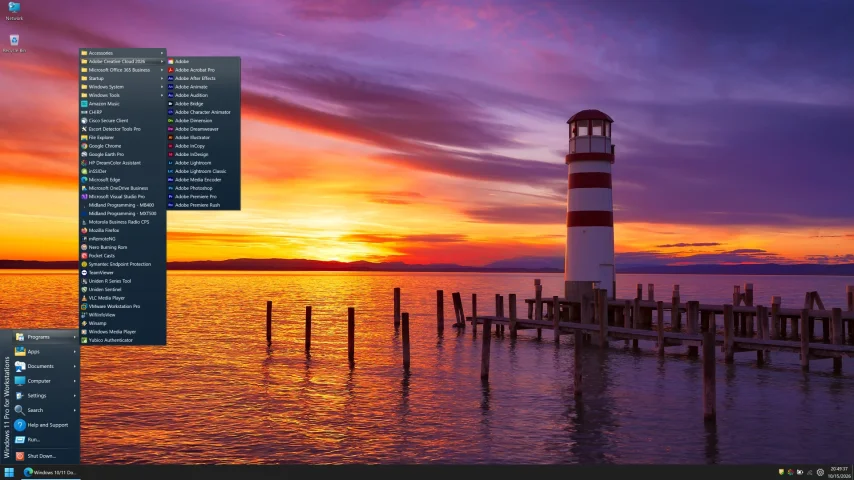
Because it's what I prefer. I know I've said this a few times, I use Open Shell to give me the cascading start menu a la WIN 95 and NT4.0. The only reason I went from Windows Vista to 7 back in the day was because of Classic Shell. I cannot stand anything other than the OG start menu from 30+ years ago. I'm using ExplorerPatcher to give me Windows 10 UI elements of the taskbar and right click context menus.

If you could take a look at how I set up Windows 95, you'd find many similarities to how I use 11.
  • Like
Reactions: cp2k
EarDemon
I could probably use that as a starting point, but I don't like the full size icons. If you have to click on each folder that's also a no-go for me, it has to be cascading.

I used to have Peppermint Linux in a VM, that was about as close as I could get to recreating a Windows NT4.0 style of menu structure, but I could never get it to scale properly in VMWare on a 4K display and eventually gave up.

Whatever the boot up time it's fine with me. The longest part of my bootup is the HP SureStart BIOS integrity check. Once that is done, it's only a few more seconds. I haven't done this reg tweak yet since the reformat, but I switched the bootup animation to the Windows 10 style spinning circle of dots, and it's two and a half rotations. I can live with that.
harshness
Because it's what I prefer.
I hope you don't believe that makes it wonderful (especially when you're using workarounds for Microsoft's malfeasance).

I use LibreOffice as opposed to Microsoft office (even in Windows) because it's UI is like the Office of old, so I'm putting my money where my mouth is (in a manner of speaking). The ribbon was one of the worst ideas to come out Redmond.
HipKat
I could probably use that as a starting point, but I don't like the full size icons. If you have to click on each folder that's also a no-go for me, it has to be cascading.

I used to have Peppermint Linux in a VM, that was about as close as I could get to recreating a Windows NT4.0 style of menu structure, but I could never get it to scale properly in VMWare on a 4K display and eventually gave up.

Whatever the boot up time it's fine with me. The longest part of my bootup is the HP SureStart BIOS integrity check. Once that is done, it's only a few more seconds. I haven't done this reg tweak yet since the reformat, but I switched the bootup animation to the Windows 10 style spinning circle of dots, and it's two and a half rotations. I can live with that.
I used to pin the C: drive to the Win Taskbar and it would open in cascading style
"MysteryMan"
2026-10 Preview Update Builds: 26300.9818 and 26200.9818 (KB5127936) has been released. Moderate time needed for those choosing to perform a manual download/install/restart. Quality improvements only. No new operating system features.
TWiT Tech Podcast Network
· posted in TWiT Tech Podcast Network
0 Replies · 4 views