Social Feed

Trying to set this DirecPC dish up with the new Coolsat 6000 (clone?) is getting to me. First I found about 70 TV channels, all scrambled. From the looks of it, probably Dish 119.
I found another satellite and did a blind scan. This one came up with 4 radio channels.
11.812V -
Radio 11 4
11.863V-
Radio 21500 1186
Radio 40000 1186
Radio 40001 1186
I haven't heard anything on the last three, but the first one sounds like it is giving news stories in French. I can't find anything even close on Lyngsat. I'm guessing I looking at around 110? I think I am a little down from 119.
I've scanned about six signals so far. The only thing that has registered is what looks like most of the channels from TP2 on 119, all scrambled, another location with "Television 1" and "Television 2" also scrambled, and one with these four radio stations.
When I go to Dish Settings on the menu, if I select a satellite I have done a blind scan on and found channels, the level stays at about 95-97% all the time. It does not vary while moving the dish even though the Sat Finder gets no signal. When I find a good signal with the sat finder, I do a blind scan. The Quality bar periodically jumps way up as it scans. If it really does think it found something, it will turn green for a bit, but doesn't always put anything in the list.
Unfortunately I no longer have access to the nice equipment I used when doing this at the radio stations. Just a $40 sat finder and the receiver. Apparently the receiver gives no useful information until it finds a channel to look at.
Any tips on setting up these things?
Thanks,
I found another satellite and did a blind scan. This one came up with 4 radio channels.
11.812V -
Radio 11 4
11.863V-
Radio 21500 1186
Radio 40000 1186
Radio 40001 1186
I haven't heard anything on the last three, but the first one sounds like it is giving news stories in French. I can't find anything even close on Lyngsat. I'm guessing I looking at around 110? I think I am a little down from 119.
I've scanned about six signals so far. The only thing that has registered is what looks like most of the channels from TP2 on 119, all scrambled, another location with "Television 1" and "Television 2" also scrambled, and one with these four radio stations.
When I go to Dish Settings on the menu, if I select a satellite I have done a blind scan on and found channels, the level stays at about 95-97% all the time. It does not vary while moving the dish even though the Sat Finder gets no signal. When I find a good signal with the sat finder, I do a blind scan. The Quality bar periodically jumps way up as it scans. If it really does think it found something, it will turn green for a bit, but doesn't always put anything in the list.
Unfortunately I no longer have access to the nice equipment I used when doing this at the radio stations. Just a $40 sat finder and the receiver. Apparently the receiver gives no useful information until it finds a channel to look at.
Any tips on setting up these things?
Thanks,
13 Replies
·
3482 views


 )


Staff member
HERE TO HELP YOU!
Cutting Edge
Sometimes a thread gets so many posts in it that is can cause issues for the server so that why today we introduce The Song Name Game Part 3!
So let the game continue!
The last song was added by Bobby who posted...
One Meat Ball - Andrews Sisters
CONTINUE ON AND HAVE FUN! WELCOME HOME TO SATELLITEGUYS.US!
Here are the original rules for the game as posted by WebbyDude back in 2006. http://www.satelliteguys.us/threads/68645-Song-Name-Game
Just name a song title and the band who performed it. The next person does the same thing, but needs to list a song title or band name which includes a word from the previous entry. Pick songs from any genre.
Example:
Long Live Rock and Roll -- Rainbow
Rainbow in the Dark -- Dio
Another example:
Ride the Lightning -- Metallica
Lightning Strikes -- Ozzy Osbourne
Get it?
An additional note: we all know that song titles, sometimes, use profane words. Because this is a family friendly website it is advised that you clean up that title up a bit. This is accomplished by using something like sh!t instead of the real word. Thanks....
So let the game continue!
The last song was added by Bobby who posted...
One Meat Ball - Andrews Sisters
CONTINUE ON AND HAVE FUN! WELCOME HOME TO SATELLITEGUYS.US!
Here are the original rules for the game as posted by WebbyDude back in 2006. http://www.satelliteguys.us/threads/68645-Song-Name-Game
Just name a song title and the band who performed it. The next person does the same thing, but needs to list a song title or band name which includes a word from the previous entry. Pick songs from any genre.
Example:
Long Live Rock and Roll -- Rainbow
Rainbow in the Dark -- Dio
Another example:
Ride the Lightning -- Metallica
Lightning Strikes -- Ozzy Osbourne
Get it?
An additional note: we all know that song titles, sometimes, use profane words. Because this is a family friendly website it is advised that you clean up that title up a bit. This is accomplished by using something like sh!t instead of the real word. Thanks....
68701 Replies
·
2682418 views


Staff member
Pub Member / Supporter
Please post your remote make/model here and any details of your issue. We are looking to collect as many examples as possible. I may reach out to you for your receiver number, but please do not post it here.
If you've already reported this to me, please repost it here so I can track all instances in one thread.
Thanks!
Brittany
If you've already reported this to me, please repost it here so I can track all instances in one thread.
Thanks!
Brittany
26 Replies
·
1101 views


Pub Member / Supporter

Pissed off at the crappy healthcare costs
My health Insurance renewal for 2027 just came in. Going from $827 a month to $1,187 a month. Deductible going up a $1k to $9,350. Max out of pocket also going up $1k to $11,000. Doctor co-pay of $40. Urgent Care co-pay $50. ER 50% coinsurance after deductible. That's all in network. Out of network is double, should it be needed.
Have to think about this. I'm really tempted to just go without now. I only go to the doctor once or twice a year. I pay out of pocket for Tirzepitide and can do without the Rosuvastatin (crestor) now. Really tired of spending over $10k a year and getting nothing out of it.
After years with Blue Cross I switched last year to Ambetter as my Blue Cross premium was going from $1200 to $1800 for a Silver plan and the Bronze plan was still going to be $1300 at BCBS. Ambetter was $827 for the same coverage with a Bronze plan. Didn't think it would jump this much so soon.
I'm guessing a Silver plan is probably over $2,000 a month for 2027.
33 Replies
·
454 views


I have Dish with Hopper3. I choose to get local channels OTA and had a "guide list" established at my previous home. Having moved a few miles away, I wanted to update the list by appending a couple new stations via a rescan. As many would know, some stations come in with the UHF/VHF antenna aimed in one direction, while others come in better with a different direction.
Unfortunately, when a scan is done (bringing in 25-30 stations for that particular antenna aim), the dialog screen does not present the established guide list; it presents an empty field to the right that the scanned stations may be selected one by one and added to the empty guide. But because of antenna aim, some stations originally saved are missing, and would have to be retrieved with a different antenna aim. But as I explain, if a 2nd scan is done with a different antenna aim, the stations saved from the first scan are lost.
It troubles me that Dish didn't develop software that would allow a user to simply append only 1 or 2 channels to the established list.
Any thought on this? Has anyone experienced this or heard of this from others?
Unfortunately, when a scan is done (bringing in 25-30 stations for that particular antenna aim), the dialog screen does not present the established guide list; it presents an empty field to the right that the scanned stations may be selected one by one and added to the empty guide. But because of antenna aim, some stations originally saved are missing, and would have to be retrieved with a different antenna aim. But as I explain, if a 2nd scan is done with a different antenna aim, the stations saved from the first scan are lost.
It troubles me that Dish didn't develop software that would allow a user to simply append only 1 or 2 channels to the established list.
Any thought on this? Has anyone experienced this or heard of this from others?
1 Replies
·
54 views

After having continuing trouble with my eight+ year old Dell Inspiron laptop I am looking to hopefully catch a good deal on new one. My options to buy is Costco and Sam's Club. It seems like a lot of new laptops are 2 in 1 which I do not need. I use the laptop to mainly surf the web and keep up with my finances, money and bills. I would like to have at least a 15" screen and having a touchscreen is a plus. The keyboard would need to lighted also. I don't game any. It would have to be Windows instead of and not Mac. The brands I see the most are Asus, Dell and HP. My two last laptops has been Dell's. Of these brands are there any standouts over the other brands. My budget (hopefully) is $600+-. Also while researching I noticed that do not have ethernet ports.
8 Replies
·
141 views


Pub Member / Supporter
Lifetime Supporter
Dang female lions don't mess around when it comes to their kiddos....aka whelps.
View: https://www.youtube.com/shorts/Vvefv5xW77s?feature=share
View: https://www.youtube.com/shorts/Vvefv5xW77s?feature=share
0 Replies
·
29 views

Supporting Founder
Pub Member / Supporter
Apple Fall Hardware Event takes place today, September 9, 2026, at 10:00 a.m. PT / 1:00 p.m. ET. It marks the debut of new CEO John Ternus and the expected reveal of Apple's first foldable phone.
139 Replies
·
2052 views


Supporting Founder
Really excited for this season with Kentucky having a new coach and some really exciting recruits. Probably won't last long, but here's hoping this season is great.
180 Replies
·
3084 views


I had an old Wireless Joey replaced by a Wireless Joey 4 (Android TV) - still have a Hopper 3 without the Hopper Plus. What do I have to do to get the EPG to show channel logos instead of "Dish"? This is annoying as hell and it's been this way for over a month…
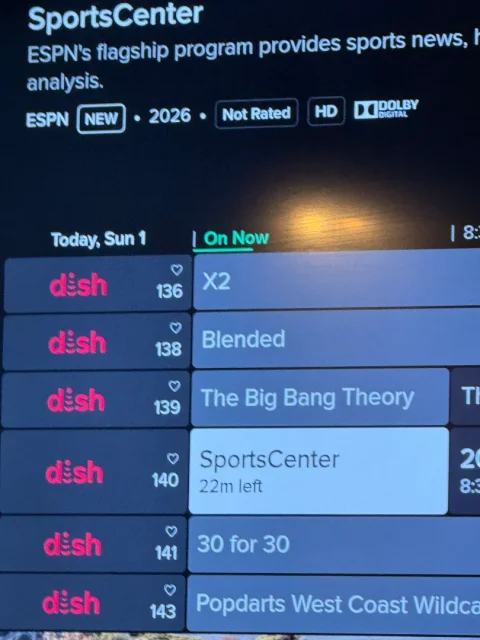
1 Replies
·
36 views