

Social Feed

What a box. With what time I've spent with FTA boxes, I spent my time learning FTA on the Coolsat 5000 and its sibling/twin the Coolsat 6000.
They are held as some of the best FTA/DVB-S receivers.
As for DVR's, I've only really used Windows Media Center and MythTV.
I figured the DVR-1100c had a pretty high standard to clear.
Arrival
=====================
Opened the box and found a remote, manual, RCA triple cable and the DVR-1100c.
Size-wise the box is approx. 1/4 inch wider than my Coolsats. Just enough to take notice, but not enough to be a bother.
Connectors
=====================
One USB on the back, a null serial interface, Component (YPbPr), S-Video (Y/C), Composite Video-outs, along with RCA Left/Right analog audio and a TOSLINK (optical) digital audio out.
It lacks a RCA/Coaxial digital audio out and a front USB port
Front Panel
=====================
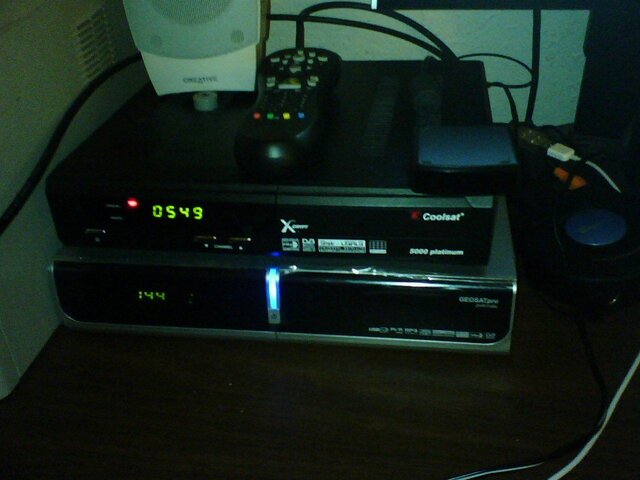
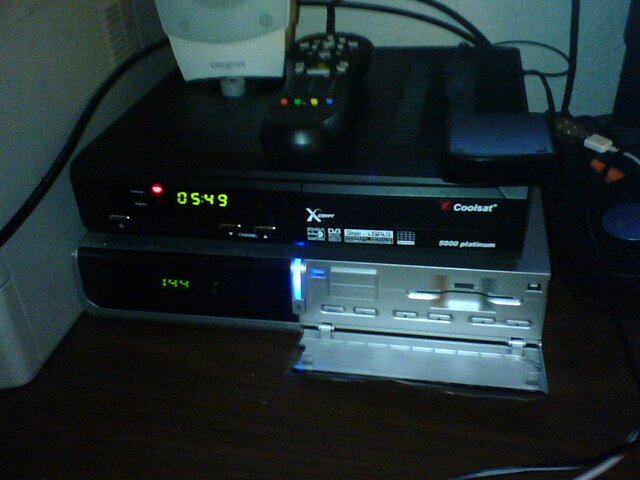
The front panel is clean and smooth.
On the left 4 digit panel shows time, channel number, PLAY, or rEC depending on the unit's status
A red LED is lit for unit being in standby or when a remote keypress is received.
The green LED becomes lit when the unit is on.
A vertical blue light bar is lit when the unit is on. The color is similar to the blue that usually you want to cover up, but this is dim enough that it is completely unnecessary.
Below it is the front panel power button.
Behind the flip down panel on the right, the buttons for MENU, OK, Channel Up, Channel Down, Volume Up and Volume Down.
Above the buttons sit a Smart card reader. The documentation states that I can put a Viaaccess or Irdeto card in there and everything should work. (If it takes Irdeto 2, I'll be a happy camper since I'll be able to sub Setanta, at least in theory.)
Installation
=====================
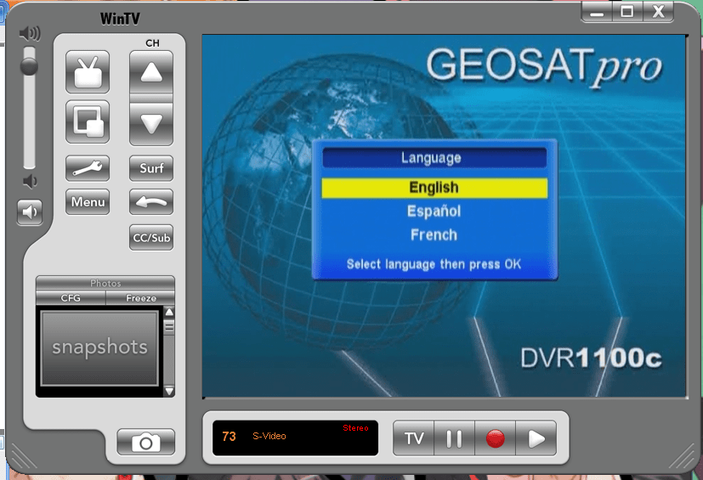
First thing it asked me was Language and presented me with the North American standard of "English/Spanish/French"
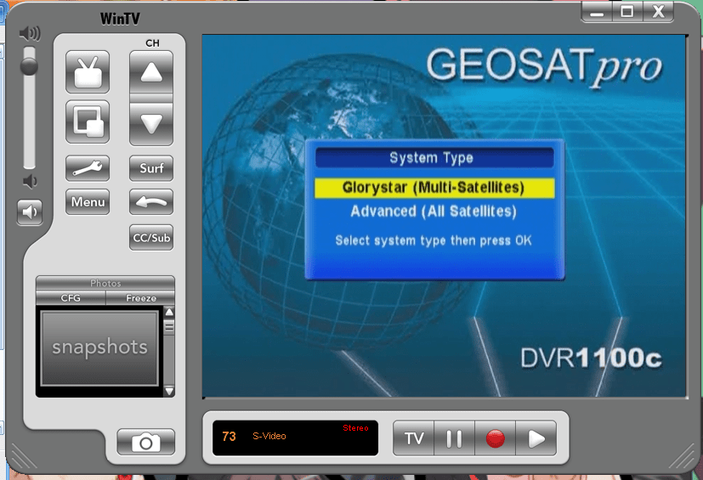
After pressing enter it presented me with the most perplexing, yet pressing question.
Glorystar(Multi-Satellite) or Advanced(All-Satellite)
For the review I'll go through the Glorystar side as well but I originally chose Advanced when I got it
Glorystar(Multi-Satellite)
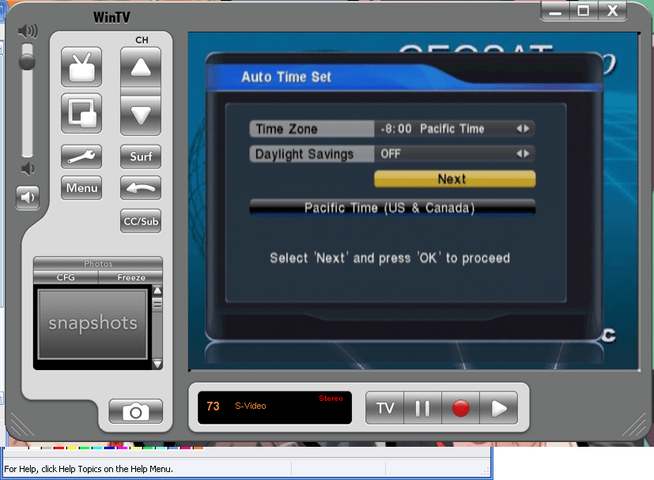
I was presented with a timezone selection.
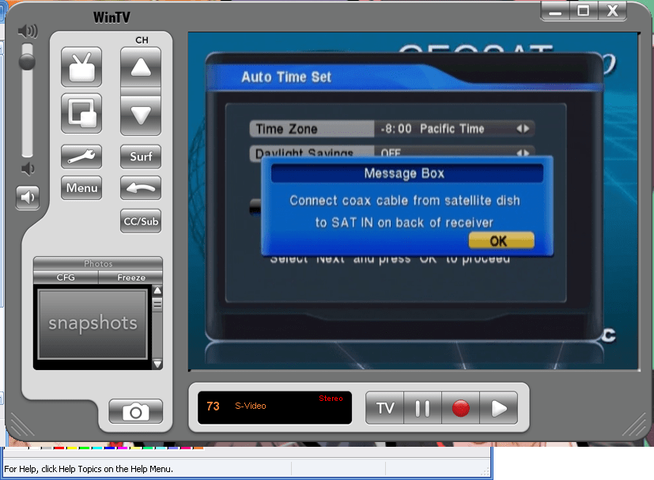
Next the box prompted me with a real shocker. "Connect coax cable from Satellite dish to SAT IN." Of all the habits not to get into, hooking up a satellite system into a live box is a good way to fry parts.
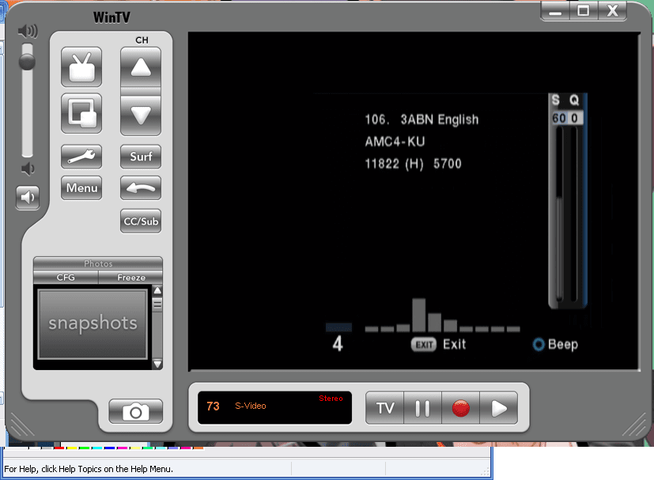
After hitting enter, the screen showed what I presumed to be the signal screen. A dull pulse was coming from the speakers now. Hitting the blue button would silence it. Looking over the screen once more the system wants to be aimed to watch 3ABN on AMC4 at 101W
Too bad I won't get far with that. My system is such a mix that I'd be shocked that the defaults were the same.
Time to dive into the menus and see what we have in store for customization.
Menu
=====================
The Menu is divided into 5 sections,
Setup
=====================
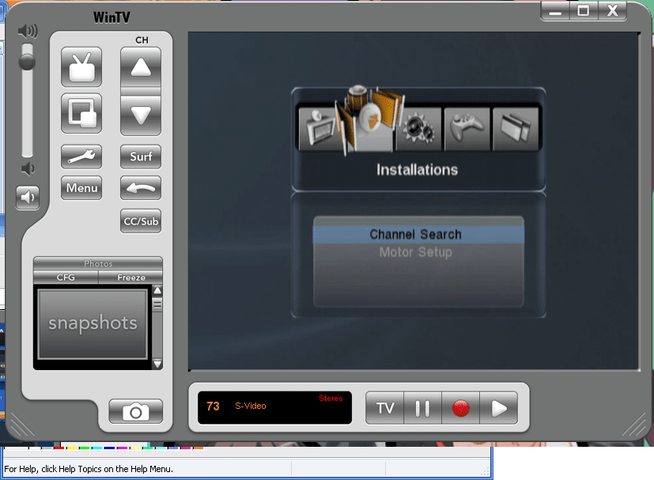
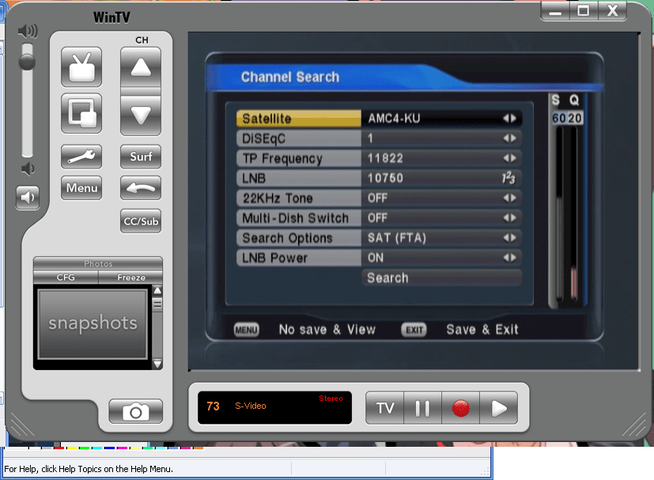
Channel search is the menu we want for setting the system up.
Now the names of the satellites and transponder were a bit out of date when I chose Glorystar mode and were even further out of date when I chose Advanced mode.
See USB down below for how to update.
After updating the transponders via Channelmaster/USB, I poked around at the various ways to setup dishes on this box
It allows for Diseqc 1.0 as well as Legacy DishNet SW21, SW42, SW44, SW64 and 22kHz tone.
There is no Diseqc 1.1 support, but it does USALS and Diseqc 1.2
I can't comment on Motor functionality as I don't have a motor.
The fact that it allowed for SW21 made me giddy since I had some sitting around from my Starband Dish that came with some. These SW21's now had some legitimate use.
There is quite the list of LO's on this box.
There is the standard 5150,10750,10600,9750,11250 but it also has Dishpro, Dishpro FSS, 5150(0kHz)/10750(22kHz) and some others.
In setting up the system, if you type in the LO frequency instead of pressing OK and selecting it from the list presented, the next time that satellite is brought up first when reentering the satellite setup, the LO will be 0 instead of what you had previously punched in.
(To reproduce: Menu -> Right-> OK -> manually punch in LO;save and exit; exit and view a channel on the same satellite that you manually punched in that LO for; Menu -> Right-> OK -> LO is now 0)
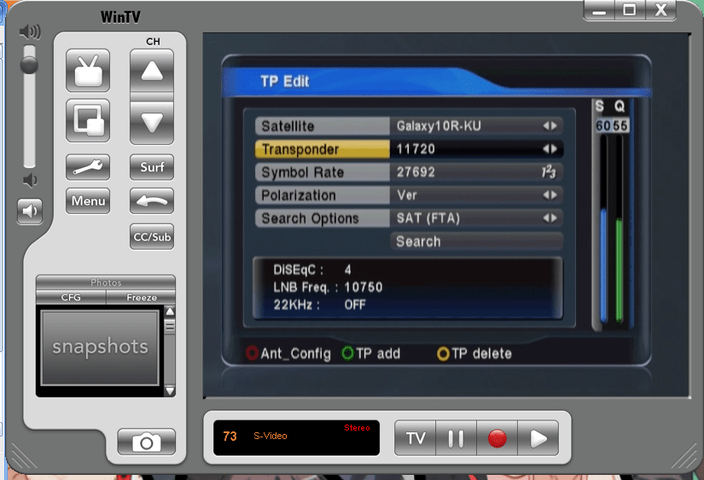
Now the transponder edit function (hit the red Teletext button in Channel search) make editing a transponder a breeze. On my Coolsats, I can't edit the frequency of a transponder on the box itself (without losing the channels), I have to drag it over to my computer and edit it via Channelmaster.
On the DVR-1100c I can edit them without making a fuss at all.
Searches can be done by All Channels, SAT(FTA), One TP, One TP (FTA) and of course Blind Scan
Each search definitely takes longer than my Coolsats but not enough that it makes me annoyed or wanting to time it.
Blindscan has 3 refining options.
Freq. steps defaults to 4MHz and steps are in 2,4,6,8,10 Mhz
Symbol rates defaults to all and offers 8000 over, 8000 under, 8000~4000, 4000 over, 4000 under selections.
Polarity defaults to All and offers Horizontal, Vertical
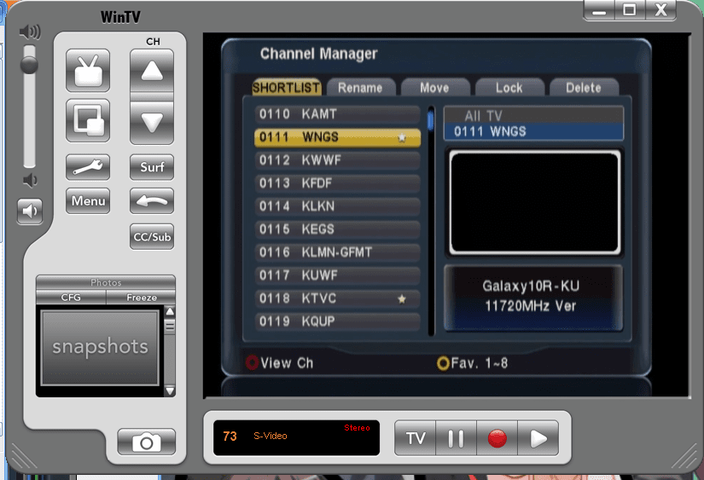
The Channel Manager is quite complete except for the lack of PID/VID/AID editing.
Brian said that that part was in the works but if you can just use channel master you should be fine.
USB
=====================
Well after bugging Brain about it, he pointed out that I just needed to make my list in Channelmaster and to Import/Export it as a Conaxsat list. What a breeze...
Load it on a USB drive, hit Menu -> Left -> Left -> Down -> OK and push up once to go to the last thing added to the drive. Hit OK again and it loads right up.
Backing up satellites, channels and transponders easy as well in the USB menu. Enter the USB menu and hit the green button. It asks you if you want to back up Channel data make a Software backup.
Now the software backup doesn't seem to make a save of the timer events, which I'll get to later on how annoying that gets.
You are also able to delete files from this menu
Everything is sorted by creation date so this may feel a bit odd to some but for a DVR this is the most logical choice.
General Use (Viewing)
=====================
As a general use FTA box, I think this is the one for the family room. With 8 Favorite lists, most families will be taken care of.
TV channels are numbered starting at 100 with radio channels starting at 1000
Volume adjustment on the DVR will affect the volume coming out of the optical out.
My Coolsats do not do this.
The remote has a orange button for bringing up the signal meter. This was the meter I had been looking for. Where the Coolsats got stuck (while locked-important detail here) the DVR meter would move and show improvements through 10 points. Finally I could fine tune!
Much of the screen space is taken by the 10 bars that show the previous 5 seconds.
Annoyingly though, It automatically gives off one of 2 tones depending on if it is locked or not. High pitched for locked and low-pitched for not locked. The sound is turned off by pressing the blue button.
However I must warn that this signal meter is not nearly as useful for putting up new dishes as my Coolsats are. The meter does not react until the unit has enough for a lock.
As far as sensitivity goes, this unit beats my Coolsats in viewing. On the Coolsat meter this unit is able to lock and keep a presentable picture and sound up to 3%(coolsat meter) lower than my Coolsats threshold. This makes it quite the winner in my book.
The difference is enough that I could get MHzWorldwide (a 2/3 FEC), solid and perfect picture, on a Voom dish (26"x24" or 68cm according to global-cm) in a 80cm if contour maps are to be believed) while my Coolsats would block up, green-screen, and squelch at me.
It's enough of a difference that my grandparents are getting this DVR now that I'm done with this review. It's always that last 3 percent that ruins FTA for them.
Now once the DVR reception breaks threshold and has a lock, it can use error correction to hold a presentable picture and sound at 5 points below threshold (on the DVR meter)
Meter equivalents
Time Machine
=====================
Time machine wants to make a "swap file" to work.
It lets you choose 512MB (15 Mins.), 1GB (30 Mins.), 2GB (1 Hour) or 4GB (2 Hours).
It creates the file and "enables" the time machine features.
I constantly get interrupted with little things and love to be able to "catch-up" to what's on.
Time Machine allows me to Pause the channel, walk away, come back withing a certain amount of time (depends on swap file size) an pick right back up.
Caveat: Time Machine watching is not saved as a future-watchable file
This feature allows seamless pausing, skipping and shifting to and from record mode.
It worked great on lower bitrate channels like the Equity channels found on G18.
However when I switched to an AC3 audio station like RetroJams the unit wanted to freeze up/lock up.
Funny enough if I paused for 10 seconds and then hit play, I could watch it for almost any length of time on the USB Hard Drive (Seagate 160GB, 2MB cache)
My Sandisk USB flash drives were good enough to record on, but not quite fast enough to record and playback in a reasonably responsive fashion.
While on the Seagate drive the unit would pause and playback within a second of pressing the button on the remote. However with the Sandisk flash drives, the unit could take as long as 5 second or more to start or stop. So get yourself a magnetic hard drive
This cool feature has one annoying problem. If at anytime the disk gets removed, unplugged or otherwise unreachable by the DVR, TimeMachine becomes disabled. Even after the drive becomes avalible, Time Machine will stay disabled I asked Brian at SatelliteAV about this and was told that the problem was in the chipset and wasn't fixable. Not that I found this to be a problem with the full functionality of the DVR.
Hitting the pause button in normal mode with Time Machine disabled will start a new recording.
Recording
=====================
The unit records in a .ts (transport stream) file.
The file size gets to be about 1.5 GB per hour. I got these numbers recording MhzWorldwide @ 97W, RTNTurnaround @ 123W (before it was scrambled) and Whitesprings @ 129W
The naming scheme is a tad funny but it works alright for me.
CHANNELNAME|MONTH|DAY|HOUR|SECOND.ts or MHzWorldwide0124021009.ts
MHzWorldwide0124021009.ts would have been recorded starting at Jan 24 at 2:10:09 AM
I was pleased to see an "open" format like the transport stream but I had some trouble on my computers trying to play it back.
I got mplayer in Ubuntu 8.10 to play it.
Totem (Ubuntu's default media player) complained of needing a MPEG-2 codec.
The newest version of VLC, 0.9.8, wouldn't play the TS files back.
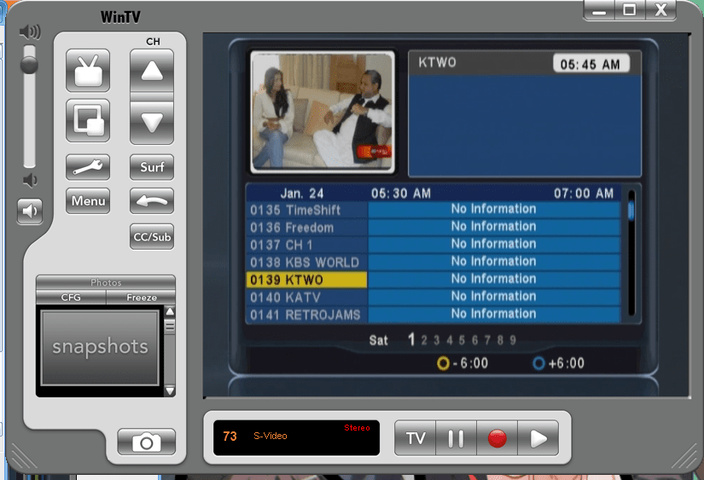
Since Program Guide info doesn't exist in North America for all but a few channels FTA, 8 recording timer events are all this box has to offer as far as automatic recording. These are all lost in the event of a power loss (Yes switching the power switch on the back will lose the timer events)
Caveat: The DVR will not stop your playback (let's say you're watching a previous recording or you hit pause on a Live show and are now in Record mode) to automatically start recording your timed event. Sometime you'll like it, other times you'll hate it. Positive or Negative, you decide.
The timer events will activate recording even if the start time has passed.
This is a good thing.
Also the unit will wake from standby to make a recording then go back into to standby.
NOTE: To exit PLAY(back) mode or REC(ord) mode you will need to press the stop button and not the exit button.
Playback
=====================
If you tap "play" on the remote it brings up the USB menu for play back here you can play MP3 audio or play the .ts recordings here.
The box says it can show JPEG files but all I've ever gotten was blank screen 'till I hit the exit button.
As far as skipping and jumping back and forth goes, the double up button offers 30 second jumps forward while the double down button on the remote offers 5 second jumps back. With the info bar up, pushing the left and right buttons make jumps in 5 minute increments making recordings of more than an hour easy to jump to a major spot.
Leaving a recording and coming back to it later starts the recording from the beginning. It does not remember where you left off.
Final thoughts
=====================
This is a great box for a finished satellite system. If you're not looking for an HD box, but want a DVR addition to your system, I seriously recommend this to be your next FTA box.
I couldn't use this for aiming, but definitely will be using it for fine-tuning.
=========================================================
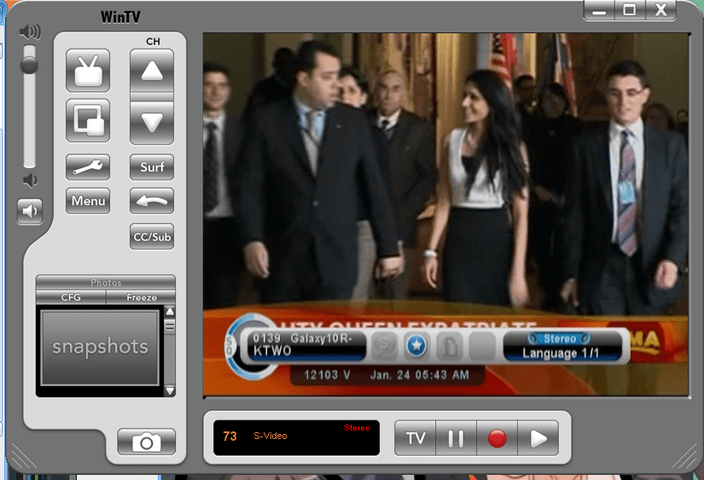
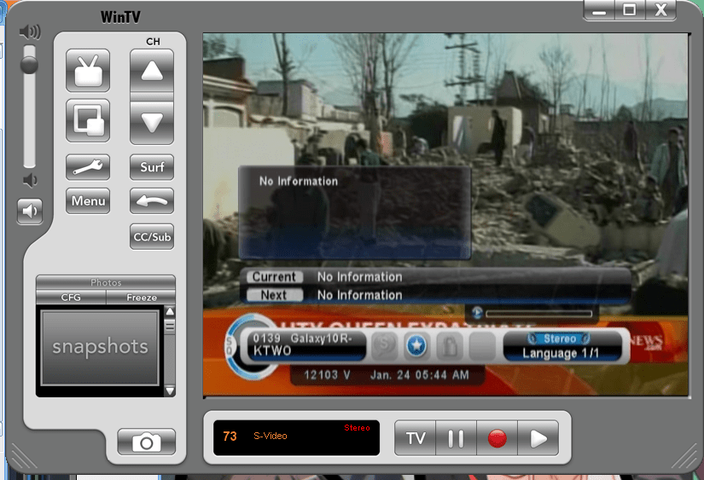
Unfortunately I didn't take any presentable pictures of the unit, and I won't be around the unit until Thursday to get good shots of the front, back and remote.
They are held as some of the best FTA/DVB-S receivers.
As for DVR's, I've only really used Windows Media Center and MythTV.
I figured the DVR-1100c had a pretty high standard to clear.
Arrival
=====================
Opened the box and found a remote, manual, RCA triple cable and the DVR-1100c.
Size-wise the box is approx. 1/4 inch wider than my Coolsats. Just enough to take notice, but not enough to be a bother.
Connectors
=====================
One USB on the back, a null serial interface, Component (YPbPr), S-Video (Y/C), Composite Video-outs, along with RCA Left/Right analog audio and a TOSLINK (optical) digital audio out.
It lacks a RCA/Coaxial digital audio out and a front USB port
Front Panel
=====================
The front panel is clean and smooth.
On the left 4 digit panel shows time, channel number, PLAY, or rEC depending on the unit's status
A red LED is lit for unit being in standby or when a remote keypress is received.
The green LED becomes lit when the unit is on.
A vertical blue light bar is lit when the unit is on. The color is similar to the blue that usually you want to cover up, but this is dim enough that it is completely unnecessary.
Below it is the front panel power button.
Behind the flip down panel on the right, the buttons for MENU, OK, Channel Up, Channel Down, Volume Up and Volume Down.
Above the buttons sit a Smart card reader. The documentation states that I can put a Viaaccess or Irdeto card in there and everything should work. (If it takes Irdeto 2, I'll be a happy camper since I'll be able to sub Setanta, at least in theory.)
Installation
=====================
First thing it asked me was Language and presented me with the North American standard of "English/Spanish/French"
After pressing enter it presented me with the most perplexing, yet pressing question.
Glorystar(Multi-Satellite) or Advanced(All-Satellite)
For the review I'll go through the Glorystar side as well but I originally chose Advanced when I got it
Glorystar(Multi-Satellite)
I was presented with a timezone selection.
Next the box prompted me with a real shocker. "Connect coax cable from Satellite dish to SAT IN." Of all the habits not to get into, hooking up a satellite system into a live box is a good way to fry parts.
After hitting enter, the screen showed what I presumed to be the signal screen. A dull pulse was coming from the speakers now. Hitting the blue button would silence it. Looking over the screen once more the system wants to be aimed to watch 3ABN on AMC4 at 101W
Too bad I won't get far with that. My system is such a mix that I'd be shocked that the defaults were the same.
Time to dive into the menus and see what we have in store for customization.
Menu
=====================
The Menu is divided into 5 sections,
Code:
Channel Manager | Installations  |    Options    |     Utility     |  Accessory
=================================================================================
Channel Manager | Channel Search |   OSD Setup   |   System Info   | Time Machine
                | Motor Setup    | Control Panel |       USB       |     OTA
                                 |  System Info  |   Time Record   | Smart Card
| Time Adjust | Factory Default |=====================
Channel search is the menu we want for setting the system up.
Now the names of the satellites and transponder were a bit out of date when I chose Glorystar mode and were even further out of date when I chose Advanced mode.
See USB down below for how to update.
After updating the transponders via Channelmaster/USB, I poked around at the various ways to setup dishes on this box
It allows for Diseqc 1.0 as well as Legacy DishNet SW21, SW42, SW44, SW64 and 22kHz tone.
There is no Diseqc 1.1 support, but it does USALS and Diseqc 1.2
I can't comment on Motor functionality as I don't have a motor.
The fact that it allowed for SW21 made me giddy since I had some sitting around from my Starband Dish that came with some. These SW21's now had some legitimate use.
Code:
Unrelated Side note: Diplexed ATSC reception take a -10dB hit when Dish 2 is selected
ATSC->|Diplexer|--12'->|Diplexer|->Antenna
DVR ->|                         |-> SW21|--50'-> DiSEqC 1.0 -> Starband @ 119W/123W/129W
                                        |--25'-> Voom/UL1 @ 97W
There is the standard 5150,10750,10600,9750,11250 but it also has Dishpro, Dishpro FSS, 5150(0kHz)/10750(22kHz) and some others.
In setting up the system, if you type in the LO frequency instead of pressing OK and selecting it from the list presented, the next time that satellite is brought up first when reentering the satellite setup, the LO will be 0 instead of what you had previously punched in.
(To reproduce: Menu -> Right-> OK -> manually punch in LO;save and exit; exit and view a channel on the same satellite that you manually punched in that LO for; Menu -> Right-> OK -> LO is now 0)
Now the transponder edit function (hit the red Teletext button in Channel search) make editing a transponder a breeze. On my Coolsats, I can't edit the frequency of a transponder on the box itself (without losing the channels), I have to drag it over to my computer and edit it via Channelmaster.
On the DVR-1100c I can edit them without making a fuss at all.
Searches can be done by All Channels, SAT(FTA), One TP, One TP (FTA) and of course Blind Scan
Each search definitely takes longer than my Coolsats but not enough that it makes me annoyed or wanting to time it.
Blindscan has 3 refining options.
Freq. steps defaults to 4MHz and steps are in 2,4,6,8,10 Mhz
Symbol rates defaults to all and offers 8000 over, 8000 under, 8000~4000, 4000 over, 4000 under selections.
Polarity defaults to All and offers Horizontal, Vertical
The Channel Manager is quite complete except for the lack of PID/VID/AID editing.
Brian said that that part was in the works but if you can just use channel master you should be fine.
USB
=====================
Well after bugging Brain about it, he pointed out that I just needed to make my list in Channelmaster and to Import/Export it as a Conaxsat list. What a breeze...
Load it on a USB drive, hit Menu -> Left -> Left -> Down -> OK and push up once to go to the last thing added to the drive. Hit OK again and it loads right up.
Backing up satellites, channels and transponders easy as well in the USB menu. Enter the USB menu and hit the green button. It asks you if you want to back up Channel data make a Software backup.
Now the software backup doesn't seem to make a save of the timer events, which I'll get to later on how annoying that gets.
You are also able to delete files from this menu
Everything is sorted by creation date so this may feel a bit odd to some but for a DVR this is the most logical choice.
General Use (Viewing)
=====================
As a general use FTA box, I think this is the one for the family room. With 8 Favorite lists, most families will be taken care of.
TV channels are numbered starting at 100 with radio channels starting at 1000
Volume adjustment on the DVR will affect the volume coming out of the optical out.
My Coolsats do not do this.
The remote has a orange button for bringing up the signal meter. This was the meter I had been looking for. Where the Coolsats got stuck (while locked-important detail here) the DVR meter would move and show improvements through 10 points. Finally I could fine tune!
Much of the screen space is taken by the 10 bars that show the previous 5 seconds.
Annoyingly though, It automatically gives off one of 2 tones depending on if it is locked or not. High pitched for locked and low-pitched for not locked. The sound is turned off by pressing the blue button.
However I must warn that this signal meter is not nearly as useful for putting up new dishes as my Coolsats are. The meter does not react until the unit has enough for a lock.
As far as sensitivity goes, this unit beats my Coolsats in viewing. On the Coolsat meter this unit is able to lock and keep a presentable picture and sound up to 3%(coolsat meter) lower than my Coolsats threshold. This makes it quite the winner in my book.
The difference is enough that I could get MHzWorldwide (a 2/3 FEC), solid and perfect picture, on a Voom dish (26"x24" or 68cm according to global-cm) in a 80cm if contour maps are to be believed) while my Coolsats would block up, green-screen, and squelch at me.
It's enough of a difference that my grandparents are getting this DVR now that I'm done with this review. It's always that last 3 percent that ruins FTA for them.
Now once the DVR reception breaks threshold and has a lock, it can use error correction to hold a presentable picture and sound at 5 points below threshold (on the DVR meter)
Meter equivalents
Code:
FEC Threshold:      *  1/2  3/4  5/6  7/8  Perfect
==================================================
DVR-1100c    : 0----7---30---40---50---59--(>70)
Coolsat 5000 : 0---20---60---63---66---69--(>72)
Coolsat 6000 : 0---20---60---63---66---69--(>87)

* : Almost on the satellite when aiming.=====================
Time machine wants to make a "swap file" to work.
It lets you choose 512MB (15 Mins.), 1GB (30 Mins.), 2GB (1 Hour) or 4GB (2 Hours).
It creates the file and "enables" the time machine features.
I constantly get interrupted with little things and love to be able to "catch-up" to what's on.
Time Machine allows me to Pause the channel, walk away, come back withing a certain amount of time (depends on swap file size) an pick right back up.
Caveat: Time Machine watching is not saved as a future-watchable file
This feature allows seamless pausing, skipping and shifting to and from record mode.
It worked great on lower bitrate channels like the Equity channels found on G18.
However when I switched to an AC3 audio station like RetroJams the unit wanted to freeze up/lock up.
Funny enough if I paused for 10 seconds and then hit play, I could watch it for almost any length of time on the USB Hard Drive (Seagate 160GB, 2MB cache)
My Sandisk USB flash drives were good enough to record on, but not quite fast enough to record and playback in a reasonably responsive fashion.
While on the Seagate drive the unit would pause and playback within a second of pressing the button on the remote. However with the Sandisk flash drives, the unit could take as long as 5 second or more to start or stop. So get yourself a magnetic hard drive
This cool feature has one annoying problem. If at anytime the disk gets removed, unplugged or otherwise unreachable by the DVR, TimeMachine becomes disabled. Even after the drive becomes avalible, Time Machine will stay disabled I asked Brian at SatelliteAV about this and was told that the problem was in the chipset and wasn't fixable. Not that I found this to be a problem with the full functionality of the DVR.
Hitting the pause button in normal mode with Time Machine disabled will start a new recording.
Recording
=====================
The unit records in a .ts (transport stream) file.
The file size gets to be about 1.5 GB per hour. I got these numbers recording MhzWorldwide @ 97W, RTNTurnaround @ 123W (before it was scrambled) and Whitesprings @ 129W
The naming scheme is a tad funny but it works alright for me.
CHANNELNAME|MONTH|DAY|HOUR|SECOND.ts or MHzWorldwide0124021009.ts
MHzWorldwide0124021009.ts would have been recorded starting at Jan 24 at 2:10:09 AM
I was pleased to see an "open" format like the transport stream but I had some trouble on my computers trying to play it back.
I got mplayer in Ubuntu 8.10 to play it.
Totem (Ubuntu's default media player) complained of needing a MPEG-2 codec.
The newest version of VLC, 0.9.8, wouldn't play the TS files back.
Since Program Guide info doesn't exist in North America for all but a few channels FTA, 8 recording timer events are all this box has to offer as far as automatic recording. These are all lost in the event of a power loss (Yes switching the power switch on the back will lose the timer events)
Caveat: The DVR will not stop your playback (let's say you're watching a previous recording or you hit pause on a Live show and are now in Record mode) to automatically start recording your timed event. Sometime you'll like it, other times you'll hate it. Positive or Negative, you decide.
The timer events will activate recording even if the start time has passed.
This is a good thing.
Also the unit will wake from standby to make a recording then go back into to standby.
NOTE: To exit PLAY(back) mode or REC(ord) mode you will need to press the stop button and not the exit button.
Playback
=====================
If you tap "play" on the remote it brings up the USB menu for play back here you can play MP3 audio or play the .ts recordings here.
The box says it can show JPEG files but all I've ever gotten was blank screen 'till I hit the exit button.
As far as skipping and jumping back and forth goes, the double up button offers 30 second jumps forward while the double down button on the remote offers 5 second jumps back. With the info bar up, pushing the left and right buttons make jumps in 5 minute increments making recordings of more than an hour easy to jump to a major spot.
Leaving a recording and coming back to it later starts the recording from the beginning. It does not remember where you left off.
Final thoughts
=====================
This is a great box for a finished satellite system. If you're not looking for an HD box, but want a DVR addition to your system, I seriously recommend this to be your next FTA box.
I couldn't use this for aiming, but definitely will be using it for fine-tuning.
=========================================================
Unfortunately I didn't take any presentable pictures of the unit, and I won't be around the unit until Thursday to get good shots of the front, back and remote.

1 Replies
·
3338 views
TWiT Tech Podcast Network
Time for another AWESOME video from the TWIT Network!
View: https://www.youtube.com/shorts/oRVxjGm0qtE
Direct YouTube Link - Tim Cook, Elton John & King Charles: A Royal Tech Event
TWIT's Website
TWIT Live Feed
View: https://www.youtube.com/shorts/oRVxjGm0qtE
Direct YouTube Link - Tim Cook, Elton John & King Charles: A Royal Tech Event
TWIT's Website
TWIT Live Feed
0 Replies
·
1 views
TFLEV
Time for another AWESOME video from TFL Electric Vehicles!
View: https://www.youtube.com/watch?v=MyF_RH1m0mc
Direct YouTube Link - Watch the New Tesla Roadster Jump, Fly and Barrel-Roll in Mid-Air!
View: https://www.youtube.com/watch?v=MyF_RH1m0mc
Direct YouTube Link - Watch the New Tesla Roadster Jump, Fly and Barrel-Roll in Mid-Air!
0 Replies
·
7 views
TWiT Tech Podcast Network
Time for another AWESOME video from the TWIT Network!
View: https://www.youtube.com/shorts/0k5iT-OlpdE
Direct YouTube Link - The Apple HomeView
TWIT's Website
TWIT Live Feed
View: https://www.youtube.com/shorts/0k5iT-OlpdE
Direct YouTube Link - The Apple HomeView
TWIT's Website
TWIT Live Feed
0 Replies
·
2 views

Pub Member / Supporter
2 Replies
·
55 views


I thought I would come here and find lots of complaints about the update to the dish anywhere mobile app, but am not seeing any. It used to look just like the desktop webpage. Now you can no longer filter by sports channels or movie channels. Plus that they made it look like a big button telephone and you see fewer channels in the screen which requires more scrolling. Yes I realize you can look at sports then select which sport you want to look at, I just liked being able to see all sporting events in the guide with all other channels being filtered out. Am I alone in the wilderness on this?
3 Replies
·
56 views


Anyone else watch this show? Any guesses as to what was in the box Gibbs gave to Abby that was on her desk? It look liked it was glowing.
I also heard that someone was leaving the show at the end of this season. Any guesses as to who thats going to be?
I also heard that someone was leaving the show at the end of this season. Any guesses as to who thats going to be?
2132 Replies
·
214683 views


 Tony is not serious enough for me. Parker is too close to the team and Tim is too young to take over IMO.
Pub Member / Supporter
Lifetime Supporter
Might be worth a watch when it comes out. Looks like typical big corp against the little guy movie BUT....there is a reason this plot type is so oft repeated, it draws audiences.
View: https://www.youtube.com/watch?v=_-f9OGsKHd4
View: https://www.youtube.com/watch?v=_-f9OGsKHd4
1 Replies
·
11 views

Lifetime Supporter
If you're going try to read / listen to the book (can't recommend the audio book enough) before this comes out, I'd avoid trailers.
Trailer below, spoiling it to make sure you read the above bold message first. The book / audio book are fantastic. Go into this blind if you can IMO!
Kind of disappointed at how much they show. A lot still to see, but man, some good reveals in the book that are just served up here.
Trailer below, spoiling it to make sure you read the above bold message first. The book / audio book are fantastic. Go into this blind if you can IMO!
Kind of disappointed at how much they show. A lot still to see, but man, some good reveals in the book that are just served up here.
21 Replies
·
715 views


Lifetime Supporter
Schedule drops tomorrow. Mandatory mini camps in June. Hall of Fame game August 6th.
110 Replies
·
1619 views




Pub Member / Supporter
Lifetime Supporter
I had quit watching this show years ago because I ended up more annoyed than entertained. Well......I'm STILL more annoyed than entertained. I DO find it interesting to see how things work behind the scenes at many businesses. What annoys me is how utterly out of touch CEOs are with the companies they run. At the end of almost every episode the head of the company is amazed at how hard the employees have to work and many times have to work around impossible guidelines set forth from headquarters.
I found this one interesting because the new CEO had big plans for this company, Muscle Maker Grill, and it looked like the stores were all pretty busy. Recent history hasn't been good to this company however. I bet the covid lockdowns were the real killer.
View: https://www.youtube.com/watch?v=yIhZm0qkz0o
I found this one interesting because the new CEO had big plans for this company, Muscle Maker Grill, and it looked like the stores were all pretty busy. Recent history hasn't been good to this company however. I bet the covid lockdowns were the real killer.
View: https://www.youtube.com/watch?v=yIhZm0qkz0o
0 Replies
·
9 views