

Social Feed
Space Shuttle Mission: STS-119 to the ISS due for dock at 5:12 p.m. EDT. Shuttle is about 7 miles out from the Space Station and NASA has live video from the ISS right now! (NASA is on the EchoStar 7 bird at 119.0 west -IN THE CLEAR FTA -Circular- 12372 (R/V) 20000 for all the newbie's that don't know) For BUD Boys 137.0°W AMC 7 C-Band 4060 V 26664 & 72.0°W AMC 6 C-Band 4040 V 26667.
STS-119 Latest News
Discovery Performs Terminal Initiation Burn
Tue, 17 Mar 2009 02:42:53 PM EDT
Space shuttle Discovery's Terminal Initiation burn is complete, placing the shuttle on a direct path to the International Space Station for the 5:12 p.m. EDT docking.
STS-119 Latest News
Discovery Begins Back Flip
Tue, 17 Mar 2009 04:27:51 PM EDT

Space shuttle Discovery is about 600 feet underneath the International Space Station and is starting to perform a back flip. This nine-minute Rendezvous Pitch Maneuver will expose Discovery's heat shield to the space station, enabling Expedition 18 crew members Mike Fincke and Sandra Magnus to snap high-resolution digital photos that will be analyzed by imagery experts at the Johnson Space Center in Houston. Once the back flip is complete, Discovery will move from underneath to in front of the station and slowly close the gap. Docking is expected at 5:12:46 p.m. EDT.
STS-119 Latest News
Discovery GO FOR DOCKING! At 415 ft apart.

Mission Control in Houston gave Discovery a "go" for docking at 4:40 p.m. EDT. Discovery is moving from underneath the International Space Station to about 400 feet in front of it and still is on target to dock at 5:12:46 p.m.
STS-119 Latest News
Discovery at 18 Feet out to dock with ISS
Tue, 17 Mar 2009 05:17:23 PM EDT
STS-119 Latest News
Discovery Capture Confirmed! Docked with ISS
Tue, 17 Mar 2009 05:20:13 PM EDT
Waiting for hard mate final lock. Moving the shuttle to dock lock from orbital night to orbital day nearing Western Australia.
STS-119 Latest News
Discovery Hard Mate Final Lock To ISS
Tue, 17 Mar 2009 05:23:33 PM EDT
STS-119 Latest News
Discovery Docks to International Space Station
Tue, 17 Mar 2009 05:25:21 PM EDT
At 5:19:53: p.m. EDT, Space shuttle Discovery docked to the Pressurized Mating Adaptor on the front of the International Space Station's Harmony module. Docking occurred over Lake Wells, western Australia. During the next eight days, the combined crews of Discovery and the station will install the S6 truss, complete three spacewalks and transfer hundreds of items between the two craft. Hatches between Discovery and the station will be opened at about 7 p.m., followed by the traditional welcoming ceremony. At about 7:30 p.m., Japan Aerospace Exploration Agency Astronaut will become a member of the station's Expedition 18 crew and Sandra Magnus will become a member of Discovery's crew. Magnus will have been a space station crew member for 121 days.
STS-119 Latest News
Shuttle Discovery crew arrives aboard the ISS at 7:10 PM
Tue, 17 Mar 2009 07:10:03 PM EDT
STS-119 Latest News
Hatches Opened at 7:09 p.m. EDT
Tue, 17 Mar 2009 07:13:41 PM EDT
Hatches between space shuttle Discovery and the International Space Station are open and the astronauts are assembling in the Harmony module for the welcoming ceremony. Space station commander Mike Fincke and Flight Engineers Sandra Magnus and Yury Lonchakov will welcome Discovery Commander Lee Archambault and his crew members Tony Antonelli, Joseph Acaba, Steve Swanson, Richard Arnold, John Phillips and Koichi Wakata.
At 7:15 p.m. EDT, or following the welcoming ceremony, NASA Television will carry a Mission Status Briefing with STS-119 Lead Shuttle Flight Director Paul Dye and Japan Aerospace Exploration Agency representative Kuniaki Shiraki.
At about 7:30 p.m., Japan Aerospace Exploration Agency Astronaut Wakata will become a member of the station's Expedition 18 crew and Sandra Magnus will become a member of Discovery's crew. Magnus will have been a space station crew member for 121 days.
STS-119 Latest News Final Edit On This Post
Tue, 17 Mar 2009 08:47:09 PM EDT
Post a new thread when they come home! Good Evening!!
Overview Launch:
March 15, 2009 7:43 p.m. EDT
Orbiter: Discovery
Mission Number: STS-119
(125th space shuttle flight)
Launch Window:10 minutes
Launch Pad: 39A
Mission Duration: 13 days
Landing Site: KSC
Inclination/Altitude: 51.6 degrees/122 nautical miles
Primary Payload:
28th station flight (15A), S6 truss segment
More Information:
NASA Website For More Information On The Shuttle & This Flight
Space Shuttle Mission: STS-119 Overview
Track The Shuttle STS-119 Here
Track The ISS (International Space Station) Here
NASA Live Tracking Here Showed last because the tracker may be unavailable at times due to heavy traffic on the site.
Can't watch it FTA? Watch NASA TV
Where to Land the Shuttle
Future Missions At NASA
Spectacular Chance to Spot Space Shuttle in Night Sky
This is a sight that should easily be visible to anyone, even from brightly-lit cities.
Want to know when a spacecraft will be flying over your city?
Click Here To Find Out!
For fellow ham operators out there in the forum
Your Guide To Monitoring The Space Shuttle
Shuttle Frequencies
===================
The Space Shuttle transmits on three frequency bands: UHF, S-Band, and
Ku-Band. The UHF frequencies are simple AM voice and are very easy to copy.
These frequencies are used for launch and landing operations, EVA operations,
and as an additional voice downlink when other channels are in use for the
current ground station has no S-Band capability.
The frequencies in use are:
296.800 MHz : Air-to-ground, or Orbiter to suit
259.700 MHz : Air-to-ground, or suit to Orbiter
279.000 MHz : Suit-to-Orbiter, or suit-to-suit
243.000 MHz : Standard military aircraft emergency frequency
The S-Band system is one of the primary Orbiter downlink bands. The voice
channels are digital slope delta modulated and are multiplexed in with the
rest of the Orbiter telemetry and is very difficult to copy. Much of the
downlink TV is on S-Band also, but is wideband FM and should be easy to copy.
The frequencies are:
2287.500 MHz - Primary digital downlink
2250.000 MHz - Wideband FM with either main engine analog telemetry during
launch, or TV during orbit operations.
The Ku-Band system is used in conjunction with the tracking and data relay
satellites and is used much more heavily in Spacelab flights than in others.
The data rate is very high (50 Mbit/s). These transmissions are directed
to TDRS satellites in geostationary orbit on a frequency of 15.003 GHz.
(Information via WA3NAN, and WA4SIR)
Ed Sileo (edsileo@qnet.com) says that Shuttle audio can be heard on 169.4
MHz at Edwards Air Force Base (EAFB). The transmitter site is on Lehman Ridge
on the east side of Edwards near the Astronautics Lab. This can be heard
during all flights since you never know when the shuttle may land at EAFB.
Shuttle Audio Retransmissions
=============================
Excerpt from the Goddard Amateur Radio Club (GARC) Shuttle Retransmission
Fact Sheet (from Jim Blackwell, N3KWU, HRSBLACKWELL@deblur.gsfc.nasa.gov)
Retransmission of Shuttle air-to-ground audio from the GARC (WA3NAN) may be
heard on the following frequencies:
Frequency Mode Antennas
(MHz)
3.860 SSB LSB N-S/E-W Dipoles
7.185 SSB LSB N-S/E-W Dipoles
14.295 SSB USB 3-element Yagi
21.395 SSB USB 5-element Yagi
28.650 SSB USB 4-element Yagi
147.45 FM Simplex Phased vertical
Where SSB is Single-Side-Band and LSB, USB indicate either Lower and Upper
Side Band. A short-wave receiver possessing a Beat Frequency Oscillator (BFO)
is needed to receive these transmissions.
GODSPEED

STS-119 Latest News
Discovery Performs Terminal Initiation Burn
Tue, 17 Mar 2009 02:42:53 PM EDT
Space shuttle Discovery's Terminal Initiation burn is complete, placing the shuttle on a direct path to the International Space Station for the 5:12 p.m. EDT docking.
STS-119 Latest News
Discovery Begins Back Flip
Tue, 17 Mar 2009 04:27:51 PM EDT
Space shuttle Discovery is about 600 feet underneath the International Space Station and is starting to perform a back flip. This nine-minute Rendezvous Pitch Maneuver will expose Discovery's heat shield to the space station, enabling Expedition 18 crew members Mike Fincke and Sandra Magnus to snap high-resolution digital photos that will be analyzed by imagery experts at the Johnson Space Center in Houston. Once the back flip is complete, Discovery will move from underneath to in front of the station and slowly close the gap. Docking is expected at 5:12:46 p.m. EDT.
STS-119 Latest News
Discovery GO FOR DOCKING! At 415 ft apart.
Mission Control in Houston gave Discovery a "go" for docking at 4:40 p.m. EDT. Discovery is moving from underneath the International Space Station to about 400 feet in front of it and still is on target to dock at 5:12:46 p.m.
STS-119 Latest News
Discovery at 18 Feet out to dock with ISS
Tue, 17 Mar 2009 05:17:23 PM EDT
STS-119 Latest News
Discovery Capture Confirmed! Docked with ISS
Tue, 17 Mar 2009 05:20:13 PM EDT
Waiting for hard mate final lock. Moving the shuttle to dock lock from orbital night to orbital day nearing Western Australia.
STS-119 Latest News
Discovery Hard Mate Final Lock To ISS
Tue, 17 Mar 2009 05:23:33 PM EDT
STS-119 Latest News
Discovery Docks to International Space Station
Tue, 17 Mar 2009 05:25:21 PM EDT
At 5:19:53: p.m. EDT, Space shuttle Discovery docked to the Pressurized Mating Adaptor on the front of the International Space Station's Harmony module. Docking occurred over Lake Wells, western Australia. During the next eight days, the combined crews of Discovery and the station will install the S6 truss, complete three spacewalks and transfer hundreds of items between the two craft. Hatches between Discovery and the station will be opened at about 7 p.m., followed by the traditional welcoming ceremony. At about 7:30 p.m., Japan Aerospace Exploration Agency Astronaut will become a member of the station's Expedition 18 crew and Sandra Magnus will become a member of Discovery's crew. Magnus will have been a space station crew member for 121 days.
STS-119 Latest News
Shuttle Discovery crew arrives aboard the ISS at 7:10 PM
Tue, 17 Mar 2009 07:10:03 PM EDT
STS-119 Latest News
Hatches Opened at 7:09 p.m. EDT
Tue, 17 Mar 2009 07:13:41 PM EDT
Hatches between space shuttle Discovery and the International Space Station are open and the astronauts are assembling in the Harmony module for the welcoming ceremony. Space station commander Mike Fincke and Flight Engineers Sandra Magnus and Yury Lonchakov will welcome Discovery Commander Lee Archambault and his crew members Tony Antonelli, Joseph Acaba, Steve Swanson, Richard Arnold, John Phillips and Koichi Wakata.
At 7:15 p.m. EDT, or following the welcoming ceremony, NASA Television will carry a Mission Status Briefing with STS-119 Lead Shuttle Flight Director Paul Dye and Japan Aerospace Exploration Agency representative Kuniaki Shiraki.
At about 7:30 p.m., Japan Aerospace Exploration Agency Astronaut Wakata will become a member of the station's Expedition 18 crew and Sandra Magnus will become a member of Discovery's crew. Magnus will have been a space station crew member for 121 days.
STS-119 Latest News Final Edit On This Post
Tue, 17 Mar 2009 08:47:09 PM EDT
Post a new thread when they come home! Good Evening!!
Overview Launch:
March 15, 2009 7:43 p.m. EDT
Orbiter: Discovery
Mission Number: STS-119
(125th space shuttle flight)
Launch Window:10 minutes
Launch Pad: 39A
Mission Duration: 13 days
Landing Site: KSC
Inclination/Altitude: 51.6 degrees/122 nautical miles
Primary Payload:
28th station flight (15A), S6 truss segment
More Information:
NASA Website For More Information On The Shuttle & This Flight
Space Shuttle Mission: STS-119 Overview
Track The Shuttle STS-119 Here
Track The ISS (International Space Station) Here
NASA Live Tracking Here Showed last because the tracker may be unavailable at times due to heavy traffic on the site.
Can't watch it FTA? Watch NASA TV
Where to Land the Shuttle
Future Missions At NASA
Spectacular Chance to Spot Space Shuttle in Night Sky
This is a sight that should easily be visible to anyone, even from brightly-lit cities.
Want to know when a spacecraft will be flying over your city?
Click Here To Find Out!
For fellow ham operators out there in the forum
Your Guide To Monitoring The Space Shuttle
Shuttle Frequencies
===================
The Space Shuttle transmits on three frequency bands: UHF, S-Band, and
Ku-Band. The UHF frequencies are simple AM voice and are very easy to copy.
These frequencies are used for launch and landing operations, EVA operations,
and as an additional voice downlink when other channels are in use for the
current ground station has no S-Band capability.
The frequencies in use are:
296.800 MHz : Air-to-ground, or Orbiter to suit
259.700 MHz : Air-to-ground, or suit to Orbiter
279.000 MHz : Suit-to-Orbiter, or suit-to-suit
243.000 MHz : Standard military aircraft emergency frequency
The S-Band system is one of the primary Orbiter downlink bands. The voice
channels are digital slope delta modulated and are multiplexed in with the
rest of the Orbiter telemetry and is very difficult to copy. Much of the
downlink TV is on S-Band also, but is wideband FM and should be easy to copy.
The frequencies are:
2287.500 MHz - Primary digital downlink
2250.000 MHz - Wideband FM with either main engine analog telemetry during
launch, or TV during orbit operations.
The Ku-Band system is used in conjunction with the tracking and data relay
satellites and is used much more heavily in Spacelab flights than in others.
The data rate is very high (50 Mbit/s). These transmissions are directed
to TDRS satellites in geostationary orbit on a frequency of 15.003 GHz.
(Information via WA3NAN, and WA4SIR)
Ed Sileo (edsileo@qnet.com) says that Shuttle audio can be heard on 169.4
MHz at Edwards Air Force Base (EAFB). The transmitter site is on Lehman Ridge
on the east side of Edwards near the Astronautics Lab. This can be heard
during all flights since you never know when the shuttle may land at EAFB.
Shuttle Audio Retransmissions
=============================
Excerpt from the Goddard Amateur Radio Club (GARC) Shuttle Retransmission
Fact Sheet (from Jim Blackwell, N3KWU, HRSBLACKWELL@deblur.gsfc.nasa.gov)
Retransmission of Shuttle air-to-ground audio from the GARC (WA3NAN) may be
heard on the following frequencies:
Frequency Mode Antennas
(MHz)
3.860 SSB LSB N-S/E-W Dipoles
7.185 SSB LSB N-S/E-W Dipoles
14.295 SSB USB 3-element Yagi
21.395 SSB USB 5-element Yagi
28.650 SSB USB 4-element Yagi
147.45 FM Simplex Phased vertical
Where SSB is Single-Side-Band and LSB, USB indicate either Lower and Upper
Side Band. A short-wave receiver possessing a Beat Frequency Oscillator (BFO)
is needed to receive these transmissions.
GODSPEED
2 Replies
·
2194 views


Pub Member / Supporter

Pissed off at the crappy healthcare costs
My health Insurance renewal for 2027 just came in. Going from $827 a month to $1,187 a month. Deductible going up a $1k to $9,350. Max out of pocket also going up $1k to $11,000. Doctor co-pay of $40. Urgent Care co-pay $50. ER 50% coinsurance after deductible. That's all in network. Out of network is double, should it be needed.
Have to think about this. I'm really tempted to just go without now. I only go to the doctor once or twice a year. I pay out of pocket for Tirzepitide and can do without the Rosuvastatin (crestor) now. Really tired of spending over $10k a year and getting nothing out of it.
After years with Blue Cross I switched last year to Ambetter as my Blue Cross premium was going from $1200 to $1800 for a Silver plan and the Bronze plan was still going to be $1300 at BCBS. Ambetter was $827 for the same coverage with a Bronze plan. Didn't think it would jump this much so soon.
I'm guessing a Silver plan is probably over $2,000 a month for 2027.
42 Replies
·
542 views


Staff member
HERE TO HELP YOU!
Cutting Edge
Sometimes a thread gets so many posts in it that is can cause issues for the server so that why today we introduce The Song Name Game Part 3!
So let the game continue!
The last song was added by Bobby who posted...
One Meat Ball - Andrews Sisters
CONTINUE ON AND HAVE FUN! WELCOME HOME TO SATELLITEGUYS.US!
Here are the original rules for the game as posted by WebbyDude back in 2006. http://www.satelliteguys.us/threads/68645-Song-Name-Game
Just name a song title and the band who performed it. The next person does the same thing, but needs to list a song title or band name which includes a word from the previous entry. Pick songs from any genre.
Example:
Long Live Rock and Roll -- Rainbow
Rainbow in the Dark -- Dio
Another example:
Ride the Lightning -- Metallica
Lightning Strikes -- Ozzy Osbourne
Get it?
An additional note: we all know that song titles, sometimes, use profane words. Because this is a family friendly website it is advised that you clean up that title up a bit. This is accomplished by using something like sh!t instead of the real word. Thanks....
So let the game continue!
The last song was added by Bobby who posted...
One Meat Ball - Andrews Sisters
CONTINUE ON AND HAVE FUN! WELCOME HOME TO SATELLITEGUYS.US!
Here are the original rules for the game as posted by WebbyDude back in 2006. http://www.satelliteguys.us/threads/68645-Song-Name-Game
Just name a song title and the band who performed it. The next person does the same thing, but needs to list a song title or band name which includes a word from the previous entry. Pick songs from any genre.
Example:
Long Live Rock and Roll -- Rainbow
Rainbow in the Dark -- Dio
Another example:
Ride the Lightning -- Metallica
Lightning Strikes -- Ozzy Osbourne
Get it?
An additional note: we all know that song titles, sometimes, use profane words. Because this is a family friendly website it is advised that you clean up that title up a bit. This is accomplished by using something like sh!t instead of the real word. Thanks....
68704 Replies
·
2682759 views


After having continuing trouble with my eight+ year old Dell Inspiron laptop I am looking to hopefully catch a good deal on new one. My options to buy is Costco and Sam's Club. It seems like a lot of new laptops are 2 in 1 which I do not need. I use the laptop to mainly surf the web and keep up with my finances, money and bills. I would like to have at least a 15" screen and having a touchscreen is a plus. The keyboard would need to lighted also. I don't game any. It would have to be Windows instead of and not Mac. The brands I see the most are Asus, Dell and HP. My two last laptops has been Dell's. Of these brands are there any standouts over the other brands. My budget (hopefully) is $600+-. Also while researching I noticed that do not have ethernet ports.
10 Replies
·
189 views


Supporting Founder
Really excited for this season with Kentucky having a new coach and some really exciting recruits. Probably won't last long, but here's hoping this season is great.
182 Replies
·
3145 views

Pub Member / Supporter
Lifetime Supporter
Was raining yesterday so I went to Sams up in Dothan to stock up on some things. Haven't been there in quite a while. I was amazed at how large most of the TVs were. When I walked in they had a 100 in Vizio (I think it was Vizio) that was marked down to something like $1,200. The first rows of TVs were all in the 80 in + sizes. The next couple of rows had the "smaller" models....those 75 and under. I was amazed at how small the 75s looked when lined up with the larger screens.
1 Replies
·
20 views
Pub Member / Supporter
Lifetime Supporter
Saw this in Sams yesterday. I thought this was a really cool idea. Having a new grandbaby I almost bought one. I saw a lot of these back in the day.

0 Replies
·
13 views
I've had a H3 receiver for years but just recently began watching and recording 4k content. I'm consistently having the display revert to the upper left quarter of the screen after fast forwarding or pausing the playback of 4k recordings.
Some research I've done blames it on the Hopper as not having the processing power to quickly shift between the FF or pause playback formats and it leaves the playback device in a mode thinking that it's no longer receiving a 4k stream. So it displays the 1/4 image.
I've found that I can quickly recover back to a full screen 4k display by using the remote sequence Pause / Info / Resume.
I've tested this on two different monitors, but they're both LGs, so maybe it's the TVs, and not the Hopper? Is this a known problem? Anyone else experience this?
Some research I've done blames it on the Hopper as not having the processing power to quickly shift between the FF or pause playback formats and it leaves the playback device in a mode thinking that it's no longer receiving a 4k stream. So it displays the 1/4 image.
I've found that I can quickly recover back to a full screen 4k display by using the remote sequence Pause / Info / Resume.
I've tested this on two different monitors, but they're both LGs, so maybe it's the TVs, and not the Hopper? Is this a known problem? Anyone else experience this?
1 Replies
·
61 views

Ham Radio 2.0
Time for another AWESOME video from Ham Radio 2.0!
View: https://www.youtube.com/watch?v=nHFHj6qZvWw
Direct YouTube Link - Selling Radios Online? The FCC Changed the Rules
Ham Radio 2.0 Website
Ham Radio 2.0 on Facebook
View: https://www.youtube.com/watch?v=nHFHj6qZvWw
Direct YouTube Link - Selling Radios Online? The FCC Changed the Rules
Ham Radio 2.0 Website
Ham Radio 2.0 on Facebook
0 Replies
·
10 views
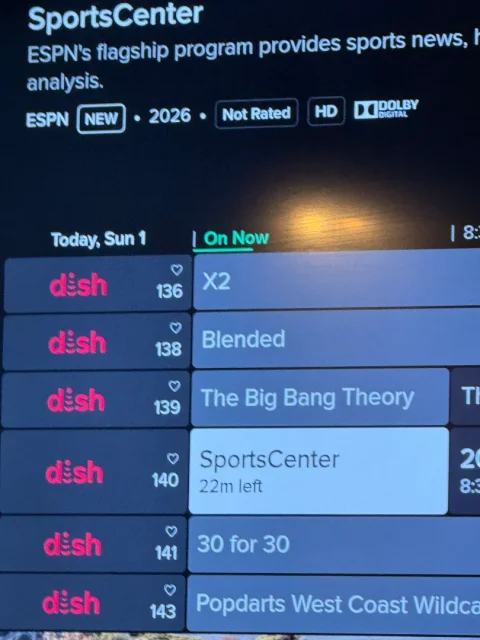
I had an old Wireless Joey replaced by a Wireless Joey 4 (Android TV) - still have a Hopper 3 without the Hopper Plus. What do I have to do to get the EPG to show channel logos instead of "Dish"? This is annoying as hell and it's been this way for over a month…
3 Replies
·
76 views

I have Dish with Hopper3. I choose to get local channels OTA and had a "guide list" established at my previous home. Having moved a few miles away, I wanted to update the list by appending a couple new stations via a rescan. As many would know, some stations come in with the UHF/VHF antenna aimed in one direction, while others come in better with a different direction.
Unfortunately, when a scan is done (bringing in 25-30 stations for that particular antenna aim), the dialog screen does not present the established guide list; it presents an empty field to the right that the scanned stations may be selected one by one and added to the empty guide. But because of antenna aim, some stations originally saved are missing, and would have to be retrieved with a different antenna aim. But as I explain, if a 2nd scan is done with a different antenna aim, the stations saved from the first scan are lost.
It troubles me that Dish didn't develop software that would allow a user to simply append only 1 or 2 channels to the established list.
Any thought on this? Has anyone experienced this or heard of this from others?
Unfortunately, when a scan is done (bringing in 25-30 stations for that particular antenna aim), the dialog screen does not present the established guide list; it presents an empty field to the right that the scanned stations may be selected one by one and added to the empty guide. But because of antenna aim, some stations originally saved are missing, and would have to be retrieved with a different antenna aim. But as I explain, if a 2nd scan is done with a different antenna aim, the stations saved from the first scan are lost.
It troubles me that Dish didn't develop software that would allow a user to simply append only 1 or 2 channels to the established list.
Any thought on this? Has anyone experienced this or heard of this from others?
2 Replies
·
106 views
