

Social Feed
afriedkin
This is my first post on this forum, and I figure I'll just "lay it all out
there" and see if I get any replies...
Since I first saw HD at Good Guys back in 1998 (NFL game), I've been dreaming of
the day I'd actually have it in my home. Well, the day has come...but I'm officially
frustrated, and would like to hear people's take on what I should or shouldn't do.
Two weeks ago, I purchased a Sony 51 inch rear projection TV. It's the KP-51WS520. It's a
great set, gorgeous picture, with an HDMI port in the back. I have Comcast install their
HDTV receiver, and I'm all set. The first thing I do is go plunk down $125 on a DVI to HDMI
cord. I've heard the picture is outstanding using this connector, and I can't wait to take
advantage. I get home, plug it in, and see three distorted pictures on my tube. I call
Comcast and they tell me that the DVI port is not functional at this time and they have no
idea when it might be. So I consider returning the cable to Good Guys, but I've thrown
away they box and am stuck with it. Fine, no biggie. I suppose I'll wait until it's "enabled"
and use it then. Now, let me explain how I've set my TV up. I've kept my Comcast digital
cable non-HD box. I've got that attached to my TIVO. This enables me to watch an HD
show, or standard show on my HD box, while recording another show to my TIVO. Also
enables me to split screen PIP two football games at once, or whatever else I want to see.
What I don't like is watching an HDchannel like NBC, CBS, or ABC that's not in HD because
if I watch it with the bars, I've been told I'm risking "burn-in" and if i stretch it, I have to
use "wide zoom" and I lose some picture. Watching those channels on a standard channel
with my non-HD box alleviates that problem, but the quality is not as good.
Anyhow, so all is well, I'm watching my ESPN HD and LOVING IT. Discovery HD is amazing,
and I can't get enough of HD Net's show on baseball stadiums. College football Saturday
rolls around, and watching the Georgia - Tennessee game is mind boggling. I've never
seen colors that sharp, a picture so vivid. It's really like being there...no, it's BETTER than
being there. Then Sunday rolls around. I'm a huge NFL fan, but can't get Direct TV because
I live in a 24 story building and our condo's balcony faces east. So I'm stuck with NFL
programming on local channels. So I get the CBS game in HD, which is wonderful. BUT,
here is the big problem...NO FOX!! I'm in Oakland, CA and Comcast here has not been
able to strike a deal with the local Fox affiliate KTVU. I've spoken to both sides regarding
the problem and there's no solution in sight (makes the NHL lockout look promising!!) So
no NFL, no MLB playoffs....NO SUPERBOWL!!! Fine, very few things in life are perfect, so I
know what I have to do. I've got to get one of those Radio Shack antennas and I'll be able
to get KTVU over the air. I'm right in the heart of downtown Oakland, and so reception
shouldn't be a problem. I call Comcast just to verify I can do this, and my nightmare
continues, and they tell me that plugging the antenna into their cable box won't work. I'd
have to have an HDTV with a built in tuner to see KTVU in HD over the air.
Now what?
Will I just accept this? Yankees-Red Sox, in standard def? NO. So I start researching. I knew
about Voom but figured since I can't get Direct TV or Dish reception from my balcony, that
Voom won't work. But I decided to call and check, and to my delight, they need a sout east
view, as opposed to south west. Excellent, problem solved. Get Voom, ditch Comcast.
Life is good...right?...wrong.
I speak to a Voom rep to set up installation. After talking to this guy for 30 seconds, I
knew he had no clue what he was talking about. I was scrolling down the channel lineup
while talking to him and I saw a Fox Sports Florida channel. I asked him if I would be
receiving my RSN, which is Fox Sports Net Bay Area, and he told me...quote..."uh, well, I
live in Texas, and I get Fox Sports South West, so you should be receiving your local
channel too!". I asked him if he was sure, he said he was. So I proceeded with my order
and am scheduled for install this Monday 10/18. Yesterday I was reading up on Voom and
I saw that there actually was NOT any Fox Sports regional networks available except for
Florida right now. I called Voom to confirm, and that appears to me to be the case. This is
a very big deal as I'm a big Warriors (NBA), Giants, A's..etc..fan. Plus, Comcast has just
started broadcasting our local teams in HD.
So to sum up this rambling post....
#1. Should I be upset that Comcast does not have their DVI port functional? Does Voom
have one? If so, will there be a big difference?
#2. "Burn-In". Is that a real possibility? Is watching channels with gray bars bad? How
about Black bars? Is there a way to watch an HD channel, that is not broadcast in HD, fill
the screen without going to "wide-zoom?" Like a setting I can tweak on my cable box, or
TV? Also, I've heard I should keep the brightness and picture levels below 50% all the time.
Is this true? I like those levels higher than 50%. That's too bad if that's the case.
#3. I'm switching to Voom for the local Fox channel. Well, all the other channels too, but if
Comcast had our Fox affiliate, I wouldn't be doing this. Is that a good move? Will I be
happy with over-the-air reception?
#4. I'm going to have to keep my Comcast HD Box because apparently Voom does not
have the Fox regional sports networks. So, the basic Voom package at $49.99 per month,
plus HBO at $19.99 per month, plus two Voom receivers at $19.99 per month, plus the
Comcast sports pack at $40.00 per month, plus one Comcast HD receiver at $5.00 per
month....equals an INSANE $135 per month for TV!!! and I'm not even getting all the
premium movie channels....or playboy!!! Is there any way around this? Do I have any
cheaper options?
#5. Does anyone have any idea if or when Voom will get all the local Fox Sports regional
channels? And if so, will it be HD? I'm worried that since the local HD Fox Sports
broadcasts are affiliated with Comcast, the broadcast may just be exclusive to Comcast
cable, and not be available to Voom.
(some other random questions...)
#6. 1080i or 720p? I've heard 720p is better. But the football game I saw on CBS looked
amazing, so I can't see how 720p can be better. A matter of personal preference?
#7. Video games bad for my TV? I have an Xbox and PS2. Can anyone recommend any
games that will look great on my TV? I've purchased the component cables for both
systems, now I just need some good HD games.
#8. DVD's. I've got an older Toshiba DVD player. It has the component blue and green
outputs on the back. Does that mean I'm getting the best quality for DVD playback? I've
heard that the best is 480i progressive scan. Is that true? Or, do I need to buy a newer
progressive scan DVD player? My current DVD player has a 16X9 option that fills the
entire screen (amazing!) but it doesn't say anything about prog scan. How about the Xbox?
Does that support prog scan playback?
#9. If you're still with me here, thanks! I appreciate it NFL network. Does voom have it?
If so, will the Game of the Week be available in HD?
#10. NBA sports package? MLB sports package? Any news on these coming to Voom? I
know DirectTV has exclusive rights to NFL Ticket, but the others would be welcome.
#11. And this is a big one. I may, and I emphasize, may....need to have the Voom dish set
up on a tri pod. I'm waiting to hear back from condo association, but that's a possibility. If
so, I'll have to call Voom and hope that the installers can do that. Has anyone else gone
this route? Does it take up a lot of space? Any specific instructions I should give to the
installers. Actually, in general, is there anything I should check before the installers leave?
#12. Voom reception. I explained to the Voom rep that I don't think I've got a great south-
eastern view from my balcony. It's more east and actually north-east. He told me not to
worry, but I can't help it. Putting the equipment on the roof here is not an option, only the
balcony. For those of you that have a good sense of where the dish can and can't get
reception, here's a link to a map of where the dish will be. I'm on the 4th floor of a big 20
plus story building. If you look at the map, my balcony faces straight up Lakeside
Drive...and the farthest south I go, to the right, is straight to the "lake merrit" typing in the
middle of the lake.
(you may have to cut and paste this)
http://maps.yahoo.com/maps_result?
zoomin=yes&name=&ed=wwr10Op_0Tqjh6UANhoJCB5FRZxyXCad0jufdkdrIhL5d2mah8ZP
hGjRgLjaPd7awCAdDK.9CaFGOR_eBuk0FLBQvXX.5kyKWdEblJS3vUeb6w--
&state=CA&csz=Oakland%2C+CA+94612
-4620&ds=n&uzip=94612&mag=10&desc=&country=US&dma=807&cat=&resize=s&rez
oom=0&.intl=us&compass=&pan_x=0&pan_y=0
It looks like I face directly east, but not south. Is it still worth the installation attempt, or is
there no chance?
#13. Some of my symptoms are right upper quadrant pain, constipation,
nausea....
oops! I got confused. I thought I was in the irritable bowl syndrome forum.
Sorry!
Anyhow, that's about it. Thanks for taking the time to read this. Any feedback is greatly
appreciated.
Ari
------------------------ Yahoo! Groups Sponsor --------------------~-->
Make a clean sweep of pop-up ads. Yahoo! Companion Toolbar.
Now with Pop-Up Blocker. Get it for free!
http://us.click.yahoo.com/L5YrjA/eSIIAA/yQLSAA/EyMolB/TM
--------------------------------------------------------------------~->
Yahoo! Groups Links
<*> To visit your group on the web, go to:
http://groups.yahoo.com/group/VOOM/
<*> To unsubscribe from this group, send an email to:
VOOM-unsubscribe@yahoogroups.com
<*> Your use of Yahoo! Groups is subject to:
http://docs.yahoo.com/info/terms/
there" and see if I get any replies...
Since I first saw HD at Good Guys back in 1998 (NFL game), I've been dreaming of
the day I'd actually have it in my home. Well, the day has come...but I'm officially
frustrated, and would like to hear people's take on what I should or shouldn't do.
Two weeks ago, I purchased a Sony 51 inch rear projection TV. It's the KP-51WS520. It's a
great set, gorgeous picture, with an HDMI port in the back. I have Comcast install their
HDTV receiver, and I'm all set. The first thing I do is go plunk down $125 on a DVI to HDMI
cord. I've heard the picture is outstanding using this connector, and I can't wait to take
advantage. I get home, plug it in, and see three distorted pictures on my tube. I call
Comcast and they tell me that the DVI port is not functional at this time and they have no
idea when it might be. So I consider returning the cable to Good Guys, but I've thrown
away they box and am stuck with it. Fine, no biggie. I suppose I'll wait until it's "enabled"
and use it then. Now, let me explain how I've set my TV up. I've kept my Comcast digital
cable non-HD box. I've got that attached to my TIVO. This enables me to watch an HD
show, or standard show on my HD box, while recording another show to my TIVO. Also
enables me to split screen PIP two football games at once, or whatever else I want to see.
What I don't like is watching an HDchannel like NBC, CBS, or ABC that's not in HD because
if I watch it with the bars, I've been told I'm risking "burn-in" and if i stretch it, I have to
use "wide zoom" and I lose some picture. Watching those channels on a standard channel
with my non-HD box alleviates that problem, but the quality is not as good.
Anyhow, so all is well, I'm watching my ESPN HD and LOVING IT. Discovery HD is amazing,
and I can't get enough of HD Net's show on baseball stadiums. College football Saturday
rolls around, and watching the Georgia - Tennessee game is mind boggling. I've never
seen colors that sharp, a picture so vivid. It's really like being there...no, it's BETTER than
being there. Then Sunday rolls around. I'm a huge NFL fan, but can't get Direct TV because
I live in a 24 story building and our condo's balcony faces east. So I'm stuck with NFL
programming on local channels. So I get the CBS game in HD, which is wonderful. BUT,
here is the big problem...NO FOX!! I'm in Oakland, CA and Comcast here has not been
able to strike a deal with the local Fox affiliate KTVU. I've spoken to both sides regarding
the problem and there's no solution in sight (makes the NHL lockout look promising!!) So
no NFL, no MLB playoffs....NO SUPERBOWL!!! Fine, very few things in life are perfect, so I
know what I have to do. I've got to get one of those Radio Shack antennas and I'll be able
to get KTVU over the air. I'm right in the heart of downtown Oakland, and so reception
shouldn't be a problem. I call Comcast just to verify I can do this, and my nightmare
continues, and they tell me that plugging the antenna into their cable box won't work. I'd
have to have an HDTV with a built in tuner to see KTVU in HD over the air.
Now what?
Will I just accept this? Yankees-Red Sox, in standard def? NO. So I start researching. I knew
about Voom but figured since I can't get Direct TV or Dish reception from my balcony, that
Voom won't work. But I decided to call and check, and to my delight, they need a sout east
view, as opposed to south west. Excellent, problem solved. Get Voom, ditch Comcast.
Life is good...right?...wrong.
I speak to a Voom rep to set up installation. After talking to this guy for 30 seconds, I
knew he had no clue what he was talking about. I was scrolling down the channel lineup
while talking to him and I saw a Fox Sports Florida channel. I asked him if I would be
receiving my RSN, which is Fox Sports Net Bay Area, and he told me...quote..."uh, well, I
live in Texas, and I get Fox Sports South West, so you should be receiving your local
channel too!". I asked him if he was sure, he said he was. So I proceeded with my order
and am scheduled for install this Monday 10/18. Yesterday I was reading up on Voom and
I saw that there actually was NOT any Fox Sports regional networks available except for
Florida right now. I called Voom to confirm, and that appears to me to be the case. This is
a very big deal as I'm a big Warriors (NBA), Giants, A's..etc..fan. Plus, Comcast has just
started broadcasting our local teams in HD.
So to sum up this rambling post....
#1. Should I be upset that Comcast does not have their DVI port functional? Does Voom
have one? If so, will there be a big difference?
#2. "Burn-In". Is that a real possibility? Is watching channels with gray bars bad? How
about Black bars? Is there a way to watch an HD channel, that is not broadcast in HD, fill
the screen without going to "wide-zoom?" Like a setting I can tweak on my cable box, or
TV? Also, I've heard I should keep the brightness and picture levels below 50% all the time.
Is this true? I like those levels higher than 50%. That's too bad if that's the case.
#3. I'm switching to Voom for the local Fox channel. Well, all the other channels too, but if
Comcast had our Fox affiliate, I wouldn't be doing this. Is that a good move? Will I be
happy with over-the-air reception?
#4. I'm going to have to keep my Comcast HD Box because apparently Voom does not
have the Fox regional sports networks. So, the basic Voom package at $49.99 per month,
plus HBO at $19.99 per month, plus two Voom receivers at $19.99 per month, plus the
Comcast sports pack at $40.00 per month, plus one Comcast HD receiver at $5.00 per
month....equals an INSANE $135 per month for TV!!! and I'm not even getting all the
premium movie channels....or playboy!!! Is there any way around this? Do I have any
cheaper options?
#5. Does anyone have any idea if or when Voom will get all the local Fox Sports regional
channels? And if so, will it be HD? I'm worried that since the local HD Fox Sports
broadcasts are affiliated with Comcast, the broadcast may just be exclusive to Comcast
cable, and not be available to Voom.
(some other random questions...)
#6. 1080i or 720p? I've heard 720p is better. But the football game I saw on CBS looked
amazing, so I can't see how 720p can be better. A matter of personal preference?
#7. Video games bad for my TV? I have an Xbox and PS2. Can anyone recommend any
games that will look great on my TV? I've purchased the component cables for both
systems, now I just need some good HD games.
#8. DVD's. I've got an older Toshiba DVD player. It has the component blue and green
outputs on the back. Does that mean I'm getting the best quality for DVD playback? I've
heard that the best is 480i progressive scan. Is that true? Or, do I need to buy a newer
progressive scan DVD player? My current DVD player has a 16X9 option that fills the
entire screen (amazing!) but it doesn't say anything about prog scan. How about the Xbox?
Does that support prog scan playback?
#9. If you're still with me here, thanks! I appreciate it
NFL network. Does voom have it? If so, will the Game of the Week be available in HD?
#10. NBA sports package? MLB sports package? Any news on these coming to Voom? I
know DirectTV has exclusive rights to NFL Ticket, but the others would be welcome.
#11. And this is a big one. I may, and I emphasize, may....need to have the Voom dish set
up on a tri pod. I'm waiting to hear back from condo association, but that's a possibility. If
so, I'll have to call Voom and hope that the installers can do that. Has anyone else gone
this route? Does it take up a lot of space? Any specific instructions I should give to the
installers. Actually, in general, is there anything I should check before the installers leave?
#12. Voom reception. I explained to the Voom rep that I don't think I've got a great south-
eastern view from my balcony. It's more east and actually north-east. He told me not to
worry, but I can't help it. Putting the equipment on the roof here is not an option, only the
balcony. For those of you that have a good sense of where the dish can and can't get
reception, here's a link to a map of where the dish will be. I'm on the 4th floor of a big 20
plus story building. If you look at the map, my balcony faces straight up Lakeside
Drive...and the farthest south I go, to the right, is straight to the "lake merrit" typing in the
middle of the lake.
(you may have to cut and paste this)
http://maps.yahoo.com/maps_result?
zoomin=yes&name=&ed=wwr10Op_0Tqjh6UANhoJCB5FRZxyXCad0jufdkdrIhL5d2mah8ZP
hGjRgLjaPd7awCAdDK.9CaFGOR_eBuk0FLBQvXX.5kyKWdEblJS3vUeb6w--
&state=CA&csz=Oakland%2C+CA+94612
-4620&ds=n&uzip=94612&mag=10&desc=&country=US&dma=807&cat=&resize=s&rez
oom=0&.intl=us&compass=&pan_x=0&pan_y=0
It looks like I face directly east, but not south. Is it still worth the installation attempt, or is
there no chance?
#13. Some of my symptoms are right upper quadrant pain, constipation,
nausea....
oops! I got confused. I thought I was in the irritable bowl syndrome forum.
Sorry!
Anyhow, that's about it. Thanks for taking the time to read this. Any feedback is greatly
appreciated.
Ari
------------------------ Yahoo! Groups Sponsor --------------------~-->
Make a clean sweep of pop-up ads. Yahoo! Companion Toolbar.
Now with Pop-Up Blocker. Get it for free!
http://us.click.yahoo.com/L5YrjA/eSIIAA/yQLSAA/EyMolB/TM
--------------------------------------------------------------------~->
Yahoo! Groups Links
<*> To visit your group on the web, go to:
http://groups.yahoo.com/group/VOOM/
<*> To unsubscribe from this group, send an email to:
VOOM-unsubscribe@yahoogroups.com
<*> Your use of Yahoo! Groups is subject to:
http://docs.yahoo.com/info/terms/
1 Replies
·
1089 views

Pub Member / Supporter
Lifetime Supporter
Videos like this can make you appreciate the things we take for granted.
View: https://www.youtube.com/shorts/a2cgQidHQJI
View: https://www.youtube.com/shorts/a2cgQidHQJI
3 Replies
·
28 views


Staff member
HERE TO HELP YOU!
Cutting Edge
Sometimes a thread gets so many posts in it that is can cause issues for the server so that why today we introduce The Song Name Game Part 3!
So let the game continue!
The last song was added by Bobby who posted...
One Meat Ball - Andrews Sisters
CONTINUE ON AND HAVE FUN! WELCOME HOME TO SATELLITEGUYS.US!
Here are the original rules for the game as posted by WebbyDude back in 2006. http://www.satelliteguys.us/threads/68645-Song-Name-Game
Just name a song title and the band who performed it. The next person does the same thing, but needs to list a song title or band name which includes a word from the previous entry. Pick songs from any genre.
Example:
Long Live Rock and Roll -- Rainbow
Rainbow in the Dark -- Dio
Another example:
Ride the Lightning -- Metallica
Lightning Strikes -- Ozzy Osbourne
Get it?
An additional note: we all know that song titles, sometimes, use profane words. Because this is a family friendly website it is advised that you clean up that title up a bit. This is accomplished by using something like sh!t instead of the real word. Thanks....
So let the game continue!
The last song was added by Bobby who posted...
One Meat Ball - Andrews Sisters
CONTINUE ON AND HAVE FUN! WELCOME HOME TO SATELLITEGUYS.US!
Here are the original rules for the game as posted by WebbyDude back in 2006. http://www.satelliteguys.us/threads/68645-Song-Name-Game
Just name a song title and the band who performed it. The next person does the same thing, but needs to list a song title or band name which includes a word from the previous entry. Pick songs from any genre.
Example:
Long Live Rock and Roll -- Rainbow
Rainbow in the Dark -- Dio
Another example:
Ride the Lightning -- Metallica
Lightning Strikes -- Ozzy Osbourne
Get it?
An additional note: we all know that song titles, sometimes, use profane words. Because this is a family friendly website it is advised that you clean up that title up a bit. This is accomplished by using something like sh!t instead of the real word. Thanks....
68743 Replies
·
2684474 views


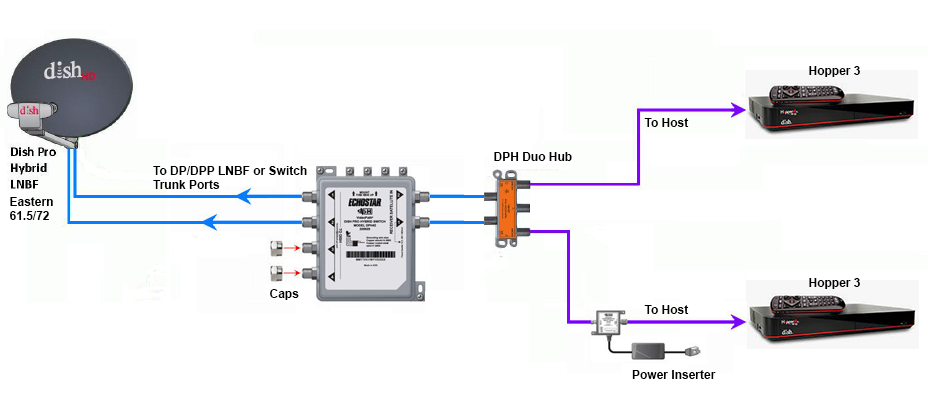
Does someone still have the diagram showing how to connect two Hopper 3s again?
I currently have one H3 and one 4K Joey, set up through a 1000.2 eastern arc hybrid lnb and solo hub.
The plan is to replace the Joey with the second H3. Already purchased a duo hub and I have three coax cables coming in from outside, from back when I used to have the older 1000.4 dish and the hopper 2. I don't fully remember, but I think the other two coax cables are just tied up next to the dish outside; will have to check again.
I currently have one H3 and one 4K Joey, set up through a 1000.2 eastern arc hybrid lnb and solo hub.
The plan is to replace the Joey with the second H3. Already purchased a duo hub and I have three coax cables coming in from outside, from back when I used to have the older 1000.4 dish and the hopper 2. I don't fully remember, but I think the other two coax cables are just tied up next to the dish outside; will have to check again.
27 Replies
·
5943 views



Pub Member / Supporter
Lifetime Supporter
Over the past year I have been tracking the changes on Western Arc. The past 3 months have had a lot of changes that I posted in the other MPEG2 Western Arc shutdown thread. Now that 129 is (basically) out of commission, here is where Western Arc stands. This is just a national channel list, (no local channels) based off what I can see and what others have contributed. Thanks to everyone who has helped me come up with the locations of some of the channels – I would try and list all of you out, but I know I would forget someone! As has been suggested in other parts of the forum, it would be great to collect the spotbeam data for those who could contribute!
A couple of pieces of info:
When I talk about number of channels on a transponder, all my numbers are unique channels – for example, channel 101 and 199 are the same channel mapped to two different numbers, but in terms of space, only takes up 1 channel worth of bandwidth on the transponder.
Finally, I have to give Dish a ton of credit. When it was 110/119/129, Dish had 82 transponders they were using – it took a lot to get it down to 50 transponders and figure out where all the pieces were going to go. What are the things they did to get there? Here are the things I saw:
A couple of pieces of info:
- Out of the 64 transponders between 110/119, there are currently 50 transponders that Dish is licensed to use. 22 are Spotbeams, 28 are ConUS transponders (14 transponders are licensed to DirecTV and Dish doesn't have access to them)
- Those 28 ConUS transponders are divided as follows:
- 10 are dedicated to National HD channels (ESPN, CNN, Disney Channel, etc). Dish is maxing out at 16 HD channels per transponder (note – in an earlier post I said there was one transponder with 17 HD channels, that was an error on my part. When I double checked my listings, one channel changed transponders). Before the transition, there was a maximum of 14 HD channels per transponder.
- 1 transponder is dedicated to adult content
- 2 are a mixture HD PPV Movies/4k channels
- 3 are set aside for HD Sports channels that are only on for live games (NBA League Pass, the PAC 12 alternate channels, some PPV events, etc); 3 SD PPV Sports Channels are there as well.
- 7 are for SD and/or music channels. Dish is maxing out at 26 SD channels per transponder thus far on the SD transponders.
- 5 transponders on 110 I have no channels listed but Dish operates. (they are labeled as ConUS on my chart below) There are other things that could be on those transponders, like RV Distant Networks, internal testing channels, etc, that I can't see. They might be able to be used for additional content, but I am not sure exactly what is on those transponders.
When I talk about number of channels on a transponder, all my numbers are unique channels – for example, channel 101 and 199 are the same channel mapped to two different numbers, but in terms of space, only takes up 1 channel worth of bandwidth on the transponder.
Finally, I have to give Dish a ton of credit. When it was 110/119/129, Dish had 82 transponders they were using – it took a lot to get it down to 50 transponders and figure out where all the pieces were going to go. What are the things they did to get there? Here are the things I saw:
- During this migration from 129, Dish converted 7 ConUS transponders on 119 into Spotbeams – that is how they ended up fitting on all the HD locals that used to be on 129. (for those interested, TP 6, 7, 8, 9, 10, 11, 13 are the ones that used to be ConUS on 119 that are now Spotbeam)
- Removed almost all SD duplicate channels that are offered in HD
- Converted remaining SD channels from MPEG2 to MPEG4
- There are also 2 subtle things that changed from the HD channel perspective
- At the beginning of the transition, Dish decreased the number of PPV Movie channels – prior to this transition the PPV channels HD PPV movies were 502-522; now they are 502-517.
- At the beginning of April when MLB, NBA, and NHL regular seasons were all going on at the same time and this transition began, there were a ton of games "joined in progress" for the HD feeds. That wasn't common since the days before the full time HD RSN's. The reason for that was prior to the transition, Dish had 4 transponders set aside for HD Sports – 2 transponders was the bandwidth set aside from the HD RSN's before Dish dropped the RSN's, then 2 transponders were for alternate channels. Now we are down to 3 transponders for HD sports.
253 Replies
·
66256 views

Lifetime Supporter
Schedule drops tomorrow. Mandatory mini camps in June. Hall of Fame game August 6th.
137 Replies
·
2804 views




I was bewildered with all the new DISH TV "Bonus View" channels, so I put together a web page table with all the info I could find. It's at:
https://anythingpeaceful.org/dishtv/DISH_TV_Bonus_View_Channels.html
Here's a partial screenshot of the table, as sorted by Channel Name. (You can click on a column header to sort.)

If you have any corrections or suggestions, please post here.
https://anythingpeaceful.org/dishtv/DISH_TV_Bonus_View_Channels.html
Here's a partial screenshot of the table, as sorted by Channel Name. (You can click on a column header to sort.)
If you have any corrections or suggestions, please post here.
46 Replies
·
6276 views
Lifetime Supporter
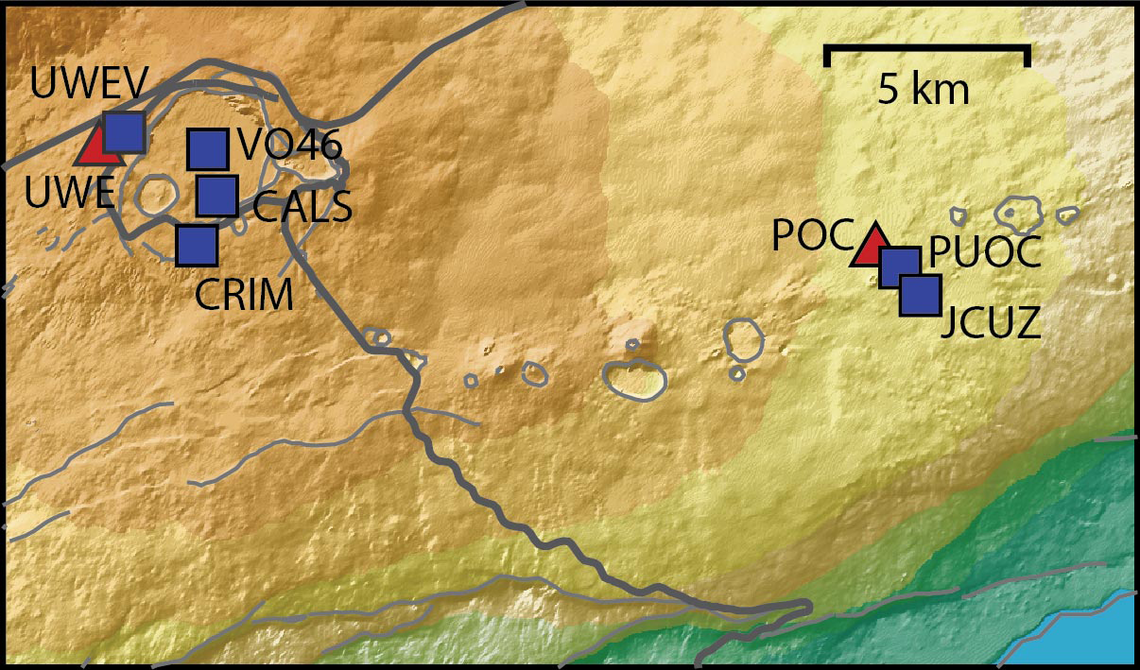
Continuing the Kilauea thread in the Pub here. Perhaps the Iceland one too next time there's remarkable activity.
Currently there is precursory lava flowing into the crater, leading to the next episode that'll probably start within the next day.
You can see the pace of inflation / deflation here. It serves as the primary predictor for when the expect the eruptions, which coincide w/ inflation turning into significant deflation and last for several hours on average with significant fountaining.
 www.usgs.gov
View: https://youtu.be/Uecu2seh4b4
Wife and I like the AfarTV feeds, for the discussion along w/ them, though they're otherwise just mirrors of the official USGS feeds.
View: https://youtu.be/iws3rh5vLAQ
Currently there is precursory lava flowing into the crater, leading to the next episode that'll probably start within the next day.
You can see the pace of inflation / deflation here. It serves as the primary predictor for when the expect the eruptions, which coincide w/ inflation turning into significant deflation and last for several hours on average with significant fountaining.
Monitoring Data for Kīlauea
For more information on how electronic tiltmeters and GPS receivers help monitor the deformation of Kīlauea volcano, see the HVO Deformation page.
View: https://youtu.be/Uecu2seh4b4
Wife and I like the AfarTV feeds, for the discussion along w/ them, though they're otherwise just mirrors of the official USGS feeds.
View: https://youtu.be/iws3rh5vLAQ
122 Replies
·
3627 views

TWiT Tech Podcast Network
Time for another AWESOME video from the TWIT Network!
View: https://www.youtube.com/watch?v=1AzBMcXCMAc
Direct YouTube Link - Intelligent Machines 895
TWIT's Website
TWIT Live Feed
View: https://www.youtube.com/watch?v=1AzBMcXCMAc
Direct YouTube Link - Intelligent Machines 895
TWIT's Website
TWIT Live Feed
0 Replies
·
12 views
Pub Member / Supporter
Lifetime Supporter
Now first, I'll mention that the area of FL I live in has extremely high humidity and not a lot of wind so things don't dry out very well for extended periods of time.
I'm in the process of tearing down and rebuilding a pergola with a surrounding deck that I built 9 yrs ago. 90% of the deck screws are just sheering off at the head because the screws rusted out. These are the deck screws you buy in the 25 lb box at your lumber yard. Very annoying. So I just ordered some 316L stainless steel screws to use for when I go to rebuild it.
I'm in the process of tearing down and rebuilding a pergola with a surrounding deck that I built 9 yrs ago. 90% of the deck screws are just sheering off at the head because the screws rusted out. These are the deck screws you buy in the 25 lb box at your lumber yard. Very annoying. So I just ordered some 316L stainless steel screws to use for when I go to rebuild it.
3 Replies
·
69 views
