Social Feed

I am going to do this review in parts, and explain to the best of my ability each part. This post is just a summary for you folks with short attention spans (like I have!)
Intro:
I've been checking into this receiver for awhile, and finally decided to pull the trigger. This one is, in my opinion, a game changer. Other than the lack of blind scan, this is the most complete FTA receiver I have ever used. This Receiver will do all these formats: DVB 4:2:0 and 4:2:2 HD and SD, AND DVB-S2 4:2:0 and 4:2:2 SD and HD. There are a couple of DVB-S2 feeds that it won't lock, one of them is the CW's on AMC 6 C-Band...but I haven't found many more that it wont lock and display.
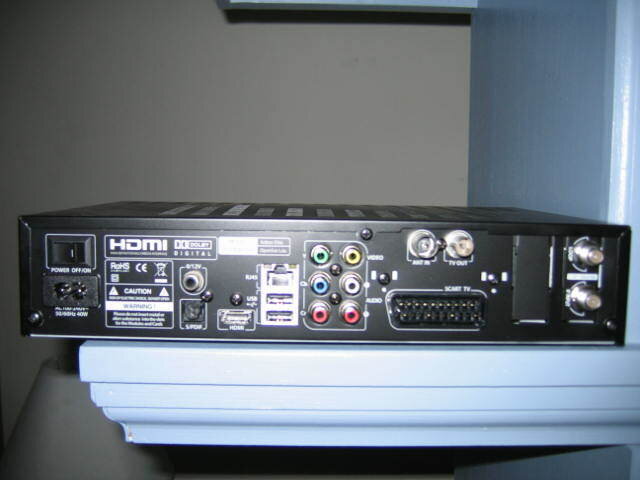
Like I said, this can do it all. Almost. Complete complement of connections on the back, HDMI,component, SCART, 2 USB ports, IF in and loop out, standard connections, with the exception of the ethernet port. That one is very important, as you will see in the following posts.
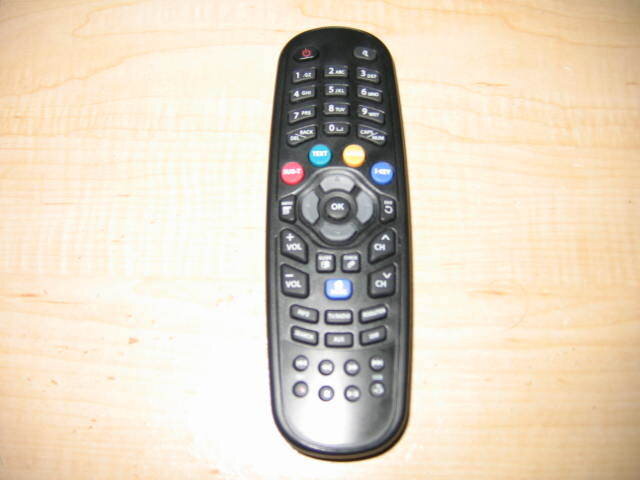
First off....this receiver's menu is different. And not at all easy, at first. You get a HOME button on the remote (its the blue one in the middle of the remote) That allows you to access the usual functions of the receiver. This is what it looks like.

In order, here we go....first option is the TV. This is where we go to ,Duh, watch TV.
Second, is the Youtube link. This is where the ethernet pays off. I just ran a wire from my wireless router to the azbox, and I am online. so I can do stuff like this. Totally searchable, but since you have to use the remote to enter search strings, its kind of slow. A USB keyboard plugin is supposed to be coming. Here's what it looks like:

And this is a youtube video playing.

Oh, and BTW, press the OK button on the remote while it plays, and your youtube video is full screen. :up
:up
Number Three, is the plugin screen. this is where the eye-patch gang will install their hackware, although I am sure some legit uses, like the USB keyboard I alluded to above, could be installed here.

Fourth is the Movie player. Put a file on a USB stick, and this dang thing will play it. I have tried most formats so far, and it hasn't missed a beat, as long as the file was error free. There's a list a mile long of the formats it will play, and I believe it. It is supposed to be able to network with your computer also to play files on it, but since I am network-ignorant, I have not been able to make it work. Navigating is simple. Highlight and push the OK button on what you want, and watch it go.

Fifth is a Music player. Same idea.

Sixth is Photo viewer, same idea.

Seventh is the file manager, sorry no pic, but it isn't substantially different from the rest of the menus. Point and click the OK button.
Eighth is the FTP client. This is only available if the firmware is updated, as I did. I havent used it yet, so I can't tell you how it works. Of if it even works.

Ninth is the RSS reader. Point and click. I haven't used it, truth is I have no need for it so I haven't messed with it.

Tenth is the web browser. This seems like a good idea on the surface, but sites today are so loaded with Flash and stuff, very few sites really display correctly. To Wit:

Number 11 is the meat of the story. This is where the magic happens. Select option 11 and you see these options:
First up is the General Info menu, self explanatory:

Yes, you can select a firmware here, and the Azbox will download and update it. Automatically.
Second, is the Language/time menu ( sorry for the blurry pic.) Standard stuff here.

Third, Timer menu. Haven't used it, but here it is.

Fourth, Internet setup. If you use DHCP its all automatically set for you. I have blacked out my IP and stuff, obviously. But under those black blocks are all sorts of numbers and periods that mean stuff. To someone. Not me, I just want it to work.

Fifth, Storage menu. whatever you have, it'll tell you about it here. This is a Linux box, so if you format here, it wont play on your windows machine later. But FAT 32 will work fine without format.

Sixth is audio/video setup. Simple. I don't know why mine is set on PAL, I need to check that....LOL

Seventh, Scan. this is where you scan for your channels, enter setup info, etc. More on this later. This is just info.

I skipped Parental Control, self explanatory. Next is the reset menu.

Last is the GOGO menu, which is setup for Europeans to get their channel lists and such. Not so much for us, as far as I know...

Okay, here's how to scan a Transponder and display video. This will be 4:2:2 NBC feed from AMC 1. Because I haven't figured out the channel editor my satellite selections are limited, so what you see will be AMC 4, but rest assured, its on AMC 1.
First up, set the satellite Parameters, switch setting, LO, etc.

Then, go to add TP/Sat and enter the TP info:

Then back out and scan it:

After its scanned, It'll ask you to save.

Then, you MUST press the blue HOME button and select TV to see what you have just scanned.
And you will then see this if you press the OK button, choose the channel and press OK.

...and in pops the video.

Final thoughts:
This thing is amazing. I am continually finding things it can do. Just this morning I figured out that it can sort channels by satellite, I hadn't figured that out before. It switches fine, no issues there. I do not use a motor, so I am unable to comment on motor operation, sorry fellers.
The PVR works, but is currently limited by software to 20Mbits data rate. Anything higher than that, it will not work with. The developers swear that that limitation is going to be removed, but I wouldn't count on it.
The channel editor works great, but it MUST be matched with the proper firmware, firmwares 2880 and newer MUST be used with the 2880 editor, NOT the old editor. You can also go to this website http://satellites-xml.eu/ , make a custom satellite list, save it in XML format, and the Azbox editor will convert it to a format that the Azbox can understand. An easy way to create any kind of list you want to. Tip of the hat to Linuxman for discovering this method. BE AWARE you MUST have ethernet in use to send/receive channel lists to and from the Azbox this works regardless of firmware, but again let me stress that you MUST use the correct editor for the firmware you are using.
The Azbox developers are promising Blind Scan will be incorporated, but I would not hold my breath. As it stands right now, its better than any receiver I have ever used. Hands down. That said, if you are a newbie, do NOT start with this box! This is NOT plug n play!
Let me add too, it gets quite hot in operation. I suggest a laptop cooler on top, I did it for mine, and it runs MUCH cooler.
Any questions, fire away!
Staff note by Iceberg.....some info was updated per stogie's request to note some corrected features.
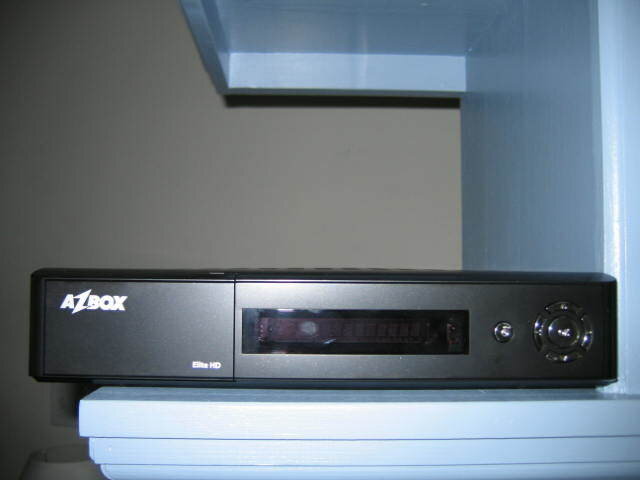
Box shots:
Intro:
I've been checking into this receiver for awhile, and finally decided to pull the trigger. This one is, in my opinion, a game changer. Other than the lack of blind scan, this is the most complete FTA receiver I have ever used. This Receiver will do all these formats: DVB 4:2:0 and 4:2:2 HD and SD, AND DVB-S2 4:2:0 and 4:2:2 SD and HD. There are a couple of DVB-S2 feeds that it won't lock, one of them is the CW's on AMC 6 C-Band...but I haven't found many more that it wont lock and display.
Like I said, this can do it all. Almost. Complete complement of connections on the back, HDMI,component, SCART, 2 USB ports, IF in and loop out, standard connections, with the exception of the ethernet port. That one is very important, as you will see in the following posts.
First off....this receiver's menu is different. And not at all easy, at first. You get a HOME button on the remote (its the blue one in the middle of the remote) That allows you to access the usual functions of the receiver. This is what it looks like.
In order, here we go....first option is the TV. This is where we go to ,Duh, watch TV.
Second, is the Youtube link. This is where the ethernet pays off. I just ran a wire from my wireless router to the azbox, and I am online. so I can do stuff like this. Totally searchable, but since you have to use the remote to enter search strings, its kind of slow. A USB keyboard plugin is supposed to be coming. Here's what it looks like:
And this is a youtube video playing.
Oh, and BTW, press the OK button on the remote while it plays, and your youtube video is full screen.
:upNumber Three, is the plugin screen. this is where the eye-patch gang will install their hackware, although I am sure some legit uses, like the USB keyboard I alluded to above, could be installed here.
Fourth is the Movie player. Put a file on a USB stick, and this dang thing will play it. I have tried most formats so far, and it hasn't missed a beat, as long as the file was error free. There's a list a mile long of the formats it will play, and I believe it. It is supposed to be able to network with your computer also to play files on it, but since I am network-ignorant, I have not been able to make it work. Navigating is simple. Highlight and push the OK button on what you want, and watch it go.
Fifth is a Music player. Same idea.
Sixth is Photo viewer, same idea.
Seventh is the file manager, sorry no pic, but it isn't substantially different from the rest of the menus. Point and click the OK button.
Eighth is the FTP client. This is only available if the firmware is updated, as I did. I havent used it yet, so I can't tell you how it works. Of if it even works.
Ninth is the RSS reader. Point and click. I haven't used it, truth is I have no need for it so I haven't messed with it.
Tenth is the web browser. This seems like a good idea on the surface, but sites today are so loaded with Flash and stuff, very few sites really display correctly. To Wit:
Number 11 is the meat of the story. This is where the magic happens. Select option 11 and you see these options:
First up is the General Info menu, self explanatory:
Yes, you can select a firmware here, and the Azbox will download and update it. Automatically.
Second, is the Language/time menu ( sorry for the blurry pic.) Standard stuff here.
Third, Timer menu. Haven't used it, but here it is.
Fourth, Internet setup. If you use DHCP its all automatically set for you. I have blacked out my IP and stuff, obviously. But under those black blocks are all sorts of numbers and periods that mean stuff. To someone. Not me, I just want it to work.
Fifth, Storage menu. whatever you have, it'll tell you about it here. This is a Linux box, so if you format here, it wont play on your windows machine later. But FAT 32 will work fine without format.
Sixth is audio/video setup. Simple. I don't know why mine is set on PAL, I need to check that....LOL
Seventh, Scan. this is where you scan for your channels, enter setup info, etc. More on this later. This is just info.
I skipped Parental Control, self explanatory. Next is the reset menu.
Last is the GOGO menu, which is setup for Europeans to get their channel lists and such. Not so much for us, as far as I know...
Okay, here's how to scan a Transponder and display video. This will be 4:2:2 NBC feed from AMC 1. Because I haven't figured out the channel editor my satellite selections are limited, so what you see will be AMC 4, but rest assured, its on AMC 1.
First up, set the satellite Parameters, switch setting, LO, etc.
Then, go to add TP/Sat and enter the TP info:
Then back out and scan it:
After its scanned, It'll ask you to save.
Then, you MUST press the blue HOME button and select TV to see what you have just scanned.
And you will then see this if you press the OK button, choose the channel and press OK.
...and in pops the video.
Final thoughts:
This thing is amazing. I am continually finding things it can do. Just this morning I figured out that it can sort channels by satellite, I hadn't figured that out before. It switches fine, no issues there. I do not use a motor, so I am unable to comment on motor operation, sorry fellers.
The PVR works, but is currently limited by software to 20Mbits data rate. Anything higher than that, it will not work with. The developers swear that that limitation is going to be removed, but I wouldn't count on it.
The channel editor works great, but it MUST be matched with the proper firmware, firmwares 2880 and newer MUST be used with the 2880 editor, NOT the old editor. You can also go to this website http://satellites-xml.eu/ , make a custom satellite list, save it in XML format, and the Azbox editor will convert it to a format that the Azbox can understand. An easy way to create any kind of list you want to. Tip of the hat to Linuxman for discovering this method. BE AWARE you MUST have ethernet in use to send/receive channel lists to and from the Azbox this works regardless of firmware, but again let me stress that you MUST use the correct editor for the firmware you are using.
The Azbox developers are promising Blind Scan will be incorporated, but I would not hold my breath. As it stands right now, its better than any receiver I have ever used. Hands down. That said, if you are a newbie, do NOT start with this box! This is NOT plug n play!
Let me add too, it gets quite hot in operation. I suggest a laptop cooler on top, I did it for mine, and it runs MUCH cooler.
Any questions, fire away!
Staff note by Iceberg.....some info was updated per stogie's request to note some corrected features.
Box shots:
464 Replies
·
153739 views


Help, I'm a little confjused on the activation process.
I purchased the Joey 4 from Solid Signal and shipping box has Call 866 726-4282 to Avtivate new Receiver. That number is Solid Signals number.
I googled and that search said call Dish to activate. I assume that is correct unless this requires a 2 step process.
Please let me know.
Thanks
I purchased the Joey 4 from Solid Signal and shipping box has Call 866 726-4282 to Avtivate new Receiver. That number is Solid Signals number.
I googled and that search said call Dish to activate. I assume that is correct unless this requires a 2 step process.
Please let me know.
Thanks
6 Replies
·
182 views


For some reason, the satelliteguys.us site is loading a lot slower than usual on both Chrome on my Asus laptop and Safari on my iPhone.
I'm also seeing longer appearances of the blue bar at the top and the "3 blue bars" loading symbol.
Is anyone else also having the same problem? Thanks in advance.
I'm also seeing longer appearances of the blue bar at the top and the "3 blue bars" loading symbol.
Is anyone else also having the same problem? Thanks in advance.
526 Replies
·
17900 views


Supporting Founder
Pub Member / Supporter
Lifetime Supporter
Apple has finally released their Apple TV 4K with built-in Siri and a microphone so it can respond to your queries even if you don't have the remote. It also increases in price, to $299. I had been planning on updating my current Apple TV 4K streamers, but that's $600 for the two of them, and that's a pass at this point.
At $299, it had better come with 256 GB of Storage, Gigabit (or better) Ethernet, the latest HDMI tech and standards, and one year of free Apple One. But it probably won't…
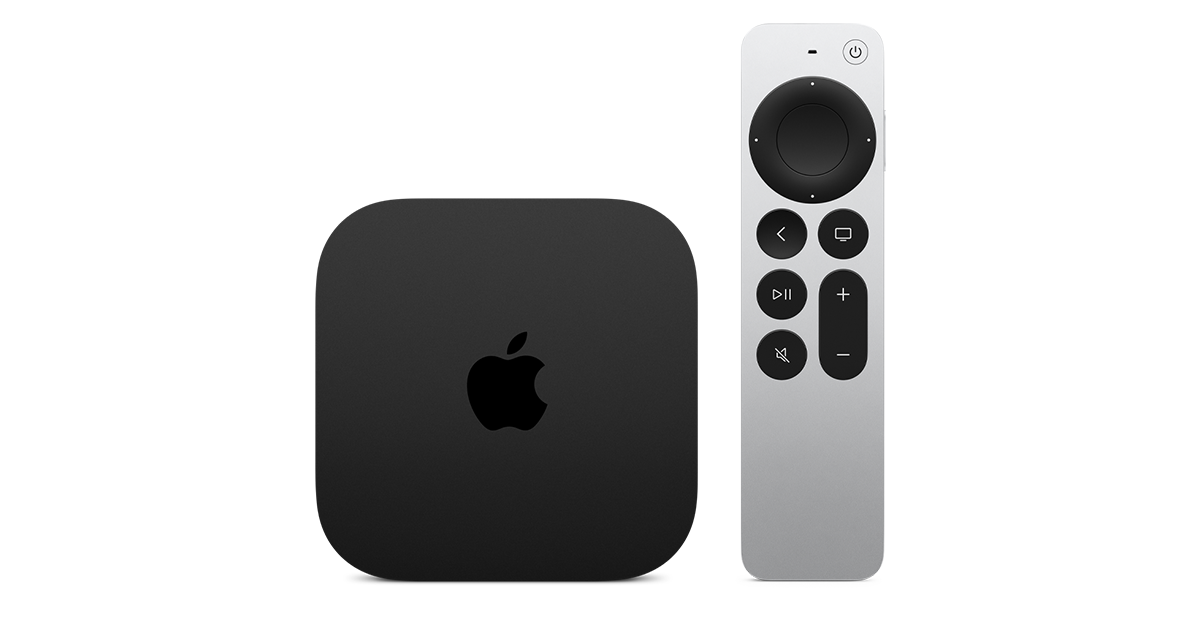
At $299, it had better come with 256 GB of Storage, Gigabit (or better) Ethernet, the latest HDMI tech and standards, and one year of free Apple One. But it probably won't…
Apple TV 4K
Apple TV 4K. New Siri AI and hands-free control. Stunning picture and immersive HomePod surround sound. Works with your Apple and smart home devices.
www.apple.com
14 Replies
·
170 views


 . apple's been making money off of software and not hardware for a while


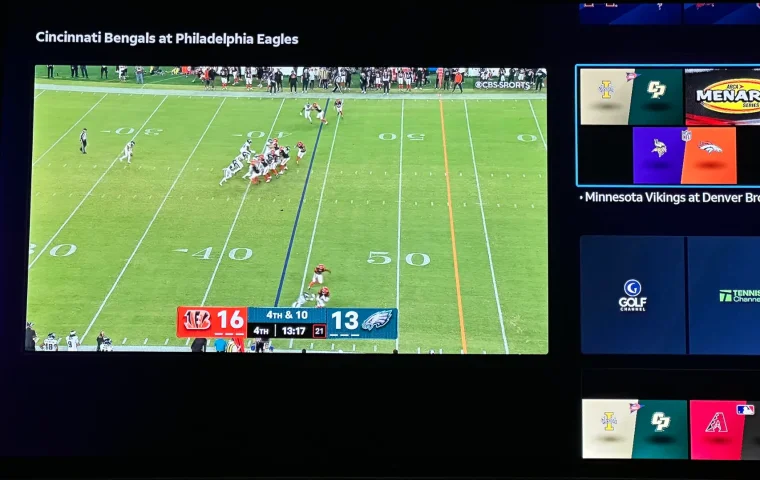
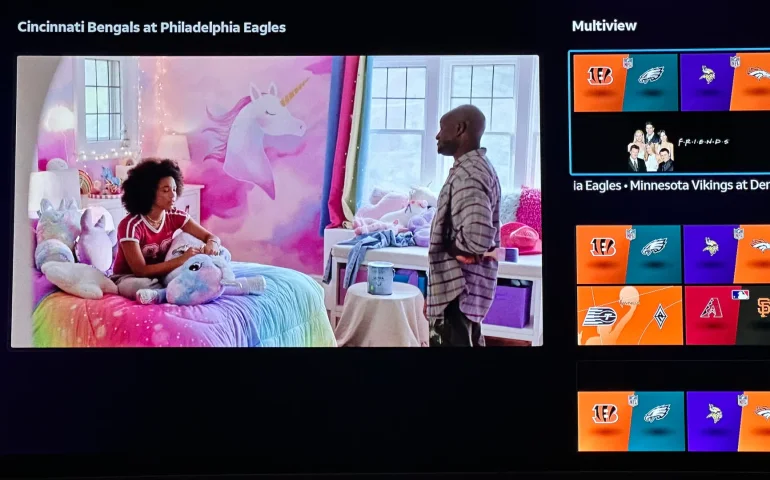
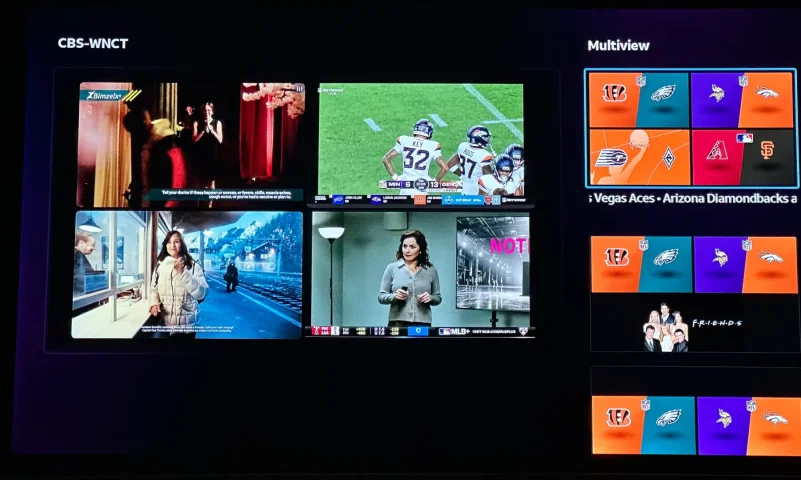
The new curated multiview is now live.
While on many of the sports channels and non sports channels there is a multi view option button. It will pull up a side bar with many different multi view options.
While on many of the sports channels and non sports channels there is a multi view option button. It will pull up a side bar with many different multi view options.
3 Replies
·
152 views


Supporting Founder
Really excited for this season with Kentucky having a new coach and some really exciting recruits. Probably won't last long, but here's hoping this season is great.
141 Replies
·
1342 views


Supporting Founder
Lifetime Supporter
This thread is a place to discuss the 4K events that appear on channel 540. We are getting, at this point, one college football game a week. Let's hope there is more coming.
1931 Replies
·
298844 views

TWiT Tech Podcast Network
Time for another AWESOME video from the TWIT Network!
View: https://www.youtube.com/watch?v=87N42NxLPC0
Direct YouTube Link - 8 U.S. States Sue OpenAI Over Safety Concerns With Younger Users
TWIT's Website
TWIT Live Feed
View: https://www.youtube.com/watch?v=87N42NxLPC0
Direct YouTube Link - 8 U.S. States Sue OpenAI Over Safety Concerns With Younger Users
TWIT's Website
TWIT Live Feed
0 Replies
·
8 views

Pub Member / Supporter
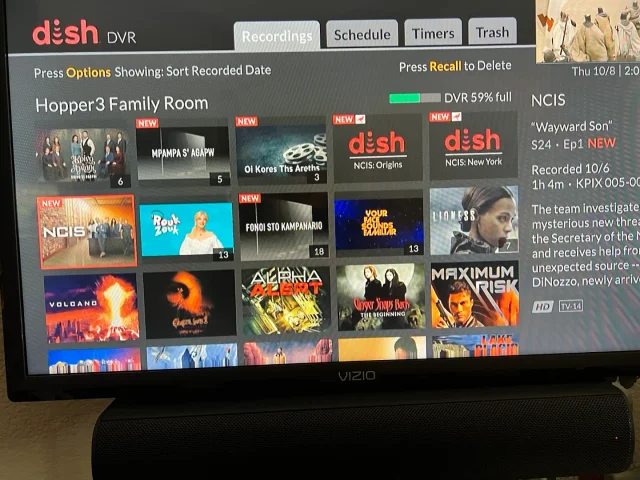
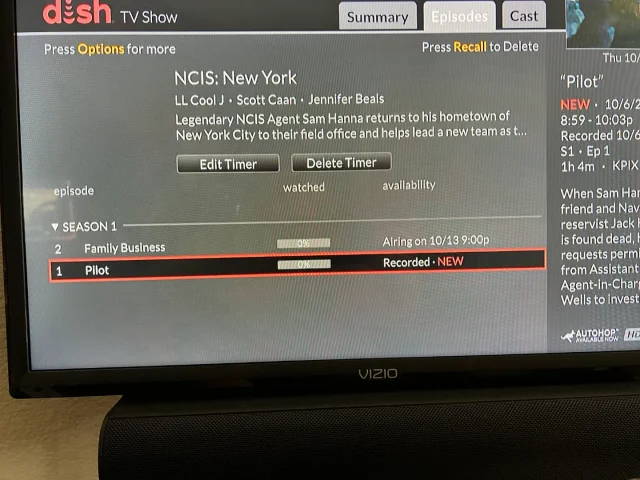
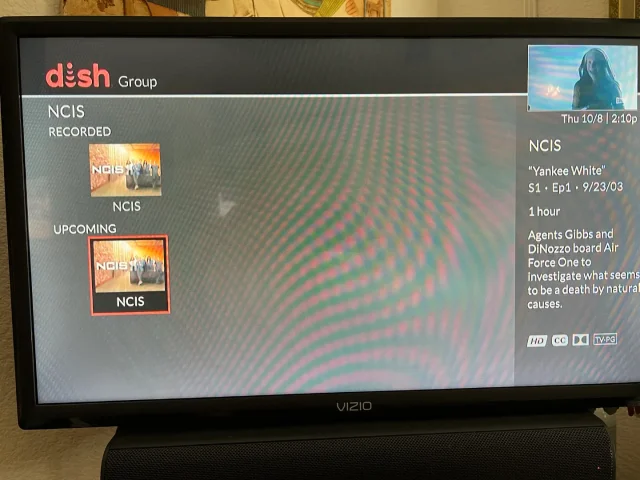
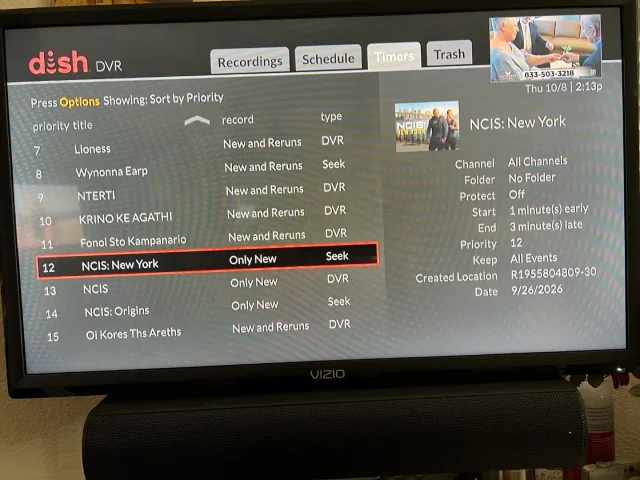
On Tuesday, I recorded the first episodes of the new season's NCIS shows on CBS (Dish provided, not OTA). The new New York series and Origins will both do Auto Skip, but the original, now season 24 does not. What's stranger, when I do a search for NCIS, Origins and New York show the current recording and the next episode it will record, but the original show only shows the current recording and some other channel showing the very first episode of season one. It makes no sense. When I set up the timers, I was able to use search for Origins and New York, but for the original, I had to scroll ahead in the guide until last Tuesday when the show was airing. Then set the timer from there. You can see its timer type is DVR where the other two are Seek. What am I missing?
Thanks!
Thanks!
20 Replies
·
386 views


Pub Member / Supporter
Cutting Edge
I created this thread on the original Edgecutter Cutting Edge Forums site. It's simply a place for those to review the latest software available for those using Windows 10 and Windows 11. To date it has received 112,559 views. I have been asked by staff to continue this thread here.
520 Replies
·
47171 views