Social Feed

digiblur
Last reply · posted in The Dish Network Uplink Center (archive)
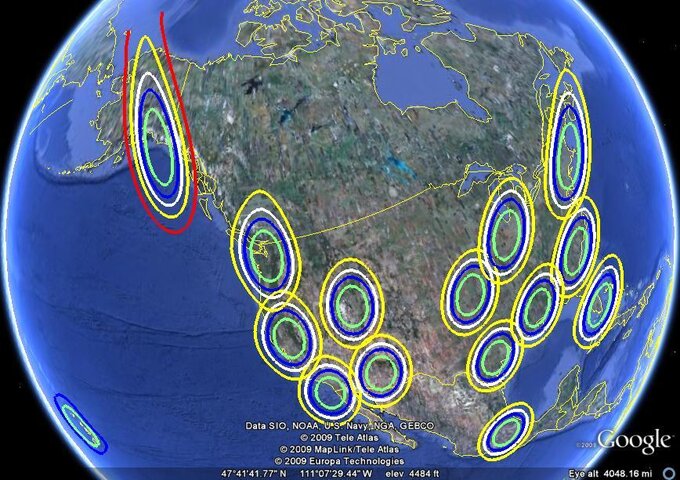
I know several people have asked..."What's space is left on Ciel-2's Spotbeams?" I took the FCC data of all the transponders that make up each beam and listed them below. I went through the current TheList data to determine which beams are used and which are not. When I list a beam as being used I am not saying it is full and/or available. I am just stating that there are channels assigned to it. Generally the transponders are used one for each DMA. Typically we only see 4-5 HD channels available in each market. DishNetwork has shown they can provide decent HD quality of 7-8 channels per 8PSK transponder. So you do the math on what room is left on each transponder. ;)

Each Spotbeam header links to TheList showing the Coverage Map and the channels allocated to the spotbeam sorted in transponder order.

I was going to add the market names on each transponder but that can change at anytime and we also have the data constantly updating on TheList so there's no need to duplicate data that I would have to keep up to date manually.

Spotbeam 1 - Alaska
5 - Used
7 - Used
9 - Used
10 - Used
12 - Used

Spotbeam 4 - Northwest Washington
8 - Not Used
10 - Not Used

Spotbeam 5 - Eastern Washington
11 - Used
12 - Not Used

Spotbeam 6 - North Central Montana
13 - Used

Spotbeam 7 - Western North Dakota
12 - Used

Spotbeam 8 - Eastern North Dakota
9 - Used

Spotbeam 9 - Northeast Minnesota
2 - Used

Spotbeam 10 - Central Oregon
13 - Not Used
14 - Used
15 - Used
16 - Used

Spotbeam 11 - Northwest Iadho
4 - Used
6 - Used

Spotbeam 12 - Northeast Idaho
5 - Used
7 - Used
8 - Used

Spotbeam 13 - South Central Montana
2 - Used

Spotbeam 14 - Central Minnesota
13 - Used
14 - Used
15 - Not Used
16 - Used

Spotbeam 15 - Northeast Wisconsin
10 - Used
12 - Used

Spotbeam 16 - North California
1 - Not Used
3 - Not Used
5 - Used
7 - Not Used
9 - Not Used

Spotbeam 17 - Western Nevada
2 - Used

Spotbeam 18 - Utah
1 - Used
3 - Not Used

Spotbeam 19 - North Central Colorado
4 - Used
6 - Used
15 - Used

Spotbeam 20 - South Central Nebraska
5 - Used
7 - Used

Spotbeam 21 - Southeast Iowa
1 - Used
3 - Used

Spotbeam 22 - Lake Michigan
9 - Used
11 - Used
13 - Used
15 - Used

Spotbeam 23 - Northwest New York
14 - Used
16 - Used

Spotbeam 24 - Indiana
5 - Used
7 - Used

Spotbeam 25 - Eastern Ohio
1 - Used
2 - Used
3 - Used
4 - Used
6 - Used
8 - Used

Spotbeam 26 - South Central New York
10 - Used
12 - Used

Spotbeam 27 - Southeast Nevada
14 - Used
16 - Not Used

Spotbeam 28 - Southeast Colorado
2 - Used

Spotbeam 29 - Eastern Kansas
4 - Used
6 - Used
8 - Not Used

Spotbeam 30 - Eastern Missouri
10 - Used
12 - Used
17 - Not Used

Spotbeam 31 - West Virginia
9 - Used
11 - Used

Spotbeam 32 - West Central California
8 - Used
10 - Used
13 - Used
15 - Used
17 - Not Used

Spotbeam 33 - Southern California
4 - Used
6 - Not Used
9 - Used
11 - Not Used
12 - Not Used

Spotbeam 34 - Central Arizona
5 - Not Used
7 - Not Used

Spotbeam 35 - New Mexico
8 - Not Used
10 - Used

Spotbeam 36 - Oklahoma
9 - Used
11 - Used
13 - Used
14 - Used
15 - Used
16 - Used

Spotbeam 37 - Arkansas
1 - Not Used
3 - Used

Spotbeam 38 - Southwest Tennessee
13 - Used
14 - Used
16 - Used

Spotbeam 39 - North Carolina
5 - Used
7 - Used
15 - Used
17 - Not Used

Spotbeam 40 - Eastern Virginia
1 - Used
3 - Used
14 - Used
16 - Not Used

Spotbeam 41 - Northeast Texas
2 - Not Used
5 - Used
7 - Not Used

Spotbeam 42 - Southern Mississipi
9 - Used
11 - Used

Spotbeam 43 - Northwest Georgia
2 - Used
4 - Used
6 - Used
8 - Used

Spotbeam 44 - Southeast South Carolina
9 - Used
11 - Used

Spotbeam 45 - Southern Arizona
3 - Not Used

Spotbeam 46 - Western Texas
11 - Used

Spotbeam 47 - Central Texas
1 - Used
3 - Used

Spotbeam 48 - Southwest Texas
10 - Not Used
12 - Used
17 - Not Used

Spotbeam 49 - Southeast Texas
6 - Not Used
8 - Used

Spotbeam 50 - Southeast Louisiana
3 - Used
10 - Used
12 - Not Used

Spotbeam 51 - Northeast Florida
14 - Used
16 - Used

Spotbeam 52 - Southern Texas
4 - Used
13 - Used
15 - Used

Spotbeam 53 - South Central Florida
5 - Used
7 - Used
13 - Used
15 - Not Used

Spotbeam 54 - South Florida
2 - Not Used
4 - Used
6 - Used
8 - Not Used

Spotbeam 55- Hawaii
2 - Used
4 - Used
6 - Used
14 - Used
16 - Used
3 Replies · 13550 views
digiblur
Below is a list of the spotbeams and their respective transponders for Echostar 7 - 119W. The Spotbeam links will take you to the map and the current channels located on the beam. Currently being vacated due to E14 in place.

Echostar7 119 Spots (as 5/27)
Spotbeam 1 - Hawaii
9 - Not Used

Spotbeam 2 - Alaska
9 - Not Used

Spotbeam 3 - West Washington
1 - Not Used
3 - Not Used

Spotbeam 4 - North California
5 - Not Used
7 - Not Used

Spotbeam 5 - South California
1 - Not Used
3 - Not Used

Spotbeam 6 - Arizona
5 - Not Used
7 - Not Used

Spotbeam 7 - Northern Utah
9 - Not Used

Spotbeam 8 - Mexico City
9 - Not Used

Spotbeam 9 - Oklahoma/Kansas
1 - Not Used
3 - Not Used

Spotbeam 10 - Southeast Texas
5 - Not Used
7 - Not Used

Spotbeam 11 - Illinois/Indiana
5 - Not Used
7 - Not Used

Spotbeam 12 - Louisiana/MS/Alabama
9 - Not Used

Spotbeam 13 - Northeast US
1 - Not Used
3 - Not Used

Spotbeam 14 - Carolinas
5 - Not Used
7 - Not Used

Spotbeam 15 - South Florida
1 - Not Used
3 - Not Used
digiblur
Echostar 14 Spotbeams in full service as of 5/27/2010

Click on the beam to view the coverage area.

CONUS Beam
Capable of 1-32 transponders. 1-5 are currently being used as spotbeams and Echostar is only license for 1-21 at 119.

Spotbeam A1 - Seattle
5 - Used
7 - Unable to use on current 1-5 spotbeam plan

Spotbeam A2 - North/Central California
2 - Not Used
4 - Used
6 - Unable to use on current 1-5 spotbeam plan

Spotbeam A3 - East Oregon/Idaho
2 - Not Used
4 - Not Used
6 - Unable to use on current 1-5 spotbeam plan

Spotbeam A4 - Central California
5 - Used
7 - Unable to use on current 1-5 spotbeam plan
9 - Unable to use on current 1-5 spotbeam plan
11 - Unable to use on current 1-5 spotbeam plan

Spotbeam A5 - Arizona
4 - Used
6 - Unable to use on current 1-5 spotbeam plan

Spotbeam A6 - North Dakota
8 - Unable to use on current 1-5 spotbeam plan

Spotbeam A7 - Dakota/Nebraska/Iowa
1 - Used
5 - Used
7 - Unable to use on current 1-5 spotbeam plan
13 - Unable to use on current 1-5 spotbeam plan

Spotbeam A8 - Iowa/Missouri
2 - Used

Spotbeam A9 - Northeast Texas
4 - Not Used

Spotbeam A10 - South Texas
2 - Not Used

Spotbeam A11 - Central Great Lakes
1 - Used
5 - Not Used
7 - Unable to use on current 1-5 spotbeam plan
9 - Unable to use on current 1-5 spotbeam plan
13 - Unable to use on current 1-5 spotbeam plan

Spotbeam A12 - Indiana/Ohio
2 - Not Used
8 - Unable to use on current 1-5 spotbeam plan

Spotbeam A13 - Texas/Louisiana/Arkansas
1 - Used
7 - Unable to use on current 1-5 spotbeam plan
9 - Unable to use on current 1-5 spotbeam plan
13 - Unable to use on current 1-5 spotbeam plan

Spotbeam A14 - Louisiana/Mississippi
2 - Used
8 - Unable to use on current 1-5 spotbeam plan
10 - Unable to use on current 1-5 spotbeam plan

Spotbeam A15 - Northeast US #1
1 - Used
7 - Unable to use on current 1-5 spotbeam plan

Spotbeam A16 - Northeast US #2
2 - Not Used

Spotbeam A17 - Georgia/Carolinas
1 - Used
3 - Used
7 - Unable to use on current 1-5 spotbeam plan
11 - Unable to use on current 1-5 spotbeam plan

Spotbeam A18 - North Carolina/Virginia
2 - Used

Spotbeam A19 - Florida #1
2 - Not Used

Spotbeam A20 - Florida #1
1 - Not Used
5 - Not Used

Spotbeam A21 - Montana
1 - Not Used
13 - Unable to use on current 1-5 spotbeam plan

Spotbeam A22 - Arizona
5 - Used

Spotbeam A23 - West Texas/New Mexico
1 - Not Used
7 - Unable to use on current 1-5 spotbeam plan

Spotbeam A24 - Alaska #1
1 - Used
3 - Used
5 - Not Used

Spotbeam A25 - Alaska #2
2 - Not Used
4 - Not Used
10 - Unable to use on current 1-5 spotbeam plan

Spotbeam A26 - Cuba
1 - Not Used
5 - Not Used

Spotbeam A27 - Hawaii #1
1 - Used
3 - Not Used
5 - Used

Spotbeam A28 - Hawaii #2
2 - Used
4 - Used

Spotbeam B1 - Oregon
8 - Unable to use on current 1-5 spotbeam plan
10 - Unable to use on current 1-5 spotbeam plan

Spotbeam B2 - South Oregon/North Cali
1 - Used
3 - Used

Spotbeam B3 - South California/Nevada
1 - Used
3 - Used
13 - Unable to use on current 1-5 spotbeam plan

Spotbeam B4 - South California
2 - Not Used
8 - Unable to use on current 1-5 spotbeam plan

Spotbeam B5 - Minnesota/Wisconsin
9 - Unable to use on current 1-5 spotbeam plan

Spotbeam B6 - Utah
10 - Unable to use on current 1-5 spotbeam plan

Spotbeam B7 - Colorado/Wyoming
3 - Not Used
9 - Unable to use on current 1-5 spotbeam plan
11 - Unable to use on current 1-5 spotbeam plan

Spotbeam B8 - New Mexico
2 - Not Used

Spotbeam B9 - Oklahoma/Kansas
4 - Used
6 - Unable to use on current 1-5 spotbeam plan
8 - Unable to use on current 1-5 spotbeam plan
10 - Unable to use on current 1-5 spotbeam plan

Spotbeam B10 - South Texas Wide #1
3 - Used
5 - Used
11 - Unable to use on current 1-5 spotbeam plan

Spotbeam B11 - South Texas Wide #2
4 - Used
6 - Unable to use on current 1-5 spotbeam plan
8 - Unable to use on current 1-5 spotbeam plan

Spotbeam B12 - Wisconsin
4 - Used
6 - Unable to use on current 1-5 spotbeam plan
10 - Unable to use on current 1-5 spotbeam plan

Spotbeam B13 - Missouri/Illinois/Indiana
3 - Used
5 - Not Used
11 - Unable to use on current 1-5 spotbeam plan

Spotbeam B14 - Kentucky/Tennessee
4 - Used
6 - Unable to use on current 1-5 spotbeam plan
10 - Unable to use on current 1-5 spotbeam plan

Spotbeam B15 - Mississippi/Alabama
3 - Not Used
5 - Used

Spotbeam B16 - New York/Penn
3 - Used
5 - Used
9 - Unable to use on current 1-5 spotbeam plan
11 - Unable to use on current 1-5 spotbeam plan
13 - Unable to use on current 1-5 spotbeam plan

Spotbeam B17 - Northeast US
4 - Used
6 - Unable to use on current 1-5 spotbeam plan
8 - Unable to use on current 1-5 spotbeam plan
10 - Unable to use on current 1-5 spotbeam plan

Spotbeam B18 - Carolinas/Georgia
4 - Used
6 - Unable to use on current 1-5 spotbeam plan
10 - Unable to use on current 1-5 spotbeam plan

Spotbeam B19 - North Florida
9 - Unable to use on current 1-5 spotbeam plan
13 - Unable to use on current 1-5 spotbeam plan

Spotbeam B20 - South Florida #1
2 - Not Used
4 - Used

Spotbeam B21 - South Florida #2
3 - Used
7 - Unable to use on current 1-5 spotbeam plan

Spotbeam B22 - Puerto Rico #1
1 - Used
3 - Used
5 - Not Used
7 - Unable to use on current 1-5 spotbeam plan

Spotbeam B24 - Puerto Rico #2
4 - Used
digiblur
Below is a list of the spotbeams and their respective transponders for Echostar 10 - 110W. The Spotbeam links will take you to the map and the current channels located on the beam.

Spotbeam 1 - South Florida
4 - Used
12 - Used
27 - Used
29 - Used
31 - Used

Spotbeam 2 - Eastern Carolinas
4 - Used
27 - Used
29 - Used

Spotbeam 3 - South Georgia
23 - Used
25 - Used

Spotbeam 4 - Western Massachusetts
4 - Used
12 - Used
18 - Used
20 - Used
26 - Used

Spotbeam 5 - Eastern Virginia
23 - Used
25 - Used
31 - Used

Spotbeam 6 - Western Carolinas
18 - Used
20 - Used
26 - Used

Spotbeam 7 - Northwest Florida
4 - Used
12 - Used

Spotbeam 8 - North Maine
23 - Used
25 - Used

Spotbeam 9 - Northwest Pennsylvania
27 - Used
29 - Used
31 - Used

Spotbeam 10 - South Central Kentucky
4 - Used
12 - Used
23 - Used
27 - Used

Spotbeam 11 - Western Alabama
26 - Used
29 - Used
31 - Used

Spotbeam 12 - Southeast Louisiana
23 - Used
25 - Used

Spotbeam 13 - South Michigan
12 - Used
18 - Used
20 - Used
26 - Used

Spotbeam 14 - Northwest Tennessee
20 - Used
25 - Used

Spotbeam 15 - South Arkansas
18 - Used
27 - Used

Spotbeam 16 - Southeast Texas
4 - Used
12 - Used

Spotbeam 17 - South Texas
27 - Used
29 - Used

Spotbeam 18 - Lake Michigan
4 - Used

Spotbeam 19 - Central Illinois
26 - Used
27 - Used
29 - Used
31 - Used

Spotbeam 20 - Southwest Missouri
4 - Used
12 - Used
23 - Used

Spotbeam 21 - Northeast Texas
20 - Used
29 - Used
31 - Used

Spotbeam 22 - South Central Texas
23 - Used
25 - Used

Spotbeam 23 - Central Wisconsin
18 - Not Used
23 - Used
25 - Used

Spotbeam 24 - South Iowa
18 - Used
20 - Used
31 - Used

Spotbeam 25 - Oklahoma
25 - Used

Spotbeam 26 - North Texas
26 - Used
31 - Used

Spotbeam 27 - Western Texas
12 - Used

Spotbeam 28 - Central Minnesota
4 - Used
12 - Used

Spotbeam 29 - South Central Nebraska
27 - Used
29 - Used

Spotbeam 30 - Central Colorado
4 - Used
12 - Used

Spotbeam 31 - Central New Mexico
27 - Used
29 - Used

Spotbeam 32 - Eastern Dakotas
23 - Used

Spotbeam 33 - Central North Dakota
26 - Used

Spotbeam 34 - Utah
23 - Used
26 - Used

Spotbeam 35 - Central Arizona
18 - Used
20 - Used

Spotbeam 36 - Central Montana
4 - Used
12 - Not Used

Spotbeam 37 - Southwest Montana
29 - Used
31 - Used

Spotbeam 38 - Nevada
4 - Used
12 - Used

Spotbeam 39 - South Central California
27 - Used
29 - Used
31 - Used

Spotbeam 40 - Eastern Washington
18 - Used
20 - Used

Spotbeam 41 - Western Idaho
25 - Used

Spotbeam 42 - Central California
23 - Used
25 - Used

Spotbeam 43 - North California
18 - Used
20 - Used
26 - Used
31 - Used

Spotbeam 44 - Oregon
27 - Used
29 - Used

Spotbeam 45 - Northwest Washington
4 - Used
12 - Used

Spotbeam 46/47 - Alaska/Hawaii
4 - Not Used
12 - Used
27 - Used
29 - Used
31 - Used

Spotbeam 46 - Alaska
18 - Not Used
26 - Used

Spotbeam 47 - Hawaii
23 - Not Used
25 - Not Used

Spotbeam 48/49 Cuba/Puerto Rico
18 - Used
20 - Used
23 - Used
25 - Used

Spotbeam 48 - Cuba
27 - Not Used

Spotbeam 49 - Puerto Rico
29 - Used
T
Last reply · posted in DISH Network Support Forum
I have Dish Hopper and Hopper Plus and also have Alexa Echo. I link the Alex skill to Dish and it asks me to enter the pairing code shown on the TV. I go into Dish Settings and there is no Alexa shown. Not sure what to do.
15 Replies · 666 views
  • Like
Reactions: tanman
Almighty1
tanman shows the Hopper 3 without the Hopper Plus. The Hopper 3 connected to Hopper Plus has a different screen which for me does not have Amazon Alexa either, probably because with the Hopper Plus connected, the DISH Settings is actually an app on the Hopper Plus.
  • Like
Reactions: charlesrshell
KAB
KAB
tanman shows the Hopper 3 without the Hopper Plus. The Hopper 3 connected to Hopper Plus has a different screen which for me does not have Amazon Alexa either, probably because with the Hopper Plus connected, the DISH Settings is actually an app on the Hopper Plus.
Yep, I got a Joey 4 (designed to work with H Plus) and no Alexa iconl
  • Like
Reactions: charlesrshell
HipKat
Guys,
Android is Google. Google is Android. Android OS and Google TV are the same thing.
The Hopper+ and Joey 4's run Android TV, which is Google's television version of Android.
That means under the hood, you have:
  • Linux kernel
  • Android framework
  • Google TV / Android TV interface
  • Google Play Store for TV apps
Alexa is the competition. Google is not going to host their competition.
The old Hopper Carbon UI is NOT Google so that's why Alexa was on there.
H
Understood. But here's the rub - Google Assistant setup is ALSO missing from the Hopper Plus setup. I'm a paraplegic.and need to use voice controls as much as possible but I can't press a button on the remote to activate Google Assistant. I prefer ALEXA (or ALEXA+) but I have one older google device and will go that route IF they make it available. BTW calling Dish Customer Service is no help- they just say they have no info on if/when there will be an update.
navychop
Ungood.
  • Like
Reactions: charlesrshell
R
What is the purpose of connecting Alexa and the H3?
cpdretired
Supporting Founder
Last reply · posted in DISH Network Support Forum
Several Dish offers showed up today in my account. Once you choose one the rest are removed. Offers were Showtime, Starz, AMC and others.
41 Replies · 1884 views
  • Like
Reactions: ewindowman and LQQK
Darrell S
I tried on Hopper last night. Many more offers than the website has. I even got 3 free months of Gallery. Only offered 1 month on website
long_time_Dish
I got Starz/Encore again for 50% off for 3 months yesterday.
R
I tried on Hopper last night. Many more offers than the website has. I even got 3 free months of Gallery. Only offered 1 month on website
How do I check for offers on my H3? My contract runs out in January.

OH - how about them Tigers!!
  • Like
Reactions: charlesrshell
Darrell S
How do I check for offers on my H3? My contract runs out in January.

OH - how about them Tigers!!
You have to find my account in the settings. Only works if you're connected to internet.
  • Like
Reactions: charlesrshell
R
You have to find my account in the settings. Only works if you're connected to internet.
Thanks, I found it. I have no offers.
T
Last reply · posted in Free To Air (FTA) Discussion
Picked up a sweet directv dish, mount, twin lnbs and a short cable.
Has anyone converted one to FTA? A Frankenstein of sorts...
4 Replies · 95 views
Titanium
Yes, many have hacked a DirecTV or Dish Network dish before. Quite undersized, but would receive the 97w KU stations with an LNBF swap. Make a template to set the LNBF face angle and distance from the reflector. Remove the current circular polarity LNBFs and make a bracket to hold the replacement linear LNBF in the correct centered position. Remember to set the polarity skew.
  • Like
Reactions: TVHabit and FTA4PA
B
would probably also work well for NHK on 101W and possibly for PBS on 99W. I used one for a while on 30W. Just keep in mind that because it's undersized for those satellites, it might work fine in clear weather but won't have much margin to account for signal degradation during rain/snow
  • Like
Reactions: TVHabit
O
If you can find one, the Shaw / Star Choice 75e ellipticals are great for use on 97, 99, and 101W. They are really just rebranded ChannelMaster 75 cm reflectors and use linear LNBFs by default out of the box.

Everyone else's mileage may vary.
  • Like
Reactions: TVHabit
T
I have read that some have converted this type dish but after giving it a good look, it's the lnb conversion that is the bottleneck. Does anyone have a picture of their attempt to configure the lnb? I watched a video on youtube from the save it for parts guy and he used duct tape! Guess it worked but I'm thinking something a bit more permanent!
Thanks to all for your interest and replies...
meStevo
Lifetime Supporter
Last reply · posted in The Chit Chat Club
A continuation of a thread from the pub, just general discussion of AI.

Brief 60 minute clip about next gem autonomous fighters - not remote controlled, but rather collaborating with controllers and aircraft in the theater.


View: https://youtu.be/DRm0mbp_n1k


We've literally got a movie already about this ;)


View: https://youtu.be/a2PW7a9ViDc
63 Replies · 1077 views
meStevo
Agreed, it mostly regurgitates known solutions. That's the point. Nobody needs an innovative fix for a driver error or a creative way to format a report. Let it handle the solved problems so people can spend their time on the ones that aren't.
harshness
Agreed, it mostly regurgitates known solutions. That's the point.
That's the point at which innovation ends, and there's no longer any point to software engineering other than swatting bugs that result from misapplication.
meStevo
That's the point at which innovation ends, and there's no longer any point to software engineering other than swatting bugs that result from misapplication.

Addressed by what you didn't quote. This cycle is as old as computing: compilers, libraries, frameworks each automated the tedious part, and the human work moved up a level. Innovation didn't end; it shifted. And people still make new compilers, libraries or frameworks.

Nobody's forced to hand anything off. Anyone who wants to keep doing it by hand still can, and people who couldn't do it at all now can.
harshness
... and people who couldn't do it at all now can.
Misapplication isn't something that the casual coder can identify. They can only discover, the hard way, that it doesn't work at some point.
meStevo
Misapplication isn't something that the casual coder can identify. They can only discover, the hard way, that it doesn't work at some point.
You're not wrong, but that's part of learning. Whether from others or our own mistakes, we've all learned that lesson one way or another.
harshness
Whether from others or our own mistakes, we've all learned that lesson one way or another.
I'm not sure that the school of hard knocks is the quickest or surest education to find your way.

There are many examples in the headlines of people getting burned multiple times and not wavering in their pursuit of stupidity.
meStevo
I'm not sure that the school of hard knocks is the quickest or surest education to find your way.

Good thing not everyone will have to learn the hard way then. The same tools can explain why something broke.

There are many examples in the headlines of people getting burned multiple times and not wavering in their pursuit of stupidity.

This is true of literally anything, though.

Happy to agree to disagree, but I'm already enjoying the dividends personally and helping others at work and at home do the same.
  • Like
Reactions: telstar_1
harshness
This is true of literally anything, though.
Do you think that means we ought to be supporting it as the long-term solution?
Foxbat
​
Foxbat
Oops.
dishstaller
Been reading this thread but not commenting much, primarily because there is so much "news" out there on this topic and it is hard to tell what is real and what is theater.
My biggest problem with AI is that these agents are taught...not necessarily programmed but taught. Well, there's an old saying "garbage in/garbage out". I remember a Joe Rogan show a while back when he had Elon Musk on and they talked about AI and Elon said one of the AIs (can't remember which one, sorry) was asked which was worse, Thermonuclear War or mis-gendering Kaitlyn Jenner and it came back with the answer that mis-gendering was worse. Now forget the politics involved with all the gender stuff we have been subjected to the past few years.....to say that mis-gendering is worse than the killing of hundreds of millions, perhaps billions of human beings.....Kaitlyn Jenner included.....is simply insane not to mention incredibly dangerous.
Scott Greczkowski
Staff member HERE TO HELP YOU! Cutting Edge
Last reply · posted in The Chit Chat Club
Sometimes a thread gets so many posts in it that is can cause issues for the server so that why today we introduce The Song Name Game Part 3!

So let the game continue!

The last song was added by Bobby who posted...

One Meat Ball - Andrews Sisters

CONTINUE ON AND HAVE FUN! WELCOME HOME TO SATELLITEGUYS.US!

Here are the original rules for the game as posted by WebbyDude back in 2006. http://www.satelliteguys.us/threads/68645-Song-Name-Game

Just name a song title and the band who performed it. The next person does the same thing, but needs to list a song title or band name which includes a word from the previous entry. Pick songs from any genre.

Example:

Long Live Rock and Roll -- Rainbow

Rainbow in the Dark -- Dio

Another example:

Ride the Lightning -- Metallica

Lightning Strikes -- Ozzy Osbourne


Get it?


An additional note: we all know that song titles, sometimes, use profane words. Because this is a family friendly website it is advised that you clean up that title up a bit. This is accomplished by using something like sh!t instead of the real word. Thanks....
68520 Replies · 2672129 views
  • Like
Reactions: c-spand
long_time_Dish
Down On My Knees - Bread
H
DOWN ON Me-Jackyl
ClarkGable
Down By The Lazy River - The Osmonds
FTA4PA
Down On The Corner - Creedence Clearwater Revival
  • Like
Reactions: dishstaller
dishstaller
Mississippi Squirrel Revival - Ray Stevens
Ramy
Supporting Founder
Last reply · posted in The Sports Section
Really excited for this season with Kentucky having a new coach and some really exciting recruits. Probably won't last long, but here's hoping this season is great.
147 Replies · 1633 views
  • Haha
Reactions: Mike0616
Y
24 team playoff seems to be real close.

Are we really that far from a 64-team tournament?

The benefit of the 24 team playoff:
  • All the cartel teams that cartels want in playoff are in playoff
    • Independent of record too! Bonus.
  • MONEY!!!!! for the cartels.
  • I'm out of ideas.
Cons
  • Regular season really doesn't matter now other than the rivalry games
    • Top cartel teams can lose three games and still make the playoff
  • Going to start resting players?
    • The playoff is going to be *checks notes* several games!
    • Resting players could make games dumb.
    • Maybe even restrict NIL players from games played.
  • How much are streaming sub costs going up a month to pay for this?!
AZ.
AZ.
24 team playoff seems to be real close.

Are we really that far from a 64-team tournament?

The benefit of the 24 team playoff:
  • All the cartel teams that cartels want in playoff are in playoff
    • Independent of record too! Bonus.
  • MONEY!!!!! for the cartels.
  • I'm out of ideas.
Cons
  • Regular season really doesn't matter now other than the rivalry games
    • Top cartel teams can lose three games and still make the playoff
  • Going to start resting players?
    • The playoff is going to be *checks notes* several games!
    • Resting players could make games dumb.
    • Maybe even restrict NIL players from games played.
  • How much are streaming sub costs going up a month to pay for this?!
One of the pro's I see is in a year with so many undefeated teams they have a good chance of an opening. Few years back you had lower divisions that didnt get a shot. I love collage football and I have no problem with that addition.

We are in what week 5 now? Been two real good ranked games to watch.....Other than that top 25 teams are playing nothing.
Jimbo
One of the pro's I see is in a year with so many undefeated teams they have a good chance of an opening. Few years back you had lower divisions that didnt get a shot. I love collage football and I have no problem with that addition.

We are in what week 5 now? Been two real good ranked games to watch.....Other than that top 25 teams are playing nothing.
There are 68 Power 4 teams, so eventually they will get there I wouldn't imagine ...
AZ.
AZ.
There are 68 Power 4 teams, so eventually they will get there I wouldn't imagine ...
Far from it but you know that....You dont like the larger playoff.....Its ok.....
Jimbo
Far from it but you know that....You dont like the larger playoff.....Its ok.....
Oh, I Hate the idea ...

It would be different if it was a game that you could play 2 or games each week, but when you only play 1 game a week, the larger playoff is Not a good thing ...

The season has how many games now, is it 14 ... then you want to play another 5 (with more to come) against Top 12 (eventually 24 teams) ... remember, the 5 games in the playoffs will be the hardest games all year and back to back.

For example, IF Ohio State should win it all this year ... they play 5 teams in the Top 25, plus they would play 5 more to win it all, depending on how the ranking shake out and if Bye weeks are given.

Thats 10 Ranked teams ... in one year ...
I don't see that happening very often ...
Edit, Bama plays 4, Georgia plays 3, But Ole Miss plays 5 (didn't expect to see that)

That said, I don't see the Buckeyes winning it all this year.
  • Like
Reactions: AZ.
AZ.
AZ.
Oh, I Hate the idea ...

It would be different if it was a game that you could play 2 or games each week, but when you only play 1 game a week, the larger playoff is Not a good thing ...

The season has how many games now, is it 14 ... then you want to play another 5 (with more to come) against Top 12 (eventually 24 teams) ... remember, the 5 games in the playoffs will be the hardest games all year and back to back.

For example, IF Ohio State should win it all this year ... they play 5 teams in the Top 25, plus they would play 5 more to win it all, depending on how the ranking shake out and if Bye weeks are given.

Thats 10 Ranked teams ... in one year ...
I don't see that happening very often ...

That said, I don't see the Buckeyes winning it all this year.
Yes anyone here knows you 100%....Astros failed no posting...Ohio state loses we hear it.....Its ok....Its called an opinion....I have one so do you.....Problem is?
  • Like
Reactions: meStevo and Yespage
Jimbo
Yes anyone here knows you 100%....Astros failed no posting...Ohio state loses we hear it.....Its ok....Its called an opinion....I have one so do you.....Problem is?
Seeing theres very little activity in the MLB threads, it wouldn't matter if I posted that the Astros didn't make the Playoffs ...

Theres more NFL info in the Pub section than in the Sports/NFL thread.
  • Haha
  • Like
Reactions: meStevo and AZ.
meStevo
Theres more NFL info in the Pub section than in the Sports/NFL thread.

Nah, you just don't understand how ignore works, which is why you made your own NFL thread thinking there wasn't one 🤣
Foxbat
IMG_1541.webp
They ought to have fun with this… :devilish
  • Like
Reactions: osu1991
osu1991
They ought to have fun with this… :devilish
Was thinking same thing. It should be a good week for sec shorts and roll call
R
A lot of upsets yesterday, but my LSU Tigers won.
brittanygarden
Staff member Pub Member / Supporter
Last reply · posted in DISH Network Support Forum
Please post your remote make/model here and any details of your issue. We are looking to collect as many examples as possible. I may reach out to you for your receiver number, but please do not post it here.

If you've already reported this to me, please repost it here so I can track all instances in one thread.

Thanks!
Brittany
25 Replies · 792 views
bookworm370
I have a solution that is guaranteed to work.
All Hopper developers are required to turn in their RF Hopper remotes and use only IR remotes.

I guarantee you that the bug will be fixed in two days!
Try it; it will work! They will work 24 hours a day to fix it when the WAF goes into the toilet!
GRB1959
I have a solution that is guaranteed to work.
All Hopper developers are required to turn in their RF Hopper remotes and use only IR remotes.

I guarantee you that the bug will be fixed in two days!
Try it; it will work! They will work 24 hours a day to fix it when the WAF goes into the toilet!
Excellent suggestion.
Foxbat
I think I have a separate issue with our Hopper 3 when watching/recording a 4K event. I have had many instances of it spontaneously restarting when I "disturbed" it during a 4K event. I learned to not touch the remote after a given point.

But it might be the IR code subroutine and 4K that make it touchy. I'll try it Wednesday night during the NLCS Game 3.
  • Like
Reactions: charlesrshell
JeffN9
I think I have a separate issue with our Hopper 3 when watching/recording a 4K event. I have had many instances of it spontaneously restarting when I "disturbed" it during a 4K event. I learned to not touch the remote after a given point.

But it might be the IR code subroutine and 4K that make it touchy. I'll try it Wednesday night during the NLCS Game 3.
I was having similar issues last night while watching and recording the NLCS game on 148. When I tried resuming the game at one point the screen went blank and I couldn't get my H3 to respond to any remote commands. Eventually the Hopper went to a HD channel but still no remote response. After a while the Hopper went into a re-boot cycle. This happened at least 3 times. I was using an IR universal remote only.

A little frustrating to have the game broken up like that but at least the Brewers won:)
bookworm370
Excellent suggestion.
Yea, I've only been a CIO for the last 30 years! :)
Trust me, when something important breaks, they get to own it!
A
Loaded H713 software on my Hopper 3 last week. Have not seen any change in the IR/RF remote issues with my Harmony 700.
Has Dish acknowledged this is a problem and are they committed to fixing it?
I'd be happy to roll back to last July.
long_time_Dish
Loaded H713 software on my Hopper 3 last week. Have not seen any change in the IR/RF remote issues with my Harmony 700.
Has Dish acknowledged this is a problem and are they committed to fixing it?
I'd be happy to roll back to last July. <-----|
Absolutely!!!---------------------------------------------|
  • Like
Reactions: charlesrshell
R
Loaded H713 software on my Hopper 3 last week. Have not seen any change in the IR/RF remote issues with my Harmony 700.
Has Dish acknowledged this is a problem and are they committed to fixing it?
I'd be happy to roll back to last July.
I got 713 a few days ago and nothing has changed concerning the IR/RF remote issues.
  • Like
Reactions: charlesrshell
Peter Parker
Supporting Founder Lifetime Supporter
Last reply · posted in DISH Network Support Forum
No idea what improvements might be involved.
14 Replies · 653 views
  • Like
Reactions: LQQK and reubenray
BatStang2000
This happened to me. I was outside mowing and my wife came out and said that our nieces and nephews were going to be on the Noon News. She had it on in the bedroom on our Joey3. Since they weren't on yet, I decided to turn it on in the Living Room on our Hopper3. When I selected the channel (through Dish, not OTA) the Joey3 turned itself off. When I went back to the bedroom to turn it back on, the Hopper3 did a reboot. Luckily it all finished before their story came on, but I just found it strange.
bookworm370
Has anyone noticed an FF stutter with 713? I used to be able to hit FF a few times and skip smoothly. After 713 (maybe 712), when I skip forward, there is a definite stutter for as many times as I have pressed FF.

Can anyone check on this and report back? Recorded programs and then press skip forward a few times to see if it's smooth? Normally, it just jumps to the right place after the skips.
  • Like
Reactions: charlesrshell
R
I got the 713 update yesterday.
  • Like
Reactions: charlesrshell
N
I'm getting fabulous picture on Ch. 148 4k, but zero audio with H713. This is with a recorded show (Notre Dame game). Anyone else have this? Audio is fine on every other channel.
  • Like
Reactions: charlesrshell
R
Has anyone noticed an FF stutter with 713? I used to be able to hit FF a few times and skip smoothly. After 713 (maybe 712), when I skip forward, there is a definite stutter for as many times as I have pressed FF.

Can anyone check on this and report back? Recorded programs and then press skip forward a few times to see if it's smooth? Normally, it just jumps to the right place after the skips.
My wife mentioned that her remote is acting strange this morning. She hit FF and it went to 15x FF.
  • Like
Reactions: charlesrshell
J
Last reply · posted in DISH Network Support Forum
This started a couple months ago. I have 2 H3s on one network, both with 2 EHD identical 3 TB seperately powered so all recordings are accessible by all 4k & J4s (8 of them).

On one H3 (not the main one that controls the MOCA network), after it reboots, it doesn't recognize it has two EHDs plugged into it. Rebooting the EHD by their power source doesn't fix it. Resetting the network doesn't. Software h3 reset doesn't fix it. Rebooting MOCA h3 doesn't fix it but so far, after 3+ cold boots (unplug pwr to H3 with unrecognized EHDs), it finally it figures out they are plugged into it. BUT.... Then when you open a program it only partially shows series and episodes, but instead of showing recordings, it only shows upcoming airings. HELP!!!!
23 Replies · 368 views
Almighty1
Thanks JohnGalt1234 - That's interesting. I wonder are the Boot Strap versions different between a Hopper 3 only and a Hopper 3 with Hopper Plus setup as I have the later. I guess when charlesrshell is able to since he has both setups, he can do the test. Unless the bootstrap version is tied to when the specific Hopper 3 is manufactured, in my case, mines is from February 2016 when it was installed.

At least Google Search AI is saying the bootstrap version will never change and unique to each Hopper 3.

1792277626286.webp


This is probably why different people seem to either have the issue or they don't because the bootstrap code could also be tied to the hardware revision and
components other than the internal HD.
  • Like
Reactions: charlesrshell
J
Sorry about dupe images... having a heck of a time trying to post an image of other H3 that my gf text to me.
  • Like
Reactions: charlesrshell
J
Sorry about dupe images... having a heck of a time trying to post an image of other H3 that my gf text to me.
1000013035.webp
  • Like
Reactions: charlesrshell
J
Thanks JohnGalt1234 - That's interesting. I wonder are the Boot Strap versions different between a Hopper 3 only and a Hopper 3 with Hopper Plus setup as I have the later. I guess when charlesrshell is able to since he has both setups, he can do the test. Unless the bootstrap version is tied to when the specific Hopper 3 is manufactured, in my case, mines is from February 2016 when it was installed.

At least Google Search AI is saying the bootstrap version will never change and unique to each Hopper 3.

View attachment 194853

This is probably why different people seem to either have the issue or they don't because the bootstrap code could also be tied to the hardware revision and
components other than the internal HD.
The image I just sent for master H3 is on hopper+., casino is not but both Vs and bootstraps are the same.
  • Like
Reactions: charlesrshell
Almighty1
JohnGalt1234 - So you basically have 2 Hopper 3's. The CasinoH3 is the one that is Hopper 3 only while Master Bedroom is a Hopper 3 with Hopper Plus setup.
Master Bedroom uses Android TV (ATV) software so the DISH part is actually a app and will behave differently as you can probably tell the Guide's are different on the Master Bedroom which will resemble the same guide used on other ATV devices such as the Joey 4 and Wireless Joey 4. If I am correct, the CasinoH3 is the one with the problem since you did say the one dated 09/05/2026 is the naughty one while 08/15/2026 named Master Bedroom is the nice one. Usually I would expect the CasinoH3 to be the one without the problem because it's Hopper 3 only and Master Bedroom would be the one with problems because it has the Hopper Plus involved. That is why they behave differently because CasinoH3 is running the native Hopper 3 software while Master Bedroom is running the Android TV software and also it runs a app called DISH known as package com.dish.atv.launcher, the version for mines is P15403 2026100917 so it's probably the same version as the Hopper Plus software version with the date of October 9, 2026, not sure what the 17 means except maybe revision 17?

This explains it better than I can. Sorry, had to take all the ads out.

1792279578261.webp
  • Like
Reactions: charlesrshell
J
JohnGalt1234 - So you basically have 2 Hopper 3's. The CasinoH3 is the one that is Hopper 3 only while Master Bedroom is a Hopper 3 with Hopper Plus setup.
Master Bedroom uses Android TV (ATV) software so the DISH part is actually a app and will behave differently as you can probably tell the Guide's are different on the Master Bedroom which will resemble the same guide used on other ATV devices such as the Joey 4 and Wireless Joey 4. If I am correct, the CasinoH3 is the one with the problem since you did say the one dated 09/05/2026 is the naughty one while 08/15/2026 named Master Bedroom is the nice one. Usually I would expect the CasinoH3 to be the one without the problem because it's Hopper 3 only and Master Bedroom would be the one with problems because it has the Hopper Plus involved. That is why they behave differently because CasinoH3 is running the native Hopper 3 software while Master Bedroom is running the Android TV software and also it runs a app called DISH known as package com.dish.atv.launcher, the version for mines is P15403 2026100917 so it's probably the same version as the Hopper Plus software version with the date of October 9, 2026, not sure what the 17 means except maybe revision 17?

This explains it better than I can. Sorry, had to take all the ads out.

View attachment 194857
As I understand it, the android is just the display signal from the hopper+. I can disconnect the H+ and plug the hdmi directly into the master hopper3.
  • Like
Reactions: charlesrshell
Almighty1
As I understand it, the android is just the display signal from the hopper+. I can disconnect the H+ and plug the hdmi directly into the master hopper3.
It is not just a display signal as explained above. When you have the Hopper+ connected, it uses Android TV for pretty much everything except for the satellite signal which is why it uses the DISH app for the standard Hopper 3 functions. But that should not matter because in your case, CasinoH3 is the Hopper 3 with the EHD which is what you call the naughty one based on the dates you mentioned and Master Bedroom which has the Hopper Plus connected to the Hopper 3 that does not have the problem. So one way to test the theory is disconnect the Hopper Plus from that Hopper 3 and then use the EHD's connected to CasinoH3 currently to see if the same issue exists. That way you will know if the problem is there without a Hopper Plus connected or if CasinoH3 is just a bad hopper to begin with.

Normally when you disconnect the Hopper Plus, it will be 30 minutes or more before you can use the Hopper 3 again.

What you want to do is:
hold the POWER button in, not the red reset button, for about 45 seconds or so while disconnecting the power to the Plus and moving the HDMI cable and it will reboot to the normal Hopper only immediately.
  • Like
Reactions: charlesrshell