

Social Feed

jcrandall
Staff member HERE TO HELP YOU!
Last reply · posted in DIRECTV CE Discussion Forum (Now CLOSED)
PLEASE READ THIS FIRST! DirecTV Cutting Edge Program: Terms, FAQ, How-To, Hidden Features, and More

If you have any issues with this CE release, please post them in this thread. We'll try to help, and DirecTV will see / be aware of your issue :)


For the latest updates, check out the Satelliteguys CE Chat on Friday nights:
chat.satelliteguys.us

-----------------


Friday July 3, 2009 11pm - 2:30am ET
Saturday July 4, 2009 11pm - 2:30am ET


Happy 4th of July. The CE schedule will be Friday/Saturday like normal.


Version 0x32F

HR20-100, HR20-700
HR21-100, HR21-200, HR21-700
HR22-100
HR23-700
R22-100, R22-200


Improvements & Updates
* DoublePlay touch ups
* Parental Controls touch ups
* Under the hood

Notes
* No keyword needed for TV Apps
* No keyword needed for DoublePlay
* Multi-Room-Video activated with keyword "MRVCLIENTON"
* You will lose your guide cache when reverting from CE to national
* Very High Risk Download
* When reporting issues with 1080p, please include the TV resolution information reported from the Miscellaneous Options screen as well as your TV model number


Previous Release Information:

New Features
01 - Multi-Room Viewing (enable with keyword search "MRVCLIENTON")
01 - Faster Reboots
03 - Dual Live Buffers (no longer requires keyword search to activate)

Improved/Updated
01 - Program Guide refinements
01 - Under the hood
01 - UI polishing
01 - 20 actors available again in listing
01 - Faster Guide
02 - DIRECTV On Demand in native mode
02 - Playlist sorting
02 - Prioritizer deletion
02 - Previous channel when exiting interactive
02 - Under the hood
03 - Fixed frequent rebooting introduced in CE:20:02
03 - Missing OTA Channels
03 - No Guide Data HR21-200 only
03 - MediaShare: Tversity subfolder playback
03 - Under the hood
04 - Fixed long time to get out of standby
04 - Dual Live Buffers (GameSwap)
----- Resolution issues when switching buffers
----- Scheduled recordings will default to background tuner when there is no response to conflict resolution dialog
----- New information message when activating
----- Deactivates after 2 hours of non-use
----- Deactivates by putting receiver in standby (turn off) for 5 minutes or more and then turn it back on
----- Removed Toggle Tuner menu from TV Options (Yellow Button)
04 - Reboot issues
04 - Black Screen
04 - Under the hood
05 - Receivers not getting software download
05 - Keep or Delete OSD upon playback
05 - DoublePlay: Channel banner display
05 - MediaShare: Unable to play videos
05 - Reboot issues
05 - Caller ID
05 - Record Series Conflict screen
05 - System Test
05 - Under the hood
06 - Trickplay to Normal Play speed
06 - No Audio on Local channel recording
06 - Audio on Mix channels
06 - MediaShare compatibility with media servers
06 - History and To Do List recording messages
06 - Record Series confirmation messages
06 - Booking live program recording prompts to add end time extension
06 - 1080p/24 TV compatibility
06 - Under the hood
07 - Spontaneous reboots
07 - Box unable to boot after CE download
07 - Lost audio after CE download
07 - Play button activates trickplay bar in ScoreGuide channels
07 - To Do List and History info screens
07 - MRV client playing back ATSC recordings
07 - DoublePlay after exiting recording
07 - Loss of background in interactive apps
07 - Under the hood
08 - MRV touch ups
08 - Playlist deletions upon software update
08 - GameSearch improvements
08 - Trickplay bar display
08 - Under the hood
09 - MRV touch ups
09 - Live Extension touch ups
09 - MediaShare fixes
09 - Incorrect title in Playlist
09 - Audio selection on ATSC channels
09 - To Do List information
09 - Under the hood
10 - MRV touch ups
10 - DoublePlay touch ups
10 - Under the hood touch ups, including 'unable to boot' reports from last week's CE
11 - DIRECTV Cinema marquee (channel 1100), even for those without internet
setup
11 - Play DIRECTV Cinema on-demand from program guide movie posters (try
the movie posters in the 1000's)
11 - Parental Controls touch ups
11 - MRV touch ups
11 - DoublePlay touch ups
11 - History information
11 - Under the hood
12 - New Feature: TV options DIRECTV Subtitling
12 - MRV touch ups
12 - DoublePlay touch ups
12 - Trickplay updates
12 - Aspect ratio changing on certain channels
12 - Box wrongly tuned to channel 9982 with screensaver showing
12 - Bookmarks updates
12 - Under the hood
45 Replies · 5113 views
cfb
cfb
Really weird. The few times I've lost the report option just rerunning network setup brought it back.
armchair
Really weird. The few times I've lost the report option just rerunning network setup brought it back.

My wife is upstairs watching a show from the downstairs unit via mrv, no problems.

When i tried to watch something that was stored on the upstairs unit on the downstairs unit, I get 4-5 seconds of gray screen followed by "unable to access media"

When I went to send a report, no report option in Misc menu. Went to network and told it to redo the network setup, which reported success. Report option then reappeared in the misc menu.

Report # 20090704-3538

Rebooting the upstairs unit fixed the problem, report was for the downstairs unit.

So the upstairs MRV server went down, but the MRV client was able to pull from the downstairs. Downstairs had the merged playlist, but couldnt play the upstairs content.

Never got the "unable to access media" error before.

I've tried a couple things with this CE to get out of restarting so frequently due to losing MRV server or shared list and I don't know if my results are due to both changes in tandem or individually but anyways I found the STB ports for audio and video had reversed themselves when I got a message that "no audio/video packets received" in the L/R (the STB audio and video ports were swapped on B/R and restarting B/R HR22 reverted them back and got the MRV server up again).

FIRST THING I TRIED (to eliminate possible port errors): So I thought I should go to a "Manual Configuration Type" under "Network Services". (Starting & connecting are two different things and since I have my HR22's connected to each other for MRV, I didn't forward the ports on my router so I get a message that says that Network Services Started but connect test failed error for network services but it doesn't inhibit MRV or DirecTv2PC or even VOD but I did notice that the STB status indicator under "More System Info" remains at 5000 rather the usual increment up on updating that it was doing). I had hoped that would get me out of the usual restarts to get MRV server going again when one goes down but it didn't.

Second Thing I Tried: (System Test via the "Test Connection" link under 'Network" to restart MRV Server) But I did find that if I go to the HR22 that still has MRV playback capability and menu navigate to "NETWORK" then 'Test Connection" and then click "Run System Test" that I can get the MRV server going again with playback on both HR22's without causing list problems. Worked once, I'll try that first when it happens again.
cfb
cfb
I'll have to try it, because it went out again last night. Receiver was operating perfectly but my wife was getting 503 errors from directv2pc. Worked fine after a reboot.

So it seems to have lasted 2.5 days between download and first failure, but gets hosed daily since then.

I did snoop the network traffic yesterday. Lots of SSDP's (service discovery, looking for new boxes I guess) between the HR20's. Some packets looking for my home theater pc that has viiv and playon running on it, although the computer was turned off. So fairly normal stuff. I'll have to scope a normal MRV network session and then get one again when it fails. I suspect that I wont be able to tell anything from it, as I'm sure the failures are occuring inside the boxes, so all I'll see are non-responses or error packets.
armchair
I've tried a couple things with this CE to get out of restarting so frequently due to losing MRV server or shared list and I don't know if my results are due to both changes in tandem or individually but anyways I found the STB ports for audio and video had reversed themselves when I got a message that "no audio/video packets received" in the L/R (the STB audio and video ports were swapped on B/R and restarting B/R HR22 reverted them back and got the MRV server up again).

FIRST THING I TRIED (to eliminate possible port errors): So I thought I should go to a "Manual Configuration Type" under "Network Services". (Starting & connecting are two different things and since I have my HR22's connected to each other for MRV, I didn't forward the ports on my router so I get a message that says that Network Services Started but connect test failed error for network services but it doesn't inhibit MRV or DirecTv2PC or even VOD but I did notice that the STB status indicator under "More System Info" remains at 5000 rather the usual increment up on updating that it was doing). I had hoped that would get me out of the usual restarts to get MRV server going again when one goes down but it didn't.

Second Thing I Tried: (System Test via the "Test Connection" link under 'Network" to restart MRV Server) But I did find that if I go to the HR22 that still has MRV playback capability and menu navigate to "NETWORK" then 'Test Connection" and then click "Run System Test" that I can get the MRV server going again with playback on both HR22's without causing list problems. Worked once, I'll try that first when it happens again.

I'll have to try it, because it went out again last night. Receiver was operating perfectly but my wife was getting 503 errors from directv2pc. Worked fine after a reboot.

So it seems to have lasted 2.5 days between download and first failure, but gets hosed daily since then.

I did snoop the network traffic yesterday. Lots of SSDP's (service discovery, looking for new boxes I guess) between the HR20's. Some packets looking for my home theater pc that has viiv and playon running on it, although the computer was turned off. So fairly normal stuff. I'll have to scope a normal MRV network session and then get one again when it fails. I suspect that I wont be able to tell anything from it, as I'm sure the failures are occuring inside the boxes, so all I'll see are non-responses or error packets.

I believe the two things I tried above w/o restart worked when I got the "Unable to view media" failure because I had a slightly different problem tonight and I just couldn't get MRV working in L/R until I restarted B/R and toggled the MultiRoomDVR in MISC. MENU on the L/R HR22.

Toggling MRVCLIENTOFF/ON or multiroomDVR or running System Test, Test Connection, or Network Services on both HR22's would not allow the L/R HR22 to see the B/R HR22. While at the same time I was able to view and playback from shared list in the B/R. So I'm guessing that one of the MRV servers must have went off-line and faulted or flagged so bad that it took a restart to get it going again. And I'm guessing again that it was the server in the B/R that went down. And I'm guessing again when I say that the server off-line caused the other HR22 in the L/R not to have shared list, or the "Filter by Playlist" option under LIST/Yellow Button (Playlist Options).

Long story condensed, I think the MRV server in B/R went off-line while I was browsing the shared list in the L/R and I found the folder I was trying to open strangely left open in the B/R when I went to verify whether I still had playback there and I still did but never got shared list, filter by playlist or MRV playback in the L/R until I restarted the B/R HR22 and toggled MultiroomDVR off/on in the L/R. I'm not sure which DVR left that folder open but I would have expected it to be closed if I exited the LIST and then opened it again. (The folder contained the same event-Roger's 15th Grand Slam- recorded on both DVR's, although playback is riddled with MRV p/b splats, I've been using it to test MRV nightly because it seems mine goes down every night.)

I could have saved time just restarting both DVR's but I wanted to get an idea of exactly is going on and I hope my guessing and posting helps someone else to either explain it better or even fix the problem.

It's late but I'm going to send the Report from the B/R later in the day and update this post with the number. (Updated; MRV working for the moment)

SENT REPORT # 20090709-23C9 FROM B/R HR22

IF NEEDED, REPORT # 20090907-2A08 WAS SENT FROM L/R HR22
cfb
cfb
Looked at my todo list and history last night, unfortunately.

Lots of shows in the history listed as "partial" with "unable to retain the program" as a reason code. IIRC I watched all of those shows and they seemed fine. I'm starting to reminisce about the good old "unexpected error 22/14/124/hike" codes.

I had one series link (stargate atlantis) set for record both/all. There were 8 episodes in the guide, none scheduled to record, none conflicting. I was able to manually tell it to record all of them. I deleted the manual recordings, it went back to (0) episodes to record on the series link. I deleted and recreated the series link and all 8 episodes showed up as scheduled to record.

While looking at this, I noticed that with the exception of the stargate atlantis series link that I deleted and recreated, nothing was scheduled to record past ~3 days. Checked the other receiver at it too had this malady. I forced a double reboot to flush the guide data.

This morning, same problem. Both units appear to not want to schedule anything on the todo list past 3 days, although it did fill in mondays shows overnight it stopped there, except for recordings I've explicitly recorded or new series links.

So basically it appears to be working, but doesnt want to enumerate the to-do list further than 3 days. I have ~40-50 shows in the to-do instead of the usual 150-200.

I wonder if the stargate atlantis thing has anything to do with sci-fi changing to sy-fy. Due to the sheer stupidity and senselesness of that move, the receiver may have just refused to record any more shows from the channel ;)
armchair
Got another audio problem with MRV; no audio when MRV or DirecTv2PC streaming from B/R HR22.

I've mentioned in previous threads I've noticed folders already open when I normally have them closed when I open shared list and then later I get various MRV failures. This time I had the unexpected folder open issue but all was well but about two hours later I noticed lost audio output of B/R.

Running system test on B/R resolved the problem but again I found another list issue; the L/R shows a recording in progress in the B/R which had already completed.

Sent Report # 20090710-14D2 from B/R HR22 prior to new CE d/l.
cpdretired
Supporting Founder
Last reply · posted in DISH Network Support Forum
Several Dish offers showed up today in my account. Once you choose one the rest are removed. Offers were Showtime, Starz, AMC and others.
34 Replies · 1638 views
  • Like
Reactions: ewindowman and LQQK
B
Just checked my account and it shows mgm+ at 8.00 per month, but that has red line drawn thru it and shows 0.00 per month. But it doesn't say how long this lasts,...... 1 month, 3 months, forever. I called customer service to get an answer, and they said nothing like that exists. Should I add the offer or not? Already paying them too much, but want to take advantage of something free.
Almighty1
This is what I see when it comes to offers on My Account on the Hopper 3 with Hopper Plus and dish.com:

AMC+ 50% off for 3 months (My Account Hopper 3 with Hopper Plus)
AMC+ Free for 3 months (My Account Hopper 3 with Hopper Plus and dish.com)
AMC+ 1 month free (My Account Hopper 3 with Hopper Plus)

Cine y Entretenimie 50% off for 3 months

DOGTV 1 month free (My Account Hopper 3 with Hopper Plus)

DISH Movie Pack 50% off for 6 months (My Account Hopper 3 with Hopper Plus and dish.com)

DOGTV 50% off for 6 months (My Account Hopper 3 with Hopper Plus)
DOGTV 1 month free (My Account Hopper 3 with Hopper Plus)

Gallery First Month Free (My Account Hopper 3 with Hopper Plus)

Heartland Pack 50% off for 6 months (My Account Hopper 3 with Hopper Plus and dish.com)

Mexico y Mas 50% off for 3 months (My Account Hopper 3 with Hopper Plus)

MGM+ $0.00/Month not saying how long (My Account Hopper 3 with Hopper Plus)

Multi-Sport Pack 50% off for 6 months (My Account Hopper 3 with Hopper Plus)

Netflix Standard with Ads, $7.99/month credit toward Netflix Standard with Ads ($.99) month with 24 month DISH commitment
(Only on My Account Hopper 3 with Hopper Plus)

Outdoor Pack 50% off for 6 months (My Account Hopper 3 with Hopper Plus)

Paramount+ with SHOWTIME 50% off for three months (My Account Hopper 3 with Hopper Plus and dish.com)
Paramount+ with SHOWTIME 2 months free (My Account Hopper 3 with Hopper Plus)

Playboy TV 50% off for 6 months (My Account Hopper 3 with Hopper Plus)

Republica Dominicana 50% off for 3 months (My Account Hopper 3 with Hopper Plus)

STARZ 50% off for 3 months (My Account Hopper 3 with Hopper Plus)
STARZ $1.99/month for 2 months (My Account Hopper 3 with Hopper Plus and dish.com)

Sudamerica y Mas 50% off for 3 months (My Account Hopper 3 with Hopper Plus)

UP Faith & Family 1 month free (My Account Hopper 3 with Hopper Plus)
S
Just checked my account and it shows mgm+ at 8.00 per month, but that has red line drawn thru it and shows 0.00 per month. But it doesn't say how long this lasts,...... 1 month, 3 months, forever. I called customer service to get an answer, and they said nothing like that exists. Should I add the offer or not? Already paying them too much, but want to take advantage of something free.
look again mine says free for 1 month
  • Like
Reactions: charlesrshell
Almighty1
look again mine says free for 1 month
Not for me, mines has no mention of how long aka the offer period and the Terms and conditions the $0.00 is good for. All I see is one can lose $5.00 if you decide to remove it before day 31 after you add it to the account.

1792131071109.webp
S
Not for me, mines has no mention of how long aka the offer period and the Terms and conditions the $0.00 is good for. All I see is one can lose $5.00 if you decide to remove it before day 31 after you add it to the account.

View attachment 194817
wonder why it says that
  • Like
Reactions: charlesrshell
Almighty1
look again mine says free for 1 month
You have a different offer that is free for a shorter timeframe which is different than the one that I and bnewt saw without defining the promotion period as I sent the question to DISH Care via Facebook Messenger and this is the response I got back 20 minutes ago.

1792177553912.webp
T
Last reply · posted in DISH Network Support Forum
I thought I would come here and find lots of complaints about the update to the dish anywhere mobile app, but am not seeing any. It used to look just like the desktop webpage. Now you can no longer filter by sports channels or movie channels. Plus that they made it look like a big button telephone and you see fewer channels in the screen which requires more scrolling. Yes I realize you can look at sports then select which sport you want to look at, I just liked being able to see all sporting events in the guide with all other channels being filtered out. Am I alone in the wilderness on this?
4 Replies · 69 views
  • Like
Reactions: dishstaller
Juan
Not alot of dish customers any more
Foxbat
I'm not a big fan of the new layout, especially on my Apple TV. It used to look like the old Guide layout on the Hopper 3, but they changed parts of that, too.
  • Like
Reactions: charlesrshell
dishstaller
I really dislike change for the sake of change
dishdude
I like the new look, it's a lot cleaner. I'm using it on one of those Onn streaming devices when I travel.
  • Like
Reactions: charlesrshell
Foxbat
Supporting Founder Pub Member / Supporter Lifetime Supporter
Last reply · posted in Internet Television (IPTV) Discussion Forum
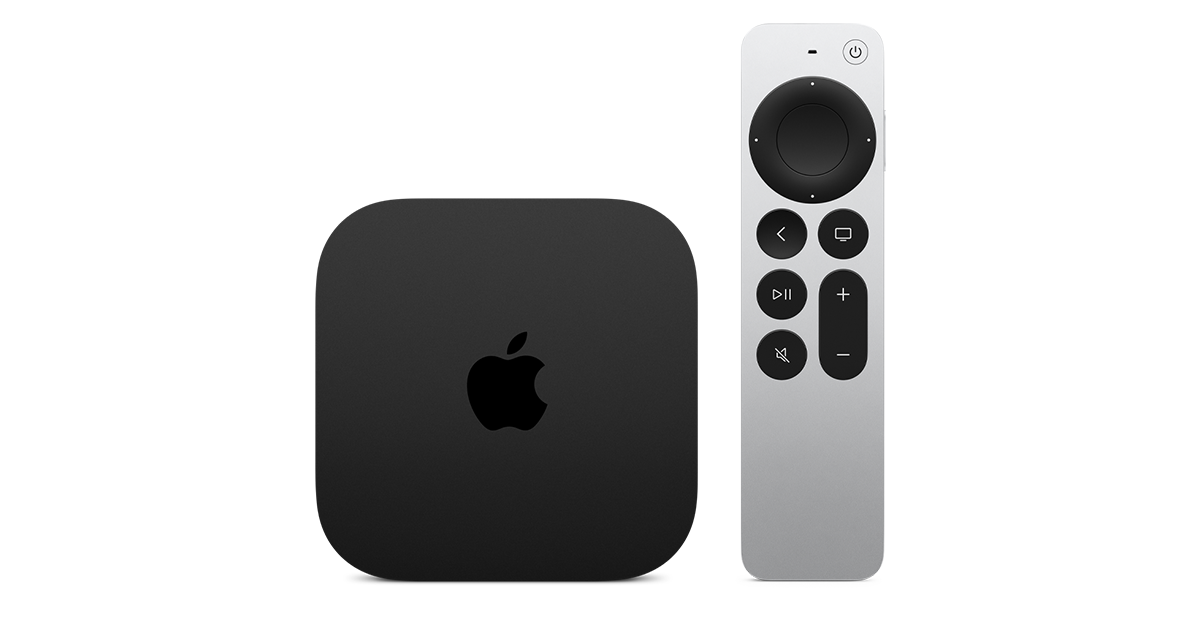
Apple has finally released their Apple TV 4K with built-in Siri and a microphone so it can respond to your queries even if you don't have the remote. It also increases in price, to $299. I had been planning on updating my current Apple TV 4K streamers, but that's $600 for the two of them, and that's a pass at this point.

At $299, it had better come with 256 GB of Storage, Gigabit (or better) Ethernet, the latest HDMI tech and standards, and one year of free Apple One. But it probably won't…
17 Replies · 240 views
Ronnie-
Meh. The 4Ks I have will do everything that these do that I need them to do.


Which that's most tech these days for anything released the last four to five years.


It's honestly a testament to how good the previous gen Apple TVs were and are.
navychop
It's honestly a testament to how good the previous gen Apple TVs were and are.

Don't tell them that. They'll adopt planned obsolescence.
navychop
Outside of gaming, would Joe Sixpack notice any difference?
KAB
KAB
Outside of gaming, would Joe Sixpack notice any difference?
Not a bit. IMO, Apple's are slow to boot up. Time is about the same with 1st gen and 3rd. Roku runs rings around them in that department. I only reason I stuck, is the Apple infrastructure, which has it's definite advantages. But $300 is a deal breaker. Later, Apple!
S
Don't tell them that. They'll adopt planned obsolescence.
they all do that anyways.. ever notice your cell phone slows down when you come up for an upgrade.. :what. apple's been making money off of software and not hardware for a while
ncted
ever notice your cell phone slows down when you come up for an upgrade
No. Makes me wonder if that is Apple or the carrier. I am on pre-paid, so I never get "an upgrade." I still have my old iPhone 11 Pro as a second line, and it runs iOS 27 just fine. My iPhone Air, which is still a current model, doesn't really seem that much faster in regular use. It is better in other ways, and worse in some ways than the 11 Pro (size), but performance really isn't a big differentiator, especially since I replaced the battery in the 11 Pro. If I had gotten enough storage when I originally bought the 11 Pro, it could still be my primary device with no issues.
ncted
Not a bit. IMO, Apple's are slow to boot up. Time is about the same with 1st gen and 3rd. Roku runs rings around them in that department. I only reason I stuck, is the Apple infrastructure, which has it's definite advantages. But $300 is a deal breaker. Later, Apple!
Yeah, they boot up a bit slower than Roku, but the OS does a lot more, so it makes sense. How often are you booting them up that is a differentiator? Aside from OS updates, mine are on all the time. I will say the ATV4K is generally quicker than the Roku Ultras I have, when it comes to launching apps and responsiveness, not that the Roku is sluggish.
  • Like
Reactions: navychop
navychop
apple's been making money off of software and not hardware for a while

What software? For iPhones? I tried to buy some image s/w IN THE APPLE STORE! They had none, and could not offer ANY s/w for iPhones
TWiT Tech Podcast Network
· posted in TWiT Tech Podcast Network
0 Replies · 4 views
TWiT Tech Podcast Network
· posted in TWiT Tech Podcast Network
0 Replies · 3 views
osu1991
Pub Member / Supporter
Last reply · posted in TV Shows
2 Replies · 61 views
  • Like
Reactions: Howard Simmons
Howard Simmons

Another Tulsa King spin off.🙄
dishstaller
Another Tulsa King spin off.🙄
But.....if you like Tulsa King....looks like you would probably like this as well. I don't mind spin-offs as long as they don't involve a sassy niece who moves from the big city :rolleyes:
TheRatPatrol
Last reply · posted in TV Shows
Anyone else watch this show? Any guesses as to what was in the box Gibbs gave to Abby that was on her desk? It look liked it was glowing.

I also heard that someone was leaving the show at the end of this season. Any guesses as to who thats going to be?
2132 Replies · 214691 views
Jimbo

Howard ...
You don't like Tony, or Tony as the Director (he's only been there for 30 seconds now) or you don't like NCIS ?
  • Like
Reactions: Howard Simmons
Howard Simmons
Howard ...
You don't like Tony, or Tony as the Director (he's only been there for 30 seconds now) or you don't like NCIS ?
Tony as the director.🙄
Jimbo
Tony as the director.🙄
Would you rather have LaRoche ???
  • Like
Reactions: Howard Simmons
dfergie
I liked this episode and a toned down Tony...
  • Like
Reactions: Jimbo
Howard Simmons
Would you rather have LaRoche ???
No. Bring in someone new.🤔 Tony is not serious enough for me. Parker is too close to the team and Tim is too young to take over IMO.
Jimbo
No. Bring in someone new.🤔 Tony is not serious enough for me. Parker is too close to the team and Tim is too young to take over IMO.
I don't think Tim and Tony are that far apart in Age ...

Remember what Tony said to Tim when they first got back together ...
Tony said: I am the New Tony, Tim .... (something to that effect)

Tony has changed, he's been running his Security Business ... I'm sure he has grown up.

Give it time ... your judging the New Tony from the old Tony.

It sounds like Tim won't be around the Team much longer either.
dishstaller
Pub Member / Supporter Lifetime Supporter
Last reply · posted in Movie Talk
Might be worth a watch when it comes out. Looks like typical big corp against the little guy movie BUT....there is a reason this plot type is so oft repeated, it draws audiences.


View: https://www.youtube.com/watch?v=_-f9OGsKHd4
1 Replies · 16 views
dishstaller
BTW, I noticed right after I posted this that someone else had already mentioned it....sorry for the duplicate thread. Still looking forward to seeing the movie.