Social Feed

jcrandall
Staff member HERE TO HELP YOU!
Last reply · posted in DIRECTV CE Discussion Forum (Now CLOSED)
PLEASE READ THIS FIRST! DirecTV Cutting Edge Program: Terms, FAQ, How-To, Hidden Features, and More

If you have any issues with this CE release, please post them in this thread. We'll try to help, and DirecTV will see / be aware of your issue :)


For the latest updates, check out the Satelliteguys CE Chat on Friday nights:
chat.satelliteguys.us

-----------------

Friday, 7/10/2009, 11pm - 2:30am ET
Saturday, 7/11/2009, 11pm - 2:30am ET

H21-100 (x4334), H21-200 (x4334)

Areas of Improvements & Updates
• Parental control
• Autotunes
• Stability

Notes
• H21-100: High Risk
• H21-200: High Risk
• Going back to National will go back to default settings and lose local market ID setting and may lose service authorization.
• To enable Multi-Room View Client, perform "IAMANEDGECUTTER" keyword search. Bring up the Miscellaneous Options screen by pressing Menu->Setup->Miscellaneous Options. From the Miscellaneous Options screen, select Multi-room DVR and choose ON. Also setup Networking on the HR2X and H21. H21 MRV feature will work properly with HR2X CE version x334 only.
• Please report all issues, including MRV


Previous Release Notes:

New Features
01 - Network
01 - Media Share
01 - Music Screen Saver
01 - Game Search
01 - 1080p/24
01 - OTA via the AM21
01 - Autotune
01 - Multi-Room Viewing
:::::::View Playlist from a networked HR2x or R22
:::::::Playback/Trick Play functions from any networked HR2x or R22
:::::::Press {LIST} to see HR2x or R22 servers one playback per server at a time
02 - Parental Controls when scheduling autotune
02 - MRV: bookmarks and resume playback from previous location
04 - Friendly name in network setup
04 - QuickTune
05 - Built-in Self Test
13 - Advance setup in remote control

Improved/Updated
02 - Support for more 1080p Sony TV models
02 - Faster Guide scrolling
02 - ATSC signal meter performance
02 - Fixed a screen saver issue
02 - ATSC setup screen now works on first boot
02 - Fixed reappearance of deleted autotunes
02 - UI updates ("tuner 2" and "tuner 3" references)
02 - Fixed Gray Screen or a PPV OSD appearing overnight
02 - Improved "Try Again" when trying to connect to the Internet.
03 - AV1/AV2 remote code refinements
03 - Improvements to DHCP network setup
04 - Issues with rebooting while in standby
04 - WGA600N Support
04 - Static IP Setup
05 - Stability
05 - Missing "Just a few seconds" OSD
05 - MRV playback and trickplay problems
05 - User Interface polishing
06 - Network services, Network setup, Network status
06 - One touch autotune via Enter key
06 - H21-100, SWM compatibility--will not affect other boxes
06 - H21-100, remote control support
06 - Removed "Reformatting Hard Drive" screen after Reset Everything
06 - Changing Display Language
07 - One touch autotune via Enter key
07 - WGA600N setup with WPA encryption
07 - Receiver not resetting
07 - Closed Captioning Loss
08 - Autotune on ATSC channels
08 - WGA600N setup with WPA encryption
08 - UI Improvements
08 - Missing spending limit unlock OSD
08 - SWM issue, Signal Strength H21-100
08 - System test H21-100
09 - Network Setup
09 - Autotune on ATSC channels
09 - Keyword search
09 - Screen flash coming out of Standby
10 - Improved Front Panel display on boot up
10 - IR Remote H21-100
10 - Remote setting when reset defaults
11 - PPV spending limit conversion (compared to national release)
11 - Video when switching to alternate audio
11 - Fixed blank reset everything screen
12 - Stability fixes
12 - Faster keyword search
12 - Reset everything warning message
13 - Autotuning when using parental controls
13 - Fixed "tune to 201" issue
13 - Reset defaults correctly sets the hide/show SD duplicates option
13 - Updated connection successful message in Network setup
13 - Stability
14 - Autotune Fixes:
::::::Manual with past start times
::::::Lingering icon after canceling
::::::Parental Controls
::::::Minor polishing
14 - Updated welcome screen and help messages
15 - Autotune Scheduling with Viewing Hours set
15 - Preserve favorites when converting from NDS to DIRECTV firmware
15 - HDCP content protection H23-600
15 - Minor polishing
16 - Additional improvements to items from previous CE
17 - Scheduling autotunes
17 - Resetting the set-top-box in standby
17 - Call ID inconsistency
18 - Scheduling autotunes
18 - Coming out of standby
19 - Showings in Info Screen
19 - PPV autotunes when converting to new Middleware
20 - Improved tuning stability
21 - Under the hood
22 - MRV
22 - Aspect ratio changing on certain channels
22 - Bookmarks updates
22 - DIRECTV Subtitling (in TV options)
22 - Stability
23 - Autotune to XM Channels
23 - Stability
8 Replies · 1277 views
twizt3dsist3r
Im noticing that when pressing list you have to wait a good 3-5 seconds before it pops up, much slower than CE's past. Also anything in a folder, when you go to open the folder, its glitched and completely blank. You can close the folder and reopen it, still blank. Ive restarted both client and server several times. HD seems to stream better though.
berck
Im noticing that when pressing list you have to wait a good 3-5 seconds before it pops up, much slower than CE's past. Also anything in a folder, when you go to open the folder, its glitched and completely blank. You can close the folder and reopen it, still blank. Ive restarted both client and server several times. HD seems to stream better though.

I'm noticing the same thing. I was able to get the contents of the folder to show up by paging past and back and forth a few times. I also had to scroll one line at a time. It eventually worked, but was a pain.
twizt3dsist3r
can you walk me through that? I tried it, and its not working for me.
espressoman
My H21-200 is not syncing/updating properly with the content on the DVR for MRV. Pressing List shows some shows, but they aren't the latest recordings. Rebooting the H21 will update force the list to update.

Report: 20090716-FD9
twizt3dsist3r
rebooting didnt work for me, hopefully this is fixed tonight.
Bruce
Supporting Founder Lifetime Supporter
Last reply · posted in Internet Television (IPTV) Discussion Forum
For the naysayers who did not think this service would make it, just added another 4.9M subscribers and that was after the removal of 1.2M Russia subscribers.

This is even better, Paramount+ revenue grew 120% and Subscription revenue grew 74% year-over-year ( 2nd quarter 2021/ 2nd quarter 2022) to $830M, principally reflecting paid subscriber growth on Paramount+.

Now compare that to Peacock with only 13 million paid, 13 million free.

664 Replies · 61553 views
Bruce
Just noticed, CBS shows on Paramount+ are now same day premieres vs next day, which is how they used to be.

Also in 4K/HDR/DV.

I wonder how providers feel about this, they pay an expensive per sub fee for CBS, who is giving another positive reason to drop Paid Live TV and subscribe to P+.
Jimbo
Just noticed, CBS shows on Paramount+ are now same day premieres vs next day, which is how they used to be.

Also in 4K/HDR/DV.

I wonder how providers feel about this, they pay an expensive per sub fee for CBS, who is giving another positive reason to drop Paid Live TV and subscribe to P+.
So, this means that those of us with Commercial Free subs, won't be Commercial Free, unless we wait till after the show is over ?
Which would make same day, not that big of a deal. :confused:
  • Like
Reactions: Bobby
b4pjoe
So, this means that those of us with Commercial Free subs, won't be Commercial Free, unless we wait till after the show is over ?
Which would make same day, not that big of a deal. :confused:
Paramount+ has always had the CBS shows on the CBS local channel and yes with commercials. What they are doing now is releasing the OnDemand versions of the show which I believe they don't release until after the shows air on the west coast. And they will be commercial free if you subscribe to the ad free version of Paramount+.
Jimbo
Paramount+ has always had the CBS shows on the CBS local channel and yes with commercials. What they are doing now is releasing the OnDemand versions of the show which I believe they don't release until after the shows air on the west coast. And they will be commercial free if you subscribe to the ad free version of Paramount+.
So, the New season won't be on the same day commercial free ???

Looks like the On Demand will Still be the Next Day ...

If you have the Top tier, you could get the LIVE Network feed same as any Cable or OTA would.
===============================================================================

Key facts

  • Premiere date: Tuesday, Oct. 6, 2026
  • Release schedule: Weekly on Tuesdays
  • Network: CBS
  • Streaming: Paramount+*
  • Series created by: Donald P. Bellisario and Don McGill
*New episodes of NCIS stream live on Paramount+ as they air on CBS for subscribers of the Paramount+ Premium plan. Episodes stream on demand on Paramount+ on the day after they air on CBS for all subscribers.
b4pjoe
So, the New season won't be on the same day commercial free ???

Looks like the On Demand will Still be the Next Day ...

If you have the Top tier, you could get the LIVE Network feed same as any Cable or OTA would.
===============================================================================

Key facts

  • Premiere date: Tuesday, Oct. 6, 2026
  • Release schedule: Weekly on Tuesdays
  • Network: CBS
  • Streaming: Paramount+*
  • Series created by: Donald P. Bellisario and Don McGill
*New episodes of NCIS stream live on Paramount+ as they air on CBS for subscribers of the Paramount+ Premium plan. Episodes stream on demand on Paramount+ on the day after they air on CBS for all subscribers.
Watching it on the CBS local on Paramount+ is the exact same as watching it on your CBS local on your current cable/satellite/mvpd/vMVPD service. The OnDemand versions of it can be released on the same day that it airs but usually it is after the show airs on the west coast so if you have a show at 7:00 pm in your time zone and it airs 3 hours later on the west coast at 10:00 pm your time then they could release it at 11:00 pm your time if it was a one hour show. I really have not checked to see what time I can see the ad free OnDemand shows on Paramount+. I know today that last nights FBI and CIA show did not pop into the Up Next row on my Apple TV until this afternoon. I guess it may have been in Paramount+ since last night but I never checked it.
  • Like
Reactions: ncted and Jimbo
Jimbo
Watching it on the CBS local on Paramount+ is the exact same as watching it on your CBS local on your current cable/satellite/mvpd/vMVPD service. The OnDemand versions of it can be released on the same day that it airs but usually it is after the show airs on the west coast so if you have a show at 7:00 pm in your time zone and it airs 3 hours later on the west coast at 10:00 pm your time then they could release it at 11:00 pm your time if it was a one hour show. I really have not checked to see what time I can see the ad free OnDemand shows on Paramount+. I know today that last nights FBI and CIA show did not pop into the Up Next row on my Apple TV until this afternoon. I guess it may have been in Paramount+ since last night but I never checked it.
I think I read 3am est the next day, somewhere.
jamieh1
Last reply · posted in DIRECTV Programming Forum
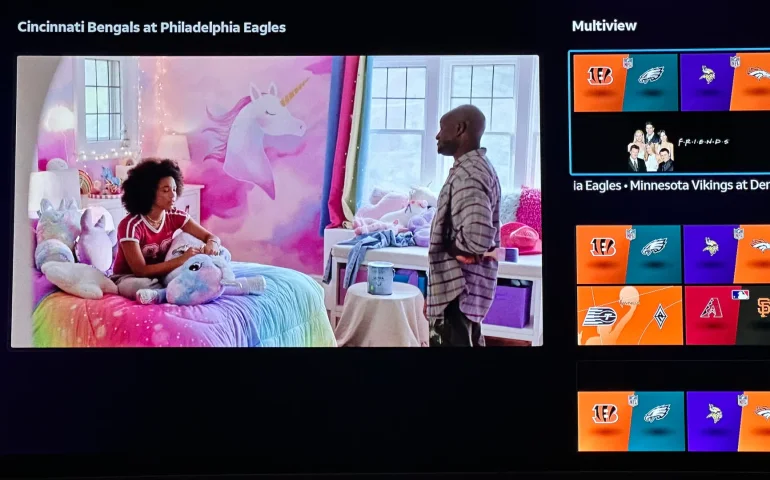
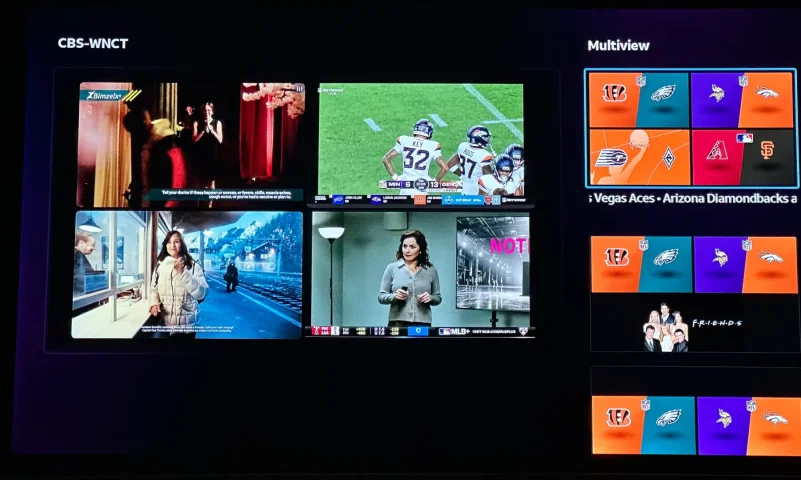
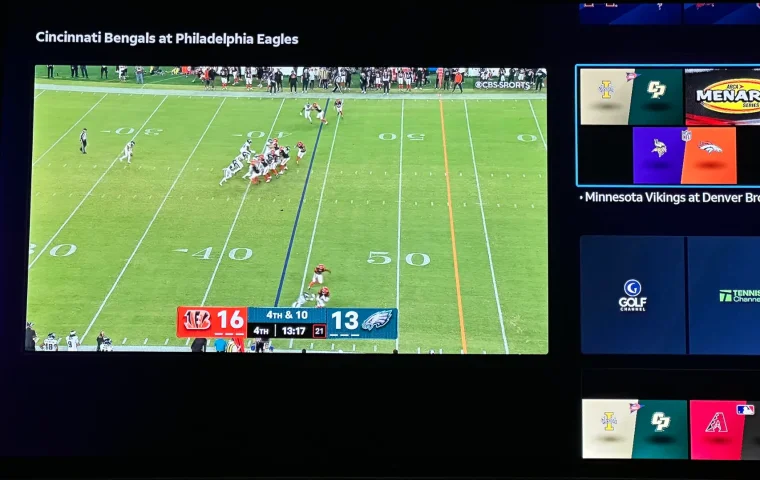
The new curated multiview is now live.
While on many of the sports channels and non sports channels there is a multi view option button. It will pull up a side bar with many different multi view options.
4 Replies · 183 views
K
It's now expanded to a Build Your Own Multiview, currently available to streaming customers with Geminis and Roku, and coming soon to Android TV, Fire TV, Vizio, LG, Apple TV and Tizen.
b4pjoe
It's now expanded to a Build Your Own Multiview, currently available to streaming customers with Geminis and Roku, and coming soon to Android TV, Fire TV, Vizio, LG, Apple TV and Tizen.
But not on the only device they ship out right now which is the Gemini Air.
  • Sad
Reactions: Jimbo
TheRatPatrol
It's now expanded to a Build Your Own Multiview, currently available to streaming customers with Geminis and Roku, and coming soon to Android TV, Fire TV, Vizio, LG, Apple TV and Tizen.
How soon will it be available on Apple TV? Thanks
I WANT MORE
But not on the only device they ship out right now which is the Gemini Air.
It's on my Air's.
"MysteryMan"
Pub Member / Supporter Cutting Edge
Last reply · posted in Computers and Gadgets
I created this thread on the original Edgecutter Cutting Edge Forums site. It's simply a place for those to review the latest software available for those using Windows 10 and Windows 11. To date it has received 112,559 views. I have been asked by staff to continue this thread here.
522 Replies · 47240 views
EarDemon
If it wasn't for what I want, I wouldn't need any of this.

Do I need a collection of handheld radios, scanners and speed enforcement countermeasures? Nope, but I want them. Very little, if any of the software used to interface with these devices is available on Linux.
WhiteBeard
If it wasn't for what I want, I wouldn't need any of this.

Do I need a collection of handheld radios, scanners and speed enforcement countermeasures? Nope, but I want them. Very little, if any of the software used to interface with these devices is available on Linux.
To each there own but I've found that Windows can't do much more than Linux can. Can't have everything. ☹️
  • Haha
Reactions: meStevo
EarDemon
To each there own but I've found that Windows can't do much more than Linux can. Can't have everything. ☹️
For niche use cases, yes I agree. Kali for ethical hacking and security testing, and running a Cacti server for network monitoring are the two things I have experience in. Plus thousands and thousands of other things, but for every day use I just can't see it. The owner of the GMRS repeater that I pay to access is changing the Tx DPL tones tomorrow, while Chirp is available on Linux, the software to program my MXT500 is not.

I run Fedora and Ubuntu in VMWare, honestly I don't care much for the UI of either of them and I don't feel like spending days/weeks to customize the UI to make it look Windows-like when I could just use Windows. The cartoonish dock at the bottom of the screen reminds me of Apple products.
harshness
I don't care much for the UI of either of them and I don't feel like spending days/weeks to customize the UI to make it look Windows-like when I could just use Windows.
What is so fantabulous about the Windows UI? By many accounts, it has been going downhill since Windows 7.

There are Linux desktops that offer Windows or Mac UIs, yet you don't hear much chatter about them outside of questions about when the creators might get sued.
  • Like
Reactions: HipKat
EarDemon
What is so fantabulous about the Windows UI?
Because it's what I prefer. I know I've said this a few times, I use Open Shell to give me the cascading start menu a la WIN 95 and NT4.0. The only reason I went from Windows Vista to 7 back in the day was because of Classic Shell. I cannot stand anything other than the OG start menu from 30+ years ago. I'm using ExplorerPatcher to give me Windows 10 UI elements of the taskbar and right click context menus.

If you could take a look at how I set up Windows 95, you'd find many similarities to how I use 11.
  • Like
Reactions: cp2k
EarDemon
I could probably use that as a starting point, but I don't like the full size icons. If you have to click on each folder that's also a no-go for me, it has to be cascading.

I used to have Peppermint Linux in a VM, that was about as close as I could get to recreating a Windows NT4.0 style of menu structure, but I could never get it to scale properly in VMWare on a 4K display and eventually gave up.

Whatever the boot up time it's fine with me. The longest part of my bootup is the HP SureStart BIOS integrity check. Once that is done, it's only a few more seconds. I haven't done this reg tweak yet since the reformat, but I switched the bootup animation to the Windows 10 style spinning circle of dots, and it's two and a half rotations. I can live with that.
harshness
Because it's what I prefer.
I hope you don't believe that makes it wonderful (especially when you're using workarounds for Microsoft's malfeasance).

I use LibreOffice as opposed to Microsoft office (even in Windows) because it's UI is like the Office of old, so I'm putting my money where my mouth is (in a manner of speaking). The ribbon was one of the worst ideas to come out Redmond.
HipKat
I could probably use that as a starting point, but I don't like the full size icons. If you have to click on each folder that's also a no-go for me, it has to be cascading.

I used to have Peppermint Linux in a VM, that was about as close as I could get to recreating a Windows NT4.0 style of menu structure, but I could never get it to scale properly in VMWare on a 4K display and eventually gave up.

Whatever the boot up time it's fine with me. The longest part of my bootup is the HP SureStart BIOS integrity check. Once that is done, it's only a few more seconds. I haven't done this reg tweak yet since the reformat, but I switched the bootup animation to the Windows 10 style spinning circle of dots, and it's two and a half rotations. I can live with that.
I used to pin the C: drive to the Win Taskbar and it would open in cascading style
Former member 209992
Last reply · posted in SatelliteGuys Support Center
For some reason, the satelliteguys.us site is loading a lot slower than usual on both Chrome on my Asus laptop and Safari on my iPhone.
I'm also seeing longer appearances of the blue bar at the top and the "3 blue bars" loading symbol.
Is anyone else also having the same problem? Thanks in advance.
528 Replies · 17966 views
  • Like
Reactions: charlesrshell
Scott Greczkowski
Remember folks... just like DNS... its always Foxbat. :D
Foxbat
Remember folks... just like DNS... its always Foxbat. :D
WTF… …What the Foxbat!😱
S
zipping right along here
S
WTF… …What the Foxbat!😱
wow what a kick in the balls!!! the wife blames you when things don't work now scott's blaming you :biggrin
Foxbat
wow what a kick in the balls!!! the wife blames you when things don't work now scott's blaming you :biggrin
I know. Here's what Scott has in store for me if I get out of line:
IMG_1990.webp
IMG_1989.webp
S
I know. Here's what Scott has in store for me if I get out of line:
OMG to freaking funny :biggrin
cpdretired
Supporting Founder
Last reply · posted in DISH Network Support Forum
Several Dish offers showed up today in my account. Once you choose one the rest are removed. Offers were Showtime, Starz, AMC and others.
33 Replies · 1597 views
  • Like
Reactions: ewindowman and LQQK
B
Just checked my account and it shows mgm+ at 8.00 per month, but that has red line drawn thru it and shows 0.00 per month. But it doesn't say how long this lasts,...... 1 month, 3 months, forever. I called customer service to get an answer, and they said nothing like that exists. Should I add the offer or not? Already paying them too much, but want to take advantage of something free.
ewindowman
Lots of offers on the hopper account app . On the website there are only a few.
Almighty1
Lots of offers on the hopper account app . On the website there are only a few.
Never had time to use the Hopper 3 account app yet. I also have a Hopper Plus so it's not the same as the Hopper 3 standalone. Will try it when I have more time, need to beat the taxes extension filing deadline first as I am still working on entering the data into the tax software.
Almighty1
This is what I see when it comes to offers on My Account on the Hopper 3 with Hopper Plus and dish.com:

AMC+ 50% off for 3 months (My Account Hopper 3 with Hopper Plus)
AMC+ Free for 3 months (My Account Hopper 3 with Hopper Plus and dish.com)
AMC+ 1 month free (My Account Hopper 3 with Hopper Plus)

Cine y Entretenimie 50% off for 3 months

DOGTV 1 month free (My Account Hopper 3 with Hopper Plus)

DISH Movie Pack 50% off for 6 months (My Account Hopper 3 with Hopper Plus and dish.com)

DOGTV 50% off for 6 months (My Account Hopper 3 with Hopper Plus)
DOGTV 1 month free (My Account Hopper 3 with Hopper Plus)

Gallery First Month Free (My Account Hopper 3 with Hopper Plus)

Heartland Pack 50% off for 6 months (My Account Hopper 3 with Hopper Plus and dish.com)

Mexico y Mas 50% off for 3 months (My Account Hopper 3 with Hopper Plus)

MGM+ $0.00/Month not saying how long (My Account Hopper 3 with Hopper Plus)

Multi-Sport Pack 50% off for 6 months (My Account Hopper 3 with Hopper Plus)

Netflix Standard with Ads, $7.99/month credit toward Netflix Standard with Ads ($.99) month with 24 month DISH commitment
(Only on My Account Hopper 3 with Hopper Plus)

Outdoor Pack 50% off for 6 months (My Account Hopper 3 with Hopper Plus)

Paramount+ with SHOWTIME 50% off for three months (My Account Hopper 3 with Hopper Plus and dish.com)
Paramount+ with SHOWTIME 2 months free (My Account Hopper 3 with Hopper Plus)

Playboy TV 50% off for 6 months (My Account Hopper 3 with Hopper Plus)

Republica Dominicana 50% off for 3 months (My Account Hopper 3 with Hopper Plus)

STARZ 50% off for 3 months (My Account Hopper 3 with Hopper Plus)
STARZ $1.99/month for 2 months (My Account Hopper 3 with Hopper Plus and dish.com)

Sudamerica y Mas 50% off for 3 months (My Account Hopper 3 with Hopper Plus)

UP Faith & Family 1 month free (My Account Hopper 3 with Hopper Plus)
S
Just checked my account and it shows mgm+ at 8.00 per month, but that has red line drawn thru it and shows 0.00 per month. But it doesn't say how long this lasts,...... 1 month, 3 months, forever. I called customer service to get an answer, and they said nothing like that exists. Should I add the offer or not? Already paying them too much, but want to take advantage of something free.
look again mine says free for 1 month
Almighty1
look again mine says free for 1 month
Not for me, mines has no mention of how long aka the offer period and the Terms and conditions the $0.00 is good for. All I see is one can lose $5.00 if you decide to remove it before day 31 after you add it to the account.

1792131071109.webp
  • Wow
Reactions: slow_poke_pete
S
Not for me, mines has no mention of how long aka the offer period and the Terms and conditions the $0.00 is good for. All I see is one can lose $5.00 if you decide to remove it before day 31 after you add it to the account.

View attachment 194817
wonder why it says that
Scott Greczkowski
Staff member HERE TO HELP YOU! Cutting Edge
Last reply · posted in The Chit Chat Club
Sometimes a thread gets so many posts in it that is can cause issues for the server so that why today we introduce The Song Name Game Part 3!

So let the game continue!

The last song was added by Bobby who posted...

One Meat Ball - Andrews Sisters

CONTINUE ON AND HAVE FUN! WELCOME HOME TO SATELLITEGUYS.US!

Here are the original rules for the game as posted by WebbyDude back in 2006. http://www.satelliteguys.us/threads/68645-Song-Name-Game

Just name a song title and the band who performed it. The next person does the same thing, but needs to list a song title or band name which includes a word from the previous entry. Pick songs from any genre.

Example:

Long Live Rock and Roll -- Rainbow

Rainbow in the Dark -- Dio

Another example:

Ride the Lightning -- Metallica

Lightning Strikes -- Ozzy Osbourne


Get it?


An additional note: we all know that song titles, sometimes, use profane words. Because this is a family friendly website it is advised that you clean up that title up a bit. This is accomplished by using something like sh!t instead of the real word. Thanks....
68496 Replies · 2670700 views
  • Like
Reactions: c-spand
sdfntx
White Noise - Jessie Baylin
  • Like
Reactions: Bobby
dishstaller
White Rabbit - Jefferson Airplane
  • Like
Reactions: ClarkGable
long_time_Dish
White Sun - The Doobie Brothers
H
White Room-Cream
  • Like
Reactions: ClarkGable
ClarkGable
White Wedding - Billy Idol
jannah
Last reply · posted in DISH Network Support Forum
Help, I'm a little confjused on the activation process.
I purchased the Joey 4 from Solid Signal and shipping box has Call 866 726-4282 to Avtivate new Receiver. That number is Solid Signals number.
I googled and that search said call Dish to activate. I assume that is correct unless this requires a 2 step process.
Please let me know.
Thanks
6 Replies · 216 views
jannah
All good called Dish and new Joey 4 is activated and working.
Old Joey 2 deactivated and no need to return. 🙂
S
All good called Dish and new Joey 4 is activated and working.
Old Joey 2 deactivated and no need to return. 🙂
i bought mine straight from dish as it was only $ 100.00 bucks!!! had the protection plan they came out removed and deactivated the 4k joey and activated and installed the joey 4.
zcrayfish
Solid signal has provided the wrong number on their website to activate Dish boxes for years now.
  • Like
Reactions: charlesrshell
Nominal
I don't know if things are different with Dish but when I first rejoined DirecTV a few years ago Solid Signal was able to create my account and activate the equipment I got from them on a self-install without a truck roll.
S
Solid signal has provided the wrong number on their website to activate Dish boxes for years now.
1-800-333-3474. billing or tech support should be able to do it!!!
S
Help, I'm a little confjused on the activation process.
I purchased the Joey 4 from Solid Signal and shipping box has Call 866 726-4282 to Avtivate new Receiver. That number is Solid Signals number.
I googled and that search said call Dish to activate. I assume that is correct unless this requires a 2 step process.
Please let me know.
Thanks
just call dish and iggy the number from solid signal!!