Social Feed

In learning mode on this box. I removed the 500GB HDD from my AB IP Box 9000HD receiver and installed it in the AZBox. The HDD is a Samsung HD502HI.
I had to modify the cables to suit the board connectors provided within the AZBox as they are not identical to the AB IP Box. I had to splice the power plug from the AZBox onto the original cable from the AB IP Box and cut the data cable connector in two pieces (the AZ IP Box cable had the power cable and the data cable in one molded piece and this would not plug into the conector on the board in the AZBox). I simply snipped it in two with a pair of dikes and it plugged in easily.
When I tried to select RECORD MODE, I received the message that no storage device was present. So I went into the SETTINGS > STORAGE MENU and deleted the partition and then formatted the HDD. It then recognized that the HDD drive was connected and would enter the record mode. It also recognizes the drive size and used space/free space available.
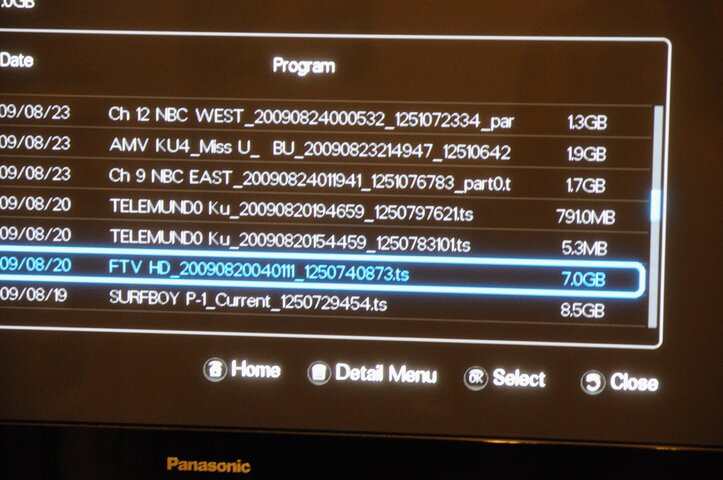
I was going to ask for assistance on how to get it to playback, but I found it just by a few more steps. You have to go to MENU > RECORDED PROGRAM. I was trying to locate it through the RECORDED MOVIES area.
If anyone has any input or further information on this subject, it would be most appreciated. But, I can state that it works and it works nice. A very clean picture and sound and they are synced properly. I recorded a few minutes of news from ONN and I cannot tell the difference between what was live and what is now recorded on the HDD. I am still using this box with the original firmware. I have some questions about updating the firmware, but I will save that for later.
RADAR
I had to modify the cables to suit the board connectors provided within the AZBox as they are not identical to the AB IP Box. I had to splice the power plug from the AZBox onto the original cable from the AB IP Box and cut the data cable connector in two pieces (the AZ IP Box cable had the power cable and the data cable in one molded piece and this would not plug into the conector on the board in the AZBox). I simply snipped it in two with a pair of dikes and it plugged in easily.
When I tried to select RECORD MODE, I received the message that no storage device was present. So I went into the SETTINGS > STORAGE MENU and deleted the partition and then formatted the HDD. It then recognized that the HDD drive was connected and would enter the record mode. It also recognizes the drive size and used space/free space available.
I was going to ask for assistance on how to get it to playback, but I found it just by a few more steps. You have to go to MENU > RECORDED PROGRAM. I was trying to locate it through the RECORDED MOVIES area.
If anyone has any input or further information on this subject, it would be most appreciated. But, I can state that it works and it works nice. A very clean picture and sound and they are synced properly. I recorded a few minutes of news from ONN and I cannot tell the difference between what was live and what is now recorded on the HDD. I am still using this box with the original firmware. I have some questions about updating the firmware, but I will save that for later.
RADAR
147 Replies
·
31070 views



Pub Member / Supporter

America’s Fastest-Growing EV State Isn’t California—Not by a Long Shot
New data shows electric vehicle adoption is increasingly driven by state policies, electricity prices and charging access—not federal incentives
 www.autoweek.com
The number-one US state for EV growth, according to the June 22 Yardi report?
Oklahoma.

It has no ZEV mandates and "minimal" incentives, Yardi says, but also has cheap electricity, high multi-car household rates (so, for example, a non-Lightning Ford F-150 pulls their trailers), and a consumer base willing to switch.
112 Replies
·
889 views




TWiT Tech Podcast Network
Time for another AWESOME video from the TWIT Network!
View: https://www.youtube.com/watch?v=mO_nW-BTlv4
Direct YouTube Link - Microsoft Defender Arriving on Linux
TWIT's Website
TWIT Live Feed
View: https://www.youtube.com/watch?v=mO_nW-BTlv4
Direct YouTube Link - Microsoft Defender Arriving on Linux
TWIT's Website
TWIT Live Feed
0 Replies
·
7 views
Ham Radio 2.0
Time for another AWESOME video from Ham Radio 2.0!
View: https://www.youtube.com/watch?v=wDeuQ1SLkQU
Direct YouTube Link - LIVE!
Ham Radio 2.0 Website
Ham Radio 2.0 on Facebook
View: https://www.youtube.com/watch?v=wDeuQ1SLkQU
Direct YouTube Link - LIVE!
Ham Radio 2.0 Website
Ham Radio 2.0 on Facebook
0 Replies
·
7 views


Supporting Founder
Really excited for this season with Kentucky having a new coach and some really exciting recruits. Probably won't last long, but here's hoping this season is great.
148 Replies
·
1724 views


Lifetime Supporter
A continuation of a thread from the pub, just general discussion of AI.
Brief 60 minute clip about next gem autonomous fighters - not remote controlled, but rather collaborating with controllers and aircraft in the theater.
View: https://youtu.be/DRm0mbp_n1k
We've literally got a movie already about this
View: https://youtu.be/a2PW7a9ViDc
Brief 60 minute clip about next gem autonomous fighters - not remote controlled, but rather collaborating with controllers and aircraft in the theater.
View: https://youtu.be/DRm0mbp_n1k
We've literally got a movie already about this
View: https://youtu.be/a2PW7a9ViDc
67 Replies
·
1136 views







TWiT Tech Podcast Network
Time for another AWESOME video from the TWIT Network!
View: https://www.youtube.com/watch?v=JElsle_m2rE
Direct YouTube Link - This Week in Tech 1105
TWIT's Website
TWIT Live Feed
View: https://www.youtube.com/watch?v=JElsle_m2rE
Direct YouTube Link - This Week in Tech 1105
TWIT's Website
TWIT Live Feed
0 Replies
·
12 views

My year was almost up and we got the new bill for a year of service for $ 360.00 insane sat radio is becoming like cable!!! i logged into my acct and hopped onto chat and told the rep that i wanted to cancel. she understood my concern and went quiet for a few minutes. i figured that she was canceling my service. she comes back and said that she seen that i have been a sub since 07 and then offers me the same package for a year for 120.00 with taxes and fee's!!! i grabbed it. after almost having a stroke 
236 Replies
·
10946 views


Staff member
HERE TO HELP YOU!
Cutting Edge
Sometimes a thread gets so many posts in it that is can cause issues for the server so that why today we introduce The Song Name Game Part 3!
So let the game continue!
The last song was added by Bobby who posted...
One Meat Ball - Andrews Sisters
CONTINUE ON AND HAVE FUN! WELCOME HOME TO SATELLITEGUYS.US!
Here are the original rules for the game as posted by WebbyDude back in 2006. http://www.satelliteguys.us/threads/68645-Song-Name-Game
Just name a song title and the band who performed it. The next person does the same thing, but needs to list a song title or band name which includes a word from the previous entry. Pick songs from any genre.
Example:
Long Live Rock and Roll -- Rainbow
Rainbow in the Dark -- Dio
Another example:
Ride the Lightning -- Metallica
Lightning Strikes -- Ozzy Osbourne
Get it?
An additional note: we all know that song titles, sometimes, use profane words. Because this is a family friendly website it is advised that you clean up that title up a bit. This is accomplished by using something like sh!t instead of the real word. Thanks....
So let the game continue!
The last song was added by Bobby who posted...
One Meat Ball - Andrews Sisters
CONTINUE ON AND HAVE FUN! WELCOME HOME TO SATELLITEGUYS.US!
Here are the original rules for the game as posted by WebbyDude back in 2006. http://www.satelliteguys.us/threads/68645-Song-Name-Game
Just name a song title and the band who performed it. The next person does the same thing, but needs to list a song title or band name which includes a word from the previous entry. Pick songs from any genre.
Example:
Long Live Rock and Roll -- Rainbow
Rainbow in the Dark -- Dio
Another example:
Ride the Lightning -- Metallica
Lightning Strikes -- Ozzy Osbourne
Get it?
An additional note: we all know that song titles, sometimes, use profane words. Because this is a family friendly website it is advised that you clean up that title up a bit. This is accomplished by using something like sh!t instead of the real word. Thanks....
68525 Replies
·
2672507 views


Lifetime Supporter
Schedule drops tomorrow. Mandatory mini camps in June. Hall of Fame game August 6th.
111 Replies
·
1716 views