

Social Feed

I picked up an LG 42LE5400 LED LCD a couple of weeks ago and thought I might pass along some initial impressions.
First off, I am replacing a year old Sony Bravia 40 inch that inexplicably lost its ability to switch HDMI inputs about a week after it was out of warranty. I also have a 42 inch Vizio Gallevia that I bought a few years ago which has developed video noise problems that makes it unusable after about two hours of use. So I decided not to go with a Sony, which I liked, or a Vizio, which was an incredible bang for the buck at the time.
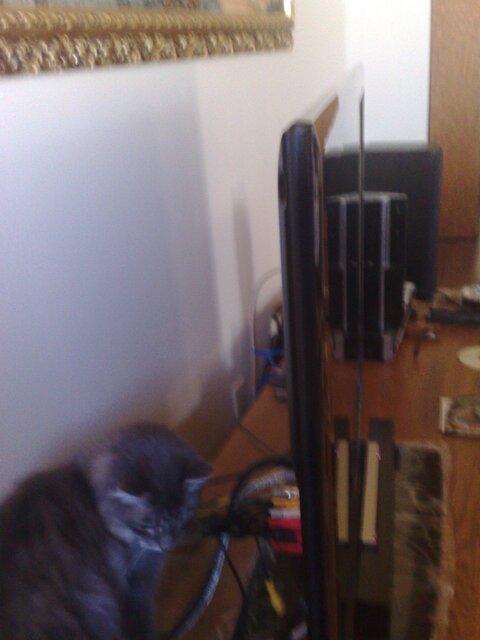
The first thing that struck me about the LG was how thin it was. I have an attached picture to show this, but to provide a basis for comparison, it is half as thick as the Bravia, and probably a fifth as thick as my three year old Vizio Gallevia. Despite that, it is about as heavy as either. Documentation is spartan at best. Most of what you need to actually put the base together and get it hooked up is in paper form, the rest is on a CD. Fortunately the setup procedure is pretty straightforward after this point, if you have set up a modern TV before. It does take two people to easily put the base on.
There are controls to turn the TV on and off, inputs, volume, and menu on the lower edge of the front of the tv. These are flush mounted bubble switch type things and the print is small and low contrast to the bezel. They are almost impossible to use in low light. The side mounted switches on the Sony and the Vizio were much easier to find and use.
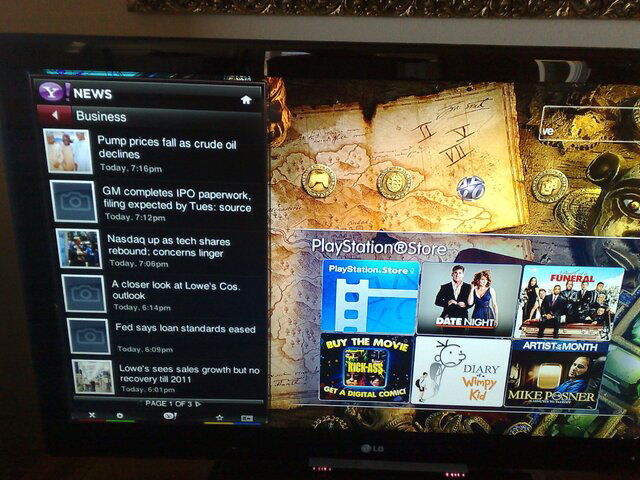
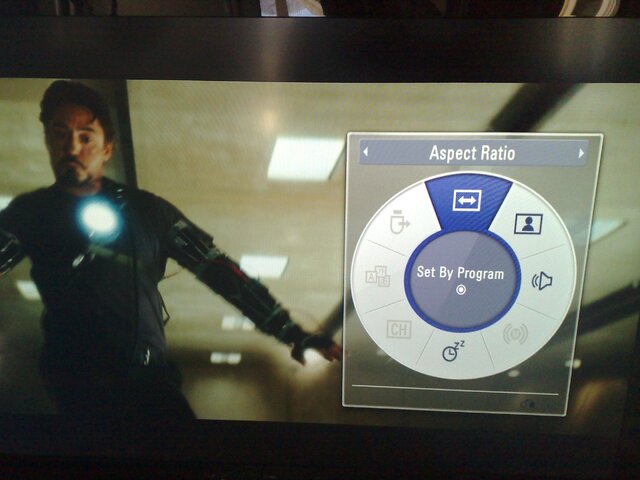
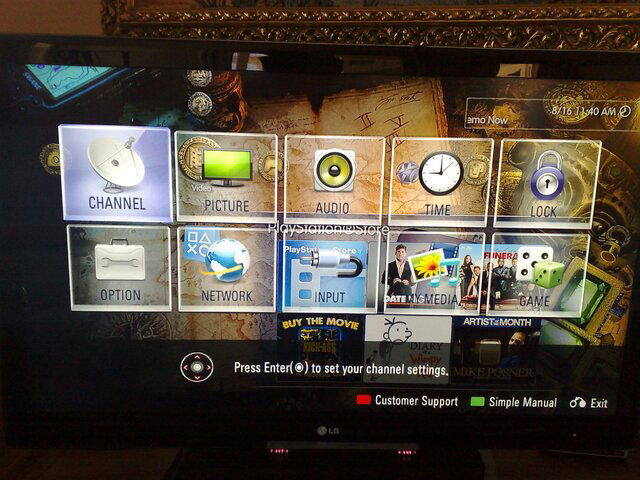
Setup was easy enough. The menuing system is wonderfully graphical compared with anything I have seen before. The menus are a combination of row and column type that have been around forever, and a neat on-screen wheel type for adjusting the picture. I have attached examples of both. There is just about everything a person could want by way of adjustment. There is an automated picture adjustment "wizard' that I did not use. If you look around a bit online there are some people who have already found optimum settings for blackest black and ideal color. I am no expert on any of this, so I located some recommended settings online and used these.
Setting up TV channels relied on an automated search that includes OTA digital, OTA analog, satellite, and cable. One thing that my old Gallevia and the Sony did that the LG will not allow is to add channels to the list. Each scan completely rebuilds the list of found channels. This is important to me because I live in a deep fringe area in the mountains between LA and Bakersfield.CA. I have two separate inputs for two outdoor antennas. I have one pointed toward Bakersfield/Fresno, and another pointed toward Los Angeles to get a couple of specific channels that are within range. I have the antennas on an A/B box. The LG isn't set up to allow me to save information from both antennas. I know there are ways around this, but it is one way that the TV differs from my others.
Another difference is the ability of the tuner to pick up distant stations. The Sony would pick up one station that the neither the Gallevia or the LG can regularly; the CW out of Fresno. To be fair, the tower is 104 miles away, but the Sony could lock it and very seldom did the signal fall to the point where the picture became pixelated. I was able to scan this channel in with the LG last night after trying for two weeks, but the picture is right at the edge of acceptability, sometimes pixelated and sometimes not there at all.
When I started shopping I was going back and forth between the Samsung and the LG. And also back and forth between plasma and LED backlit/edgelit. I decided on LED because it would give me decent blacks and would work well in a bright room. To be honest, the only real deciding factor in LG over Samsung was my LG Blu ray player BD370. The two units sync up well. When I insert a disc into the player the TV changes input. I have read it is also supposed to adapt the TV settings, but I see no evidence of that.
The picture is amazing. As I said above, I didn't use the picture wizard for this, instead I found some settings on a board (maybe AVS forum?) that were supposed to be better than factory settings. In my case they really made a huge difference. The one caveat here being that I had to turn off the energy saving features to set it up. I'll let the pictures I am uploading speak for themselves. It completely changed the experience of gaming on the Wii and more so on the PS3. Details jump out in a way that I have not seen before. After two weeks I am still seeing things that elicit a "wow" while watching. There is still a substantial amount of glare from the screen that you can see in some of the pictures. 480i looks good. 480p looks better, better than on the Sony. I think the darker blacks may help make the picture less noisy at lower resolutions.
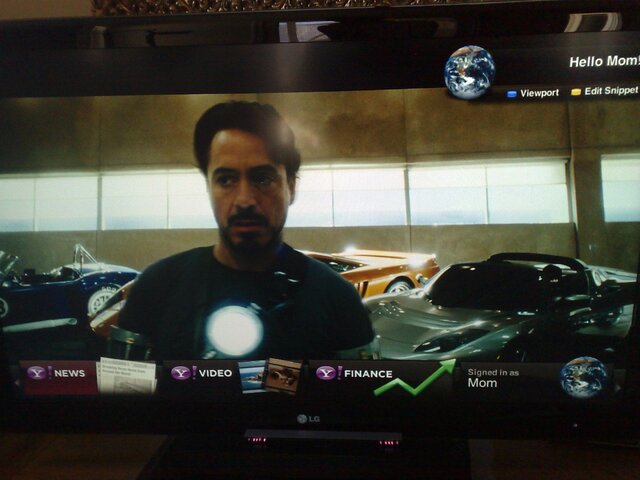
The Internet features are really nice-to-haves. I can't say as I have used them very much in the last two weeks. I did set up the Yahoo widgets, and have played with the Youtube application, but that is about it. I have Netflix activated on both the BD player and the Wii that is connected to the TV, so it just seems redundant to have yet another Netflix device. I do like the ability to use the Yahoo widgets to check news headlines. It is much more accessible and complete than the news application on the Wii. The widgets and applications respond very quickly. I don't know what kind of processor runs this TV, but there is no lag as long as your Internet connection is fairly good. You can have multiple profiles set up for the widgets for different users. That seems a bit much for the half dozen widgets included. It makes me wonder if there will be more widgets included in some later firmware update.
It does have an update feature similar to my BD player. It asked to update the firmware the first time I powered up the tv attached to the network. It has the ability to connect wirelessly as well, but that requires a seperate dongle. The attachment point for this dongle looks very proprietary.
The remote has some odd touches, but works well. The input button is near the top of the remote in a line of four buttons labelled energy, av mode, input, and TV. I find I have to really look for the button when I changes sources. Since I have a satellite receiver, a Wii, a PS2, a PS3, an HD DVD player, a DVD player, a Bluray player, and an AV receiver all connected to video sources, this is kind of confusing. There is a facility to rename inputs, which I have not used yet. That will probably help. The navigation in the menus is controlled from four arrow keys with an enter button in the middle. The keys/buttons on the remote are very stiff, and it does take some force to make sure the buttons have "clicked". There is a Netcast button to bring up the Internet options, and a widgets button that brings up the Yahoo Widgets as a ribbon bar along the bottom of the screen. Nice.
Anyway, the above are just some impressions of this TV. I thought I might pass them along. So far I am very impressed. To be honest, I could easily do away with half of what this TV is capable of and still be perfectly happy. I bought it for the picture, and the picture has far exceeded my expectations. The images below were taken with a cell phone camera so really aren't very true to life. The first two are a lot more representative of what I am seeing here than the four to the right.
First off, I am replacing a year old Sony Bravia 40 inch that inexplicably lost its ability to switch HDMI inputs about a week after it was out of warranty. I also have a 42 inch Vizio Gallevia that I bought a few years ago which has developed video noise problems that makes it unusable after about two hours of use. So I decided not to go with a Sony, which I liked, or a Vizio, which was an incredible bang for the buck at the time.
The first thing that struck me about the LG was how thin it was. I have an attached picture to show this, but to provide a basis for comparison, it is half as thick as the Bravia, and probably a fifth as thick as my three year old Vizio Gallevia. Despite that, it is about as heavy as either. Documentation is spartan at best. Most of what you need to actually put the base together and get it hooked up is in paper form, the rest is on a CD. Fortunately the setup procedure is pretty straightforward after this point, if you have set up a modern TV before. It does take two people to easily put the base on.
There are controls to turn the TV on and off, inputs, volume, and menu on the lower edge of the front of the tv. These are flush mounted bubble switch type things and the print is small and low contrast to the bezel. They are almost impossible to use in low light. The side mounted switches on the Sony and the Vizio were much easier to find and use.
Setup was easy enough. The menuing system is wonderfully graphical compared with anything I have seen before. The menus are a combination of row and column type that have been around forever, and a neat on-screen wheel type for adjusting the picture. I have attached examples of both. There is just about everything a person could want by way of adjustment. There is an automated picture adjustment "wizard' that I did not use. If you look around a bit online there are some people who have already found optimum settings for blackest black and ideal color. I am no expert on any of this, so I located some recommended settings online and used these.
Setting up TV channels relied on an automated search that includes OTA digital, OTA analog, satellite, and cable. One thing that my old Gallevia and the Sony did that the LG will not allow is to add channels to the list. Each scan completely rebuilds the list of found channels. This is important to me because I live in a deep fringe area in the mountains between LA and Bakersfield.CA. I have two separate inputs for two outdoor antennas. I have one pointed toward Bakersfield/Fresno, and another pointed toward Los Angeles to get a couple of specific channels that are within range. I have the antennas on an A/B box. The LG isn't set up to allow me to save information from both antennas. I know there are ways around this, but it is one way that the TV differs from my others.
Another difference is the ability of the tuner to pick up distant stations. The Sony would pick up one station that the neither the Gallevia or the LG can regularly; the CW out of Fresno. To be fair, the tower is 104 miles away, but the Sony could lock it and very seldom did the signal fall to the point where the picture became pixelated. I was able to scan this channel in with the LG last night after trying for two weeks, but the picture is right at the edge of acceptability, sometimes pixelated and sometimes not there at all.
When I started shopping I was going back and forth between the Samsung and the LG. And also back and forth between plasma and LED backlit/edgelit. I decided on LED because it would give me decent blacks and would work well in a bright room. To be honest, the only real deciding factor in LG over Samsung was my LG Blu ray player BD370. The two units sync up well. When I insert a disc into the player the TV changes input. I have read it is also supposed to adapt the TV settings, but I see no evidence of that.
The picture is amazing. As I said above, I didn't use the picture wizard for this, instead I found some settings on a board (maybe AVS forum?) that were supposed to be better than factory settings. In my case they really made a huge difference. The one caveat here being that I had to turn off the energy saving features to set it up. I'll let the pictures I am uploading speak for themselves. It completely changed the experience of gaming on the Wii and more so on the PS3. Details jump out in a way that I have not seen before. After two weeks I am still seeing things that elicit a "wow" while watching. There is still a substantial amount of glare from the screen that you can see in some of the pictures. 480i looks good. 480p looks better, better than on the Sony. I think the darker blacks may help make the picture less noisy at lower resolutions.
The Internet features are really nice-to-haves. I can't say as I have used them very much in the last two weeks. I did set up the Yahoo widgets, and have played with the Youtube application, but that is about it. I have Netflix activated on both the BD player and the Wii that is connected to the TV, so it just seems redundant to have yet another Netflix device. I do like the ability to use the Yahoo widgets to check news headlines. It is much more accessible and complete than the news application on the Wii. The widgets and applications respond very quickly. I don't know what kind of processor runs this TV, but there is no lag as long as your Internet connection is fairly good. You can have multiple profiles set up for the widgets for different users. That seems a bit much for the half dozen widgets included. It makes me wonder if there will be more widgets included in some later firmware update.
It does have an update feature similar to my BD player. It asked to update the firmware the first time I powered up the tv attached to the network. It has the ability to connect wirelessly as well, but that requires a seperate dongle. The attachment point for this dongle looks very proprietary.
The remote has some odd touches, but works well. The input button is near the top of the remote in a line of four buttons labelled energy, av mode, input, and TV. I find I have to really look for the button when I changes sources. Since I have a satellite receiver, a Wii, a PS2, a PS3, an HD DVD player, a DVD player, a Bluray player, and an AV receiver all connected to video sources, this is kind of confusing. There is a facility to rename inputs, which I have not used yet. That will probably help. The navigation in the menus is controlled from four arrow keys with an enter button in the middle. The keys/buttons on the remote are very stiff, and it does take some force to make sure the buttons have "clicked". There is a Netcast button to bring up the Internet options, and a widgets button that brings up the Yahoo Widgets as a ribbon bar along the bottom of the screen. Nice.
Anyway, the above are just some impressions of this TV. I thought I might pass them along. So far I am very impressed. To be honest, I could easily do away with half of what this TV is capable of and still be perfectly happy. I bought it for the picture, and the picture has far exceeded my expectations. The images below were taken with a cell phone camera so really aren't very true to life. The first two are a lot more representative of what I am seeing here than the four to the right.

5 Replies
·
3164 views


Staff member
HERE TO HELP YOU!
Cutting Edge
Sometimes a thread gets so many posts in it that is can cause issues for the server so that why today we introduce The Song Name Game Part 3!
So let the game continue!
The last song was added by Bobby who posted...
One Meat Ball - Andrews Sisters
CONTINUE ON AND HAVE FUN! WELCOME HOME TO SATELLITEGUYS.US!
Here are the original rules for the game as posted by WebbyDude back in 2006. http://www.satelliteguys.us/threads/68645-Song-Name-Game
Just name a song title and the band who performed it. The next person does the same thing, but needs to list a song title or band name which includes a word from the previous entry. Pick songs from any genre.
Example:
Long Live Rock and Roll -- Rainbow
Rainbow in the Dark -- Dio
Another example:
Ride the Lightning -- Metallica
Lightning Strikes -- Ozzy Osbourne
Get it?
An additional note: we all know that song titles, sometimes, use profane words. Because this is a family friendly website it is advised that you clean up that title up a bit. This is accomplished by using something like sh!t instead of the real word. Thanks....
So let the game continue!
The last song was added by Bobby who posted...
One Meat Ball - Andrews Sisters
CONTINUE ON AND HAVE FUN! WELCOME HOME TO SATELLITEGUYS.US!
Here are the original rules for the game as posted by WebbyDude back in 2006. http://www.satelliteguys.us/threads/68645-Song-Name-Game
Just name a song title and the band who performed it. The next person does the same thing, but needs to list a song title or band name which includes a word from the previous entry. Pick songs from any genre.
Example:
Long Live Rock and Roll -- Rainbow
Rainbow in the Dark -- Dio
Another example:
Ride the Lightning -- Metallica
Lightning Strikes -- Ozzy Osbourne
Get it?
An additional note: we all know that song titles, sometimes, use profane words. Because this is a family friendly website it is advised that you clean up that title up a bit. This is accomplished by using something like sh!t instead of the real word. Thanks....
68546 Replies
·
2674213 views


TWiT Tech Podcast Network
Time for another AWESOME video from the TWIT Network!
View: https://www.youtube.com/watch?v=ojDkPVLnkNI
Direct YouTube Link - Security Now 1101
TWIT's Website
TWIT Live Feed
View: https://www.youtube.com/watch?v=ojDkPVLnkNI
Direct YouTube Link - Security Now 1101
TWIT's Website
TWIT Live Feed
0 Replies
·
2 views


Supporting Founder
Since the Reds have there thread we should too!
Last watched Nine inch Nails
Next 3:10 to Yuma
Last watched Nine inch Nails
Next 3:10 to Yuma
5391 Replies
·
510656 views


TWiT Tech Podcast Network
Time for another AWESOME video from the TWIT Network!
View: https://www.youtube.com/watch?v=w4lDymQdOo0
Direct YouTube Link - MacBreak Weekly 1047
TWIT's Website
TWIT Live Feed
View: https://www.youtube.com/watch?v=w4lDymQdOo0
Direct YouTube Link - MacBreak Weekly 1047
TWIT's Website
TWIT Live Feed
0 Replies
·
7 views

Staff member
Pub Member / Supporter
Cutting Edge
The TPN Map Excel Presents all DIRECTV Channels:
Understanding the TPN Map
Making Sense of the TPN Map Display Conventions
National (50-States or wide/NAT+PR beams)
Local (Local-Into-Local or narrow/Spot beams)
Local (Local-Into-Local or narrow/Spot beams)
Additional tabs provide:
OTA the (Over-The-Air) Database
VOD (Video On_Demand) Records
Offline Records
Engr Records
Net Decoder a graphic presentation of all satellites and transponders
VOD (Video On_Demand) Records
Offline Records
Engr Records
Net Decoder a graphic presentation of all satellites and transponders
Domestic Satellites
@99W...... D11, D14
@101W.... D16
@103W.... D12, D15
@110W.... D5
@119W.... D8
@99W...... D11, D14
@101W.... D16
@103W.... D12, D15
@110W.... D5
@119W.... D8
Understanding the TPN Map
Making Sense of the TPN Map Display Conventions
2143 Replies
·
933955 views


Supporting Founder
Lifetime Supporter
This is a thread that will keep you apprised of 4K events that will be showing on Dish channel 540. Keep looking here for information.
As of today, 9-27-17, there are no scheduled events posted for the next 2 weeks. That is subject to change on a daily basis.
As of today, 9-27-17, there are no scheduled events posted for the next 2 weeks. That is subject to change on a daily basis.
763 Replies
·
167390 views
Linus Tech Tips
Time for another AWESOME video from Linus Tech Tips!
View: https://www.youtube.com/watch?v=LGA4ZFr-hfo
Direct YouTube Link - I Gotta Stop Following Advice From Reddit
Linus on Facebook
The LTT Store
View: https://www.youtube.com/watch?v=LGA4ZFr-hfo
Direct YouTube Link - I Gotta Stop Following Advice From Reddit
Linus on Facebook
The LTT Store
0 Replies
·
10 views

Lifetime Supporter
Schedule drops tomorrow. Mandatory mini camps in June. Hall of Fame game August 6th.
119 Replies
·
1919 views



Staff member
HERE TO HELP YOU!
Stumbled across this ... http://www.gaspricewatch.com/USGas_ZipSearch.asp
I found no local prices, although it did show stations at my location...
Added these to this post...
USA National Gas Temperature Map
State By State Gasoline Taxes
Gas Buddy
Ethanol Free Stations
I found no local prices, although it did show stations at my location...
Added these to this post...
USA National Gas Temperature Map
State By State Gasoline Taxes
Gas Buddy
Ethanol Free Stations
5556 Replies
·
460883 views