Social Feed

slriv
Last reply · posted in Old YAHOOGROUPS - VOOM! Archives
Hi, Newbie Voom person here. I threw together some notes so far in a
review context last night, but here's the gist of it all. I realize
not everyone thinks like I do, so this is just my opinion. ;) Enjoy.

Voom

I recently signed up for Voom on their $1 promotional offer. The
installation cost made it a no-brainer to try, and if it didn't work
or reception was unacceptable, I could easily drop it within a short
period. The installation does bind you to a 6 month contract, however.

Installation

My installation was a mess. The installer was completely unprepared.
He didn't have the right equipment and refused to make a cable run
through my apartment without trying to get another $79. He was a nice
guy, but he was a typical sub-contractor trying to get out of doing as
much work as possible. My cable run is long, but it is within the 125
ft limit that is offered in the Voom installation, so technically Voom
owes me another install.

Since I'm an apartment dweller, I'm forced to use a tripod for dish
installation. I already have a tripod and a dish setup for DirecTV.
The Voom installer didn't bring one and acted like it would be weeks
before he could come back, so I let him go ahead and commandeer the
DirecTV gear to get it working which effectively disabled my existing
service. I had planned on dumping DirecTV anyway, but it is sad the
installer was not prepared especially when it is clear where I live
from the work order. The other nit about this and why I didn't bother
to wait is the installer was going to try charging another $100 to get
the tripod installed. Add that to the cable run and you see my
dilemma.

OTA Antenna Installation

I'm a lucky guy, there is no doubt. Since I live on the top floor in
my complex, I can receive virtually every digital channel broadcast in
the region even with the cheap antenna that came with the Voom gear.
Frankly, I'm so impressed with this, I'm considering dumping all the
sat gear and getting an HD tuner card for my HTPC and be done with it.
Sadly I would lose SciFi and Starz Westerns channel.

Experience

Well, it's HD. the 30 some odd channels are primarily composed of a
bunch of Voom content with the standard movie channels and a few
extras broadcast in HD. Most cable channels are still in SD and have
years before they have to bother with upgrading (2010).

As far as content, Voom has fewer channels (dramatically so), but
almost all the ones I care about are there. Besides, who needs 10
shopping channels, 5 or 10 relgious brainwashing channels or 100
sports channels? This however does beg the question of why Voom is the
same price as the competition.

Menus and guides on the receiver are atrocious. I'm a bit of a snob
here having lived with TiVo for the past 5 years and DirecTV for 10
years straight, but I just don't get why the guide only shows 5
channels a page, and then if you move forward in time you run into
this weird bug where shows that wrap across pages (horizontally)
sometimes move back to the right even though they should be moving to
the left. It's very disconcerting and basically a bug. There are NO
advanced features in the guide. There is no easy way to search for
content and basically you are stuck paging through broken menus to
find when stuff is broadcast. Again, I am spoiled here, I'm used to
typing in a name and a list of matches showing up. I actually found
myself logging into tvguide.com to find out what was coming on.

You never know just how much you rely on a PVR until you don't have
one. Voom is planning to release their HD DVR sometime in March, but
like so many of these things I wouldn't hold my breath. When I made my
order I asked about this and they only committed to the first half of
2005 which is suspicious considering what was being said at CES.

Picture quality is excellent on the HD channels, but SD channels are
extremely soft. I tried an SVideo cable, and things didn't improve.
I'm not sure why this is the case but it's made watching SD
unpleasant. I'm starting to think perhaps they are over-compressing
these channels.
Conclusion
Pros

* HD is here, and Voom is delivering.
* The system works, and although the local channels require a
separate terrestrial antenna the guide seamlessly marries the two
feeds. See AntennaWeb.org to check your home.

Cons

* No PVR/DVR device is out yet. I think odds are not good and
especially considering they are giving mixed signals.
* Menu Guide system is 1980's technology and forces you to think
in channel numbers instead of programs... Very annoying
* Installation is bollocks, be prepared for an unhappy experience
* Again, why only 5 channels per page in the guide??? What the
hell are they going to do with the other 3/4's of the screen. And
don't tell me advertising, I'm paying for this damn service.
* No firewire output, which means you can't use an HD VCR unless
it's WVHS with component inputs ($5K and they aren't made anymore!!!).
* Possibly SD channels are over-compressed making them very soft,
but that's only speculation.

You be the judge, but if you are a snob, like me, you will probably be
disappointed. The current $1 offer is great and is worth trying out.
It does commit you to a 6 month contract however. Not everyone will be
able to sign up for Voom because of satellite location. I'm pretty
lucky, but the actual direction of the satellite requires you don't
have any buildings or mountain ranges due east.


------------------------
6 Replies · 1437 views
Robert Heitner
RE: [VOOM] Re: Voom experience

I couldn't agree more. SD on Directv, Dish and cable companies are so
compressed sometimes you think you're getting the feed from rabbit ears in
analog. While I'm loving my cable hd dvr, I really miss Voom and hope
they'll release their whole house dvr solution so I can join up again.

Missing Voom in Kemah, TX

Robert Heitner Jr.
Data Developers Plus, Corp.
<blocked::http://www.ddpcorp.com> http://www.ddpcorp.com

Home of the #1 Contact Management Solution!
<blocked::BLOCKED::http://www.riatacrm.com/> http://www.riatacrm.com


_____

From: berockin1 [mailto:berockin1@yahoo.com]
Sent: Wednesday, January 19, 2005 1:12 PM
To: VOOM@yahoogroups.com
Subject: [VOOM] Re: Voom experience


Hmmmm, most think the SD on VOOM is the best they've seen whether it
be on DBS or Cable. Voom compresses less that anyone on the SD.
I guess it all in what everyone sees, to my eye the SD is great
looking. Lets hope we're seeing it for a while to come. : \

--- In VOOM@yahoogroups.com, "slriv" <samr@s...> wrote:
>
> Hi, Newbie Voom person here. I threw together some notes so far in

a
> review context last night, but here's the gist of it all. I realize
> not everyone thinks like I do, so this is just my opinion. ;)

Enjoy.
>
> Voom
>
> I recently signed up for Voom on their $1 promotional offer. The
> installation cost made it a no-brainer to try, and if it didn't work
> or reception was unacceptable, I could easily drop it within a short
> period. The installation does bind you to a 6 month contract,

however.
>
> Installation
>
> My installation was a mess. The installer was completely unprepared.
> He didn't have the right equipment and refused to make a cable run
> through my apartment without trying to get another $79. He was a

nice
> guy, but he was a typical sub-contractor trying to get out of doing

as
> much work as possible. My cable run is long, but it is within the

125
> ft limit that is offered in the Voom installation, so technically

Voom
> owes me another install.
>
> Since I'm an apartment dweller, I'm forced to use a tripod for dish
> installation. I already have a tripod and a dish setup for DirecTV.
> The Voom installer didn't bring one and acted like it would be weeks
> before he could come back, so I let him go ahead and commandeer the
> DirecTV gear to get it working which effectively disabled my

existing
> service. I had planned on dumping DirecTV anyway, but it is sad the
> installer was not prepared especially when it is clear where I live
> from the work order. The other nit about this and why I didn't

bother
> to wait is the installer was going to try charging another $100 to

get
> the tripod installed. Add that to the cable run and you see my
> dilemma.
>
> OTA Antenna Installation
>
> I'm a lucky guy, there is no doubt. Since I live on the top floor in
> my complex, I can receive virtually every digital channel broadcast

in
> the region even with the cheap antenna that came with the Voom gear.
> Frankly, I'm so impressed with this, I'm considering dumping all the
> sat gear and getting an HD tuner card for my HTPC and be done with

it.
> Sadly I would lose SciFi and Starz Westerns channel.
>
> Experience
>
> Well, it's HD. the 30 some odd channels are primarily composed of a
> bunch of Voom content with the standard movie channels and a few
> extras broadcast in HD. Most cable channels are still in SD and have
> years before they have to bother with upgrading (2010).
>
> As far as content, Voom has fewer channels (dramatically so), but
> almost all the ones I care about are there. Besides, who needs 10
> shopping channels, 5 or 10 relgious brainwashing channels or 100
> sports channels? This however does beg the question of why Voom is

the
> same price as the competition.
>
> Menus and guides on the receiver are atrocious. I'm a bit of a snob
> here having lived with TiVo for the past 5 years and DirecTV for 10
> years straight, but I just don't get why the guide only shows 5
> channels a page, and then if you move forward in time you run into
> this weird bug where shows that wrap across pages (horizontally)
> sometimes move back to the right even though they should be moving

to
> the left. It's very disconcerting and basically a bug. There are NO
> advanced features in the guide. There is no easy way to search for
> content and basically you are stuck paging through broken menus to
> find when stuff is broadcast. Again, I am spoiled here, I'm used to
> typing in a name and a list of matches showing up. I actually found
> myself logging into tvguide.com to find out what was coming on.
>
> You never know just how much you rely on a PVR until you don't have
> one. Voom is planning to release their HD DVR sometime in March, but
> like so many of these things I wouldn't hold my breath. When I made

my
> order I asked about this and they only committed to the first half

of
> 2005 which is suspicious considering what was being said at CES.
>
> Picture quality is excellent on the HD channels, but SD channels are
> extremely soft. I tried an SVideo cable, and things didn't improve.
> I'm not sure why this is the case but it's made watching SD
> unpleasant. I'm starting to think perhaps they are over-compressing
> these channels.
> Conclusion
> Pros
>
> * HD is here, and Voom is delivering.
> * The system works, and although the local channels require a
> separate terrestrial antenna the guide seamlessly marries the two
> feeds. See AntennaWeb.org to check your home.
>
> Cons
>
> * No PVR/DVR device is out yet. I think odds are not good and
> especially considering they are giving mixed signals.
> * Menu Guide system is 1980's technology and forces you to think
> in channel numbers instead of programs... Very annoying
> * Installation is bollocks, be prepared for an unhappy

experience
> * Again, why only 5 channels per page in the guide??? What the
> hell are they going to do with the other 3/4's of the screen. And
> don't tell me advertising, I'm paying for this damn service.
> * No firewire output, which means you can't use an HD VCR unless
> it's WVHS with component inputs ($5K and they aren't made

anymore!!!).
> * Possibly SD channels are over-compressed making them very

soft,
> but that's only speculation.
>
> You be the judge, but if you are a snob, like me, you will probably

be
> disappointed. The current $1 offer is great and is worth trying out.
> It does commit you to a 6 month contract however. Not everyone will

be
> able to sign up for Voom because of satellite location. I'm pretty
> lucky, but the actual direction of the satellite requires you don't
> have any buildings or mountain ranges due east.


_____

Yahoo! Groups Links


* To visit your group on the web, go to:
http://groups.yahoo.com/group/VOOM/


* To unsubscribe from this group, send an email to:
VOOM-unsubscribe@yahoogroups.com
<mailto:VOOM-unsubscribe@yahoogroups.com?subject=Unsubscribe>


* Your use of Yahoo! Groups is subject to the Yahoo! Terms of Service
<http://docs.yahoo.com/info/terms/> .


[Non-text portions of this message have been removed]


------------------------
slriv
[VOOM] Re: Voom experience

Ultimately the lack of a DVR is the problem for me. Even the soft SD
channels are tolerable when you consider the HD content, but without a
DVR I find it very hard to make it through any program without losing
interest due to commercial breaks and other nonsense. The voom
channels are interesting, and some movies I've never even heard of. ;)

I was curious though, are the movies on these channels and on HBO and
the other HD channels truly telecine'd (for lack of a better word)
into 1080i or are they just 480p being upconverted? I ask because
most of the film movies don't seem better than the corresponding DVD
through a progressive scan player?

Sam

--- In VOOM@yahoogroups.com, "Robert Heitner" <ddprobert@y...> wrote:
> I couldn't agree more. SD on Directv, Dish and cable companies are

so
> compressed sometimes you think you're getting the feed from rabbit

ears in
> analog. While I'm loving my cable hd dvr, I really miss Voom and

hope
> they'll release their whole house dvr solution so I can join up

again.
>
> Missing Voom in Kemah, TX
>
> Robert Heitner Jr.
> Data Developers Plus, Corp.
> <blocked::http://www.ddpcorp.com> http://www.ddpcorp.com
>
> Home of the #1 Contact Management Solution!
> <blocked::BLOCKED::http://www.riatacrm.com/> ht

tp://www.riatacrm.com
]


------------------------
seattlesatelliter
[VOOM] Re: Voom experience

Hi Sam,

It has been reported by those in the know that the movies are not
upconverted but transferred from the original 35mm film directly to
1080i. Yes, we've noticed the variation in quality as well. I
suspect this is due to the age of the film stock in many cases and to
poor transfers in others but am no expert in this area.

Still watching HDTV under rainy and warm Seattle skies, Gill


--- In VOOM@yahoogroups.com, "slriv" <samr@s...> wrote:
>
> Ultimately the lack of a DVR is the problem for me. Even the soft SD
> channels are tolerable when you consider the HD content, but without a
> DVR I find it very hard to make it through any program without losing
> interest due to commercial breaks and other nonsense. The voom
> channels are interesting, and some movies I've never even heard of. ;)
>
> I was curious though, are the movies on these channels and on HBO and
> the other HD channels truly telecine'd (for lack of a better word)
> into 1080i or are they just 480p being upconverted? I ask because
> most of the film movies don't seem better than the corresponding DVD
> through a progressive scan player?
>
> Sam
>
> --- In VOOM@yahoogroups.com, "Robert Heitner" <ddprobert@y...> wrote:
> > I couldn't agree more. SD on Directv, Dish and cable companies are

> so
> > compressed sometimes you think you're getting the feed from rabbit

> ears in
> > analog. While I'm loving my cable hd dvr, I really miss Voom and

> hope
> > they'll release their whole house dvr solution so I can join up

> again.
> >
> > Missing Voom in Kemah, TX
> >
> > Robert Heitner Jr.
> > Data Developers Plus, Corp.
> > <blocked::http://www.ddpcorp.com> http://www.ddpcorp.com
> >
> > Home of the #1 Contact Management Solution!
> > <blocked::BLOCKED::http://www.riatacrm.com/> ht

> tp://www.riatacrm.com
> ]


------------------------
berockin1
[VOOM] Re: Voom experience

Exactly, HD transfers and upconversion are two different things.
It's all based on the source, if VOOM decides to show a 40 year old
doc. sot on 8mm film obviously that would look not so good even after
an HD transfer. Good stock 35mm film has great resolution for transfer

--- In VOOM@yahoogroups.com, "seattlesatelliter"
<seattlesatelliter@y...> wrote:
>
> Hi Sam,
>
> It has been reported by those in the know that the movies are not
> upconverted but transferred from the original 35mm film directly to
> 1080i. Yes, we've noticed the variation in quality as well. I
> suspect this is due to the age of the film stock in many cases and

to
> poor transfers in others but am no expert in this area.
>
> Still watching HDTV under rainy and warm Seattle skies, Gill
>
>
> --- In VOOM@yahoogroups.com, "slriv" <samr@s...> wrote:
> >
> > Ultimately the lack of a DVR is the problem for me. Even the

soft SD
> > channels are tolerable when you consider the HD content, but

without a
> > DVR I find it very hard to make it through any program without

losing
> > interest due to commercial breaks and other nonsense. The voom
> > channels are interesting, and some movies I've never even heard

of. ;)
> >
> > I was curious though, are the movies on these channels and on HBO

and
> > the other HD channels truly telecine'd (for lack of a better word)
> > into 1080i or are they just 480p being upconverted? I ask because
> > most of the film movies don't seem better than the corresponding

DVD
> > through a progressive scan player?
> >
> > Sam
> >
> > --- In VOOM@yahoogroups.com, "Robert Heitner" <ddprobert@y...>

wrote:
> > > I couldn't agree more. SD on Directv, Dish and cable companies

are
> > so
> > > compressed sometimes you think you're getting the feed from

rabbit
> > ears in
> > > analog. While I'm loving my cable hd dvr, I really miss Voom and

> > hope
> > > they'll release their whole house dvr solution so I can join up

> > again.
> > >
> > > Missing Voom in Kemah, TX
> > >
> > > Robert Heitner Jr.
> > > Data Developers Plus, Corp.
> > > <blocked::http://www.ddpcorp.com> http://www.ddpcorp.com
> > >
> > > Home of the #1 Contact Management Solution!
> > > <blocked::BLOCKED::http://www.riatacrm.com/> ht

> > tp://www.riatacrm.com
> > ]


------------------------
Stan Sexton
Re: [VOOM] Re: Voom experience

Lack of a DVR is not a problem as I use a top of the line JVC VCR with digital processing that records at 400 lines with 99 cent store tape. And I can store the programs for archiving. I know DVRs do little tricks but they are weak on archiving and resolution.

Addessing the resolution question, I have often wondered about the true resolution on VOOM's movie channels. Are they telecined to low resolution OR is it just that the original old film is not that sharp when telecined?

[Non-text portions of this message have been removed]


------------------------
Scott Greczkowski
Staff member HERE TO HELP YOU! Cutting Edge
Last reply · posted in The Chit Chat Club
Sometimes a thread gets so many posts in it that is can cause issues for the server so that why today we introduce The Song Name Game Part 3!

So let the game continue!

The last song was added by Bobby who posted...

One Meat Ball - Andrews Sisters

CONTINUE ON AND HAVE FUN! WELCOME HOME TO SATELLITEGUYS.US!

Here are the original rules for the game as posted by WebbyDude back in 2006. http://www.satelliteguys.us/threads/68645-Song-Name-Game

Just name a song title and the band who performed it. The next person does the same thing, but needs to list a song title or band name which includes a word from the previous entry. Pick songs from any genre.

Example:

Long Live Rock and Roll -- Rainbow

Rainbow in the Dark -- Dio

Another example:

Ride the Lightning -- Metallica

Lightning Strikes -- Ozzy Osbourne


Get it?


An additional note: we all know that song titles, sometimes, use profane words. Because this is a family friendly website it is advised that you clean up that title up a bit. This is accomplished by using something like sh!t instead of the real word. Thanks....
68747 Replies · 2684646 views
  • Like
Reactions: c-spand
dishstaller
Purple Rain - Prince
  • Like
Reactions: ClarkGable
long_time_Dish
Smoke On The Water - Deep Purple
EatMyVolts
Smoke Gets In Your Eyes -- The Platters
  • Like
Reactions: ClarkGable
H
Roll Me Up And SMOKE Me When I Die-Willie Nelson
ClarkGable
Roll On Down The Highway - Bachman-Turner Overdrive
zippyfrog
Pub Member / Supporter Lifetime Supporter
Last reply · posted in DISH Network Support Forum
Over the past year I have been tracking the changes on Western Arc. The past 3 months have had a lot of changes that I posted in the other MPEG2 Western Arc shutdown thread. Now that 129 is (basically) out of commission, here is where Western Arc stands. This is just a national channel list, (no local channels) based off what I can see and what others have contributed. Thanks to everyone who has helped me come up with the locations of some of the channels – I would try and list all of you out, but I know I would forget someone! As has been suggested in other parts of the forum, it would be great to collect the spotbeam data for those who could contribute!

A couple of pieces of info:
  • Out of the 64 transponders between 110/119, there are currently 50 transponders that Dish is licensed to use. 22 are Spotbeams, 28 are ConUS transponders (14 transponders are licensed to DirecTV and Dish doesn't have access to them)
  • Those 28 ConUS transponders are divided as follows:
    • 10 are dedicated to National HD channels (ESPN, CNN, Disney Channel, etc). Dish is maxing out at 16 HD channels per transponder (note – in an earlier post I said there was one transponder with 17 HD channels, that was an error on my part. When I double checked my listings, one channel changed transponders). Before the transition, there was a maximum of 14 HD channels per transponder.
    • 1 transponder is dedicated to adult content
    • 2 are a mixture HD PPV Movies/4k channels
    • 3 are set aside for HD Sports channels that are only on for live games (NBA League Pass, the PAC 12 alternate channels, some PPV events, etc); 3 SD PPV Sports Channels are there as well.
    • 7 are for SD and/or music channels. Dish is maxing out at 26 SD channels per transponder thus far on the SD transponders.
    • 5 transponders on 110 I have no channels listed but Dish operates. (they are labeled as ConUS on my chart below) There are other things that could be on those transponders, like RV Distant Networks, internal testing channels, etc, that I can't see. They might be able to be used for additional content, but I am not sure exactly what is on those transponders.
There are two transponders that have lower than normal SD channels – 110, TP 21 and 119, TP 19. Previously those transponders contained the programming guides that get downloaded from the satellite when the receivers download EPG. I assume that is where the programming guides are still downloaded from, thus less channels there.

When I talk about number of channels on a transponder, all my numbers are unique channels – for example, channel 101 and 199 are the same channel mapped to two different numbers, but in terms of space, only takes up 1 channel worth of bandwidth on the transponder.

Finally, I have to give Dish a ton of credit. When it was 110/119/129, Dish had 82 transponders they were using – it took a lot to get it down to 50 transponders and figure out where all the pieces were going to go. What are the things they did to get there? Here are the things I saw:
  • During this migration from 129, Dish converted 7 ConUS transponders on 119 into Spotbeams – that is how they ended up fitting on all the HD locals that used to be on 129. (for those interested, TP 6, 7, 8, 9, 10, 11, 13 are the ones that used to be ConUS on 119 that are now Spotbeam)
  • Removed almost all SD duplicate channels that are offered in HD
  • Converted remaining SD channels from MPEG2 to MPEG4
  • There are also 2 subtle things that changed from the HD channel perspective
    • At the beginning of the transition, Dish decreased the number of PPV Movie channels – prior to this transition the PPV channels HD PPV movies were 502-522; now they are 502-517.
    • At the beginning of April when MLB, NBA, and NHL regular seasons were all going on at the same time and this transition began, there were a ton of games "joined in progress" for the HD feeds. That wasn't common since the days before the full time HD RSN's. The reason for that was prior to the transition, Dish had 4 transponders set aside for HD Sports – 2 transponders was the bandwidth set aside from the HD RSN's before Dish dropped the RSN's, then 2 transponders were for alternate channels. Now we are down to 3 transponders for HD sports.
254 Replies · 66373 views
zippyfrog
Dish has officially removed all the locals from 119 and they are all on 110 now. TP 02, 04, 06, 08, 10 were all functioning as Spotbeams as of last week, but now they are ConUS.

This means all 21 transponders that Dish has access to at 119 are now ConUS.
  • Like
Reactions: charlesrshell
D
Dish has officially removed all the locals from 119 and they are all on 110 now.
Might be a silly question, but does this mean ALL 29 TP's on 110 are positively spot beams now?
zippyfrog
Might be a silly question, but does this mean ALL 29 TP's on 110 are positively spot beams now?
Nope - TP 1-13 are still ConUS on 110. Which is crazy...there are so many different spotbeams on the new 110 satellite compared to the older 110 or 119. Now, someone can correct me if I am wrong on this - but aren't there two satellites at 110 right now? If so, it looks like TP 1-13 are coming from the old satellite at 110 and 14 onward are spotbeams on the new satellite.
  • Like
Reactions: charlesrshell
D
Now, someone can correct me if I am wrong on this - but aren't there two satellites at 110 right now?
Hopefully nelson61 can chime in on this one, because I'm not sure, either.
I guess the thing I'm really perplexed about, is if there are NO more locals - at least on spotbeams - on 119, then how DID they cram ALL the locals on 110 & NOT have ALL those x-ponders in SB mode by now?
  • Like
Reactions: charlesrshell
zippyfrog
Hopefully nelson61 can chime in on this one, because I'm not sure, either.
I guess the thing I'm really perplexed about, is if there are NO more locals - at least on spotbeams - on 119, then how DID they cram ALL the locals on 110 & NOT have ALL those x-ponders in SB mode by now?

Here was a comment by nelson61 last year:
EchoStar 23 (Conus beam) will still be at 110W so there can be some Conus beam coverage from 110W depending on how many transponders they use for the spots.
In the same thread, he gave all the kml files for the spotbeams to put on Google Earth, and it looks like there are a lot more spotbeams per transponder available than the old satellite. My gut is that there is just a more technilogically advanced satellite, and can handle more channels.

I would love an analysis of how many channels could be fit on all the spots!
  • Like
Reactions: charlesrshell
D
My gut is that there is just a more technilogically advanced satellite, and can handle more channels.
My only trouble with that explanation, is the fact that they are wasting at least 1 TP (TP 10, to be precise) on a local market (part of the Chicago locals are on that TP) that could be used for more CONUS channels (namely more HD!)
zippyfrog
My only trouble with that explanation, is the fact that they are wasting at least 1 TP (TP 10, to be precise) on a local market (part of the Chicago locals are on that TP) that could be used for more CONUS channels (namely more HD!)
I ran the Schedule S through ChatGPT to analyze the data quickly, and according to ChatGPT, the 16 transponders currently being used for SpotBeams on 110 is all that has been authorized by the FCC. So Dish might be using TP 01-13 for ConUS on 110 for the foreseeable future. If that is the case, Dish has a ton of space to bring in more HD channels nationally or use that bandwidth for something else.

I know my lists aren't perfect as I can't see all the test channels and behind the scenes channels, but for channels available to subscribers - there are no channels on 119 TP 01-08 and 10; and on 110, TP14 has only 4 channels. With Dish putting 16 HD channels per transponder right now, that is about 145+ slots for HD channels that are available if Dish does keep 110 as ConUS for TP 01-13.

1793870854650.webp
  • Like
Reactions: charlesrshell
ewindowman
Lifetime Supporter
Last reply · posted in DISH Network Support Forum
Looks like dish is Bankrupt. Filling tomorrow Tuesday June 30th
446 Replies · 15316 views
rvvaquero
If Musk did acquire DISH, he would just convert it to use his own satellites to deliver it. Might be easier than creating a new startup. Change my dish out to one which connects to Starlink? Who knows?
S
  • Like
Reactions: charlesrshell
S
  • Like
Reactions: charlesrshell
S
  • Like
Reactions: charlesrshell
dishstaller
Pub Member / Supporter Lifetime Supporter
Last reply · posted in The Chit Chat Club
Videos like this can make you appreciate the things we take for granted.


View: https://www.youtube.com/shorts/a2cgQidHQJI
3 Replies · 53 views
  • Like
Reactions: Bobby and navychop
Bobby
Videos like this can make you appreciate the things we take for granted.


View: https://www.youtube.com/shorts/a2cgQidHQJI

That brought tears to my eyes.
dishstaller
That brought tears to my eyes.
Really...REALLY hate to do this to you Bobby, but....


View: https://www.youtube.com/watch?v=LsOo3jzkhYA&pp=ygUed29tYW4gaGVhcnMgZm9yIHRoZSBmaXJzdCB0aW1l
  • Like
Reactions: Bobby
dishstaller
Okay....if you think you can take it....this one brought tears to my eyes when I first saw it and did again just now.


View: https://www.youtube.com/shorts/i5UCDwHMatg?feature=share
  • Like
Reactions: Bobby
DialgaChampion
Last reply · posted in DISH Network Support Forum
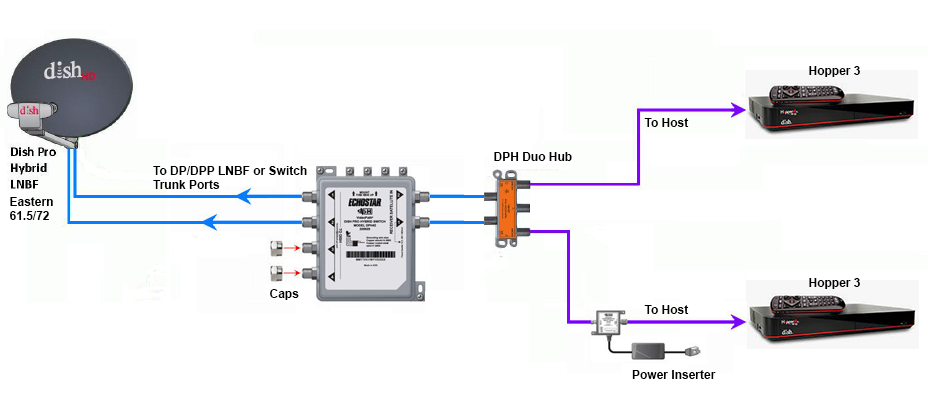
Does someone still have the diagram showing how to connect two Hopper 3s again?

I currently have one H3 and one 4K Joey, set up through a 1000.2 eastern arc hybrid lnb and solo hub.

The plan is to replace the Joey with the second H3. Already purchased a duo hub and I have three coax cables coming in from outside, from back when I used to have the older 1000.4 dish and the hopper 2. I don't fully remember, but I think the other two coax cables are just tied up next to the dish outside; will have to check again.
27 Replies · 5970 views
HipKat
dp6.png

You need a 42 switch.
Run the outputs to the inputs on the Duo Hub
DialgaChampion
You need a 42 switch.
Run the outputs to the inputs on the Duo Hub

Okay, so I made an updated diagram just to make sure I understand this right...

- 2 Coax connected from outside Dish LNB into 42 switch.
- 2 Coax from 42 switch into Duo Hub.
- 1 Coax from Duo Hub into 1st Hopper 3.
- 1 Coax from Duo Hub into Power Inserter.
- 1 Coax from Power Inserter into 2nd Hopper 3.
- Power Inserter plugged into wall electrical outlet.

Did I get that right? And also, I assume the power inserter is required?
HipKat
Okay, so I made an updated diagram just to make sure I understand this right...

- 2 Coax connected from outside Dish LNB into 42 switch.
- 2 Coax from 42 switch into Duo Hub.
- 1 Coax from Duo Hub into 1st Hopper 3.
- 1 Coax from Duo Hub into Power Inserter.
- 1 Coax from Power Inserter into 2nd Hopper 3.
- Power Inserter plugged into wall electrical outlet.

Did I get that right? And also, I assume the power inserter is required?
Twa Coaxes from the LNB if it's Eastern Arc (2 "Eyes") and three if it's Western Arc and yes, the power inserter, it's required
LQQK
Does someone still have the diagram showing how to connect two Hopper 3s again?

I currently have one H3 and one 4K Joey, set up through a 1000.2 eastern arc hybrid lnb and solo hub.

The plan is to replace the Joey with the second H3. Already purchased a duo hub and I have three coax cables coming in from outside, from back when I used to have the older 1000.4 dish and the hopper 2. I don't fully remember, but I think the other two coax cables are just tied up next to the dish outside; will have to check again.
Are you going with 2 H3s for the PIP/Multi-View features or something else?
  • Like
Reactions: charlesrshell
DialgaChampion
Are you going with 2 H3s for the PIP/Multi-View features or something else?

No, it's specifically to fix the problem with the 4K Joey's live feed intermittently freezing. I'll be watching a live program and then randomly out of nowhere, the picture and sound will just pixelate/freeze for 5-10 seconds, then go back to normal. Doesn't matter which channel it's on either. It's like what happens when the signal cuts out during heavy rain or a thunderstorm, but this will happen even on a perfectly clear day/night.

It doesn't happen with my H3 though, only with the Joey. I've replaced the solo hub and I've also replaced the Joey itself with another brand new 4K Joey, but it's still the same problem. And I know it's not the coax going from the hub into the Joey because I previously had another receiver connected in the same room before changing to the whole home dvr setup and that receiver worked fine.

So I'm basing this off process of elimination, which seems to indicate a problem with the 4K Joey device itself. Only thing I haven't tried is maybe getting a regular Joey 3, if that's still the latest model of Joey currently available, but otherwise the only other solution is getting a second Hopper 3. It'd be nice if the 42 and the Power Inserter weren't necessary and I could just use the Duo Hub though.
DialgaChampion
Twa Coaxes from the LNB if it's Eastern Arc (2 "Eyes") and three if it's Western Arc and yes, the power inserter, it's required
Yep just swap the lnb with a dpp lnb and connect the 42 switch.

Finally got around to trying to set everything up. Need some help because I've got an issue.

1st Hopper 3 works fine.

2nd Hopper 3 doesn't show any channels in my Top 200 package in the guide, even though it's set to All Subscribed. But it does see the 1st Hopper 3 and can access the recordings on it.

Here's my setup:
  • DPP EA 61.5/72 LNB on the dish. 2 Coaxes going from LNB into the DPH42 switch.
  • DPH42 "Receiver 1" port > Power Inserter "To Switch" port..... Power Inserter "To Receiver" port > Duo Hub "ODU 1" port.
  • DPH42 "Receiver 2" port > Duo Hub "ODU 2" port.
  • 2 Coaxes from both Host ports on the Duo Hub into both Hopper 3s.
I've spent the last few hours troubleshooting, no success. I did the Test Installation on the Diagnostics screen. Red button. Held Power Button for 15 seconds.

Also tried several different configurations with the coax cables according to Google's AI suggestions. Tried connecting both a Solo Hub and a Duo Hub (I don't have 2 solo hubs at the moment), having each Hopper connected to each hub independently. Tried connecting Receiver 2 from the DPH42 directly into the 2nd Hopper 3. Tried having the Power Inserter connected both before and after the hub.

I even checked my account online. Both Hopper 3s are authorized and "Powered" on the account. Even tried "Wake Up Receivers". That second H3 still won't show my channels in the guide at all.

According to Google's AI, it thinks this is the problem:
  • - When you plug two Hopper 3 units into a single Duo Hub, the hub cannot allocate the correct satellite transponder frequencies to both boxes simultaneously.
  • - As a result, the first Hopper 3 hogs the satellite line, while the second Hopper 3 gets locked out of the satellite signal entirely—causing an empty guide and blocking live TV. The unlinked status on the whole-home screen occurs because the software recognizes the conflict and stops integration.
But none of its solutions have worked. Any ideas?
  • Like
Reactions: charlesrshell
N
Googles AI is wrong as according to what you wrote you have two completely separate satellite line from the switch

My be a dumb question but did you run the check switch option on th 2nd H3

Did you try swapping the H3 to see if the problem switches between the two

That's all I can think of at the moment
DialgaChampion
Googles AI is wrong as according to what you wrote you have two completely separate satellite line from the switch

My be a dumb question but did you run the check switch option on th 2nd H3

Did you try swapping the H3 to see if the problem switches between the two

That's all I can think of at the moment

Check Status complete. No issues found.
Test Installation screen shows green checks for 61.5 and 72, all 16 tuners.
Options > TV Activity shows 1 of 16 tuners in use.

When I bring up the program guide, the dish scapes channel appears and displays fine. The guide also shows the bonusview channels, and the stream and ppv channels.

I tried swapping the 2nd H3's cables with the 1st H3 and having it as the only H3 connected. It still has the same issue, so it seems isolated to the second Hopper 3 itself.

There was another suggestion from Google, not sure if it applies:

If the TV Activity Screen shows that your tuners are "Available" and "1 of 16 in use," your satellite signal path is 100% active and perfectly working. Your hardware wiring bypass has officially succeeded—the second Hopper 3 is successfully talking to the DPH42 switch, receiving high-frequency satellite data, and its internal processors are healthy. Because the hardware is fully operational, the fact that your screen is still black and the guide is missing means your receiver is stuck in Account Quarantine (Authorization Hold). Because a dual Hopper 3 system requires a non-standard account setup (32 tuners instead of the typical 16-tuner cap), standard "Wake Up" hits sent from the customer app or website are getting rejected by the system. The box can look at the data stream (which is why tuners show as available), but it is legally blocked by the internal software from decoding the live video feeds. To flip the switch and activate the live video feed, a DISH billing agent must manually push a tier-3 service re-hit through their legacy terminal.​

Any thoughts?
  • Like
Reactions: charlesrshell
S
No, it's specifically to fix the problem with the 4K Joey's live feed intermittently freezing. I'll be watching a live program and then randomly out of nowhere, the picture and sound will just pixelate/freeze for 5-10 seconds, then go back to normal. Doesn't matter which channel it's on either. It's like what happens when the signal cuts out during heavy rain or a thunderstorm, but this will happen even on a perfectly clear day/night.

It doesn't happen with my H3 though, only with the Joey. I've replaced the solo hub and I've also replaced the Joey itself with another brand new 4K Joey, but it's still the same problem. And I know it's not the coax going from the hub into the Joey because I previously had another receiver connected in the same room before changing to the whole home dvr setup and that receiver worked fine.

So I'm basing this off process of elimination, which seems to indicate a problem with the 4K Joey device itself. Only thing I haven't tried is maybe getting a regular Joey 3, if that's still the latest model of Joey currently available, but otherwise the only other solution is getting a second Hopper 3. It'd be nice if the 42 and the Power Inserter weren't necessary and I could just use the Duo Hub though.
Why not upgrade to the joey 4 with is an android box and dump the 4k joey
DialgaChampion
Ok, I finally solved it. The second Hopper 3 just needed to be updated to the latest software version. After downloading it, all the channels in my package showed up in the program guide. I guess Dish's system is set up so that if your receiver doesn't have the most recent software update, you can't access your channels, even if the receiver is authorized on the account.

Thank you everyone for helping. I'm very proud I was able to set all of this up myself with all of your guidance. I only wish my mother was still alive to enjoy it, but life is not fair.

Why not upgrade to the joey 4 with is an android box and dump the 4k joey

Stubborness perhaps. I could've tried replacing the original H3 to see if that solved the freezing issue too, since it's over 10 years old now. But I spent so much time and effort trying to set up the coax cables correctly and buying all the correct equipment for a 2 Hopper setup that I was determined to get it done. I'm not a DIYer, but this was one thing I was very passionate about doing, to give my parents the best television experience possible without the hassle of internet/streaming.
meStevo
Lifetime Supporter
Last reply · posted in The Sports Section
Schedule drops tomorrow. Mandatory mini camps in June. Hall of Fame game August 6th.
137 Replies · 2826 views
  • Like
Reactions: Jimbo and dfergie
HipKat
Balls
Bears. Took care of the elite Seahawks defense in a great performance.
NFC North. The entire division is 2 games above .500
Lions. Finally handed an L to that weird Minnesota team. Good vibes for Jack Campbell.
Pitt. Took the lead of the division convincingly.
Bengals vs Titans game. Fireworks game. Not sure it was a well-played game, but it sure was fun. JoeyB with 6 scores... and 4 turnovers.
Denver. They keep winning, man. Payton is a baller of a coach.
Packers. Thorough beatdown of the hard-to-read Panthers.
Jags. Demolished the hapless Colts.
Rams. The Super team finally wins back-to-back games.


Goats
Vikings. Took their first L. I know their D is insane, but their offense is setting back football to the 1950's.
Cowboys. Lost a 2-score lead vs. the Gardner Minshew-led Cards... at home. Embarrassing.
Browns. Playing for the division lead by scoring 6 points.
Bucs vs Falcons game. Setting modern football back to the ice age. Honorable mention to Tua Penix err ... Michael Tagov .... well, you know what I mean.
Bengals fans acting like Burrow just won the MVP after his performance. I get it. 6 scores is awesome. But. He also turned the ball over 4 times and required overtime to beat the 1-win Titans. So spare me the parade.
Chiefs. Not because they lost. It was a close game decided on the last play vs. a divisional rival on the road. That's always rough. But because of their whining over the CLEAR flag they got on the would-be winning play. They are used to getting the calls, and when they don't, they complain. Honorable mention to Mahomes for this quote: "I mean, at the end of the day, you have to go with whatever is called, but a lot of times in those big moments, the little stuff doesn't get called like that"... so you admit it was a penalty?? Just shut up, man.
Colts. They began the fire sale earlier in the week, and it showed. This team is cooked; Daniel Jones should go to the bench, and Steichen will be fired pretty soon.
Chargers. Wow. That's all I got.
Miami. For having the Pats sort of on the ropes and letting them go.
Eagles. Another team that should consider selling some assets. They are going nowhere.
Howard Simmons
Balls
Bears. Took care of the elite Seahawks defense in a great performance.
NFC North. The entire division is 2 games above .500
Lions. Finally handed an L to that weird Minnesota team. Good vibes for Jack Campbell.
Pitt. Took the lead of the division convincingly.
Bengals vs Titans game. Fireworks game. Not sure it was a well-played game, but it sure was fun. JoeyB with 6 scores... and 4 turnovers.
Denver. They keep winning, man. Payton is a baller of a coach.
Packers. Thorough beatdown of the hard-to-read Panthers.
Jags. Demolished the hapless Colts.
Rams. The Super team finally wins back-to-back games.


Goats
Vikings. Took their first L. I know their D is insane, but their offense is setting back football to the 1950's.
Cowboys. Lost a 2-score lead vs. the Gardner Minshew-led Cards... at home. Embarrassing.
Browns. Playing for the division lead by scoring 6 points.
Bucs vs Falcons game. Setting modern football back to the ice age. Honorable mention to Tua Penix err ... Michael Tagov .... well, you know what I mean.
Bengals fans acting like Burrow just won the MVP after his performance. I get it. 6 scores is awesome. But. He also turned the ball over 4 times and required overtime to beat the 1-win Titans. So spare me the parade.
Chiefs. Not because they lost. It was a close game decided on the last play vs. a divisional rival on the road. That's always rough. But because of their whining over the CLEAR flag they got on the would-be winning play. They are used to getting the calls, and when they don't, they complain. Honorable mention to Mahomes for this quote: "I mean, at the end of the day, you have to go with whatever is called, but a lot of times in those big moments, the little stuff doesn't get called like that"... so you admit it was a penalty?? Just shut up, man.
Colts. They began the fire sale earlier in the week, and it showed. This team is cooked; Daniel Jones should go to the bench, and Steichen will be fired pretty soon.
Chargers. Wow. That's all I got.
Miami. For having the Pats sort of on the ropes and letting them go.
Eagles. Another team that should consider selling some assets. They are going nowhere.
Mahomes is the biggest cry baby I have ever seen. He thinks he's privileged or something.🙄
R
Mahomes is the biggest cry baby I have ever seen. He thinks he's privileged or something.🙄
So is Kelce.
meStevo
Just the same vilification as players like Brady experienced, a product of their success and largely overblown (just like them 'getting all the calls').
  • Like
Reactions: Mike0616 and AZ.
Y
Mahomes is the biggest cry baby I have ever seen. He thinks he's privileged or something.🙄
Well you see him more because he is incredibly talented. And yes, typically players try to spin things being in their favor. This isn't cricket where sportsmanship (except in Australia) is expected.
  • Haha
Reactions: Mike0616
HipKat
Mahomes is the biggest cry baby I have ever seen. He thinks he's privileged or something.🙄
He wants to be Brady
  • Haha
  • Like
Reactions: AZ. and Mike0616
HipKat
Just the same vilification as players like Brady experienced, a product of their success and largely overblown (just like them 'getting all the calls').
The only people who deny what Brady got from the officials are Brady fans
  • Like
Reactions: AZ. and Mike0616
T
Last reply · posted in DISH Network Support Forum
I was bewildered with all the new DISH TV "Bonus View" channels, so I put together a web page table with all the info I could find. It's at:

https://anythingpeaceful.org/dishtv/DISH_TV_Bonus_View_Channels.html

Here's a partial screenshot of the table, as sorted by Channel Name. (You can click on a column header to sort.)

screenshot.jpg


If you have any corrections or suggestions, please post here.
46 Replies · 6308 views
T
One Bonus View channel added today. And one correction (on my part):

added and corrected.webp


One Removed:

removed.webp


My full list is at: DISH TV "Bonus View" Channels

BTW, not a Bonus View item, but there was a temporary channel 304 Spooktacular added, I imagine just for the Halloween season.

Thanks again to Pat for the many tips.
  • Like
Reactions: charlesrshell
T
Three new Bonus View channels today:

pic.webp


My full list is at: DISH TV "Bonus View" Channels

As always, thanks to Pat for the tips.
T
Four Bonus View channels removed today:

pic1.webp
  • Like
Reactions: charlesrshell
B
Why all the changes?
  • Like
Reactions: charlesrshell
T
Why all the changes?
I guess the Bonus View world is very dynamic.

And here's two more changes for you:
pic.webp
  • Like
Reactions: charlesrshell