Social Feed

C
Last reply · posted in Free To Air (FTA) Discussion
Captive Works CW-700S
Digiwav SG-2100 Motor
Fortec 33" Dish

I am trying to set up a motorized system using USALS. I have watched a Ytube video which said step one is to enter your latitude and longitude, which I did after searching around in the menus. After aiming the dish due south at 110 W satellite ( I am in Tucson, AZ), I reset the Digiwav motor, thinking I would need a starting point for the system. Then I searched for satellites and once found ran a scan for channels. What I discovered is that everything is 2 degrees off. The 97w channels are showing up on a receiver channel listing called 95w and the 93.1 stations are showing up in 91w etc. The instructions for the manual motor settings for the Digiwav motor say twice that your receiver must be turned off to move the motor but when I turn off the receiver, there is no power going to the motor and therefore cannot move. I don't get it. Any input would be appreciated.
13 Replies · 9902 views
C
One more question, under the motorized system setup screen, I have the following four choices:
Save Position
Go to Position
Go to reference
Go to X.X(11.0)

and each one has an "ok" button to click on. What do these do?
AcWxRadar
One more question, under the motorized system setup screen, I have the following four choices:
Save Position

and each one has an "ok" button to click on. What do these do?

Cliff,

SAVE POSITION is normally associated with DiSEqC 1.2 motor control. There is memory storage in the motor itself. This is factory loaded (normally) for all satellite positions, but you can overwrite the factory positions to accomodate your own system setup. For instance, if you are trying to peak the signal from AMC 9 @ 83.0°W, you can use the DiSEqC 1.2 MOVE commands to step the motor a little to the east or a little to the west and search for the PEAK signal quality reading from a specific TP on 83.0°W. Once you are satisfied with the quality reading, highlight SAVE POSITION and press OK. This will overwrite the factory recorded position for AMC 9 / the satellite at 83.0°W and record your newly found position in its place.

If you ever perform the RESET on your H-H motor (according to your motor manual's instructions), it will erase the new position that you recorded above and reset it to what it was from the factory.

Here poses a question. Why does the factory create a predetermined satellite position list in the first place if you are going to normally overwrite it anyway? This is a very difficult question for me to answer. I simply do not know the answer. It may be rather simple, but not what we expect. I will do more research on this specific topic in the future, but for now you need not worry about it. It really is immaterial to what we are doing. Especially if you use USALS as that information (USALS) is stored within the receiver and overrides any stored satellite postion within the motor.

When using USALS, you only need three basic items.
1] Your site's latitude and longitude coordinates.
2] The satellite's orbital position.
3] Proper alignment of the dish and motor to your dead center, true south or HOME satellite position.

When using USALS, it is critically important to have your dish and motor aligned properly. USALS is a mathematical calculation which uses your site latitude and longitude and the satellite's orbital degre position to tell the motor how far and in which direction to move from the HOME position. Setting up your dish and motor with the proper HOME satellite makes your alignment process for all the other satellites a breeze as you don't need to anything for them at all (normally). The trick is getting your HOME satellite or truest due south satellite aligned perfectly. All other satellite positions are calculated based on that reference position.

Be advised, it is not an official requirement to utilize the HOME satellite (the satellite that is dead center or true south from your position) to get your dish aligned. You can use a satellite that is nearby if a good signal from the HOME satellite is not available or if you have no LOS for the HOME satellite. This will require you to take some additional steps to compensate for the slight error, but it works out the same in the end. It just means extra work at the very start. If you are within one degree, you are really well set.

If the only satellite that you can obtain a signal from is more than one degree away from your HOME satellite, you will have to apply some alternate techniques. You have to pretend that the HOME satellite is where it should be and drive the dish to the nearest satellite to it that you can get a signal from. Adjust your dish and motor alignment to peak the signal as well as you can on this satellite and then try to trace the arc.

Here you must take for granted what the dish and motor installation manuals tell you regarding setting the angles for each. Then, do NOT align your dish and motor to the nearest satellite. Align it to the HOME satellite (even though it may actually be imaginary - or has no signal). Then, with the receiver, tell it to MOVE the motor to the next nearest satellite that offers a signal and then peak the alignment of your dish and motor.

This way, you are still using the HOME satellite position as the reference, but you are "pretending" that you actually received a signal from it to peak the alignment with, although you didn't actually confirm it. You are basically skipping one step and hoping that you set the angles appropriately as you move on to another satellite to the east or the west. You are going to confirm your alignment there instead.

Doing this requires you to be more savvy. Say that the nearest satellite to your HOME satellite is actually 3 degrees away. Don't make the mistake of aligning your dish azimuth and dish elevation as if this satellite was your HOME satellite. Your arc will be off if you do this. Align the dish and motor to what you "BELIEVE" to be the HOME satellite and then use your reciever to drive the dish to the alternate satellite position and ONLY adjust your azimuth angle (move the motor on the mast east to west). If your motor and dish manuals were correct with the dish elevation instructions (angle) and you have the latitude angle of the motor set properly, you should detect a signal. When you do, fine tune it with the azimuth the best you can, then adjust the dish elevation angle. Get the signal to come in strong, but don't worry about peaking it to 100%. You don't have to be too precise at this point, you will work on improving this later, as you test more satellites across the arc. This is when and where you make compensations as you go back and forth across the horizon. Peak the signal a little on one sat to the east then go back to the west side and recheck and peak a signal a little and then back to the east side and repeak a little. You may need to adjust the azimuth and the dish elevation, but DO NOT change your motor elevation or latitude angle. If you set it correctly at the beginning, that is all you need or want to do.

I hope that you understand and comprehend my instructions. It isn't easy to put this all into words to paint the proper picture. I hope they give bonus points for trying! LOL

RADAR
AcWxRadar
One more question, under the motorized system setup screen, I have the following four choices:
Go to Position

and each one has an "ok" button to click on. What do these do?

Cliff,

GOTO POSITION is easy to explain, whatever satellite you have on the docket above or the one you have selected at the onset, the GOTO POSITION is supposed to drive the dish motor to that satellite.

RADAR
AcWxRadar
One more question, under the motorized system setup screen, I have the following four choices:

Go to reference

and each one has an "ok" button to click on. What do these do?

Cliff,

The GO TO REFERENCE is used to send the motor to it "HOME" position. If you click on OK for this option, it is supposed to drive your motor to the ZERO or HOME position. If you look at your motor tube, the pointer should then be aligned to the 0° mark on the motor houring scale. This is a sort of RESET feature. Basically, it is a command that tells the motor to go look for your HOME position. This is an alternate to resetting the entire motor as is does not erase all of your settings, it just tries to "RESET HOME". This feature commands the motor to go back to the ZERO or HOME postion and reset that position when it detects the flag signal from either a mechanical switch or a magnetic reed switch. Some sort of switch or sensor lets the motor know when it is at HOME and that is what it is looking for when you tell it to GO TO 0.

RADAR
AcWxRadar
One more question, under the motorized system setup screen, I have the following four choices:
Go to X.X(11.0)

and each one has an "ok" button to click on. What do these do?

Cliff,

This instruction elludes me. I am not sure what its function is. I have a gut feeling that it is an option to drive the dish motor to a DiSEqC recorded position, something like the GO TO POSITION command, but instead of telling it to go to a degree position, it is telling the motor to go to a stored motor postiion (like go to the satellite position that I stored as position #5).

I can only guess on this one, sorry. That instruction is something that is not available to my receivers, so I don't know how that works. Possibly I am wrong with the GO TO POSITION and the GO TO X, I may actually have the two reversed. Not knowing your receiver's operation first hand is my limitation. I have a Captive works 800S, but I don't use it. I am dabbling with the AZBox at present.

RADAR
C
Go to X.X(11.0) means "go to the angle position calculated by USALS."
Scott Greczkowski
Staff member HERE TO HELP YOU! Cutting Edge
Last reply · posted in The Chit Chat Club
Sometimes a thread gets so many posts in it that is can cause issues for the server so that why today we introduce The Song Name Game Part 3!

So let the game continue!

The last song was added by Bobby who posted...

One Meat Ball - Andrews Sisters

CONTINUE ON AND HAVE FUN! WELCOME HOME TO SATELLITEGUYS.US!

Here are the original rules for the game as posted by WebbyDude back in 2006. http://www.satelliteguys.us/threads/68645-Song-Name-Game

Just name a song title and the band who performed it. The next person does the same thing, but needs to list a song title or band name which includes a word from the previous entry. Pick songs from any genre.

Example:

Long Live Rock and Roll -- Rainbow

Rainbow in the Dark -- Dio

Another example:

Ride the Lightning -- Metallica

Lightning Strikes -- Ozzy Osbourne


Get it?


An additional note: we all know that song titles, sometimes, use profane words. Because this is a family friendly website it is advised that you clean up that title up a bit. This is accomplished by using something like sh!t instead of the real word. Thanks....
68631 Replies · 2678978 views
  • Like
Reactions: c-spand
H
PEOPLE Are Strange-The Doors
harshness
Still Loving You - Scorpions
Bobby
PEOPLE Are Strange-The Doors

You're Still A Young Man - Tower Of Power
No Match, back to:
People Are Strange - The Doors


Isn't Life Strange - The Moody Blues
FTA4PA
Strange Days - Nazareth
  • Like
Reactions: dishstaller
gms49ers
Dancing Days - Led Zeppelin
dishstaller
Dancing in the Street - Van Halen
TWiT Tech Podcast Network
· posted in TWiT Tech Podcast Network
0 Replies · 5 views
TRG
TRG
Pub Member / Supporter
Last reply · posted in Local Radio Discussion
20 Replies · 583 views
dishdude
It's probably been 2 decades since I've listened to an AM radio station. Very rarely listen to FM any more.
  • Like
Reactions: reubenray and Jimbo
Jimbo
I am 1 that wants the AM to Stay ....
That said, since '08 I have had Sat radio available to me ... I think I have turned on AM 3 or 4 times, just to see if its still there.

Fwiw, if theres a Major disaster or bad weather or whatever, the chances of me finding out about it by going to the AM side of the radio is SLIM and None.
Even FM, I haven't really had on since '13ish, I may turn it on from time to time, just to see if its still there.
harshness
Fwiw, if theres a Major disaster or bad weather or whatever, the chances of me finding out about it by going to the AM side of the radio is SLIM and None.
Automation has seen to that. You can't get evening drive traffic reports where I live, much less disaster reports.
dishstaller
Very rarely listen to FM any more
That goes for a lot of people. I've been advertising on radio for more than a decade now and am very familiar with this subject. While it is still a valuable tool, it has far less impact than it did just a few years ago. The best reaction I get is from a local Country music station....they play a mix of older and newer music and have a very big footprint.
  • Like
Reactions: Mr Tony
Jimbo
That goes for a lot of people. I've been advertising on radio for more than a decade now and am very familiar with this subject. While it is still a valuable tool, it has far less impact than it did just a few years ago. The best reaction I get is from a local Country music station....they play a mix of older and newer music and have a very big footprint.
Do you do any Ad's on Satellite ?

If Not, why not, because it's not Local ?
dishstaller
Do you do any Ad's on Satellite ?

If Not, why not, because it's not Local ?
No, just regular FM stations. One is the country station I mentioned and the other is a Talk Radio station which used to get fantastic results but honestly, since the death of Rush Limbaugh, talk radio just doesn't do as well. There were two guys who had an early morning show which was hugely popular here in the southeast but one of them retired a couple years ago and the show just doesn't garner the same numbers as it used to.
TheForce
Supporting Founder Pub Member / Supporter
Last reply · posted in The Phone & Tablet Zone
Apple Fall Hardware Event takes place today, September 9, 2026, at 10:00 a.m. PT / 1:00 p.m. ET. It marks the debut of new CEO John Ternus and the expected reveal of Apple's first foldable phone.
135 Replies · 1640 views
comfortably_numb
Can't remember if I've posted this yet..


View: https://www.youtube.com/watch?v=nfL5seXJyWU
  • Haha
Reactions: slow_poke_pete
Foxbat
IFixIt has published their Teardown and they had some positive things to say about the iPhone Duo. It still showed some dust ingress into the hinge assembly but seemed otherwise well-sealed.
​

But with a considerable number of reports of the main screen dying with similar failures, AppleCare+ should be a no-brainer for this phone.
S

most carriers do. that's why they send updates that slow phones down!! i buy unlocked phones no effect to me
S
IFixIt has published their Teardown and they had some positive things to say about the iPhone Duo. It still showed some dust ingress into the hinge assembly but seemed otherwise well-sealed.
​

But with a considerable number of reports of the main screen dying with similar failures, AppleCare+ should be a no-brainer for this phone.

hope you have apple care a screen job is 1000.00 :oops:. can we say over priced garbage!!!
harshness
Gone are the days when Apple "perfects" what debuted years earlier on an Android phone.
comfortably_numb
Gone are the days when Apple "perfects" what debuted years earlier on an Android phone.

Or better yet, innovate something "completely revolutionary!"
SkyWatcher57
Pub Member / Supporter
Last reply · posted in Free To Air (FTA) Discussion
Hello folks, well my luck ran out last week with a nasty thunderstorm and after 39 years here, finally took a hit. Now, the FTA receivers I had for some years worked great until now. Recently picked up a fairly cheap receiver, online, KOQIT and seems to be good, but for the life of me, I cannot get the HDMI output to work with 3 of my Samsung monitors. I can hook it up to my Samsung TV and its HDMI input and it works fine. The 2 receivers I lost also worked fine with them, so am I going crazy? anyone have come across this or have any suggestions? And, since this is a somewhat cheap unit but works, what is everyone out there using for receivers these days? without breaking the bank? I enjoy watching FTA TV, so I will invest more if needed, what is a really good, detailed unit these days. I'm so use to watching a few of them HD channels. Right now I'm down to composite hookups, yuck! Any help or info would be greatly appreciated. Thanks Frank :rolleyes:
47 Replies · 1293 views
(((Garyd)))
Hello folks, well my luck ran out last week with a nasty thunderstorm and after 39 years here, finally took a hit. Now, the FTA receivers I had for some years worked great until now. Recently picked up a fairly cheap receiver, online, KOQIT and seems to be good, but for the life of me, I cannot get the HDMI output to work with 3 of my Samsung monitors. I can hook it up to my Samsung TV and its HDMI input and it works fine. The 2 receivers I lost also worked fine with them, so am I going crazy? anyone have come across this or have any suggestions? And, since this is a somewhat cheap unit but works, what is everyone out there using for receivers these days? without breaking the bank? I enjoy watching FTA TV, so I will invest more if needed, what is a really good, detailed unit these days. I'm so use to watching a few of them HD channels. Right now I'm down to composite hookups, yuck! Any help or info would be greatly appreciated. Thanks Frank :rolleyes:
Take the cover off, show me pics of the board of the bad one and also the bottom of the board. I'm an old hardware electronics tech plus a satellite dealer; I fixed a lot of FTA and regular receivers. I may be able to fix it for you. And yes, they got hit by lightning; it's best to email me the pics at diamondsatellite@snet.net or call me at 203-232-8888. I give you a 50-50 chance of fixing it; I do have spare parts. my phone is a fliptop phone
Gary
  • Like
Reactions: navychop
S
Hello folks, well my luck ran out last week with a nasty thunderstorm and after 39 years here, finally took a hit. Now, the FTA receivers I had for some years worked great until now. Recently picked up a fairly cheap receiver, online, KOQIT and seems to be good, but for the life of me, I cannot get the HDMI output to work with 3 of my Samsung monitors. I can hook it up to my Samsung TV and its HDMI input and it works fine. The 2 receivers I lost also worked fine with them, so am I going crazy? anyone have come across this or have any suggestions? And, since this is a somewhat cheap unit but works, what is everyone out there using for receivers these days? without breaking the bank? I enjoy watching FTA TV, so I will invest more if needed, what is a really good, detailed unit these days. I'm so use to watching a few of them HD channels. Right now I'm down to composite hookups, yuck! Any help or info would be greatly appreciated. Thanks Frank :rolleyes:
a good surge protector will help to.
  • Like
Reactions: SkyWatcher57
SkyWatcher57
Take the cover off, show me pics of the board of the bad one and also the bottom of the board. I'm an old hardware electronics tech plus a satellite dealer; I fixed a lot of FTA and regular receivers. I may be able to fix it for you. And yes, they got hit by lightning; it's best to email me the pics at diamondsatellite@snet.net or call me at 203-232-8888. I give you a 50-50 chance of fixing it; I do have spare parts. my phone is a fliptop phone
Gary
Hi Gary, still working on getting you those
Hi Gary, just saw this, ok, I'll grab some pics tomorrow and post them. thx
Still working getting you those pictures, nice weekends means yard work and fall prep, thanks
  • Like
Reactions: (((Garyd)))
k4otl
Anybody know how to add "hidden" audio channels like for 101 W Ku or 105W C band on these recvr's? I've exported the database file but don't have anything that will read or edit it.
cyberham
For 105W C, you scan in the Westwood tp normally. Then select the audio channel you want. Not necessary to manually enter. On 101W, you must manually enter.
k4otl
For 105W C, you scan in the Westwood tp normally. Then select the audio channel you want. Not necessary to manually enter. On 101W, you must manually enter.
Seems like I remember that now, with my V9 I manually entered anyway on 105, easier for me to pick the channel later :)
T
Last reply · posted in Free To Air (FTA) Discussion
IS Amiko MIRA 3 any good ???
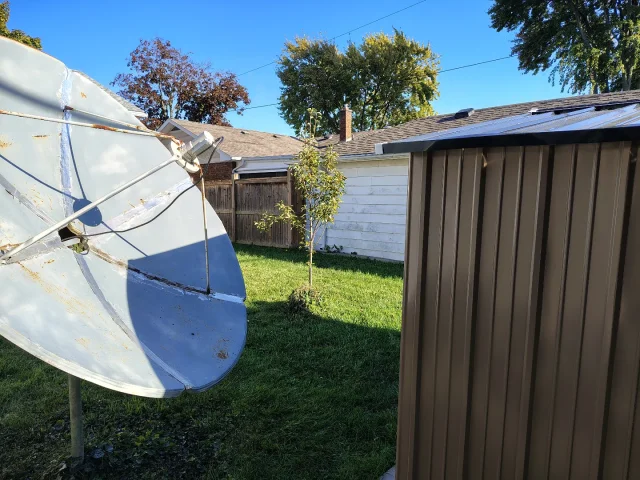
Can you recommend the best to cover all bases. NO BEEPS on certain channels 101w (NEWSMAX ,NEWS NATION), a clock that keeps working STEADY for timed recording ,solid unit with good lifespan. My Amiko died AND my Linkbox has NO Favorites Button and BEEPS on many channels. Picking up 105 west with a NEW SHED IN THE Way with 6 foot Cband ..95 percent quality ...unbelievable.
10 Replies · 270 views
T
Have you tried a new power brick on your Amiko?

YOU WERE RIGHT. IT IS WORKING NOW WITH 2X AMPS !!

DAN
primestar31
Have you tried a new power brick on your Amiko?

YOU WERE RIGHT. IT IS WORKING NOW WITH 2X AMPS !!

DAN
That's great!

Many people have all sorts of power bricks laying around. Provided the plug fits, and it's the right polarity and same voltage and the same OR higher amps, why not try another one IF the device you want to try it on doesn't seem to work right.
  • Like
Reactions: cyberham
JFOK
That's great!

Many people have all sorts of power bricks laying around. Provided the plug fits, and it's the right polarity and same voltage and the same OR higher amps, why not try another one IF the device you want to try it on doesn't seem to work right.
primestar31,

Could you explain to me what a power brick is ?
Thanks,

John
primestar31
primestar31,

Could you explain to me what a power brick is ?
Thanks,

John
Some people just call them power supplies (which really isn't a good fit in this case), some call them "wall adapters" but it's an external power supply or AC adapter that converts (AC) from a wall outlet into low-voltage (DC) that an electronic device needs to run.
  • Like
Reactions: JFOK
T
[Give us a summary of what you receive with a 6-footer. I'm very curious.]

Right now on C band getting 105w, a Mexican channel with 95% quality and I am near Detroit! I'm recording a TECHNO MUSIC FESTIVAL today from Mexico ..if you can believe it.....and yes that SHED is partly in the path so I'm puzzled. There are also christian channels on 105w.
cyberham
...Right now on C band getting 105w, a Mexican channel with 95% quality...
105W has some very strong transponders. I received more than four transponders using a 41-inch dish recently. See here.
k4otl
[Give us a summary of what you receive with a 6-footer. I'm very curious.]

Right now on C band getting 105w, a Mexican channel with 95% quality and I am near Detroit! I'm recording a TECHNO MUSIC FESTIVAL today from Mexico ..if you can believe it.....and yes that SHED is partly in the path so I'm puzzled. There are also christian channels on 105w.
The Westwood One Mux on 105W would likely be receivable, has some good music channels on there. It does scan in, but it's more convenient to manually enter the PIDs, check out Lyngsat for the channels: EchoStar 105/SES 11 at 105.0°W - LyngSat

I use a 10 footer (only C-band dish I have), but it's very strong.