Social Feed

H
Last reply · posted in DISH Network Support Forum
It kind of sound crazy to hook up both to a 722 but would it work?...The sling adapter would use the TV 2 and the Pro HD would use the TV 1 is my math correct? Im thinking if I wanted to have a friend use my slingbox instead of giving them access to my DISH Account just have them use the web player or the stand alone program and access the PRO HD...
5 Replies · 4093 views
T
You are correct, there should not be a problem in this setup. So long as the network can handle the traffic you should be good to go. Make sure you look at the Sling Adapters system and network requirements to insure that this will work for you.
TG2
TG2
You are correct, there should not be a problem in this setup. So long as the network can handle the traffic you should be good to go. Make sure you look at the Sling Adapters system and network requirements to insure that this will work for you.
Tony, I hate to say this .. but the "network requirements" they list are complete crap for the SlingAdapter. I've seen the Adapter start in the 3 meg range for some scenes, but 99.9% of the time I have mine active, its 7 to 9 megs of traffic *inhouse* (ie. watching on PC in back room, from sling adapter in front room).

Now outside of the house, I've only been on one connection that would max my upload limit, and there the video worked at 2 megs continuously, but it wouldn't do HD, and stuttered on the "better" player setting.
T
I want to make sure we refer to the "minimum spec" designation. Good call TG2 (and other posts I have made agree with you completely). They are a minimum because they will work and not because they will necessarily deliver exactly what you will expect. Being well above the minimum is a personal preference I have, mainly because there are many things on my network that chew up my bandwidth. As a personal preference, I won't even load software on my computer if I am at the minimum specs, because it won't work the way I intend it to. If I really want the software, I get to "upgrade"!

I am concerned about the bandwidth numbers you are reporting though. How are you measuring that kind of throughput on the SlingAdapter alone, and how are you accessing it? Are you doing anything else at the same time that might "trick" the counter? Oops... May have forgotten the animal, vegetable, or mineral part of 20 q's.

As far as part 2 of your statement though, getting HD through 2 Mbps is likely to stutter, if it plays at all. Can't say I am surprised at that.
TG2
TG2
<snip>
I am concerned about the bandwidth numbers you are reporting though. How are you measuring that kind of throughput on the SlingAdapter alone, and how are you accessing it? Are you doing anything else at the same time that might "trick" the counter? Oops... May have forgotten the animal, vegetable, or mineral part of 20 q's.

As far as part 2 of your statement though, getting HD through 2 Mbps is likely to stutter, if it plays at all. Can't say I am surprised at that.
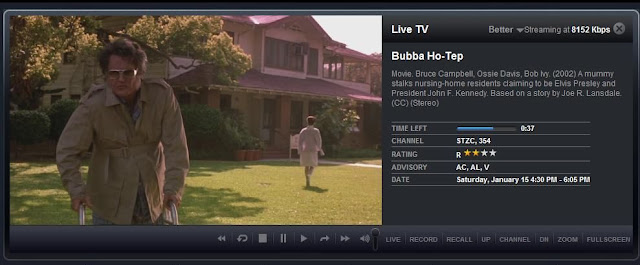
First we have the screen shot "streaming at 8152k"

8meg-clip.jpg


Link to the ScreenCap album
Picasa Web Albums - Trebor - 2011DishScree...

And in calling attention to this screen shot, somewhere else I've made reference to one of the times the Sling locked up and that was all she wrote ... this is what that "flat line" looks like (someone charge the paddles!!) :)

2011.01.06%20-%20bandwidth2.JPG


You can get the full size pictures at the TINYURL above.. and I can make more.. This connection is only between one internal router and the other, on the other is where my 722k, my AV receiver, and Bluray player are. When not powered on, the bluray and AV receiver use zero bandwidth and only check for updates at power on. Only the 722k has the ability to be remotely powered or operated (ie sling).

When operating normally, you don't see a flat 8 meg bandwidth, its spikes for moments at a time sometimes with valleys of low near zero inbetween, or the aligator sawtooth. Its the same if I stream HD with my bluray or youtube 480p (though lower bandwidth on 480p) though it seems when watching "LIVE" tv, that the bandwidth shows more erraticly.

(I'm in the process @3am eastern, in adding some more bandwidth screen shots, with video visible)
TG2
TG2
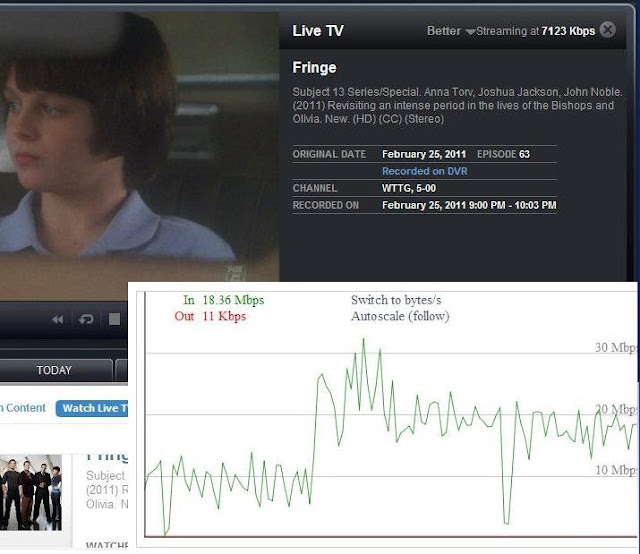
And here's one more.. as a test ... I'm moving a 600 meg ISO image file across the same wireless p2p link having hooked my laptop into my switch there, while streaming Fox's Fringe from my DVR.


Another Album of Screen shots (just over a short period of time 5 mins or so) showing the traffic roughly stable, and streaming continued fairly normally

Picasa Web Albums - Trebor - 2011DishScree...


dishbw2-20110228-03b.JPG

I cut/pasted the initial bandwidth graph to reduce the picture area, this is about 1 minute into the copy of the 600 Meg file.

Streaming at 7.1 meg and bandwidth at 18+ meg ... so the wireless p2p link I have supports the bandwidth ... which also makes me then wonder why the bandwidth wouldn't go any higher when trying to stream BEST/HD in the viewer (potentially my computer but something tells me its probably not that).

So .. there's the network usage, this is only inside my home network, there is some administrivia that leaves the local network in communicating back to Dish/Sling ... key point is that on the "Better" setting, the bandwidth used is FAR ABOVE what one might expect when told HD requires 3+ megs, and everything else under HD is less than that, from the specs both on the web site, and from what ships with the Dish Sling Adapter.

:)
Scott Greczkowski
Staff member HERE TO HELP YOU! Cutting Edge
Last reply · posted in The Chit Chat Club
Sometimes a thread gets so many posts in it that is can cause issues for the server so that why today we introduce The Song Name Game Part 3!

So let the game continue!

The last song was added by Bobby who posted...

One Meat Ball - Andrews Sisters

CONTINUE ON AND HAVE FUN! WELCOME HOME TO SATELLITEGUYS.US!

Here are the original rules for the game as posted by WebbyDude back in 2006. http://www.satelliteguys.us/threads/68645-Song-Name-Game

Just name a song title and the band who performed it. The next person does the same thing, but needs to list a song title or band name which includes a word from the previous entry. Pick songs from any genre.

Example:

Long Live Rock and Roll -- Rainbow

Rainbow in the Dark -- Dio

Another example:

Ride the Lightning -- Metallica

Lightning Strikes -- Ozzy Osbourne


Get it?


An additional note: we all know that song titles, sometimes, use profane words. Because this is a family friendly website it is advised that you clean up that title up a bit. This is accomplished by using something like sh!t instead of the real word. Thanks....
68658 Replies · 2680205 views
  • Like
Reactions: c-spand
dishstaller
I Wanna Talk About Me - Toby Keith
  • Like
Reactions: RaiderPower
Bobby
98.6 - Keith
harshness
I'm Easy - Keith Carridine
  • Like
Reactions: RaiderPower
gms49ers
It's Easy - Boston
RaiderPower
Take It Easy On Me - Little River Band
  • Like
Reactions: dishstaller
R
Last reply · posted in Computers and Gadgets
Lately my eight year old Dell laptop has been shutting off even when I have a full battery. I have had to keep it plugged up all the time to keep this from happening. Any idea what is causing this? I replaced the battery about three years ago.
2 Replies · 45 views
arlo
A recalibration might be needed. Even if it shows full, the individual cells may have become unbalaced. And the BMS chip in the battery reports false information to the pc.
Try this. Start it up in the bios/uefi and leave it there until the battery dies and it shuts off.
It might just keep running longer than in Windows. Or run for a short while and shut off.
If it's the first case. Probably just needs a balancing. If the latter, the pack might just be dead.
Not throwing stones but perhaps just a cheaply constructed battery with substandard cells. Could be.

Patience. Keep restarting it in bios/uefi until it won't fire up anymore.
Then plug the charger in and let it complete a full charge. And see what happens. If it's better.
Do the same thing one more time. Run it until it dies dead-dead. Then just let it charge, pc shut off.
When charged, it might be better. It might not be.

There are bench jigs that read the actual BMS and override it to let a tech manually monitor and charge the separate packs. They can also reset any "time bombs" in it that cause an otherwise good pack to show bad.
Maybe Santa will be good to me some year.

You might just need a new battery. Maybe the PC power management chip is going. A Dell common thing.
Leaving a laptop plugged in with a full battery is known to reduce the life. Asus for one recommends that you don't leave the charger plugged in all of the time even when shut down. And setting Windows to charge the battery to 85% instead of 100% increases life.
That's all I got.
dishstaller
That's all I got.
That was quite enough....I definitely learned something from your post. Thanks
TRG
TRG
Pub Member / Supporter
Last reply · posted in Computers and Gadgets
I set up a music server for my brother a few years ago. It's basically a small headless computer but it needs to have a DHCP IP address reserved for it in the router settings. This was easy to do in his DSL router. He's switching to Starlink now and I was wondering if these setting are easily accessible in the Starlink router. I'm pretty sure he will be getting the latest V5 router.
5 Replies · 283 views
b4pjoe
I set up a music server for my brother a few years ago. It's basically a small headless computer but it needs to have a DHCP IP address reserved for it in the router settings. This was easy to do in his DSL router. He's switching to Starlink now and I was wondering if these setting are easily accessible in the Starlink router. I'm pretty sure he will be getting the latest V5 router.
If you can't get into the router to reserve an IP address just don't use DHCP on the device that needs connected and assign it to a specific IP address in the network settings.
  • Like
Reactions: harshness
HipKat
I set up a music server for my brother a few years ago. It's basically a small headless computer but it needs to have a DHCP IP address reserved for it in the router settings. This was easy to do in his DSL router. He's switching to Starlink now and I was wondering if these setting are easily accessible in the Starlink router. I'm pretty sure he will be getting the latest V5 router.
They are not. Your best bet is to set up a third-party router, attached to the Starlink for your server, that you can get into, like a Linksys, etc
  • Like
Reactions: Foxbat
Foxbat
…it needs to have a DHCP IP address reserved for it in the router settings. This was easy to do in his DSL router. He's switching to Starlink now and I was wondering if these setting are easily accessible in the Starlink router. I'm pretty sure he will be getting the latest V5 router.
The Starlink V5 Install Kit I just got comes with the Mini Router. It is pretty limited in what it can do. For example, it can provide only one IP subnet at a time, no Guest Network, but it does support the pass-thru to a third-party Router. You can also split the Wi-Fi into separate 5 GHz & 2.4 GHz SSIDs to help some IoT devices that don't support 5 GHz bands to work.

The larger Starlink Router that still comes with the V4 Kit does support a Guest Network with separate IPv4 Subnet, but it's $120 from Starlink. And it still won't do DHCP Reservations.
harshness
If you can restrict the DHCP address space to assign addresses to one end of the subnet (i.e. x.x.x.50+), you can manually assign the IP address on pretty much any operating system. This is a default behavior on several popular routers. As the Router Mini only supports 235 devices, I expect that's already done.

Another option is to use a router that supports PoE to power the antenna. This article discusses that option (under PoE Power heading):

  • Like
Reactions: Foxbat
Foxbat
Now that I've had the v5 kit with the Mini Router, it's not as bad as I first thought. Yes, no DHCP reservations, but you can set up multiple SSIDs that have separate IPv4 subnets, and like the big brother, you can select from 192.168.x.0/24 or 10.x.0.0/16 (where "x" is 1-4).

You can also split a subnet and have different SSIDs for the 5 GHz and 2.4 GHz channels to handle some IoT devices. I haven't discovered what subnet the 2nd NIC on the router assigns, I'm guessing it's the first subnet.
dishstaller
Pub Member / Supporter Lifetime Supporter
Last reply · posted in The Chit Chat Club
2 Replies · 50 views
dishstaller
Sorry for posting the wrong link. Just corrected it.
dishstaller
Pub Member / Supporter Lifetime Supporter
Last reply · posted in The Chit Chat Club
Terrible tragedy. You would think that they would have safe guards in place that would prevent something like this from happening. I guess if you are going to ride in a passenger train it might be best to get a car near the rear.

2 Replies · 55 views
  • Sad
Reactions: Jimbo
Jimbo
Terrible tragedy. You would think that they would have safe guards in place that would prevent something like this from happening. I guess if you are going to ride in a passenger train it might be best to get a car near the rear.

They will have to look at the switching sections to determine WHY 2 trains were on the same track ... at the same time.
dishstaller
Thought this article might be of interest to some of you who might travel via train.