

Social Feed
After a few months of anticipation I finally got my hands on the new GeosatPro MicroHD. When I first took it out of the package I noticed the box it came in was pretty small. Took out the receiver which is TINY! The length is about 2/3 the length of the remote. The front has 2 lights on it. One for power (red if off green if on) and a USB light. Green if a USB is attached and red if recording. The back is very simple. Power input (comes with 12v wall wart), USB, HDMI, sat input and the composite output which is a 3.5mm to the 3 colored wire (red/white/yellow). Since I am using HDMI I didn't plug that other cable in. I hooked up my 500GB hard drive too. The remote is very well laid out with easy to understand buttons. Also the Manhattan I have has some weird remote interference with my older plasma HDTV resulting in putting the receiver about 18 inches away from the TV. The MicroHD is where the Coolsat 5000 was which is right below the TV and the remote works great.
Upon powering it up you have to set up what satellites you want programmed in. The menu structure is very well thought out and simple to operate. I went into Satellite List (which when you start is one of the few options). The satellite list is thorough with KU first then C-Band. It starts at 30W and goes to 127W on the KU side. I like the fact the names are the orbital spot first then the name. I did go and rename most of the sats (I removed the "K" part….I know I'm working with KU). I did notice Satmex 5 (116.8) on the KU side is not listed. But since the footprint doesn't reach me it's a moot point. I may add it later.
Setting up for a motorized is very simple. I went into the antenna setup and the motor/switch setup. The neat thing is once you have it set up you really don't need to go back in there. I went in and set up my true south of 93W. Everything is there so you don't have to go into submenus for some options. You can set up Diseqc 1.0, 22k switch, Diseqc 1.1 and a motor. I did set up USALS originally and they were all spot on. But the "don't like change" in me changed them to Diseqc 1.2. Setup is a little different as for Diseqc 1.2 there is a "motor position" that you select a # between 1 & 99 to save each satellite. So as example my true south is #1, then 61W is #2, 72W is #3 and so on. I went through and have all my satellites set up. The default LNB Frequency is 10750 but you can scroll through numerous different LNB Frequency options. While it has the normal frequencies like 5150, 5750, 9750, 10600, 10750 and 11250 it also has options for stacked LNB's (13850), and even the C/Ku LNB's (5150/10750). It has pretty much any LNB Frequency known (and some not known).
The transponder list on some satellites is a little outdated. I had to go online and find a active transponder for my true south (93W) as none of the existing transponders were active. I do like that you can delete all transponders with one click (you can delete transponders one by one if you like). So once I was locked on a satellite I deleted all the transponders and blind scanned fresh. You have the option of blind scan-normal, blind scan-detail and transponder scan. Most of the time blindscan-normal works but in a couple of examples BS-detail might be needed. You can also select one polarity or even the frequency range. Manual PID entry is also an option.
I did some testing between 3 receivers on blind scanning. A Coolsat 5000, the MicroHD and my Manhattan. I first tried 91W which had some news feeds on it
Coolsat 5000 found 9 transponders and 5 channels
Manhattan found 11 transponders and 4 channels
MicroHD found 11 transponders and 7 channels
The thing to note is the MicroHD when you select "blind scan" defaults to 11700-12200 when scanning. The Manhattan scans from 11700-12900 so it found 3 transponders from Bell TV's satellite
I then went to 72W
Coolsat 3 transponders and 5 channels (missed KFTL at 1666 symbol rate)
Manhattan did hit KFTL but missed the NBC mux (12052 V 6890)
MicroHD found 4 transponders and 6 channels (a feed, KFTL and the NBC mux)
When I went to 83W I had some weird results
Coolsat found 8 transponders and 6 channels (but missed the RTV mux completely)
Manhattan found the RTV mux but missed most of the NBC feeds that were up
MicroHD logged the RTV mux easily but missed a couple of the NBC feeds.
I did a couple tests with the MicroHD. Some transponders have multiple frequencies on a transponder close together. Depending on how close they are the Micro might not hit all of them on a normal blind scan. When I did a detail scan (which takes longer) it hit 7 of the NBC transponders that are 6 Mhz apart. I noticed also when I scanned 125W the 3 "feeds" for PBS that are close together (12163, 12169 and 12175 H 4444) on a normal scan it hit 2 of them but missed the middle one. Detail scan brought them in. On the positive it did find transponders with symbol rates down to 1029. While the MicroHD may take a little longer to scan than the Coolsat 5000 (less than 30 seconds in most cases…a little longer if DVB-S2 transponders are present) the fact it finds more makes it worth it. If you press "signal" button while on a channel a full screen signal meter shows up.
Recording something is very easy and you can record two things at once as long as it's the same transponder. If you try and record a 3rd you get a popup that says "Unable to record 3rd channel". If you are recording something the receiver allows you to scroll through the other channels on the transponder (if there are some) but it wont let you move off that transponder. So as example when I was recording TuffTV the only channels I could go through using the up down arrows were PBJ & RTV. The reason I say this is other receivers let you go onto another transponder but gives you a popup first asking to record. The Micro makes this easier as you don't have to think "now what channels are on that same transponder that I can watch?" especially if you have channels separated in the list. As example on 97W I have the "news" channels listed first. But they may not be sorted by transponder. If I am recording say Russia Today and want to scroll to Al Jazeera English if say JN1 is between them the Manhattan would give me the popup to ask if I want to stop the program. The MicroHD if I hit channel up goes to JN1. If I hit channel up again it goes back to Russia Today (those are the only 2 channels from that transponder I have saved.) If you want to stop a program (and are recording two things) it gives you a popup regardless of channel you are on and you pick which one to stop. If only one program is recording you have to go to that channel to stop the recording.
I set up a couple timers to see how it handles them. One was on 97W and the other was on 125W. The one on 97W fired without a hitch. It recorded 5 minutes then shut off. The 2nd one, which went 4 minutes after the 1st one ended, first moved the dish to 125W then started recording. So in this case the 5 minute recording was 4 minutes 33 seconds. So if you need to have the dish move, make sure to set it a couple minutes earlier so it can move there. By the way Diseqc 1.2 is spot on. That is one thing I worried about from using other receivers. Usually Diseqc 1.2 seems to have issues with stopping at the right spot. This one does not. Also the clock holds time properly so no worries about it losing time. You can manually set it or set it via the satellite.
The receiver does have a buffer (timeshift) which works really well. You can go backwards or forward at 2,4,8,16 or 24 times speed. In the menu settings you can have it so when you hit record it either starts when you hit record or it dumps the whole buffer in the file. The one thing I ran into is the record length. Normally when you hit record it would pre-set for 2 hours. You could hit record again and change this to whatever you wanted. Also the buffer counts towards that recording time. So if you had 38 minutes of buffered programming and hit record it shows 38:01. But when I hit record it defaults to 14 hours and you cant change it.
Channel editing is very easy to do. Go into the TV channel (or radio if you need to work on those) and use the color buttons to edit a channel name, move them around or remove. One thing I wish the MicroHD had was a way to remove all channels from a transponder. My GeosatPro 200 has that option. I can remove channels one by one, per transponder or per satellite. Also I noticed that if you rename a channel and do a blind scan at another time it overwrites the edited name. As we all know very few of the PBS channels actually have a name attached. Most are "TV3", "TV4" etc. So I renamed TV3 & TV4 as PBS HD EAST and PBS HD WEST. Well when I redid a blind scan later when it found 12140 V 30000 (where they are located) it renamed them back to TV3 & TV4.
All and all I give this a receiver a HUGE thumbs up! The fact it works out of the box like we want it to lets us play with the receiver instead of being disappointed with something not working. I don't have to worry about if something doesn't work and wait for a software update that might fix something but break something else. The receiver can do software upgrades via OTA via the G19 sat but that is coming within the next week or so (per Brian). One note is to make sure to do a channel backup before updating software as it does wipe everything out. As I mentioned to Brian last night I can sum up the MicroHD with this line
"Honestly this is the first receiver I have worked with in a long time (a good 2-3 years) that after a half hour I didn't hook the Coolsat 5000 back up to the setup. This one is definitely a keeper"
The good
-small size…can be placed really anywhere
-remote is laid out pretty well
-easy to navigate menus
-sat list is up to date with names
-easy to add/delete/rename satellites
-can use 22k, Diseqc 1.0, 1.1 & 1.2 (or USALS) at same time
-has pretty much every combination of a LNB LO Frequency known to man (and some probably not known)
-can record two shows at once while watching a 3rd or a DVR program (same transponder only)
-numerous scanning options. Can blind scan normal, blind scan detail, TP scan, sat scan (of existing transponders)
-Can specify frequency range (default is 11700-12200 for KU Band 10750 LNB LO frequency) and polarity
-PID scan
-blind scan finds symbol rates down to 1000
-picks up DVB, MPEG4 and DVB-S2 transponders
-easy edit of channel names/deleting of channels
-can delete all TP's on satellite with one click
-software updates via satellite (G19)
-timeshift (buffer) of current program
-a accurate clock
-if you hit record it can dump the buffered programming in the DVR file
-no issues with the remote interference (I had another receiver that had major interference and I had to set it up away from the entertainment center. The Geosat is right under the TV)
There are a couple things that that could be improved on. I have already forwarded the info to SatelliteAV.
One thing that really bugs me is there is a "moving dish" popup that shows up no matter what you do. I know some receivers have it but most that popup leaves right away. This stays up for 15 seconds unless you hit "exit" before that. This shows up if you go into the transponder list and antenna setup. I understand if you are going from say 83W to 91W but why when you are on 91W already and you want to blind scan it does that popup when you hit OK to scan? The only time it is rather quick is when you power it on for the first time. It only shows up for about 2 seconds. I know my Coolsat 5000 only does it for a couple seconds but I'm still using version 1.00 software. Anything else (including the factory 3rd party stuff) has that popup too for longer.
This is what SatelliteAv sent back to me about it
"Dish Moving" - It also drives me nuts! We are working on this irritant so the display will leave after 3 or 4 seconds, but their are other functions hard coded by ALI that is making this very difficult. If the display is programmed to disappear earlier, there is currently no way to prevent he next step of the process from starting. There are no time place holders without the display. The result is if the display is removed early, the next event step starts. What happens for example is that if in a scan mode, the scan is initiated prior to the dish landing on the target satellite. I have been playing with displaying a blank screen, but this can confuse the user as you still must either press exit to skip to the next step or wait. If the user does not visually see that a motor move event command is still waiting to time out, the RCU would not function until the exit button was pressed or the event times out. It is totally a ALI coding issue that we are fighting a work around
When doing a blind scan if you select one polarity after the scan is done it stays on that polarity. You have to go into the satellite scan, change it to AUTO then back out.
SatelliteAV said this is on the list to be fixed so it defaults to auto when done.
I mentioned this above but if you rename a channel and do a scan at another time it writes over the existing name with what the SID shows....example I scanned the PBS HD feeds on 12140 V 30000. They show as "TV3 & TV4"....I renamed them "PBS HD EAST" and "PBS HD WEST". When I rescanned AMC21 it rewrote the names as TV3 & TV4
SatelliteAV said this is on the list to be fixed so that it doesn't overwrite the changed channel name
The record length is weird as it defaults to 14 hours and you can't change it. While this doesn't bother me right now as timer recordings work properly and I would just hit "stop" when I was done with a on-the-fly recording for some people who hit record and only want it to record say an hour will run into issues. SatelliteAV is aware of it and trying to duplicate it.
edit 6/23...this has been fixed. Dont know what I did but unplugging her hard drive and inserting it again and now I'm back to the 2 hour default and can change the length to record
edit 6/29...had the same issue and Brian suggested a factory reset after loading software. That fixes the glitch
I'm sure I'll come across some other things (after all I've had it for 48 hours) which I'll post.
I'm happy to have one and now after 6 ½ years I can actually retire my Coolsat 5000 as the "main" receiver in my setup.
edit: 6/22...OMG! I just stumbled upon something else it can do
Now I know you can record two programs on the same transponder but I just tested and found out you can set two timers the same way....EVEN IF THE SAME TIME
I know the Manhattan wont let you set 2 overlapping timers even if same transponder. The MicroHD can.
for more info on that (timers) see post 35 & 36
tons of pictures to follow
Upon powering it up you have to set up what satellites you want programmed in. The menu structure is very well thought out and simple to operate. I went into Satellite List (which when you start is one of the few options). The satellite list is thorough with KU first then C-Band. It starts at 30W and goes to 127W on the KU side. I like the fact the names are the orbital spot first then the name. I did go and rename most of the sats (I removed the "K" part….I know I'm working with KU). I did notice Satmex 5 (116.8) on the KU side is not listed. But since the footprint doesn't reach me it's a moot point. I may add it later.
Setting up for a motorized is very simple. I went into the antenna setup and the motor/switch setup. The neat thing is once you have it set up you really don't need to go back in there. I went in and set up my true south of 93W. Everything is there so you don't have to go into submenus for some options. You can set up Diseqc 1.0, 22k switch, Diseqc 1.1 and a motor. I did set up USALS originally and they were all spot on. But the "don't like change" in me changed them to Diseqc 1.2. Setup is a little different as for Diseqc 1.2 there is a "motor position" that you select a # between 1 & 99 to save each satellite. So as example my true south is #1, then 61W is #2, 72W is #3 and so on. I went through and have all my satellites set up. The default LNB Frequency is 10750 but you can scroll through numerous different LNB Frequency options. While it has the normal frequencies like 5150, 5750, 9750, 10600, 10750 and 11250 it also has options for stacked LNB's (13850), and even the C/Ku LNB's (5150/10750). It has pretty much any LNB Frequency known (and some not known).
The transponder list on some satellites is a little outdated. I had to go online and find a active transponder for my true south (93W) as none of the existing transponders were active. I do like that you can delete all transponders with one click (you can delete transponders one by one if you like). So once I was locked on a satellite I deleted all the transponders and blind scanned fresh. You have the option of blind scan-normal, blind scan-detail and transponder scan. Most of the time blindscan-normal works but in a couple of examples BS-detail might be needed. You can also select one polarity or even the frequency range. Manual PID entry is also an option.
I did some testing between 3 receivers on blind scanning. A Coolsat 5000, the MicroHD and my Manhattan. I first tried 91W which had some news feeds on it
Coolsat 5000 found 9 transponders and 5 channels
Manhattan found 11 transponders and 4 channels
MicroHD found 11 transponders and 7 channels
The thing to note is the MicroHD when you select "blind scan" defaults to 11700-12200 when scanning. The Manhattan scans from 11700-12900 so it found 3 transponders from Bell TV's satellite
I then went to 72W
Coolsat 3 transponders and 5 channels (missed KFTL at 1666 symbol rate)
Manhattan did hit KFTL but missed the NBC mux (12052 V 6890)
MicroHD found 4 transponders and 6 channels (a feed, KFTL and the NBC mux)
When I went to 83W I had some weird results
Coolsat found 8 transponders and 6 channels (but missed the RTV mux completely)
Manhattan found the RTV mux but missed most of the NBC feeds that were up
MicroHD logged the RTV mux easily but missed a couple of the NBC feeds.
I did a couple tests with the MicroHD. Some transponders have multiple frequencies on a transponder close together. Depending on how close they are the Micro might not hit all of them on a normal blind scan. When I did a detail scan (which takes longer) it hit 7 of the NBC transponders that are 6 Mhz apart. I noticed also when I scanned 125W the 3 "feeds" for PBS that are close together (12163, 12169 and 12175 H 4444) on a normal scan it hit 2 of them but missed the middle one. Detail scan brought them in. On the positive it did find transponders with symbol rates down to 1029. While the MicroHD may take a little longer to scan than the Coolsat 5000 (less than 30 seconds in most cases…a little longer if DVB-S2 transponders are present) the fact it finds more makes it worth it. If you press "signal" button while on a channel a full screen signal meter shows up.
Recording something is very easy and you can record two things at once as long as it's the same transponder. If you try and record a 3rd you get a popup that says "Unable to record 3rd channel". If you are recording something the receiver allows you to scroll through the other channels on the transponder (if there are some) but it wont let you move off that transponder. So as example when I was recording TuffTV the only channels I could go through using the up down arrows were PBJ & RTV. The reason I say this is other receivers let you go onto another transponder but gives you a popup first asking to record. The Micro makes this easier as you don't have to think "now what channels are on that same transponder that I can watch?" especially if you have channels separated in the list. As example on 97W I have the "news" channels listed first. But they may not be sorted by transponder. If I am recording say Russia Today and want to scroll to Al Jazeera English if say JN1 is between them the Manhattan would give me the popup to ask if I want to stop the program. The MicroHD if I hit channel up goes to JN1. If I hit channel up again it goes back to Russia Today (those are the only 2 channels from that transponder I have saved.) If you want to stop a program (and are recording two things) it gives you a popup regardless of channel you are on and you pick which one to stop. If only one program is recording you have to go to that channel to stop the recording.
I set up a couple timers to see how it handles them. One was on 97W and the other was on 125W. The one on 97W fired without a hitch. It recorded 5 minutes then shut off. The 2nd one, which went 4 minutes after the 1st one ended, first moved the dish to 125W then started recording. So in this case the 5 minute recording was 4 minutes 33 seconds. So if you need to have the dish move, make sure to set it a couple minutes earlier so it can move there. By the way Diseqc 1.2 is spot on. That is one thing I worried about from using other receivers. Usually Diseqc 1.2 seems to have issues with stopping at the right spot. This one does not. Also the clock holds time properly so no worries about it losing time. You can manually set it or set it via the satellite.
The receiver does have a buffer (timeshift) which works really well. You can go backwards or forward at 2,4,8,16 or 24 times speed. In the menu settings you can have it so when you hit record it either starts when you hit record or it dumps the whole buffer in the file. The one thing I ran into is the record length. Normally when you hit record it would pre-set for 2 hours. You could hit record again and change this to whatever you wanted. Also the buffer counts towards that recording time. So if you had 38 minutes of buffered programming and hit record it shows 38:01. But when I hit record it defaults to 14 hours and you cant change it.
Channel editing is very easy to do. Go into the TV channel (or radio if you need to work on those) and use the color buttons to edit a channel name, move them around or remove. One thing I wish the MicroHD had was a way to remove all channels from a transponder. My GeosatPro 200 has that option. I can remove channels one by one, per transponder or per satellite. Also I noticed that if you rename a channel and do a blind scan at another time it overwrites the edited name. As we all know very few of the PBS channels actually have a name attached. Most are "TV3", "TV4" etc. So I renamed TV3 & TV4 as PBS HD EAST and PBS HD WEST. Well when I redid a blind scan later when it found 12140 V 30000 (where they are located) it renamed them back to TV3 & TV4.
All and all I give this a receiver a HUGE thumbs up! The fact it works out of the box like we want it to lets us play with the receiver instead of being disappointed with something not working. I don't have to worry about if something doesn't work and wait for a software update that might fix something but break something else. The receiver can do software upgrades via OTA via the G19 sat but that is coming within the next week or so (per Brian). One note is to make sure to do a channel backup before updating software as it does wipe everything out. As I mentioned to Brian last night I can sum up the MicroHD with this line
"Honestly this is the first receiver I have worked with in a long time (a good 2-3 years) that after a half hour I didn't hook the Coolsat 5000 back up to the setup. This one is definitely a keeper"
The good
-small size…can be placed really anywhere
-remote is laid out pretty well
-easy to navigate menus
-sat list is up to date with names
-easy to add/delete/rename satellites
-can use 22k, Diseqc 1.0, 1.1 & 1.2 (or USALS) at same time
-has pretty much every combination of a LNB LO Frequency known to man (and some probably not known)
-can record two shows at once while watching a 3rd or a DVR program (same transponder only)
-numerous scanning options. Can blind scan normal, blind scan detail, TP scan, sat scan (of existing transponders)
-Can specify frequency range (default is 11700-12200 for KU Band 10750 LNB LO frequency) and polarity
-PID scan
-blind scan finds symbol rates down to 1000
-picks up DVB, MPEG4 and DVB-S2 transponders
-easy edit of channel names/deleting of channels
-can delete all TP's on satellite with one click
-software updates via satellite (G19)
-timeshift (buffer) of current program
-a accurate clock
-if you hit record it can dump the buffered programming in the DVR file
-no issues with the remote interference (I had another receiver that had major interference and I had to set it up away from the entertainment center. The Geosat is right under the TV)
There are a couple things that that could be improved on. I have already forwarded the info to SatelliteAV.
One thing that really bugs me is there is a "moving dish" popup that shows up no matter what you do. I know some receivers have it but most that popup leaves right away. This stays up for 15 seconds unless you hit "exit" before that. This shows up if you go into the transponder list and antenna setup. I understand if you are going from say 83W to 91W but why when you are on 91W already and you want to blind scan it does that popup when you hit OK to scan? The only time it is rather quick is when you power it on for the first time. It only shows up for about 2 seconds. I know my Coolsat 5000 only does it for a couple seconds but I'm still using version 1.00 software. Anything else (including the factory 3rd party stuff) has that popup too for longer.
This is what SatelliteAv sent back to me about it
"Dish Moving" - It also drives me nuts! We are working on this irritant so the display will leave after 3 or 4 seconds, but their are other functions hard coded by ALI that is making this very difficult. If the display is programmed to disappear earlier, there is currently no way to prevent he next step of the process from starting. There are no time place holders without the display. The result is if the display is removed early, the next event step starts. What happens for example is that if in a scan mode, the scan is initiated prior to the dish landing on the target satellite. I have been playing with displaying a blank screen, but this can confuse the user as you still must either press exit to skip to the next step or wait. If the user does not visually see that a motor move event command is still waiting to time out, the RCU would not function until the exit button was pressed or the event times out. It is totally a ALI coding issue that we are fighting a work around
When doing a blind scan if you select one polarity after the scan is done it stays on that polarity. You have to go into the satellite scan, change it to AUTO then back out.
SatelliteAV said this is on the list to be fixed so it defaults to auto when done.
I mentioned this above but if you rename a channel and do a scan at another time it writes over the existing name with what the SID shows....example I scanned the PBS HD feeds on 12140 V 30000. They show as "TV3 & TV4"....I renamed them "PBS HD EAST" and "PBS HD WEST". When I rescanned AMC21 it rewrote the names as TV3 & TV4
SatelliteAV said this is on the list to be fixed so that it doesn't overwrite the changed channel name
The record length is weird as it defaults to 14 hours and you can't change it. While this doesn't bother me right now as timer recordings work properly and I would just hit "stop" when I was done with a on-the-fly recording for some people who hit record and only want it to record say an hour will run into issues. SatelliteAV is aware of it and trying to duplicate it.
edit 6/23...this has been fixed. Dont know what I did but unplugging her hard drive and inserting it again and now I'm back to the 2 hour default and can change the length to record
edit 6/29...had the same issue and Brian suggested a factory reset after loading software. That fixes the glitch
I'm sure I'll come across some other things (after all I've had it for 48 hours) which I'll post.
I'm happy to have one and now after 6 ½ years I can actually retire my Coolsat 5000 as the "main" receiver in my setup.
edit: 6/22...OMG! I just stumbled upon something else it can do
Now I know you can record two programs on the same transponder but I just tested and found out you can set two timers the same way....EVEN IF THE SAME TIME
I know the Manhattan wont let you set 2 overlapping timers even if same transponder. The MicroHD can.
for more info on that (timers) see post 35 & 36
tons of pictures to follow
171 Replies
·
87457 views


Pub Member / Supporter
Cutting Edge
I created this thread on the original Edgecutter Cutting Edge Forums site. It's simply a place for those to review the latest software available for those using Windows 10 and Windows 11. To date it has received 112,559 views. I have been asked by staff to continue this thread here.
521 Replies
·
47182 views



For some reason, the satelliteguys.us site is loading a lot slower than usual on both Chrome on my Asus laptop and Safari on my iPhone.
I'm also seeing longer appearances of the blue bar at the top and the "3 blue bars" loading symbol.
Is anyone else also having the same problem? Thanks in advance.
I'm also seeing longer appearances of the blue bar at the top and the "3 blue bars" loading symbol.
Is anyone else also having the same problem? Thanks in advance.
527 Replies
·
17907 views


Help, I'm a little confjused on the activation process.
I purchased the Joey 4 from Solid Signal and shipping box has Call 866 726-4282 to Avtivate new Receiver. That number is Solid Signals number.
I googled and that search said call Dish to activate. I assume that is correct unless this requires a 2 step process.
Please let me know.
Thanks
I purchased the Joey 4 from Solid Signal and shipping box has Call 866 726-4282 to Avtivate new Receiver. That number is Solid Signals number.
I googled and that search said call Dish to activate. I assume that is correct unless this requires a 2 step process.
Please let me know.
Thanks
6 Replies
·
192 views


Supporting Founder
Pub Member / Supporter
Lifetime Supporter
Apple has finally released their Apple TV 4K with built-in Siri and a microphone so it can respond to your queries even if you don't have the remote. It also increases in price, to $299. I had been planning on updating my current Apple TV 4K streamers, but that's $600 for the two of them, and that's a pass at this point.
At $299, it had better come with 256 GB of Storage, Gigabit (or better) Ethernet, the latest HDMI tech and standards, and one year of free Apple One. But it probably won't…
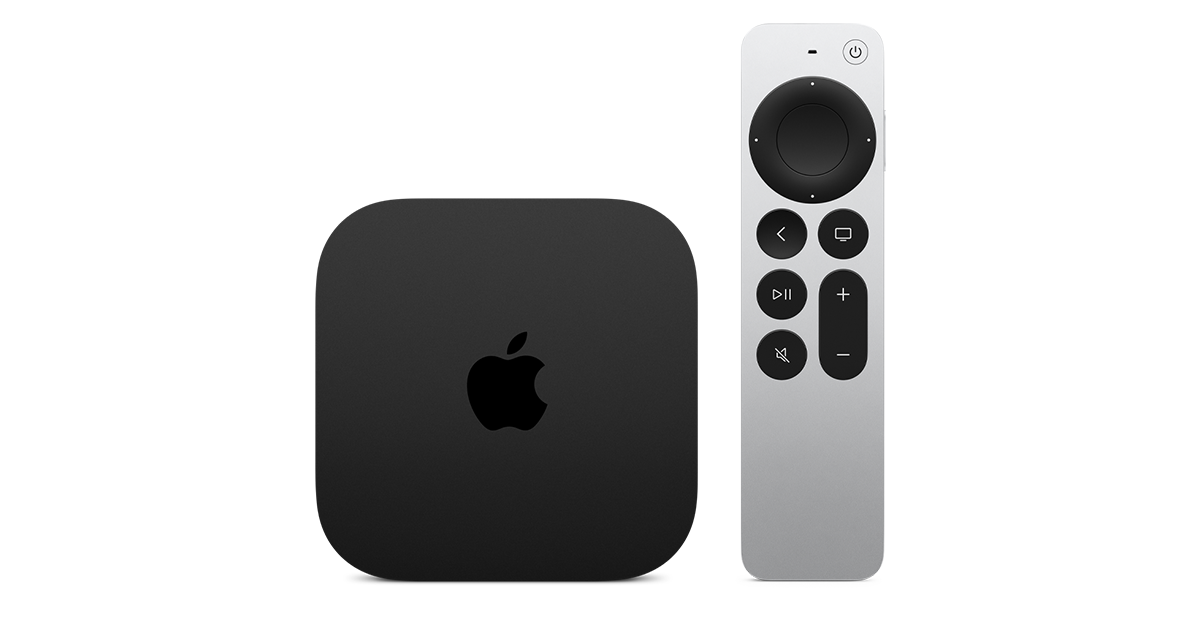
At $299, it had better come with 256 GB of Storage, Gigabit (or better) Ethernet, the latest HDMI tech and standards, and one year of free Apple One. But it probably won't…
Apple TV 4K
Apple TV 4K. New Siri AI and hands-free control. Stunning picture and immersive HomePod surround sound. Works with your Apple and smart home devices.
www.apple.com
14 Replies
·
174 views


 . apple's been making money off of software and not hardware for a while


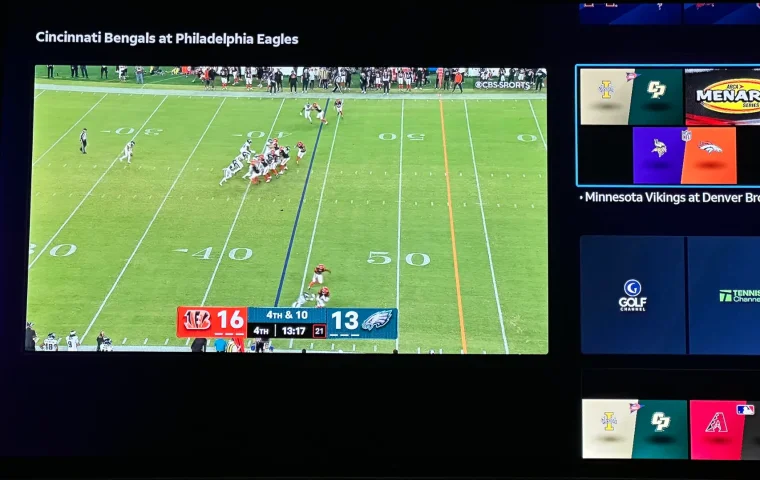
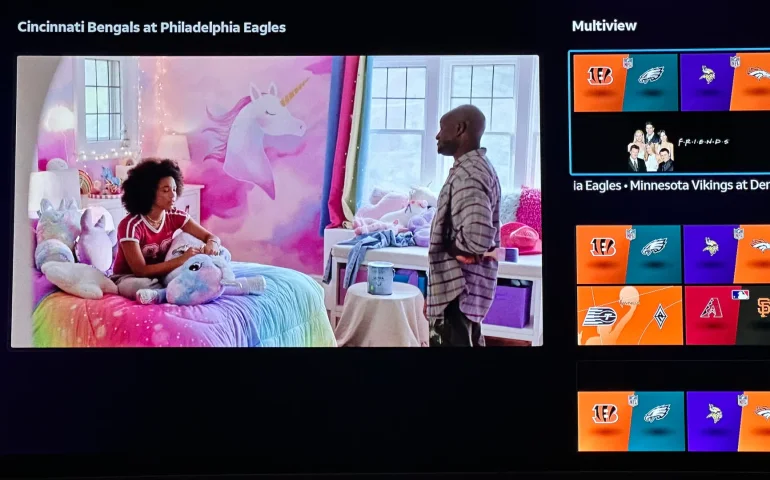
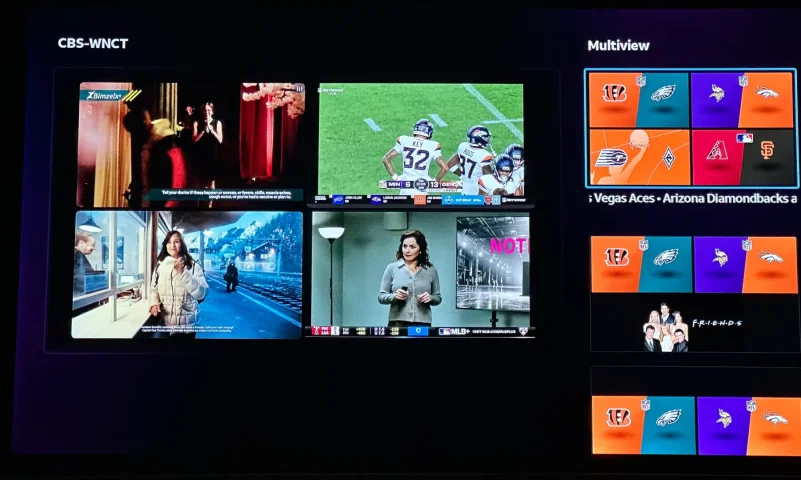
The new curated multiview is now live.
While on many of the sports channels and non sports channels there is a multi view option button. It will pull up a side bar with many different multi view options.
While on many of the sports channels and non sports channels there is a multi view option button. It will pull up a side bar with many different multi view options.
3 Replies
·
158 views


Supporting Founder
Really excited for this season with Kentucky having a new coach and some really exciting recruits. Probably won't last long, but here's hoping this season is great.
141 Replies
·
1348 views


Supporting Founder
Lifetime Supporter
This thread is a place to discuss the 4K events that appear on channel 540. We are getting, at this point, one college football game a week. Let's hope there is more coming.
1931 Replies
·
298853 views

TWiT Tech Podcast Network
Time for another AWESOME video from the TWIT Network!
View: https://www.youtube.com/watch?v=87N42NxLPC0
Direct YouTube Link - 8 U.S. States Sue OpenAI Over Safety Concerns With Younger Users
TWIT's Website
TWIT Live Feed
View: https://www.youtube.com/watch?v=87N42NxLPC0
Direct YouTube Link - 8 U.S. States Sue OpenAI Over Safety Concerns With Younger Users
TWIT's Website
TWIT Live Feed
0 Replies
·
12 views

Pub Member / Supporter
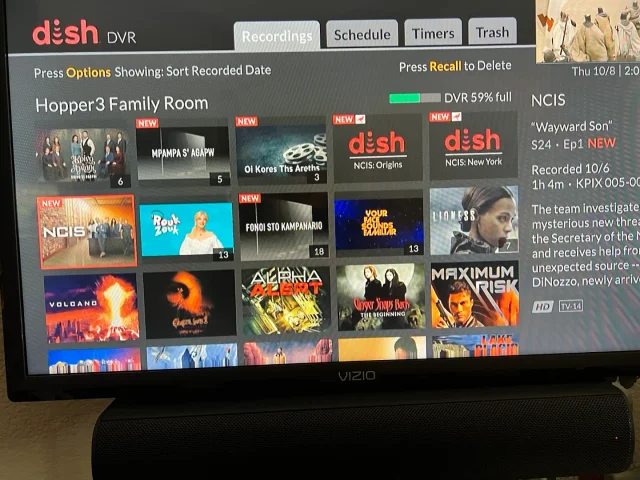
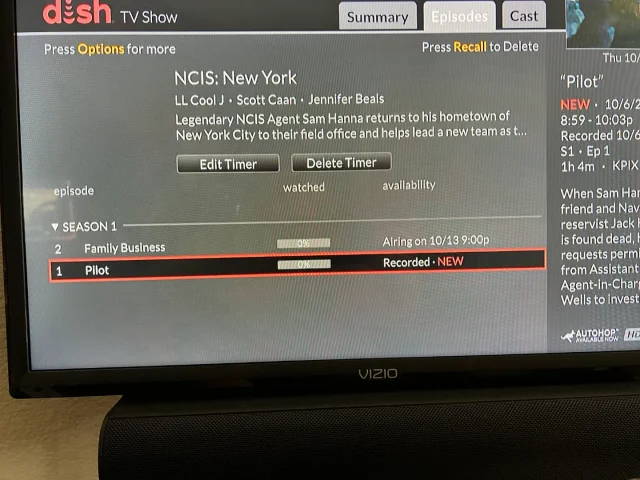
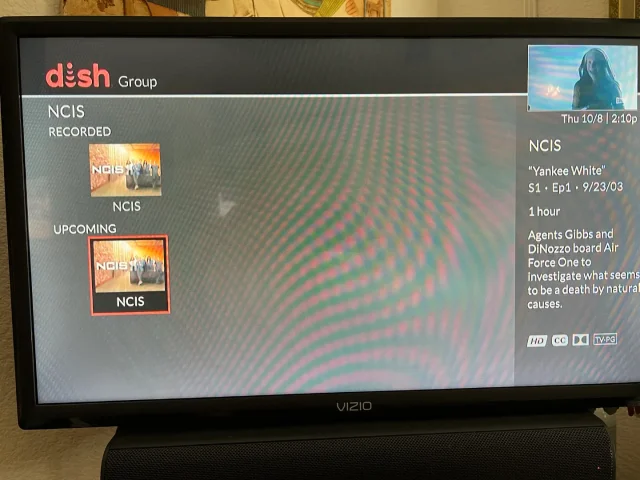
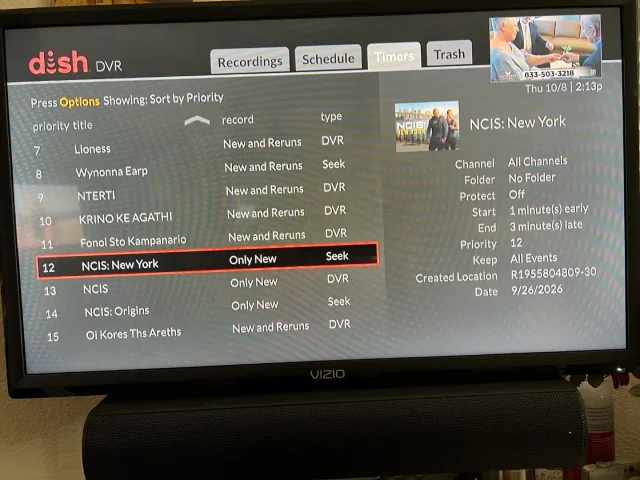
On Tuesday, I recorded the first episodes of the new season's NCIS shows on CBS (Dish provided, not OTA). The new New York series and Origins will both do Auto Skip, but the original, now season 24 does not. What's stranger, when I do a search for NCIS, Origins and New York show the current recording and the next episode it will record, but the original show only shows the current recording and some other channel showing the very first episode of season one. It makes no sense. When I set up the timers, I was able to use search for Origins and New York, but for the original, I had to scroll ahead in the guide until last Tuesday when the show was airing. Then set the timer from there. You can see its timer type is DVR where the other two are Seek. What am I missing?
Thanks!
Thanks!
20 Replies
·
392 views


