

Social Feed

yelraek
Pub Member / Supporter
Last reply · posted in DISH Network Support Forum
Apparently you cannot delete a VOD movie from the rentals folder after it has expired. I have tried every way I could think of with no success. The only option is "rent again". Hesitantly I tried that option hoping that it would give me a way to delete but to my dismay it started the movie. I did not want to rent it again. I asked a DIRT member for help. He said that the movie should automatically delete after the stated rental time but there was no way of manually deleting it at this time. I rented the movie about a week ago and it has not deleted. I asked the DIRT member if he could help me by canceling the second rent as I did not want to watch it again. I have not received an answer to that question. This occurred yesterday.
17 Replies · 5575 views
SandFarmer
On my HwS all the "expired" rentals once selected only have one option to select where the "play" button would be and that's "delete". You can't "Blue Button" delete if selected in the main "Rentals" window.
yelraek
On my HwS all the "expired" rentals once selected only have one option to select where the "play" button would be and that's "delete". You can't "Blue Button" delete if selected in the main "Rentals" window.

I forgot to mention I have the H3. The recall button will not delete the movie. The only option to select is the Rent Again button, which I find to be deceptive.
N
I forgot to mention I have the H3. The recall button will not delete the movie. The only option to select is the Rent Again button, which I find to be deceptive.
Naturally the recall button will not delete.
Once in the rental folder select the movie and the only option will be to select delete. That worked the other day for me.
yelraek
Naturally the recall button will not delete.
Once in the rental folder select the movie and the only option will be to select delete. That worked the other day for me.

The recall button will delete the program icons that have been recorded in the H3 but will not delete the movie icon in the rentals folder. What you suggest will work only in the H1 or H2.
N
The recall button will delete the program icons that have been recorded in the H3 but will not delete the movie icon in the rentals folder. What you suggest will work only in the H1 or H2.
H1 or H2 AND H3 select the movie and then select delete.
yelraek
H1 or H2 AND H3 select the movie and then select delete.

Nice that it works for you. Does not work for me.
N
Nice that it works for you. Does not work for me.
Well I only have rented free 4k VOD maybe that why.
yelraek
Well I only have rented free 4k VOD maybe that why.

Could be. Mine was free VOD too but was not 4k.
Bobby
Could be. Mine was free VOD too but was not 4k.
If it was free VOD you are not out anything, cash wise, if you were to re-rent. There is a definite issue with paid rentals.....
Bobby
Could be. Mine was free VOD too but was not 4k.
Ya know, I rented a free movie this morning and fast forwarded it to the end. I see it in my Rentals folder. When I looked at this one it offers the option to delete, whereas paid rentals do not. Can you tell me what free movie you rented that won't let you delete it....
N
Ya know, I rented a free movie this morning and fast forwarded it to the end. I see it in my Rentals folder. When I looked at this one it offers the option to delete, whereas paid rentals do not. Can you tell me what free movie you rented that won't let you delete it....
I believe you need to wait until it expires.
yelraek
Ya know, I rented a free movie this morning and fast forwarded it to the end. I see it in my Rentals folder. When I looked at this one it offers the option to delete, whereas paid rentals do not. Can you tell me what free movie you rented that won't let you delete it....

That's strange. I rented the James Bond movie - Spectre using one of my certificates. It has expired again and still only gives me the option to rent again.
Bobby
That's strange. I rented the James Bond movie - Spectre using one of my certificates. It has expired again and still only gives me the option to rent again.
Now the picture becomes clear. Even though it was free to you, you had a certificate, it's still a pay movie. Right now pay movies stay in your rental folder until they time out, like not available to rent any more.
dfergie
Staff member HERE TO HELP YOU!
Last reply · posted in Movie Talk
5 Replies · 147 views
primestar31

Wait, didn't this one come out a few years ago? It was all in Japanese. It was also VERY good!

OK, looked it up, that was Godzilla Minus One
Bruce
Wait, didn't this one come out a few years ago? It was all in Japanese. It was also VERY good!

OK, looked it up, that was Godzilla Minus One
At theaters, only in Japanese, on Disc and Netflix, available in English.
Foxbat
New trailer has dropped:
​
long_time_Dish
Looks good! I'm interested...
dishstaller
Pub Member / Supporter Lifetime Supporter
Last reply · posted in The Chit Chat Club
Videos like this can make you appreciate the things we take for granted.


View: https://www.youtube.com/shorts/a2cgQidHQJI
4 Replies · 84 views
Bobby
Videos like this can make you appreciate the things we take for granted.


View: https://www.youtube.com/shorts/a2cgQidHQJI

That brought tears to my eyes.
  • Like
Reactions: NYDutch
dishstaller
That brought tears to my eyes.
Really...REALLY hate to do this to you Bobby, but....


View: https://www.youtube.com/watch?v=LsOo3jzkhYA&pp=ygUed29tYW4gaGVhcnMgZm9yIHRoZSBmaXJzdCB0aW1l
  • Like
Reactions: NYDutch and Bobby
dishstaller
Okay....if you think you can take it....this one brought tears to my eyes when I first saw it and did again just now.


View: https://www.youtube.com/shorts/i5UCDwHMatg?feature=share
  • Like
Reactions: NYDutch and Bobby
dishstaller
This came up in my suggestions probably because of the video I posted. I had NO idea exactly what being color blind actually was. Now I understand why that man was so blown away with seeing the trees......a lot of color blind people see green as brown, so grass, trees, etc all look brown.


View: https://www.youtube.com/watch?v=i18_RngKJDQ
meStevo
Lifetime Supporter
Last reply · posted in The Chit Chat Club
Continuing the Kilauea thread in the Pub here. Perhaps the Iceland one too next time there's remarkable activity.

Currently there is precursory lava flowing into the crater, leading to the next episode that'll probably start within the next day.

You can see the pace of inflation / deflation here. It serves as the primary predictor for when the expect the eruptions, which coincide w/ inflation turning into significant deflation and last for several hours on average with significant fountaining.
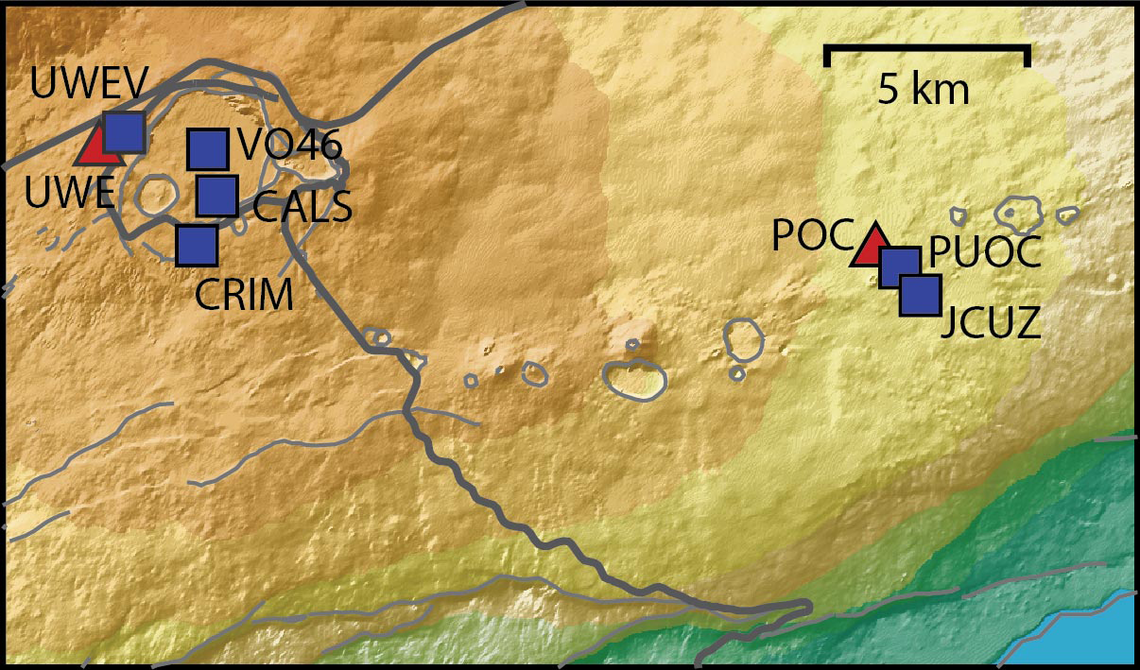


View: https://youtu.be/Uecu2seh4b4


Wife and I like the AfarTV feeds, for the discussion along w/ them, though they're otherwise just mirrors of the official USGS feeds.


View: https://youtu.be/iws3rh5vLAQ
124 Replies · 3706 views
  • Like
Reactions: osu1991
Foxbat
Looks like Episode 55 is over at 09:00 HST, just under six hours. The USGS said the fountains reached 720' or 220 meters.
​
  • Like
Reactions: RaiderPower
Foxbat
The USGS Kīlaeua Webcam #1 has been showing overflows and doming from the North vent overnight. Maybe the volcanic plumbing has settled back into its two-three week cycle of fountaining?

But I do miss the little cinder cone that broke up in the last episode.
Foxbat
Sorry, I should have posted these earlier:

​

We're still waiting on the start of Episode 56.
  • Like
Reactions: RaiderPower
Foxbat
At 08:01 HST 11/05/2026, the North Vent produced what I would call a "wet burp" after the precursory "pistoning" events, small amounts of lava pouring out of the vent for a few seconds to minutes and then everything recedes. There must have been a gas bubble holding thing back because two minutes later the lava started flowing out of the vent in all directions. Then, at 08:25, it stopped. What a tease! I thought this was how Episode 56 started.

About 12 minutes later at 08:38, the North vent once again started overflowing and picked up steam at 08:42. By 09:00, slight doming could be seen in the pool of lava in the vent. Surely this is it!

But, 09:50 and things wind down again. By 09:57 HST there's just fumes coming out of the vent. Phooey.

But then 10:00 comes and the heavy lava flows kick in again. This time seems like the real deal. At 10:30 HST there's little spurts of lava flying up in the air over the vent, but more from gas than a steady fountain of lava. This looks promising!

11:30 HST and the color of the lava is definitely hotter, and the intensity has picked up to a definite dome and precursor to fountaining. The USGS calls Episode 56 as officially starting at 12:10 HST:

Alert Level: WATCH, Color Code: ORANGE 2026-11-05 22:29:12 UTC
HVO/USGS Volcanic Activity Notice

Volcano: Kilauea (VNUM #332010)

Current Volcano Alert Level: WATCH
Current Aviation Color Code: ORANGE

Issued: Thursday, November 5, 2026, 12:29 PM HST
Source: Hawaiian Volcano Observatory
Notice Number: 2026/H514
Location: N 19 deg 25 min W 155 deg 17 min
Elevation: 4091 ft (1247 m)
Area: Hawaii

Summary: Episode 56 of the ongoing Halemaʻumaʻu eruption began at 12:10 PM HST on November 5, 2026.

Volcanic Activity:
Episode 56 of lava fountaining in Halemaʻumaʻu began at the summit of Kīlauea began at 12:10 PM HST on November 5, 2026.

Lava fountain heights are relatively low at about 100 ft (30 meters), but will likely increase. Ground-level sensors near the eruptive vents indicate that winds are blowing from the northeast direction, which suggests that volcanic gas emissions and volcanic material may be distributed to the southwest direction from Halemaʻumaʻu.
  • Like
Reactions: meStevo
Foxbat
​
  • Like
Reactions: RaiderPower
BlackHitachi
Supporting Founder
Last reply · posted in Movie Talk
Since the Reds have there thread we should too!

Last watched Nine inch Nails
Next 3:10 to Yuma
5397 Replies · 511780 views
dfergie

Last of the Dogmen is my favorite of hers.
  • Like
Reactions: osu1991
"MysteryMan"
Gone.webp
osu1991
Star Wars Despecialized Edition

IMG_0803.webp
osu1991
  • Like
Reactions: dfergie
dishstaller
Just watched Napoleon. Good night.....all of those young men dying for the egos of their leaders. Now we can kill at a distance, back then you saw the man you were killing eye to eye.
comfortably_numb
Pub Member / Supporter
Last reply · posted in Internet Television (IPTV) Discussion Forum
Not sure saving $24/year is worth it unless you're a hardcore Philo user. I'll stick with monthly.

IMG_0351.webp
7 Replies · 239 views
Jimbo
Not sure saving $24/year is worth it unless you're a hardcore Philo user. I'll stick with monthly.

View attachment 195247
$24 for the Year, would be more useful.
Howard Simmons
$24 for the Year, would be more useful.
But when you cancel you still have to watch until the plan runs out. With monthly you're done at the end of the month.
Jimbo
But when you cancel you still have to watch until the plan runs out. With monthly you're done at the end of the month.
Sorry, my point was the expense.
comfortably_numb
$24 for the Year, would be more useful.

Philo's monthly price is reasonable, IMO, because it's still the cheapest way I'm aware of to get all the linear Discovery networks AND access to the Discovery Go apps.
  • Like
Reactions: Howard Simmons
Jimbo
Philo's monthly price is reasonable, IMO, because it's still the cheapest way I'm aware of to get all the linear Discovery networks AND access to the Discovery Go apps.
I guess if it was something I used on a regular basis, I suppose.
  • Like
Reactions: Howard Simmons
comfortably_numb
In other Philo news..

IMG_0364.webp
Bobby
Oh boy, I can't wait! 😂
K
Pub Member / Supporter Lifetime Supporter
Last reply · posted in TV Shows
'Rockford Files' Reboot Gets NBC Pilot Order

I grow tired of all the reboots. Most I don't bother with but will depend on the actor chosen.
19 Replies · 758 views
long_time_Dish
Yeah, I'll check it out as well, but shan't be holding my breath...It'll be tough to equal James Garner in that role...
  • Like
Reactions: Foxbat
harshness
...It'll be tough to equal James Garner in that role...
I can think of a few actors (including some females) who might fit the bill.

This will all depend on the storyline. I'm not sure how well it will translate. Modern TV hasn't been all that kind to PIs and even less kind to CIs (confidential informants).
K
Premier is Saturday, Jan 2nd. Moving to Thursday on the 7th.
long_time_Dish

I wonder how they're/if they're going to do something like the answering machine message opening? It was always funny...
  • Like
Reactions: dfergie
osu1991
Pub Member / Supporter
· posted in Movie Talk
0 Replies · 28 views
  • Like
Reactions: Foxbat and dfergie
osu1991
Pub Member / Supporter
· posted in Movie Talk
0 Replies · 33 views
  • Like
Reactions: Foxbat
M
Last reply · posted in DISH Network Support Forum
I have Dish with Hopper3. I choose to get local channels OTA and had a "guide list" established at my previous home. Having moved a few miles away, I wanted to update the list by appending a couple new stations via a rescan. As many would know, some stations come in with the UHF/VHF antenna aimed in one direction, while others come in better with a different direction.

Unfortunately, when a scan is done (bringing in 25-30 stations for that particular antenna aim), the dialog screen does not present the established guide list; it presents an empty field to the right that the scanned stations may be selected one by one and added to the empty guide. But because of antenna aim, some stations originally saved are missing, and would have to be retrieved with a different antenna aim. But as I explain, if a 2nd​ scan is done with a different antenna aim, the stations saved from the first scan are lost.

It troubles me that Dish didn't develop software that would allow a user to simply append only 1 or 2 channels to the established list. :mad:

Any thought on this? Has anyone experienced this or heard of this from others?
15 Replies · 523 views
dishstaller
I could very well be wrong....it has been a LOT of years but back when I had a 722K it seemed like when you went back to the scan screen that you could just scan again and it would ADD those channels to the previous list or you could delete the previous results and only add the channels from the new scan.
  • Like
Reactions: charlesrshell
N
I could very well be wrong....it has been a LOT of years but back when I had a 722K it seemed like when you went back to the scan screen that you could just scan again and it would ADD those channels to the previous list or you could delete the previous results and only add the channels from the new scan.
I am not sure about that but I do know that you could manually add additional channels just by entering the actual RF channel number and the older receivers would add the virtual channels to your list
dishstaller
I am not sure about that but I do know that you could manually add additional channels just by entering the actual RF channel number and the older receivers would add the virtual channels to your list
Like I said.....that has been many years ago. Swapped my 722K for a Hopper in 2012.

It does seem like I remember having to delete the existing channels when we did a rescan. Back then our local stations KEPT monkeying around with things and it was non-stop complaints from customers about their channels not coming in. Got so bad that I stopped selling OR installing OTAs....something I had been doing since 1984 so you know it HAD to be pretty bad.
M
You made one of my points for me with this comment, Dishstaller:

"... local stations KEPT monkeying around with things and it was non-stop complaints from customers about their channels not coming in ..."
dennispap
I could very well be wrong....it has been a LOT of years but back when I had a 722K it seemed like when you went back to the scan screen that you could just scan again and it would ADD those channels to the previous list or you could delete the previous results and only add the channels from the new scan.
I remember that also on my 722.
dishstaller
I remember that also on my 722.
Thanks.....has been too many years to remember clearly.
  • Like
Reactions: charlesrshell
Bobby
Keep in mind that the 722 had a built in OTA tuner and the 722K had a plug in module for OTA. The Hoppers and Wallys use an add on USB OTA dongle. I believe they are entirely different.
Linus Tech Tips
· posted in Linus Tech Tips
0 Replies · 25 views