

Social Feed
I've got a Hopper 3 and I have installed dish anywhere on an iPad, and iPhone, and to Amazon fire sticks.
Today, I noticed in the Amazon fire stick settings for the app a section titled "authorized devices." It lists for devices and states that the maximum amount of devices that can be linked to the account is five. That's fine and I knew that I could only authorize five devices. However, it also lists next to each device a number of days remaining. It looks like this:
AFTSSS 30 Days Remaining
AFTMM 26 Days Remaining
AFTMM 27 Days Remaining
AFTMM 30 Days Remaining
The iPad and the iPhone settings under authorized devices says that " Devices are automatically authorized when you watch on-demand programs. Authorized devices are automatically removed after 30 days of an activity." Both the iPhone and the iPad say that there are 23 days remaining. All of this appears under a section entitled authorized devices which has under it subsections authorized devices for on demand an authorized devices for purchased content"
What does this mean? Does it all apply only to on demand and/or purchased content? Does it apply also to just watching OTA and DVR content? Will I lose access on each device in 30 or 26 days? Will I need to reauthorize or log in again?
Thanks.
Today, I noticed in the Amazon fire stick settings for the app a section titled "authorized devices." It lists for devices and states that the maximum amount of devices that can be linked to the account is five. That's fine and I knew that I could only authorize five devices. However, it also lists next to each device a number of days remaining. It looks like this:
AFTSSS 30 Days Remaining
AFTMM 26 Days Remaining
AFTMM 27 Days Remaining
AFTMM 30 Days Remaining
The iPad and the iPhone settings under authorized devices says that " Devices are automatically authorized when you watch on-demand programs. Authorized devices are automatically removed after 30 days of an activity." Both the iPhone and the iPad say that there are 23 days remaining. All of this appears under a section entitled authorized devices which has under it subsections authorized devices for on demand an authorized devices for purchased content"
What does this mean? Does it all apply only to on demand and/or purchased content? Does it apply also to just watching OTA and DVR content? Will I lose access on each device in 30 or 26 days? Will I need to reauthorize or log in again?
Thanks.
6 Replies
·
5678 views


Staff member
HERE TO HELP YOU!
Cutting Edge
Sometimes a thread gets so many posts in it that is can cause issues for the server so that why today we introduce The Song Name Game Part 3!
So let the game continue!
The last song was added by Bobby who posted...
One Meat Ball - Andrews Sisters
CONTINUE ON AND HAVE FUN! WELCOME HOME TO SATELLITEGUYS.US!
Here are the original rules for the game as posted by WebbyDude back in 2006. http://www.satelliteguys.us/threads/68645-Song-Name-Game
Just name a song title and the band who performed it. The next person does the same thing, but needs to list a song title or band name which includes a word from the previous entry. Pick songs from any genre.
Example:
Long Live Rock and Roll -- Rainbow
Rainbow in the Dark -- Dio
Another example:
Ride the Lightning -- Metallica
Lightning Strikes -- Ozzy Osbourne
Get it?
An additional note: we all know that song titles, sometimes, use profane words. Because this is a family friendly website it is advised that you clean up that title up a bit. This is accomplished by using something like sh!t instead of the real word. Thanks....
So let the game continue!
The last song was added by Bobby who posted...
One Meat Ball - Andrews Sisters
CONTINUE ON AND HAVE FUN! WELCOME HOME TO SATELLITEGUYS.US!
Here are the original rules for the game as posted by WebbyDude back in 2006. http://www.satelliteguys.us/threads/68645-Song-Name-Game
Just name a song title and the band who performed it. The next person does the same thing, but needs to list a song title or band name which includes a word from the previous entry. Pick songs from any genre.
Example:
Long Live Rock and Roll -- Rainbow
Rainbow in the Dark -- Dio
Another example:
Ride the Lightning -- Metallica
Lightning Strikes -- Ozzy Osbourne
Get it?
An additional note: we all know that song titles, sometimes, use profane words. Because this is a family friendly website it is advised that you clean up that title up a bit. This is accomplished by using something like sh!t instead of the real word. Thanks....
68630 Replies
·
2678886 views


iJustine
Time for another AWESOME video from iJustine!
View: https://www.youtube.com/shorts/bmgQFnQEqVo
Direct YouTube Link - New colors of the HomePod Mini 2! Blue, pink and green!
The official iJustine Website's Website
Buy her book!
View: https://www.youtube.com/shorts/bmgQFnQEqVo
Direct YouTube Link - New colors of the HomePod Mini 2! Blue, pink and green!
The official iJustine Website's Website
Buy her book!
0 Replies
·
3 views

Pub Member / Supporter
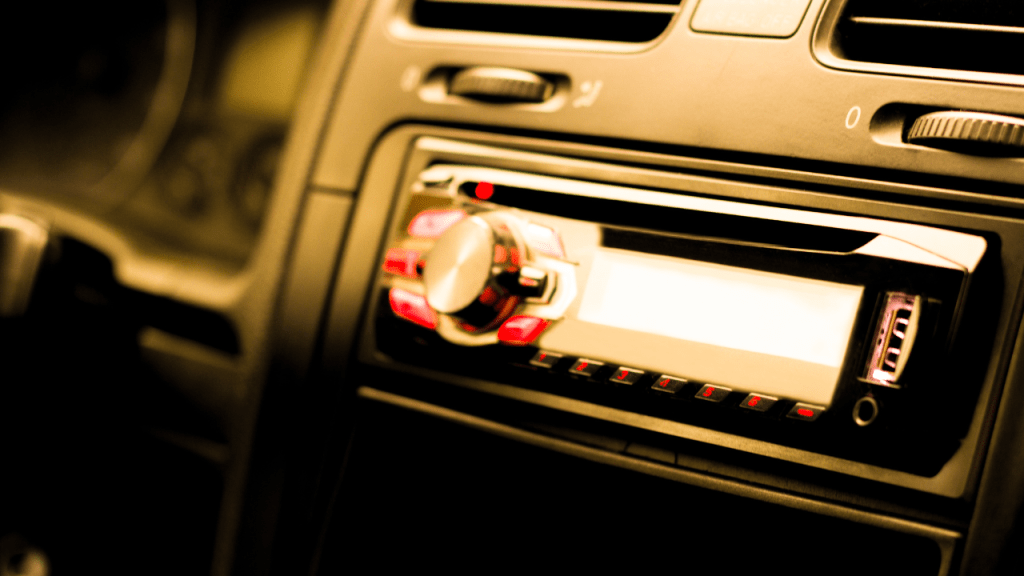
House Passes AM Radio For Every Vehicle Act
(Washington, DC) - The U.S. House has passed the AM Radio for Every Vehicle Act, marking a major step forward for broadcasters and listeners who have pushed to keep AM radio available in new cars and
 wabcradio.com
20 Replies
·
581 views


Supporting Founder
Pub Member / Supporter
Apple Fall Hardware Event takes place today, September 9, 2026, at 10:00 a.m. PT / 1:00 p.m. ET. It marks the debut of new CEO John Ternus and the expected reveal of Apple's first foldable phone.
135 Replies
·
1638 views


 . can we say over priced garbage!!!
TWiT Tech Podcast Network
Time for another AWESOME video from the TWIT Network!
View: https://www.youtube.com/shorts/1gKXwyGz68c
Direct YouTube Link - Will AI Be Rejected in Game Development's Future? #shorts
TWIT's Website
TWIT Live Feed
View: https://www.youtube.com/shorts/1gKXwyGz68c
Direct YouTube Link - Will AI Be Rejected in Game Development's Future? #shorts
TWIT's Website
TWIT Live Feed
0 Replies
·
7 views

Pub Member / Supporter
Hello folks, well my luck ran out last week with a nasty thunderstorm and after 39 years here, finally took a hit. Now, the FTA receivers I had for some years worked great until now. Recently picked up a fairly cheap receiver, online, KOQIT and seems to be good, but for the life of me, I cannot get the HDMI output to work with 3 of my Samsung monitors. I can hook it up to my Samsung TV and its HDMI input and it works fine. The 2 receivers I lost also worked fine with them, so am I going crazy? anyone have come across this or have any suggestions? And, since this is a somewhat cheap unit but works, what is everyone out there using for receivers these days? without breaking the bank? I enjoy watching FTA TV, so I will invest more if needed, what is a really good, detailed unit these days. I'm so use to watching a few of them HD channels. Right now I'm down to composite hookups, yuck! Any help or info would be greatly appreciated. Thanks Frank 
47 Replies
·
1290 views


IS Amiko MIRA 3 any good ???
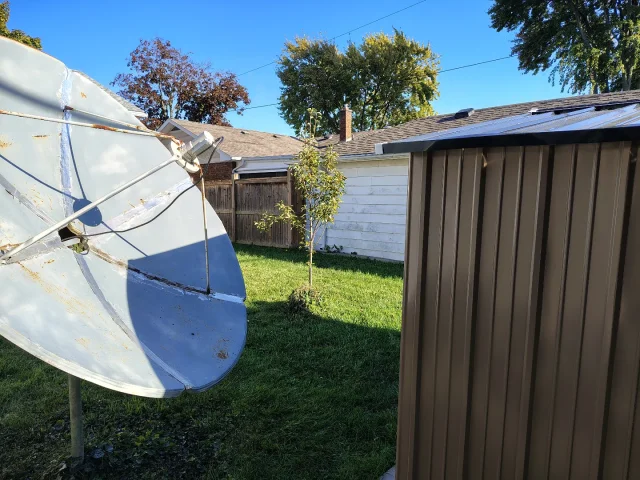
Can you recommend the best to cover all bases. NO BEEPS on certain channels 101w (NEWSMAX ,NEWS NATION), a clock that keeps working STEADY for timed recording ,solid unit with good lifespan. My Amiko died AND my Linkbox has NO Favorites Button and BEEPS on many channels. Picking up 105 west with a NEW SHED IN THE Way with 6 foot Cband ..95 percent quality ...unbelievable.
Can you recommend the best to cover all bases. NO BEEPS on certain channels 101w (NEWSMAX ,NEWS NATION), a clock that keeps working STEADY for timed recording ,solid unit with good lifespan. My Amiko died AND my Linkbox has NO Favorites Button and BEEPS on many channels. Picking up 105 west with a NEW SHED IN THE Way with 6 foot Cband ..95 percent quality ...unbelievable.
10 Replies
·
268 views


Pub Member / Supporter
Lifetime Supporter
3 Replies
·
65 views

Supporting Founder
Really excited for this season with Kentucky having a new coach and some really exciting recruits. Probably won't last long, but here's hoping this season is great.
172 Replies
·
2475 views


TWiT Tech Podcast Network
Time for another AWESOME video from the TWIT Network!
View: https://www.youtube.com/watch?v=omPQDqqbatQ
Direct YouTube Link - Whiskey Pick: Frey Ranch Straight Bourbon
TWIT's Website
TWIT Live Feed
View: https://www.youtube.com/watch?v=omPQDqqbatQ
Direct YouTube Link - Whiskey Pick: Frey Ranch Straight Bourbon
TWIT's Website
TWIT Live Feed
0 Replies
·
25 views