

Social Feed

Staff member
HERE TO HELP YOU!
Pub Member / Supporter
Cutting Edge
Everyone's talking about Starlink these days. I get it. It's cool and exciting. Why wouldn't you want to be able to stream at high speed from anywhere? But there's some stuff they won't tell you. I'll tell you though, although I don't think you'll like it.
Starlink advertises itself as costing about $150 a month. Now, that's probably more than you're paying for home internet already. (By the way, if you're paying more than $50 a month for high-speed internet, you need to check this out.) If you're in a really rural area, though, you might consider that to be a bargain since you probably can't get high speed at any price.
They don't tell you that the $150 plan probably won't keep you happy for long. First of all, speeds are good but not great. Typically you'll get about 25Mbps during peak times, which is enough to stream on one TV and that's about it. Second, although it's advertised as unlimited, you'll have issues once you get to 1TB per month. That sound like a lot of capacity, but it's not. Once you've downloaded that much, your internet speed will drop to about the same as dial-up, or you'll have to purchase additional data as you go.
I tested out in a real world situation to try to figure out how much data an average person would use. As one person using internet for 3 hours a day, that equated to about 25GB a day. I didn't use the service to back up my computer, just really for routine movie and TV watching. That's 750GB per month, and I didn't really use it all day like I would for weekends. I'm just one guy streaming from popular streaming services.
Honestly that was a lot more data than I expected and it really opened my eyes to how much you'll pay.
Starlink for businesses is a little more flexible, but the costs are a lot higher. Their business tier is 6TB per month which sounds like a lot but remember you could have a lot of employees who move large attachments, do video conferencing and more. That top tier costs… wait for it… $1500 per month. That gets to be a pretty big number pretty soon. Internet is super important for business, but that's a very large burden to put on yourself.
Starlink rolled out their RV and marine services this year and while they are great, they're also absurdly expensive. You will pay up to $2,500 for the equipment up front. If you're in an RV, expect to pay $200 a month for speeds about the same as 2000s-era DSL. It gets worse if you're looking at a boat. You'll pay up to $5,000 a month for marine service.
If you were thinking you could maybe get the RV service or the residential service and use it on your boat, think again. Starlink limits their RV service and residential service to land only. They'll be able to detect that you're away from the marina and, honestly, they'll just shut you off.
Here's the bottom line. You don't need to spend that much to get what you want. And I'm going to show you how.

This is the best kept secret in mobile and marine. It's weBoost's Drive Reach cell phone signal booster. This little device is a one time purchase and it eliminates all the problems associated with using cell service on a boat or in an RV. It will fill your inside space with strong cell service, even if you're up to 10 miles offshore. And that means you can leverage the cell service you have instead of paying more for Starlink.
Now, if you're going to stream a lot, you will need something with its own data plan, and you'll want something that can give you Wi-Fi instead of tethering to your phone. That's where this device comes in.
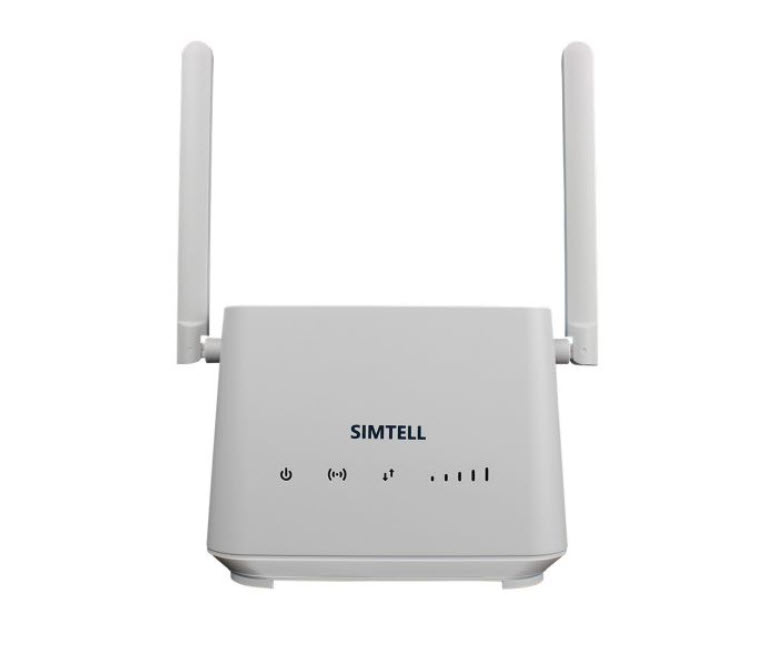
What you see above is the SIMTELL digital cellular router system. It turns cell service into Wi-Fi, and uses its own data plan so that you don't have to worry about tethering. The data plans are generous and you will get the fastest cellular internet available. It uses eSIM technology to check which of the major carriers is the fastest, and automatically switches.
If you're looking for a live TV solution, consider satellite television instead of internet. You'll get hundreds of channels of live entertainment so maybe you won't even want to stream. Satellite for boats and RVs is mature, solid technology and it works. The service is a lot less than you'll pay for Starlink and you get a ton of great programs. It's just an option to consider.
Starlink is an up and coming technology. If you've had it for a little while you've probably already thrown away all your equipment at least once. Chances are you will again. How many times are you willing to pay $600 – $2000 for equipment before it gets old? Once the Starlink equipment is obsolete you have no choice but to upgrade. Compare that to cellular internet which is very likely to work with the equipment you buy today for a decade or more.
I hope I was able to show you that Starlink isn't the value that everyone thinks it is. It's evolving, and I think there will be a time when it is the best choice. That time isn't today. Today you owe it to yourself to look at the best option available now. In most cases, that's satellite TV, cellular signal boosters, cellular routers… or a combination of all of them. But I get it. This is unfamiliar territory.
Luckily you have a "friend in the business." Call Signal Connect to find out more about entertainment and connectivity options that really make sense. We don't run overseas call centers. We staff our Detroit-area office with certified experts who are available to you with just a phone call, text, or email. Try us! Call 888-233-7563, use the chat button at lower right, or fill out the form below. Remember, Starlink may sound like an excellent solution, but in the end it's sky-high prices and uncertainty, at least today.
The post STARLINK: Here's what they won't tell you appeared first on The Solid Signal Blog.
Continue reading...
Starlink is more expensive than you think
Starlink advertises itself as costing about $150 a month. Now, that's probably more than you're paying for home internet already. (By the way, if you're paying more than $50 a month for high-speed internet, you need to check this out.) If you're in a really rural area, though, you might consider that to be a bargain since you probably can't get high speed at any price.
They don't tell you that the $150 plan probably won't keep you happy for long. First of all, speeds are good but not great. Typically you'll get about 25Mbps during peak times, which is enough to stream on one TV and that's about it. Second, although it's advertised as unlimited, you'll have issues once you get to 1TB per month. That sound like a lot of capacity, but it's not. Once you've downloaded that much, your internet speed will drop to about the same as dial-up, or you'll have to purchase additional data as you go.
I tested out in a real world situation to try to figure out how much data an average person would use. As one person using internet for 3 hours a day, that equated to about 25GB a day. I didn't use the service to back up my computer, just really for routine movie and TV watching. That's 750GB per month, and I didn't really use it all day like I would for weekends. I'm just one guy streaming from popular streaming services.
Honestly that was a lot more data than I expected and it really opened my eyes to how much you'll pay.
Starlink for businesses is even more expensive
Starlink for businesses is a little more flexible, but the costs are a lot higher. Their business tier is 6TB per month which sounds like a lot but remember you could have a lot of employees who move large attachments, do video conferencing and more. That top tier costs… wait for it… $1500 per month. That gets to be a pretty big number pretty soon. Internet is super important for business, but that's a very large burden to put on yourself.
And don't even get me started on RV and marine
Starlink rolled out their RV and marine services this year and while they are great, they're also absurdly expensive. You will pay up to $2,500 for the equipment up front. If you're in an RV, expect to pay $200 a month for speeds about the same as 2000s-era DSL. It gets worse if you're looking at a boat. You'll pay up to $5,000 a month for marine service.
If you were thinking you could maybe get the RV service or the residential service and use it on your boat, think again. Starlink limits their RV service and residential service to land only. They'll be able to detect that you're away from the marina and, honestly, they'll just shut you off.
There are better ways that cost way less and work way better.
Here's the bottom line. You don't need to spend that much to get what you want. And I'm going to show you how.
Start with a cell phone signal booster
This is the best kept secret in mobile and marine. It's weBoost's Drive Reach cell phone signal booster. This little device is a one time purchase and it eliminates all the problems associated with using cell service on a boat or in an RV. It will fill your inside space with strong cell service, even if you're up to 10 miles offshore. And that means you can leverage the cell service you have instead of paying more for Starlink.
Now, if you're going to stream a lot, you will need something with its own data plan, and you'll want something that can give you Wi-Fi instead of tethering to your phone. That's where this device comes in.
What you see above is the SIMTELL digital cellular router system. It turns cell service into Wi-Fi, and uses its own data plan so that you don't have to worry about tethering. The data plans are generous and you will get the fastest cellular internet available. It uses eSIM technology to check which of the major carriers is the fastest, and automatically switches.
Or, think about satellite TV
If you're looking for a live TV solution, consider satellite television instead of internet. You'll get hundreds of channels of live entertainment so maybe you won't even want to stream. Satellite for boats and RVs is mature, solid technology and it works. The service is a lot less than you'll pay for Starlink and you get a ton of great programs. It's just an option to consider.
There's one more thing to think about.
Starlink is an up and coming technology. If you've had it for a little while you've probably already thrown away all your equipment at least once. Chances are you will again. How many times are you willing to pay $600 – $2000 for equipment before it gets old? Once the Starlink equipment is obsolete you have no choice but to upgrade. Compare that to cellular internet which is very likely to work with the equipment you buy today for a decade or more.
Did I convince you?
I hope I was able to show you that Starlink isn't the value that everyone thinks it is. It's evolving, and I think there will be a time when it is the best choice. That time isn't today. Today you owe it to yourself to look at the best option available now. In most cases, that's satellite TV, cellular signal boosters, cellular routers… or a combination of all of them. But I get it. This is unfamiliar territory.
Luckily you have a "friend in the business." Call Signal Connect to find out more about entertainment and connectivity options that really make sense. We don't run overseas call centers. We staff our Detroit-area office with certified experts who are available to you with just a phone call, text, or email. Try us! Call 888-233-7563, use the chat button at lower right, or fill out the form below. Remember, Starlink may sound like an excellent solution, but in the end it's sky-high prices and uncertainty, at least today.
The post STARLINK: Here's what they won't tell you appeared first on The Solid Signal Blog.
Continue reading...
0 Replies
·
401 views

Staff member
HERE TO HELP YOU!
Cutting Edge
Sometimes a thread gets so many posts in it that is can cause issues for the server so that why today we introduce The Song Name Game Part 3!
So let the game continue!
The last song was added by Bobby who posted...
One Meat Ball - Andrews Sisters
CONTINUE ON AND HAVE FUN! WELCOME HOME TO SATELLITEGUYS.US!
Here are the original rules for the game as posted by WebbyDude back in 2006. http://www.satelliteguys.us/threads/68645-Song-Name-Game
Just name a song title and the band who performed it. The next person does the same thing, but needs to list a song title or band name which includes a word from the previous entry. Pick songs from any genre.
Example:
Long Live Rock and Roll -- Rainbow
Rainbow in the Dark -- Dio
Another example:
Ride the Lightning -- Metallica
Lightning Strikes -- Ozzy Osbourne
Get it?
An additional note: we all know that song titles, sometimes, use profane words. Because this is a family friendly website it is advised that you clean up that title up a bit. This is accomplished by using something like sh!t instead of the real word. Thanks....
So let the game continue!
The last song was added by Bobby who posted...
One Meat Ball - Andrews Sisters
CONTINUE ON AND HAVE FUN! WELCOME HOME TO SATELLITEGUYS.US!
Here are the original rules for the game as posted by WebbyDude back in 2006. http://www.satelliteguys.us/threads/68645-Song-Name-Game
Just name a song title and the band who performed it. The next person does the same thing, but needs to list a song title or band name which includes a word from the previous entry. Pick songs from any genre.
Example:
Long Live Rock and Roll -- Rainbow
Rainbow in the Dark -- Dio
Another example:
Ride the Lightning -- Metallica
Lightning Strikes -- Ozzy Osbourne
Get it?
An additional note: we all know that song titles, sometimes, use profane words. Because this is a family friendly website it is advised that you clean up that title up a bit. This is accomplished by using something like sh!t instead of the real word. Thanks....
68658 Replies
·
2680179 views


Lately my eight year old Dell laptop has been shutting off even when I have a full battery. I have had to keep it plugged up all the time to keep this from happening. Any idea what is causing this? I replaced the battery about three years ago.
2 Replies
·
43 views


Pub Member / Supporter
I set up a music server for my brother a few years ago. It's basically a small headless computer but it needs to have a DHCP IP address reserved for it in the router settings. This was easy to do in his DSL router. He's switching to Starlink now and I was wondering if these setting are easily accessible in the Starlink router. I'm pretty sure he will be getting the latest V5 router.
5 Replies
·
282 views


Pub Member / Supporter
Lifetime Supporter
Good...simple humor. Enjoy
View: https://www.youtube.com/watch?v=E92AtfTLge4
View: https://www.youtube.com/watch?v=HJy0WnejlF4
View: https://www.youtube.com/watch?v=E92AtfTLge4
View: https://www.youtube.com/watch?v=HJy0WnejlF4
2 Replies
·
50 views

Pub Member / Supporter
Lifetime Supporter
Terrible tragedy. You would think that they would have safe guards in place that would prevent something like this from happening. I guess if you are going to ride in a passenger train it might be best to get a car near the rear.
 www.zerohedge.com
At Least 64 Dead After Two High-Speed Trains Collide In Spain<!-- --> | ZeroHedge
ZeroHedge - On a long enough timeline, the survival rate for everyone drops to zero
www.zerohedge.com
2 Replies
·
53 views


Booredatwork.com
Time for another AWESOME video from BoredAtWork!
View: https://www.youtube.com/watch?v=MSXmcYapC3I
Direct YouTube Link - MacBook Pro With PROLED XDR Display - Watch Before you BUY!
Booredatwork.com Website
Booredatwork on Facebook
View: https://www.youtube.com/watch?v=MSXmcYapC3I
Direct YouTube Link - MacBook Pro With PROLED XDR Display - Watch Before you BUY!
Booredatwork.com Website
Booredatwork on Facebook
0 Replies
·
12 views
Marques Brownlee
Time for another AWESOME video from Marques Brownlee!
View: https://www.youtube.com/watch?v=2reQut8WNGc
Direct YouTube Link - Macbook PROLED XDR Impressions: They Said They Wouldn't!
The official MKBHD Website!
The MKBHD Store
View: https://www.youtube.com/watch?v=2reQut8WNGc
Direct YouTube Link - Macbook PROLED XDR Impressions: They Said They Wouldn't!
The official MKBHD Website!
The MKBHD Store
0 Replies
·
25 views
iJustine
Time for another AWESOME video from iJustine!
View: https://www.youtube.com/shorts/Duq4hKmUE4c
Direct YouTube Link - MacBoo PROLED - What You Need To Know!
The official iJustine Website's Website
Buy her book!
View: https://www.youtube.com/shorts/Duq4hKmUE4c
Direct YouTube Link - MacBoo PROLED - What You Need To Know!
The official iJustine Website's Website
Buy her book!
0 Replies
·
27 views
iJustine
Time for another AWESOME video from iJustine!
View: https://www.youtube.com/shorts/sgr5V8j7c5w
Direct YouTube Link - MacBook PROLED Nanotexture
The official iJustine Website's Website
Buy her book!
View: https://www.youtube.com/shorts/sgr5V8j7c5w
Direct YouTube Link - MacBook PROLED Nanotexture
The official iJustine Website's Website
Buy her book!
0 Replies
·
5 views
TWiT Tech Podcast Network
Time for another AWESOME video from the TWIT Network!
View: https://www.youtube.com/watch?v=TbfGWonQfys
Direct YouTube Link - Microsoft's New Round of Employee Buyouts
TWIT's Website
TWIT Live Feed
View: https://www.youtube.com/watch?v=TbfGWonQfys
Direct YouTube Link - Microsoft's New Round of Employee Buyouts
TWIT's Website
TWIT Live Feed
0 Replies
·
22 views