

Social Feed

Staff member
HERE TO HELP YOU!
Pub Member / Supporter
Cutting Edge
It's more confusing than ever. When you're planning your home viewing, you may be considering putting DIRECTV in every room. There's a little more to it than just running a cable. You need to be using the right satellite dish and you need to understand how DIRECTV thinks about your home system.
You might think of the number of black boxes in the house, but DIRECTV thinks in terms of "tuners." In DIRECTV parlance, a tuner is defined as the ability to watch or record one channel. In order to watch one thing and record another, you need two tuners. But it gets a little more complicated than that.
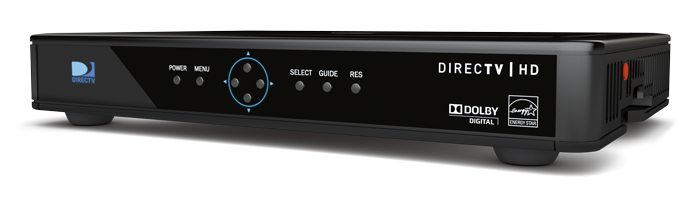
DIRECTV has done everything they possibly can to make this as confusing as possible. On the one hand they have receivers like this H25:
On the other hand they have clients like this C61K.
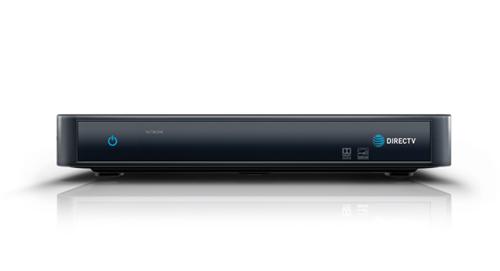
These black boxes are identical in size and other than the fact that one puts out 4K and the other doesn't, they act almost identically. DIRECTV's done this on purpose because they don't want you to think about what's in front of you. So, the only way to really know if you have a receiver or a client is to look at the model number, usually found on a green sticker on the bottom, or look to see if there is an access card (which DIRECTV could be conveniently hiding behind a door.)
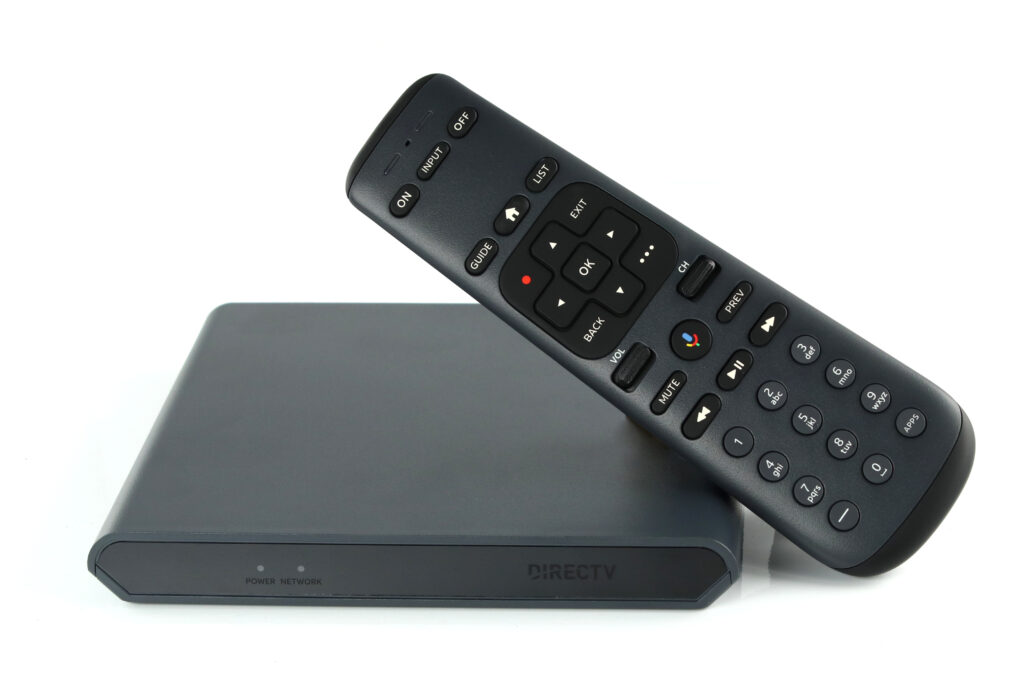
DIRECTV is moving forward with its next generation of consumer equipment. The first is the box you see above you, the Gemini. Gemini is a streaming box that essentially imitates a DIRECTV box. As far as you, the customer, are concerned this looks and acts like a DIRECTV receiver. It's actually a streaming box that runs an app to turn it into a DIRECTV client. This may sound weird, but it lets the box run on the common Android TV operating system. This way it can run popular streaming apps and get more frequent core updates.
A receiver has a tuner in it and can work by itself.
A client doesn't have a tuner in it and only works with a DVR.
Simple as that. If you want to take your DIRECTV box with you, or if your DVR breaks, you'll see the difference quickly because client boxes will stop working. Receivers won't.
Most new DIRECTV installs can serve up to 13 tuners. There are several ways to get as many tuners as you need, but it usually involves putting up a new dish or modifying the dish you have. So it's important to get an accurate count of what you'll need. Luckily it's easy with some simple math, and here's a lookup table:
*It's worth pointing out that the HS17 Genie 2 generally only needs 7 tuners to operate but it's recommended to reserve 11 for future expandability.
Clients, including the Gemini, don't have tuners, that's why they count as zero. Now, add up all the tuners you have. Is that number more than 8? You may have to rethink your system.
There's an excellent tutorial on upgrading your system to use either an external multiswitch or new LNB, but with today's technology, most people will not need a separate multiswitch, just the right LNB. Your choices come down to:
Reverse Band 3 SWM LNB: This is the recommended LNB for almost all installs. It will support 13 tuners in most installations. If you are willing to micromanage the order in which your receivers power up, you can get 21 tuners out of it.
Reverse Band 5 Legacy LNB: This LNB is used for 4K installs, where more than 13 tuners are needed, or in commercial installs. It's the LNB to use if you plan on using a SWM-30 multiswitch for ultimate expandability.
It's worth mentioning at this point that DIRECTV has almost completely abandoned its satellites at the 110 and 119 locations. Most customers won't ever receive anything meaningful from these locations, so there's no point in going to the 5-location LNB unless you need its expandability.
If this is a new install, you should always be thinking about the SWM-30. However, if this is an older install, you may have an older multiswitch as well. These are the three multiswitches that are still available from Solid Signal:
*Limitations with older DIRECTV receivers mean that the SWM-30 only supports 13 tuners on each output. However, newer receivers like the H44 and later business-only receivers allow the full 15 tuners on each output of the SWM-30.
If you already have a SWM system, you can simply take off one LNB and put on another. I suggest marking the position of the alignment screws on the back of the dish with a Sharpie so you know that you haven't moved anything, but in most cases it's as simple as unscrewing one LNB and screwing in the other.
If your current LNB has one output, it should be replaced with the Reverse Band 3 SWM LNB. If your current LNB has four outputs, the path gets a bit more complicated. In order to use the Reverse Band 5 LNB, you will need six lines from the dish. You may only have four. You will also need the SWM-30 multiswitch, where you may have an older SWM-8 or SWM-16 multiswitch. This is the time to decide if you really need all those extra tuners and possibly simplify your system if you don't. This tutorial goes into more detail.
This part isn't as complex as it sounds. It really comes down to how much extra wire and equipment you are willing to put in.
The good news for residential customers with Genie 2 systems is that the answer here doesn't really matter. The Genie 2 will work with as few as 7 tuners, but I recommend reserving 11 for future compatibility. The Reverse Band 3 dish supplies 13 tuners. Since you can't have any other equipment on your account if you have a Genie 2, there's nothing to worry about.
Whether you're a business or residential customer, you have one option if you want to keep things relatively simple. Choose the Reverse Band 3 LNB. This LNB will supply up to 13 tuners and can't be upgraded to offer more.
If you are one of those people who really want to push the envelope, you can actually run 21 tuners off a Reverse Band 3 LNB. However, if any of your equipment is from the previous generation (in other words, if it's HR24, H25, or older) you should stick to 13 tuners. The older generation boxes will give you problems if you're trying to use too many and you power them up first.
If you're a business user with H44 or later receivers, you should be able to run 21 boxes off this LNB with no problem. However, it's an unsupported install and it's hard to know if you'll have problems later.
With the right combination of equipment, there is no limit to the number of tuners you can run off one dish. I've personally planned systems with over 125 receivers from one dish. Eventually there does come a point where you can't amplify the signal enough, but I haven't gotten there yet. The point is, if you use a Reverse Band 5 Legacy LNB and multiple SWM-30s you can put in as many tuners as you want.
Our team is here for you! Call the experts at 888-233-7563 during East Coast business hours. If it's after hours, fill out the form below. We'll get back to you, usually within one business day.
The post UPDATED FOR '23 and beyond: Get to know "Tuner Math" appeared first on The Solid Signal Blog.
Continue reading...
You might think of the number of black boxes in the house, but DIRECTV thinks in terms of "tuners." In DIRECTV parlance, a tuner is defined as the ability to watch or record one channel. In order to watch one thing and record another, you need two tuners. But it gets a little more complicated than that.
Receivers vs. Clients
DIRECTV has done everything they possibly can to make this as confusing as possible. On the one hand they have receivers like this H25:
On the other hand they have clients like this C61K.
These black boxes are identical in size and other than the fact that one puts out 4K and the other doesn't, they act almost identically. DIRECTV's done this on purpose because they don't want you to think about what's in front of you. So, the only way to really know if you have a receiver or a client is to look at the model number, usually found on a green sticker on the bottom, or look to see if there is an access card (which DIRECTV could be conveniently hiding behind a door.)
Even more confusing: Introducing Gemini
DIRECTV is moving forward with its next generation of consumer equipment. The first is the box you see above you, the Gemini. Gemini is a streaming box that essentially imitates a DIRECTV box. As far as you, the customer, are concerned this looks and acts like a DIRECTV receiver. It's actually a streaming box that runs an app to turn it into a DIRECTV client. This may sound weird, but it lets the box run on the common Android TV operating system. This way it can run popular streaming apps and get more frequent core updates.
Is the difference between a receiver and a client?
A receiver has a tuner in it and can work by itself.
A client doesn't have a tuner in it and only works with a DVR.
Simple as that. If you want to take your DIRECTV box with you, or if your DVR breaks, you'll see the difference quickly because client boxes will stop working. Receivers won't.
Why you need to count up tuners
Most new DIRECTV installs can serve up to 13 tuners. There are several ways to get as many tuners as you need, but it usually involves putting up a new dish or modifying the dish you have. So it's important to get an accurate count of what you'll need. Luckily it's easy with some simple math, and here's a lookup table:
| Equipment | # of tuners |
| HS17 Genie 2 DVR | 11* |
| HR54 Genie 1 DVR | 7 |
| HR24 DVR (or earlier DVR) | 2 |
| H44 receiver (commercial customers) | 1 |
| H24 / H25 (or any other receiver) | 1 |
| Gemini Internet-connected client | 0 |
| 4K Genie client | 0 |
| HD Genie client | 0 |
Clients, including the Gemini, don't have tuners, that's why they count as zero. Now, add up all the tuners you have. Is that number more than 8? You may have to rethink your system.
There's an excellent tutorial on upgrading your system to use either an external multiswitch or new LNB, but with today's technology, most people will not need a separate multiswitch, just the right LNB. Your choices come down to:
Reverse Band 3 SWM LNB: This is the recommended LNB for almost all installs. It will support 13 tuners in most installations. If you are willing to micromanage the order in which your receivers power up, you can get 21 tuners out of it.
Reverse Band 5 Legacy LNB: This LNB is used for 4K installs, where more than 13 tuners are needed, or in commercial installs. It's the LNB to use if you plan on using a SWM-30 multiswitch for ultimate expandability.
It's worth mentioning at this point that DIRECTV has almost completely abandoned its satellites at the 110 and 119 locations. Most customers won't ever receive anything meaningful from these locations, so there's no point in going to the 5-location LNB unless you need its expandability.
Choosing the right multiswitch
If this is a new install, you should always be thinking about the SWM-30. However, if this is an older install, you may have an older multiswitch as well. These are the three multiswitches that are still available from Solid Signal:
| Equipment | # of tuners supported |
| SWM-30 multiswitch | 30 (H44 only) or 26 (other devices)* |
| SWM-8 multiswitch | 8 |
| SWM-16 multiswitch | 16 |
Swapping out the LNB
If you already have a SWM system, you can simply take off one LNB and put on another. I suggest marking the position of the alignment screws on the back of the dish with a Sharpie so you know that you haven't moved anything, but in most cases it's as simple as unscrewing one LNB and screwing in the other.
If your current LNB has one output, it should be replaced with the Reverse Band 3 SWM LNB. If your current LNB has four outputs, the path gets a bit more complicated. In order to use the Reverse Band 5 LNB, you will need six lines from the dish. You may only have four. You will also need the SWM-30 multiswitch, where you may have an older SWM-8 or SWM-16 multiswitch. This is the time to decide if you really need all those extra tuners and possibly simplify your system if you don't. This tutorial goes into more detail.
How many tuners can you run off a single DIRECTV dish?
This part isn't as complex as it sounds. It really comes down to how much extra wire and equipment you are willing to put in.
Residential customers with Genie 2
The good news for residential customers with Genie 2 systems is that the answer here doesn't really matter. The Genie 2 will work with as few as 7 tuners, but I recommend reserving 11 for future compatibility. The Reverse Band 3 dish supplies 13 tuners. Since you can't have any other equipment on your account if you have a Genie 2, there's nothing to worry about.
Customers who want to keep things simple
Whether you're a business or residential customer, you have one option if you want to keep things relatively simple. Choose the Reverse Band 3 LNB. This LNB will supply up to 13 tuners and can't be upgraded to offer more.
If you are one of those people who really want to push the envelope, you can actually run 21 tuners off a Reverse Band 3 LNB. However, if any of your equipment is from the previous generation (in other words, if it's HR24, H25, or older) you should stick to 13 tuners. The older generation boxes will give you problems if you're trying to use too many and you power them up first.
If you're a business user with H44 or later receivers, you should be able to run 21 boxes off this LNB with no problem. However, it's an unsupported install and it's hard to know if you'll have problems later.
Customers with larger installs
With the right combination of equipment, there is no limit to the number of tuners you can run off one dish. I've personally planned systems with over 125 receivers from one dish. Eventually there does come a point where you can't amplify the signal enough, but I haven't gotten there yet. The point is, if you use a Reverse Band 5 Legacy LNB and multiple SWM-30s you can put in as many tuners as you want.
Need more help?
Our team is here for you! Call the experts at 888-233-7563 during East Coast business hours. If it's after hours, fill out the form below. We'll get back to you, usually within one business day.
The post UPDATED FOR '23 and beyond: Get to know "Tuner Math" appeared first on The Solid Signal Blog.
Continue reading...
0 Replies
·
313 views

Staff member
HERE TO HELP YOU!
Cutting Edge
Sometimes a thread gets so many posts in it that is can cause issues for the server so that why today we introduce The Song Name Game Part 3!
So let the game continue!
The last song was added by Bobby who posted...
One Meat Ball - Andrews Sisters
CONTINUE ON AND HAVE FUN! WELCOME HOME TO SATELLITEGUYS.US!
Here are the original rules for the game as posted by WebbyDude back in 2006. http://www.satelliteguys.us/threads/68645-Song-Name-Game
Just name a song title and the band who performed it. The next person does the same thing, but needs to list a song title or band name which includes a word from the previous entry. Pick songs from any genre.
Example:
Long Live Rock and Roll -- Rainbow
Rainbow in the Dark -- Dio
Another example:
Ride the Lightning -- Metallica
Lightning Strikes -- Ozzy Osbourne
Get it?
An additional note: we all know that song titles, sometimes, use profane words. Because this is a family friendly website it is advised that you clean up that title up a bit. This is accomplished by using something like sh!t instead of the real word. Thanks....
So let the game continue!
The last song was added by Bobby who posted...
One Meat Ball - Andrews Sisters
CONTINUE ON AND HAVE FUN! WELCOME HOME TO SATELLITEGUYS.US!
Here are the original rules for the game as posted by WebbyDude back in 2006. http://www.satelliteguys.us/threads/68645-Song-Name-Game
Just name a song title and the band who performed it. The next person does the same thing, but needs to list a song title or band name which includes a word from the previous entry. Pick songs from any genre.
Example:
Long Live Rock and Roll -- Rainbow
Rainbow in the Dark -- Dio
Another example:
Ride the Lightning -- Metallica
Lightning Strikes -- Ozzy Osbourne
Get it?
An additional note: we all know that song titles, sometimes, use profane words. Because this is a family friendly website it is advised that you clean up that title up a bit. This is accomplished by using something like sh!t instead of the real word. Thanks....
68657 Replies
·
2680157 views


Lately my eight year old Dell laptop has been shutting off even when I have a full battery. I have had to keep it plugged up all the time to keep this from happening. Any idea what is causing this? I replaced the battery about three years ago.
2 Replies
·
37 views


Pub Member / Supporter
I set up a music server for my brother a few years ago. It's basically a small headless computer but it needs to have a DHCP IP address reserved for it in the router settings. This was easy to do in his DSL router. He's switching to Starlink now and I was wondering if these setting are easily accessible in the Starlink router. I'm pretty sure he will be getting the latest V5 router.
5 Replies
·
276 views


Pub Member / Supporter
Lifetime Supporter
Good...simple humor. Enjoy
View: https://www.youtube.com/watch?v=E92AtfTLge4
View: https://www.youtube.com/watch?v=HJy0WnejlF4
View: https://www.youtube.com/watch?v=E92AtfTLge4
View: https://www.youtube.com/watch?v=HJy0WnejlF4
2 Replies
·
45 views

Pub Member / Supporter
Lifetime Supporter
Terrible tragedy. You would think that they would have safe guards in place that would prevent something like this from happening. I guess if you are going to ride in a passenger train it might be best to get a car near the rear.
 www.zerohedge.com
At Least 64 Dead After Two High-Speed Trains Collide In Spain<!-- --> | ZeroHedge
ZeroHedge - On a long enough timeline, the survival rate for everyone drops to zero
www.zerohedge.com
2 Replies
·
49 views


Booredatwork.com
Time for another AWESOME video from BoredAtWork!
View: https://www.youtube.com/watch?v=MSXmcYapC3I
Direct YouTube Link - MacBook Pro With PROLED XDR Display - Watch Before you BUY!
Booredatwork.com Website
Booredatwork on Facebook
View: https://www.youtube.com/watch?v=MSXmcYapC3I
Direct YouTube Link - MacBook Pro With PROLED XDR Display - Watch Before you BUY!
Booredatwork.com Website
Booredatwork on Facebook
0 Replies
·
9 views
Marques Brownlee
Time for another AWESOME video from Marques Brownlee!
View: https://www.youtube.com/watch?v=2reQut8WNGc
Direct YouTube Link - Macbook PROLED XDR Impressions: They Said They Wouldn't!
The official MKBHD Website!
The MKBHD Store
View: https://www.youtube.com/watch?v=2reQut8WNGc
Direct YouTube Link - Macbook PROLED XDR Impressions: They Said They Wouldn't!
The official MKBHD Website!
The MKBHD Store
0 Replies
·
22 views
iJustine
Time for another AWESOME video from iJustine!
View: https://www.youtube.com/shorts/Duq4hKmUE4c
Direct YouTube Link - MacBoo PROLED - What You Need To Know!
The official iJustine Website's Website
Buy her book!
View: https://www.youtube.com/shorts/Duq4hKmUE4c
Direct YouTube Link - MacBoo PROLED - What You Need To Know!
The official iJustine Website's Website
Buy her book!
0 Replies
·
25 views
iJustine
Time for another AWESOME video from iJustine!
View: https://www.youtube.com/shorts/sgr5V8j7c5w
Direct YouTube Link - MacBook PROLED Nanotexture
The official iJustine Website's Website
Buy her book!
View: https://www.youtube.com/shorts/sgr5V8j7c5w
Direct YouTube Link - MacBook PROLED Nanotexture
The official iJustine Website's Website
Buy her book!
0 Replies
·
4 views
TWiT Tech Podcast Network
Time for another AWESOME video from the TWIT Network!
View: https://www.youtube.com/watch?v=TbfGWonQfys
Direct YouTube Link - Microsoft's New Round of Employee Buyouts
TWIT's Website
TWIT Live Feed
View: https://www.youtube.com/watch?v=TbfGWonQfys
Direct YouTube Link - Microsoft's New Round of Employee Buyouts
TWIT's Website
TWIT Live Feed
0 Replies
·
20 views