

Social Feed

Staff member
HERE TO HELP YOU!
Pub Member / Supporter
Cutting Edge
Why stay home when you can roam? That's the motto of RV'ers everywhere and while you're roaming, why not take your satellite service with you? Our new white paper shows you all the options in an easy-to-use interactive PDF. The text is listed below, but you'll want to download this one and click away for a customized guide showing exactly what you'll need!
Click here to download our interactive PDF!
Whether it's a big, loud tailgate party or a quiet evening spent watching TV while it's rainy out, there's nothing like bringing your home entertainment experience withyou. It's easy if you put up an antenna, but an antenna isn't going to take you all the way, right? You want DVR service, recorded programs, pay-per-view, and all those sports channels!
Luckily you have options. Whether it's a simple tripod that keeps your budget intact, a full-fledged system that keeps your family entertained while you're driving, or something in between, we have the solutions you need to get satellite TV hooked up and rolling!
Our interactive PDF has a chart showing all the options.
In the US, you have two choices for satellite TV. If you already have satellite service at home with one provider or the other, the decision is easy. Both DISH and DIRECTV let you use receivers that you supply from home, as long as there is no one from home. However, most RV satellite dishes don't work with DIRECTV's Genie or DISH's Hopper. You are generally better off getting a dedicated receiver for the RV if you're going to spend a lot of time in your RV.


Really, the choice is up to you. If you are happy with the provider you have at home there is no reason to use a different one just for RV'ing. You'll find that complicated tailgate setups are usually better with DIRECTV, while it's easiest to get HDTV on a single receiver with DISH.
Remember, though, it's never ok to borrow a receiver from someone else. Also, both DIRECTV and DISH say it's ok to use their service on your RV as long as you aren't using it at home at the same time.
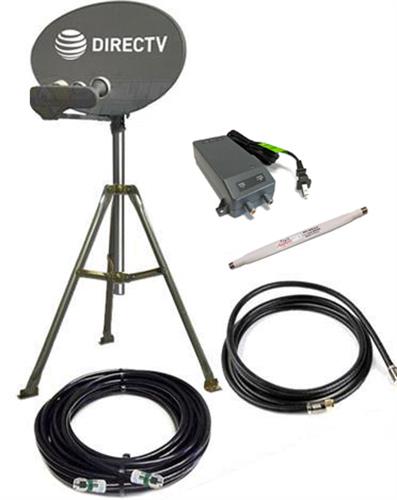
A satellite dish on a tripod is the least expensive way to get satellite TV in your RV. However, it isn't always the best choice. When it comes to setup, aiming the dish can take a long time unless you're very familiar with it. For those who do want to use tripod-mounted dishes, I always recommend the use of a meter.
DIRECTV customers must choose the AIM meter, while DISH customers should use the AI Turbo S2 meter. Both are very expensive and hard to justify for occasion use, but without them you must rely on the built-in signal meters on your receiver and that will add a lot of time to your aim.
DIRECTV customers will generally choose a tripod-mounted dish so that they can get HD and 4K programming, which isn't available using smaller self-aiming dishes. We have a kit that includes everything you need. Just add a satellite receiver to complete the package.
DISH customers tend not to choose tripod-mounted dishes, because they can get HD programming using smaller self-aiming dishes. The DISH version of these products is less expensive than the DIRECTV version, making it less likely that you'll want to go through the extra hassle of aiming the dish yourself. If you are interested in getting a tripod-mounted solution for DISH, just combine this Western Arc dish with this tripod and this mast. You'll also want a Wally receiver to watch TV or a Hopper Duo DVR to be able to record two programs at once.
An auto-aiming satellite dish is often the best choice for people who want to use their satellite dishes at tailgate parties. You get a satellite dish housed in a protective cover. Set it on a level surface with a view of the southern sky. Connect up a receiver and a power source, and the system goes to work. In just a few minutes, you're watching television.
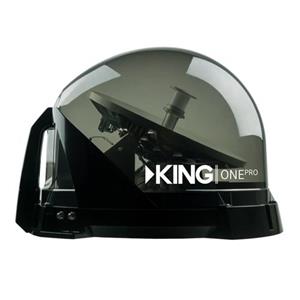
The top of the line if you're choosing this sort of system comes from KING. The Tailgater Pro and KING One Pro both allow for two receivers to be connected. Both feature a transparent covering that makes aiming even easier because you can see where the dish is aiming. There's also a large, comfortable handle which makes setup and teardown a breeze.
DIRECTV customers will need a H24 satellite receiver to complete the package, while DISH customers can choose a Wally receiver tor a Hopper Duo DVR.
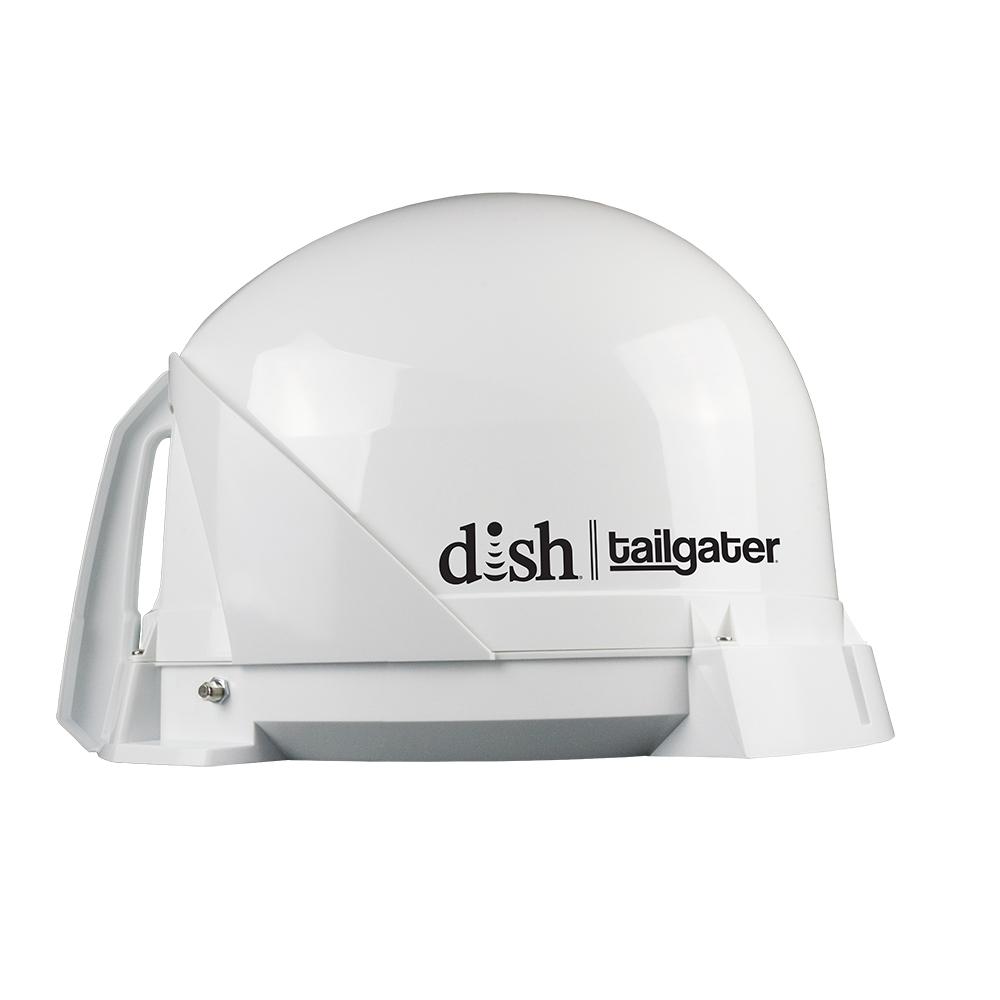
Depending on your budget and personal preferences, you may want to choose one of the other options available at Solid Signal. If you don't need to connect two receivers, you can save a little money by opting for the Tailgater (DISH) or the KING Quest (DIRECTV.) Each is very similar to the more expensive units above, but only has one satellite receiver output. They also use a solid-color cover.
Solid Signal also offers products from Winegard. Both KING and Winegard are US-based companies known for quality. For those who prefer a Winegard product, choose the Winegard Playmaker (DISH) for a simple, low-cost solution that supports a single receiver. For a more premium solution, choose the Winegard Carryout G2 for either DIRECTV or DISH. The Carryout G2 supports two receivers.
In order to use the Hopper Duo DVR, you must have a system capable of supporting two receivers.
The ultimate in RV luxury is an auto-aiming dish. Sit back and relax and let the dish do the work! It's true that these solutions are expensive but when looked at as part of an entire RV purchase they really don't add more than 1-2% to the overall cost and with a dish that aims itself, you're free to relax and enjoy! Auto-aiming dishes can pull in HD programming and will support almost any receiver or DVR.
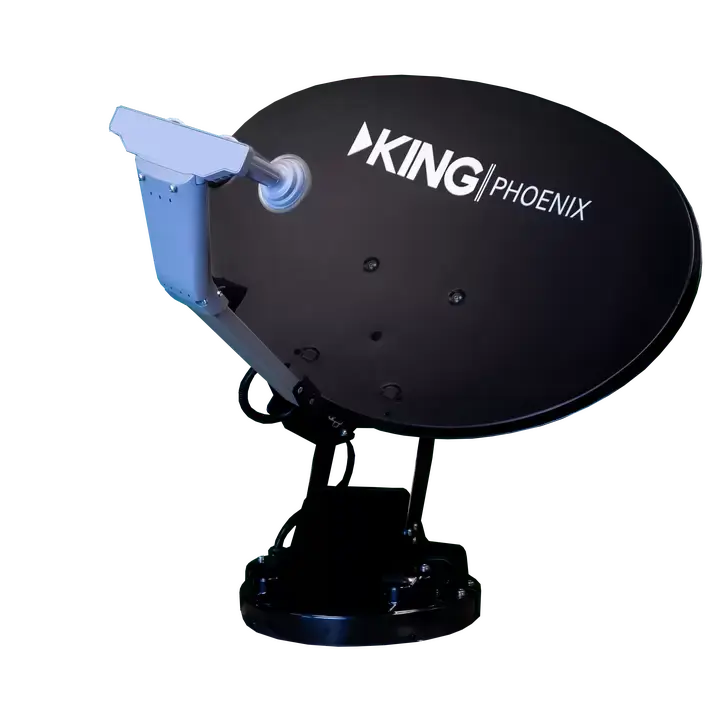
When looking for an auto-aiming dish, there are several choices but the leaders are the KING Phoenix for DIRECTV and KING Phoenix for DISH. When folded, these have the lowest profile of any RV-mounted dish. This means better fuel economy and more confidence when going into tunnels. When you park, they aim themselves quickly and give you access to all the same programming that you'll get when you're at home.
The DISH version of the Phoenix will support the Hopper 3 DVR, and the DIRECTV version will support a Genie DVR. However, most people stick with a simple receiver or 2-tuner DVR. DIRECTV customers can choose the H24 satellite receiver to complete the package, while DISH customers can choose a Wally receiver or a Hopper Duo DVR.
Winegard also offers auto-aiming dishes in its Trav'ler line. The Trav'ler Pro for DISH and the Trav'ler Pro for DIRECTV are available now. Both have similar technology to the KING products in a larger package.
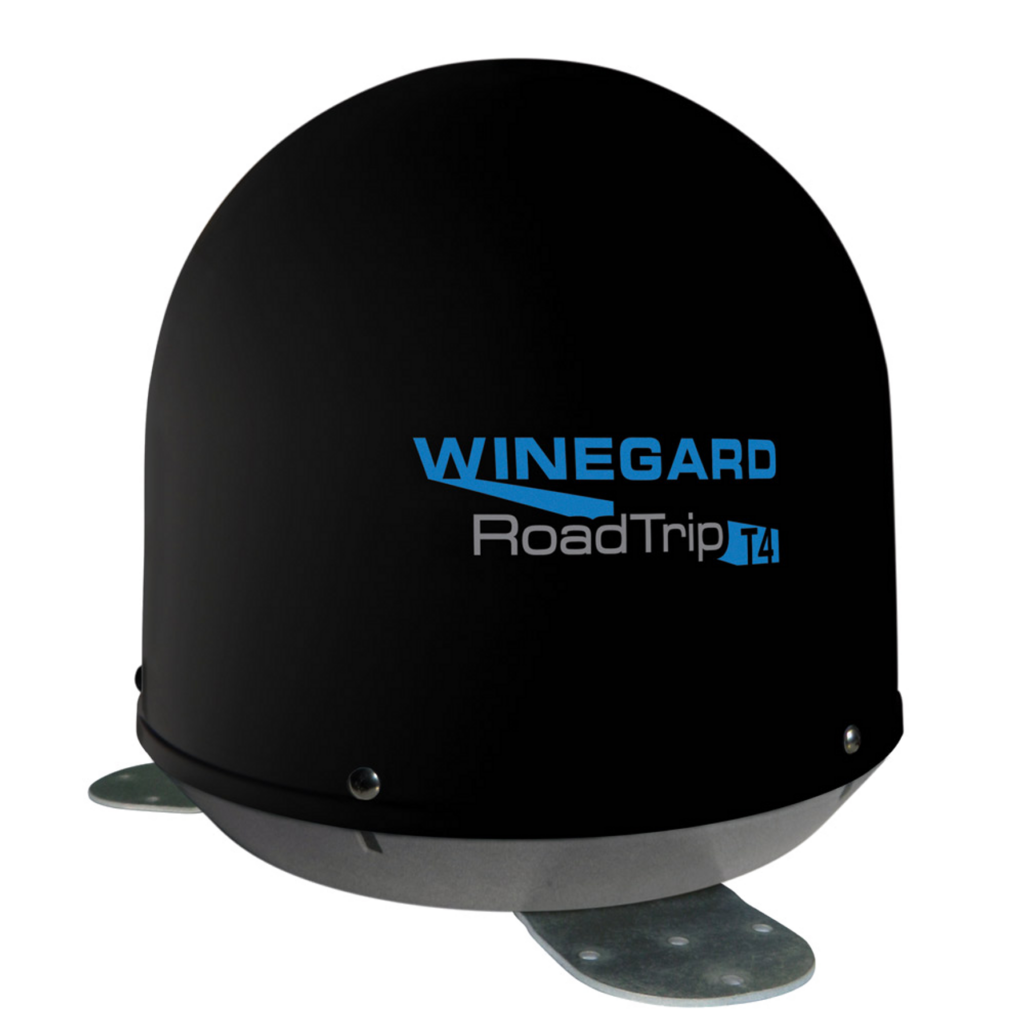
If you want your passengers to be able to watch satellite TV while you're driving, there's really only one good choice. In-motion satellite systems tend to be too large for RVs, but Winegard has created their Roadtrip T4 which is small enough to fit on the roof of an RV. The Roadtrip T4 is compatible with DIRECTV or DISH and has dual outputs to support two receivers or one Hopper Duo DVR.
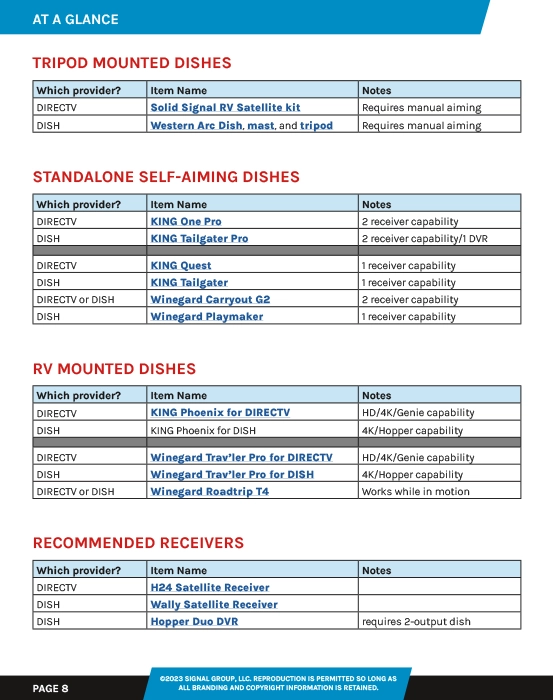
I've created an interactive chart you can use to choose the right products for you. It's included in the multi-page PDF you can download above. To use the interactive features, click on the image below.
The post UPDATED FOR '23 AND BEYOND: Enjoy Satellite Service in your RV! appeared first on The Solid Signal Blog.
Continue reading...
Click here to download our interactive PDF!
Enjoy TV while traveling
Whether it's a big, loud tailgate party or a quiet evening spent watching TV while it's rainy out, there's nothing like bringing your home entertainment experience withyou. It's easy if you put up an antenna, but an antenna isn't going to take you all the way, right? You want DVR service, recorded programs, pay-per-view, and all those sports channels!
Luckily you have options. Whether it's a simple tripod that keeps your budget intact, a full-fledged system that keeps your family entertained while you're driving, or something in between, we have the solutions you need to get satellite TV hooked up and rolling!
Our interactive PDF has a chart showing all the options.
Choosing the right provider
In the US, you have two choices for satellite TV. If you already have satellite service at home with one provider or the other, the decision is easy. Both DISH and DIRECTV let you use receivers that you supply from home, as long as there is no one from home. However, most RV satellite dishes don't work with DIRECTV's Genie or DISH's Hopper. You are generally better off getting a dedicated receiver for the RV if you're going to spend a lot of time in your RV.
- The most channels
- The most sports packages
- More HD and 4K programs
- Faster channel changes
- More international channels
- The most streaming service logins
- Lower power use
- Suspend your account for up to six months, once a year
- Simplest pricing
- 3-year price lock if you sign a contract
- Month to month plans
- Can opt out of local channels and save
- Attach an antenna for local channels
- Simple 2-tuner DVR available
- Lower power use
- Month-to-month plans available
Really, the choice is up to you. If you are happy with the provider you have at home there is no reason to use a different one just for RV'ing. You'll find that complicated tailgate setups are usually better with DIRECTV, while it's easiest to get HDTV on a single receiver with DISH.
Remember, though, it's never ok to borrow a receiver from someone else. Also, both DIRECTV and DISH say it's ok to use their service on your RV as long as you aren't using it at home at the same time.
Should you choose a dish on a tripod?
A satellite dish on a tripod is the least expensive way to get satellite TV in your RV. However, it isn't always the best choice. When it comes to setup, aiming the dish can take a long time unless you're very familiar with it. For those who do want to use tripod-mounted dishes, I always recommend the use of a meter.
DIRECTV customers must choose the AIM meter, while DISH customers should use the AI Turbo S2 meter. Both are very expensive and hard to justify for occasion use, but without them you must rely on the built-in signal meters on your receiver and that will add a lot of time to your aim.
DIRECTV customers will generally choose a tripod-mounted dish so that they can get HD and 4K programming, which isn't available using smaller self-aiming dishes. We have a kit that includes everything you need. Just add a satellite receiver to complete the package.
DISH customers tend not to choose tripod-mounted dishes, because they can get HD programming using smaller self-aiming dishes. The DISH version of these products is less expensive than the DIRECTV version, making it less likely that you'll want to go through the extra hassle of aiming the dish yourself. If you are interested in getting a tripod-mounted solution for DISH, just combine this Western Arc dish with this tripod and this mast. You'll also want a Wally receiver to watch TV or a Hopper Duo DVR to be able to record two programs at once.
Auto-aiming dishes (standalone)
An auto-aiming satellite dish is often the best choice for people who want to use their satellite dishes at tailgate parties. You get a satellite dish housed in a protective cover. Set it on a level surface with a view of the southern sky. Connect up a receiver and a power source, and the system goes to work. In just a few minutes, you're watching television.
BEST CHOICE: KING Tailgater Pro (DISH) / KING One Pro (DIRECTV)
The top of the line if you're choosing this sort of system comes from KING. The Tailgater Pro and KING One Pro both allow for two receivers to be connected. Both feature a transparent covering that makes aiming even easier because you can see where the dish is aiming. There's also a large, comfortable handle which makes setup and teardown a breeze.
DIRECTV customers will need a H24 satellite receiver to complete the package, while DISH customers can choose a Wally receiver tor a Hopper Duo DVR.
Other options
Depending on your budget and personal preferences, you may want to choose one of the other options available at Solid Signal. If you don't need to connect two receivers, you can save a little money by opting for the Tailgater (DISH) or the KING Quest (DIRECTV.) Each is very similar to the more expensive units above, but only has one satellite receiver output. They also use a solid-color cover.
Solid Signal also offers products from Winegard. Both KING and Winegard are US-based companies known for quality. For those who prefer a Winegard product, choose the Winegard Playmaker (DISH) for a simple, low-cost solution that supports a single receiver. For a more premium solution, choose the Winegard Carryout G2 for either DIRECTV or DISH. The Carryout G2 supports two receivers.
In order to use the Hopper Duo DVR, you must have a system capable of supporting two receivers.
RV Mounted Satellite Dishes
The ultimate in RV luxury is an auto-aiming dish. Sit back and relax and let the dish do the work! It's true that these solutions are expensive but when looked at as part of an entire RV purchase they really don't add more than 1-2% to the overall cost and with a dish that aims itself, you're free to relax and enjoy! Auto-aiming dishes can pull in HD programming and will support almost any receiver or DVR.
BEST CHOICE: KING Phoenix
When looking for an auto-aiming dish, there are several choices but the leaders are the KING Phoenix for DIRECTV and KING Phoenix for DISH. When folded, these have the lowest profile of any RV-mounted dish. This means better fuel economy and more confidence when going into tunnels. When you park, they aim themselves quickly and give you access to all the same programming that you'll get when you're at home.
The DISH version of the Phoenix will support the Hopper 3 DVR, and the DIRECTV version will support a Genie DVR. However, most people stick with a simple receiver or 2-tuner DVR. DIRECTV customers can choose the H24 satellite receiver to complete the package, while DISH customers can choose a Wally receiver or a Hopper Duo DVR.
Other options
Winegard also offers auto-aiming dishes in its Trav'ler line. The Trav'ler Pro for DISH and the Trav'ler Pro for DIRECTV are available now. Both have similar technology to the KING products in a larger package.
In-motion satellite: Winegard Roadtrip T4
If you want your passengers to be able to watch satellite TV while you're driving, there's really only one good choice. In-motion satellite systems tend to be too large for RVs, but Winegard has created their Roadtrip T4 which is small enough to fit on the roof of an RV. The Roadtrip T4 is compatible with DIRECTV or DISH and has dual outputs to support two receivers or one Hopper Duo DVR.
At a glance
I've created an interactive chart you can use to choose the right products for you. It's included in the multi-page PDF you can download above. To use the interactive features, click on the image below.
The post UPDATED FOR '23 AND BEYOND: Enjoy Satellite Service in your RV! appeared first on The Solid Signal Blog.
Continue reading...
0 Replies
·
389 views

Staff member
HERE TO HELP YOU!
Cutting Edge
Sometimes a thread gets so many posts in it that is can cause issues for the server so that why today we introduce The Song Name Game Part 3!
So let the game continue!
The last song was added by Bobby who posted...
One Meat Ball - Andrews Sisters
CONTINUE ON AND HAVE FUN! WELCOME HOME TO SATELLITEGUYS.US!
Here are the original rules for the game as posted by WebbyDude back in 2006. http://www.satelliteguys.us/threads/68645-Song-Name-Game
Just name a song title and the band who performed it. The next person does the same thing, but needs to list a song title or band name which includes a word from the previous entry. Pick songs from any genre.
Example:
Long Live Rock and Roll -- Rainbow
Rainbow in the Dark -- Dio
Another example:
Ride the Lightning -- Metallica
Lightning Strikes -- Ozzy Osbourne
Get it?
An additional note: we all know that song titles, sometimes, use profane words. Because this is a family friendly website it is advised that you clean up that title up a bit. This is accomplished by using something like sh!t instead of the real word. Thanks....
So let the game continue!
The last song was added by Bobby who posted...
One Meat Ball - Andrews Sisters
CONTINUE ON AND HAVE FUN! WELCOME HOME TO SATELLITEGUYS.US!
Here are the original rules for the game as posted by WebbyDude back in 2006. http://www.satelliteguys.us/threads/68645-Song-Name-Game
Just name a song title and the band who performed it. The next person does the same thing, but needs to list a song title or band name which includes a word from the previous entry. Pick songs from any genre.
Example:
Long Live Rock and Roll -- Rainbow
Rainbow in the Dark -- Dio
Another example:
Ride the Lightning -- Metallica
Lightning Strikes -- Ozzy Osbourne
Get it?
An additional note: we all know that song titles, sometimes, use profane words. Because this is a family friendly website it is advised that you clean up that title up a bit. This is accomplished by using something like sh!t instead of the real word. Thanks....
68657 Replies
·
2680157 views


Lately my eight year old Dell laptop has been shutting off even when I have a full battery. I have had to keep it plugged up all the time to keep this from happening. Any idea what is causing this? I replaced the battery about three years ago.
2 Replies
·
37 views


Pub Member / Supporter
I set up a music server for my brother a few years ago. It's basically a small headless computer but it needs to have a DHCP IP address reserved for it in the router settings. This was easy to do in his DSL router. He's switching to Starlink now and I was wondering if these setting are easily accessible in the Starlink router. I'm pretty sure he will be getting the latest V5 router.
5 Replies
·
276 views


Pub Member / Supporter
Lifetime Supporter
Good...simple humor. Enjoy
View: https://www.youtube.com/watch?v=E92AtfTLge4
View: https://www.youtube.com/watch?v=HJy0WnejlF4
View: https://www.youtube.com/watch?v=E92AtfTLge4
View: https://www.youtube.com/watch?v=HJy0WnejlF4
2 Replies
·
45 views

Pub Member / Supporter
Lifetime Supporter
Terrible tragedy. You would think that they would have safe guards in place that would prevent something like this from happening. I guess if you are going to ride in a passenger train it might be best to get a car near the rear.
 www.zerohedge.com
At Least 64 Dead After Two High-Speed Trains Collide In Spain<!-- --> | ZeroHedge
ZeroHedge - On a long enough timeline, the survival rate for everyone drops to zero
www.zerohedge.com
2 Replies
·
49 views


Booredatwork.com
Time for another AWESOME video from BoredAtWork!
View: https://www.youtube.com/watch?v=MSXmcYapC3I
Direct YouTube Link - MacBook Pro With PROLED XDR Display - Watch Before you BUY!
Booredatwork.com Website
Booredatwork on Facebook
View: https://www.youtube.com/watch?v=MSXmcYapC3I
Direct YouTube Link - MacBook Pro With PROLED XDR Display - Watch Before you BUY!
Booredatwork.com Website
Booredatwork on Facebook
0 Replies
·
9 views
Marques Brownlee
Time for another AWESOME video from Marques Brownlee!
View: https://www.youtube.com/watch?v=2reQut8WNGc
Direct YouTube Link - Macbook PROLED XDR Impressions: They Said They Wouldn't!
The official MKBHD Website!
The MKBHD Store
View: https://www.youtube.com/watch?v=2reQut8WNGc
Direct YouTube Link - Macbook PROLED XDR Impressions: They Said They Wouldn't!
The official MKBHD Website!
The MKBHD Store
0 Replies
·
22 views
iJustine
Time for another AWESOME video from iJustine!
View: https://www.youtube.com/shorts/Duq4hKmUE4c
Direct YouTube Link - MacBoo PROLED - What You Need To Know!
The official iJustine Website's Website
Buy her book!
View: https://www.youtube.com/shorts/Duq4hKmUE4c
Direct YouTube Link - MacBoo PROLED - What You Need To Know!
The official iJustine Website's Website
Buy her book!
0 Replies
·
25 views
iJustine
Time for another AWESOME video from iJustine!
View: https://www.youtube.com/shorts/sgr5V8j7c5w
Direct YouTube Link - MacBook PROLED Nanotexture
The official iJustine Website's Website
Buy her book!
View: https://www.youtube.com/shorts/sgr5V8j7c5w
Direct YouTube Link - MacBook PROLED Nanotexture
The official iJustine Website's Website
Buy her book!
0 Replies
·
4 views
TWiT Tech Podcast Network
Time for another AWESOME video from the TWIT Network!
View: https://www.youtube.com/watch?v=TbfGWonQfys
Direct YouTube Link - Microsoft's New Round of Employee Buyouts
TWIT's Website
TWIT Live Feed
View: https://www.youtube.com/watch?v=TbfGWonQfys
Direct YouTube Link - Microsoft's New Round of Employee Buyouts
TWIT's Website
TWIT Live Feed
0 Replies
·
20 views