

Social Feed

Staff member
HERE TO HELP YOU!
Pub Member / Supporter
Cutting Edge
Chances are you never think about transistors. The thing is, though, you're surrounded by millions of them if not billions. There are several million in your computer, another million or so in the monitor, plus they're in the remote, in your phone, possibly even in your charging cable. If you were to consider the sheer number of transistors you interact with daily, it would probably send you into a state of advanced paranoia.
The transistors surrounding you are almost too small to see and tend to hang around together on computer chips where hundreds of thousands fit on a square smaller than your phone's home button. They form the basic building blocks of every single device you own with any sort of plug, acting as microscopic switches that, when combined together into the thousands and millions, react together almost as if by magic.
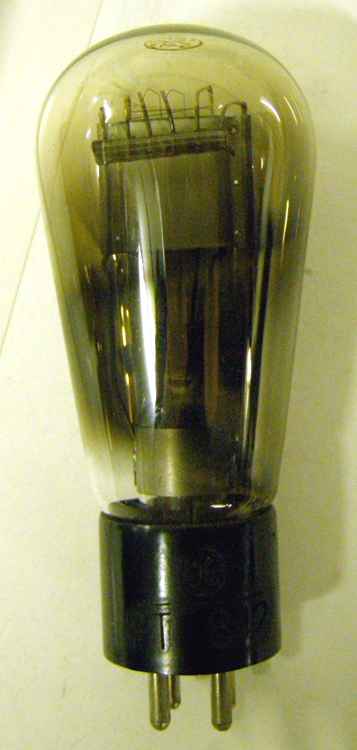
The basic building block of early computers were relays and vacuum tubes, large delicate glass monstrosities the size of light bulbs. It would take a space the size of a city block for enough vacuum tubes to power your iPhone and they would likely break so quickly that you'd never even get to play Minecraft.
The vacuum tube was an outgrowth of early research into radio waves in the 19th century. It became an essential part of early radio reception. One of the many purposes of vacuum tubes (and transistors today) is to act as an amplifier, keeping the characteristics of a signal while increasing its amount. Without amplifiers, we wouldn't be able to listen to radio, watch television, or do nearly anything wirelessly. The signals that get to our devices are too weak to be used on their own, and amplifiers fix that.
Early computers used vacuum tubes in their capacity to control the flow of electricity. It's possible to configure them as electronic "gates" which allow the same circuits to do different things. That very capability forms the basis of every electronic device on the planet. Unfortunately, delicate vacuum tubes burned out easily and were too large to do anything we'd call useful today.
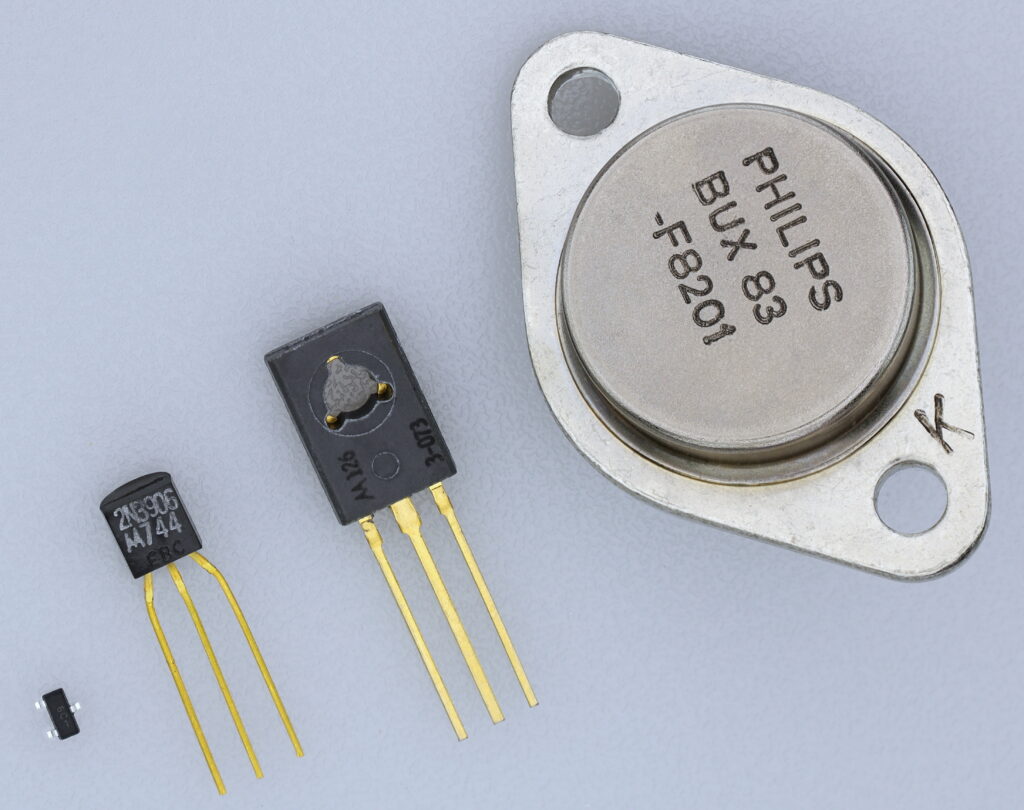
One of the biggest consumers of vacuum tubes in the 20th century was AT&T. AT&T was, at the time, one of the leaders of the tech world. Their gigantic telephone switching systems made life possible and turbocharged the tech revolution. But, just changing vacuum tubes was a full-time job and creating tube-based telephone exchanges was rapidly becoming a challenge due to their size.
AT&T needed a solution that was smaller and "solid-state." The term 'solid-state" refers to anything with zero moving parts enclosed in a single solid enclosure. The idea of solid-state circuitry was a dream: small, reliable circuits that never needed maintenance. The only thing that was needed was a way to figure out how to do it.
Credit for the transistor goes to John Bardeen, Walter Brattain, and William Shockley who, working together in AT&T's Bell Laboratories, changed the world and won the Nobel Prize for doing it. They were technically not the first people to experiment with what would later be called semiconductors, but their creation was the first one that was capable of replacing tubes.
Later improvements on the transistor made it possible to flat-mount them, creating the first integrated circuit "computer chips." These three men set in motion a wave of miniaturization that hasn't stopped today. That wave makes it possible for you to drive through a desert at 70mph (the legal limit). It also makes it possible to get a traffic report on your phone (using hands-free technology of course.) The transistor is one of the most influential inventions of all time. Not only that, it's so common today that we can't even imagine being without it.
The post Someone INVENTED it: Transistor appeared first on The Solid Signal Blog.
Continue reading...
The transistors surrounding you are almost too small to see and tend to hang around together on computer chips where hundreds of thousands fit on a square smaller than your phone's home button. They form the basic building blocks of every single device you own with any sort of plug, acting as microscopic switches that, when combined together into the thousands and millions, react together almost as if by magic.
Oh, but it was not always so.
The basic building block of early computers were relays and vacuum tubes, large delicate glass monstrosities the size of light bulbs. It would take a space the size of a city block for enough vacuum tubes to power your iPhone and they would likely break so quickly that you'd never even get to play Minecraft.
The vacuum tube was an outgrowth of early research into radio waves in the 19th century. It became an essential part of early radio reception. One of the many purposes of vacuum tubes (and transistors today) is to act as an amplifier, keeping the characteristics of a signal while increasing its amount. Without amplifiers, we wouldn't be able to listen to radio, watch television, or do nearly anything wirelessly. The signals that get to our devices are too weak to be used on their own, and amplifiers fix that.
Early computers used vacuum tubes in their capacity to control the flow of electricity. It's possible to configure them as electronic "gates" which allow the same circuits to do different things. That very capability forms the basis of every electronic device on the planet. Unfortunately, delicate vacuum tubes burned out easily and were too large to do anything we'd call useful today.
Enter the transistor
One of the biggest consumers of vacuum tubes in the 20th century was AT&T. AT&T was, at the time, one of the leaders of the tech world. Their gigantic telephone switching systems made life possible and turbocharged the tech revolution. But, just changing vacuum tubes was a full-time job and creating tube-based telephone exchanges was rapidly becoming a challenge due to their size.
AT&T needed a solution that was smaller and "solid-state." The term 'solid-state" refers to anything with zero moving parts enclosed in a single solid enclosure. The idea of solid-state circuitry was a dream: small, reliable circuits that never needed maintenance. The only thing that was needed was a way to figure out how to do it.
Enter the transistor
Credit for the transistor goes to John Bardeen, Walter Brattain, and William Shockley who, working together in AT&T's Bell Laboratories, changed the world and won the Nobel Prize for doing it. They were technically not the first people to experiment with what would later be called semiconductors, but their creation was the first one that was capable of replacing tubes.
Later improvements on the transistor made it possible to flat-mount them, creating the first integrated circuit "computer chips." These three men set in motion a wave of miniaturization that hasn't stopped today. That wave makes it possible for you to drive through a desert at 70mph (the legal limit). It also makes it possible to get a traffic report on your phone (using hands-free technology of course.) The transistor is one of the most influential inventions of all time. Not only that, it's so common today that we can't even imagine being without it.
The post Someone INVENTED it: Transistor appeared first on The Solid Signal Blog.
Continue reading...
0 Replies
·
361 views
iJustine
Time for another AWESOME video from iJustine!
View: https://www.youtube.com/shorts/yj3f7ab5pBI
Direct YouTube Link - iPhone Duo's First Concert! Revis!
The official iJustine Website's Website
Buy her book!
View: https://www.youtube.com/shorts/yj3f7ab5pBI
Direct YouTube Link - iPhone Duo's First Concert! Revis!
The official iJustine Website's Website
Buy her book!
0 Replies
·
0 views
TWiT Tech Podcast Network
Time for another AWESOME video from the TWIT Network!
View: https://www.youtube.com/shorts/7NJXMnbT1Mk
Direct YouTube Link - New iPad mini Announced... at $699?
TWIT's Website
TWIT Live Feed
View: https://www.youtube.com/shorts/7NJXMnbT1Mk
Direct YouTube Link - New iPad mini Announced... at $699?
TWIT's Website
TWIT Live Feed
0 Replies
·
0 views

Staff member
HERE TO HELP YOU!
Cutting Edge
Sometimes a thread gets so many posts in it that is can cause issues for the server so that why today we introduce The Song Name Game Part 3!
So let the game continue!
The last song was added by Bobby who posted...
One Meat Ball - Andrews Sisters
CONTINUE ON AND HAVE FUN! WELCOME HOME TO SATELLITEGUYS.US!
Here are the original rules for the game as posted by WebbyDude back in 2006. http://www.satelliteguys.us/threads/68645-Song-Name-Game
Just name a song title and the band who performed it. The next person does the same thing, but needs to list a song title or band name which includes a word from the previous entry. Pick songs from any genre.
Example:
Long Live Rock and Roll -- Rainbow
Rainbow in the Dark -- Dio
Another example:
Ride the Lightning -- Metallica
Lightning Strikes -- Ozzy Osbourne
Get it?
An additional note: we all know that song titles, sometimes, use profane words. Because this is a family friendly website it is advised that you clean up that title up a bit. This is accomplished by using something like sh!t instead of the real word. Thanks....
So let the game continue!
The last song was added by Bobby who posted...
One Meat Ball - Andrews Sisters
CONTINUE ON AND HAVE FUN! WELCOME HOME TO SATELLITEGUYS.US!
Here are the original rules for the game as posted by WebbyDude back in 2006. http://www.satelliteguys.us/threads/68645-Song-Name-Game
Just name a song title and the band who performed it. The next person does the same thing, but needs to list a song title or band name which includes a word from the previous entry. Pick songs from any genre.
Example:
Long Live Rock and Roll -- Rainbow
Rainbow in the Dark -- Dio
Another example:
Ride the Lightning -- Metallica
Lightning Strikes -- Ozzy Osbourne
Get it?
An additional note: we all know that song titles, sometimes, use profane words. Because this is a family friendly website it is advised that you clean up that title up a bit. This is accomplished by using something like sh!t instead of the real word. Thanks....
68658 Replies
·
2680205 views


Lately my eight year old Dell laptop has been shutting off even when I have a full battery. I have had to keep it plugged up all the time to keep this from happening. Any idea what is causing this? I replaced the battery about three years ago.
2 Replies
·
45 views


Pub Member / Supporter
I set up a music server for my brother a few years ago. It's basically a small headless computer but it needs to have a DHCP IP address reserved for it in the router settings. This was easy to do in his DSL router. He's switching to Starlink now and I was wondering if these setting are easily accessible in the Starlink router. I'm pretty sure he will be getting the latest V5 router.
5 Replies
·
283 views


Pub Member / Supporter
Lifetime Supporter
Good...simple humor. Enjoy
View: https://www.youtube.com/watch?v=E92AtfTLge4
View: https://www.youtube.com/watch?v=HJy0WnejlF4
View: https://www.youtube.com/watch?v=E92AtfTLge4
View: https://www.youtube.com/watch?v=HJy0WnejlF4
2 Replies
·
50 views

Pub Member / Supporter
Lifetime Supporter
Terrible tragedy. You would think that they would have safe guards in place that would prevent something like this from happening. I guess if you are going to ride in a passenger train it might be best to get a car near the rear.
 www.zerohedge.com
At Least 64 Dead After Two High-Speed Trains Collide In Spain<!-- --> | ZeroHedge
ZeroHedge - On a long enough timeline, the survival rate for everyone drops to zero
www.zerohedge.com
2 Replies
·
55 views


Booredatwork.com
Time for another AWESOME video from BoredAtWork!
View: https://www.youtube.com/watch?v=MSXmcYapC3I
Direct YouTube Link - MacBook Pro With PROLED XDR Display - Watch Before you BUY!
Booredatwork.com Website
Booredatwork on Facebook
View: https://www.youtube.com/watch?v=MSXmcYapC3I
Direct YouTube Link - MacBook Pro With PROLED XDR Display - Watch Before you BUY!
Booredatwork.com Website
Booredatwork on Facebook
0 Replies
·
14 views
Marques Brownlee
Time for another AWESOME video from Marques Brownlee!
View: https://www.youtube.com/watch?v=2reQut8WNGc
Direct YouTube Link - Macbook PROLED XDR Impressions: They Said They Wouldn't!
The official MKBHD Website!
The MKBHD Store
View: https://www.youtube.com/watch?v=2reQut8WNGc
Direct YouTube Link - Macbook PROLED XDR Impressions: They Said They Wouldn't!
The official MKBHD Website!
The MKBHD Store
0 Replies
·
26 views
iJustine
Time for another AWESOME video from iJustine!
View: https://www.youtube.com/shorts/Duq4hKmUE4c
Direct YouTube Link - MacBoo PROLED - What You Need To Know!
The official iJustine Website's Website
Buy her book!
View: https://www.youtube.com/shorts/Duq4hKmUE4c
Direct YouTube Link - MacBoo PROLED - What You Need To Know!
The official iJustine Website's Website
Buy her book!
0 Replies
·
27 views