

Social Feed

Staff member
HERE TO HELP YOU!
Pub Member / Supporter
Cutting Edge
The modern, everyday light switch is barely even 100 years old. Not surprising if you think about the fact that electric lights haven't even been in homes for much longer than that. Yet, we hardly think about the humble light switch, which gives a lifetime of use for barely any cost, and which functions perfectly day after day. The only time we think about a light switch is when the power goes out and they suddenly stop working.
A light switch shouldn't be tough to understand. It's just a way to allow electricity to flow or not flow. And it should be as simple as that. But, early light switches were unsafe and unreliable. Without enough shielding, they had a tendency to shock people. What's more, as they worked, they created little sparks which had a tendency to make the switch stop working as residue built up on it. Those sparks were also a fire hazard.
The solution was to create a light switch that closed the circuit so quickly that a spark couldn't really form, and to encase it in something that wouldn't transmit the electricity at all. There's surprisingly little information on how this happened available on the internet. All available sources seem to agree that the concept of a "quick break light switch" came from a British inventor named John Henry Holmes. Holmes was a pioneer in electrical distribution, inventing some of the earliest systems for transmitting high voltage across distance.
In 1884, Holmes invented a light switch that worked quickly enough that there wasn't a risk of sparks. His patents in the US and Britain helped move the entire idea of electrical distribution forward.
The modern light switch that most homes still have was patented in 1917. Again, there's very little information about how it was invented, but we know it was William J. Newton who figured it all out.
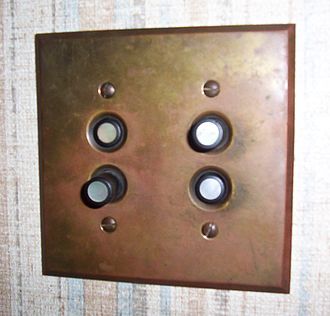
Early light switches used push buttons like what you see above. These were very common in prewar homes, and you might even see them in homes today. They've become rarer, though, and seeing one tends to make you think that maybe the entire electrical system needs replacing. Still, the loud "click" of the switch is nostalgic for a lot of people.
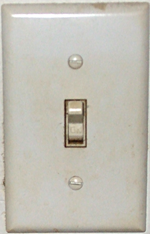
The majority of light switches in use today look something like the toggle switch you see above. It's been popular in the last 30 years or so to use the "decora" style as well, which looks like this:
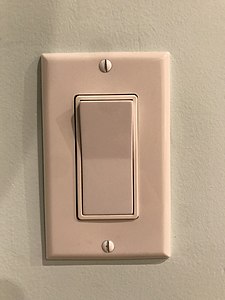
For whatever reason, Americans associate this switch with looking more modern. In either case, the inner workings are pretty much the same. The contacts inside are kept apart until the switch is in the completely flipped position, which minimizes sparking. And, of course, the entire thing is encased in plastic so there is no danger of the user getting a shock.
If you've ever been to another country, you'll notice that light switches vary depending on where you are. To some degree this is due to the standard shape of electrical boxes, which are defined differently by different governments. It's common in much of the world for light switches to be square as opposed to tall, and in some parts of the world you see truly odd things like knobs or switches where the "down" position means "on." No matter what they look like though, they all act the same.
The post Someone INVENTED It: Light Switch appeared first on The Solid Signal Blog.
Continue reading...
Understanding the problem of a light switch
A light switch shouldn't be tough to understand. It's just a way to allow electricity to flow or not flow. And it should be as simple as that. But, early light switches were unsafe and unreliable. Without enough shielding, they had a tendency to shock people. What's more, as they worked, they created little sparks which had a tendency to make the switch stop working as residue built up on it. Those sparks were also a fire hazard.
The solution was to create a light switch that closed the circuit so quickly that a spark couldn't really form, and to encase it in something that wouldn't transmit the electricity at all. There's surprisingly little information on how this happened available on the internet. All available sources seem to agree that the concept of a "quick break light switch" came from a British inventor named John Henry Holmes. Holmes was a pioneer in electrical distribution, inventing some of the earliest systems for transmitting high voltage across distance.
In 1884, Holmes invented a light switch that worked quickly enough that there wasn't a risk of sparks. His patents in the US and Britain helped move the entire idea of electrical distribution forward.
Early light switches
The modern light switch that most homes still have was patented in 1917. Again, there's very little information about how it was invented, but we know it was William J. Newton who figured it all out.
Early light switches used push buttons like what you see above. These were very common in prewar homes, and you might even see them in homes today. They've become rarer, though, and seeing one tends to make you think that maybe the entire electrical system needs replacing. Still, the loud "click" of the switch is nostalgic for a lot of people.
Today's light switches
The majority of light switches in use today look something like the toggle switch you see above. It's been popular in the last 30 years or so to use the "decora" style as well, which looks like this:
For whatever reason, Americans associate this switch with looking more modern. In either case, the inner workings are pretty much the same. The contacts inside are kept apart until the switch is in the completely flipped position, which minimizes sparking. And, of course, the entire thing is encased in plastic so there is no danger of the user getting a shock.
If you've ever been to another country, you'll notice that light switches vary depending on where you are. To some degree this is due to the standard shape of electrical boxes, which are defined differently by different governments. It's common in much of the world for light switches to be square as opposed to tall, and in some parts of the world you see truly odd things like knobs or switches where the "down" position means "on." No matter what they look like though, they all act the same.
The post Someone INVENTED It: Light Switch appeared first on The Solid Signal Blog.
Continue reading...
0 Replies
·
305 views
iJustine
Time for another AWESOME video from iJustine!
View: https://www.youtube.com/shorts/yj3f7ab5pBI
Direct YouTube Link - iPhone Duo's First Concert! Revis!
The official iJustine Website's Website
Buy her book!
View: https://www.youtube.com/shorts/yj3f7ab5pBI
Direct YouTube Link - iPhone Duo's First Concert! Revis!
The official iJustine Website's Website
Buy her book!
0 Replies
·
0 views
TWiT Tech Podcast Network
Time for another AWESOME video from the TWIT Network!
View: https://www.youtube.com/shorts/7NJXMnbT1Mk
Direct YouTube Link - New iPad mini Announced... at $699?
TWIT's Website
TWIT Live Feed
View: https://www.youtube.com/shorts/7NJXMnbT1Mk
Direct YouTube Link - New iPad mini Announced... at $699?
TWIT's Website
TWIT Live Feed
0 Replies
·
0 views

Staff member
HERE TO HELP YOU!
Cutting Edge
Sometimes a thread gets so many posts in it that is can cause issues for the server so that why today we introduce The Song Name Game Part 3!
So let the game continue!
The last song was added by Bobby who posted...
One Meat Ball - Andrews Sisters
CONTINUE ON AND HAVE FUN! WELCOME HOME TO SATELLITEGUYS.US!
Here are the original rules for the game as posted by WebbyDude back in 2006. http://www.satelliteguys.us/threads/68645-Song-Name-Game
Just name a song title and the band who performed it. The next person does the same thing, but needs to list a song title or band name which includes a word from the previous entry. Pick songs from any genre.
Example:
Long Live Rock and Roll -- Rainbow
Rainbow in the Dark -- Dio
Another example:
Ride the Lightning -- Metallica
Lightning Strikes -- Ozzy Osbourne
Get it?
An additional note: we all know that song titles, sometimes, use profane words. Because this is a family friendly website it is advised that you clean up that title up a bit. This is accomplished by using something like sh!t instead of the real word. Thanks....
So let the game continue!
The last song was added by Bobby who posted...
One Meat Ball - Andrews Sisters
CONTINUE ON AND HAVE FUN! WELCOME HOME TO SATELLITEGUYS.US!
Here are the original rules for the game as posted by WebbyDude back in 2006. http://www.satelliteguys.us/threads/68645-Song-Name-Game
Just name a song title and the band who performed it. The next person does the same thing, but needs to list a song title or band name which includes a word from the previous entry. Pick songs from any genre.
Example:
Long Live Rock and Roll -- Rainbow
Rainbow in the Dark -- Dio
Another example:
Ride the Lightning -- Metallica
Lightning Strikes -- Ozzy Osbourne
Get it?
An additional note: we all know that song titles, sometimes, use profane words. Because this is a family friendly website it is advised that you clean up that title up a bit. This is accomplished by using something like sh!t instead of the real word. Thanks....
68658 Replies
·
2680205 views


Lately my eight year old Dell laptop has been shutting off even when I have a full battery. I have had to keep it plugged up all the time to keep this from happening. Any idea what is causing this? I replaced the battery about three years ago.
2 Replies
·
45 views


Pub Member / Supporter
I set up a music server for my brother a few years ago. It's basically a small headless computer but it needs to have a DHCP IP address reserved for it in the router settings. This was easy to do in his DSL router. He's switching to Starlink now and I was wondering if these setting are easily accessible in the Starlink router. I'm pretty sure he will be getting the latest V5 router.
5 Replies
·
283 views


Pub Member / Supporter
Lifetime Supporter
Good...simple humor. Enjoy
View: https://www.youtube.com/watch?v=E92AtfTLge4
View: https://www.youtube.com/watch?v=HJy0WnejlF4
View: https://www.youtube.com/watch?v=E92AtfTLge4
View: https://www.youtube.com/watch?v=HJy0WnejlF4
2 Replies
·
50 views

Pub Member / Supporter
Lifetime Supporter
Terrible tragedy. You would think that they would have safe guards in place that would prevent something like this from happening. I guess if you are going to ride in a passenger train it might be best to get a car near the rear.
 www.zerohedge.com
At Least 64 Dead After Two High-Speed Trains Collide In Spain<!-- --> | ZeroHedge
ZeroHedge - On a long enough timeline, the survival rate for everyone drops to zero
www.zerohedge.com
2 Replies
·
55 views


Booredatwork.com
Time for another AWESOME video from BoredAtWork!
View: https://www.youtube.com/watch?v=MSXmcYapC3I
Direct YouTube Link - MacBook Pro With PROLED XDR Display - Watch Before you BUY!
Booredatwork.com Website
Booredatwork on Facebook
View: https://www.youtube.com/watch?v=MSXmcYapC3I
Direct YouTube Link - MacBook Pro With PROLED XDR Display - Watch Before you BUY!
Booredatwork.com Website
Booredatwork on Facebook
0 Replies
·
14 views
Marques Brownlee
Time for another AWESOME video from Marques Brownlee!
View: https://www.youtube.com/watch?v=2reQut8WNGc
Direct YouTube Link - Macbook PROLED XDR Impressions: They Said They Wouldn't!
The official MKBHD Website!
The MKBHD Store
View: https://www.youtube.com/watch?v=2reQut8WNGc
Direct YouTube Link - Macbook PROLED XDR Impressions: They Said They Wouldn't!
The official MKBHD Website!
The MKBHD Store
0 Replies
·
26 views
iJustine
Time for another AWESOME video from iJustine!
View: https://www.youtube.com/shorts/Duq4hKmUE4c
Direct YouTube Link - MacBoo PROLED - What You Need To Know!
The official iJustine Website's Website
Buy her book!
View: https://www.youtube.com/shorts/Duq4hKmUE4c
Direct YouTube Link - MacBoo PROLED - What You Need To Know!
The official iJustine Website's Website
Buy her book!
0 Replies
·
27 views