

Social Feed

Staff member
HERE TO HELP YOU!
Pub Member / Supporter
Cutting Edge
Reprinted with permission from the weBoost blog.
Most of us have faced frustrating call drops or painfully slow downloads due to weak cellular signal. Common causes for this include distance from the nearest cell tower or physical obstructions like building materials or outdoor terrain. A cell phone signal booster is designed to amplify the existing signal to overcome these factors and deliver stronger signal inside, so you get more reliable calls and messaging, and faster data speeds. But in an increasingly crowded market, how do you choose the best cell phone booster for home? This article will show you.

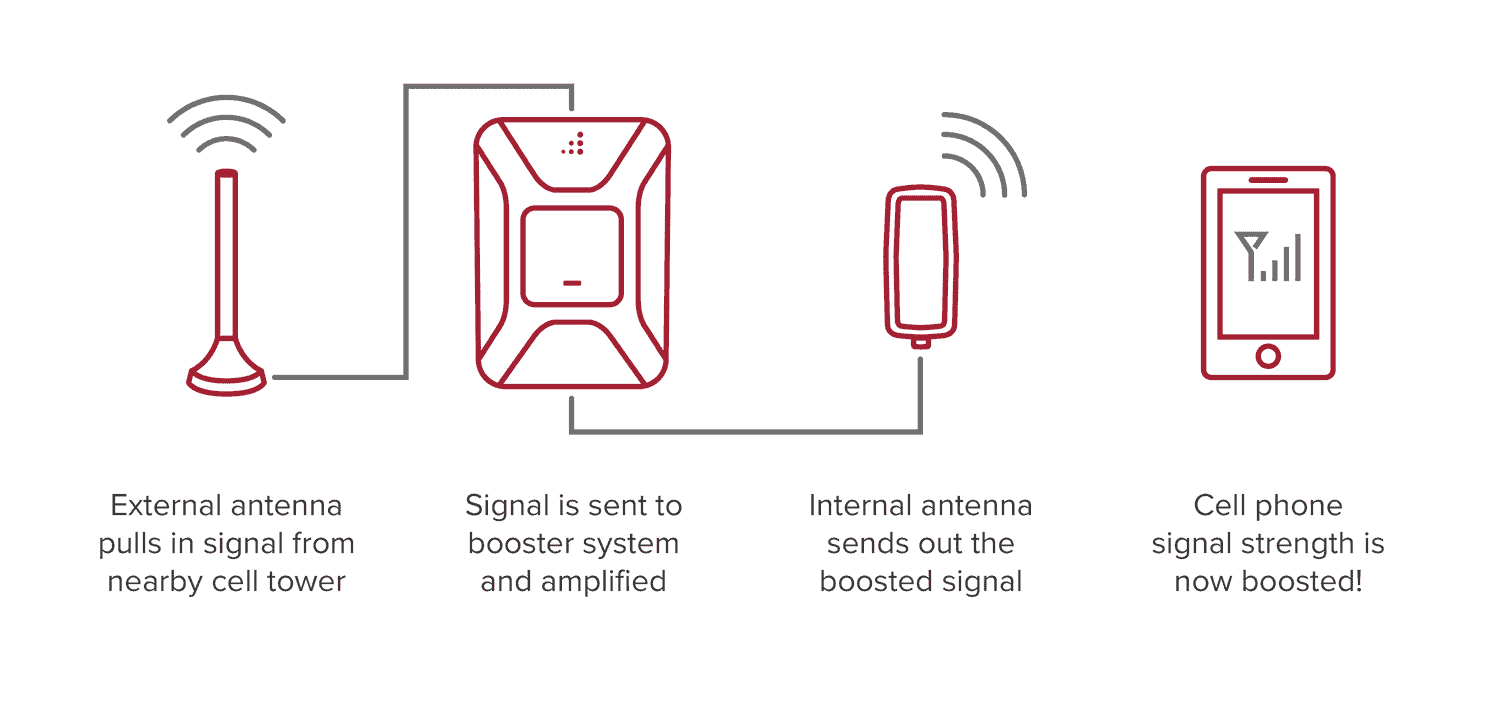
Cell phone boosters are becoming increasingly popular, especially in areas with spotty cellular reception. But how exactly do they manage to take a weak cell phone signal and amplify it, so you can stay connected at home? Let's take a more detailed look into how cell signal boosters work. The technology isn't hard to understand once you're familiar with the 3 main components:
One of the primary considerations when selecting a cell phone booster is understanding the specific coverage area in square feet that you need to address. Whether you're in an urban setting with dense infrastructure or a rural area farther from cell towers, determining how much coverage you need is paramount. Choose a device that matches your coverage needs to avoid paying for unnecessary coverage or getting insufficient coverage.
Tip: Rural areas often present unique signal challenges. The distance from the nearest cell tower and natural obstructions like hills or dense foliage can lead to weak signals or even complete dead zones in parts of your home. For such situations, you may need a high-power booster, even if your home isn't particularly large in terms of square footage.
Check the strength of the external signal where you plan to place the outdoor antenna. A booster will be more effective if there's at least some signal to amplify. You can determine your outside signal strength by using the free weBoost app, or by checking the number of bars on your phone (although there's no standard for what a bar means).
For a more technical approach, you can switch your iPhone or Android device to field test mode to view your precise signal strength.
Depending on your living arrangement and how comfortable you are with tools and ladders, you can opt for:
Professional installation: This option is ideal if you're not terribly simply tech savvy or just want to ensure the booster is set up perfectly. For example, the weBoost Installed | Home Complete offers professional installation as part of the package. With this choice, you can be assured of a clean and efficient installation that's optimized to your unique surroundings, without the hassle of handling it yourself.
DIY installation: Going the do-it-yourself route can be a great option as long as you're aware of the potential challenges. Depending on your model, installation may require climbing a ladder and drilling holes to route cable into and around your home. Because of this, it may take several hours to do it on your own. While a self-installed setup is great for a lot of people, keep in mind that it might not look as clean or be as optimized as a professional installation.
Before buying your best cell phone booster for home, make sure the models you're looking at are compatible with both your mobile device and your service provider. With an ever-evolving wireless landscape, frequencies and bands for 4G LTE and emerging 5G can change quickly.
Rather than get off into the weeds on bands and frequencies, look for carrier-agnostic boosters that work on any network or device. At weBoost, all of our products are this way, so you know you're getting a device that will work with your carrier and be compatible with your device. In fact, our boosters can serve multiple devices on multiple carriers simultaneously. So even if everyone in your home uses a different provider or you have guests coming over frequently, your weBoost system will work for all of them.
As you explore the market, you'll encounter a spectrum of options, from cost-effective to premium. At weBoost, we believe in delivering the best cell phone boosters for home, work, and vehicle at fair prices. While there may be less expensive products that look comparable on paper, we use only the best components and engineering to deliver less noise and better real-world performance over the long haul.
We are also the only manufacturer to design, build, ship, and support our products in the U.S.A. None of our products require a subscription to use – they're a one-time investment designed to serve you for years to come.
Customer reviews serve as windows into real-world performance, potential issues, and overall satisfaction levels of products. It's always a good idea to check out reviews from other users to gauge performance and reliability, so you can choose the best cell phone booster for home.
Also consider the warranty offered. Our products are made to last for years, backed by a 30-day money-back guarantee and 2-year warranty.
Your experience with a manufacturer doesn't end with your purchase. Signal boosters are designed for user-friendly operations, but what happens if you have a question or need to troubleshoot? What kind of post-purchase support will you receive?
At weBoost, our U.S.-based customer service team is ready to assist and answer your questions, so you get the most out of your cell phone signal booster.
Every cell phone booster for home, business, or vehicle should be FCC certified, confirming it meets specific standards. The certification ensures that the booster operates within the radiofrequency emission limits set by the FCC. This is essential not only for the safety of every user, but also helps prevent harmful interference with other electronic devices or communication channels.
weBoost stands out in the realm of cell phone signal boosters for home. We tailor our products to cater to different needs, whether it's a small apartment or sprawling rambler. Here's our list of the best cell phone boosters for home.
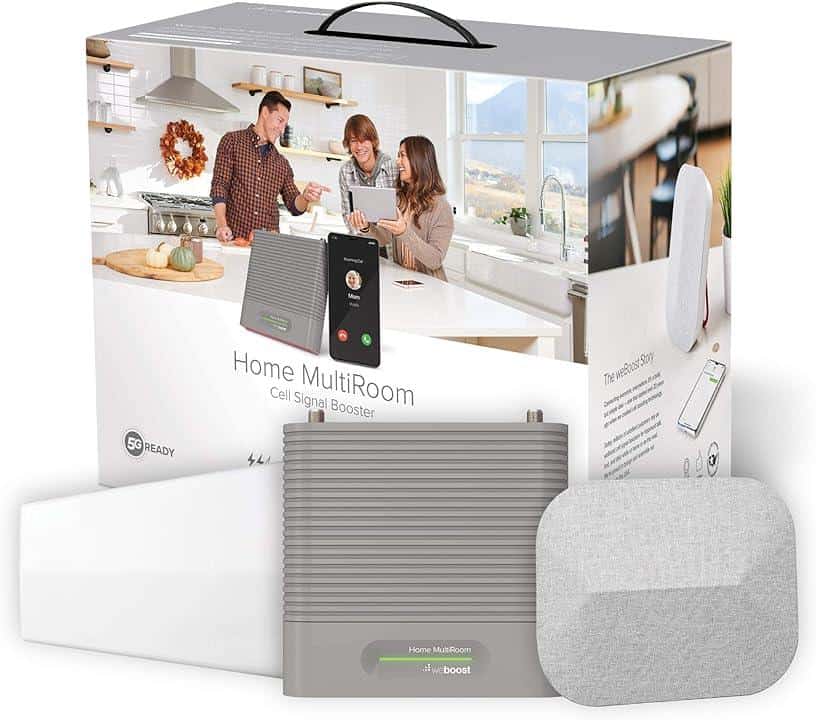
This device is particularly suited for expansive settings, spanning multiple rooms in larger homes. No matter how many people are in your household, Home MultiRoom is designed to amplify cellular signal for all of them at once. Like all our products, its compatibility extends across multiple carriers and encompasses all U.S. networks.
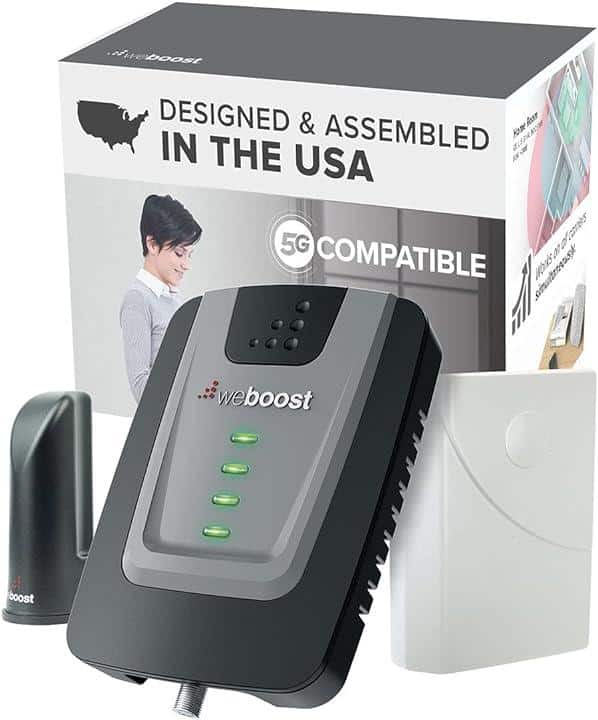
If you just need to cover a single room, weBoost Home Room is a great choice. It's an economical option that doesn't skimp on performance. With its desktop style inside antenna, this booster enhances both voice and data signals across all U.S. cellular carriers without taking up a lot of space.
For large homes that require a comprehensive coverage solution, weBoost Home Complete is a go-to. Designed to offer a whole-house coverage, this powerful device caters to multiple users and devices simultaneously, on any U.S. network.
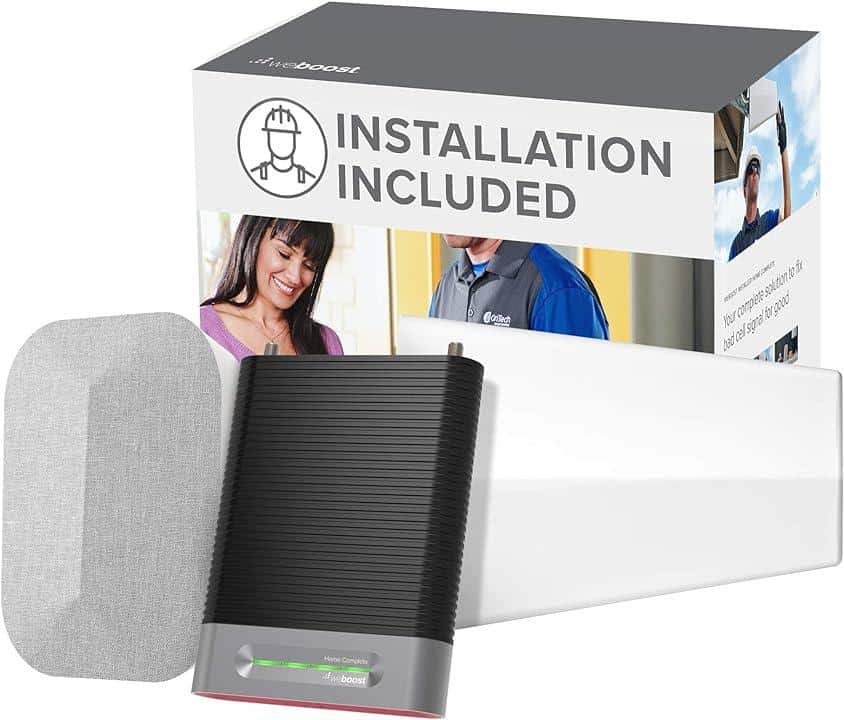
This is the installed version of Home Complete. weBoost Installed Home Complete comes with certified professional installation, available across all U.S. zip codes. Besides ensuring a seamless setup for maximum efficacy, Installed Home Complete is engineered for whole-home signal enhancement.
For those with smaller homes or apartments, weBoost Home Studio makes for an ideal pick. Beyond its functional prowess in boosting voice, text, and data signals for all U.S. carriers, it boasts a sleek, space-saving design with integrated booster and antenna that blends effortlessly with modern interiors.
Maintaining a strong signal is more crucial than ever. Whether it's staying connected with loved ones, ensuring smooth WiFi and hotspot connections, or making important calls, a signal booster is a worthy investment. Use this guide as a foundation to find the best cell phone signal booster tailored to your needs.
After understanding the importance of a strong and consistent cellular signal, it's time to make a change for the better. Elevate your home's connectivity by choosing the right cell phone signal booster.
Shop the best cell phone signal boosters for home.
The post How to Choose the Best Cell Phone Booster for Home appeared first on The Solid Signal Blog.
Continue reading...
Most of us have faced frustrating call drops or painfully slow downloads due to weak cellular signal. Common causes for this include distance from the nearest cell tower or physical obstructions like building materials or outdoor terrain. A cell phone signal booster is designed to amplify the existing signal to overcome these factors and deliver stronger signal inside, so you get more reliable calls and messaging, and faster data speeds. But in an increasingly crowded market, how do you choose the best cell phone booster for home? This article will show you.
1. Understand how a cell phone booster works
Cell phone boosters are becoming increasingly popular, especially in areas with spotty cellular reception. But how exactly do they manage to take a weak cell phone signal and amplify it, so you can stay connected at home? Let's take a more detailed look into how cell signal boosters work. The technology isn't hard to understand once you're familiar with the 3 main components:
- Outside antenna: The outside antenna captures the weak signal from a cell phone tower. There are two types: omnidirectional antennas, which can receive signals from multiple directions, and Yagi or directional antennas, which are pointed toward the nearest tower.
- Amplifier: Otherwise known as a booster unit, the amplifier boosts the captured signal received from the outside antenna.
Note: Cell signal is measured in decibels (dB). The closer to 0 the dB measurement is, the stronger the signal, including negative and positive numbers. So a signal measured at -70 dB is stronger than a signal measured at -90 dB (-70 is closer to 0). - Inside antenna: Once amplified, the stronger signal is broadcast throughout the coverage area by the indoor antenna. Now all your users and devices can use the stronger signal for whatever they need to do. Depending on which home booster you buy, the coverage area could be a single room, multiple rooms, or a whole home with thousands of square feet.
2. Determine the coverage area you need
One of the primary considerations when selecting a cell phone booster is understanding the specific coverage area in square feet that you need to address. Whether you're in an urban setting with dense infrastructure or a rural area farther from cell towers, determining how much coverage you need is paramount. Choose a device that matches your coverage needs to avoid paying for unnecessary coverage or getting insufficient coverage.
Tip: Rural areas often present unique signal challenges. The distance from the nearest cell tower and natural obstructions like hills or dense foliage can lead to weak signals or even complete dead zones in parts of your home. For such situations, you may need a high-power booster, even if your home isn't particularly large in terms of square footage.
3. Consider the strength of external signal
Check the strength of the external signal where you plan to place the outdoor antenna. A booster will be more effective if there's at least some signal to amplify. You can determine your outside signal strength by using the free weBoost app, or by checking the number of bars on your phone (although there's no standard for what a bar means).
For a more technical approach, you can switch your iPhone or Android device to field test mode to view your precise signal strength.
4. Decide on installation preferences
Depending on your living arrangement and how comfortable you are with tools and ladders, you can opt for:
Professional installation: This option is ideal if you're not terribly simply tech savvy or just want to ensure the booster is set up perfectly. For example, the weBoost Installed | Home Complete offers professional installation as part of the package. With this choice, you can be assured of a clean and efficient installation that's optimized to your unique surroundings, without the hassle of handling it yourself.
DIY installation: Going the do-it-yourself route can be a great option as long as you're aware of the potential challenges. Depending on your model, installation may require climbing a ladder and drilling holes to route cable into and around your home. Because of this, it may take several hours to do it on your own. While a self-installed setup is great for a lot of people, keep in mind that it might not look as clean or be as optimized as a professional installation.
5. Check compatibility with your carrier and phone
Before buying your best cell phone booster for home, make sure the models you're looking at are compatible with both your mobile device and your service provider. With an ever-evolving wireless landscape, frequencies and bands for 4G LTE and emerging 5G can change quickly.
Rather than get off into the weeds on bands and frequencies, look for carrier-agnostic boosters that work on any network or device. At weBoost, all of our products are this way, so you know you're getting a device that will work with your carrier and be compatible with your device. In fact, our boosters can serve multiple devices on multiple carriers simultaneously. So even if everyone in your home uses a different provider or you have guests coming over frequently, your weBoost system will work for all of them.
6. Budget considerations
As you explore the market, you'll encounter a spectrum of options, from cost-effective to premium. At weBoost, we believe in delivering the best cell phone boosters for home, work, and vehicle at fair prices. While there may be less expensive products that look comparable on paper, we use only the best components and engineering to deliver less noise and better real-world performance over the long haul.
We are also the only manufacturer to design, build, ship, and support our products in the U.S.A. None of our products require a subscription to use – they're a one-time investment designed to serve you for years to come.
7. Customer reviews and warranty
Customer reviews serve as windows into real-world performance, potential issues, and overall satisfaction levels of products. It's always a good idea to check out reviews from other users to gauge performance and reliability, so you can choose the best cell phone booster for home.
Also consider the warranty offered. Our products are made to last for years, backed by a 30-day money-back guarantee and 2-year warranty.
8. Technical support and customer service
Your experience with a manufacturer doesn't end with your purchase. Signal boosters are designed for user-friendly operations, but what happens if you have a question or need to troubleshoot? What kind of post-purchase support will you receive?
At weBoost, our U.S.-based customer service team is ready to assist and answer your questions, so you get the most out of your cell phone signal booster.
9. FCC certification
Every cell phone booster for home, business, or vehicle should be FCC certified, confirming it meets specific standards. The certification ensures that the booster operates within the radiofrequency emission limits set by the FCC. This is essential not only for the safety of every user, but also helps prevent harmful interference with other electronic devices or communication channels.
What's the best cell phone signal booster for home?
weBoost stands out in the realm of cell phone signal boosters for home. We tailor our products to cater to different needs, whether it's a small apartment or sprawling rambler. Here's our list of the best cell phone boosters for home.
weBoost Home MultiRoom
This device is particularly suited for expansive settings, spanning multiple rooms in larger homes. No matter how many people are in your household, Home MultiRoom is designed to amplify cellular signal for all of them at once. Like all our products, its compatibility extends across multiple carriers and encompasses all U.S. networks.
weBoost Home Room
If you just need to cover a single room, weBoost Home Room is a great choice. It's an economical option that doesn't skimp on performance. With its desktop style inside antenna, this booster enhances both voice and data signals across all U.S. cellular carriers without taking up a lot of space.
weBoost Home Complete
For large homes that require a comprehensive coverage solution, weBoost Home Complete is a go-to. Designed to offer a whole-house coverage, this powerful device caters to multiple users and devices simultaneously, on any U.S. network.
weBoost Installed Home Complete
This is the installed version of Home Complete. weBoost Installed Home Complete comes with certified professional installation, available across all U.S. zip codes. Besides ensuring a seamless setup for maximum efficacy, Installed Home Complete is engineered for whole-home signal enhancement.
weBoost Home Studio
For those with smaller homes or apartments, weBoost Home Studio makes for an ideal pick. Beyond its functional prowess in boosting voice, text, and data signals for all U.S. carriers, it boasts a sleek, space-saving design with integrated booster and antenna that blends effortlessly with modern interiors.
Choosing the right home booster: a closing thought
Maintaining a strong signal is more crucial than ever. Whether it's staying connected with loved ones, ensuring smooth WiFi and hotspot connections, or making important calls, a signal booster is a worthy investment. Use this guide as a foundation to find the best cell phone signal booster tailored to your needs.
After understanding the importance of a strong and consistent cellular signal, it's time to make a change for the better. Elevate your home's connectivity by choosing the right cell phone signal booster.
Shop the best cell phone signal boosters for home.
The post How to Choose the Best Cell Phone Booster for Home appeared first on The Solid Signal Blog.
Continue reading...
0 Replies
·
334 views

Staff member
HERE TO HELP YOU!
Anyone making their own breakfast sausage? I've recently been trying different recipes, found some I like, some I've modified...
29 Replies
·
3504 views


 . get a nice chuck roast!!!
TWiT Tech Podcast Network
Time for another AWESOME video from the TWIT Network!
View: https://www.youtube.com/watch?v=n43A0sNukCg
Direct YouTube Link - SpaceX Seeks to Conduct 450 Starship Launches a Year in Texas!
TWIT's Website
TWIT Live Feed
View: https://www.youtube.com/watch?v=n43A0sNukCg
Direct YouTube Link - SpaceX Seeks to Conduct 450 Starship Launches a Year in Texas!
TWIT's Website
TWIT Live Feed
0 Replies
·
11 views

Staff member
HERE TO HELP YOU!
Cutting Edge
Sometimes a thread gets so many posts in it that is can cause issues for the server so that why today we introduce The Song Name Game Part 3!
So let the game continue!
The last song was added by Bobby who posted...
One Meat Ball - Andrews Sisters
CONTINUE ON AND HAVE FUN! WELCOME HOME TO SATELLITEGUYS.US!
Here are the original rules for the game as posted by WebbyDude back in 2006. http://www.satelliteguys.us/threads/68645-Song-Name-Game
Just name a song title and the band who performed it. The next person does the same thing, but needs to list a song title or band name which includes a word from the previous entry. Pick songs from any genre.
Example:
Long Live Rock and Roll -- Rainbow
Rainbow in the Dark -- Dio
Another example:
Ride the Lightning -- Metallica
Lightning Strikes -- Ozzy Osbourne
Get it?
An additional note: we all know that song titles, sometimes, use profane words. Because this is a family friendly website it is advised that you clean up that title up a bit. This is accomplished by using something like sh!t instead of the real word. Thanks....
So let the game continue!
The last song was added by Bobby who posted...
One Meat Ball - Andrews Sisters
CONTINUE ON AND HAVE FUN! WELCOME HOME TO SATELLITEGUYS.US!
Here are the original rules for the game as posted by WebbyDude back in 2006. http://www.satelliteguys.us/threads/68645-Song-Name-Game
Just name a song title and the band who performed it. The next person does the same thing, but needs to list a song title or band name which includes a word from the previous entry. Pick songs from any genre.
Example:
Long Live Rock and Roll -- Rainbow
Rainbow in the Dark -- Dio
Another example:
Ride the Lightning -- Metallica
Lightning Strikes -- Ozzy Osbourne
Get it?
An additional note: we all know that song titles, sometimes, use profane words. Because this is a family friendly website it is advised that you clean up that title up a bit. This is accomplished by using something like sh!t instead of the real word. Thanks....
68506 Replies
·
2671361 views


Marques Brownlee
Time for another AWESOME video from Marques Brownlee!
View: https://www.youtube.com/watch?v=scwlR0QHGOk
Direct YouTube Link - The NEW Tesla Roadster: My Honest Reaction
The official MKBHD Website!
The MKBHD Store
View: https://www.youtube.com/watch?v=scwlR0QHGOk
Direct YouTube Link - The NEW Tesla Roadster: My Honest Reaction
The official MKBHD Website!
The MKBHD Store
0 Replies
·
6 views
iJustine
Time for another AWESOME video from iJustine!
View: https://www.youtube.com/shorts/m44iKsdN1-Q
Direct YouTube Link - NVIDIA RTX Spark launch party!!!
The official iJustine Website's Website
Buy her book!
View: https://www.youtube.com/shorts/m44iKsdN1-Q
Direct YouTube Link - NVIDIA RTX Spark launch party!!!
The official iJustine Website's Website
Buy her book!
0 Replies
·
21 views

For quite a while now, people with a VIP211k have been losing their recordings on their activated external HDDs... even when there's nothing physically wrong with HDD. I believe this is an intentional and underhanded tactic that Dish is pulling in an attempt to force users away from the VIP211k.
They are obviously regretting that they ever let users have a "non-dvr" dvr in the first place. You would think they would be happy charging you a $40 one time fee... and then be happy letting the customer be the one responsible for HDD failures.
Dish clearly hates the 211k bitter-clingers. This recording deletion problem is intentional (IMO), and I think it is just one more tool that they are using. Hopper and a 2-year agreement... that's what they want you to have. Think about that... a 2-year agreement... with a company $30 Billion in debt (that's with a B). What happens when all that debt causes them to drop the channel that may have been your whole reason for having Dish in the first place? Guess who's stuck with a service that no longer suits their needs... for the remainder of the 2-year agreement.
On top of that, they don't want you to install it yourself. I purchased and installed all my equipment myself. That used to be common. Now, they lie to me and tell me that my dish must be updated to use a Hopper. Funny thing is... they don't even know what dish I have because they didn't install it, and I didn't tell them. If you ask what type of dish/LNBs the hopper needs... good luck getting an answer. All they know is that whatever you have needs to be upgraded by an installer.
It is quite apparent to me that they care much more about staying in their box, than they do working with the customer. That's too bad, because it hasn't always been that way. It's like they are totally unaware of the current business environment that they are trying to compete in.
I have been a customer since 2010. I will be cancelling my service before the next period. Yeah, I know, my $1,200 a year won't make a difference to them. It just seems like they have forgotten who needs who, especially when you consider the competition in today's streaming world. But hey, they will have succeed in forcing me off the 211k.
They are obviously regretting that they ever let users have a "non-dvr" dvr in the first place. You would think they would be happy charging you a $40 one time fee... and then be happy letting the customer be the one responsible for HDD failures.
Dish clearly hates the 211k bitter-clingers. This recording deletion problem is intentional (IMO), and I think it is just one more tool that they are using. Hopper and a 2-year agreement... that's what they want you to have. Think about that... a 2-year agreement... with a company $30 Billion in debt (that's with a B). What happens when all that debt causes them to drop the channel that may have been your whole reason for having Dish in the first place? Guess who's stuck with a service that no longer suits their needs... for the remainder of the 2-year agreement.
On top of that, they don't want you to install it yourself. I purchased and installed all my equipment myself. That used to be common. Now, they lie to me and tell me that my dish must be updated to use a Hopper. Funny thing is... they don't even know what dish I have because they didn't install it, and I didn't tell them. If you ask what type of dish/LNBs the hopper needs... good luck getting an answer. All they know is that whatever you have needs to be upgraded by an installer.
It is quite apparent to me that they care much more about staying in their box, than they do working with the customer. That's too bad, because it hasn't always been that way. It's like they are totally unaware of the current business environment that they are trying to compete in.
I have been a customer since 2010. I will be cancelling my service before the next period. Yeah, I know, my $1,200 a year won't make a difference to them. It just seems like they have forgotten who needs who, especially when you consider the competition in today's streaming world. But hey, they will have succeed in forcing me off the 211k.
168 Replies
·
7510 views


Pub Member / Supporter
Lifetime Supporter
Has anyone subscribed to NBA League Pass for 2026-27 and try to link their account to NBA.com to stream League Pass? I purchased it for 2026-27, and when I linked, I got a message saying success, but then I receive an error that my linked subscription does not include the preseason games for NBA League Pass. Is that how it has always been? I know satellite doesn't have the preseason games on the NBA League Pass channels, but I thought that I was able to stream the preseason once I linked my account on NBA.com?
2 Replies
·
97 views


Supporting Founder
Really excited for this season with Kentucky having a new coach and some really exciting recruits. Probably won't last long, but here's hoping this season is great.
143 Replies
·
1478 views


For some reason, the satelliteguys.us site is loading a lot slower than usual on both Chrome on my Asus laptop and Safari on my iPhone.
I'm also seeing longer appearances of the blue bar at the top and the "3 blue bars" loading symbol.
Is anyone else also having the same problem? Thanks in advance.
I'm also seeing longer appearances of the blue bar at the top and the "3 blue bars" loading symbol.
Is anyone else also having the same problem? Thanks in advance.
530 Replies
·
18140 views


I thought I would come here and find lots of complaints about the update to the dish anywhere mobile app, but am not seeing any. It used to look just like the desktop webpage. Now you can no longer filter by sports channels or movie channels. Plus that they made it look like a big button telephone and you see fewer channels in the screen which requires more scrolling. Yes I realize you can look at sports then select which sport you want to look at, I just liked being able to see all sporting events in the guide with all other channels being filtered out. Am I alone in the wilderness on this?
7 Replies
·
168 views

