

Social Feed

My TV is a 4x3 HDTV. As such I understand that it's a bit of a rarity, with nearly all HD sets sold today being 16x9 widescreen. In the settings of the 942 I see that there are two apparently discrete settings for TV Type (1080i, 720p, and 480p) and the other is for Aspect Ratio (16x9, 4x3 #1, 4x3 #2).
My issue is with SD content, regardless of whether the signal comes out via the DVI or component outputs on the back of the 942. Regardless of whether I set the TV Type to 1080i or 720p, and then pick any Aspect Ratio (I tried all combinations), the 942 seemed to assume that my TV was 16x9.
The consequence of this is that with regular SD content my TV shows both letterboxing and windowboxing (black bars all around) - not acceptable b/c the picture is too small. I can play with the Format button on the 942 remote to stretch the picture to fill from left to right, but cannot fill the screen vertically.
There are two workarounds I have found, neither of which is really acceptable. The first is to change the TV Type to 480p. This allows for full screen of SD content, but then the HD content fills the screen also, and doesn't look good b/c it's only 480 lines instead of true HD.
The second workaround is to use the TV2 output to run a composite cable to a different input on my TV. This is the way I currently have it, but that means that when changing channels on the 942 from an SD to an HD one, I also have to change the input on my TV (and, often, change the Format). Not to mention that this makes it less convenient (impossible?) to fully use the multi-room function of the 942.
Can anyone confirm that the 942 will upconvert all SD content on TV1 to 1080i (or 720p) and therefore always be sending a 16x9 signal? Is there *any* way to bypass this and have the SD content sent over component (or DVI) in full 4x3 glory?
I'm assuming that the issue is with the 942 b/c I am able to watch full-screen (4x3) DVD content through the same component inputs on my TV. I understand, too, that every TV (mine is the Sony 36XBR800) is a little different, but it seems like they've left an entire class of TVs (4x3 HDTV) with only the option of using the composite (not even S-Video) in order to fill the entire screen with SD content.
FWIW, this behavior was identical on my 811; I had hoped that with the 942 the issue would have been resolved.
Thanks.
My issue is with SD content, regardless of whether the signal comes out via the DVI or component outputs on the back of the 942. Regardless of whether I set the TV Type to 1080i or 720p, and then pick any Aspect Ratio (I tried all combinations), the 942 seemed to assume that my TV was 16x9.
The consequence of this is that with regular SD content my TV shows both letterboxing and windowboxing (black bars all around) - not acceptable b/c the picture is too small. I can play with the Format button on the 942 remote to stretch the picture to fill from left to right, but cannot fill the screen vertically.
There are two workarounds I have found, neither of which is really acceptable. The first is to change the TV Type to 480p. This allows for full screen of SD content, but then the HD content fills the screen also, and doesn't look good b/c it's only 480 lines instead of true HD.
The second workaround is to use the TV2 output to run a composite cable to a different input on my TV. This is the way I currently have it, but that means that when changing channels on the 942 from an SD to an HD one, I also have to change the input on my TV (and, often, change the Format). Not to mention that this makes it less convenient (impossible?) to fully use the multi-room function of the 942.
Can anyone confirm that the 942 will upconvert all SD content on TV1 to 1080i (or 720p) and therefore always be sending a 16x9 signal? Is there *any* way to bypass this and have the SD content sent over component (or DVI) in full 4x3 glory?
I'm assuming that the issue is with the 942 b/c I am able to watch full-screen (4x3) DVD content through the same component inputs on my TV. I understand, too, that every TV (mine is the Sony 36XBR800) is a little different, but it seems like they've left an entire class of TVs (4x3 HDTV) with only the option of using the composite (not even S-Video) in order to fill the entire screen with SD content.
FWIW, this behavior was identical on my 811; I had hoped that with the 942 the issue would have been resolved.
Thanks.
13 Replies
·
2517 views


Pub Member / Supporter
Not sure saving $24/year is worth it unless you're a hardcore Philo user. I'll stick with monthly.

7 Replies
·
217 views


'Rockford Files' Reboot Gets NBC Pilot Order
I grow tired of all the reboots. Most I don't bother with but will depend on the actor chosen.
I grow tired of all the reboots. Most I don't bother with but will depend on the actor chosen.
19 Replies
·
742 views


Lifetime Supporter
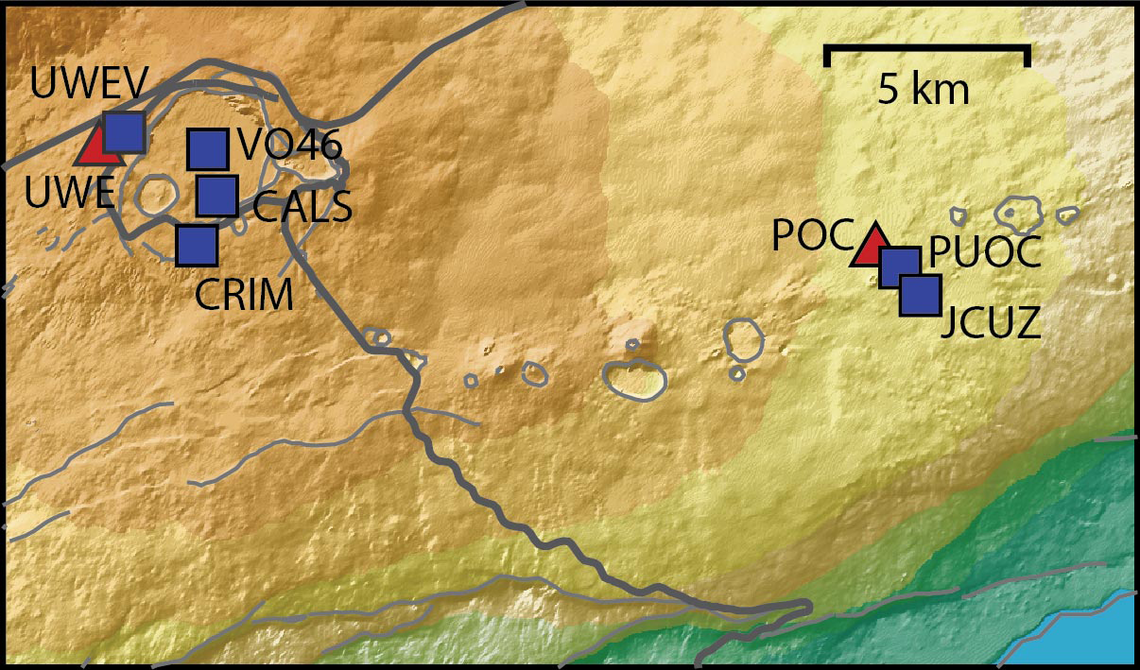
Continuing the Kilauea thread in the Pub here. Perhaps the Iceland one too next time there's remarkable activity.
Currently there is precursory lava flowing into the crater, leading to the next episode that'll probably start within the next day.
You can see the pace of inflation / deflation here. It serves as the primary predictor for when the expect the eruptions, which coincide w/ inflation turning into significant deflation and last for several hours on average with significant fountaining.
 www.usgs.gov
View: https://youtu.be/Uecu2seh4b4
Wife and I like the AfarTV feeds, for the discussion along w/ them, though they're otherwise just mirrors of the official USGS feeds.
View: https://youtu.be/iws3rh5vLAQ
Currently there is precursory lava flowing into the crater, leading to the next episode that'll probably start within the next day.
You can see the pace of inflation / deflation here. It serves as the primary predictor for when the expect the eruptions, which coincide w/ inflation turning into significant deflation and last for several hours on average with significant fountaining.
Monitoring Data for Kīlauea
For more information on how electronic tiltmeters and GPS receivers help monitor the deformation of Kīlauea volcano, see the HVO Deformation page.
View: https://youtu.be/Uecu2seh4b4
Wife and I like the AfarTV feeds, for the discussion along w/ them, though they're otherwise just mirrors of the official USGS feeds.
View: https://youtu.be/iws3rh5vLAQ
123 Replies
·
3673 views


Pub Member / Supporter
0 Replies
·
13 views
Pub Member / Supporter
0 Replies
·
19 views
I have Dish with Hopper3. I choose to get local channels OTA and had a "guide list" established at my previous home. Having moved a few miles away, I wanted to update the list by appending a couple new stations via a rescan. As many would know, some stations come in with the UHF/VHF antenna aimed in one direction, while others come in better with a different direction.
Unfortunately, when a scan is done (bringing in 25-30 stations for that particular antenna aim), the dialog screen does not present the established guide list; it presents an empty field to the right that the scanned stations may be selected one by one and added to the empty guide. But because of antenna aim, some stations originally saved are missing, and would have to be retrieved with a different antenna aim. But as I explain, if a 2nd scan is done with a different antenna aim, the stations saved from the first scan are lost.
It troubles me that Dish didn't develop software that would allow a user to simply append only 1 or 2 channels to the established list.
Any thought on this? Has anyone experienced this or heard of this from others?
Unfortunately, when a scan is done (bringing in 25-30 stations for that particular antenna aim), the dialog screen does not present the established guide list; it presents an empty field to the right that the scanned stations may be selected one by one and added to the empty guide. But because of antenna aim, some stations originally saved are missing, and would have to be retrieved with a different antenna aim. But as I explain, if a 2nd scan is done with a different antenna aim, the stations saved from the first scan are lost.
It troubles me that Dish didn't develop software that would allow a user to simply append only 1 or 2 channels to the established list.
Any thought on this? Has anyone experienced this or heard of this from others?
15 Replies
·
503 views

Linus Tech Tips
Time for another AWESOME video from Linus Tech Tips!
View: https://www.youtube.com/shorts/spXuvLHTIs4
Direct YouTube Link - My F-You To Sam Altman
Linus on Facebook
The LTT Store
View: https://www.youtube.com/shorts/spXuvLHTIs4
Direct YouTube Link - My F-You To Sam Altman
Linus on Facebook
The LTT Store
0 Replies
·
15 views
TWiT Tech Podcast Network
Time for another AWESOME video from the TWIT Network!
View: https://www.youtube.com/shorts/MLSSmfls3w4
Direct YouTube Link - watchOS 27.3 Beta - Siri Recap and Live Rewind Coming!
TWIT's Website
TWIT Live Feed
View: https://www.youtube.com/shorts/MLSSmfls3w4
Direct YouTube Link - watchOS 27.3 Beta - Siri Recap and Live Rewind Coming!
TWIT's Website
TWIT Live Feed
0 Replies
·
11 views
Pub Member / Supporter
12 Replies
·
254 views
 since I did not read every Marvel Comic Book ever published. If I had, I might be comparing the comics' version of events compared to what's transpiring in "Visionquest". So, I am enjoying the series a lot, not weighed down by previous expectations, knowing only the Avengers MCU movies and the "Wandavision" / "Agatha All Along" TV series.


Staff member
HERE TO HELP YOU!
Cutting Edge
Sometimes a thread gets so many posts in it that is can cause issues for the server so that why today we introduce The Song Name Game Part 3!
So let the game continue!
The last song was added by Bobby who posted...
One Meat Ball - Andrews Sisters
CONTINUE ON AND HAVE FUN! WELCOME HOME TO SATELLITEGUYS.US!
Here are the original rules for the game as posted by WebbyDude back in 2006. http://www.satelliteguys.us/threads/68645-Song-Name-Game
Just name a song title and the band who performed it. The next person does the same thing, but needs to list a song title or band name which includes a word from the previous entry. Pick songs from any genre.
Example:
Long Live Rock and Roll -- Rainbow
Rainbow in the Dark -- Dio
Another example:
Ride the Lightning -- Metallica
Lightning Strikes -- Ozzy Osbourne
Get it?
An additional note: we all know that song titles, sometimes, use profane words. Because this is a family friendly website it is advised that you clean up that title up a bit. This is accomplished by using something like sh!t instead of the real word. Thanks....
So let the game continue!
The last song was added by Bobby who posted...
One Meat Ball - Andrews Sisters
CONTINUE ON AND HAVE FUN! WELCOME HOME TO SATELLITEGUYS.US!
Here are the original rules for the game as posted by WebbyDude back in 2006. http://www.satelliteguys.us/threads/68645-Song-Name-Game
Just name a song title and the band who performed it. The next person does the same thing, but needs to list a song title or band name which includes a word from the previous entry. Pick songs from any genre.
Example:
Long Live Rock and Roll -- Rainbow
Rainbow in the Dark -- Dio
Another example:
Ride the Lightning -- Metallica
Lightning Strikes -- Ozzy Osbourne
Get it?
An additional note: we all know that song titles, sometimes, use profane words. Because this is a family friendly website it is advised that you clean up that title up a bit. This is accomplished by using something like sh!t instead of the real word. Thanks....
68756 Replies
·
2684937 views


