

Social Feed
Hello all,
I have a weird problem with my VOOM system. I have a Mitsubishi HDTV hooked up to my VOOM receiver and cannot watch any of the CinemaHD channels. I can get all the other HD channels (e.g. HDNews, DiscoveryHD, MOOV, etc.) but whenever I try to change the channel to a CinemaHD channel, my TV flickers as if it is trying to change the resolution mode, and then goes into "blue screen" mode. After that I cannot get ANY channels unless I power-cycle the VOOM box. Anybody see this problem? Any tips?
Thanks,
Kevin
I have a weird problem with my VOOM system. I have a Mitsubishi HDTV hooked up to my VOOM receiver and cannot watch any of the CinemaHD channels. I can get all the other HD channels (e.g. HDNews, DiscoveryHD, MOOV, etc.) but whenever I try to change the channel to a CinemaHD channel, my TV flickers as if it is trying to change the resolution mode, and then goes into "blue screen" mode. After that I cannot get ANY channels unless I power-cycle the VOOM box.
Anybody see this problem? Any tips?Thanks,
Kevin
10 Replies
·
2080 views

Staff member
HERE TO HELP YOU!
Cutting Edge
Sometimes a thread gets so many posts in it that is can cause issues for the server so that why today we introduce The Song Name Game Part 3!
So let the game continue!
The last song was added by Bobby who posted...
One Meat Ball - Andrews Sisters
CONTINUE ON AND HAVE FUN! WELCOME HOME TO SATELLITEGUYS.US!
Here are the original rules for the game as posted by WebbyDude back in 2006. http://www.satelliteguys.us/threads/68645-Song-Name-Game
Just name a song title and the band who performed it. The next person does the same thing, but needs to list a song title or band name which includes a word from the previous entry. Pick songs from any genre.
Example:
Long Live Rock and Roll -- Rainbow
Rainbow in the Dark -- Dio
Another example:
Ride the Lightning -- Metallica
Lightning Strikes -- Ozzy Osbourne
Get it?
An additional note: we all know that song titles, sometimes, use profane words. Because this is a family friendly website it is advised that you clean up that title up a bit. This is accomplished by using something like sh!t instead of the real word. Thanks....
So let the game continue!
The last song was added by Bobby who posted...
One Meat Ball - Andrews Sisters
CONTINUE ON AND HAVE FUN! WELCOME HOME TO SATELLITEGUYS.US!
Here are the original rules for the game as posted by WebbyDude back in 2006. http://www.satelliteguys.us/threads/68645-Song-Name-Game
Just name a song title and the band who performed it. The next person does the same thing, but needs to list a song title or band name which includes a word from the previous entry. Pick songs from any genre.
Example:
Long Live Rock and Roll -- Rainbow
Rainbow in the Dark -- Dio
Another example:
Ride the Lightning -- Metallica
Lightning Strikes -- Ozzy Osbourne
Get it?
An additional note: we all know that song titles, sometimes, use profane words. Because this is a family friendly website it is advised that you clean up that title up a bit. This is accomplished by using something like sh!t instead of the real word. Thanks....
68844 Replies
·
2693185 views


Supporting Founder
Really excited for this season with Kentucky having a new coach and some really exciting recruits. Probably won't last long, but here's hoping this season is great.
204 Replies
·
5927 views


Linus Tech Tips
Time for another AWESOME video from Linus Tech Tips!
View: https://www.youtube.com/watch?v=u5UTIofKDGc
Direct YouTube Link - My Datacenter Evicted Me
Linus on Facebook
The LTT Store
View: https://www.youtube.com/watch?v=u5UTIofKDGc
Direct YouTube Link - My Datacenter Evicted Me
Linus on Facebook
The LTT Store
0 Replies
·
14 views
TWiT Tech Podcast Network
Time for another AWESOME video from the TWIT Network!
View: https://www.youtube.com/shorts/5t6TSRkpSZg
Direct YouTube Link - Nvidia and the AI Bubble: Is the Boom Starting to Crack? #shorts
TWIT's Website
TWIT Live Feed
View: https://www.youtube.com/shorts/5t6TSRkpSZg
Direct YouTube Link - Nvidia and the AI Bubble: Is the Boom Starting to Crack? #shorts
TWIT's Website
TWIT Live Feed
0 Replies
·
12 views

Lifetime Supporter
EchoStar 11 is at 110W operating at an inclined orbit as a backup.
They have filed to extend it's license through 2027 and expect it likely run out of fuel and require deorbiting sometime in mid year 2027.
 fccprod.servicenowservices.com
They have filed to extend it's license through 2027 and expect it likely run out of fuel and require deorbiting sometime in mid year 2027.
ICFS Application Summary - ICFS Portal
0 Replies
·
46 views
Pub Member / Supporter

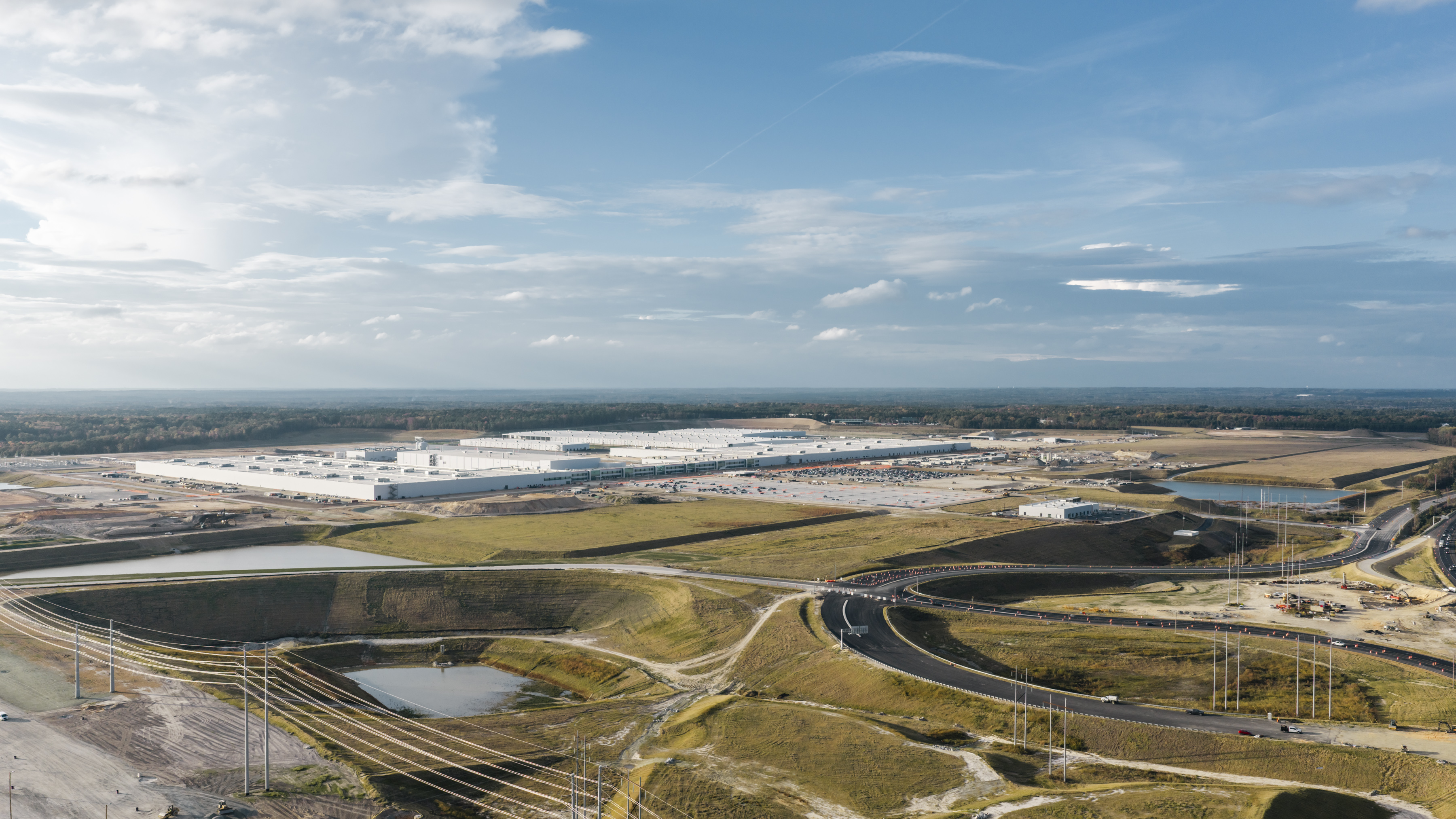
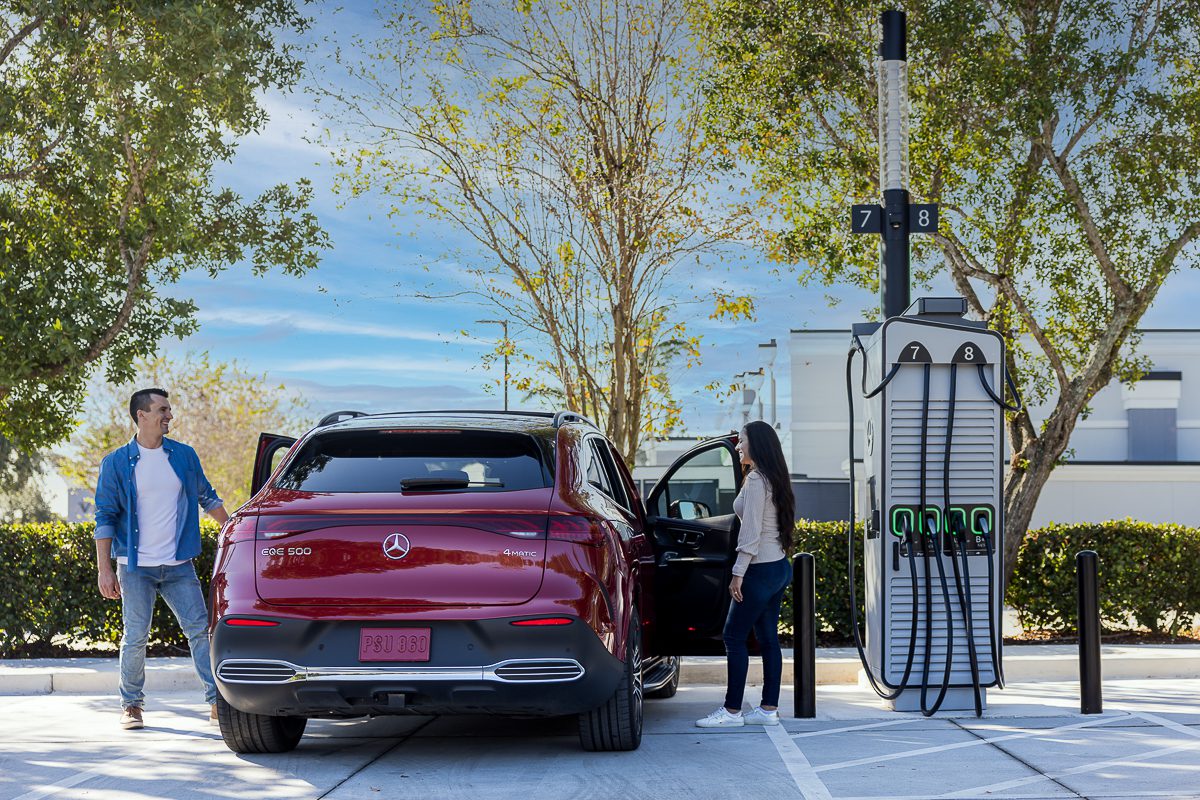
America’s Fastest-Growing EV State Isn’t California—Not by a Long Shot
New data shows electric vehicle adoption is increasingly driven by state policies, electricity prices and charging access—not federal incentives
 www.autoweek.com
The number-one US state for EV growth, according to the June 22 Yardi report?
Oklahoma.

It has no ZEV mandates and "minimal" incentives, Yardi says, but also has cheap electricity, high multi-car household rates (so, for example, a non-Lightning Ford F-150 pulls their trailers), and a consumer base willing to switch.
126 Replies
·
1512 views



TWiT Tech Podcast Network
Time for another AWESOME video from the TWIT Network!
View: https://www.youtube.com/shorts/m44kWQ3jiCs
Direct YouTube Link - SpaceX Starship Catch: One Chance to Land at Starbase #shorts
TWIT's Website
TWIT Live Feed
View: https://www.youtube.com/shorts/m44kWQ3jiCs
Direct YouTube Link - SpaceX Starship Catch: One Chance to Land at Starbase #shorts
TWIT's Website
TWIT Live Feed
0 Replies
·
13 views

Lifetime Supporter
Looks like dish is Bankrupt. Filling tomorrow Tuesday June 30th
523 Replies
·
19680 views


أهلا بالجميع،
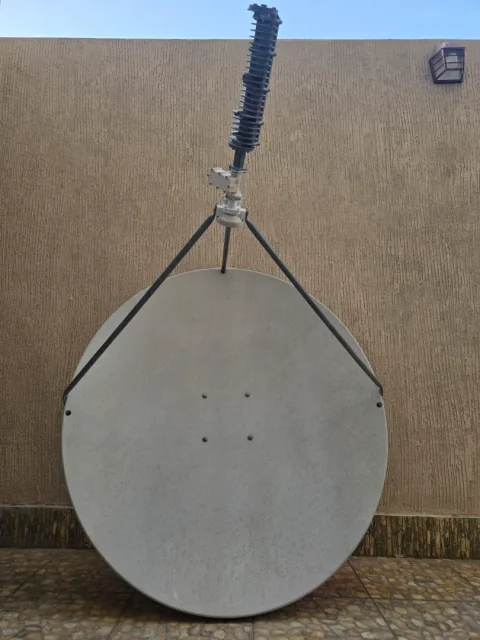
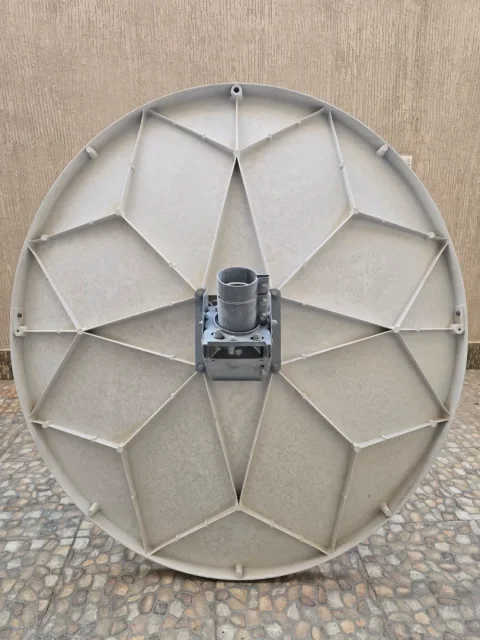
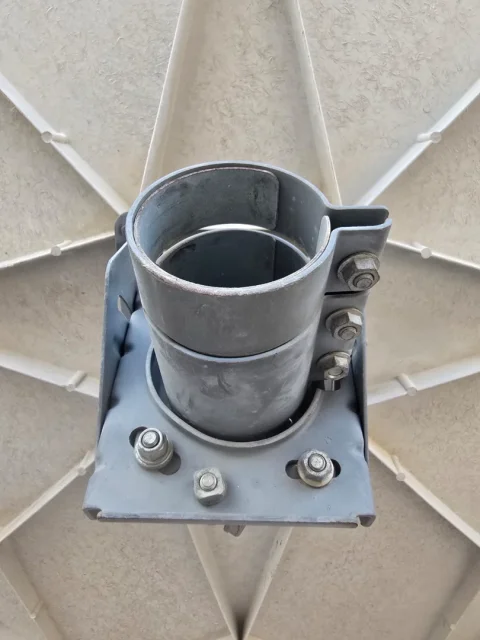
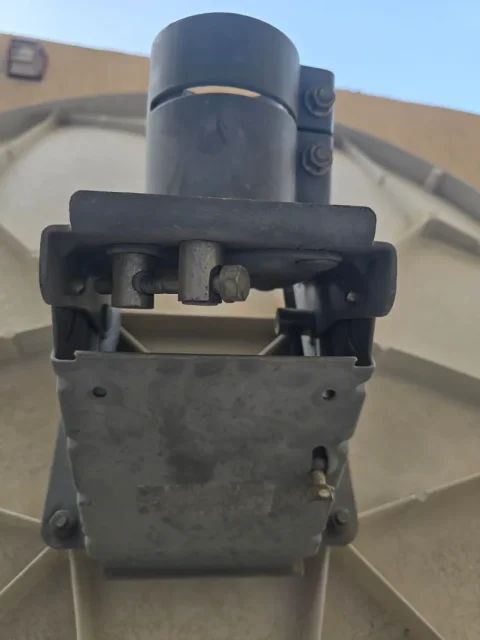
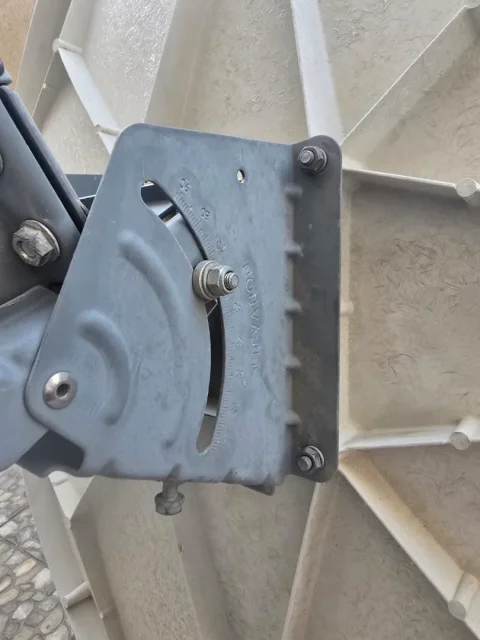
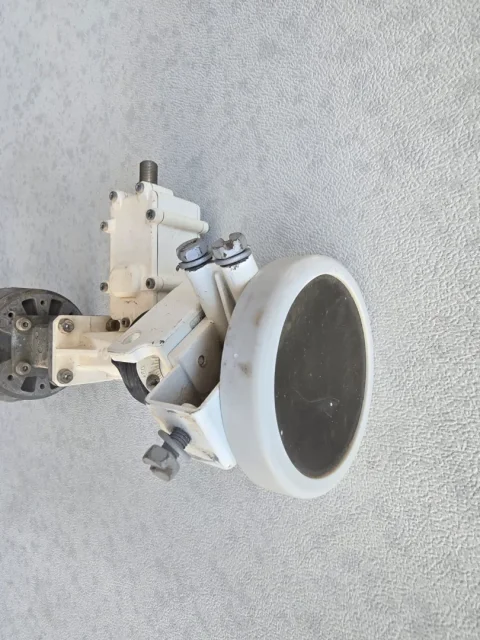
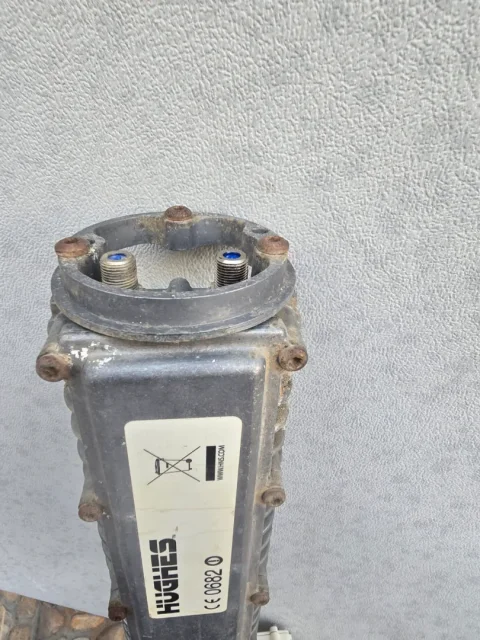
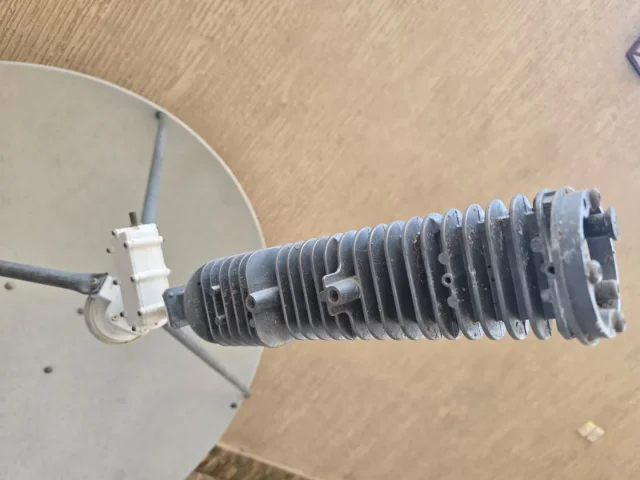
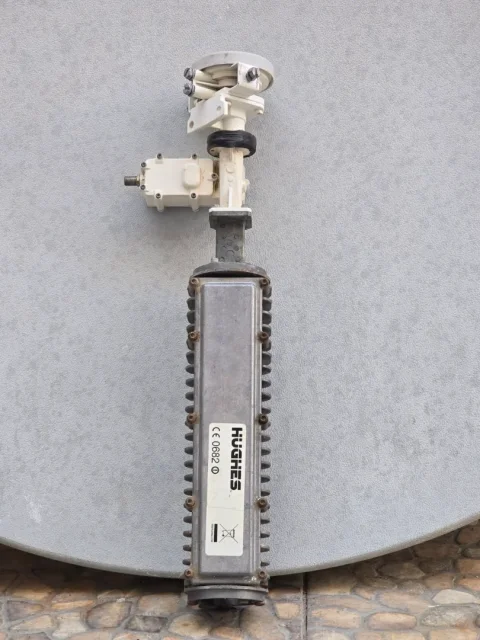
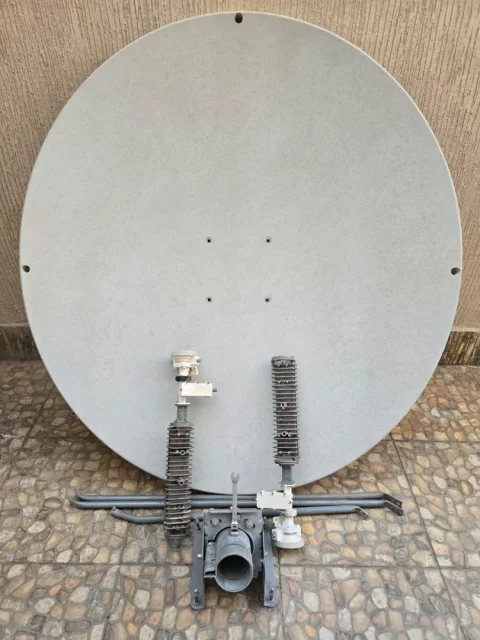
حصلت على طبق استقبال فضائي كامل - باستثناء المكونات الإلكترونية الداخلية - من تاجر خردة.
يبدو أنه كان يستخدم سابقاً للوصول إلى الإنترنت عبر الأقمار الصناعية في منشأة حكومية.
كيف يمكنني الاستفادة من هذا الطبق؟
هل من الممكن الحصول على خدمة إنترنت عبر الأقمار الصناعية مجاناً، أم أن الاشتراك الشهري أو السنوي مطلوب؟
هل يمكن استخدامه لاستقبال قنوات التلفزيون الفضائية المجانية؟
هل من الممكن استقبال كليهما - قنوات التلفزيون عبر الأقمار الصناعية والإنترنت (التحميل/التنزيل) - في وقت واحد؟
هل يمكنني تغطية الطبق بمادة عازلة وواقية لحمايته من عوامل التعرية والتعرض لأشعة الشمس؟
هل هناك أي مكونات إضافية أحتاج إلى تثبيتها في الداخل لإكمال النظام؟
مواصفات الطبق:
عدسة Channel Master ذات البعد البؤري الرئيسي 1.2 متر
صُنع في الولايات المتحدة الأمريكية
(نطاق Ku أو نطاق C، حسب المكون المستخدم)
شكراً للجميع.
حصلت على طبق استقبال فضائي كامل - باستثناء المكونات الإلكترونية الداخلية - من تاجر خردة.
يبدو أنه كان يستخدم سابقاً للوصول إلى الإنترنت عبر الأقمار الصناعية في منشأة حكومية.
كيف يمكنني الاستفادة من هذا الطبق؟
هل من الممكن الحصول على خدمة إنترنت عبر الأقمار الصناعية مجاناً، أم أن الاشتراك الشهري أو السنوي مطلوب؟
هل يمكن استخدامه لاستقبال قنوات التلفزيون الفضائية المجانية؟
هل من الممكن استقبال كليهما - قنوات التلفزيون عبر الأقمار الصناعية والإنترنت (التحميل/التنزيل) - في وقت واحد؟
هل يمكنني تغطية الطبق بمادة عازلة وواقية لحمايته من عوامل التعرية والتعرض لأشعة الشمس؟
هل هناك أي مكونات إضافية أحتاج إلى تثبيتها في الداخل لإكمال النظام؟
مواصفات الطبق:
عدسة Channel Master ذات البعد البؤري الرئيسي 1.2 متر
صُنع في الولايات المتحدة الأمريكية
(نطاق Ku أو نطاق C، حسب المكون المستخدم)
شكراً للجميع.


3 Replies
·
107 views
TWiT Tech Podcast Network
Time for another AWESOME video from the TWIT Network!
View: https://www.youtube.com/shorts/cva3u4UTiP0
Direct YouTube Link - SSHole OpenSSH Flaw: Hackers Target Linux Systems #shorts
TWIT's Website
TWIT Live Feed
View: https://www.youtube.com/shorts/cva3u4UTiP0
Direct YouTube Link - SSHole OpenSSH Flaw: Hackers Target Linux Systems #shorts
TWIT's Website
TWIT Live Feed
0 Replies
·
18 views