

Social Feed
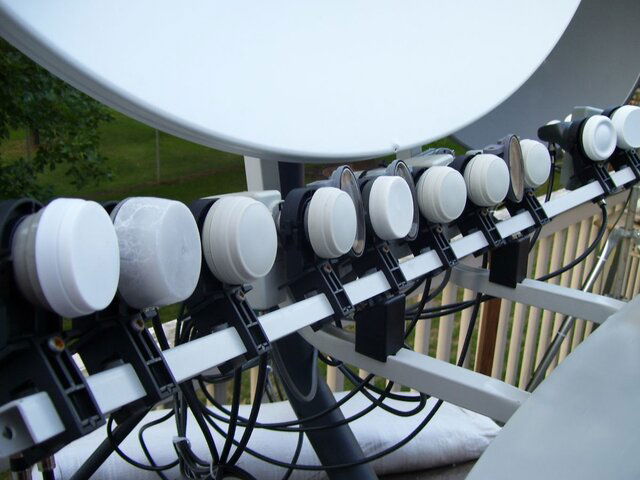
The other day I was out working on the "dish farm" and I decided to condense some of the setup.
Now before today I had the following set up
-6 foot C-Band dish
-Dish500 with I adapter for Dish Network subscription 110
-Dish300 for 61.5 Dish Network
-36" dish for G10 with a LNB attached for 119 Dish Network
-Primestar dish for IA8
-StarChoice dish for SC subscription
-30" motorized
I know lots of us have multiple LNB's on one dish (usually 2 or 3) but the LNB's off the center always have lower signal and that turned me off. I always want the best signal possible..
I had seen picture of the dual reflector dishes that can do 10+ LNB's and thought "yeah right". I did some reading and saw a review done in Tele-satellite magazine a month or so ago and that's what caught my interest. If I could combine dishes together while not sacrificing signal that would really clean up a lot of the setup. But the article was pretty quick and the review only did 4 satellites 13 degrees apart. I wanted more.
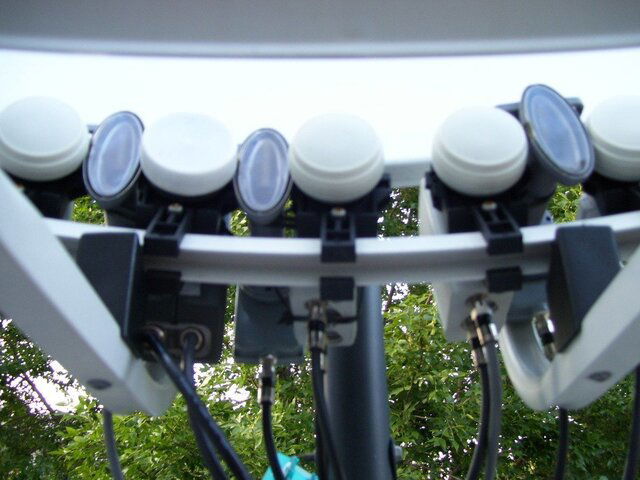
Enter the Wave Frontier Toroidal T-90 multi-LNB dish
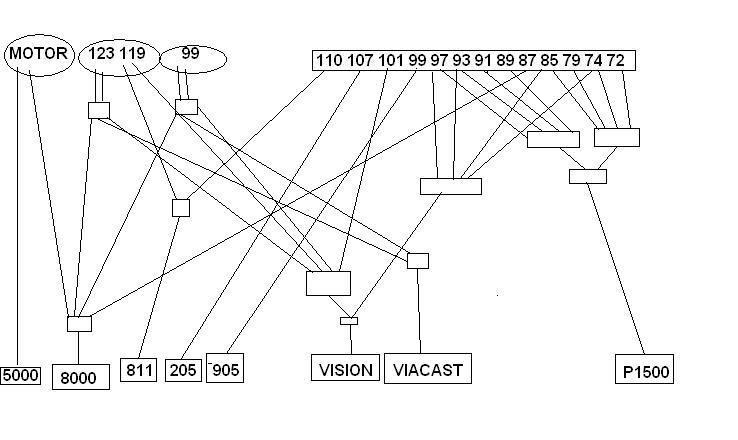
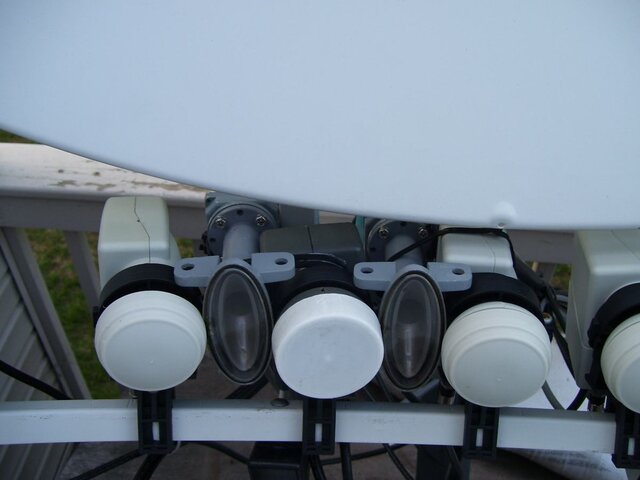
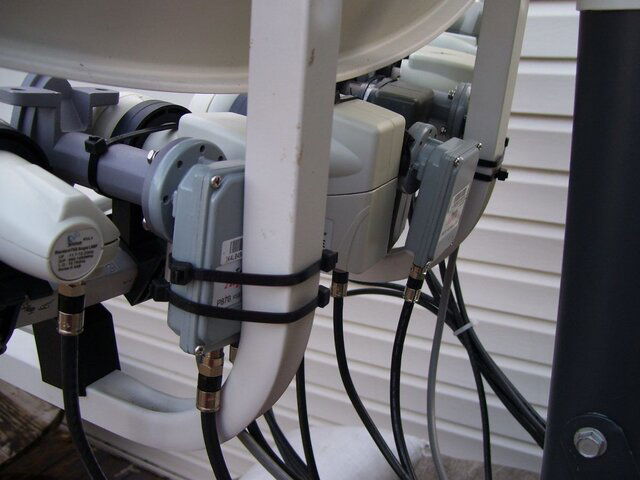
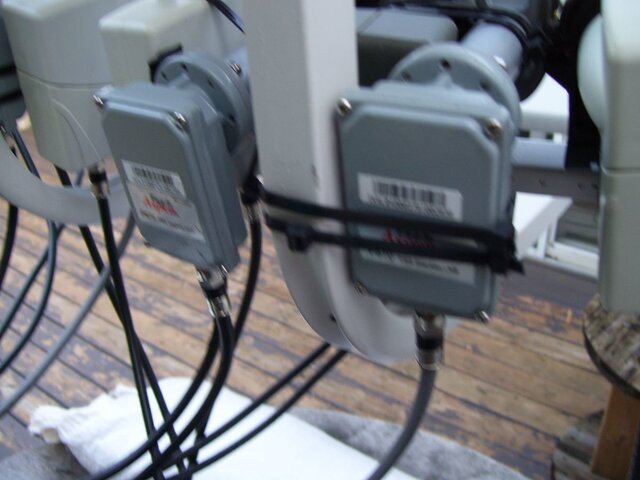
Fist thing you want to do before ordering is to figure out what satellites you want to pick up (to make sure you have enough LNB's & switches). The satellites have to be 3 degrees apart and the max view is 40 degrees so I took out the Lyngsat list and started figuring out what satellites I wanted to get. I knew I needed 110 & 119 for Dish and 107.3 for StarChoice. This would take care of my subscriptions. I wanted G10 for sure so I knew the farthest I could go on the other side was AMC9 at 83. With AMC1 (103) and the screwy skew, I figured "half way between". I also chose some satellites with feeds. 97, 93, 89, and 85. So I ordered from Sadoun the T-90, 3 duals, one single, and 2 reverse DBS LNB's and 2 22k switches. I already had a couple LNB's that could be used too. If you use DBS for subscription, you need these reverse polarity LNB's due to the 2 reflectors or else the polarity is backwards. KU Band is fine.
So Friday night I come home to see a HUGE box in front of my door. I had to use the 2 wheeler to bring it in. Opened up the box to see a lot of parts (a lot). Took everything out of the box and separated the parts in little piles. Please note this is not a half hour build the dish job so make sure you have a couple hours minimum to build it. And away we go.
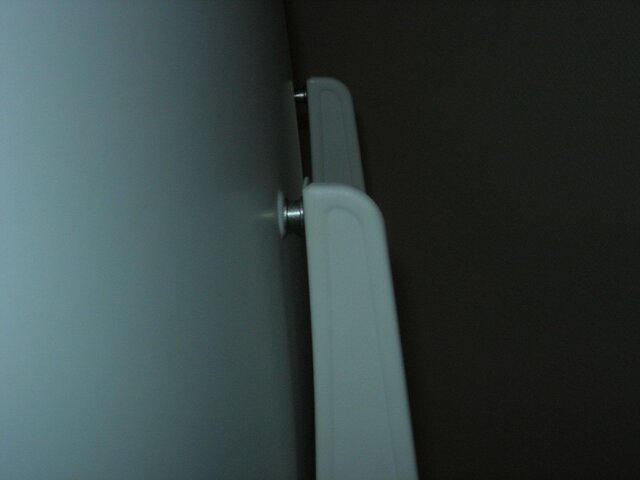
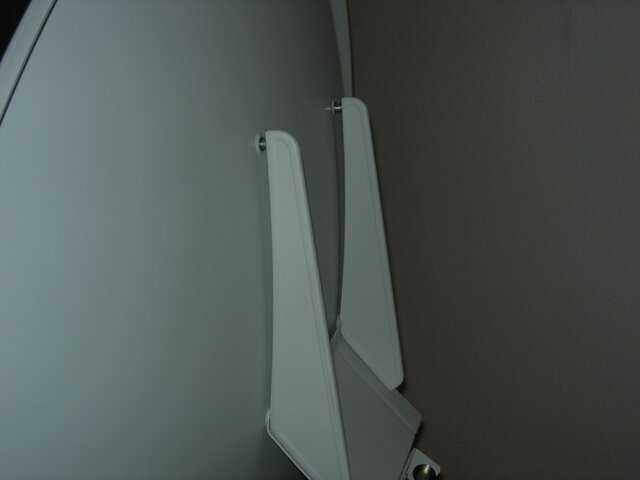
The first thing I noticed is the instructions aren't the best. I mainly looked at the pictures. This is a big dish (42x40) and has 2 reflectors. They claim the 2nd reflector does the magic. We'll see. Building it wasn't bad (there aren't that many actual parts, just lots of nuts and bolts). I did have a little difficulty lining up the holes for 2 pieces but we got it put together. I highly suggest 2 people put this together because the dish is heavy. The mast is kinda weird. There is only one bolt to go through the bottom of the mast and there is a brace that goes behind the mast and you have to use. The mast is 2 3/8" so it is a bigger mast. Once I had the dish put together I put it on the mast (temporarily set up in living room). Put the arms on to hold the 2nd reflector and put that up. Lastly there is the "slide bar" where the LNB's go. It took me about 3 hours to build it and get it ready (I did take a couple breaks but I say it was at least 2+ hours for sure. And I wish I had a 2nd set of hands because putting together some parts were tricky for one person.
So Saturday I went out to find a spot to mount the dish. Check Line of sight which was no issue. The issue was I thought I could use my StarChoice mast but it was too small and I really didn't want to drill more holes, I settled on the table that my C-Band dish is on. Made sure mast was plumb and put in bolts for foot and brace and leveled it out. Put dish up (here is where a 2nd person could come in handy) on mast and was very happy that by looks, my roof wouldn't come near my LOS : )
There is a spot on Sadoun's site that you can enter your latitude/longitude and list your easternmost & western most satellites that you want to pick up and it tells you where to aim the dish and gives you skew and "twist" of the LNB holders. Printed that out and started working on aiming. The first two issues I came across were there is no elevation markings. Its just one giant bolt that you screw and unscrew. Another thing is skew has markings for every 10. My skew was 82.61 so I had to guestimate.
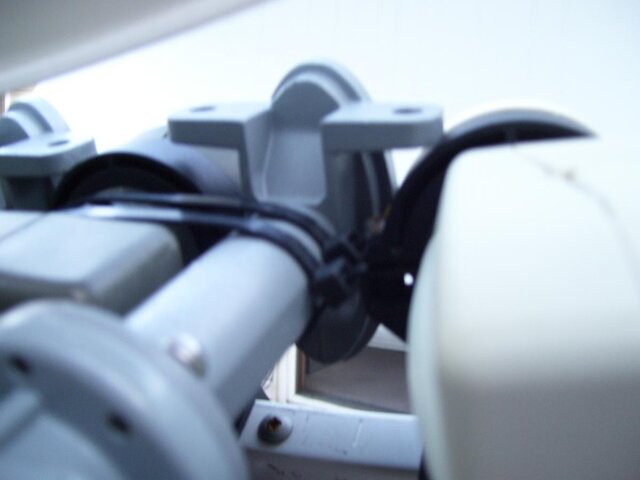
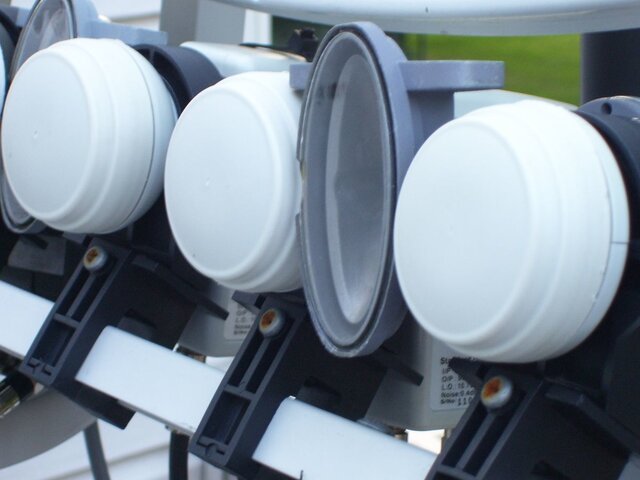
The LNB holders are quite interesting. They have markings for 0, +10, +20, -10, -20 and I didn't know what they were for. Well, these are to twist the LNB holder to aim it up properly. The chart that I printed out told me what each one was and you can fine tune these (more on that later).
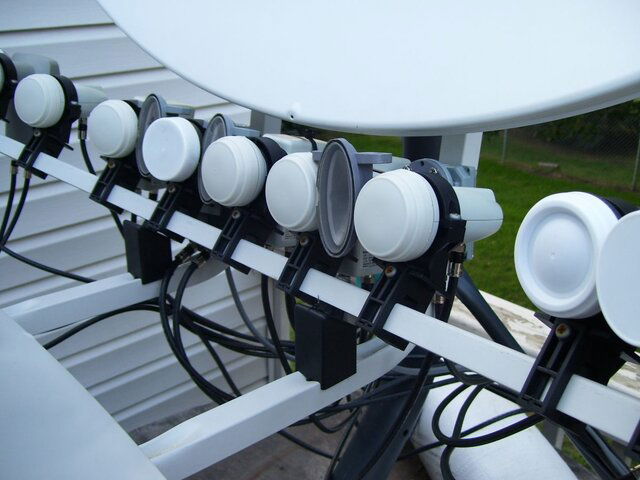
Since I wanted to get from 85-123 I used 83 in the setup which gave me 103 as my "center" LNB. I felt it was easier to use an exiting satellite and not "104" when I said I wanted 85-123. The slide scale is pretty neat. It has markings on it so you don't have to guess. The LNB in the center goes to 0. So I slid it down the scale to 0 and tightened it.
Here's where the fun began. With no way of knowing what elevation was, I had to basically hunt. I tuned up Pentagon channel on my Pansat 1500 and aimed where I thought it was. Nothing. Tried some more. Nothing. If I had a angle finder it would be easier (I think). The one advantage of the Pansat is when your close, the signal meter goes up (even if the elevation is off). Finally found Pentagon. 45 signal. Tweaked the LNB and got it at abut 75. Now I skewed to where I thought 82 was. You're suppose to add LNB's on your far east and west satellites and tweak the skew from there. This is what took forever to do because one was fine but the other was bad. I tried for almost an hour to get both at good signals. I decided to try and tweak it a little closer in by using 119 and 89 (these 2 satellites I wanted for sure). This was much easier to do and in 15 minutes I had both tweaked in.
Now I started adding LNB's. First one was 107.3 for my SC subscription and got that tuned in.(I hooked up my StarChoice receiver to tune that in). Setting up other LNB's is much easier. 107.3 is 4 degrees form 103. Slide it to "4" on the scale and bam..signal. Tweaked the signal in. Added 110 & 119 with a breeze. Now I started on the other side (remember, when working with multiple LNB's they go on the opposite side so the right side was from 101 down).
Added 97 and tweaked. The best thing to do if you don't have a satellite meter is to pick an active transponder on the receiver and slide the LNB until the signal comes in.
Remember the numbers on the LNB holders? You can adjust those for optimum signal. There is a screw to keep them from moving. I adjusted those and got a few more points on some transponders. Basically when the signal comes down, it reflects off the dish to the 2nd reflector and to the LNB. The twisting of the bracket lines it up to get the second bounce. So twisting them allows you to optimize signal. Skew is normally not needed as the whole dish is skewed but you can skew the LNB too if you wish (again for signal).I only did that for AMC1 (which is off anyways) and one other (I forget off the top of my head). Had good signal on a couple TP's on IA5. I made sure to check most active TP's before continuing. Slipped another LNB down the scale for IA6 and got that tuned in. This is the easiest part. Just need to add or subtract and line it up on the marking. Please note this is not etched in stone, You can move it for optimum signal. Added one for 89 and got really good signal. I tried to add one for 85 but AMC2 is kinda bad signal wise here in MN so the signals I didn't like the best. So I settled on AMC9 at 83. I tried to get 79 (which is more than 20 off center) and I did get a flicker but ran out of the slide bar
Now the last one was G10. This one took some working because I feel I might have a minor LOS issue. The signals aren't as good as I wanted but should be fine.
So now the test. What kind of signals can I get? This is where I was most skeptical as I have worked with multiple LNB's on a dish and normally any LNB not dead center has some degrading of signal. This is where I was amazed by the signals I was getting.
103 was the first one that amazed me. Remember that AMC1's skew is goofy so I skewed the LNB and to my amazement, I got 99 on Pentagon. I also got about 10 feeds that I have NEVER seen on AMC1 (mainly due to the LNB being off). So I was very happy.
107.3, 110, and 119 were set up with their respective receivers, so those were fine
97 I tweaked a little bit and got 75-80 on most transponders. 93 took some tweaking but I got very good numbers on those. 89 made me happy as ABCNewsNow & ABCNewsOne were both 75-85 on the meter. I did pick up a couple feeds.
AMC9 had NBC News Feed and that was at 75 (that's normal). G10 was the only one I saw some signal loss (maybe it was the satellite) but I was amazed at how the fact I was 20 degrees off center for AMC9 and the signal was the same as if I had it aimed at a fixed dish. The numbers for IA8 were the same as my 40x30 Primestar which was aimed directly at the satellite.
Then I decided to have some fun. The book claims 3 degree spacing due to the LNB holders and LNB's. But could I get 2 degrees? I really wanted 101 for some of the programming there and since the signals are strong, I figured "what the heck lets try". This took some major tweaking because the LNB holders are too big so 2.5 degrees is the minimum spacing. I did get 107.3 & 110 with non issues but 110 sicne its DBS has some play room. I put the LNB between 103 & 97 and got it over as far as I could to 103 and I got a decent signal (40) on KUIL but some of the weaker ones not even a flicker. So I twisted the LNB holder and the signal went up. Even though the LNB is probably aimed at 100 twisting the LNB holder allowed me to get decent signals on 101. These aren't as good as if I could aim directly at 101 but decent.
So when all said and done I have
Single LNB on 83
Dual LNB on 89
Dual LNB on 93
Dual LNB on 97
Single LNB on 101
Dual LNB on 103
Single LNB on 107.3 for StarChoice
Single reversed LNB's for 110/119 for Dish subscription
Single LNB on 123
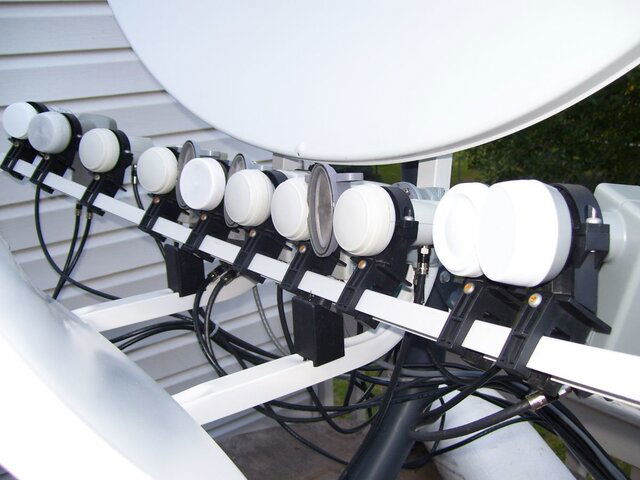
When I first started I had my doubts (lots of them) but this is one amazing dish. The fact that I was able to go from 7 dishes to 3 is amazing. I was able to get rid of the StarChoice dish, the Primestar at IA8, the G10 dish and the 2 DBS dishes (I did lose 61.5 but I mainly used that for Pentagon Channel). So now I have my motorized, the Toroidal and the C-Band dish. I was able to add 10 LNB's to the dish and not sacrifice the signal. This will allow me to motor around and still be able to see a few satellites on other boxes which works good for sporting events.
SPECS:
Main reflector
Height 96.7 cm (38.1 in.)
Width 108.6 cm (42.8 in.)
Sub reflector
Height 36.1 cm (14.2 in.)
Width 83.6 cm (32.9 in.)
Net Weight 14.1 kg (31.0 lbs)
Operating Frequency10.70 - 12.75 GHz
Polarization Linear & Circular
Multi Satellite Range in arc 40 degrees in arc
Mid Band Gain @ 12.5 Ghz 39.65 dB (± 0.45 dB)
Recommended Satellite Spacing 3 degrees
Pole Diameter 2 3/8"
Windloading
Operational 80 km/h (50 mph)
Survival 200 km/h (125 mph)
LNBF Installation 1 – 16 LNBFs
Pros of the dish are pretty self explanatory
-allows you to use multiple LNB's on one dish
-signal is not degraded even if it is 20 degrees off center (this is what made me a believer in the dish)
-Once you get the east, west and center LNBs set up, adding LNB's is a breeze
-multiple ways of fine tuning for optimum signal if needed
-slide scale on this rules. No need to think where it needs to be. Just add or subtract from the center LNB. (So when I added one for 97, I went to the mark for "6" and boom signal)
-Lots of room for me to add cables & switches
-Big reflector (42x40) really brings in those signals
-Allows you to use multiple receivers to see multiple satellites (your setup may vary depending on LNB's)
The drawback of the unit (and there are a couple)
-First off, I cannot stress enough this is not for the beginner. Setting this up is not like adding LNB's to a fixed dish. When working with a fixed plane (the slide scale) you cant move the LNB's up and down. You have to move the whole unit. The hardest part was getting the far east & west satellites tuned in with the skew and elevation. This took the longest. Make sure you have planned a good half day for setup and a couple hours for building.
-The unit is very heavy (30+ pounds) so a 2nd person is suggested for mounting and building.
-no elevation scale really bugs me (of course if I had an angle reader there would be no issues). There is even a spot to put the angle reader
-skew scale is pretty generic. Marks every 10. Wish it had more markings.
-3 degree spacing so make sure you know what you want to get first. I was able to get 2 degrees but I have a feeling if I wanted 87 (as an example) it would be trickier than 101 due to lower signals
-You need special LNB's for DBS due to the dual reflector. The polarity is off if you use a regular DBS LNB. No biggie if you use it for FTA but a subscription requires these different LNB's. Hopefully they don't go out.
Reasons you might want to get a T-90
-you have multiple subscriptions and want them all on one dish
-you have multiple receivers and want to see a few satellites
-you want to condense your dish farm
-you want instant channel changing from a couple satellites
Reasons the T-90 may not be for you
-you want to see satellites 2 degrees apart
-you have LOS issues
-you want to see it all (the T-90 has a 40 degree arc whereas a motorized can see more)
-you have issues aiming a fixed dish
All and all I am VERY happy with the Toroidal dish. I know some people like having a dish farm, but due to my setup I was limited with putting dishes on the roof and the deck was getting to look a little tacky with dishes everywhere, so I was able to go from 7 dishes to 3 makes me happy. Thanks to Sadoun for stocking the dish and also for their fast shipping. I still have to hook it all up with switches and stuff.
167 Replies
·
101471 views


I have Dish with Hopper3. I choose to get local channels OTA and had a "guide list" established at my previous home. Having moved a few miles away, I wanted to update the list by appending a couple new stations via a rescan. As many would know, some stations come in with the UHF/VHF antenna aimed in one direction, while others come in better with a different direction.
Unfortunately, when a scan is done (bringing in 25-30 stations for that particular antenna aim), the dialog screen does not present the established guide list; it presents an empty field to the right that the scanned stations may be selected one by one and added to the empty guide. But because of antenna aim, some stations originally saved are missing, and would have to be retrieved with a different antenna aim. But as I explain, if a 2nd scan is done with a different antenna aim, the stations saved from the first scan are lost.
It troubles me that Dish didn't develop software that would allow a user to simply append only 1 or 2 channels to the established list.
Any thought on this? Has anyone experienced this or heard of this from others?
9 Replies
·
351 views


Staff member
HERE TO HELP YOU!
Cutting Edge
Sometimes a thread gets so many posts in it that is can cause issues for the server so that why today we introduce The Song Name Game Part 3!
So let the game continue!
The last song was added by Bobby who posted...
One Meat Ball - Andrews Sisters
CONTINUE ON AND HAVE FUN! WELCOME HOME TO SATELLITEGUYS.US!
Here are the original rules for the game as posted by WebbyDude back in 2006. http://www.satelliteguys.us/threads/68645-Song-Name-Game
Just name a song title and the band who performed it. The next person does the same thing, but needs to list a song title or band name which includes a word from the previous entry. Pick songs from any genre.
Example:
Long Live Rock and Roll -- Rainbow
Rainbow in the Dark -- Dio
Another example:
Ride the Lightning -- Metallica
Lightning Strikes -- Ozzy Osbourne
Get it?
An additional note: we all know that song titles, sometimes, use profane words. Because this is a family friendly website it is advised that you clean up that title up a bit. This is accomplished by using something like sh!t instead of the real word. Thanks....
68735 Replies
·
2684172 views


Pub Member / Supporter
Not sure saving $24/year is worth it unless you're a hardcore Philo user. I'll stick with monthly.

1 Replies
·
68 views

TWiT Tech Podcast Network
Time for another AWESOME video from the TWIT Network!
View: https://www.youtube.com/shorts/X5Yp6dbu76U
Direct YouTube Link - Ginux: A Rust Operating System Kernel Built in 11 Days #shorts
TWIT's Website
TWIT Live Feed
View: https://www.youtube.com/shorts/X5Yp6dbu76U
Direct YouTube Link - Ginux: A Rust Operating System Kernel Built in 11 Days #shorts
TWIT's Website
TWIT Live Feed
0 Replies
·
6 views

Pub Member / Supporter
Pissed off at the crappy healthcare costs
My health Insurance renewal for 2027 just came in. Going from $827 a month to $1,187 a month. Deductible going up a $1k to $9,350. Max out of pocket also going up $1k to $11,000. Doctor co-pay of $40. Urgent Care co-pay $50. ER 50% coinsurance after deductible. That's all in network. Out of network is double, should it be needed.
Have to think about this. I'm really tempted to just go without now. I only go to the doctor once or twice a year. I pay out of pocket for Tirzepitide and can do without the Rosuvastatin (crestor) now. Really tired of spending over $10k a year and getting nothing out of it.
After years with Blue Cross I switched last year to Ambetter as my Blue Cross premium was going from $1200 to $1800 for a Silver plan and the Bronze plan was still going to be $1300 at BCBS. Ambetter was $827 for the same coverage with a Bronze plan. Didn't think it would jump this much so soon.
I'm guessing a Silver plan is probably over $2,000 a month for 2027.
70 Replies
·
1016 views




I was bewildered with all the new DISH TV "Bonus View" channels, so I put together a web page table with all the info I could find. It's at:
https://anythingpeaceful.org/dishtv/DISH_TV_Bonus_View_Channels.html
Here's a partial screenshot of the table, as sorted by Channel Name. (You can click on a column header to sort.)

If you have any corrections or suggestions, please post here.
https://anythingpeaceful.org/dishtv/DISH_TV_Bonus_View_Channels.html
Here's a partial screenshot of the table, as sorted by Channel Name. (You can click on a column header to sort.)
If you have any corrections or suggestions, please post here.
45 Replies
·
6197 views
TFLEV
Time for another AWESOME video from TFL Electric Vehicles!
View: https://www.youtube.com/watch?v=JvCXgeUJXS0
Direct YouTube Link - Geely E5 (EX5) First Drive: Meet The Toyota RAV4 of China!
View: https://www.youtube.com/watch?v=JvCXgeUJXS0
Direct YouTube Link - Geely E5 (EX5) First Drive: Meet The Toyota RAV4 of China!
0 Replies
·
14 views

Staff member
Pub Member / Supporter
Cutting Edge
The TPN Map Excel Presents all DIRECTV Channels:
Understanding the TPN Map
Making Sense of the TPN Map Display Conventions
National (50-States or wide/NAT+PR beams)
Local (Local-Into-Local or narrow/Spot beams)
Local (Local-Into-Local or narrow/Spot beams)
Additional tabs provide:
OTA the (Over-The-Air) Database
VOD (Video On_Demand) Records
Offline Records
Engr Records
Net Decoder a graphic presentation of all satellites and transponders
VOD (Video On_Demand) Records
Offline Records
Engr Records
Net Decoder a graphic presentation of all satellites and transponders
Domestic Satellites
@99W...... D11, D14
@101W.... D16
@103W.... D12, D15
@110W.... D5
@119W.... D8
@99W...... D11, D14
@101W.... D16
@103W.... D12, D15
@110W.... D5
@119W.... D8
Understanding the TPN Map
Making Sense of the TPN Map Display Conventions
2176 Replies
·
951235 views


Pub Member / Supporter
Lifetime Supporter
Over the past year I have been tracking the changes on Western Arc. The past 3 months have had a lot of changes that I posted in the other MPEG2 Western Arc shutdown thread. Now that 129 is (basically) out of commission, here is where Western Arc stands. This is just a national channel list, (no local channels) based off what I can see and what others have contributed. Thanks to everyone who has helped me come up with the locations of some of the channels – I would try and list all of you out, but I know I would forget someone! As has been suggested in other parts of the forum, it would be great to collect the spotbeam data for those who could contribute!
A couple of pieces of info:
When I talk about number of channels on a transponder, all my numbers are unique channels – for example, channel 101 and 199 are the same channel mapped to two different numbers, but in terms of space, only takes up 1 channel worth of bandwidth on the transponder.
Finally, I have to give Dish a ton of credit. When it was 110/119/129, Dish had 82 transponders they were using – it took a lot to get it down to 50 transponders and figure out where all the pieces were going to go. What are the things they did to get there? Here are the things I saw:
A couple of pieces of info:
- Out of the 64 transponders between 110/119, there are currently 50 transponders that Dish is licensed to use. 22 are Spotbeams, 28 are ConUS transponders (14 transponders are licensed to DirecTV and Dish doesn't have access to them)
- Those 28 ConUS transponders are divided as follows:
- 10 are dedicated to National HD channels (ESPN, CNN, Disney Channel, etc). Dish is maxing out at 16 HD channels per transponder (note – in an earlier post I said there was one transponder with 17 HD channels, that was an error on my part. When I double checked my listings, one channel changed transponders). Before the transition, there was a maximum of 14 HD channels per transponder.
- 1 transponder is dedicated to adult content
- 2 are a mixture HD PPV Movies/4k channels
- 3 are set aside for HD Sports channels that are only on for live games (NBA League Pass, the PAC 12 alternate channels, some PPV events, etc); 3 SD PPV Sports Channels are there as well.
- 7 are for SD and/or music channels. Dish is maxing out at 26 SD channels per transponder thus far on the SD transponders.
- 5 transponders on 110 I have no channels listed but Dish operates. (they are labeled as ConUS on my chart below) There are other things that could be on those transponders, like RV Distant Networks, internal testing channels, etc, that I can't see. They might be able to be used for additional content, but I am not sure exactly what is on those transponders.
When I talk about number of channels on a transponder, all my numbers are unique channels – for example, channel 101 and 199 are the same channel mapped to two different numbers, but in terms of space, only takes up 1 channel worth of bandwidth on the transponder.
Finally, I have to give Dish a ton of credit. When it was 110/119/129, Dish had 82 transponders they were using – it took a lot to get it down to 50 transponders and figure out where all the pieces were going to go. What are the things they did to get there? Here are the things I saw:
- During this migration from 129, Dish converted 7 ConUS transponders on 119 into Spotbeams – that is how they ended up fitting on all the HD locals that used to be on 129. (for those interested, TP 6, 7, 8, 9, 10, 11, 13 are the ones that used to be ConUS on 119 that are now Spotbeam)
- Removed almost all SD duplicate channels that are offered in HD
- Converted remaining SD channels from MPEG2 to MPEG4
- There are also 2 subtle things that changed from the HD channel perspective
- At the beginning of the transition, Dish decreased the number of PPV Movie channels – prior to this transition the PPV channels HD PPV movies were 502-522; now they are 502-517.
- At the beginning of April when MLB, NBA, and NHL regular seasons were all going on at the same time and this transition began, there were a ton of games "joined in progress" for the HD feeds. That wasn't common since the days before the full time HD RSN's. The reason for that was prior to the transition, Dish had 4 transponders set aside for HD Sports – 2 transponders was the bandwidth set aside from the HD RSN's before Dish dropped the RSN's, then 2 transponders were for alternate channels. Now we are down to 3 transponders for HD sports.
250 Replies
·
66026 views

TWiT Tech Podcast Network
Time for another AWESOME video from the TWIT Network!
View: https://www.youtube.com/watch?v=Lsr0owJQjdM
Direct YouTube Link - Whiskey Pick: Sideshow Lincoln Straight Bottled-in-Bond Bourbon
TWIT's Website
TWIT Live Feed
View: https://www.youtube.com/watch?v=Lsr0owJQjdM
Direct YouTube Link - Whiskey Pick: Sideshow Lincoln Straight Bottled-in-Bond Bourbon
TWIT's Website
TWIT Live Feed
0 Replies
·
21 views