

Social Feed

Staff member
HERE TO HELP YOU!
Cutting Edge
SatelliteGuys was proud to be the only Internet site at Team Summit 2004, and we are proud to give you the first look at one the most requested Dish DVR features, Name Based Recording!
At the moment most Dish DVR's are like glorified VCR's you set them to record at a specific date and time and (hopefully) the DVR records it then. If you have shows set to record weekly the Dish DVR is not smart enough to notice that you show is not on one week and will record whatever airs in that time slot. Dish DVR's are also not smart enough to notice when a show is a special and it runs for a longer time, currently when a show runs long the Dish DVR records the time you set it to record (meaning you miss the end of the super sized show)
Well soon this will be a thing of the past when Dish Introduces its latest concept "Name Based Recording" with name based recording the Dish DVR's get smart and record your favorite shows based on name rather then by time!
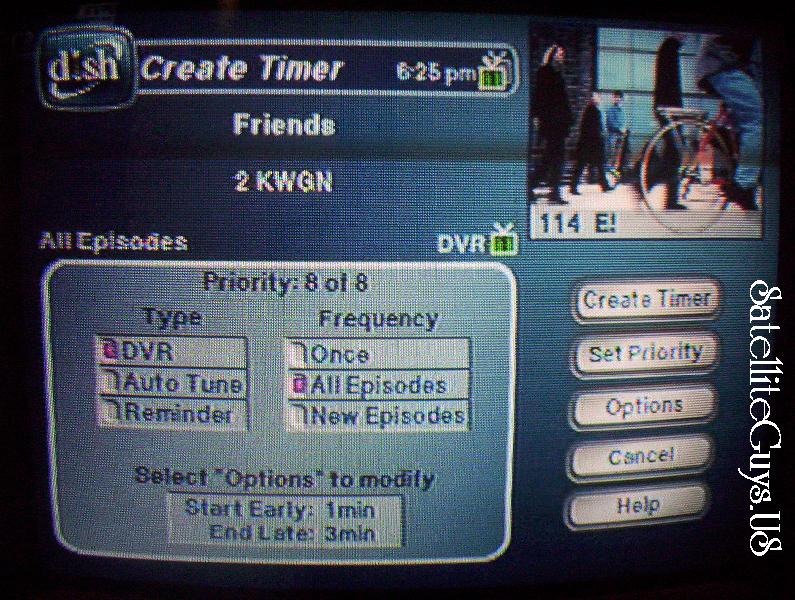
Setting up a timer could not be easier, select the show you want to record in the guide like you do not to setup timers on the Dish DVR. From there you select how often you would like this show to record. You can tell it to only record shows that are NEW episodes (ala Season Ticket) our you can tell it to record every episode of the show with that name that airs.
From what I saw they need to add a feature so that you can set your unit to record your show only off one channel, so lets say you like Friends, and you want to record each episode which airs Monday - Friday and you want it to record off WPIX only, this way you dont also record Friends Monday through Friday which is airing on WGN and KTLA as well (since they would be the same episode)
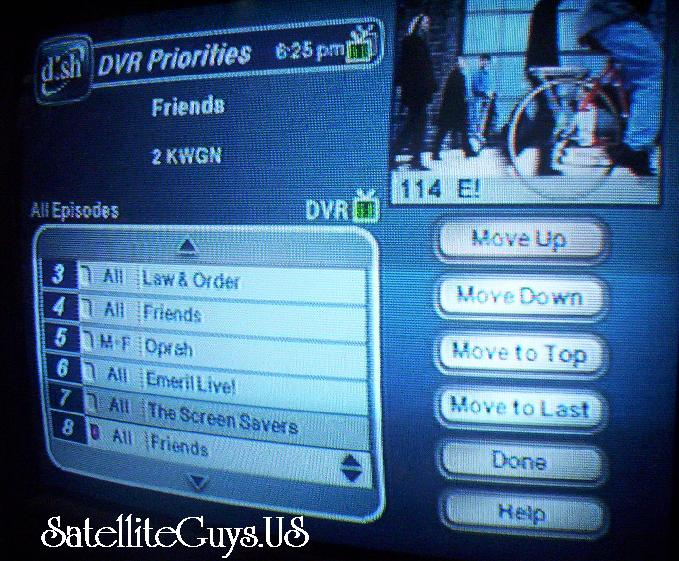
Now Dish lets you specify what recording you REALLY want, so if Friends is on and American Idol is on (and you don't want to miss it) you can set American Idle at the higher priority (incase friends and American Idol are on at the same time) This way you never miss the show you REALLY want to see.
Now you will notice there are no times listed in the timers screen. The DVR will automaticly program itself for the correct time when it sees your show you want in the listings. And if they show is supersized you will see the complete show (unless the guide listings are wrong)
I am really looking forward to the Name Based Recording feature, and from what I have seen at Team Summit, it looks like we may see it SOON.
Thanks for visiting SatelliteGuys.US!
At the moment most Dish DVR's are like glorified VCR's you set them to record at a specific date and time and (hopefully) the DVR records it then. If you have shows set to record weekly the Dish DVR is not smart enough to notice that you show is not on one week and will record whatever airs in that time slot. Dish DVR's are also not smart enough to notice when a show is a special and it runs for a longer time, currently when a show runs long the Dish DVR records the time you set it to record (meaning you miss the end of the super sized show)
Well soon this will be a thing of the past when Dish Introduces its latest concept "Name Based Recording" with name based recording the Dish DVR's get smart and record your favorite shows based on name rather then by time!
Setting up a timer could not be easier, select the show you want to record in the guide like you do not to setup timers on the Dish DVR. From there you select how often you would like this show to record. You can tell it to only record shows that are NEW episodes (ala Season Ticket) our you can tell it to record every episode of the show with that name that airs.
From what I saw they need to add a feature so that you can set your unit to record your show only off one channel, so lets say you like Friends, and you want to record each episode which airs Monday - Friday and you want it to record off WPIX only, this way you dont also record Friends Monday through Friday which is airing on WGN and KTLA as well (since they would be the same episode)
Now Dish lets you specify what recording you REALLY want, so if Friends is on and American Idol is on (and you don't want to miss it) you can set American Idle at the higher priority (incase friends and American Idol are on at the same time) This way you never miss the show you REALLY want to see.
Now you will notice there are no times listed in the timers screen. The DVR will automaticly program itself for the correct time when it sees your show you want in the listings. And if they show is supersized you will see the complete show (unless the guide listings are wrong)
I am really looking forward to the Name Based Recording feature, and from what I have seen at Team Summit, it looks like we may see it SOON.
Thanks for visiting SatelliteGuys.US!
104 Replies
·
16214 views


Pub Member / Supporter
Lifetime Supporter
0 Replies
·
0 views
Staff member
HERE TO HELP YOU!
Cutting Edge
Sometimes a thread gets so many posts in it that is can cause issues for the server so that why today we introduce The Song Name Game Part 3!
So let the game continue!
The last song was added by Bobby who posted...
One Meat Ball - Andrews Sisters
CONTINUE ON AND HAVE FUN! WELCOME HOME TO SATELLITEGUYS.US!
Here are the original rules for the game as posted by WebbyDude back in 2006. http://www.satelliteguys.us/threads/68645-Song-Name-Game
Just name a song title and the band who performed it. The next person does the same thing, but needs to list a song title or band name which includes a word from the previous entry. Pick songs from any genre.
Example:
Long Live Rock and Roll -- Rainbow
Rainbow in the Dark -- Dio
Another example:
Ride the Lightning -- Metallica
Lightning Strikes -- Ozzy Osbourne
Get it?
An additional note: we all know that song titles, sometimes, use profane words. Because this is a family friendly website it is advised that you clean up that title up a bit. This is accomplished by using something like sh!t instead of the real word. Thanks....
So let the game continue!
The last song was added by Bobby who posted...
One Meat Ball - Andrews Sisters
CONTINUE ON AND HAVE FUN! WELCOME HOME TO SATELLITEGUYS.US!
Here are the original rules for the game as posted by WebbyDude back in 2006. http://www.satelliteguys.us/threads/68645-Song-Name-Game
Just name a song title and the band who performed it. The next person does the same thing, but needs to list a song title or band name which includes a word from the previous entry. Pick songs from any genre.
Example:
Long Live Rock and Roll -- Rainbow
Rainbow in the Dark -- Dio
Another example:
Ride the Lightning -- Metallica
Lightning Strikes -- Ozzy Osbourne
Get it?
An additional note: we all know that song titles, sometimes, use profane words. Because this is a family friendly website it is advised that you clean up that title up a bit. This is accomplished by using something like sh!t instead of the real word. Thanks....
68556 Replies
·
2674973 views


Marques Brownlee
Time for another AWESOME video from Marques Brownlee!
View: https://www.youtube.com/watch?v=ESABTN4VtrA
Direct YouTube Link - iPhone Duo Review: First Generation Fun!
The official MKBHD Website!
The MKBHD Store
View: https://www.youtube.com/watch?v=ESABTN4VtrA
Direct YouTube Link - iPhone Duo Review: First Generation Fun!
The official MKBHD Website!
The MKBHD Store
0 Replies
·
1 views
iJustine
Time for another AWESOME video from iJustine!
View: https://www.youtube.com/shorts/Fy1G8zjCEPc
Direct YouTube Link - iPhone Duo Unboxing!
The official iJustine Website's Website
Buy her book!
View: https://www.youtube.com/shorts/Fy1G8zjCEPc
Direct YouTube Link - iPhone Duo Unboxing!
The official iJustine Website's Website
Buy her book!
0 Replies
·
1 views
iJustine
Time for another AWESOME video from iJustine!
View: https://www.youtube.com/watch?v=YPdYDxo3Bqk
Direct YouTube Link - iPhone Duo Unboxing, set up and first impressions!
The official iJustine Website's Website
Buy her book!
View: https://www.youtube.com/watch?v=YPdYDxo3Bqk
Direct YouTube Link - iPhone Duo Unboxing, set up and first impressions!
The official iJustine Website's Website
Buy her book!
0 Replies
·
1 views
iJustine
Time for another AWESOME video from iJustine!
View: https://www.youtube.com/watch?v=QkAbWwFoH7c
Direct YouTube Link - iPhone Duo Review - A week with the folding iPhone!
The official iJustine Website's Website
Buy her book!
View: https://www.youtube.com/watch?v=QkAbWwFoH7c
Direct YouTube Link - iPhone Duo Review - A week with the folding iPhone!
The official iJustine Website's Website
Buy her book!
0 Replies
·
1 views

Supporting Founder
Lifetime Supporter
No idea what improvements might be involved.
27 Replies
·
1274 views


Booredatwork.com
Time for another AWESOME video from BoredAtWork!
View: https://www.youtube.com/shorts/XCyGc4o_8ME
Direct YouTube Link - HELLO DUO!
Booredatwork.com Website
Booredatwork on Facebook
View: https://www.youtube.com/shorts/XCyGc4o_8ME
Direct YouTube Link - HELLO DUO!
Booredatwork.com Website
Booredatwork on Facebook
0 Replies
·
5 views
Pub Member / Supporter
Lifetime Supporter
1 Replies
·
36 views


Staff member
Pub Member / Supporter
Cutting Edge
The TPN Map Excel Presents all DIRECTV Channels:
Understanding the TPN Map
Making Sense of the TPN Map Display Conventions
National (50-States or wide/NAT+PR beams)
Local (Local-Into-Local or narrow/Spot beams)
Local (Local-Into-Local or narrow/Spot beams)
Additional tabs provide:
OTA the (Over-The-Air) Database
VOD (Video On_Demand) Records
Offline Records
Engr Records
Net Decoder a graphic presentation of all satellites and transponders
VOD (Video On_Demand) Records
Offline Records
Engr Records
Net Decoder a graphic presentation of all satellites and transponders
Domestic Satellites
@99W...... D11, D14
@101W.... D16
@103W.... D12, D15
@110W.... D5
@119W.... D8
@99W...... D11, D14
@101W.... D16
@103W.... D12, D15
@110W.... D5
@119W.... D8
Understanding the TPN Map
Making Sense of the TPN Map Display Conventions
2146 Replies
·
934630 views