Social Feed

paul wong
Last reply · posted in Old YAHOOGROUPS - VOOM! Archives
Below is what appeared in the HOA minute:
"Old Business
Antenna Approval Process
The need for an architectural approval process for
antenna addition and placement was discussed. Several
residents voiced concern regarding the negative impact
on the general appearance of our housing area if
residents were to continue placement of one or more
rooftop antennas and/or parabolic dishes on their
homes. Ron agreed to investigate if the
establishment of such a process is within the scope of
rights of an HOA. If his research supports our taking
such action, the HOA will move to adopt the following
guidelines (June 10, 2004 Upon review of paragraph
4.08 of our CCRs and Civil Code Section 1376, the HOA
moves ahead with the following proposal)

Guidelines for future placement of antennas and/or
parabolic dish for television reception:
only one antenna of the type used by Dish or Direct
TV (parabolic and approx 18" in diameter) will be
allowed
antenna placement is to be below eave (gutter line)
no attachment to the chimney area will be allowed

It was agreed that residents with existing antennas be
grandfathered in as compliant. However it is hoped
that those residents not in compliance with the new
guidelines will choose to modify their antenna
arrangement to conform to the spirit of the new
guidelines. Ron has offered to make this case to those
individuals as well."

My voom antenna is on the chimney. Two points against
me if i have to keep Voom for HDTV. First, i will
have to keep either the Channel Master or Voom dish.
Say, even if i am willing to keep cable just to see
local tv, and keep VOOM for special channels, but what
happen when the dish size going over 18 inches in a
few month?
Unless i can get legal assistance in fighting the HOA,
or i am willing to move, i see VOOM is doomed for me
at
my current location:Los Gatos, California( I had
checked with Los Gatos City construction department,
and i was told indeed the HOA has the legal
superiority in dealing with the antenna issue.What is
unclear to me is whether HOA can also restrict the
dish/location/size issue.


__________________________________
Do you Yahoo!?
Yahoo! Mail - Helps protect you from nasty viruses.
http://promotions.yahoo.com/new_mail


------------------------ Yahoo! Groups Sponsor --------------------~-->
Make a clean sweep of pop-up ads. Yahoo! Companion Toolbar.
Now with Pop-Up Blocker. Get it for free!
http://us.click.yahoo.com/L5YrjA/eSIIAA/yQLSAA/EyMolB/TM
--------------------------------------------------------------------~->


Yahoo! Groups Links

<*> To visit your group on the web, go to:
http://groups.yahoo.com/group/VOOM/

<*> To unsubscribe from this group, send an email to:
VOOM-unsubscribe@yahoogroups.com

<*> Your use of Yahoo! Groups is subject to:
http://docs.yahoo.com/info/terms/
14 Replies · 2364 views
LOBO2999
Thanks Cmslick3 , that is what I ment do not move into a neighbor hood with an association, and like cmslick3 said The link above explains it all.
RP
Re: [VOOM] Hi, Wilt, how do i deal with HOA - PLEASE COMMENT HERE-

my condo (i own it) faces north. and i am on the 2nd floor and have a
patio/balcony...

for me to get a signal i have to extend the dish in a southernly
direction over my roofline (i only have to get the dish about 6 inches
over my roofline to get signal)....

at first my HOA said I WAS ALLOWED to have a dish as long it is not
mounted on common property/areas...
they said it would have to be on a tri-pod....

so that is what i did!

the dish stood over 10 feet tall (from the bottom of my patio to just 6
inches over the roofline) so that it could get a signal.

they then said to take it down for 2 reasons:

#1. it was a safety hazard. they said it might fall due to wind and that
i am on the 2nd floor so it could be a problem....
(i used 55 pounds of quickcrete in a large bucket) the antenna was not
moving) --- should I get over 100 pounds of cement??

#2. it was out of my exlusive use area. (which they said anything that
extends over the roofline is not in my own exlusive use area)
so they are saying i can have a dish on a tripod as long as it does not
go over the roofline - and of course i cannot get any signal
if the dish does not go 6 inches over my roofline......

the HOA went on to say that only people who happen to be facing south
can get a dish and recieve broadcasts but not those on the north side.

comments???

rp


paul wong wrote:

>Below is what appeared in the HOA minute:
>"Old Business
>Antenna Approval Process
>The need for an architectural approval process for
>antenna addition and placement was discussed. Several
>residents voiced concern regarding the negative impact
>on the general appearance of our housing area if
>residents were to continue placement of one or more
>rooftop antennas and/or parabolic dishes on their
>homes. Ron agreed to investigate if the
>establishment of such a process is within the scope of
>rights of an HOA. If his research supports our taking
>such action, the HOA will move to adopt the following
>guidelines (June 10, 2004 Upon review of paragraph
>4.08 of our CCRs and Civil Code Section 1376, the HOA
>moves ahead with the following proposal)
>
>Guidelines for future placement of antennas and/or
>parabolic dish for television reception:
>only one antenna of the type used by Dish or Direct
>TV (parabolic and approx 18" in diameter) will be
>allowed
>antenna placement is to be below eave (gutter line)
>no attachment to the chimney area will be allowed
>
>It was agreed that residents with existing antennas be
>grandfathered in as compliant. However it is hoped
>that those residents not in compliance with the new
>guidelines will choose to modify their antenna
>arrangement to conform to the spirit of the new
>guidelines. Ron has offered to make this case to those
>individuals as well."
>
>My voom antenna is on the chimney. Two points against
>me if i have to keep Voom for HDTV. First, i will
>have to keep either the Channel Master or Voom dish.
>Say, even if i am willing to keep cable just to see
>local tv, and keep VOOM for special channels, but what
>happen when the dish size going over 18 inches in a
>few month?
>Unless i can get legal assistance in fighting the HOA,
>or i am willing to move, i see VOOM is doomed for me
>at
>my current location:Los Gatos, California( I had
>checked with Los Gatos City construction department,
>and i was told indeed the HOA has the legal
>superiority in dealing with the antenna issue.What is
>unclear to me is whether HOA can also restrict the
>dish/location/size issue.
>
>
>
>__________________________________
>Do you Yahoo!?
>Yahoo! Mail - Helps protect you from nasty viruses.
>http://promotions.yahoo.com/new_mail
>
>
>------------------------ Yahoo! Groups Sponsor --------------------~--> Make a clean sweep of pop-up ads. Yahoo! Companion Toolbar.
>Now with Pop-Up Blocker. Get it for free!
>http://us.click.yahoo.com/L5YrjA/eSIIAA/yQLSAA/EyMolB/TM
>--------------------------------------------------------------------~-> Yahoo! Groups Links
>
>
>
>
>
>
>
>


------------------------ Yahoo! Groups Sponsor --------------------~-->
Make a clean sweep of pop-up ads. Yahoo! Companion Toolbar.
Now with Pop-Up Blocker. Get it for free!
http://us.click.yahoo.com/L5YrjA/eSIIAA/yQLSAA/EyMolB/TM
--------------------------------------------------------------------~->


Yahoo! Groups Links

<*> To visit your group on the web, go to:
http://groups.yahoo.com/group/VOOM/

<*> To unsubscribe from this group, send an email to:
VOOM-unsubscribe@yahoogroups.com

<*> Your use of Yahoo! Groups is subject to:
http://docs.yahoo.com/info/terms/
Tvlman
The government document gives you the right to install your dish & antenna. Next time go to the City Attorney with this document not the Construction people. Go ahead and install. The law is on your side.
G
HOA and dishes

I can speak about this from experience as I was the treasurer for my HOA when I lived in a condo. I was one of the first people to bring up putting a dish up for satellite tv. I did a lot of research on the FCC ruling and here is what I learned (basically):

1. The FCC ruling covers a dish up to 1 meter in diameter.
2. You can put the dish (pretty much) anywhere whether this is common property or your own property in order to obtain a signal.
3. If there is a safety hazzard the HOA reserves the right to ask you to have the dish reinstalled/moved. they can, however, ask you to have the dish moved somewhere else as long as you can receive a signal in the new location (at your expense).
4. The HOA CANNOT tell you the dish is not allowed if you meet the above guidelines.
5. Every time something like this was brought to court, the courts ruled in favor or the owner, not the HOA (when the guidelines are met). And I do mean EVERY TIME.

Basically, what I would suggest is taking the tact I originally took. Offer to use a professional installer (you have to with Voom anyway). You can offer to get a copy of any applicable licenses from the installer to give to the HOA. You might also do what I did and write up some basic guidelines for the installation (for people who will install their own--i.e. non-Voom users). I did a nice clean install on my original DirecTV install and they loved it. I wrote up what I did so others could have as a guideline.

You might also offer to have the HOA come and inspect your installation.

Basically, I understand where you are. You WILL win the fight but it may not be worth winning. If you're extra nice to the board you have a better chance of winning them over than if you just say, "It's my legal right and I'm doing it!"

Hope this helps.

The Rickster
C
Dear Guest,
I hate to say it but in this set of circumstances you are up a creek without a paddle. The rules specificly state that an antenna mounted on /in an exclusive use are may not extend into the common use area. It also states that there are no exclusions to this rule for people whom happen to face north, in other words the FCC can't help you if you purchases a north facing condo and decided you want satellite. You don't happen to have a southern window do ya?? maybe try putting the dish inside..

Sorry there is not much help in your case..
DialgaChampion
Last reply · posted in DISH Network Support Forum
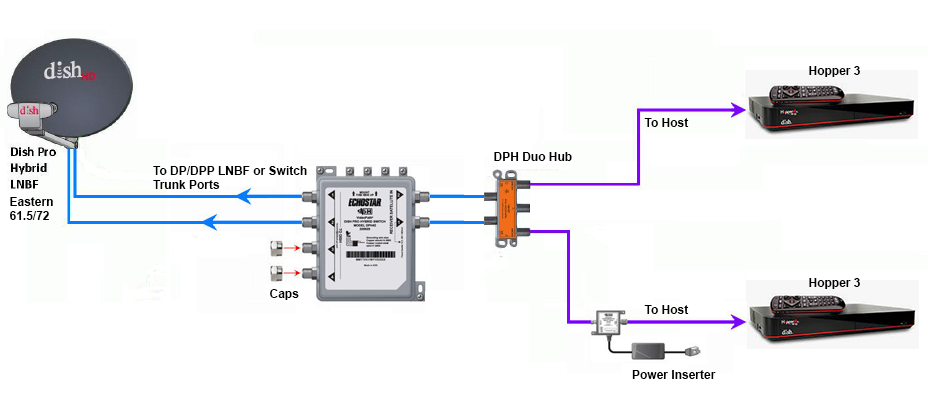
Does someone still have the diagram showing how to connect two Hopper 3s again?

I currently have one H3 and one 4K Joey, set up through a 1000.2 eastern arc hybrid lnb and solo hub.

The plan is to replace the Joey with the second H3. Already purchased a duo hub and I have three coax cables coming in from outside, from back when I used to have the older 1000.4 dish and the hopper 2. I don't fully remember, but I think the other two coax cables are just tied up next to the dish outside; will have to check again.
27 Replies · 5922 views
HipKat
dp6.png

You need a 42 switch.
Run the outputs to the inputs on the Duo Hub
DialgaChampion
You need a 42 switch.
Run the outputs to the inputs on the Duo Hub

Okay, so I made an updated diagram just to make sure I understand this right...

- 2 Coax connected from outside Dish LNB into 42 switch.
- 2 Coax from 42 switch into Duo Hub.
- 1 Coax from Duo Hub into 1st Hopper 3.
- 1 Coax from Duo Hub into Power Inserter.
- 1 Coax from Power Inserter into 2nd Hopper 3.
- Power Inserter plugged into wall electrical outlet.

Did I get that right? And also, I assume the power inserter is required?
HipKat
Okay, so I made an updated diagram just to make sure I understand this right...

- 2 Coax connected from outside Dish LNB into 42 switch.
- 2 Coax from 42 switch into Duo Hub.
- 1 Coax from Duo Hub into 1st Hopper 3.
- 1 Coax from Duo Hub into Power Inserter.
- 1 Coax from Power Inserter into 2nd Hopper 3.
- Power Inserter plugged into wall electrical outlet.

Did I get that right? And also, I assume the power inserter is required?
Twa Coaxes from the LNB if it's Eastern Arc (2 "Eyes") and three if it's Western Arc and yes, the power inserter, it's required
LQQK
Does someone still have the diagram showing how to connect two Hopper 3s again?

I currently have one H3 and one 4K Joey, set up through a 1000.2 eastern arc hybrid lnb and solo hub.

The plan is to replace the Joey with the second H3. Already purchased a duo hub and I have three coax cables coming in from outside, from back when I used to have the older 1000.4 dish and the hopper 2. I don't fully remember, but I think the other two coax cables are just tied up next to the dish outside; will have to check again.
Are you going with 2 H3s for the PIP/Multi-View features or something else?
  • Like
Reactions: charlesrshell
DialgaChampion
Are you going with 2 H3s for the PIP/Multi-View features or something else?

No, it's specifically to fix the problem with the 4K Joey's live feed intermittently freezing. I'll be watching a live program and then randomly out of nowhere, the picture and sound will just pixelate/freeze for 5-10 seconds, then go back to normal. Doesn't matter which channel it's on either. It's like what happens when the signal cuts out during heavy rain or a thunderstorm, but this will happen even on a perfectly clear day/night.

It doesn't happen with my H3 though, only with the Joey. I've replaced the solo hub and I've also replaced the Joey itself with another brand new 4K Joey, but it's still the same problem. And I know it's not the coax going from the hub into the Joey because I previously had another receiver connected in the same room before changing to the whole home dvr setup and that receiver worked fine.

So I'm basing this off process of elimination, which seems to indicate a problem with the 4K Joey device itself. Only thing I haven't tried is maybe getting a regular Joey 3, if that's still the latest model of Joey currently available, but otherwise the only other solution is getting a second Hopper 3. It'd be nice if the 42 and the Power Inserter weren't necessary and I could just use the Duo Hub though.
DialgaChampion
Twa Coaxes from the LNB if it's Eastern Arc (2 "Eyes") and three if it's Western Arc and yes, the power inserter, it's required
Yep just swap the lnb with a dpp lnb and connect the 42 switch.

Finally got around to trying to set everything up. Need some help because I've got an issue.

1st Hopper 3 works fine.

2nd Hopper 3 doesn't show any channels in my Top 200 package in the guide, even though it's set to All Subscribed. But it does see the 1st Hopper 3 and can access the recordings on it.

Here's my setup:
  • DPP EA 61.5/72 LNB on the dish. 2 Coaxes going from LNB into the DPH42 switch.
  • DPH42 "Receiver 1" port > Power Inserter "To Switch" port..... Power Inserter "To Receiver" port > Duo Hub "ODU 1" port.
  • DPH42 "Receiver 2" port > Duo Hub "ODU 2" port.
  • 2 Coaxes from both Host ports on the Duo Hub into both Hopper 3s.
I've spent the last few hours troubleshooting, no success. I did the Test Installation on the Diagnostics screen. Red button. Held Power Button for 15 seconds.

Also tried several different configurations with the coax cables according to Google's AI suggestions. Tried connecting both a Solo Hub and a Duo Hub (I don't have 2 solo hubs at the moment), having each Hopper connected to each hub independently. Tried connecting Receiver 2 from the DPH42 directly into the 2nd Hopper 3. Tried having the Power Inserter connected both before and after the hub.

I even checked my account online. Both Hopper 3s are authorized and "Powered" on the account. Even tried "Wake Up Receivers". That second H3 still won't show my channels in the guide at all.

According to Google's AI, it thinks this is the problem:
  • - When you plug two Hopper 3 units into a single Duo Hub, the hub cannot allocate the correct satellite transponder frequencies to both boxes simultaneously.
  • - As a result, the first Hopper 3 hogs the satellite line, while the second Hopper 3 gets locked out of the satellite signal entirely—causing an empty guide and blocking live TV. The unlinked status on the whole-home screen occurs because the software recognizes the conflict and stops integration.
But none of its solutions have worked. Any ideas?
  • Like
Reactions: charlesrshell
N
Googles AI is wrong as according to what you wrote you have two completely separate satellite line from the switch

My be a dumb question but did you run the check switch option on th 2nd H3

Did you try swapping the H3 to see if the problem switches between the two

That's all I can think of at the moment
DialgaChampion
Googles AI is wrong as according to what you wrote you have two completely separate satellite line from the switch

My be a dumb question but did you run the check switch option on th 2nd H3

Did you try swapping the H3 to see if the problem switches between the two

That's all I can think of at the moment

Check Status complete. No issues found.
Test Installation screen shows green checks for 61.5 and 72, all 16 tuners.
Options > TV Activity shows 1 of 16 tuners in use.

When I bring up the program guide, the dish scapes channel appears and displays fine. The guide also shows the bonusview channels, and the stream and ppv channels.

I tried swapping the 2nd H3's cables with the 1st H3 and having it as the only H3 connected. It still has the same issue, so it seems isolated to the second Hopper 3 itself.

There was another suggestion from Google, not sure if it applies:

If the TV Activity Screen shows that your tuners are "Available" and "1 of 16 in use," your satellite signal path is 100% active and perfectly working. Your hardware wiring bypass has officially succeeded—the second Hopper 3 is successfully talking to the DPH42 switch, receiving high-frequency satellite data, and its internal processors are healthy. Because the hardware is fully operational, the fact that your screen is still black and the guide is missing means your receiver is stuck in Account Quarantine (Authorization Hold). Because a dual Hopper 3 system requires a non-standard account setup (32 tuners instead of the typical 16-tuner cap), standard "Wake Up" hits sent from the customer app or website are getting rejected by the system. The box can look at the data stream (which is why tuners show as available), but it is legally blocked by the internal software from decoding the live video feeds. To flip the switch and activate the live video feed, a DISH billing agent must manually push a tier-3 service re-hit through their legacy terminal.​

Any thoughts?
  • Like
Reactions: charlesrshell
S
No, it's specifically to fix the problem with the 4K Joey's live feed intermittently freezing. I'll be watching a live program and then randomly out of nowhere, the picture and sound will just pixelate/freeze for 5-10 seconds, then go back to normal. Doesn't matter which channel it's on either. It's like what happens when the signal cuts out during heavy rain or a thunderstorm, but this will happen even on a perfectly clear day/night.

It doesn't happen with my H3 though, only with the Joey. I've replaced the solo hub and I've also replaced the Joey itself with another brand new 4K Joey, but it's still the same problem. And I know it's not the coax going from the hub into the Joey because I previously had another receiver connected in the same room before changing to the whole home dvr setup and that receiver worked fine.

So I'm basing this off process of elimination, which seems to indicate a problem with the 4K Joey device itself. Only thing I haven't tried is maybe getting a regular Joey 3, if that's still the latest model of Joey currently available, but otherwise the only other solution is getting a second Hopper 3. It'd be nice if the 42 and the Power Inserter weren't necessary and I could just use the Duo Hub though.
Why not upgrade to the joey 4 with is an android box and dump the 4k joey
DialgaChampion
Ok, I finally solved it. The second Hopper 3 just needed to be updated to the latest software version. After downloading it, all the channels in my package showed up in the program guide. I guess Dish's system is set up so that if your receiver doesn't have the most recent software update, you can't access your channels, even if the receiver is authorized on the account.

Thank you everyone for helping. I'm very proud I was able to set all of this up myself with all of your guidance. I only wish my mother was still alive to enjoy it, but life is not fair.

Why not upgrade to the joey 4 with is an android box and dump the 4k joey

Stubborness perhaps. I could've tried replacing the original H3 to see if that solved the freezing issue too, since it's over 10 years old now. But I spent so much time and effort trying to set up the coax cables correctly and buying all the correct equipment for a 2 Hopper setup that I was determined to get it done. I'm not a DIYer, but this was one thing I was very passionate about doing, to give my parents the best television experience possible without the hassle of internet/streaming.
  • Like
Reactions: charlesrshell
dishstaller
Pub Member / Supporter Lifetime Supporter
· posted in The Chit Chat Club
Videos like this can make you appreciate the things we take for granted.


View: https://www.youtube.com/shorts/a2cgQidHQJI
0 Replies · 4 views
zippyfrog
Pub Member / Supporter Lifetime Supporter
Last reply · posted in DISH Network Support Forum
Over the past year I have been tracking the changes on Western Arc. The past 3 months have had a lot of changes that I posted in the other MPEG2 Western Arc shutdown thread. Now that 129 is (basically) out of commission, here is where Western Arc stands. This is just a national channel list, (no local channels) based off what I can see and what others have contributed. Thanks to everyone who has helped me come up with the locations of some of the channels – I would try and list all of you out, but I know I would forget someone! As has been suggested in other parts of the forum, it would be great to collect the spotbeam data for those who could contribute!

A couple of pieces of info:
  • Out of the 64 transponders between 110/119, there are currently 50 transponders that Dish is licensed to use. 22 are Spotbeams, 28 are ConUS transponders (14 transponders are licensed to DirecTV and Dish doesn't have access to them)
  • Those 28 ConUS transponders are divided as follows:
    • 10 are dedicated to National HD channels (ESPN, CNN, Disney Channel, etc). Dish is maxing out at 16 HD channels per transponder (note – in an earlier post I said there was one transponder with 17 HD channels, that was an error on my part. When I double checked my listings, one channel changed transponders). Before the transition, there was a maximum of 14 HD channels per transponder.
    • 1 transponder is dedicated to adult content
    • 2 are a mixture HD PPV Movies/4k channels
    • 3 are set aside for HD Sports channels that are only on for live games (NBA League Pass, the PAC 12 alternate channels, some PPV events, etc); 3 SD PPV Sports Channels are there as well.
    • 7 are for SD and/or music channels. Dish is maxing out at 26 SD channels per transponder thus far on the SD transponders.
    • 5 transponders on 110 I have no channels listed but Dish operates. (they are labeled as ConUS on my chart below) There are other things that could be on those transponders, like RV Distant Networks, internal testing channels, etc, that I can't see. They might be able to be used for additional content, but I am not sure exactly what is on those transponders.
There are two transponders that have lower than normal SD channels – 110, TP 21 and 119, TP 19. Previously those transponders contained the programming guides that get downloaded from the satellite when the receivers download EPG. I assume that is where the programming guides are still downloaded from, thus less channels there.

When I talk about number of channels on a transponder, all my numbers are unique channels – for example, channel 101 and 199 are the same channel mapped to two different numbers, but in terms of space, only takes up 1 channel worth of bandwidth on the transponder.

Finally, I have to give Dish a ton of credit. When it was 110/119/129, Dish had 82 transponders they were using – it took a lot to get it down to 50 transponders and figure out where all the pieces were going to go. What are the things they did to get there? Here are the things I saw:
  • During this migration from 129, Dish converted 7 ConUS transponders on 119 into Spotbeams – that is how they ended up fitting on all the HD locals that used to be on 129. (for those interested, TP 6, 7, 8, 9, 10, 11, 13 are the ones that used to be ConUS on 119 that are now Spotbeam)
  • Removed almost all SD duplicate channels that are offered in HD
  • Converted remaining SD channels from MPEG2 to MPEG4
  • There are also 2 subtle things that changed from the HD channel perspective
    • At the beginning of the transition, Dish decreased the number of PPV Movie channels – prior to this transition the PPV channels HD PPV movies were 502-522; now they are 502-517.
    • At the beginning of April when MLB, NBA, and NHL regular seasons were all going on at the same time and this transition began, there were a ton of games "joined in progress" for the HD feeds. That wasn't common since the days before the full time HD RSN's. The reason for that was prior to the transition, Dish had 4 transponders set aside for HD Sports – 2 transponders was the bandwidth set aside from the HD RSN's before Dish dropped the RSN's, then 2 transponders were for alternate channels. Now we are down to 3 transponders for HD sports.
253 Replies · 66231 views
zippyfrog
Dish has officially removed all the locals from 119 and they are all on 110 now. TP 02, 04, 06, 08, 10 were all functioning as Spotbeams as of last week, but now they are ConUS.

This means all 21 transponders that Dish has access to at 119 are now ConUS.
  • Like
Reactions: charlesrshell
D
Dish has officially removed all the locals from 119 and they are all on 110 now.
Might be a silly question, but does this mean ALL 29 TP's on 110 are positively spot beams now?
zippyfrog
Might be a silly question, but does this mean ALL 29 TP's on 110 are positively spot beams now?
Nope - TP 1-13 are still ConUS on 110. Which is crazy...there are so many different spotbeams on the new 110 satellite compared to the older 110 or 119. Now, someone can correct me if I am wrong on this - but aren't there two satellites at 110 right now? If so, it looks like TP 1-13 are coming from the old satellite at 110 and 14 onward are spotbeams on the new satellite.
  • Like
Reactions: charlesrshell
D
Now, someone can correct me if I am wrong on this - but aren't there two satellites at 110 right now?
Hopefully nelson61 can chime in on this one, because I'm not sure, either.
I guess the thing I'm really perplexed about, is if there are NO more locals - at least on spotbeams - on 119, then how DID they cram ALL the locals on 110 & NOT have ALL those x-ponders in SB mode by now?
  • Like
Reactions: charlesrshell
zippyfrog
Hopefully nelson61 can chime in on this one, because I'm not sure, either.
I guess the thing I'm really perplexed about, is if there are NO more locals - at least on spotbeams - on 119, then how DID they cram ALL the locals on 110 & NOT have ALL those x-ponders in SB mode by now?

Here was a comment by nelson61 last year:
EchoStar 23 (Conus beam) will still be at 110W so there can be some Conus beam coverage from 110W depending on how many transponders they use for the spots.
In the same thread, he gave all the kml files for the spotbeams to put on Google Earth, and it looks like there are a lot more spotbeams per transponder available than the old satellite. My gut is that there is just a more technilogically advanced satellite, and can handle more channels.

I would love an analysis of how many channels could be fit on all the spots!
  • Like
Reactions: charlesrshell
D
My gut is that there is just a more technilogically advanced satellite, and can handle more channels.
My only trouble with that explanation, is the fact that they are wasting at least 1 TP (TP 10, to be precise) on a local market (part of the Chicago locals are on that TP) that could be used for more CONUS channels (namely more HD!)
meStevo
Lifetime Supporter
Last reply · posted in The Sports Section
Schedule drops tomorrow. Mandatory mini camps in June. Hall of Fame game August 6th.
137 Replies · 2797 views
  • Like
Reactions: Jimbo and dfergie
HipKat
Balls
Bears. Took care of the elite Seahawks defense in a great performance.
NFC North. The entire division is 2 games above .500
Lions. Finally handed an L to that weird Minnesota team. Good vibes for Jack Campbell.
Pitt. Took the lead of the division convincingly.
Bengals vs Titans game. Fireworks game. Not sure it was a well-played game, but it sure was fun. JoeyB with 6 scores... and 4 turnovers.
Denver. They keep winning, man. Payton is a baller of a coach.
Packers. Thorough beatdown of the hard-to-read Panthers.
Jags. Demolished the hapless Colts.
Rams. The Super team finally wins back-to-back games.


Goats
Vikings. Took their first L. I know their D is insane, but their offense is setting back football to the 1950's.
Cowboys. Lost a 2-score lead vs. the Gardner Minshew-led Cards... at home. Embarrassing.
Browns. Playing for the division lead by scoring 6 points.
Bucs vs Falcons game. Setting modern football back to the ice age. Honorable mention to Tua Penix err ... Michael Tagov .... well, you know what I mean.
Bengals fans acting like Burrow just won the MVP after his performance. I get it. 6 scores is awesome. But. He also turned the ball over 4 times and required overtime to beat the 1-win Titans. So spare me the parade.
Chiefs. Not because they lost. It was a close game decided on the last play vs. a divisional rival on the road. That's always rough. But because of their whining over the CLEAR flag they got on the would-be winning play. They are used to getting the calls, and when they don't, they complain. Honorable mention to Mahomes for this quote: "I mean, at the end of the day, you have to go with whatever is called, but a lot of times in those big moments, the little stuff doesn't get called like that"... so you admit it was a penalty?? Just shut up, man.
Colts. They began the fire sale earlier in the week, and it showed. This team is cooked; Daniel Jones should go to the bench, and Steichen will be fired pretty soon.
Chargers. Wow. That's all I got.
Miami. For having the Pats sort of on the ropes and letting them go.
Eagles. Another team that should consider selling some assets. They are going nowhere.
Howard Simmons
Balls
Bears. Took care of the elite Seahawks defense in a great performance.
NFC North. The entire division is 2 games above .500
Lions. Finally handed an L to that weird Minnesota team. Good vibes for Jack Campbell.
Pitt. Took the lead of the division convincingly.
Bengals vs Titans game. Fireworks game. Not sure it was a well-played game, but it sure was fun. JoeyB with 6 scores... and 4 turnovers.
Denver. They keep winning, man. Payton is a baller of a coach.
Packers. Thorough beatdown of the hard-to-read Panthers.
Jags. Demolished the hapless Colts.
Rams. The Super team finally wins back-to-back games.


Goats
Vikings. Took their first L. I know their D is insane, but their offense is setting back football to the 1950's.
Cowboys. Lost a 2-score lead vs. the Gardner Minshew-led Cards... at home. Embarrassing.
Browns. Playing for the division lead by scoring 6 points.
Bucs vs Falcons game. Setting modern football back to the ice age. Honorable mention to Tua Penix err ... Michael Tagov .... well, you know what I mean.
Bengals fans acting like Burrow just won the MVP after his performance. I get it. 6 scores is awesome. But. He also turned the ball over 4 times and required overtime to beat the 1-win Titans. So spare me the parade.
Chiefs. Not because they lost. It was a close game decided on the last play vs. a divisional rival on the road. That's always rough. But because of their whining over the CLEAR flag they got on the would-be winning play. They are used to getting the calls, and when they don't, they complain. Honorable mention to Mahomes for this quote: "I mean, at the end of the day, you have to go with whatever is called, but a lot of times in those big moments, the little stuff doesn't get called like that"... so you admit it was a penalty?? Just shut up, man.
Colts. They began the fire sale earlier in the week, and it showed. This team is cooked; Daniel Jones should go to the bench, and Steichen will be fired pretty soon.
Chargers. Wow. That's all I got.
Miami. For having the Pats sort of on the ropes and letting them go.
Eagles. Another team that should consider selling some assets. They are going nowhere.
Mahomes is the biggest cry baby I have ever seen. He thinks he's privileged or something.🙄
R
Mahomes is the biggest cry baby I have ever seen. He thinks he's privileged or something.🙄
So is Kelce.
meStevo
Just the same vilification as players like Brady experienced, a product of their success and largely overblown (just like them 'getting all the calls').
  • Like
Reactions: Mike0616 and AZ.
Y
Mahomes is the biggest cry baby I have ever seen. He thinks he's privileged or something.🙄
Well you see him more because he is incredibly talented. And yes, typically players try to spin things being in their favor. This isn't cricket where sportsmanship (except in Australia) is expected.
  • Haha
Reactions: Mike0616
HipKat
Mahomes is the biggest cry baby I have ever seen. He thinks he's privileged or something.🙄
He wants to be Brady
  • Haha
  • Like
Reactions: AZ. and Mike0616
HipKat
Just the same vilification as players like Brady experienced, a product of their success and largely overblown (just like them 'getting all the calls').
The only people who deny what Brady got from the officials are Brady fans
  • Like
Reactions: AZ. and Mike0616
Scott Greczkowski
Staff member HERE TO HELP YOU! Cutting Edge
Last reply · posted in The Chit Chat Club
Sometimes a thread gets so many posts in it that is can cause issues for the server so that why today we introduce The Song Name Game Part 3!

So let the game continue!

The last song was added by Bobby who posted...

One Meat Ball - Andrews Sisters

CONTINUE ON AND HAVE FUN! WELCOME HOME TO SATELLITEGUYS.US!

Here are the original rules for the game as posted by WebbyDude back in 2006. http://www.satelliteguys.us/threads/68645-Song-Name-Game

Just name a song title and the band who performed it. The next person does the same thing, but needs to list a song title or band name which includes a word from the previous entry. Pick songs from any genre.

Example:

Long Live Rock and Roll -- Rainbow

Rainbow in the Dark -- Dio

Another example:

Ride the Lightning -- Metallica

Lightning Strikes -- Ozzy Osbourne


Get it?


An additional note: we all know that song titles, sometimes, use profane words. Because this is a family friendly website it is advised that you clean up that title up a bit. This is accomplished by using something like sh!t instead of the real word. Thanks....
68742 Replies · 2684443 views
  • Like
Reactions: c-spand
dishstaller
Coming Back to Life - Pink Floyd
gms49ers
Echos - Pink Floyd
dishstaller
Echoes in the Rain - Enya
  • Like
Reactions: Bobby
gms49ers
Fool in the Rain - Led Zeppelin
  • Like
Reactions: long_time_Dish
long_time_Dish
Mandolin Rain - Bruce Hornsby
ewindowman
Lifetime Supporter
Last reply · posted in DISH Network Support Forum
Looks like dish is Bankrupt. Filling tomorrow Tuesday June 30th
444 Replies · 15221 views
nelson61
Washington Post

SpaceX has held talks with Boost's parent company EchoStar in recent months about launching its own signature wireless service through a deal with the company, according to two people familiar with the negotiations.
Musk, the SpaceX CEO, has discussed the deal personally, meeting with EchoStar chairman Charlie Ergen last month, according to the people. The potential deal may result in SpaceX acquiring Boost Mobile or SpaceX gaining access to its network, which it leases from AT&T and T-Mobile US, the people said.
Access to those lease agreements would be a coup for SpaceX. The back door would allow Musk to make a play for a U.S. wireless market that equity research firm MoffettNathanson estimates is worth $235 billion. But the proposed service may need consent from those carriers for the service to actually launch, the people said.
Scott Greczkowski
Washington Post

SpaceX has held talks with Boost's parent company EchoStar in recent months about launching its own signature wireless service through a deal with the company, according to two people familiar with the negotiations.
Musk, the SpaceX CEO, has discussed the deal personally, meeting with EchoStar chairman Charlie Ergen last month, according to the people. The potential deal may result in SpaceX acquiring Boost Mobile or SpaceX gaining access to its network, which it leases from AT&T and T-Mobile US, the people said.
Access to those lease agreements would be a coup for SpaceX. The back door would allow Musk to make a play for a U.S. wireless market that equity research firm MoffettNathanson estimates is worth $235 billion. But the proposed service may need consent from those carriers for the service to actually launch, the people said.
Can't remember where or who I saw predict this. :D

It wouldn't surprise me to see Elon soon own all of DISH / Echostar in the future.
Bruce
It wouldn't surprise me to see Elon soon own all of DISH / Echostar in the future.
Again, why would Musk want a TV Service, specially one that is losing over a million subscribers a year.

Phone service…maybe, but not TV.
Scott Greczkowski
Again, why would Musk want a TV Service, specially one that is losing over a million subscribers a year.

Phone service…maybe, but not TV.
I know he wants TV. He wants to deliver EVERYTHING to EVERYWHERE.
Bruce
I know he wants TV. He wants to deliver EVERYTHING to EVERYWHERE.
Again, if so, why would he want Dish/Sling of all the providers?

He could deliver anything without actually owning, for example, watching the Lions game in my Tesla Y on it's screen via the YT app, while on the way to my future in-laws on Sunday.
rvvaquero
If Musk did acquire DISH, he would just convert it to use his own satellites to deliver it. Might be easier than creating a new startup. Change my dish out to one which connects to Starlink? Who knows?
S
  • Like
Reactions: charlesrshell
S
  • Like
Reactions: charlesrshell
T
Last reply · posted in DISH Network Support Forum
I was bewildered with all the new DISH TV "Bonus View" channels, so I put together a web page table with all the info I could find. It's at:

https://anythingpeaceful.org/dishtv/DISH_TV_Bonus_View_Channels.html

Here's a partial screenshot of the table, as sorted by Channel Name. (You can click on a column header to sort.)

screenshot.jpg


If you have any corrections or suggestions, please post here.
46 Replies · 6267 views
T
One Bonus View channel added today. And one correction (on my part):

added and corrected.webp


One Removed:

removed.webp


My full list is at: DISH TV "Bonus View" Channels

BTW, not a Bonus View item, but there was a temporary channel 304 Spooktacular added, I imagine just for the Halloween season.

Thanks again to Pat for the many tips.
  • Like
Reactions: charlesrshell
T
Three new Bonus View channels today:

pic.webp


My full list is at: DISH TV "Bonus View" Channels

As always, thanks to Pat for the tips.
T
Four Bonus View channels removed today:

pic1.webp
  • Like
Reactions: charlesrshell
B
Why all the changes?
  • Like
Reactions: charlesrshell
T
Why all the changes?
I guess the Bonus View world is very dynamic.

And here's two more changes for you:
pic.webp
  • Like
Reactions: charlesrshell
meStevo
Lifetime Supporter
Last reply · posted in The Chit Chat Club
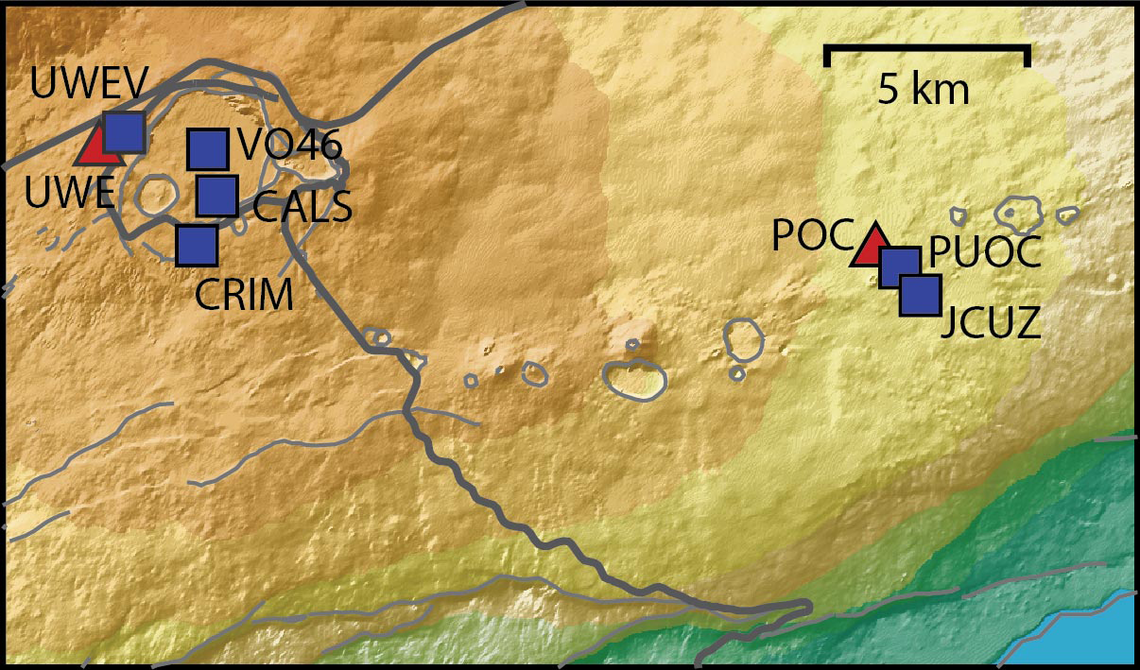
Continuing the Kilauea thread in the Pub here. Perhaps the Iceland one too next time there's remarkable activity.

Currently there is precursory lava flowing into the crater, leading to the next episode that'll probably start within the next day.

You can see the pace of inflation / deflation here. It serves as the primary predictor for when the expect the eruptions, which coincide w/ inflation turning into significant deflation and last for several hours on average with significant fountaining.


View: https://youtu.be/Uecu2seh4b4


Wife and I like the AfarTV feeds, for the discussion along w/ them, though they're otherwise just mirrors of the official USGS feeds.


View: https://youtu.be/iws3rh5vLAQ
122 Replies · 3620 views
  • Like
Reactions: osu1991
Foxbat
Oooo, quite the show now. All three vents have doming and overflows. The cone that built up around the North vent lost its upper quarter at 02:50 Oct 17 and is now spewing lava at a healthy rate. Don't know if I would say it's a fountain, but it's close.


IMG_1534.webp

edit: The USGS has called the official start of Episode 55 as starting at 03:19 HST Oct 17, 2026:

Alert Level: WATCH, Color Code: ORANGE 2026-10-17 13:43:56 UTC
HVO/USGS Volcanic Activity Notice

Volcano: Kilauea (VNUM #332010)

Current Volcano Alert Level: WATCH
Current Aviation Color Code: ORANGE

Issued: Saturday, October 17, 2026, 3:43 AM HST
Source: Hawaiian Volcano Observatory
Notice Number: 2026/H488
Location: N 19 deg 25 min W 155 deg 17 min
Elevation: 4091 ft (1247 m)
Area: Hawaii

Summary: Episode 55 of the ongoing Halemaʻumaʻu eruption began at 3:19 AM HST on October 17, 2026.

Volcanic Activity:
Episode 55 of lava fountaining in Halemaʻumaʻu began at the summit of Kīlauea began at 3:19 AM HST on October 17, 2026.

Fountain heights are relatively low at about 100-150 feet (30-45 m), and it is not clear whether this episode will evolve to the same heights as previous episodes. Continuous overflows from the vents began yesterday, October 16, just before 6 a.m. HST and transitioned into episode 55 fountains at 3:19 a.m. HST this morning. The current forecast is for winds are blowing from the north-northeast direction, which suggests that volcanic gas emissions and volcanic material may be distributed to the south-southwest direction from Halemaʻumaʻu.
  • All eruptive vents and lava flows are confined to Halemaʻumaʻu crater within Hawaiʻi Volcanoes National Park. Tephra fall from volcanic ash clouds is greatest within 3 miles (5 km) of the vents, lighter ash and Pele's Hair may stay suspended for large distances from the vents.
Foxbat
Kīlauea seems to be returning to the "normal" eruption script, impressive fountaining from the North Vent. For once, the V2 Cam has the best overall shot:
IMG_1535.webp
The lava flows have covered a good portion of the Halemaʻumaʻu crater floor.
Foxbat
Looks like Episode 55 is over at 09:00 HST, just under six hours. The USGS said the fountains reached 720' or 220 meters.
​
  • Like
Reactions: RaiderPower
Foxbat
The USGS Kīlaeua Webcam #1 has been showing overflows and doming from the North vent overnight. Maybe the volcanic plumbing has settled back into its two-three week cycle of fountaining?

But I do miss the little cinder cone that broke up in the last episode.
Foxbat
Sorry, I should have posted these earlier:

​

We're still waiting on the start of Episode 56.
  • Like
Reactions: RaiderPower
TWiT Tech Podcast Network
· posted in TWiT Tech Podcast Network
0 Replies · 9 views
dishstaller
Pub Member / Supporter Lifetime Supporter
Last reply · posted in The Chit Chat Club
Now first, I'll mention that the area of FL I live in has extremely high humidity and not a lot of wind so things don't dry out very well for extended periods of time.
I'm in the process of tearing down and rebuilding a pergola with a surrounding deck that I built 9 yrs ago. 90% of the deck screws are just sheering off at the head because the screws rusted out. These are the deck screws you buy in the 25 lb box at your lumber yard. Very annoying. So I just ordered some 316L stainless steel screws to use for when I go to rebuild it.
3 Replies · 63 views
AZ.
AZ.
Now first, I'll mention that the area of FL I live in has extremely high humidity and not a lot of wind so things don't dry out very well for extended periods of time.
I'm in the process of tearing down and rebuilding a pergola with a surrounding deck that I built 9 yrs ago. 90% of the deck screws are just sheering off at the head because the screws rusted out. These are the deck screws you buy in the 25 lb box at your lumber yard. Very annoying. So I just ordered some 316L stainless steel screws to use for when I go to rebuild it.
Screws are all crap, soft and useless! Sick of going through 3 to get one not to break, strip or shear! I aint that strong in my old age!
T
Well, isn't removal of screws intrinsically much tougher than drive-in, simply because over time they become more adhered to the wood, whether or not they actively rust? Possibly there could be less of that effect with stainless.
dishstaller
Well, isn't removal of screws intrinsically much tougher than drive-in, simply because over time they become more adhered to the wood, whether or not they actively rust?
I have seen that happen that not in this case. I had also used some screws from an old box I had that I needed to use up....didn't think much of it at the time. ALL of THOSE screws came out perfectly and had virtually no rust on them. The ones that you find at your lumber yard....those with the orange snap on lids were mostly rust. The problem with the heads sheering off was that I had to get my crowbar and pry each board up one joist at the time. Took a simple job and made it 1000% harder.

As for adhering to the wood...true story. Back when hurricane Michael hit, it almost took the weather vane off of the old milk barn behind my parent's house. I climbed up on the roof and only one nail was still holding it. Grabbed my hammer and tried to pull it out...wasn't budging. Grabbed a short crowbar (all I had access to) wouldn't budge. Ended up cutting the stupid nail so I could get the weather vane. Barn was built in the late 40s, I guess the nail had become one with the pine lumber used to build the barn.