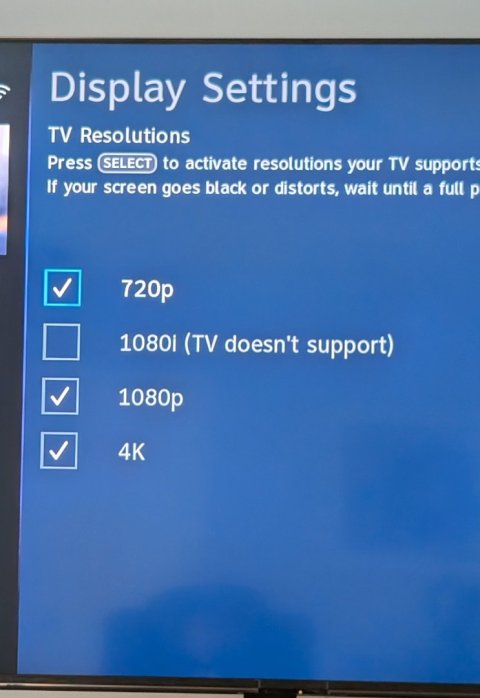
"1080i Not Supported"

Status
Please reply by conversation.

RichManitoba

SatelliteGuys Pro
Mar 5, 2010
199
25
Madison, WI
I recently bought a Bravia 7, 65 inch.
Set up was easy with DirecTV and my Bose soundbar.
However, when I scroll through the information banner to change the resolution (other than when I am on a 4K Channel), the best I can do is 720p.

In the DirecTV resolution settings, 720p, 1080p, and 4K are checked, but I can't check the 1080i box because it states the TV doesn't support.
Is it possible the new HDMI cord I bought is the problem?
(10K -8K HDMI 2.1 Ultra High Speed)

So the bottom line is, I hope I didn't just buy a new QLED, and not be able to watch 1080 from my DirecTV 4K box.
(My previous big screen was a 8 year old 60 inch Samsung which supported all resolutions)

Any help is appreciated thank you.
 

"MysteryMan"

SatelliteGuys Pro
Pub Member / Supporter
Cutting Edge
Apr 27, 2023
704
379
USA
First try using a different HDMI cable. If that doesn't solve the issue go into your Sony Bravia's Apps menu and select the Help app. Select Problem Diagnosis, then select Self Diagnostics. If no issues are reported, try resetting your Sony Bravia. If the issue is still there perform a CLEARMYBOX on your DIRECTV server. Allow 24-48 hrs for everything to reload. I have a Sony XBR-55X900F and a Sony MASTER series XR65A95L connected to my DIRECTV HR54-200 - C61K-700 with all resolutions checked and have no issues,
 

RichManitoba

SatelliteGuys Pro
Mar 5, 2010
199
25
Madison, WI
First try using a different HDMI cable. If that doesn't solve the issue go into your Sony Bravia's Apps menu and select the Help app. Select Problem Diagnosis, then select Self Diagnostics. If no issues are reported, try resetting your Sony Bravia. If the issue is still there perform a CLEARMYBOX on your DIRECTV server. Allow 24-48 hrs for everything to reload. I have a Sony XBR-55X900F and a Sony MASTER series XR65A95L connected to my DIRECTV HR54-200 - C61K-700 with all resolutions checked and have no issues,
Thank you, MM.
I'll connect a standard HDMI, and if that doesn't work I'll use your other suggestions. Thank you!
 

Bruce

Bender and Chloe, the real Members of the Year
Supporting Founder
Lifetime Supporter
Nov 29, 2003
17,655
23,165
Thank you, MM.
I'll connect a standard HDMI, and if that doesn't work I'll use your other suggestions. Thank you!
Actually, you might need to go into your menu, change the input to enhanced.

I have two Sonys, the inputs that would take a 4K/DV signal, I had to switch it so it would.

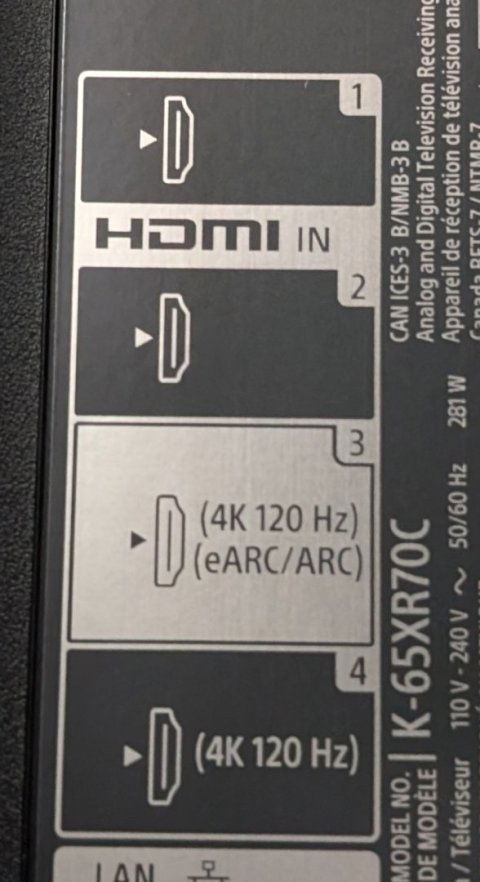
Also, the Bravia 7, only two inputs that will take accept the 4K signal, unfortunately, one is the eArc port, so you might need to check what input you have it in.
 

RichManitoba

SatelliteGuys Pro
Mar 5, 2010
199
25
Madison, WI
Actually, you might need to go into your menu, change the input to enhanced.

I have two Sonys, the inputs that would take a 4K/DV signal, I had to switch it so it would.

Also, the Bravia 7, only two inputs that will take accept the 4K signal, unfortunately, one is the eArc port, so you might need to check what input you have it in.
I'm using the HDMI eARC for my Bose soundbar. I'm using the other 4K HDMI for my Dtv mini 4K Genie.
I've changed HDMI cords, and didn't help.
I'm searching for settings in the Sony TV for resolution, but just getting it the other day I'm still learning since it doesn't come with a user's manual.
 

Bruce

Bender and Chloe, the real Members of the Year
Supporting Founder
Lifetime Supporter
Nov 29, 2003
17,655
23,165
I'm using the HDMI eARC for my Bose soundbar. I'm using the other 4K HDMI for my Dtv mini 4K Genie.
You never answered what port.

HDMI 3 is for ARC.

HDMI 4 is HDMI 2.1, use that one, should give you the least amount of trouble.

But you need to change it to enhanced in the menu

I've changed HDMI cords, and didn't help.
Not the problem.
I'm searching for settings in the Sony TV for resolution, but just getting it the other day I'm still learning since it doesn't come with a user's manual.
 

"MysteryMan"

SatelliteGuys Pro
Pub Member / Supporter
Cutting Edge
Apr 27, 2023
704
379
USA
I'm using the HDMI eARC for my Bose soundbar. I'm using the other 4K HDMI for my Dtv mini 4K Genie.
I've changed HDMI cords, and didn't help.
I'm searching for settings in the Sony TV for resolution, but just getting it the other day I'm still learning since it doesn't come with a user's manual.
Go to Crutchfield's website and type in your TV's model number. You'll be able to download the user manual there.
 

RichManitoba

SatelliteGuys Pro
Mar 5, 2010
199
25
Madison, WI
You never answered what port.

HDMI 3 is for ARC.

HDMI 4 is HDMI 2.1, use that one, should give you the least amount of trouble.

But you need to change it to enhanced in the menu


Not the problem.

•Yes, my soundbar is connected to eARC which is HDMI 3.
•My DirecTV client is connected to HDMI 4.
•I have a Blu-ray in HDMI 2.
•All inputs are in enhanced mode.
• I contacted SONY who said it's a DIRECTV issue.
• I contacted DirecTV who said it's a TV issue.
I haven't done a clear my box, but DirecTV said that won't do anything. That's why I'll probably try it.
 

Attachments

  • PXL_20240813_002126442~2.jpg
    PXL_20240813_002126442~2.jpg
    85.2 KB · Views: 124
  • PXL_20240819_204804344.jpg
    PXL_20240819_204804344.jpg
    76 KB · Views: 142

RichManitoba

SatelliteGuys Pro
Mar 5, 2010
199
25
Madison, WI
•Yes, my soundbar is connected to eARC which is HDMI 3.
•My DirecTV client is connected to HDMI 4.
•I have a Blu-ray in HDMI 2.
•All inputs are in enhanced mode.
• I contacted SONY who said it's a DIRECTV issue.
• I contacted DirecTV who said it's a TV issue.
I haven't done a clear my box, but DirecTV said that won't do anything. That's why I'll probably try it.
I've tried everything and there is no change, other TVs in the house a couple of (16 and 20 in) show they are receiving in 1080. I don't understand why I can't get this TV to broadcast in 1080. Don't get me wrong, it's a beautiful picture, but .......
 

Foxbat

Addicted to new HW
Supporting Founder
Pub Member / Supporter
Lifetime Supporter
Nov 25, 2003
24,584
20,321
Michiana
If your setup supports 1080p, is it a problem that it doesn't support the "lesser" 1080i format? Are there channels that won't display because they need 1080i?
 
  • Like
Reactions: Tom Speer

RichManitoba

SatelliteGuys Pro
Mar 5, 2010
199
25
Madison, WI
If your setup supports 1080p, is it a problem that it doesn't support the "lesser" 1080i format? Are there channels that won't display because they need 1080i?
The only problem is I chose this TV , but apparently it won't support what DirecTV is broadcasting in, 1080i.
I was told by SONY if a TV supported 1080p it would support 1080i.
If it's only showing me 720p except for the actual DirecTV 4K channels, where it is 4K), why did I spend the money? As I mentioned, I have two smaller TVs that are 6 to 8 years old that are receiving the 1080i.
 
  • Like
Reactions: Foxbat

raoul5788

Studebaker driver
Staff member
HERE TO HELP YOU!
Supporting Founder
Lifetime Supporter
Dec 28, 2004
33,157
18,482
Cheshire CT
The only problem is I chose this TV , but apparently it won't support what DirecTV is broadcasting in, 1080i.
I was told by SONY if a TV supported 1080p it would support 1080i.
If it's only showing me 720p except for the actual DirecTV 4K channels, where it is 4K), why did I spend the money? As I mentioned, I have two smaller TVs that are 6 to 8 years old that are receiving the 1080i.
What's the model # of the TV?
 

Bruce

Bender and Chloe, the real Members of the Year
Supporting Founder
Lifetime Supporter
Nov 29, 2003
17,655
23,165
What's the model # of the TV?
He already posted it was a Sony Bravia 7, which is a new model (2024)-

The only thing I can suggest, go into his menu and check your inputs again, here is my Sony Z9K (2022)-
IMG_1438.jpeg

IMG_1439.jpeg
 

Bruce

Bender and Chloe, the real Members of the Year
Supporting Founder
Lifetime Supporter
Nov 29, 2003
17,655
23,165
Thanks, I know all inputs are "Enhanced Format", but I'll check and see if they're Dolby Vision or 4K120,8K.
Maybe THAT would make a difference.
Did you resolve this?
 
Status
Please reply by conversation.

Max logon not working

Directv rewards ripped me off