

MoCA Question, unknown wireless Joey

  • ENJOY SATELLITEGUYS AD FREE THIS FEBRUARY!

    Thank you to the very generous support we got from our members in December we have decided to make the month of February AD FREE for everyone!

    We want to see the true speed of our site and enjoy SatelliteGuys the way it was meant to be enjoyed!

    If you would like to help us keep the lights on and keep enjoying the site AD FREE consider becoming a PUB MEMBER by CLICKING HERE.

    THANK YOU TO EVERYONE FOR YOUR SUPPORT!

gasman882001

SatelliteGuys Pro
Original poster
Lifetime Supporter
Jan 13, 2004
698
138
Houston, Tx
Just started noticing a MoCA red icon in the bottom left of my TV screen. Recent software update??? Reset everything and still receive the error. I have 1 Hopper3, and 1 wireless Joey. I noticed a second one showing up (wireless Joey AP2) while performing diagnostics and have no clue who/what this is? I do live in a sub-division so could this be the neighbors? If so, why would they have on and not connected to their own system? I have attached some screen prints I took this morning. At a minimum, how to get rid of the MoCA on the main tv screen. My 2 tvs are working fine as of last night. I also have an Amazon Fire stick upstairs, so once in a great while watch Dish from that but have not done it recently, not sure how that could be causing this. Any help would be appreciated.
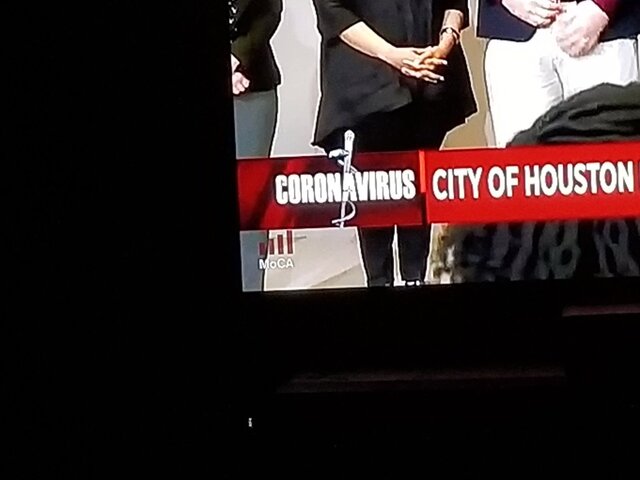
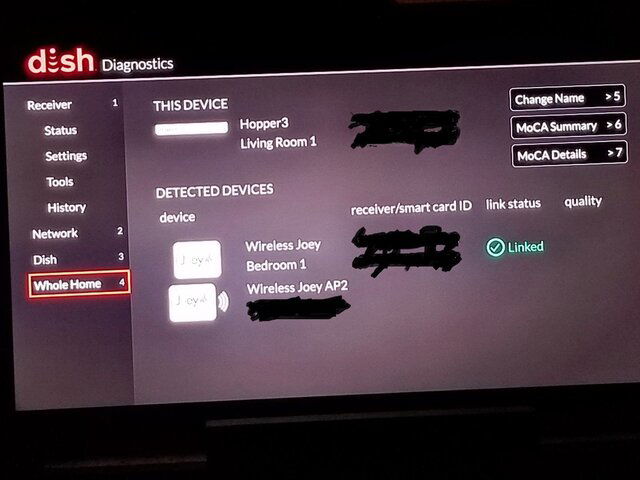
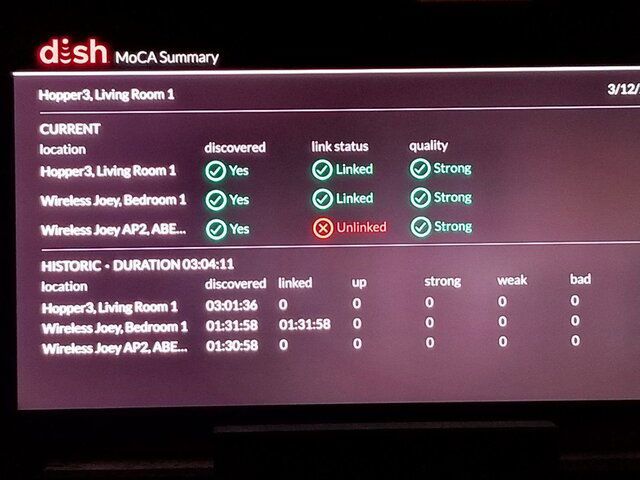
moca RED error on TV screen.jpgLinked.jpgmoca summary.jpg
 

How full is my Hopper 3?

Help with VIP 211Z

Users Who Are Viewing This Thread (Total: 0, Members: 0, Guests: 0)

Who Read This Thread (Total Members: 2)