

Questions about the Sofabaton Universal Remote

Advertisements

Foxbat

Addicted to new HW
Original poster
Supporting Founder
Pub Member / Supporter
Lifetime Supporter
Nov 25, 2003
27,463
24,532
Michiana
Well, I don't know about you, but I have a Harmony Universal Remote and it works great for controlling all the devices in my Home Theater. The problem is the Harmony remote we have is old, experiencing polymer degradation (i.e., its soft-touch case is "sticky" to the touch), and it's on it's second replacement LiIon battery. At some point the battery will die again and I'll be bringing out all the old remotes from hiding.

Also, our tech-adverse friend loves the Harmony 580 (I think that's the model number) that controls her TV, Satellite, AVR, CD player, etc., but she's afraid that she's going to kill the Mute button the further we get into the 2024 Presidential Election. To be fair, she mutes all commercials, so political ads are not her only target for "Mute"…

I have been keeping an eye on the Universal Remote market, especially those that allow for Macro Commands (switch on the TV, switch to Local OTA tuner, tune to Channel xx.ss, switch on the AVR, set input to ARC/HDMI 1, set audio to Dolby Digital, and set volume to 20%) that can be assigned to a single "Watch TV" button. I haven't seen anything promising until Sofabaton showed up.

So I will ask SatelliteGuys, does anyone here have one of the Sofabaton remotes? Does it work as well or better than the Harmony remote? How difficult is it to program? Does it have a good build quality?

Here's a review that came out last month from Tom's Hardware:
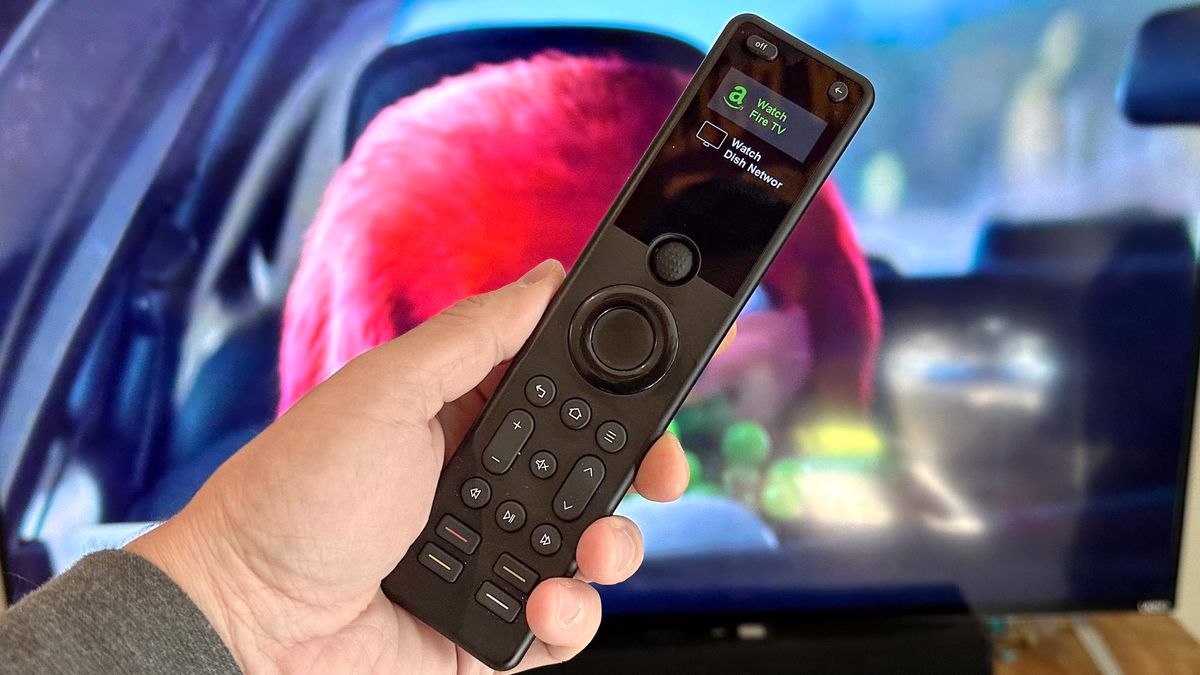
 
I think the bigger question may be how substantial the associated device database is.

Universal remotes have taken a big hit from HDMI-CEC and rightly so.

URC still makes some powerful remotes but they're wicked expensive.
 
I'm also very interested in this answer. A lot of interest in these products right now from Solid Signal customers.
 
  • Like
Reactions: Foxbat
HDMI and CEC is great if your equipment is recent and talks with everything else, but my tech-adverse friend is not going to like me telling her if the $55 remote dies, she has to replace her entire entertainment center. Maybe not the Denon, but most everything else is over ten years old.
 
I have a U1 model from a couple years ago. It does not have the Hub. Been a while but I recall setup was pretty simple via the iPhone app. I didn't have any need for macros so didn't venture in there. Seems to be similar build quality to what I recall of the Harmonys. I was never fond of the Harmony software so I found this easier.

But honestly, I use the Sony TV remote the vast majority of the time.
 
  • Like
Reactions: Foxbat
Sorry to resurrect my old thread, but I had fun with the Sofabaton U2 remote last week, getting it programmed to control the menagerie of devices in our summer vacation home. My brother had donated the 50" Sceptre HDTV years back, and it keeps on going, so fortunately, it was in the device database. The AVR is a Denon AVR-S760H, the satellite is a Dish ViP 211k, the Blu-ray player is a Panasonic BD-35, and there is a Roku 4K Stick plugged into the Aux2 port on the Denon.

My biggest gripe with the U2 is the lack of Activities that I was so used to with the Harmony remote. There is a Macro capability where you can string together IR codes to get the Entertainment System into the correct configuration, but again, not very editable so you're deleting and recreating the Macro, so it's a pain.

Another disappointment wasn't Sofabaton's fault, but the Roku Stick doesn't do Bluetooth or IR, just proprietary Wi-Fi from the Roku voice remote. It works and all, but gosh darn it, now we're back to having multiple remotes on the end table.

The final letdown for me was not being able to program in all the functions for the Denon. The Harmony can select the different Surround modes via an IR Code that the Harmony can send, faster than cycling though the different Surround modes via the Movie or Music buttons. The App used to program the Sofabaton U2 does not list those Functions, so you can't assign them to a free button (which on the U2, aren't many). Since the Denon Remote doesn't produce this code, you can't use it to "Learn" that code with the U2 remote.

One thing I did find useful was the ability to have the Front Deck speakers available as one of the U2's Devices. That made it much easier to control than using the Denon Remote, pressing Zone 2, selecting the audio input, and setting the volume, then remembering to put the remote back into Main Zone to control the living room volume. If I'm outside on the deck, I'm still going to use my phone's Denon App and control the outside speakers that way as it's communicating via the Cabin LAN, no line-of-sight to the IR receiver needed.

With the U2, there is a Power Button which is used to control the power of the selected device, and a TV Power button which controls the power on the TV. One oddity I found was needing to verify for every device that the Device Power was the Power Toggle for that device, and that the TV Power was set to the Sceptre's Power Toggle code.

Once everything was set up, a little tuning of missing functions was performed. Example: The U2 remote does not have an ⏏ button for opening/closing the tray. So I assigned the "E" button on the keypad to "Eject" by learning the ⏏ button on the Panasonic remote.

Six years back I came up with a cheatsheet with the Denon and TV remotes, and a matrix saying what Inputs for the Denon and TV need to be to watch/listen to the various sources. I need to generate a new cheatsheet that uses the Sofabaton U2 and incorporates the Roku remote as well.
1786291835172.webp
 
  • Like
Reactions: navychop

Remember When

Sony’s Dazzling New Display Adds to the RGB LED TV Hype