

Social Feed

Supporting Founder
I have a HP notebook with xp that I put an extra gig of memory in it that maxed it out at 2gig. Is there any settings I should change to max out the speed of the this thing ? Thanks in advance for any suggestions.
8 Replies
·
2166 views


Staff member
HERE TO HELP YOU!
Anyone making their own breakfast sausage? I've recently been trying different recipes, found some I like, some I've modified...
37 Replies
·
3544 views


TWiT Tech Podcast Network
Time for another AWESOME video from the TWIT Network!
View: https://www.youtube.com/shorts/dw_V2FYKRUk
Direct YouTube Link - AI Model Poisoned: Uncovering Hidden Dangers #shorts
TWIT's Website
TWIT Live Feed
View: https://www.youtube.com/shorts/dw_V2FYKRUk
Direct YouTube Link - AI Model Poisoned: Uncovering Hidden Dangers #shorts
TWIT's Website
TWIT Live Feed
0 Replies
·
1 views
TWiT Tech Podcast Network
Time for another AWESOME video from the TWIT Network!
View: https://www.youtube.com/watch?v=Y1R9ZVnuUpw
Direct YouTube Link - Club TWiT: Mikah's Crafting Corner #25 - Ray Gun Papercraft Part 6
TWIT's Website
TWIT Live Feed
View: https://www.youtube.com/watch?v=Y1R9ZVnuUpw
Direct YouTube Link - Club TWiT: Mikah's Crafting Corner #25 - Ray Gun Papercraft Part 6
TWIT's Website
TWIT Live Feed
0 Replies
·
2 views

Staff member
HERE TO HELP YOU!
Cutting Edge
Sometimes a thread gets so many posts in it that is can cause issues for the server so that why today we introduce The Song Name Game Part 3!
So let the game continue!
The last song was added by Bobby who posted...
One Meat Ball - Andrews Sisters
CONTINUE ON AND HAVE FUN! WELCOME HOME TO SATELLITEGUYS.US!
Here are the original rules for the game as posted by WebbyDude back in 2006. http://www.satelliteguys.us/threads/68645-Song-Name-Game
Just name a song title and the band who performed it. The next person does the same thing, but needs to list a song title or band name which includes a word from the previous entry. Pick songs from any genre.
Example:
Long Live Rock and Roll -- Rainbow
Rainbow in the Dark -- Dio
Another example:
Ride the Lightning -- Metallica
Lightning Strikes -- Ozzy Osbourne
Get it?
An additional note: we all know that song titles, sometimes, use profane words. Because this is a family friendly website it is advised that you clean up that title up a bit. This is accomplished by using something like sh!t instead of the real word. Thanks....
So let the game continue!
The last song was added by Bobby who posted...
One Meat Ball - Andrews Sisters
CONTINUE ON AND HAVE FUN! WELCOME HOME TO SATELLITEGUYS.US!
Here are the original rules for the game as posted by WebbyDude back in 2006. http://www.satelliteguys.us/threads/68645-Song-Name-Game
Just name a song title and the band who performed it. The next person does the same thing, but needs to list a song title or band name which includes a word from the previous entry. Pick songs from any genre.
Example:
Long Live Rock and Roll -- Rainbow
Rainbow in the Dark -- Dio
Another example:
Ride the Lightning -- Metallica
Lightning Strikes -- Ozzy Osbourne
Get it?
An additional note: we all know that song titles, sometimes, use profane words. Because this is a family friendly website it is advised that you clean up that title up a bit. This is accomplished by using something like sh!t instead of the real word. Thanks....
68508 Replies
·
2671477 views


Lifetime Supporter
Continuing the Kilauea thread in the Pub here. Perhaps the Iceland one too next time there's remarkable activity.
Currently there is precursory lava flowing into the crater, leading to the next episode that'll probably start within the next day.
You can see the pace of inflation / deflation here. It serves as the primary predictor for when the expect the eruptions, which coincide w/ inflation turning into significant deflation and last for several hours on average with significant fountaining.
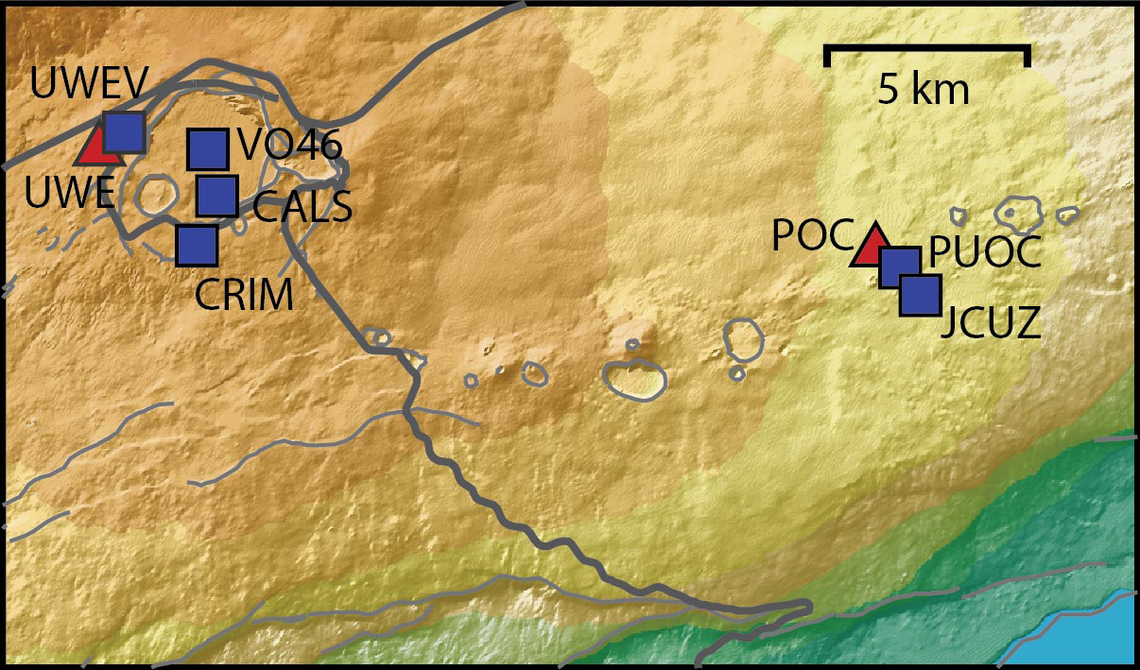
 www.usgs.gov
View: https://youtu.be/Uecu2seh4b4
Wife and I like the AfarTV feeds, for the discussion along w/ them, though they're otherwise just mirrors of the official USGS feeds.
View: https://youtu.be/iws3rh5vLAQ
Currently there is precursory lava flowing into the crater, leading to the next episode that'll probably start within the next day.
You can see the pace of inflation / deflation here. It serves as the primary predictor for when the expect the eruptions, which coincide w/ inflation turning into significant deflation and last for several hours on average with significant fountaining.
Monitoring Data for Kīlauea
For more information on how electronic tiltmeters and GPS receivers help monitor the deformation of Kīlauea volcano, see the HVO Deformation page.
View: https://youtu.be/Uecu2seh4b4
Wife and I like the AfarTV feeds, for the discussion along w/ them, though they're otherwise just mirrors of the official USGS feeds.
View: https://youtu.be/iws3rh5vLAQ
117 Replies
·
3209 views


Anyone else watch this show? Any guesses as to what was in the box Gibbs gave to Abby that was on her desk? It look liked it was glowing.
I also heard that someone was leaving the show at the end of this season. Any guesses as to who thats going to be?
I also heard that someone was leaving the show at the end of this season. Any guesses as to who thats going to be?
2134 Replies
·
214745 views


 Tony is not serious enough for me. Parker is too close to the team and Tim is too young to take over IMO.

TWiT Tech Podcast Network
Time for another AWESOME video from the TWIT Network!
View: https://www.youtube.com/watch?v=n43A0sNukCg
Direct YouTube Link - SpaceX Seeks to Conduct 450 Starship Launches a Year in Texas!
TWIT's Website
TWIT Live Feed
View: https://www.youtube.com/watch?v=n43A0sNukCg
Direct YouTube Link - SpaceX Seeks to Conduct 450 Starship Launches a Year in Texas!
TWIT's Website
TWIT Live Feed
0 Replies
·
15 views
Marques Brownlee
Time for another AWESOME video from Marques Brownlee!
View: https://www.youtube.com/watch?v=scwlR0QHGOk
Direct YouTube Link - The NEW Tesla Roadster: My Honest Reaction
The official MKBHD Website!
The MKBHD Store
View: https://www.youtube.com/watch?v=scwlR0QHGOk
Direct YouTube Link - The NEW Tesla Roadster: My Honest Reaction
The official MKBHD Website!
The MKBHD Store
0 Replies
·
11 views
iJustine
Time for another AWESOME video from iJustine!
View: https://www.youtube.com/shorts/m44iKsdN1-Q
Direct YouTube Link - NVIDIA RTX Spark launch party!!!
The official iJustine Website's Website
Buy her book!
View: https://www.youtube.com/shorts/m44iKsdN1-Q
Direct YouTube Link - NVIDIA RTX Spark launch party!!!
The official iJustine Website's Website
Buy her book!
0 Replies
·
27 views

For quite a while now, people with a VIP211k have been losing their recordings on their activated external HDDs... even when there's nothing physically wrong with HDD. I believe this is an intentional and underhanded tactic that Dish is pulling in an attempt to force users away from the VIP211k.
They are obviously regretting that they ever let users have a "non-dvr" dvr in the first place. You would think they would be happy charging you a $40 one time fee... and then be happy letting the customer be the one responsible for HDD failures.
Dish clearly hates the 211k bitter-clingers. This recording deletion problem is intentional (IMO), and I think it is just one more tool that they are using. Hopper and a 2-year agreement... that's what they want you to have. Think about that... a 2-year agreement... with a company $30 Billion in debt (that's with a B). What happens when all that debt causes them to drop the channel that may have been your whole reason for having Dish in the first place? Guess who's stuck with a service that no longer suits their needs... for the remainder of the 2-year agreement.
On top of that, they don't want you to install it yourself. I purchased and installed all my equipment myself. That used to be common. Now, they lie to me and tell me that my dish must be updated to use a Hopper. Funny thing is... they don't even know what dish I have because they didn't install it, and I didn't tell them. If you ask what type of dish/LNBs the hopper needs... good luck getting an answer. All they know is that whatever you have needs to be upgraded by an installer.
It is quite apparent to me that they care much more about staying in their box, than they do working with the customer. That's too bad, because it hasn't always been that way. It's like they are totally unaware of the current business environment that they are trying to compete in.
I have been a customer since 2010. I will be cancelling my service before the next period. Yeah, I know, my $1,200 a year won't make a difference to them. It just seems like they have forgotten who needs who, especially when you consider the competition in today's streaming world. But hey, they will have succeed in forcing me off the 211k.
They are obviously regretting that they ever let users have a "non-dvr" dvr in the first place. You would think they would be happy charging you a $40 one time fee... and then be happy letting the customer be the one responsible for HDD failures.
Dish clearly hates the 211k bitter-clingers. This recording deletion problem is intentional (IMO), and I think it is just one more tool that they are using. Hopper and a 2-year agreement... that's what they want you to have. Think about that... a 2-year agreement... with a company $30 Billion in debt (that's with a B). What happens when all that debt causes them to drop the channel that may have been your whole reason for having Dish in the first place? Guess who's stuck with a service that no longer suits their needs... for the remainder of the 2-year agreement.
On top of that, they don't want you to install it yourself. I purchased and installed all my equipment myself. That used to be common. Now, they lie to me and tell me that my dish must be updated to use a Hopper. Funny thing is... they don't even know what dish I have because they didn't install it, and I didn't tell them. If you ask what type of dish/LNBs the hopper needs... good luck getting an answer. All they know is that whatever you have needs to be upgraded by an installer.
It is quite apparent to me that they care much more about staying in their box, than they do working with the customer. That's too bad, because it hasn't always been that way. It's like they are totally unaware of the current business environment that they are trying to compete in.
I have been a customer since 2010. I will be cancelling my service before the next period. Yeah, I know, my $1,200 a year won't make a difference to them. It just seems like they have forgotten who needs who, especially when you consider the competition in today's streaming world. But hey, they will have succeed in forcing me off the 211k.
168 Replies
·
7532 views


