

Social Feed

navychop
Pub Member / Supporter Lifetime Supporter
Last reply · posted in Computers and Gadgets
On my new home machine, I installed W7 RC, entered the code and it's worked reasonably well.

It will not install a network storage driver, but that's because the HDD s/w says that version of Windows is not supported and shuts down. I'll install it on another machine and see if the manu comes out with a W7 version. No biggie.

The problem is that it now puts up a message saying to the effect that I might be a victim of software counterfeiting. And it wants me to reenter the auth code. I can dig it up and try, but what's with this?

Anybody know why this is happening? Indicates some other problem? I don't want to shift over everything from my old machine until I have this resolved.

BTW, I have the full version on order and have almost no problems with the W7 machine at work.
20 Replies · 2980 views
mike123abc
Quite frankly there is no reason to go with 32 bit any more unless:

1. Your processor is old and does not support x64. This includes cheap laptops with old Pentium dual cores

2. You have to run some old program that will not run on the WOW 32 emulator that W64 uses.

Vista broke the ground with this. When I first got Vista x64 I had to get rid of some old cards in my computers. Now that MS has forced everyone to go x64 if they want to get the logo, all that old junk as been pretty much eliminated.

MS predicts by the end of W7 all but the netbook type market will be shipping with x64 since standard memory included will be a minimum of 4GB.

Memory Limits for Windows Releases (Windows)

Interesting the limit is 16GB for home premium, 192 for prof/ultimate.
navychop
At work, we cannot go w/any 64 bit version of Windows, as it is "unsupported" by our accounting system. Definitely does not work w/Vista 64. And Windows 7 is not supported "at this time." Maybe with the next release in a few months. But I have it up and running on a 32bit version of W7. Might try it on a new machine w/W7 64, just for grins.

This can't be the only 64 bit hostile program out there. Maybe they'll work anyway, but the authors want to do a lot of testing before putting their official ok on it.
D
Now that MS has forced everyone to go x64 if they want to get the logo, all that old junk as been pretty much eliminated.
I like the idea of x64 everywhere, but life can be a real b!tch....

At work: Cisco IPSec client. No x64 version, never will be (from Cisco).
A third party version is more expensive than Windows 7 itself...

There are workarounds but won't ever become mainstream solutions...

At home: DVB cards with some linear LNBs running HH motors. USALS and DiSEqC.
Works 100% on x86 XP (better 2GB RAM or less) and crappy as hell x64 drivers at best...

Interesting the limit is 16GB for home premium, 192 for prof/ultimate.
Unless desktop virtualization becomes common place, I don't expect 16GB to become a bottleneck for at least 5 years.

Diogen.
mike123abc
True IPsec is EOL, Cisco wants you to use anyconnect VPN now (essentially SSL).

MS is predicting that the majority of W7 shipped will be x64 over the life of the product.

Considering MS is committed to a new OS every 2-3 years to make it worthwhile to buy a support contract, I do not expect 16GB to be limiting during the lifetime of W7.
Ilya
At work, we cannot go w/any 64 bit version of Windows, as it is "unsupported" by our accounting system.
And those accounting systems is the main reason why Microsoft came out with the XP Mode in Windows 7. ;)
It just went RTM by the way.
navychop
I'm counting on that mode. But direct support would be better. New version of accounting program comes out the end of this month.
vurbano
Wow I turned off UAC the first day I had Vista64. I couldnt stand it.
G
Last reply · posted in DISH Network Support Forum
After a strange reboot last night in the middle of viewing, this morning several more reboots and about a half an hour download.
8 Replies · 1030 views
Almighty1
Just did the update check manually about an hour ago with Hopper 3 on H713 and Hopper Plus on P15403.
Noticed something new when I clicked on the Update Software, it presented a pop-up as follows:
"Update software 1573
Update later Update now Cancel" with those three buttons which did not exist before.

After updating the H715 - I guess there must be major bugs as both H709 and H714 were skipped.

So here are the issue(s):

Issue #1
It did fix the problem with H713 which was:
"One of the problems I am seeing is that the Available Joey Software section no longer is showing the Android TV versions even after a manual software reset twice and the nightly reboot. Until it does, nether Technician Android TV download and Hopper Plus is able to check, download and update the Android TV software."

This was a major problem with H703.

H710 removed that dependency so H711 and H712 were working without that dependency but H713 brought it back which is fixed in H715 as no P versions or Android TV versions are shown in the Available Joey Software on the main Diagnostics screen.
However, with that said, the TECHNICIAN SETTINGS, Download ATV (Android TV) Files is not working correctly as the Download ATV Files shows:
"Download ATV Files 3000
Download in progress. This operation will be
complete when the files are downloaded

Joey 4 : P554- Failed
Joey 4 : P55403- Failed
Wireless Joey 4 : P654- Failed
Wireless Joey 4 : P65403- Complete
HopperPlus : P154- Complete
HopperPlus : P15403- Failed

OK"
From what I can tell, each of them goes through the Downloading followed by the Processing stages first before it goes into the Failed or Complete stage. It seemed to be going in a loop earlier as it will start downloading from the first item being the Joey 4 each time before it eventually stopped. This is the first time ever since 2023 that I had ever seen it Failed.

With that said, the dependency appears to still be required for the Hopper Plus to check, download and update the Android TV software as it says Failed, No Target when going to "Device Preferences", About, "Software Update"

Issue #2
Still cannot cast to Hopper 3 with Hopper Plus(Software P15317) with the Hopper Plus "Google Chromecast Built-In" feature" as it shows up as a casting device when the Hopper Plus is online and disappears when the Hopper 3 and Hopper Plus does it's nightly reboots but times out when one tries to cast to it and always shows up as Not available in the Google Home app on Android phone. No one else anywhere on the internet had confirmed whether it is working for them or not. Per brittanygarden in DM on October 16, 2026:
"We've been working with Google on this. We have a fix on the Google side projected for Q4. I know we're in Q4 now, but I will try to get a narrowed down timeline for you."

brittanygarden and Rick Durham

jsmit86 and naptime - If you are able to use H715, does the issue mentioned below still exist?
  • Like
Reactions: charlesrshell
jsmit86
Just did the update check manually about an hour ago with Hopper 3 on H713 and Hopper Plus on P15403.
Noticed something new when I clicked on the Update Software, it presented a pop-up as follows:
"Update software 1573
Update later Update now Cancel" with those three buttons which did not exist before.

After updating the H715 - I guess there must be major bugs as both H709 and H714 were skipped.

So here are the issue(s):

Issue #1
It did fix the problem with H713 which was:
"One of the problems I am seeing is that the Available Joey Software section no longer is showing the Android TV versions even after a manual software reset twice and the nightly reboot. Until it does, nether Technician Android TV download and Hopper Plus is able to check, download and update the Android TV software."

This was a major problem with H703.

H710 removed that dependency so H711 and H712 were working without that dependency but H713 brought it back which is fixed in H715 as no P versions or Android TV versions are shown in the Available Joey Software on the main Diagnostics screen.
However, with that said, the TECHNICIAN SETTINGS, Download ATV (Android TV) Files is not working correctly as the Download ATV Files shows:
"Download ATV Files 3000
Download in progress. This operation will be
complete when the files are downloaded

Joey 4 : P554- Failed
Joey 4 : P55403- Failed
Wireless Joey 4 : P654- Failed
Wireless Joey 4 : P65403- Complete
HopperPlus : P154- Complete
HopperPlus : P15403- Failed

OK"
From what I can tell, each of them goes through the Downloading followed by the Processing stages first before it goes into the Failed or Complete stage. It seemed to be going in a loop earlier as it will start downloading from the first item being the Joey 4 each time before it eventually stopped. This is the first time ever since 2023 that I had ever seen it Failed.

With that said, the dependency appears to still be required for the Hopper Plus to check, download and update the Android TV software as it says Failed, No Target when going to "Device Preferences", About, "Software Update"

Issue #2
Still cannot cast to Hopper 3 with Hopper Plus(Software P15317) with the Hopper Plus "Google Chromecast Built-In" feature" as it shows up as a casting device when the Hopper Plus is online and disappears when the Hopper 3 and Hopper Plus does it's nightly reboots but times out when one tries to cast to it and always shows up as Not available in the Google Home app on Android phone. No one else anywhere on the internet had confirmed whether it is working for them or not. Per brittanygarden in DM on October 16, 2026:
"We've been working with Google on this. We have a fix on the Google side projected for Q4. I know we're in Q4 now, but I will try to get a narrowed down timeline for you."

brittanygarden and Rick Durham

jsmit86 and naptime - If you are able to use H715, does the issue mentioned below still exist?
I have not been updated to 715 yet. I am on a QE "Beta" or Test version that did fix the audio issue. The last communication I had with the team mentioned that the full release of that fix was likely in December.
It would be nice to know if 715 does solve that issue of no audio when Dolby is ON, during 4K HDR events.
Almighty1
I have not been updated to 715 yet. I am on a QE "Beta" or Test version that did fix the audio issue. The last communication I had with the team mentioned that the full release of that fix was likely in December.
It would be nice to know if 715 does solve that issue of no audio when Dolby is ON, during 4K HDR events.
Interesting, is QE "Beta" or Test version different than the H708 you had mentioned that they rolled you back to or is that a newer version after that?
  • Like
Reactions: charlesrshell
jsmit86
Interesting, is QE "Beta" or Test version different than the H708 you had mentioned that they rolled you back to or is that a newer version after that?
I think it is, but I am not aware of specific differences.
My original communication of the issue was very detailed, and they had the team work on it and felt they knew what was causing the issue.
The rollback to 708 confirmed that 708 did not have that problem.
I got an email in late October asking if I would be open to checking if a beta version had the problem. I agreed to the test, and it did not have the dolby problem.
david_jr
Not sure if it was this update or a previous one, but both my H3's had the bug where I couldn't use FF without screwing up the recording permanently. If I tried 60X for instance it would fast forward for a bit then go to the end of the recording and not let me get back to where I was trying to get no matter what. The temp fix was to use the skip ahead which for whatever reason still worked. Annoying having to skip ahead through 8 minutes or so of commercials on live sports talk recordings. Well it is now fixed, but not sure when that happened because I haven't had the nerve to try FF until this last week when I discovered it had been fixed. Working properly now on both my H3's. However my Dish Anywhere app is still not allowing me to use both H3's as feeds out. Tested this again a few days ago with my son and we both couldn't watch at the same time, even though we were connected to the other H3. If he was using DA and I attempted to use it with the other H3, it would bring up a message stating another user was using DA and do you want to take over. Very frustrating hoping they fix this soon.
jsmit86
I have not been updated to 715 yet. I am on a QE "Beta" or Test version that did fix the audio issue. The last communication I had with the team mentioned that the full release of that fix was likely in December.
It would be nice to know if 715 does solve that issue of no audio when Dolby is ON, during 4K HDR events.
I got updated to 715 last week, and I can confirm that it has solved the no dolby audio bug on 4K HDR events.
R
I got updated to 715 last week, and I can confirm that it has solved the no dolby audio bug on 4K HDR events.
When I watched the LSU/Texas A&M game in 4K HDR I was able to get dolby audio. I believe it was on ABC. I have the 715 update.
S
When I watched the LSU/Texas A&M game in 4K HDR I was able to get dolby audio. I believe it was on ABC. I have the 715 update.
i have the 715 update and i rewound a program and the f**king thing froze up!!! be ware!!!
dfergie
Staff member HERE TO HELP YOU!
Last reply · posted in TV Shows
What shows are you Streaming or watching on Broadcast, Satellite or Cable?
706 Replies · 72356 views
TRG
TRG
I've been sick since last night. Just a cold, nothing serious. A while back I bought the entire 15 season Red Green TV show on DVD. Felt like watching it today so I binged most of season 1. Goofy yet enjoyable Canadian comedy.
  • Like
Reactions: dishstaller
dishstaller
I've been sick since last night. Just a cold, nothing serious.
Sorry to hear that. I got hit with a cold a few weeks ago....had been many years since I had one.
osu1991
Catching up on last nights Voice US episode.
dfergie
The Celebrity Traitors UK S2…
R
While my wife is cooking Thanksgiving stuff I am trying to catch up all of the Stargate recordings.
Mark609
· posted in DISH Network Support Forum
Help! Double pops, quite loud, are driving me crazy on my Buckeye Hypex NCx500 3 channel amp, only on DISH sources. 7.2.4

Every time the program source changes from a commercial back to a program or vice vs I get 2 loud pops. Where it was once occasional, it's now all the time. Kicker is I did not have these issues with previous external LCR amps/pre-amp out nor the internal A/B amps in my Anthem MRX1140 that was driving LCR a while back.

DISH Tech stayed with me on the phone linking my unit to them about a month ago but it didn't help.

Beginning to think I've got a bad unit or is a software update issue?

Am using new 1.5' Monoprice XLR->RCA cables.
0 Replies · 17 views
Gary Toma
Staff member Pub Member / Supporter Cutting Edge
Last reply · posted in DIRECTV Technical Resources Forum
The TPN Map Excel Presents all DIRECTV Channels:
​
National (50-States or wide/NAT+PR beams)
Local (Local-Into-Local or narrow/Spot beams)
​
Additional tabs provide:​
OTA the (Over-The-Air) Database
VOD (Video On_Demand) Records
Offline Records
Engr Records
Net Decoder a graphic presentation of all satellites and transponders
​
Domestic Satellites
@99W...... D11, D14
@101W.... D16
@103W.... D12, D15
@110W.... D5
@119W.... D8​

Understanding the TPN Map

Making Sense of the TPN Map Display Conventions
2194 Replies · 982641 views
K
C-SPAN3 is finally testing on satellite as a MPEG4/SD channel

WXCW/46 is now live for Fort Myers

So far only WJBF-D2/7 Augusta and KSVI-D2/7 Billings are testing out of that batch of Nexstar CW stations.

NHL feeds testing:
650 *HURCANES
660.1 *BLUJCKTS
668.1 *WILD
673 *BLUES

Peacock Sports Pass is testing on 9440-9450

Some more TPN swaps, and prep for additional ones

Targetted Offers:
9751 *NETFLX
9755 *STREAM - New season of Tulsa King with Paramount+ Essential for $8.99
9756 *STREAM - New HBO Max Legal Drama "War" with HBO Max Basic with ads for $10.99
9759 *SPORTS - 6 Months of DIRECTV Sports Pack - On Us!!
K
Some more reshuffles

Prep for the Bucks feed to go live in the near future?
K
WXCW/46 is now live for Fort Myers
WXCW is now testing on the stream server
D
DirecTV Satellite Transponder Updates for Nov 25 2026

Comparison of Transponder Data for Nov 25 2026 vs Nov 18 2026:


No changes in system tables for any transponder tuning parameters.

Changes to the use of defined transponders:


3 Previously unused Transponders with current APG records::
Net 0 TID 30 Beam NAT + PR is a National Transponder on D16@101, TPN 31
Net 15 TID 17 Beam NAT + PR is a National Transponder on D15@103ca, TPN 18
Net 15 TID 130 Beam NAT is a National Transponder on D15@103cb, TPN 7

Stream (PID) counts:

LIVE Streams​
National​
Spot Beams​
Count​
Change​
Count​
Change​
4K​
4​
​
​
​
HD​
265​
-1​
1451​
1​
SD mpeg4​
143​
​
194​
​
SD mpeg2​
433​
​
​
​
RB​
​
​
​
​
Audio​
89​
​
​
​
Push​
26​
​
​
​
Slate​
19​
​
1​
​
​
TEST Streams​
National​
Spot Beams​
Count​
Change​
Count​
Change​
4K​
​
​
​
​
HD​
​
​
3​
1​
SD mpeg4​
​
​
​
​
SD mpeg2​
​
​
​
​
RB​
​
​
​
​
Engr Work​
59​
23​
​
​
​


The PID count Excel workbook provides much more count detail.

Newly updated tables of Streams on each transponder are available in the DataDigesters TPN Grids

More details of changes in individual channels will follow in the Weekly Analysis
and Gary Toma's Domestic TPN Map Excel files
Prep for more reshuffles
Weekly Analysis soon
Enjoy
DataDigesters
D
Weekly Analysis for 11/25/2026:
K
WISH/8 and WNDY/23 Indy are testing

KJNP/4 Fairbanks is now live

Finally updating WPAN/53 in the Mobile-Pensacola DMA to PBS Emerald Coast

1940 All Reality from WE TV is testing as a SVOD channel
Z
Last reply · posted in DISH Network Support Forum
I moved my H3 from the Coach to the Park Model and the signal is weak. On the Coach I had the Winegard Trav'ler. At the Park Model I got a fixed dish setup from Solid Signal. DISH Network Triple LNB HD Western Arc (VOOM) Dish Antenna(DISH1000.2). Just couldn't get it to pickup a signal. Took the LNB from the Coach and I got a signal that gave me service but the slightest foul weather it was out. Apparently the LNB from Solid Signal was a Reman piece. I complained and they refunded me. So now I'm thinking that my Coach LNB is getting weak and I should get a new one. From what I've read here that any that you get for DISH is Reman even if it says that it's new it's a Reman? How do I tell if my LNB is 100%? And what I'm buying is good too. Do the LNB's fail because of sun damage to the white horns on them? The two triple LNBs I see are the 145511 and the 151027 Hybrid? (I think I have this one). My system consists of the above dish and LNB, a DPH42 Switch and a power inserter and a splitter node then to the H3 receiver. Thoughts? Thanks
4 Replies · 225 views
HipKat
I moved my H3 from the Coach to the Park Model and the signal is weak. On the Coach I had the Winegard Trav'ler. At the Park Model I got a fixed dish setup from Solid Signal. DISH Network Triple LNB HD Western Arc (VOOM) Dish Antenna(DISH1000.2). Just couldn't get it to pickup a signal. Took the LNB from the Coach and I got a signal that gave me service but the slightest foul weather it was out. Apparently the LNB from Solid Signal was a Reman piece. I complained and they refunded me. So now I'm thinking that my Coach LNB is getting weak and I should get a new one. From what I've read here that any that you get for DISH is Reman even if it says that it's new it's a Reman? How do I tell if my LNB is 100%? And what I'm buying is good too. Do the LNB's fail because of sun damage to the white horns on them? The two triple LNBs I see are the 145511 and the 151027 Hybrid? (I think I have this one). My system consists of the above dish and LNB, a DPH42 Switch and a power inserter and a splitter node then to the H3 receiver. Thoughts? Thanks
Get rid of the triple, the 42 switch, and the power inserter, and see if you can get a Dish 500 kit with a Western Arc Hybrid Twin LNBF. That is compatible with ALL receivers now and is what is used on all installations (Western Arc)
S
I moved my H3 from the Coach to the Park Model and the signal is weak. On the Coach I had the Winegard Trav'ler. At the Park Model I got a fixed dish setup from Solid Signal. DISH Network Triple LNB HD Western Arc (VOOM) Dish Antenna(DISH1000.2). Just couldn't get it to pickup a signal. Took the LNB from the Coach and I got a signal that gave me service but the slightest foul weather it was out. Apparently the LNB from Solid Signal was a Reman piece. I complained and they refunded me. So now I'm thinking that my Coach LNB is getting weak and I should get a new one. From what I've read here that any that you get for DISH is Reman even if it says that it's new it's a Reman? How do I tell if my LNB is 100%? And what I'm buying is good too. Do the LNB's fail because of sun damage to the white horns on them? The two triple LNBs I see are the 145511 and the 151027 Hybrid? (I think I have this one). My system consists of the above dish and LNB, a DPH42 Switch and a power inserter and a splitter node then to the H3 receiver. Thoughts? Thanks
4KMediaTV
A couple of the things you asked didn't really get answered yet, so here's what I'd check before buying another LNB.

First, how to tell if an LNB is actually going bad: don't go by one signal number. Go into Point Dish and check signal strength on 119, 110 and 129, scrolling through a few transponders on each. A healthy LNB is fairly even across transponders on the same satellite; a dying one usually shows some transponders much lower than the rest, or readings that drift down as it warms up in the sun. Run the same check cold in the morning and again after it's been in the sun, and run Check Switch — if the switch test starts failing or losing a satellite intermittently, that's the LNB or the cabling, not the receiver.

On the 'new vs reman' question: a lot of the LNBs sold as new are in fact remanufactured — look for a reman sticker, a date code, or a feedhorn that looks scuffed or sun-faded rather than clean white. A reman isn't automatically bad, but I wouldn't pay new money for one without checking that, and I'd test it the way above rather than trusting the label.

And yes, the sun does kill them. The white feedhorn caps get brittle and crack after years in the sun, moisture gets in, and the LNB starts drifting or dropping out in rain first — which matches your 'slight foul weather loses signal' symptom. Look closely at the cap and the throat of the feedhorn for cracks or green corrosion, and check the coax connector at the LNB for water as well.

On your two triples: 151027 is the Hybrid triple, which is the one you want with a Hopper 3, and 145511 is the older DPP triple — that one is why you need the DPH42 and the power inserter in the chain. HipKat's suggestion to simplify to a Hybrid setup removes two failure points, and I'd agree with that if you're replacing parts anyway, but I'd do the signal checks first so you know whether it's the LNB, the switch, or just the feedhorn cap before you spend on anything.
S
I moved my H3 from the Coach to the Park Model and the signal is weak. On the Coach I had the Winegard Trav'ler. At the Park Model I got a fixed dish setup from Solid Signal. DISH Network Triple LNB HD Western Arc (VOOM) Dish Antenna(DISH1000.2). Just couldn't get it to pickup a signal. Took the LNB from the Coach and I got a signal that gave me service but the slightest foul weather it was out. Apparently the LNB from Solid Signal was a Reman piece. I complained and they refunded me. So now I'm thinking that my Coach LNB is getting weak and I should get a new one. From what I've read here that any that you get for DISH is Reman even if it says that it's new it's a Reman? How do I tell if my LNB is 100%? And what I'm buying is good too. Do the LNB's fail because of sun damage to the white horns on them? The two triple LNBs I see are the 145511 and the 151027 Hybrid? (I think I have this one). My system consists of the above dish and LNB, a DPH42 Switch and a power inserter and a splitter node then to the H3 receiver. Thoughts? Thanks
all of the harware is a reman. with maybe the new dish 500 WA twin LNB
  • Like
Reactions: charlesrshell
Scott Greczkowski
Staff member HERE TO HELP YOU! Cutting Edge
Last reply · posted in The Chit Chat Club
Sometimes a thread gets so many posts in it that is can cause issues for the server so that why today we introduce The Song Name Game Part 3!

So let the game continue!

The last song was added by Bobby who posted...

One Meat Ball - Andrews Sisters

CONTINUE ON AND HAVE FUN! WELCOME HOME TO SATELLITEGUYS.US!

Here are the original rules for the game as posted by WebbyDude back in 2006. http://www.satelliteguys.us/threads/68645-Song-Name-Game

Just name a song title and the band who performed it. The next person does the same thing, but needs to list a song title or band name which includes a word from the previous entry. Pick songs from any genre.

Example:

Long Live Rock and Roll -- Rainbow

Rainbow in the Dark -- Dio

Another example:

Ride the Lightning -- Metallica

Lightning Strikes -- Ozzy Osbourne


Get it?


An additional note: we all know that song titles, sometimes, use profane words. Because this is a family friendly website it is advised that you clean up that title up a bit. This is accomplished by using something like sh!t instead of the real word. Thanks....
68965 Replies · 2707855 views
  • Like
Reactions: c-spand
dishstaller
You Ain't Seen Nothing Yet - Bachman-Turner Overdrive
sdfntx
You Ain't Foolin' Me - The Marshall Tucker Band
long_time_Dish
Just A Gigolo (I Ain't Got Nobody) - David Lee Roth
H
NOBODY But You-Blake Shelton
ClarkGable
You Are So Beautiful - Joe Cocker
T
Last reply · posted in Free To Air (FTA) Discussion
The box always worked SORTOF but lately , I was unable to tune in channels.
Someone here suggested a new power supply. Good suggestion. It worked a little better for a little while but after warming up NO CHANNELS. Warming up? Maybe it needs better cooling. So I hacked it and installed a fan. See photo.
That only worked for a 15-20 minutes. Can anyone guess what the real problem was?
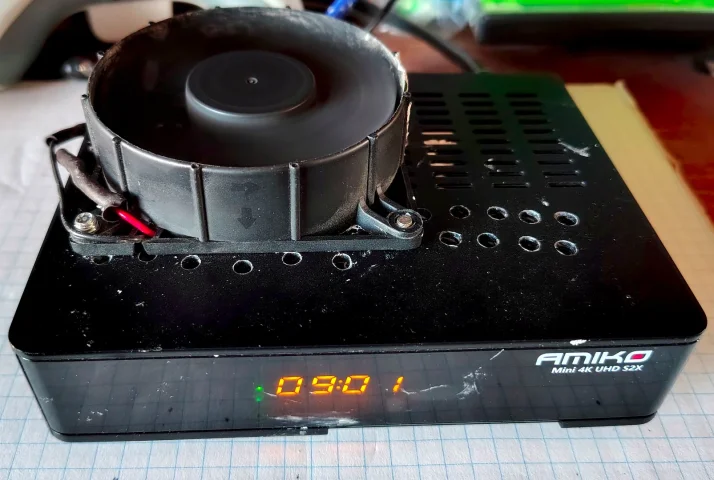
5 Replies · 144 views
  • Like
Reactions: FTA4PA
FTA4PA
The box always worked SORTOF but lately , I was unable to tune in channels.
Someone here suggested a new power supply. Good suggestion. It worked a little better for a little while but after warming up NO CHANNELS. Warming up? Maybe it needs better cooling. So I hacked it and installed a fan. See photo.
That only worked for a 15-20 minutes. Can anyone guess what the real problem was?

I had to add a fan to a Chinese box once to keep it from overheating (thread here somewhere) but that was an issue new out of the box. What was the issue with your Amiko receiver?
cyberham
... So I hacked it and installed a fan...
How did you power the fan? Not by sourcing from the power adapter or receiver, hopefully.

Can you describe the problem symptom in more detail? How do you know it is/was a receiver issue and not related to the dish orientation?
T
How did you power the fan? Not by sourcing from the power adapter or receiver, hopefully.

Can you describe the problem symptom in more detail? How do you know it is/was a receiver issue and not related to the dish orientation?
I have a new much more BEEFY power supply. 3-4 amps

Dan
T
I had to add a fan to a Chinese box once to keep it from overheating (thread here somewhere) but that was an issue new out of the box. What was the issue with your Amiko receiver?
It wasn't the receiver even though I thought it was, but adding the fan will lengthen the life of the box.
4KMediaTV
My money is on the LNB, not the box — especially since you say it wasn't the receiver.

That 15-20 minute pattern is classic for an LNB drifting as it warms up: it works cold, then the local oscillator drifts off frequency and the receiver can't lock anything, so you get 'no channels' even though signal strength still looks fine. A fan on the box won't touch that, because the part overheating is out on the dish.

A couple of quick checks that would confirm it before you replace anything:
- When it dies, go into the signal meter and note signal strength vs. signal quality on a known transponder, then compare the same transponder cold the next morning. Strength staying up while quality drops to zero points at the LNB, not the box.
- If you can, swap in any known-good LNB, even a spare, and see if it stays locked past the 20-minute mark. Or move the box to another dish/feed if you have one.
- While you're up there, check the coax connectors for green corrosion or water inside the boot, and make sure the dish hasn't shifted slightly — a marginal alignment looks exactly like this too, working when conditions are perfect and dropping out as things warm up and expand.

If the LNB is the culprit, check the feedhorn cap as well — a cracked or sun-baked cap lets moisture in, and that kills LNBs slowly exactly like this.

Curious what you found — was it the LNB in the end?
dfergie
Staff member HERE TO HELP YOU!
Last reply · posted in The Sports Section
168 Replies · 6065 views
  • Like
Reactions: Foxbat and meStevo
meStevo
Late yesterday I was invited to the F1 event tonight as a guest of Atlassian Williams.

Had no idea what that entailed. What a surreal night. This is me between FP1 and FP2 about to get into a supercar driven by an F1 Academy driver at 170mph down the Las Vegas Strip.

1795158671353.webp
Ronnie-
Late yesterday I was invited to the F1 event tonight as a guest of Atlassian Williams.

Had no idea what that entailed. What a surreal night. This is me between FP1 and FP2 about to get into a supercar driven by an F1 Academy driver at 170mph down the Las Vegas Strip.

View attachment 195627
Ill bet that was an experience.

Ceasars was giving me comp tickets to all of it this weekend, and me and my daughter were going. But school work and events didnt work out for her to go.
Y
Late yesterday I was invited to the F1 event tonight as a guest of Atlassian Williams.

Had no idea what that entailed. What a surreal night. This is me between FP1 and FP2 about to get into a supercar driven by an F1 Academy driver at 170mph down the Las Vegas Strip.

View attachment 195627
Awesome stuff!
  • Like
Reactions: Foxbat and dfergie
meStevo
Yeah, the Paddock Club experience is a hell of a thing. They offered me a room at the Four Seasons too but would rather be at home unless I was going to multiple days of events and this was just for tonight.

1795207878434.webp


1795207907433.webp


1795207950557.webp
1795208040474.webp
1795208051897.webp
1795208075099.webp
1795208086554.webp
1795208108885.webp
Foxbat
This is me between FP1 and FP2 about to get into a supercar driven by an F1 Academy driver at 170mph down the Las Vegas Strip.
Looks like the rains from FP1 gave you a break. I saw there were Winter Storm warnings about 20 miles west of Las Vegas!

That's got to be an awesome experience! Congratulations!
  • Like
Reactions: meStevo
meStevo
This came in the mail today, signed by both Williams drivers - Alex Albon and Carlos Sainz.

1795583751638.webp