Social Feed

H
Last reply · posted in DISH Network Support Forum
Since my local cable company has decided to increase their fee by a "modest amount" (actually about 23% for me) I've decided to look into satellite tv.

DishNetwork seems to have something that sounds almost perfect for me, a simple 522 reciever that I can hook up to 2 tv's. I do NOT qualify for local stations but I can make up most of that from Distant Network a la carte.

I will need an OTA antenna to pick up the local ABC and NBC stations. According to antennaweb.org I'm 8 and 11.1 miles from the transmitters, so it shouldn't be a big problem.

The questions I have are about how they works together

If I get some kind of OTA antenna that mounts to the dish or on the roof I'm assuming I'll need a diplexor that will connect the antenna and sat onto one coax, that will come into the house, then does it need to be resplit or can it go directly into the 522?

If it needs to be resplit then I assume the sat plugs into Satellite In while the OTA antenna plugs into the Antenna/Cable In on the back of the 522.

It also appears from the 522 manual (the online pdf version) that this will only work for TV1 and for TV2 I'll have to connect the OTA antenna directly to the second TV. Is this correct?

Most importantly how do I switch from viewing a program coming from the satellite to one coming from the antenna? Can I use the DVR to record programs from the antenna?

There's probably a dozen more questions, but it's been a long 2 days seaching the web, reading pdf's and forums and my brain is fried :)
I apologize if any of this is unclear, I'm very new to satellites and DBS.

...and btw, this forum has already been an incredible resource for me, you guys are awesome.
5 Replies · 1591 views
SimpleSimon
Welcome aboard!

First, the 522 is not a 'simple' receiver. Second, unless you're gonna spend big bucks on DPPlus gear, you're going to have a dual cable coming into the house to feed the 522.

You only need a diplexer if you have to share the OTA feed on the same cable. Considering you already have cable TV wire running around the house, you should probably just use that for the OTA. That also solves some of your other issues.

Remember - the 522 and most other E* boxes do NOT actually do anything with the OTA signals, so there's no real reason to mix them in unless you've got a TV with only one input. Exception: the 921 is capable of recording digital OTA.

And thank you - we do try to give out the good stuff here. ;)
H
SimpleSimon said:
Welcome aboard!

First, the 522 is not a 'simple' receiver. Second, unless you're gonna spend big bucks on DPPlus gear, you're going to have a dual cable coming into the house to feed the 522.

You only need a diplexer if you have to share the OTA feed on the same cable. Considering you already have cable TV wire running around the house, you should probably just use that for the OTA. That also solves some of your other issues.

Remember - the 522 and most other E* boxes do NOT actually do anything with the OTA signals, so there's no real reason to mix them in unless you've got a TV with only one input. Exception: the 921 is capable of recording digital OTA.

And thank you - we do try to give out the good stuff here. ;)

thanks for the info....sorry about calling the 522 simple, what I meant was only having to use one receiver.

The cable coming into the house now will still be connected to my cable modem so I'm not sure if it's possible to use that for OTA also.

If I understood you correctly, then I cannot use the 522's DVR capability to record anything coming in from the OTA. It's a case where if you press the SAT button on the remote you'll be using the satellite and if you turn that off then you're using the signals coming in from the OTA and the two never work together at the same time on the same tv.

I suppose the easy way around that is too hook up a VCR to the second tv.
SimpleSimon
No sorry needed - and I meant that the installation isn't actually simpler - mostly due to the number of cables needed.

Yeah - mixing cable internet & OTA is not wise. The cable internet is probably only needed at a single location - maybe it can be isolated from the rest of the house wiring.

Correct - the 522 will only record satellite, and you've got the handle on how OTA works with it. In fact, it's best to not bother with the 522's Ant-In port at all.

OTA to VCR to one TV input and 522 to another TV input is a good way to go.

And in case you've not done it before, signal quality is best on S-Video, next is RCA (composite), worst is RF (coax). So use the best you've got, and keep that in mind when buying new gear.
H
SimpleSimon said:
Correct - the 522 will only record satellite, and you've got the handle on how OTA works with it. In fact, it's best to not bother with the 522's Ant-In port at all.

OTA to VCR to one TV input and 522 to another TV input is a good way to go.

SimpleSimon...thanks for the suggestions.

I've talked with a Dish CSR and it looks like the middle of next week
I'll have the dish installed

There is one thing I'm not quite sure about, I've read in other threads that you can use a combiner to get Satellite and OTA to a TV that only has one RF connection, can it be that easy?

I've been thinking of setting up an old TV in a room in the basement and was wondering if I could get the dish and basic cable to it.

I appreciate the time and advice, you've cleared up a lot of my questions and doubts. Thanks again
SimpleSimon
Not exactly that easy - cable usually has every channel occupied, so there's no place for the satellite box's RF output to "fit". The 322 or 522 TV2 has an adjustable UHF output that might be usable.
dishstaller
Pub Member / Supporter Lifetime Supporter
Last reply · posted in The Chit Chat Club
1 Replies · 24 views
Bruce
Supporting Founder Lifetime Supporter
Last reply · posted in Internet Television (IPTV) Discussion Forum
I was reading this article


That said this-
Last summer, for the first time, streaming services like Netflix and Amazon Prime claimed the largest share of the television viewing audience, surpassing both cable and broadcast TV. Streaming captured 34.8 percent of July viewers, according to Nielsen data, compared to 34.4 percent for cable and 21.6 percent for broadcast.

And then, sometime in the second half of 2022, cord-cutters became the majority. The share of cable and satellite television subscribers dipped to 48 percent, according to a report from Samba TV, a television technology company.


Now I do not consider those with YTTV and the likes, Cord Cutters, but they still do not have Traditional Cable/Satellite delivered Live TV, so I decided to do the math.

There are, now, 129 Million Households in the United States.

In 2015, there were 100 Million Cable/Sat Subscribers , no streaming Live TV Service.

Today, there are 66 Million Live TV subscribers, including Cable, Satellite and Streaming.

Roughly, Streaming Live TV has 14 Million subs including all of them.

So that means, Cable/Satellite now has, roughly, 51 Million Households

So in just 8 years, lost 49% of their subscribers and by the end of this year, expected sub count to be, roughly, 45 million households.

That means a total loss of 55% since 2015 at the end of 2023.

But out of 129 Million households, 45 million will mean only 35% will get Cable/Satellite Delivered Live TV by the end of 2023.

Imagine what 2024 will be like.
897 Replies · 72062 views
  • Wow
Reactions: MikeD-C05
Bruce
And again, 15 months in a row, streaming wins-

Cable and Broadcast added together-36.4%

Streaming with a massive 49.6%, 13.2% higher than Broadcast/Streaming.

IMG_2172.webp
Jimbo
And again, 15 months in a row, streaming wins-

Cable and Broadcast added together-36.4%

Streaming with a massive 49.6%, 13.2% higher than Broadcast/Streaming.

View attachment 194983
Your Still Thrilled about all this ?

These numbers will Never be accurate as many people use Both still ...

You have services like Hulu Live and You Tube TV that do, what you call Cable, but they ARE Streaming, so Which is is ?

Does it get counted 2x as both Streaming and Cable ?
  • Like
Reactions: MikeD-C05
Jimbo
But they ARE Streaming as well, so they Should be counted as both, which would make the Streaming numbers even More prominate.

Q.
Who does the Counting for Streaming ?

Neilson does the Broadcast/Cable ...
Bruce
But they ARE Streaming as well, so they Should be counted as both, which would make the Streaming numbers even More prominate.

Q.
Who does the Counting for Streaming ?

Neilson does the Broadcast/Cable ...
Same.

Ratings for streaming content is extremely accurate, since the service knows who is watching what and when, when we hit ok on our remotes.

Ratings for Broadcast/Cable shows has always been a estimate.
Jimbo
Same.

Ratings for streaming content is extremely accurate, since the service knows who is watching what and when, when we hit ok on our remotes.

Ratings for Broadcast/Cable shows has always been a estimate.
If I flip thru shows on an app, 3-4 in a few minutes, does that still show that I watched the whole episode ?


If I watch the Super Bowl for 5 minutes, does that count as watching the Super Bowl ?
Is it the same if I just watched the Commercials.
Bruce
If I flip thru shows on an app, 3-4 in a few minutes, does that still show that I watched the whole episode ?


If I watch the Super Bowl for 5 minutes, does that count as watching the Super Bowl ?
Is it the same if I just watched the Commercials.
Nielsen Streaming Ratings: Third-party measurement firm Nielsen tracks U.S. streaming viewership, releasing weekly reports that measure total minutes viewed across major television sets, broken down by program (such as original, acquired, and movie content) rather than minute-by-minute audience retention curves.
  • Like
Reactions: llokey and Jimbo
S
Your Still Thrilled about all this ?

These numbers will Never be accurate as many people use Both still ...
Nobody is "happy" or "sad" about this. Simply posting data in an non-editorialized way has nothing to do with anyone's feelings.

The data on the streaming side is immensely accurate, I'm guessing to the millisecond. Plus most people likely have not turned off data sharing and thus they are grabbing a huge swath of data. Much more accurate than cable which relies on a smaller sample size and probably not to the second.

In either case, nobody is getting "double counted" because it's usage based. If I watch 100 minutes of content and 30 minutes is on Youtube and 20 minutes on Disney and 50 minutes on YTTV, it's going to show up as 30%, 20%, 50% slices of my personal pie respectively.
Q.
Who does the Counting for Streaming ?

Neilson does the Broadcast/Cable ...
Nielsen does. If you go into the settings of any of your streaming accounts, you can turn off the option to share to usage data with their third party measuring service - Nielsen.
Jimbo
Nobody is "happy" or "sad" about this. Simply posting data in an non-editorialized way has nothing to do with anyone's feelings.

The data on the streaming side is immensely accurate, I'm guessing to the millisecond. Plus most people likely have not turned off data sharing and thus they are grabbing a huge swath of data. Much more accurate than cable which relies on a smaller sample size and probably not to the second.

In either case, nobody is getting "double counted" because it's usage based. If I watch 100 minutes of content and 30 minutes is on Youtube and 20 minutes on Disney and 50 minutes on YTTV, it's going to show up as 30%, 20%, 50% slices of my personal pie respectively.

Nielsen does. If you go into the settings of any of your streaming accounts, you can turn off the option to share to usage data with their third party measuring service - Nielsen.
I have turned some off, not others ...
dishstaller

Funny thing is that as the screen size and pic quality increase, the quality of the programming has DEcreased.
  • Sad
Reactions: Jimbo
Ramy
Supporting Founder
Last reply · posted in The Sports Section
Really excited for this season with Kentucky having a new coach and some really exciting recruits. Probably won't last long, but here's hoping this season is great.
174 Replies · 2643 views
  • Haha
Reactions: Mike0616
Y
You mean other than Miami being in the final last year... and Indiana being the only bye team to win a game?
Jimbo
You mean other than Miami being in the final last year... and Indiana being the only bye team to win a game?
No, I was actually referring to outside of the Top 8, but should have been Top 12 ...

I guess I should have looked at the bracket from last year first ...

I'm more thinking about them trying to expect a 15 to beat a 5 seed or there abouts .
Ronnie-
I'm more thinking about them trying to expect a 15 to beat a 5 seed or there abouts .
I mean you get upsets all the time.

Just a couple of weeks ago. Unranked Florida knocked off number 7 texas. Unranked Auburn beat number 1 Georgia.

This week unranked Cincinnati beat number 8 texas Tech. Unranked UCF beat number 2 BYU.

No reason to think similar upsets wont happen in the playoffs where a low seed can upset a higher one.
AZ.
AZ.
I mean you get upsets all the time.

Just a couple of weeks ago. Unranked Florida knocked off number 7 texas. Unranked Auburn beat number 1 Georgia.

This week unranked Cincinnati beat number 8 texas Tech. Unranked UCF beat number 2 BYU.

No reason to think similar upsets wont happen in the playoffs where a low seed can upset a higher one.
Yep, wonder why we rank the top 25 in 2 poles still? Do the ranking change much if they are unranked or have many loses? They sure do, any given day never take your opponent as a cake walk.....
Jimbo
I mean you get upsets all the time.

Just a couple of weeks ago. Unranked Florida knocked off number 7 texas. Unranked Auburn beat number 1 Georgia.

This week unranked Cincinnati beat number 8 texas Tech. Unranked UCF beat number 2 BYU.

No reason to think similar upsets wont happen in the playoffs where a low seed can upset a higher one.
Correct, you Do get upsets from time to time ....however .
You Don't get teams UPSETTING teams for 5 weeks in a row.

They are trying to make this Basketball and its a far cry from the way that is played.

How long till they go to 32 teams ? Then they will say, well, the NFL is 32 teams, we can make more money that way .... except the NFL is 32 teams, that are a set number of teams and divisions, you don't have that in College ... oh but they will try.

They would have to choose what teams they would want in and thats it.
Hopefully that NEVER happens.

I can see the NCAA going away and the CFP taking that portion over and a Collective Bargaining agreement coming in the not to distant future.
  • Haha
Reactions: meStevo
rvvaquero
The problem with rankings and playoffs is that they are designed to hype the game and make money. Period.

The only reason that BYU and Texas Tech were upsets is that they were hyped up in the standings in the first place. I love watching BYU and Bear Bachmeier. They are a fun and talented team, but not nearly so strong, fast, big, and skilled as a true top ten team. Does anyone truly believe they could compete with the likes of Georgia, Ohio State, Indiana, Alabama, etc.? Yet, they were ranked above those teams.

Each year, there are 10 to 12 teams who truly could compete for the championship if it depended on winning more than one game in a playoff. Including teams like James Madison, Tulane, BYU, etc. in a playoff has nothing to do with determining a national champion. It's just about money.
  • Like
Reactions: Yespage and AZ.
Ronnie-
Correct, you Do get upsets from time to time
Yes. As shown in a few posts now.


You Don't get teams UPSETTING teams for 5 weeks in a row.

.
But that wasn't what your stated argument was though.


I mean if you drag it out, no team even a favorite is gonna win every game 20 weeks in a row.


With the parity in college football now, who knows who can beat anyone at any given time?

This season and last have shown it might not be the ones we think that might win it all that will win it all.
  • Like
Reactions: osu1991
Jimbo
Yes. As shown in a few posts now.


But that wasn't what your stated argument was though.


I mean if you drag it out, no team even a favorite is gonna win every game 20 weeks in a row.


With the parity in college football now, who knows who can beat anyone at any given time?

This season and last have shown it might not be the ones we think that might win it all that will win it all.
No, no ... if you want to make the playoffs, you want to Win it ... If you want to Win it, you need to Win 4-5 games in a row against Top 10 teams for the most part, theres a Possibility you'd play someone out side of the Top 10, but not much.

The Playoffs is a 4-5 game Win or Go Home.
DialgaChampion
Last reply · posted in DISH Network Support Forum
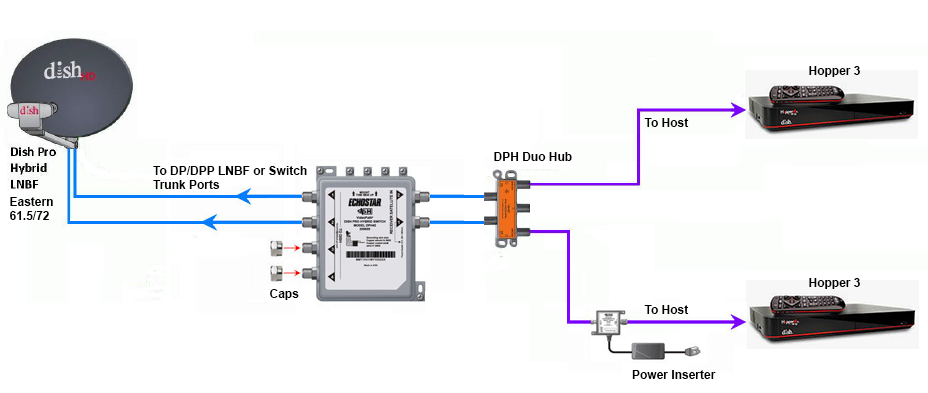
Does someone still have the diagram showing how to connect two Hopper 3s again?

I currently have one H3 and one 4K Joey, set up through a 1000.2 eastern arc hybrid lnb and solo hub.

The plan is to replace the Joey with the second H3. Already purchased a duo hub and I have three coax cables coming in from outside, from back when I used to have the older 1000.4 dish and the hopper 2. I don't fully remember, but I think the other two coax cables are just tied up next to the dish outside; will have to check again.
26 Replies · 5703 views
HipKat
dp6.png

You need a 42 switch.
Run the outputs to the inputs on the Duo Hub
DialgaChampion
You need a 42 switch.
Run the outputs to the inputs on the Duo Hub

Okay, so I made an updated diagram just to make sure I understand this right...

- 2 Coax connected from outside Dish LNB into 42 switch.
- 2 Coax from 42 switch into Duo Hub.
- 1 Coax from Duo Hub into 1st Hopper 3.
- 1 Coax from Duo Hub into Power Inserter.
- 1 Coax from Power Inserter into 2nd Hopper 3.
- Power Inserter plugged into wall electrical outlet.

Did I get that right? And also, I assume the power inserter is required?
HipKat
Okay, so I made an updated diagram just to make sure I understand this right...

- 2 Coax connected from outside Dish LNB into 42 switch.
- 2 Coax from 42 switch into Duo Hub.
- 1 Coax from Duo Hub into 1st Hopper 3.
- 1 Coax from Duo Hub into Power Inserter.
- 1 Coax from Power Inserter into 2nd Hopper 3.
- Power Inserter plugged into wall electrical outlet.

Did I get that right? And also, I assume the power inserter is required?
Twa Coaxes from the LNB if it's Eastern Arc (2 "Eyes") and three if it's Western Arc and yes, the power inserter, it's required
LQQK
Does someone still have the diagram showing how to connect two Hopper 3s again?

I currently have one H3 and one 4K Joey, set up through a 1000.2 eastern arc hybrid lnb and solo hub.

The plan is to replace the Joey with the second H3. Already purchased a duo hub and I have three coax cables coming in from outside, from back when I used to have the older 1000.4 dish and the hopper 2. I don't fully remember, but I think the other two coax cables are just tied up next to the dish outside; will have to check again.
Are you going with 2 H3s for the PIP/Multi-View features or something else?
  • Like
Reactions: charlesrshell
DialgaChampion
Are you going with 2 H3s for the PIP/Multi-View features or something else?

No, it's specifically to fix the problem with the 4K Joey's live feed intermittently freezing. I'll be watching a live program and then randomly out of nowhere, the picture and sound will just pixelate/freeze for 5-10 seconds, then go back to normal. Doesn't matter which channel it's on either. It's like what happens when the signal cuts out during heavy rain or a thunderstorm, but this will happen even on a perfectly clear day/night.

It doesn't happen with my H3 though, only with the Joey. I've replaced the solo hub and I've also replaced the Joey itself with another brand new 4K Joey, but it's still the same problem. And I know it's not the coax going from the hub into the Joey because I previously had another receiver connected in the same room before changing to the whole home dvr setup and that receiver worked fine.

So I'm basing this off process of elimination, which seems to indicate a problem with the 4K Joey device itself. Only thing I haven't tried is maybe getting a regular Joey 3, if that's still the latest model of Joey currently available, but otherwise the only other solution is getting a second Hopper 3. It'd be nice if the 42 and the Power Inserter weren't necessary and I could just use the Duo Hub though.
SandFarmer
Now that my Owned H3 fried itself. What gear can I remove for just one H3? Already took down the 129 Wing Dish.
  • Like
Reactions: charlesrshell
Bobby
Now that my Owned H3 fried itself. What gear can I remove for just one H3? Already took down the 129 Wing Dish.
You do know that DISH will replace your owned, fried, Hopper don't you. It's free....
SandFarmer
You do know that DISH will replace your owned, fried, Hopper don't you. It's free....
Yup. Been there done that many times over the past 29 years. Since not having it, I have found better and cheaper ways to get what little programming in need from it.

Just wondering how far down I can strip down all the gear on my chimney.

The 129 J-Arm grew an Outdoor Long Range AP. I already have several unused RJ lines that are going to be IPoE from the rack. Just wondering how much gear I'm going to be able to put up there.

Sent from my S61Pro using Tapatalk
  • Like
Reactions: charlesrshell
DialgaChampion
Twa Coaxes from the LNB if it's Eastern Arc (2 "Eyes") and three if it's Western Arc and yes, the power inserter, it's required
Yep just swap the lnb with a dpp lnb and connect the 42 switch.

Finally got around to trying to set everything up. Need some help because I've got an issue.

1st Hopper 3 works fine.

2nd Hopper 3 doesn't show any channels in my Top 200 package in the guide, even though it's set to All Subscribed. But it does see the 1st Hopper 3 and can access the recordings on it.

Here's my setup:
  • DPP EA 61.5/72 LNB on the dish. 2 Coaxes going from LNB into the DPH42 switch.
  • DPH42 "Receiver 1" port > Power Inserter "To Switch" port..... Power Inserter "To Receiver" port > Duo Hub "ODU 1" port.
  • DPH42 "Receiver 2" port > Duo Hub "ODU 2" port.
  • 2 Coaxes from both Host ports on the Duo Hub into both Hopper 3s.
I've spent the last few hours troubleshooting, no success. I did the Test Installation on the Diagnostics screen. Red button. Held Power Button for 15 seconds.

Also tried several different configurations with the coax cables according to Google's AI suggestions. Tried connecting both a Solo Hub and a Duo Hub (I don't have 2 solo hubs at the moment), having each Hopper connected to each hub independently. Tried connecting Receiver 2 from the DPH42 directly into the 2nd Hopper 3. Tried having the Power Inserter connected both before and after the hub.

I even checked my account online. Both Hopper 3s are authorized and "Powered" on the account. Even tried "Wake Up Receivers". That second H3 still won't show my channels in the guide at all.

According to Google's AI, it thinks this is the problem:
  • - When you plug two Hopper 3 units into a single Duo Hub, the hub cannot allocate the correct satellite transponder frequencies to both boxes simultaneously.
  • - As a result, the first Hopper 3 hogs the satellite line, while the second Hopper 3 gets locked out of the satellite signal entirely—causing an empty guide and blocking live TV. The unlinked status on the whole-home screen occurs because the software recognizes the conflict and stops integration.
But none of its solutions have worked. Any ideas?
  • Like
Reactions: charlesrshell
N
Googles AI is wrong as according to what you wrote you have two completely separate satellite line from the switch

My be a dumb question but did you run the check switch option on th 2nd H3

Did you try swapping the H3 to see if the problem switches between the two

That's all I can think of at the moment
  • Like
Reactions: charlesrshell
DialgaChampion
Googles AI is wrong as according to what you wrote you have two completely separate satellite line from the switch

My be a dumb question but did you run the check switch option on th 2nd H3

Did you try swapping the H3 to see if the problem switches between the two

That's all I can think of at the moment

Check Status complete. No issues found.
Test Installation screen shows green checks for 61.5 and 72, all 16 tuners.
Options > TV Activity shows 1 of 16 tuners in use.

When I bring up the program guide, the dish scapes channel appears and displays fine. The guide also shows the bonusview channels, and the stream and ppv channels.

I tried swapping the 2nd H3's cables with the 1st H3 and having it as the only H3 connected. It still has the same issue, so it seems isolated to the second Hopper 3 itself.

There was another suggestion from Google, not sure if it applies:

If the TV Activity Screen shows that your tuners are "Available" and "1 of 16 in use," your satellite signal path is 100% active and perfectly working. Your hardware wiring bypass has officially succeeded—the second Hopper 3 is successfully talking to the DPH42 switch, receiving high-frequency satellite data, and its internal processors are healthy. Because the hardware is fully operational, the fact that your screen is still black and the guide is missing means your receiver is stuck in Account Quarantine (Authorization Hold). Because a dual Hopper 3 system requires a non-standard account setup (32 tuners instead of the typical 16-tuner cap), standard "Wake Up" hits sent from the customer app or website are getting rejected by the system. The box can look at the data stream (which is why tuners show as available), but it is legally blocked by the internal software from decoding the live video feeds. To flip the switch and activate the live video feed, a DISH billing agent must manually push a tier-3 service re-hit through their legacy terminal.​

Any thoughts?
S
No, it's specifically to fix the problem with the 4K Joey's live feed intermittently freezing. I'll be watching a live program and then randomly out of nowhere, the picture and sound will just pixelate/freeze for 5-10 seconds, then go back to normal. Doesn't matter which channel it's on either. It's like what happens when the signal cuts out during heavy rain or a thunderstorm, but this will happen even on a perfectly clear day/night.

It doesn't happen with my H3 though, only with the Joey. I've replaced the solo hub and I've also replaced the Joey itself with another brand new 4K Joey, but it's still the same problem. And I know it's not the coax going from the hub into the Joey because I previously had another receiver connected in the same room before changing to the whole home dvr setup and that receiver worked fine.

So I'm basing this off process of elimination, which seems to indicate a problem with the 4K Joey device itself. Only thing I haven't tried is maybe getting a regular Joey 3, if that's still the latest model of Joey currently available, but otherwise the only other solution is getting a second Hopper 3. It'd be nice if the 42 and the Power Inserter weren't necessary and I could just use the Duo Hub though.
Why not upgrade to the joey 4 with is an android box and dump the 4k joey
dishstaller
Pub Member / Supporter Lifetime Supporter
· posted in The Chit Chat Club
While always entertaining....I hope you guys recognize that the child molesters they arrested in this video were STRICTLY due to tips from the National Center for Missing and Exploited Children. I strongly suggest that you go to their website and support them. They are the ONLY entity that is trying to curb all the perverts out there. And yes...if you want to have sex or see someone have sex with a minor you ARE a pervert.


View: https://www.youtube.com/watch?v=swYXp9x5bag&t=911s
0 Replies · 16 views