Social Feed

M
Last reply · posted in Free To Air (FTA) Discussion
I'm trying to lock the 63W sat but having a hard time, I once had the SCETV PBS feeds @ 11959 V 4340 3/4 and can't seem to find it now. Does anybody know if there's a signal for this feed or is there another STRONG TP for locking this sat? Thanks in advance
16 Replies · 3073 views
M
I finally found it by blind scanning the blind signals without any QS readings. I first had 33 - 36% QS and a solid video but once the sun warmed the dish the signal progressively dropped to 0% but before that I tweaked the freq's & SR's and found the best for me is 11964 v 11263. Then as I was flipping through the channels the signal came back with a pixelating video at about 20% QS. I imagine the night hours may be better to view these.

It's odd how the Freq's & SR's vary for different locations, probably because they are so weak and touchy. At least I found the bird again. Thanks for all the help guy's. :)
C
these feeds seem weak for everyone. on my 1m they are just above the fringe here in central canada. even on the 1.2m the quality doesnt increase much. since this is the eastern side of my ku arc i sometimes get trick into thinking i need to tweak the dish more but it never helps.

crackt out,.
B.J.
these feeds seem weak for everyone. on my 1m they are just above the fringe here in central canada. even on the 1.2m the quality doesnt increase much. since this is the eastern side of my ku arc i sometimes get trick into thinking i need to tweak the dish more but it never helps.

crackt out,.

The weird thing is that these transponders are so variable. Over the years, I keep reading posts about various channels saying that they are weak one week, and strong the next week, but when I look at spectrum scans, they are almost exactly the same, so I've always disregarded posts about transponders changing in power, except for occasions when there is heavy rain near the uplink site.

But this SCETV thing, I was watching it a few days ago, and getting a fairly strong signal, well above my threshold, then zap, and I lost lock. I had done a spectrum scan prior to starting watching, so I repeated it, and the signal strength had dropped by at least 1/3. Every other transponder on the sat had the same signal level as before, except for the SCETV signal.
Then, yesterday, upon reading this thread, I tuned it in again. Again, nice strong signal, well above threshold, then, after watching a nice show for about an hour or so, all of a sudden, no lock. I tried the rest of the afternoon, and into the evening, to get the signal back, but never got it to lock. Tune it in this morning, and nice strong lock. Yesterday MAY have been weather related though, as there were some storms moving through SC, but you would have thought that it would have found some break in the storm when I'd get a signal.
B.J.
I finally found it by blind scanning the blind signals without any QS readings. I first had 33 - 36% QS and a solid video but once the sun warmed the dish the signal progressively dropped to 0% but before that I tweaked the freq's & SR's and found the best for me is 11964 v 11263. Then as I was flipping through the channels the signal came back with a pixelating video at about 20% QS. I imagine the night hours may be better to view these.

It's odd how the Freq's & SR's vary for different locations, probably because they are so weak and touchy. At least I found the bird again. Thanks for all the help guy's. :)

Re freqs & SRs varying for "different locations". They don't. The LO freq on different LNBs will drift with temperature a bit, and this can make the freqs that your receiver sees to be off by 1 to 2 MHz if you have ANY of the consumer LNBFs or a low end LNB. With the higher priced LNBs, they can be stable within a few tenths of a MHz or even better than that for expensive PLL LNBs or LNBs that have a temperature controlled oven. I had ONE LNB once that was off by 5 MHz, but usually they are better than that.
The SRs, on the other hand generally do not vary. I think you are always best off by keying in the exact SR, if it is known to be correct. In this case, the NIT of the SCETV signal lists the SR as 11280, so you can be pretty sure that this is the correct SR. The NITs don't always have the correct info, but usually when it is incorrect, it's pretty obvious, like being entered as zero. But in this case, when it's in there at 11280, which is also what people seem to be reporting, I think 11280 is the correct SR, and you are probably making things worse by using 11263. If that truely is your best lock, then I think your receiver has a problem. Yes, receivers like the Mercury will come up with incorrect SRs on blind scans, but usually if you enter the correct SR it will work, and I think work better.
I have seen one case where there was an SR listed as 20000 in the NIT of a transponder, and upon entering that, the channels were breaking up, and so I measured the SR, and found that it was 20009. At first no-one believed this in another forum where I posted the info, but eventually it was confirmed by a few other people, and eventually the SR went back to where it was supposed to be. Apparently they had a problem at the uplink. But generally, if they put real numbers in the NIT, that are close to what you're seeing posted, then you can usually trust that.
M
Thanks B.J. for the educating info, it may have been the fact that 2 days prior to locating the 63W I replaced the LNBF with a new DMSI JSC321S and as I mentioned in my post, the Sun was warming up the dish which seemed to have an effect and lost the signal intermittently. I am waiting for the arrival of a DMX522 for testing and I'll be able to compare. The SR 11263 that I settled with wasn't likely having any influence one way or the other at that time of tweaking, the sig was too bad and fluxuating to make a proper evaluation. I believe (as you said) that the freq was more notable. I couldn't continue my tweaking and evaluation after losing the sig so then I reported what I had found at that time. There will be another day for testing if I can lock again.
B.J.
BTW, don't take anything I say as fact, it's all just opinion, usually based on observations that are often misleading.
Reason I said what I said about the SRs though is that the SRs aren't affected by the LNB. Ie the LNB being off will bring the signal to your receiver off freq, however the SR will still be right on. The oscillators in your receiver can be off, but since receivers are inside with more constant temp, so you usually don't expect them to be off as much.

However one other thing, showing how confusing comparisons of freq and SR changes can be, some receivers don't seem to care whether the SR or the freq is off, while other receivers need to be very close to the proper parameters. Different receivers seem to behave a lot differently.

I was experimenting with 3 of my receivers just now. My Twinhan 1020a needs to be very close in freq, usually within 2 or 3 MHz on a low SR signal, and 4 or 5 MHz on a high SR signal, whereas my TT3200 can tune a transponder when off by over 20 MHz on a high SR signal. My Genpix will tune when off by about 15 MHz on a high SR signal, but is even tighter than the Twinhan on low SR signals.
Being off in SR is more confusing. I was just playing with my TT3200 and my Genpix, and I was able to get the Genpix to tune almost 400 off on a 29270 SR channel, but my TT3200 wouldn't lock when I was off by only 19. This despite the fact that the 3200 will lock when significantly further off in frequency. The Twinhan was intermediate between the two. On these receivers, until you are near the point where it won't lock, these receivers performed fairly well, whereas my old Fortec Lifetime, would appear to have a good lock, but the picture would break up due to errors, when only off by a small amount on SR.

Another aspect that makes some of these observations unreliable, however is that I have seen occasions where if I lock on a transponder, then slowly increase the SR, I can get it to lock fairly far off the correct value, and yet if I start off on the same wrong value that I was able to lock on when gradually changing SR, it won't lock. So when comparing things, I usually try to tune in a significantly different transponder between each test, so that each test is more independent.

Anyway, in short, these frequency/SR comparisons can lead different people using different receivers into different conclusions, and sometimes the way you do the comparison greatly affects your observations.
M
Hi B.J.,

Those results are quite interesting and gave me thoughts of how might switches in general affect issues like these? In this hobby I'm learning more each day and have just learned something new today after troubleshooting my new modification of a Tri-LNB on my 8 ft BUD. If you haven't already seen it, take a look for reference to what I'm talking about, note the last post with photos.
http://www.satelliteguys.us/c-band-satellite-discussion/205836-tri-lnb-setup-3.html

After getting it all installed and testing the 91 & 95 LNB's which have good results, I neglected to test the 103 LNB with my field test TV/Rec'vr while outside. After calling it a night I powered up the living room stb and found only one TP live on the 103 and it was in the mid 80's%, all others were dead. My first thought was that the additional LNB's were blocking the signal somehow, I thought that all my efforts were in vain. So today I first pulled the 91 LNB off (2 mounting screws) and turned on the living room stb and there it was, I had one of the TP's back but after switching channels then back it wouldn't lock. I then thought to check switches because I just added a Chieta HD2041 to the run which was inline to the 22KHz on the 103 LNB (DMSI BSC621 C/Ku) that switches the 95 LNB. So I substituted the 22KHz on the BSC621 with a new Chieta 22KHz I had and BINGO! Everything was working so I reinstalled the 91 LNB and tested again and it's all working flawlessly. Funny thing is, the BSC621 22KHz sw worked fine before adding the Chieta HD2041 diseqc but somehow it didn't like the BSC621 22K sw. Having one strong TP alive on the 103 indicated that it might not be a blocked signal issue. In this case it appears that possibly frequencies were touchy within the switching system. Does any of this make sense? It's just a guess as to why it acted this way but a new 22KHz switch did resolve the problem. I ordered 2 new EMP Centauri 4X1 diseqc and they're due in tomorrow. I thought to test one with the BSC621 22KHz reintroduced to the setup and see if maybe the Chieta is the finicky culprit. Either way, I'll be sticking with the new EMP Centauri, I understand they're unsurpassable. Again... Thanks for your input :)
M
Last reply · posted in DISH Network Support Forum
Over the past few weeks, I have had problems connecting to streaming services (Netflix, HBO et al). When I go to the TV's native Channels, I have no problem. The Dish internet troubleshooter shows I have a good internet connection. I'm wondering whether it's an issue with my internet provider or a problem with the Dish software on the Hopper Plus. Anyone else seeing this?
1 Replies · 76 views
Almighty1
Over the past few weeks, I have had problems connecting to streaming services (Netflix, HBO et al). When I go to the TV's native Channels, I have no problem. The Dish internet troubleshooter shows I have a good internet connection. I'm wondering whether it's an issue with my internet provider or a problem with the Dish software on the Hopper Plus. Anyone else seeing this?
I have a DISH Hopper 3 (Software H713) with Hopper Plus (Software P15403). I have not tried streaming services but I primarily watch TVB Jadeworld international package which is only available by streaming and when I have an issue, I usually have to go to a non-streaming satellite channel first before the streaming channels will work again. What software versions do you have and what is the error message if any are showing on your screen? or is that Dish downloading logo just stuck and never finishes?
dishstaller
Pub Member / Supporter Lifetime Supporter
· posted in The Chit Chat Club
It states the average amount they are under water is OVER $7,000. :eek

Personally, I tend to be the type that drives a vehicle for a lot of years....do my own oil changes and other fluid changes. Just replaced the spark plugs and a couple coils. Youtube is great for things like this.

0 Replies · 4 views
Scott Greczkowski
Staff member HERE TO HELP YOU! Cutting Edge
Last reply · posted in The Chit Chat Club
Sometimes a thread gets so many posts in it that is can cause issues for the server so that why today we introduce The Song Name Game Part 3!

So let the game continue!

The last song was added by Bobby who posted...

One Meat Ball - Andrews Sisters

CONTINUE ON AND HAVE FUN! WELCOME HOME TO SATELLITEGUYS.US!

Here are the original rules for the game as posted by WebbyDude back in 2006. http://www.satelliteguys.us/threads/68645-Song-Name-Game

Just name a song title and the band who performed it. The next person does the same thing, but needs to list a song title or band name which includes a word from the previous entry. Pick songs from any genre.

Example:

Long Live Rock and Roll -- Rainbow

Rainbow in the Dark -- Dio

Another example:

Ride the Lightning -- Metallica

Lightning Strikes -- Ozzy Osbourne


Get it?


An additional note: we all know that song titles, sometimes, use profane words. Because this is a family friendly website it is advised that you clean up that title up a bit. This is accomplished by using something like sh!t instead of the real word. Thanks....
68659 Replies · 2680247 views
  • Like
Reactions: c-spand
Bobby
98.6 - Keith
harshness
I'm Easy - Keith Carridine
gms49ers
It's Easy - Boston
  • Like
Reactions: long_time_Dish
RaiderPower
Take It Easy On Me - Little River Band
long_time_Dish
Take It Easy - The Eagles
jamieh1
Last reply · posted in DIRECTV Programming Forum
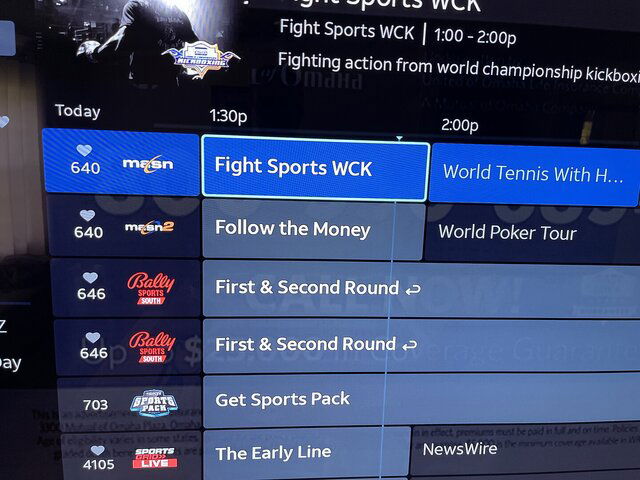
DIRECTV Stream/Internet added Ch 4105 SportsGrid
268 Replies · 38709 views
  • Like
Reactions: c-spand and KyL416
K
Now live:
4101 Yahoo! Sports Network
4121 DP World Tour
4195 F1 Channel
4196 MotoGP Channel
K
Now live:
4275 Law & Crime
4364 Military Makeover Channel
K
Game Show Central is now live on channel 4342
K
Now live:
4101 Yahoo! Sports Network
4121 DP World Tour
4195 F1 Channel
4196 MotoGP Channel
It only took them 41 days to announce it
  • Like
Reactions: Mr Tony
K
Now testing:
AyM Sports 3 USA
Best Bets TV powered by VSiN
CBS Sports Golazo Network
CBS Sports HQ
Judge Judy
TWiT Tech Podcast Network
· posted in TWiT Tech Podcast Network
0 Replies · 3 views
dfergie
Staff member HERE TO HELP YOU!
Last reply · posted in What's Cooking?
We have a Breakfast and Dinner thread so... :)
Continuing from the Breakfast thread, found Cornbread mix so ...
Yellow Cornbread Mix
2 Hatch Green Chiles -diced
1 Egg
2/3 cup of milk
add to greased pan
Bake for 400f 20-25 minutes(From instructions)
now to put together and try... this to go with pinto beans...
5449 Replies · 336092 views
TRG
TRG
Club sandwich and corn chowder. Iced tea.
dfergie
Chili dog bowl, water… (homemade chili)
TRG
TRG
Leftover wanton soup and pork fried rice. Water.
dfergie
IMG_5955.webp

Sweet tea…
  • Like
Reactions: Bobby and TRG
TRG
TRG
Tuna salad sandwich on toasted honey whole wheat bread with a handful of kettle chips. Water.
  • Like
Reactions: Bobby
R
Last reply · posted in Computers and Gadgets
Lately my eight year old Dell laptop has been shutting off even when I have a full battery. I have had to keep it plugged up all the time to keep this from happening. Any idea what is causing this? I replaced the battery about three years ago.
2 Replies · 50 views
arlo
A recalibration might be needed. Even if it shows full, the individual cells may have become unbalaced. And the BMS chip in the battery reports false information to the pc.
Try this. Start it up in the bios/uefi and leave it there until the battery dies and it shuts off.
It might just keep running longer than in Windows. Or run for a short while and shut off.
If it's the first case. Probably just needs a balancing. If the latter, the pack might just be dead.
Not throwing stones but perhaps just a cheaply constructed battery with substandard cells. Could be.

Patience. Keep restarting it in bios/uefi until it won't fire up anymore.
Then plug the charger in and let it complete a full charge. And see what happens. If it's better.
Do the same thing one more time. Run it until it dies dead-dead. Then just let it charge, pc shut off.
When charged, it might be better. It might not be.

There are bench jigs that read the actual BMS and override it to let a tech manually monitor and charge the separate packs. They can also reset any "time bombs" in it that cause an otherwise good pack to show bad.
Maybe Santa will be good to me some year.

You might just need a new battery. Maybe the PC power management chip is going. A Dell common thing.
Leaving a laptop plugged in with a full battery is known to reduce the life. Asus for one recommends that you don't leave the charger plugged in all of the time even when shut down. And setting Windows to charge the battery to 85% instead of 100% increases life.
That's all I got.
dishstaller
That's all I got.
That was quite enough....I definitely learned something from your post. Thanks
TRG
TRG
Pub Member / Supporter
Last reply · posted in Computers and Gadgets
I set up a music server for my brother a few years ago. It's basically a small headless computer but it needs to have a DHCP IP address reserved for it in the router settings. This was easy to do in his DSL router. He's switching to Starlink now and I was wondering if these setting are easily accessible in the Starlink router. I'm pretty sure he will be getting the latest V5 router.
5 Replies · 288 views
b4pjoe
I set up a music server for my brother a few years ago. It's basically a small headless computer but it needs to have a DHCP IP address reserved for it in the router settings. This was easy to do in his DSL router. He's switching to Starlink now and I was wondering if these setting are easily accessible in the Starlink router. I'm pretty sure he will be getting the latest V5 router.
If you can't get into the router to reserve an IP address just don't use DHCP on the device that needs connected and assign it to a specific IP address in the network settings.
  • Like
Reactions: harshness
HipKat
I set up a music server for my brother a few years ago. It's basically a small headless computer but it needs to have a DHCP IP address reserved for it in the router settings. This was easy to do in his DSL router. He's switching to Starlink now and I was wondering if these setting are easily accessible in the Starlink router. I'm pretty sure he will be getting the latest V5 router.
They are not. Your best bet is to set up a third-party router, attached to the Starlink for your server, that you can get into, like a Linksys, etc
  • Like
Reactions: Foxbat
Foxbat
…it needs to have a DHCP IP address reserved for it in the router settings. This was easy to do in his DSL router. He's switching to Starlink now and I was wondering if these setting are easily accessible in the Starlink router. I'm pretty sure he will be getting the latest V5 router.
The Starlink V5 Install Kit I just got comes with the Mini Router. It is pretty limited in what it can do. For example, it can provide only one IP subnet at a time, no Guest Network, but it does support the pass-thru to a third-party Router. You can also split the Wi-Fi into separate 5 GHz & 2.4 GHz SSIDs to help some IoT devices that don't support 5 GHz bands to work.

The larger Starlink Router that still comes with the V4 Kit does support a Guest Network with separate IPv4 Subnet, but it's $120 from Starlink. And it still won't do DHCP Reservations.
harshness
If you can restrict the DHCP address space to assign addresses to one end of the subnet (i.e. x.x.x.50+), you can manually assign the IP address on pretty much any operating system. This is a default behavior on several popular routers. As the Router Mini only supports 235 devices, I expect that's already done.

Another option is to use a router that supports PoE to power the antenna. This article discusses that option (under PoE Power heading):

  • Like
Reactions: Foxbat
Foxbat
Now that I've had the v5 kit with the Mini Router, it's not as bad as I first thought. Yes, no DHCP reservations, but you can set up multiple SSIDs that have separate IPv4 subnets, and like the big brother, you can select from 192.168.x.0/24 or 10.x.0.0/16 (where "x" is 1-4).

You can also split a subnet and have different SSIDs for the 5 GHz and 2.4 GHz channels to handle some IoT devices. I haven't discovered what subnet the 2nd NIC on the router assigns, I'm guessing it's the first subnet.