

Social Feed

I have been lurking on these forums, as well as a few others, for several months looking at my options for something other than Time Warner Cable here in the Raleigh, NC area. By far, this was my favorite (and the most informative forum) so I signed up a few weeks back but this is my first post. I want to thank everyone for the massive amount of helpful information I have found on this forum...and hope that perhaps my review after a few weeks may help someone who is also considering a switch.
I decided to move from TWC after our "price-lock" for two years was not honored. Every month they started raising the bill, and it wasn't just the "extras" but the actual package price that was supposed to be locked in for two years kept increasing. We called several times and no one would help, and finally we were told it did look wrong but it would take 7 days to research. After 7 days and still no call back we called again and they said it was never reviewed and would take another 21 days! We kept calling until we got a supervisor who said that this was not correct at all, and that he could fix it right away...that they obviously overcharged us. So we just said to please fix it and in exchange for the poor service please allow us out of the price lock with no penalty which he did. Thankfully! We got Dish installed a couple of weeks ago.
We considered Direct TV and Dish Network, and ultimately chose Dish due to the available channels better matching our viewing needs and the pricing was better as well. I knew from first hand viewing that there is not a discernible difference between the two in HD despite what many will tell you. We have Direct TV at work so I watch it every day (mainly Bloomberg...yeah, I know...but at least I get to watch TV at work, LOL). I also knew the programming guide and DVRs with Dish were much more highly reviewed and that was important to me because ever since the TWC guide update it was very slow to respond when you tried to use either the guide or the DVR. I am sure that Direct TV would have also been a better choice than TWC.
My biggest concern was rain fade since we get a lot of strong storms and heavy rain in this area. However, I honestly hadn't seen any issues at work with Direct TV unless there were extremely heavy rains...normally we had a clear picture all the time...and we get those strong afternoon storms quite often. Well, the last few weeks in this area have produced some of the heaviest rains and strongest storms I have seen in the 11 years we've lived here. I am very happy to say we had no rain fade at all during even the heaviest rains, with one exception.
Just over a week ago we had torrential rain, so hard that I could hear it loudly over the TV volume. I got up and looked outside and it looked like a river going down our street it was raining so hard. Yet I had not been able to tell at all on the TV (no rain fade of any kind). I flipped over to a local channel and they had a special weather statement about the heavy rains, possible hail, and 58+ MPH winds. Within a few minutes I started noticing some pixelation and then the satellite went out. I looked out again and small trees in the neighborhood were bending over and it looked like it was raining sideways. I could hear the rain pounding into the side of the house now rather than on the roof. It looked like a tropical storm and in fact did damage some trees in our neighborhood. When the winds subsided (about 6-8 minutes) the satellite came back on. It was still raining just as hard but no wind...and my picture was crystal clear. So even with much heavier rainfall amounts than normal, we've had perfect reception at all times but this one. Oh, and the neighbors said they had cable problems during that storm also. Our installer said we had a perfect line of sight and very strong signal so your mileage may vary, but I am very pleased.
I have more channels than I did on TWC, even though my bill is about the same for the cable portion (I still have internet with them). However, after the price lock expired in six months my package would have gone up $30 per month with them, plus any annual increases. With Dish, after 12 months it will go up $15 dollars, so I am still coming out ahead and with more channels. Plus at least once a week it seems, for the past 11 years, the Scientific Atlanta DVRs would lock up and have to reboot, which took quite a while...and normally happened at the most inopportune time. I can't imagine I will lose more viewing time to rain fade than to the TWC equipment reboots.
I love the guide, the way you can pick HD only or all subscribed channels. It is quick and responsive. And of course, I love the significantly better storage capacity of the DVRs. I have two 722 receivers. The HD is brilliant and looks amazing on both my brand new 55" Samsung LED LCD and also my two year old Samsung 46" LCD TV which my son inherited after I bought the new TV. We also have a couple of SD sets connected as well. Without a doubt the HD is as good or better than on TWC depending on the channel (better on most...as good on the remaining ones). TWC did have a few channels that looked outstanding, also. I cannot imagine a better picture is possible (one neighbor has Direct TV on a comparable TV and we cannot tell any difference at all between Direct and Dish).
Where I have noticed a big difference are the SD channels. By far and away, even on my 55" display, the SD channels are much better than on TWC. Some are quite impressive, much better than I've ever experienced with TWC. I won't pretend that I've watched every channel, some I will never watch (I have the top 250 with the Multi-sports pack, along with the 3 months free HBO and Showtime). But the ones I have watched have not disappointed at all. My wife and son are both very happy with the switch also.
My installer was very professional (a Dish employee) and did a neat, efficient job. The dish was placed on a 3 ft pole in my side yard in a great location for both line of sight and for practicality. It will be very easy to get to if I ever need to access it, and it is out of the way from any activity we would do outside. The contacts I've had with Dish CSRs have been good so far. I signed up using the chat feature so I'd have written record of everything told to me. I copied and pasted the full conversations just in case. I signed up on a Sunday evening and they wanted to install Monday morning. I had to move that to Tuesday since I couldn't get off work that fast. So far, everything has been great. I know that like any other service or product, at some point I'll have an issue, perhaps minor, perhaps major. At that time I will re-evaluate but as of now, I am super happy with my choice to change to Dish.
I have tried to be as honest as possible in my review of my experience so far and hope it may help anyone who is considering a change. Again, thanks to all who post here for the tremendous help you gave to me (even though you didn't know it at the time) as I was searching for answers and trying to sort out all the hype from the truth.
I decided to move from TWC after our "price-lock" for two years was not honored. Every month they started raising the bill, and it wasn't just the "extras" but the actual package price that was supposed to be locked in for two years kept increasing. We called several times and no one would help, and finally we were told it did look wrong but it would take 7 days to research. After 7 days and still no call back we called again and they said it was never reviewed and would take another 21 days! We kept calling until we got a supervisor who said that this was not correct at all, and that he could fix it right away...that they obviously overcharged us. So we just said to please fix it and in exchange for the poor service please allow us out of the price lock with no penalty which he did. Thankfully! We got Dish installed a couple of weeks ago.
We considered Direct TV and Dish Network, and ultimately chose Dish due to the available channels better matching our viewing needs and the pricing was better as well. I knew from first hand viewing that there is not a discernible difference between the two in HD despite what many will tell you. We have Direct TV at work so I watch it every day (mainly Bloomberg...yeah, I know...but at least I get to watch TV at work, LOL). I also knew the programming guide and DVRs with Dish were much more highly reviewed and that was important to me because ever since the TWC guide update it was very slow to respond when you tried to use either the guide or the DVR. I am sure that Direct TV would have also been a better choice than TWC.
My biggest concern was rain fade since we get a lot of strong storms and heavy rain in this area. However, I honestly hadn't seen any issues at work with Direct TV unless there were extremely heavy rains...normally we had a clear picture all the time...and we get those strong afternoon storms quite often. Well, the last few weeks in this area have produced some of the heaviest rains and strongest storms I have seen in the 11 years we've lived here. I am very happy to say we had no rain fade at all during even the heaviest rains, with one exception.
Just over a week ago we had torrential rain, so hard that I could hear it loudly over the TV volume. I got up and looked outside and it looked like a river going down our street it was raining so hard. Yet I had not been able to tell at all on the TV (no rain fade of any kind). I flipped over to a local channel and they had a special weather statement about the heavy rains, possible hail, and 58+ MPH winds. Within a few minutes I started noticing some pixelation and then the satellite went out. I looked out again and small trees in the neighborhood were bending over and it looked like it was raining sideways. I could hear the rain pounding into the side of the house now rather than on the roof. It looked like a tropical storm and in fact did damage some trees in our neighborhood. When the winds subsided (about 6-8 minutes) the satellite came back on. It was still raining just as hard but no wind...and my picture was crystal clear. So even with much heavier rainfall amounts than normal, we've had perfect reception at all times but this one. Oh, and the neighbors said they had cable problems during that storm also. Our installer said we had a perfect line of sight and very strong signal so your mileage may vary, but I am very pleased.
I have more channels than I did on TWC, even though my bill is about the same for the cable portion (I still have internet with them). However, after the price lock expired in six months my package would have gone up $30 per month with them, plus any annual increases. With Dish, after 12 months it will go up $15 dollars, so I am still coming out ahead and with more channels. Plus at least once a week it seems, for the past 11 years, the Scientific Atlanta DVRs would lock up and have to reboot, which took quite a while...and normally happened at the most inopportune time. I can't imagine I will lose more viewing time to rain fade than to the TWC equipment reboots.
I love the guide, the way you can pick HD only or all subscribed channels. It is quick and responsive. And of course, I love the significantly better storage capacity of the DVRs. I have two 722 receivers. The HD is brilliant and looks amazing on both my brand new 55" Samsung LED LCD and also my two year old Samsung 46" LCD TV which my son inherited after I bought the new TV. We also have a couple of SD sets connected as well. Without a doubt the HD is as good or better than on TWC depending on the channel (better on most...as good on the remaining ones). TWC did have a few channels that looked outstanding, also. I cannot imagine a better picture is possible (one neighbor has Direct TV on a comparable TV and we cannot tell any difference at all between Direct and Dish).
Where I have noticed a big difference are the SD channels. By far and away, even on my 55" display, the SD channels are much better than on TWC. Some are quite impressive, much better than I've ever experienced with TWC. I won't pretend that I've watched every channel, some I will never watch (I have the top 250 with the Multi-sports pack, along with the 3 months free HBO and Showtime). But the ones I have watched have not disappointed at all. My wife and son are both very happy with the switch also.
My installer was very professional (a Dish employee) and did a neat, efficient job. The dish was placed on a 3 ft pole in my side yard in a great location for both line of sight and for practicality. It will be very easy to get to if I ever need to access it, and it is out of the way from any activity we would do outside. The contacts I've had with Dish CSRs have been good so far. I signed up using the chat feature so I'd have written record of everything told to me. I copied and pasted the full conversations just in case. I signed up on a Sunday evening and they wanted to install Monday morning. I had to move that to Tuesday since I couldn't get off work that fast. So far, everything has been great. I know that like any other service or product, at some point I'll have an issue, perhaps minor, perhaps major. At that time I will re-evaluate but as of now, I am super happy with my choice to change to Dish.
I have tried to be as honest as possible in my review of my experience so far and hope it may help anyone who is considering a change. Again, thanks to all who post here for the tremendous help you gave to me (even though you didn't know it at the time) as I was searching for answers and trying to sort out all the hype from the truth.
13 Replies
·
2867 views


Marques Brownlee
Time for another AWESOME video from Marques Brownlee!
View: https://www.youtube.com/watch?v=2reQut8WNGc
Direct YouTube Link - Macbook PROLED XDR Impressions: They Said They Wouldn't!
The official MKBHD Website!
The MKBHD Store
View: https://www.youtube.com/watch?v=2reQut8WNGc
Direct YouTube Link - Macbook PROLED XDR Impressions: They Said They Wouldn't!
The official MKBHD Website!
The MKBHD Store
0 Replies
·
3 views
iJustine
Time for another AWESOME video from iJustine!
View: https://www.youtube.com/shorts/Duq4hKmUE4c
Direct YouTube Link - MacBoo PROLED - What You Need To Know!
The official iJustine Website's Website
Buy her book!
View: https://www.youtube.com/shorts/Duq4hKmUE4c
Direct YouTube Link - MacBoo PROLED - What You Need To Know!
The official iJustine Website's Website
Buy her book!
0 Replies
·
3 views
iJustine
Time for another AWESOME video from iJustine!
View: https://www.youtube.com/shorts/sgr5V8j7c5w
Direct YouTube Link - MacBook PROLED Nanotexture
The official iJustine Website's Website
Buy her book!
View: https://www.youtube.com/shorts/sgr5V8j7c5w
Direct YouTube Link - MacBook PROLED Nanotexture
The official iJustine Website's Website
Buy her book!
0 Replies
·
2 views
TWiT Tech Podcast Network
Time for another AWESOME video from the TWIT Network!
View: https://www.youtube.com/watch?v=TbfGWonQfys
Direct YouTube Link - Microsoft's New Round of Employee Buyouts
TWIT's Website
TWIT Live Feed
View: https://www.youtube.com/watch?v=TbfGWonQfys
Direct YouTube Link - Microsoft's New Round of Employee Buyouts
TWIT's Website
TWIT Live Feed
0 Replies
·
3 views
Linus Tech Tips
Time for another AWESOME video from Linus Tech Tips!
View: https://www.youtube.com/watch?v=7JOW7TTOGfI
Direct YouTube Link - Linus was Right - Apple (probably)
Linus on Facebook
The LTT Store
View: https://www.youtube.com/watch?v=7JOW7TTOGfI
Direct YouTube Link - Linus was Right - Apple (probably)
Linus on Facebook
The LTT Store
0 Replies
·
4 views

Pub Member / Supporter
Lifetime Supporter
1 Replies
·
23 views


Supporting Founder
Lifetime Supporter
I was reading this article

 thehill.com
That said this-
Last summer, for the first time, streaming services like Netflix and Amazon Prime claimed the largest share of the television viewing audience, surpassing both cable and broadcast TV. Streaming captured 34.8 percent of July viewers, according to Nielsen data, compared to 34.4 percent for cable and 21.6 percent for broadcast.
And then, sometime in the second half of 2022, cord-cutters became the majority. The share of cable and satellite television subscribers dipped to 48 percent, according to a report from Samba TV, a television technology company.
Now I do not consider those with YTTV and the likes, Cord Cutters, but they still do not have Traditional Cable/Satellite delivered Live TV, so I decided to do the math.
There are, now, 129 Million Households in the United States.
In 2015, there were 100 Million Cable/Sat Subscribers , no streaming Live TV Service.
Today, there are 66 Million Live TV subscribers, including Cable, Satellite and Streaming.
Roughly, Streaming Live TV has 14 Million subs including all of them.
So that means, Cable/Satellite now has, roughly, 51 Million Households
So in just 8 years, lost 49% of their subscribers and by the end of this year, expected sub count to be, roughly, 45 million households.
That means a total loss of 55% since 2015 at the end of 2023.
But out of 129 Million households, 45 million will mean only 35% will get Cable/Satellite Delivered Live TV by the end of 2023.
Imagine what 2024 will be like.
Cable TV ‘cord-cutters’ became the majority in 2022
The steady decline of cable and broadcast television, and the rise of streaming services, reached a sort of inflection point over the past year. Last summer, for the first time, streaming ser…
thehill.com
That said this-
Last summer, for the first time, streaming services like Netflix and Amazon Prime claimed the largest share of the television viewing audience, surpassing both cable and broadcast TV. Streaming captured 34.8 percent of July viewers, according to Nielsen data, compared to 34.4 percent for cable and 21.6 percent for broadcast.
And then, sometime in the second half of 2022, cord-cutters became the majority. The share of cable and satellite television subscribers dipped to 48 percent, according to a report from Samba TV, a television technology company.
Now I do not consider those with YTTV and the likes, Cord Cutters, but they still do not have Traditional Cable/Satellite delivered Live TV, so I decided to do the math.
There are, now, 129 Million Households in the United States.
In 2015, there were 100 Million Cable/Sat Subscribers , no streaming Live TV Service.
Today, there are 66 Million Live TV subscribers, including Cable, Satellite and Streaming.
Roughly, Streaming Live TV has 14 Million subs including all of them.
So that means, Cable/Satellite now has, roughly, 51 Million Households
So in just 8 years, lost 49% of their subscribers and by the end of this year, expected sub count to be, roughly, 45 million households.
That means a total loss of 55% since 2015 at the end of 2023.
But out of 129 Million households, 45 million will mean only 35% will get Cable/Satellite Delivered Live TV by the end of 2023.
Imagine what 2024 will be like.
897 Replies
·
72059 views


Supporting Founder
Really excited for this season with Kentucky having a new coach and some really exciting recruits. Probably won't last long, but here's hoping this season is great.
174 Replies
·
2640 views


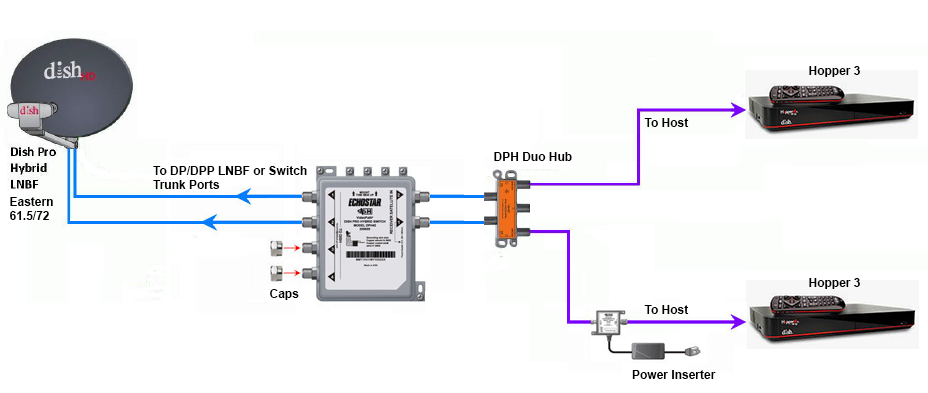
Does someone still have the diagram showing how to connect two Hopper 3s again?
I currently have one H3 and one 4K Joey, set up through a 1000.2 eastern arc hybrid lnb and solo hub.
The plan is to replace the Joey with the second H3. Already purchased a duo hub and I have three coax cables coming in from outside, from back when I used to have the older 1000.4 dish and the hopper 2. I don't fully remember, but I think the other two coax cables are just tied up next to the dish outside; will have to check again.
I currently have one H3 and one 4K Joey, set up through a 1000.2 eastern arc hybrid lnb and solo hub.
The plan is to replace the Joey with the second H3. Already purchased a duo hub and I have three coax cables coming in from outside, from back when I used to have the older 1000.4 dish and the hopper 2. I don't fully remember, but I think the other two coax cables are just tied up next to the dish outside; will have to check again.
26 Replies
·
5696 views



Pub Member / Supporter
Lifetime Supporter
While always entertaining....I hope you guys recognize that the child molesters they arrested in this video were STRICTLY due to tips from the National Center for Missing and Exploited Children. I strongly suggest that you go to their website and support them. They are the ONLY entity that is trying to curb all the perverts out there. And yes...if you want to have sex or see someone have sex with a minor you ARE a pervert.
View: https://www.youtube.com/watch?v=swYXp9x5bag&t=911s
View: https://www.youtube.com/watch?v=swYXp9x5bag&t=911s
0 Replies
·
15 views