

Social Feed
voom reciever problems
 i have had voom's service for 2 weeks & it has had problems 12 out of the 14 days picture freezing ,box locking up after channel up(122),channel staying the same video surf bar still changing channels,massive tileing from wind,turning on sat box no picture etc,etc,etc.Always have to power down box by resetting & then it works good for the most part i love the picture quality but this service is extremly poor multiple calls to voom 2 missed service calls already for the box replacement then when i mention disconnecting i am told i mite have to pay a early termination fee what a joke there s**t doesnt work & i have to pay a penalty i wish i would of read all the complaints on this site b4 i signed up disatisfied so far hopeing new box cures the problem but i doubt it since installs inc & voom themselves aknowledged other people also having similar problems thanks for listning to my venting Bill
20 Replies
·
2635 views

Pub Member / Supporter
Lifetime Supporter
Videos like this can make you appreciate the things we take for granted.
View: https://www.youtube.com/shorts/a2cgQidHQJI
View: https://www.youtube.com/shorts/a2cgQidHQJI
3 Replies
·
23 views


Staff member
HERE TO HELP YOU!
Cutting Edge
Sometimes a thread gets so many posts in it that is can cause issues for the server so that why today we introduce The Song Name Game Part 3!
So let the game continue!
The last song was added by Bobby who posted...
One Meat Ball - Andrews Sisters
CONTINUE ON AND HAVE FUN! WELCOME HOME TO SATELLITEGUYS.US!
Here are the original rules for the game as posted by WebbyDude back in 2006. http://www.satelliteguys.us/threads/68645-Song-Name-Game
Just name a song title and the band who performed it. The next person does the same thing, but needs to list a song title or band name which includes a word from the previous entry. Pick songs from any genre.
Example:
Long Live Rock and Roll -- Rainbow
Rainbow in the Dark -- Dio
Another example:
Ride the Lightning -- Metallica
Lightning Strikes -- Ozzy Osbourne
Get it?
An additional note: we all know that song titles, sometimes, use profane words. Because this is a family friendly website it is advised that you clean up that title up a bit. This is accomplished by using something like sh!t instead of the real word. Thanks....
So let the game continue!
The last song was added by Bobby who posted...
One Meat Ball - Andrews Sisters
CONTINUE ON AND HAVE FUN! WELCOME HOME TO SATELLITEGUYS.US!
Here are the original rules for the game as posted by WebbyDude back in 2006. http://www.satelliteguys.us/threads/68645-Song-Name-Game
Just name a song title and the band who performed it. The next person does the same thing, but needs to list a song title or band name which includes a word from the previous entry. Pick songs from any genre.
Example:
Long Live Rock and Roll -- Rainbow
Rainbow in the Dark -- Dio
Another example:
Ride the Lightning -- Metallica
Lightning Strikes -- Ozzy Osbourne
Get it?
An additional note: we all know that song titles, sometimes, use profane words. Because this is a family friendly website it is advised that you clean up that title up a bit. This is accomplished by using something like sh!t instead of the real word. Thanks....
68743 Replies
·
2684457 views


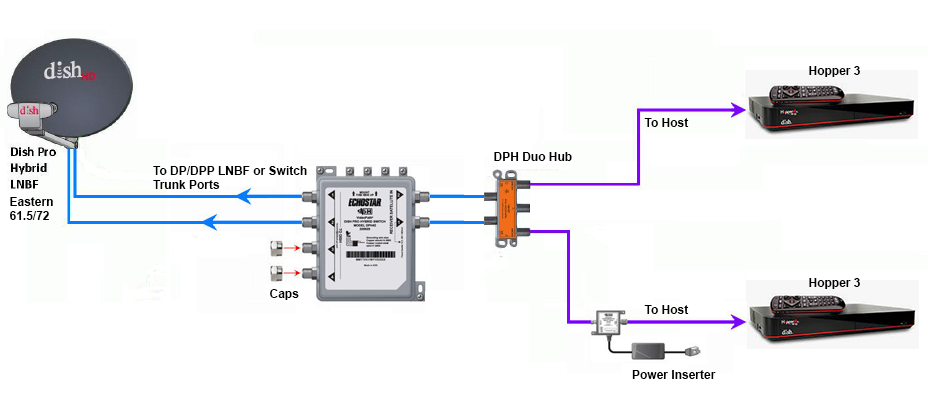
Does someone still have the diagram showing how to connect two Hopper 3s again?
I currently have one H3 and one 4K Joey, set up through a 1000.2 eastern arc hybrid lnb and solo hub.
The plan is to replace the Joey with the second H3. Already purchased a duo hub and I have three coax cables coming in from outside, from back when I used to have the older 1000.4 dish and the hopper 2. I don't fully remember, but I think the other two coax cables are just tied up next to the dish outside; will have to check again.
I currently have one H3 and one 4K Joey, set up through a 1000.2 eastern arc hybrid lnb and solo hub.
The plan is to replace the Joey with the second H3. Already purchased a duo hub and I have three coax cables coming in from outside, from back when I used to have the older 1000.4 dish and the hopper 2. I don't fully remember, but I think the other two coax cables are just tied up next to the dish outside; will have to check again.
27 Replies
·
5938 views



Pub Member / Supporter
Lifetime Supporter
Over the past year I have been tracking the changes on Western Arc. The past 3 months have had a lot of changes that I posted in the other MPEG2 Western Arc shutdown thread. Now that 129 is (basically) out of commission, here is where Western Arc stands. This is just a national channel list, (no local channels) based off what I can see and what others have contributed. Thanks to everyone who has helped me come up with the locations of some of the channels – I would try and list all of you out, but I know I would forget someone! As has been suggested in other parts of the forum, it would be great to collect the spotbeam data for those who could contribute!
A couple of pieces of info:
When I talk about number of channels on a transponder, all my numbers are unique channels – for example, channel 101 and 199 are the same channel mapped to two different numbers, but in terms of space, only takes up 1 channel worth of bandwidth on the transponder.
Finally, I have to give Dish a ton of credit. When it was 110/119/129, Dish had 82 transponders they were using – it took a lot to get it down to 50 transponders and figure out where all the pieces were going to go. What are the things they did to get there? Here are the things I saw:
A couple of pieces of info:
- Out of the 64 transponders between 110/119, there are currently 50 transponders that Dish is licensed to use. 22 are Spotbeams, 28 are ConUS transponders (14 transponders are licensed to DirecTV and Dish doesn't have access to them)
- Those 28 ConUS transponders are divided as follows:
- 10 are dedicated to National HD channels (ESPN, CNN, Disney Channel, etc). Dish is maxing out at 16 HD channels per transponder (note – in an earlier post I said there was one transponder with 17 HD channels, that was an error on my part. When I double checked my listings, one channel changed transponders). Before the transition, there was a maximum of 14 HD channels per transponder.
- 1 transponder is dedicated to adult content
- 2 are a mixture HD PPV Movies/4k channels
- 3 are set aside for HD Sports channels that are only on for live games (NBA League Pass, the PAC 12 alternate channels, some PPV events, etc); 3 SD PPV Sports Channels are there as well.
- 7 are for SD and/or music channels. Dish is maxing out at 26 SD channels per transponder thus far on the SD transponders.
- 5 transponders on 110 I have no channels listed but Dish operates. (they are labeled as ConUS on my chart below) There are other things that could be on those transponders, like RV Distant Networks, internal testing channels, etc, that I can't see. They might be able to be used for additional content, but I am not sure exactly what is on those transponders.
When I talk about number of channels on a transponder, all my numbers are unique channels – for example, channel 101 and 199 are the same channel mapped to two different numbers, but in terms of space, only takes up 1 channel worth of bandwidth on the transponder.
Finally, I have to give Dish a ton of credit. When it was 110/119/129, Dish had 82 transponders they were using – it took a lot to get it down to 50 transponders and figure out where all the pieces were going to go. What are the things they did to get there? Here are the things I saw:
- During this migration from 129, Dish converted 7 ConUS transponders on 119 into Spotbeams – that is how they ended up fitting on all the HD locals that used to be on 129. (for those interested, TP 6, 7, 8, 9, 10, 11, 13 are the ones that used to be ConUS on 119 that are now Spotbeam)
- Removed almost all SD duplicate channels that are offered in HD
- Converted remaining SD channels from MPEG2 to MPEG4
- There are also 2 subtle things that changed from the HD channel perspective
- At the beginning of the transition, Dish decreased the number of PPV Movie channels – prior to this transition the PPV channels HD PPV movies were 502-522; now they are 502-517.
- At the beginning of April when MLB, NBA, and NHL regular seasons were all going on at the same time and this transition began, there were a ton of games "joined in progress" for the HD feeds. That wasn't common since the days before the full time HD RSN's. The reason for that was prior to the transition, Dish had 4 transponders set aside for HD Sports – 2 transponders was the bandwidth set aside from the HD RSN's before Dish dropped the RSN's, then 2 transponders were for alternate channels. Now we are down to 3 transponders for HD sports.
253 Replies
·
66244 views

Lifetime Supporter
Schedule drops tomorrow. Mandatory mini camps in June. Hall of Fame game August 6th.
137 Replies
·
2800 views




I was bewildered with all the new DISH TV "Bonus View" channels, so I put together a web page table with all the info I could find. It's at:
https://anythingpeaceful.org/dishtv/DISH_TV_Bonus_View_Channels.html
Here's a partial screenshot of the table, as sorted by Channel Name. (You can click on a column header to sort.)

If you have any corrections or suggestions, please post here.
https://anythingpeaceful.org/dishtv/DISH_TV_Bonus_View_Channels.html
Here's a partial screenshot of the table, as sorted by Channel Name. (You can click on a column header to sort.)
If you have any corrections or suggestions, please post here.
46 Replies
·
6273 views
Lifetime Supporter
Continuing the Kilauea thread in the Pub here. Perhaps the Iceland one too next time there's remarkable activity.
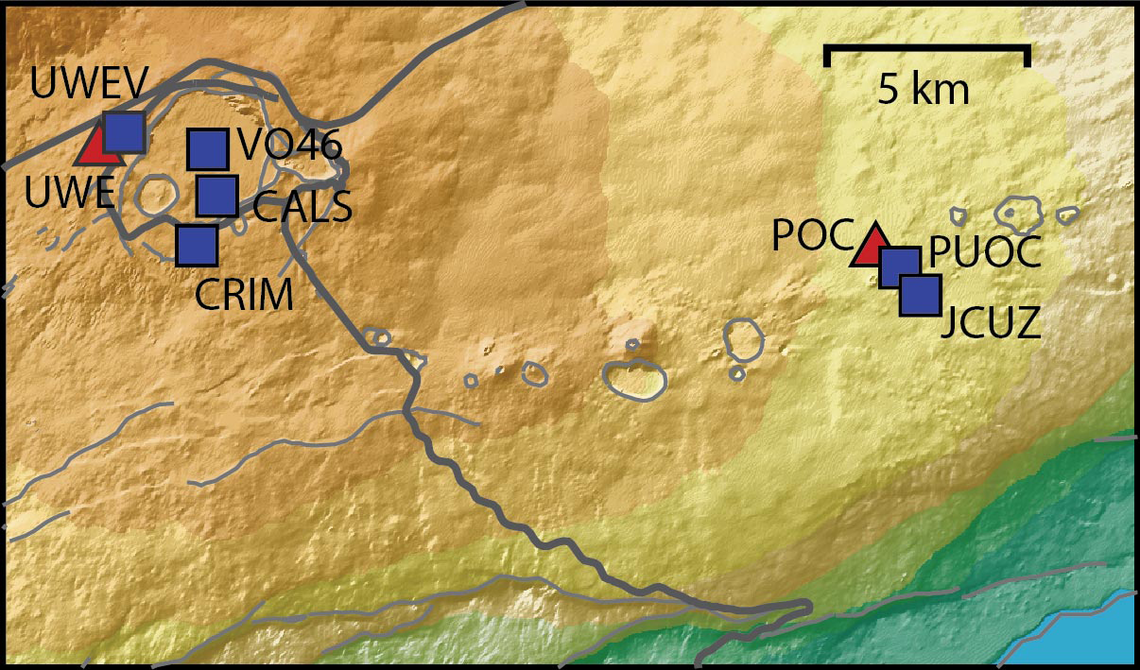
Currently there is precursory lava flowing into the crater, leading to the next episode that'll probably start within the next day.
You can see the pace of inflation / deflation here. It serves as the primary predictor for when the expect the eruptions, which coincide w/ inflation turning into significant deflation and last for several hours on average with significant fountaining.
 www.usgs.gov
View: https://youtu.be/Uecu2seh4b4
Wife and I like the AfarTV feeds, for the discussion along w/ them, though they're otherwise just mirrors of the official USGS feeds.
View: https://youtu.be/iws3rh5vLAQ
Currently there is precursory lava flowing into the crater, leading to the next episode that'll probably start within the next day.
You can see the pace of inflation / deflation here. It serves as the primary predictor for when the expect the eruptions, which coincide w/ inflation turning into significant deflation and last for several hours on average with significant fountaining.
Monitoring Data for Kīlauea
For more information on how electronic tiltmeters and GPS receivers help monitor the deformation of Kīlauea volcano, see the HVO Deformation page.
View: https://youtu.be/Uecu2seh4b4
Wife and I like the AfarTV feeds, for the discussion along w/ them, though they're otherwise just mirrors of the official USGS feeds.
View: https://youtu.be/iws3rh5vLAQ
122 Replies
·
3624 views

TWiT Tech Podcast Network
Time for another AWESOME video from the TWIT Network!
View: https://www.youtube.com/watch?v=1AzBMcXCMAc
Direct YouTube Link - Intelligent Machines 895
TWIT's Website
TWIT Live Feed
View: https://www.youtube.com/watch?v=1AzBMcXCMAc
Direct YouTube Link - Intelligent Machines 895
TWIT's Website
TWIT Live Feed
0 Replies
·
11 views
Pub Member / Supporter
Lifetime Supporter
Now first, I'll mention that the area of FL I live in has extremely high humidity and not a lot of wind so things don't dry out very well for extended periods of time.
I'm in the process of tearing down and rebuilding a pergola with a surrounding deck that I built 9 yrs ago. 90% of the deck screws are just sheering off at the head because the screws rusted out. These are the deck screws you buy in the 25 lb box at your lumber yard. Very annoying. So I just ordered some 316L stainless steel screws to use for when I go to rebuild it.
I'm in the process of tearing down and rebuilding a pergola with a surrounding deck that I built 9 yrs ago. 90% of the deck screws are just sheering off at the head because the screws rusted out. These are the deck screws you buy in the 25 lb box at your lumber yard. Very annoying. So I just ordered some 316L stainless steel screws to use for when I go to rebuild it.
3 Replies
·
66 views
