

Social Feed
Sorry this is so long and wordy, but this is the kind of info that I wish I would have found more easily when I was contemplating my switch over.....
I had a five year love affair with Dish Network. I was a bachelor with an HDTV in the living room and an SDTV in the bedroom. One box, two tvs, great customer service and a third OTA tuner built right into my 722 receiver. Running AT200 except for Sept-Dec when I would upgrade to AT250 so I could watch Mountain West Conference football on Versus. I had added a 1TB HDD to my 722 and archived tons of college football games to it and happily used it and the internal HDD for all of my DVR needs (two games at a time, all Saturday) and I would watch football deep into the night. Life was good.
Then my life changed. First a new girlfriend and then a new baby two years later. This meant a 2nd HDTV and a 2nd SDTV. One box was no longer going to be adequate. So I called Dish to see about adding another 722 for the additional 2 TVs:
"Certainly Mr. Smith. That'll be $100 up front for the new 722 and an additional $17/month for the use of it."
"WTF!!!! I think I'll research my options and get back to you"
So, I courted DirecTV and weighed it against my years with Dish. Sadly, the installer came a week ago and I put Dish Down for good. I replaced my trusty 722 with 2 HR24 DVRs and 2 H24 HD Receivers.
Here's the comparison/contrast after a week with DirecTV.
Hardware
Whole Home DVR is at least as good as promised and probably better since I haven't really checked everything out, yet. The shared playlist between the 2 HR24s is awesome.... any recording on any tv at any time. Having 4 DVR tuners meant I could take down my rooftop antenna, too, since I won't need the additional tuner to record two programs and still simultaneously watch a third.
If you're used to the feel of the 722, don't be afraid of the HR24 and the H24. I insisted on these boxes at installation since DirecTV boxes always seemed to be slow and laggy when I had played with them in the past. The HR24s are certainly not faster than the 722, but might be just as quick with most commands. My biggest complaint is that the "Step Ahead" command is slower than the 722. When you skip ahead 30 seconds on a 722, it is instant. The HR24 does a quick scroll. A nice feature that was added to this was that multiple jump ahead commands are displayed on the screen's timeline when you push "Step Ahead" more than once. If I push "Step Ahead" 4 times, the number "4" is displayed at the end of the timeline for the half second while the DVR scrolls through playback. The DirecTV interface as a whole is less impressive than Dish Network's. Where it looks like a professional graphic designer took the time to design Dish's guides and menus with drop-shadowed fonts, customizable menus, etc., DirecTV looks like they just jumped into MS Paint, designed a 2D interface and then tansferred it onto the software. Certainly not as easy to read or as pleasant to the eye as Dish, although I can appreciate the straight forward design. I wish I could shrink the font and display more guide information. Very functional, but not as pretty or customizable as Dish. DirecTV lets you skip ahead or back 12 hours with a single button push, but I much prefer the 24 hour jump that Dish uses. The boxes are much smaller and lack the fan noise of the 722, especially the 4a.m. wind-up that Dish does every night. The front panel displays are busier than the 722, and while not distracting, seem pointless. The next time I actually refer to the front of a receiver box for information will be the first time (other than power on/off). My favorite feature is the ability to automatically adjust the display output according to the broadcast type. With one setting, the box sends the signal to the TV with exactly the format/resolution it is broadcast. 1080i broadcasts are sent to the TV as 1080i, 720p is sent as 720p and 480i is sent as 480i. If I want to watch ESPN in 720p and then switch to TBS, then I know the picture I am watching is in its native resolution. I don't have to choose whether the signal coming from the box is set to 1080i or 720p. I watch a lot of sports and don't want to sacrifice progressive scan to get 1080 output on everything else. I wish DirecTV could implement external HDD usage the same way Dish does. In fact, compared to Dish, DirecTV just plain sucks at this. The 500GB internal HDD is nice, though.
The H24s seemed just as fast as a 722, except when executing DVR commands from one of the HR24s, but they are not uncomfortably slow and once the program has begun playback it feels nearly real-time. Everything else is nearly identical to the HR24. Not being able to FF or Rewind live broadcasts hasn't been a big deal since the H24s are in the baby's room and my 5-year old's room.
Programming
SD broadcasts are softer on DirecTV than Dish. It's not close. I think Dish applies some edge sharpening at the expense of artifacts in their .mp4 transcodes that DirecTV doesn't. I prefer Dish in this sense. I don't see any real difference in HD broadcasts and they differ from Network to Network, anyway.
Holy crap, does DirecTV have a lot of "filler channels" in their lineup or what? It has literally taken me hours to make customized guides and dump all of the useless, weird stuff that D* is throwing up there. Dish's guides are grouped slightly better and the guides have more options for customization.
Choice Xtra > AT200 at a similar price point. Losing E! HD, Lifetime Movie Network HD and AMC HD to get the ESPN package in HD (ESPNU & ESPN News) and gaining some of the documentary channels is a worthy trade-off. Versus is also part of this package; I had to jump to AT250 to get this on Dish.
Once I get my guides completely customized, I'm sure I'll be plenty happy with DirecTV.
Pricing
For one HDTV and one SDTV, it is hard to beat Dish. The cost of adding more TVs, especially a 2nd HDTV makes Dish prohibitively expensive. The new customer bargains didn't entice me to switch to DirecTV, it was mostly Dish's perceived inability to offer what DirecTV could for a multiple TV household at a similar price. I'm a value shopper which is different than a price shopper (think Kia buyer vs. Lexus buyer).
My upfront cost for DirecTV was $209. That got me 2 HR24s, 1 H24 and 1 SD box. Because my locals aren't available in SD, DirecTV upgraded my SD box to an H24 at no charge. So $198 + tax got me 2 HR24s and 2 H24s. Purchasing through CostCo got me a $180 CostCo Cash Card.
Net Up Front Cost $29 for DirecTV
Net Up Front Cost $100 to stay with Dish Network
I also got a referral from a current D* subscriber, so I get $10/month off for 10 months. My first ten months that also includes HBO/Cinemax/Showtime/Staz for the first three are at $47.99, $57.99 for two months, then $74.99 for the final year. It will probably jump to $77.99 in year two with the annual price increase.
Had I stayed with Dish, my per month cost would have been $82.99.
After four online conversations, two phone calls and an e-mail to a Dish rep that was lurking on the High Def Forum, I got Dish to drop the $100 up front fee for the 2nd 722 and they offered me $10 off for the first six months of my new 2-year contract, equaling my 2nd year cost with DirecTV. To get Versus in the fall would cost me an additional $10/month from Sept-December ($92.99/month). The $17/month fee for the 2nd DVR is just killing Dish in this case. If it would have been $5, I'd still be listening to Charlie talk about why they had to shut down the LIN broadcasts and explain why I am still watching college basketball in SD on ESPNU.
I also had to pay $140 to cancel my Dish contract early. Even then, I break even at 7 months by going with DirecTV over Dish.
Installation
Everything comes into the house on one RG-6 cable into the SWM and is split off to the individual rooms from there. My DECA connector is one RG-6 in and one Cat5e out to the router on my electronics wall. That is one less cable in than I had with Dish + the OTA antenna. On the other hand, there's an extra power cable that needs to be plugged in at the central junction box and I have to have a receiver at every TV. My signal strength appears to be considerably better with DirecTV (86-100). One RG-6 to every room. All of my rooms would have had to been recabled with dual coax in order to run the 2nd TVs off the 722s.
I was also able to shed an ethernet switch in my living room because I had my 722 and a PS3 connected to a wireless bridge so that I could maintain internet/network capability without running Cat 5 through the walls. Since the HR24 is networked through the coax, I only need one internet connection (to the PS3). Net loss of two ethernet cables and another power cable in the living room.
Cliffs
Even with a $140 penalty for early contract termination, I break even at 7 months by going with D* over E* for a 4 room setup. With D* I have HD capability on 4 TVs instead of 2 and I have 6 tuners with DVR capability on 4 of them and the entire house works off the same DVR playlist. The programming package is slightly better for my wants and very slightly cheaper, too. There are fewer cables and wires and I have better signal strenght than i had with E*. I will miss AMC in HD, but gain the ESPN/Disney family in HD as well as the NatGeo duo and Versus in HD.
Incidentally, Dish did send me an e-mail the day after I cancelled their service and installed D*. They offered me $10 off for the first year if I would uncancel my cancellation as well as waive the $100 up front. Sorry Dish, too late and one year of discounts short. Why would they wait until their service is completely cancelled before they make that offer? Did they think I was bluffing and wouldn't really go through with it? I'm pretty sure that nobody's gonna cancel their new install once it's in place to go back for $120 over the course of one year.
I had a five year love affair with Dish Network. I was a bachelor with an HDTV in the living room and an SDTV in the bedroom. One box, two tvs, great customer service and a third OTA tuner built right into my 722 receiver. Running AT200 except for Sept-Dec when I would upgrade to AT250 so I could watch Mountain West Conference football on Versus. I had added a 1TB HDD to my 722 and archived tons of college football games to it and happily used it and the internal HDD for all of my DVR needs (two games at a time, all Saturday) and I would watch football deep into the night. Life was good.
Then my life changed. First a new girlfriend and then a new baby two years later. This meant a 2nd HDTV and a 2nd SDTV. One box was no longer going to be adequate. So I called Dish to see about adding another 722 for the additional 2 TVs:
"Certainly Mr. Smith. That'll be $100 up front for the new 722 and an additional $17/month for the use of it."
"WTF!!!! I think I'll research my options and get back to you"
So, I courted DirecTV and weighed it against my years with Dish. Sadly, the installer came a week ago and I put Dish Down for good. I replaced my trusty 722 with 2 HR24 DVRs and 2 H24 HD Receivers.
Here's the comparison/contrast after a week with DirecTV.
Hardware
Whole Home DVR is at least as good as promised and probably better since I haven't really checked everything out, yet. The shared playlist between the 2 HR24s is awesome.... any recording on any tv at any time. Having 4 DVR tuners meant I could take down my rooftop antenna, too, since I won't need the additional tuner to record two programs and still simultaneously watch a third.
If you're used to the feel of the 722, don't be afraid of the HR24 and the H24. I insisted on these boxes at installation since DirecTV boxes always seemed to be slow and laggy when I had played with them in the past. The HR24s are certainly not faster than the 722, but might be just as quick with most commands. My biggest complaint is that the "Step Ahead" command is slower than the 722. When you skip ahead 30 seconds on a 722, it is instant. The HR24 does a quick scroll. A nice feature that was added to this was that multiple jump ahead commands are displayed on the screen's timeline when you push "Step Ahead" more than once. If I push "Step Ahead" 4 times, the number "4" is displayed at the end of the timeline for the half second while the DVR scrolls through playback. The DirecTV interface as a whole is less impressive than Dish Network's. Where it looks like a professional graphic designer took the time to design Dish's guides and menus with drop-shadowed fonts, customizable menus, etc., DirecTV looks like they just jumped into MS Paint, designed a 2D interface and then tansferred it onto the software. Certainly not as easy to read or as pleasant to the eye as Dish, although I can appreciate the straight forward design. I wish I could shrink the font and display more guide information. Very functional, but not as pretty or customizable as Dish. DirecTV lets you skip ahead or back 12 hours with a single button push, but I much prefer the 24 hour jump that Dish uses. The boxes are much smaller and lack the fan noise of the 722, especially the 4a.m. wind-up that Dish does every night. The front panel displays are busier than the 722, and while not distracting, seem pointless. The next time I actually refer to the front of a receiver box for information will be the first time (other than power on/off). My favorite feature is the ability to automatically adjust the display output according to the broadcast type. With one setting, the box sends the signal to the TV with exactly the format/resolution it is broadcast. 1080i broadcasts are sent to the TV as 1080i, 720p is sent as 720p and 480i is sent as 480i. If I want to watch ESPN in 720p and then switch to TBS, then I know the picture I am watching is in its native resolution. I don't have to choose whether the signal coming from the box is set to 1080i or 720p. I watch a lot of sports and don't want to sacrifice progressive scan to get 1080 output on everything else. I wish DirecTV could implement external HDD usage the same way Dish does. In fact, compared to Dish, DirecTV just plain sucks at this. The 500GB internal HDD is nice, though.
The H24s seemed just as fast as a 722, except when executing DVR commands from one of the HR24s, but they are not uncomfortably slow and once the program has begun playback it feels nearly real-time. Everything else is nearly identical to the HR24. Not being able to FF or Rewind live broadcasts hasn't been a big deal since the H24s are in the baby's room and my 5-year old's room.
Programming
SD broadcasts are softer on DirecTV than Dish. It's not close. I think Dish applies some edge sharpening at the expense of artifacts in their .mp4 transcodes that DirecTV doesn't. I prefer Dish in this sense. I don't see any real difference in HD broadcasts and they differ from Network to Network, anyway.
Holy crap, does DirecTV have a lot of "filler channels" in their lineup or what? It has literally taken me hours to make customized guides and dump all of the useless, weird stuff that D* is throwing up there. Dish's guides are grouped slightly better and the guides have more options for customization.
Choice Xtra > AT200 at a similar price point. Losing E! HD, Lifetime Movie Network HD and AMC HD to get the ESPN package in HD (ESPNU & ESPN News) and gaining some of the documentary channels is a worthy trade-off. Versus is also part of this package; I had to jump to AT250 to get this on Dish.
Once I get my guides completely customized, I'm sure I'll be plenty happy with DirecTV.
Pricing
For one HDTV and one SDTV, it is hard to beat Dish. The cost of adding more TVs, especially a 2nd HDTV makes Dish prohibitively expensive. The new customer bargains didn't entice me to switch to DirecTV, it was mostly Dish's perceived inability to offer what DirecTV could for a multiple TV household at a similar price. I'm a value shopper which is different than a price shopper (think Kia buyer vs. Lexus buyer).
My upfront cost for DirecTV was $209. That got me 2 HR24s, 1 H24 and 1 SD box. Because my locals aren't available in SD, DirecTV upgraded my SD box to an H24 at no charge. So $198 + tax got me 2 HR24s and 2 H24s. Purchasing through CostCo got me a $180 CostCo Cash Card.
Net Up Front Cost $29 for DirecTV
Net Up Front Cost $100 to stay with Dish Network
I also got a referral from a current D* subscriber, so I get $10/month off for 10 months. My first ten months that also includes HBO/Cinemax/Showtime/Staz for the first three are at $47.99, $57.99 for two months, then $74.99 for the final year. It will probably jump to $77.99 in year two with the annual price increase.
Had I stayed with Dish, my per month cost would have been $82.99.
After four online conversations, two phone calls and an e-mail to a Dish rep that was lurking on the High Def Forum, I got Dish to drop the $100 up front fee for the 2nd 722 and they offered me $10 off for the first six months of my new 2-year contract, equaling my 2nd year cost with DirecTV. To get Versus in the fall would cost me an additional $10/month from Sept-December ($92.99/month). The $17/month fee for the 2nd DVR is just killing Dish in this case. If it would have been $5, I'd still be listening to Charlie talk about why they had to shut down the LIN broadcasts and explain why I am still watching college basketball in SD on ESPNU.
I also had to pay $140 to cancel my Dish contract early. Even then, I break even at 7 months by going with DirecTV over Dish.
Installation
Everything comes into the house on one RG-6 cable into the SWM and is split off to the individual rooms from there. My DECA connector is one RG-6 in and one Cat5e out to the router on my electronics wall. That is one less cable in than I had with Dish + the OTA antenna. On the other hand, there's an extra power cable that needs to be plugged in at the central junction box and I have to have a receiver at every TV. My signal strength appears to be considerably better with DirecTV (86-100). One RG-6 to every room. All of my rooms would have had to been recabled with dual coax in order to run the 2nd TVs off the 722s.
I was also able to shed an ethernet switch in my living room because I had my 722 and a PS3 connected to a wireless bridge so that I could maintain internet/network capability without running Cat 5 through the walls. Since the HR24 is networked through the coax, I only need one internet connection (to the PS3). Net loss of two ethernet cables and another power cable in the living room.
Cliffs
Even with a $140 penalty for early contract termination, I break even at 7 months by going with D* over E* for a 4 room setup. With D* I have HD capability on 4 TVs instead of 2 and I have 6 tuners with DVR capability on 4 of them and the entire house works off the same DVR playlist. The programming package is slightly better for my wants and very slightly cheaper, too. There are fewer cables and wires and I have better signal strenght than i had with E*. I will miss AMC in HD, but gain the ESPN/Disney family in HD as well as the NatGeo duo and Versus in HD.
Incidentally, Dish did send me an e-mail the day after I cancelled their service and installed D*. They offered me $10 off for the first year if I would uncancel my cancellation as well as waive the $100 up front. Sorry Dish, too late and one year of discounts short. Why would they wait until their service is completely cancelled before they make that offer? Did they think I was bluffing and wouldn't really go through with it? I'm pretty sure that nobody's gonna cancel their new install once it's in place to go back for $120 over the course of one year.
30 Replies
·
24594 views

This started a couple months ago. I have 2 H3s on one network, both with 2 EHD identical 3 TB seperately powered so all recordings are accessible by all 4k & J4s (8 of them).
On one H3 (not the main one that controls the MOCA network), after it reboots, it doesn't recognize it has two EHDs plugged into it. Rebooting the EHD by their power source doesn't fix it. Resetting the network doesn't. Software h3 reset doesn't fix it. Rebooting MOCA h3 doesn't fix it but so far, after 3+ cold boots (unplug pwr to H3 with unrecognized EHDs), it finally it figures out they are plugged into it. BUT.... Then when you open a program it only partially shows series and episodes, but instead of showing recordings, it only shows upcoming airings. HELP!!!!
On one H3 (not the main one that controls the MOCA network), after it reboots, it doesn't recognize it has two EHDs plugged into it. Rebooting the EHD by their power source doesn't fix it. Resetting the network doesn't. Software h3 reset doesn't fix it. Rebooting MOCA h3 doesn't fix it but so far, after 3+ cold boots (unplug pwr to H3 with unrecognized EHDs), it finally it figures out they are plugged into it. BUT.... Then when you open a program it only partially shows series and episodes, but instead of showing recordings, it only shows upcoming airings. HELP!!!!
13 Replies
·
216 views


TWiT Tech Podcast Network
Time for another AWESOME video from the TWIT Network!
View: https://www.youtube.com/shorts/E-QczD5oEh4
Direct YouTube Link - AI vs. Coders & Mathematicians: The Great Disruption #shorts
TWIT's Website
TWIT Live Feed
View: https://www.youtube.com/shorts/E-QczD5oEh4
Direct YouTube Link - AI vs. Coders & Mathematicians: The Great Disruption #shorts
TWIT's Website
TWIT Live Feed
0 Replies
·
2 views


Staff member
HERE TO HELP YOU!
Cutting Edge
Sometimes a thread gets so many posts in it that is can cause issues for the server so that why today we introduce The Song Name Game Part 3!
So let the game continue!
The last song was added by Bobby who posted...
One Meat Ball - Andrews Sisters
CONTINUE ON AND HAVE FUN! WELCOME HOME TO SATELLITEGUYS.US!
Here are the original rules for the game as posted by WebbyDude back in 2006. http://www.satelliteguys.us/threads/68645-Song-Name-Game
Just name a song title and the band who performed it. The next person does the same thing, but needs to list a song title or band name which includes a word from the previous entry. Pick songs from any genre.
Example:
Long Live Rock and Roll -- Rainbow
Rainbow in the Dark -- Dio
Another example:
Ride the Lightning -- Metallica
Lightning Strikes -- Ozzy Osbourne
Get it?
An additional note: we all know that song titles, sometimes, use profane words. Because this is a family friendly website it is advised that you clean up that title up a bit. This is accomplished by using something like sh!t instead of the real word. Thanks....
So let the game continue!
The last song was added by Bobby who posted...
One Meat Ball - Andrews Sisters
CONTINUE ON AND HAVE FUN! WELCOME HOME TO SATELLITEGUYS.US!
Here are the original rules for the game as posted by WebbyDude back in 2006. http://www.satelliteguys.us/threads/68645-Song-Name-Game
Just name a song title and the band who performed it. The next person does the same thing, but needs to list a song title or band name which includes a word from the previous entry. Pick songs from any genre.
Example:
Long Live Rock and Roll -- Rainbow
Rainbow in the Dark -- Dio
Another example:
Ride the Lightning -- Metallica
Lightning Strikes -- Ozzy Osbourne
Get it?
An additional note: we all know that song titles, sometimes, use profane words. Because this is a family friendly website it is advised that you clean up that title up a bit. This is accomplished by using something like sh!t instead of the real word. Thanks....
68512 Replies
·
2671677 views


For some reason, the satelliteguys.us site is loading a lot slower than usual on both Chrome on my Asus laptop and Safari on my iPhone.
I'm also seeing longer appearances of the blue bar at the top and the "3 blue bars" loading symbol.
Is anyone else also having the same problem? Thanks in advance.
I'm also seeing longer appearances of the blue bar at the top and the "3 blue bars" loading symbol.
Is anyone else also having the same problem? Thanks in advance.
540 Replies
·
18263 views


Supporting Founder
Lifetime Supporter
No idea what improvements might be involved.
11 Replies
·
547 views


Staff member
Pub Member / Supporter
Please post your remote make/model here and any details of your issue. We are looking to collect as many examples as possible. I may reach out to you for your receiver number, but please do not post it here.
If you've already reported this to me, please repost it here so I can track all instances in one thread.
Thanks!
Brittany
If you've already reported this to me, please repost it here so I can track all instances in one thread.
Thanks!
Brittany
22 Replies
·
685 views


Lifetime Supporter
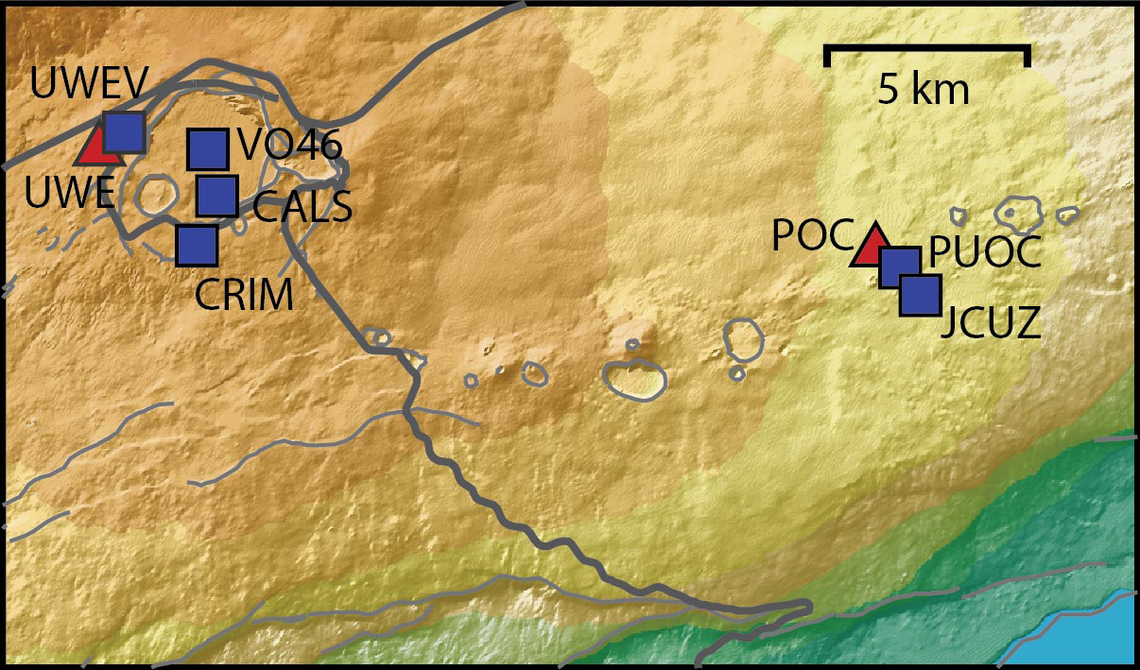
Continuing the Kilauea thread in the Pub here. Perhaps the Iceland one too next time there's remarkable activity.
Currently there is precursory lava flowing into the crater, leading to the next episode that'll probably start within the next day.
You can see the pace of inflation / deflation here. It serves as the primary predictor for when the expect the eruptions, which coincide w/ inflation turning into significant deflation and last for several hours on average with significant fountaining.
 www.usgs.gov
View: https://youtu.be/Uecu2seh4b4
Wife and I like the AfarTV feeds, for the discussion along w/ them, though they're otherwise just mirrors of the official USGS feeds.
View: https://youtu.be/iws3rh5vLAQ
Currently there is precursory lava flowing into the crater, leading to the next episode that'll probably start within the next day.
You can see the pace of inflation / deflation here. It serves as the primary predictor for when the expect the eruptions, which coincide w/ inflation turning into significant deflation and last for several hours on average with significant fountaining.
Monitoring Data for Kīlauea
For more information on how electronic tiltmeters and GPS receivers help monitor the deformation of Kīlauea volcano, see the HVO Deformation page.
View: https://youtu.be/Uecu2seh4b4
Wife and I like the AfarTV feeds, for the discussion along w/ them, though they're otherwise just mirrors of the official USGS feeds.
View: https://youtu.be/iws3rh5vLAQ
120 Replies
·
3259 views
TWiT Tech Podcast Network
Time for another AWESOME video from the TWIT Network!
View: https://www.youtube.com/shorts/AGvjJoT67F0
Direct YouTube Link - The Multi-User Functionality of the Apple HomeView
TWIT's Website
TWIT Live Feed
View: https://www.youtube.com/shorts/AGvjJoT67F0
Direct YouTube Link - The Multi-User Functionality of the Apple HomeView
TWIT's Website
TWIT Live Feed
0 Replies
·
9 views
TWiT Tech Podcast Network
Time for another AWESOME video from the TWIT Network!
View: https://www.youtube.com/shorts/mhc5dZ09m3U
Direct YouTube Link - Perseverance Mars Rover Sets New Interplanetary Driving Record
TWIT's Website
TWIT Live Feed
View: https://www.youtube.com/shorts/mhc5dZ09m3U
Direct YouTube Link - Perseverance Mars Rover Sets New Interplanetary Driving Record
TWIT's Website
TWIT Live Feed
0 Replies
·
13 views