

Social Feed

Staff member
HERE TO HELP YOU!
Lifetime Supporter
OPPO BDP-103 Blu-ray Player Review
The latest OPPO player is here! Here is my review.

First impressions
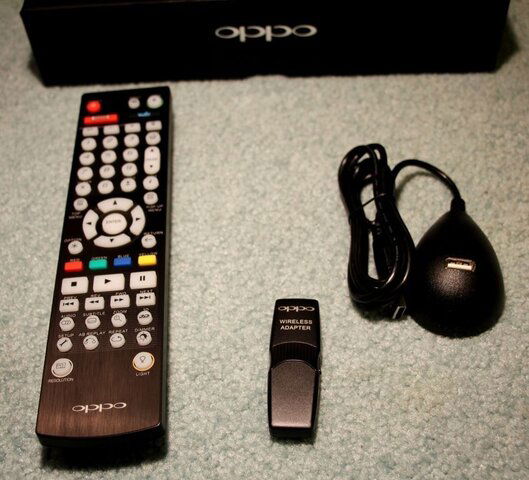
The player is rather heavy and feels very solid. I do like its clean style and its brushed aluminum finish. Doesn't look cheap at all (after spending $499, I wouldn't expect anything less ). The player came enclosed in the OPPO signature bag and with a stylish black box for cables and remote. Nice touch! Also included in the box were: a heavy-duty high speed HDMI cable (with Ethernet support), a Wireless-N dongle, and a USB extender.
Picture quality
The Blu-ray picture on this player looks absolutely spectacular! Of course the same can be said about any high-quality Blu-ray player out there. However, what sets this one apart is how well it handles video noise reduction and upconversion. The latest Marvell Qdeo chip does excellent job in removing video noise and improving the picture quality. This is especially noticeable on DVDs in dark low-contrast scenes.
Dual HDMI outputs
The player features two HDMI output ports. You can display the image on two HD displays simultaneously or you can use one HDMI output for video and the other one for audio ("Split A/V" mode). This is especially convenient if your display is 3D-capable (HDMI 1.4 compliant), but your audio system is HDMI 1.3 and cannot pass the 1.4 signal.
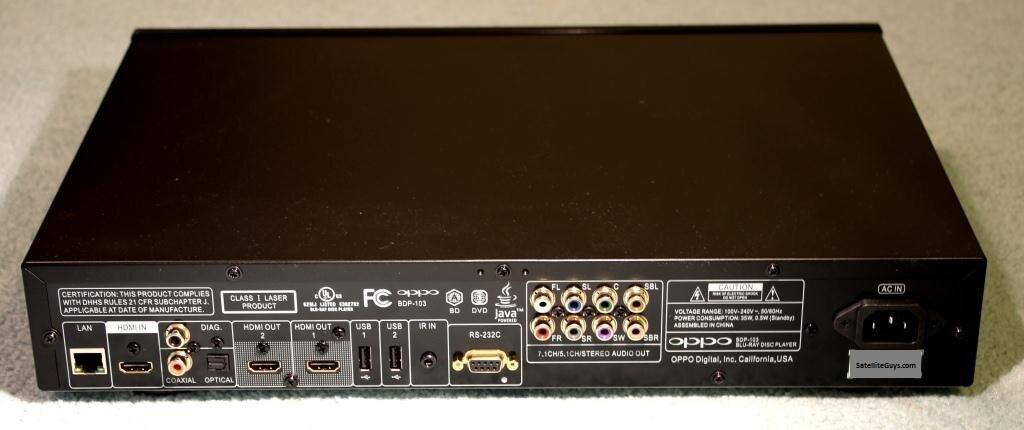
However, the two HDMI outputs are not created equal. The new Marvell Qdeo processing is only utilized on HDMI 1, so that's the preferred output for video. Keep in mind that HDMI 1 is the one on the right, and HDMI 2 is the one on the left. Somewhat confusing!
I did some side-by-side comparison of the two outputs (using a split-screen setup from two Epson 8350 projectors) and I do see significant difference between the two, particularly for DVD content. On the other hand, if your audio system can decode DSD (SACD Direct Stream Digital) and you prefer that over LPCM, then keep in mind that DSD output is only available from HDMI 2. I also noticed that HDMI 2 port creates some trouble for my projector when switching from one HDMI resolution to another, though quite possibly that can be corrected with a firmware update.
HDMI inputs
Are you running out of HDMI inputs in your A/V system? You are not alone! This player however can offer some help, as it has two HDMI inputs: one in the back and one in the front. Not only this can save you some money on buying an HDMI switch, but more importantly this will allow you to take full advantage of the Marvell Qdeo image processing for other video sources. In addition, the front HDMI input has MHL support (can charge some mobile devices).
Internet streaming
The player supports Internet streaming directly. It has built-in apps for Netflix, VUDU, Film Fresh, YouTube, Pandora and Picasa. I haven't tried them all yet, but according to OPPO's website, both NetFlix and VUDU streaming can handle 1080p and multi-channel audio (5.1 and 7.1 respectively).
Need more apps? The player supports the new Roku Stick ($99) via its front MHL-compatible HDMI port. (Though personally, I would rather buy a standalone Roku player.)
External media playback
In addition to playing disks, the BDP-103 can play external media from flash drives and external hard drives (connected via one of its three USB 2.0 ports), as well as play files over the network (via its Ethernet port or via included wireless-N adapter). Not only it can play via DLNA, as both Digital Media Player (DMP) and Digital Media Renderer (DMR), but it even can play files directly from a network share (SMB playback) without requiring any DLNA server! And as always, OPPO supports all kinds of data formats: MP4, AVI, MKV, and many-many more! (I only tried a few and they all played without any problems.) There is no eSATA or USB3 support, but I don't think this is a big problem, especially with the SMB support over Ethernet.
3D
The BDP-103 is a 3D Blu-ray player. Unfortunately the front projector in my Home Theater is not 3D, so to try it out with some 3D material I hooked up the player to a 47" LG LED set in the living room and gave it try. I played some scenes from Avatar and Prometheus. All looked fantastic! Out of curiosity I did some A/B comparison with an LG player and the 3D image produced by the BDP-103 looked somewhat better, more natural, compared to the LG player, though honestly I didn't have a chance to do enough comparison to state anything conclusive.
Multi-system support
If you have DVDs from other countries, you will truly appreciate the player's multi-system capabilities. It can play DVDs recorded in PAL and either output the native PAL signal directly or up-convert it all the way to 1080p. In addition, with a simple "SuperDisk" software mod you can make this player region-free (for DVD). I tried it and it works like a charm!
SACD and DVD-A audio
The BDP-103 is not only an excellent video player, but it's a great audio player too. Of particular interest to me, is its capability to play SACD and DVD-A formats. In fact, this was one of my main reasons to look into OPPO in the first place: not too many Blu-ray players offer this capability.
Limitations
Not entirely OPPO's fault, but the BDP-103 does have some limitations compared to its predecessors, mostly caused by the latest industry requirements. Completely gone are the analog video ports (there is one composite video output in the back, but it's for diagnostics purposes only). The player fully implements Cinavia copy-protection, which is now mandatory for all Blu-ray players. It means that some (presently only few) movies ripped from BDs may refuse to play. It cannot play ISO files directly, though reportedly there is currently a workaround: you can mount and play them via SMB (I haven't tried that though).
Other features
This player can up-scale to 4K! Wow! That sounds intriguing! But that's probably the most useless feature for me at present, since it will likely be years before I can afford a 4K display and when I finally get one, I am sure it will have built-in up-scaling too. Having said that, I am glad the player can do 4K. It makes me feel better about investing in this player: it won't get obsolete too soon.
This player is very quiet! Not only its transport is very quiet, but it's new fan-less design completely eliminates any fan noise.
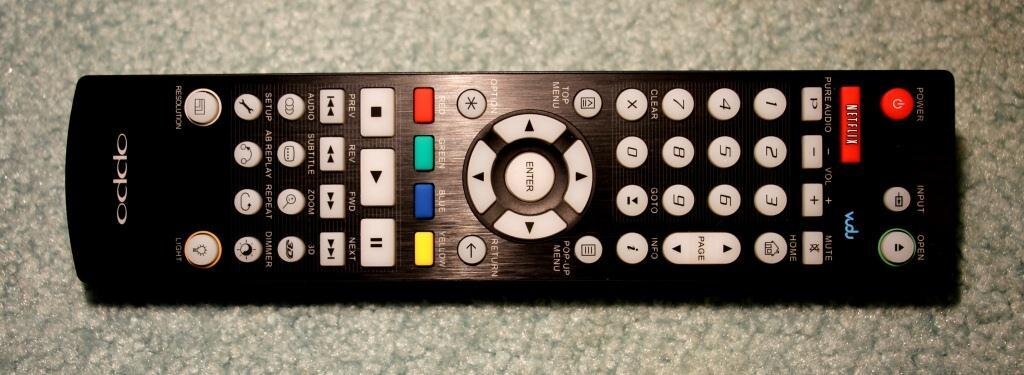
Very quick response to the remote, quick disk load. Nice backlit remote!
If you have an older surround system that doesn't have HDMI, you will be happy to know that the player does offer 7.1 multi-channel analog audio outputs. Though if you are a true old-school audiophile who wants to stay in the analog domain as much as possible, then you may want to wait for the upcoming BDP-105 model ($1,199.00), which is supposed to have much better DACs. For the rest of us, the BDP-103 will do just fine!
Conclusion
So far I am very happy with this player! OPPO makes some of the best and the most feature-rich players out there and this latest model is no disappointment. This player produces an excellent HD image, while keeping it accurate, without doing any artificial "enhancements" and its up-scaling capabilities are superb.
The only question is whether the $499 price tag is justifiable. In my opinion, if you are just looking for a good Blu-ray player and you don't really need all other features that this OPPO BDP-103 offers, then you can save some money and a get a decent player for a fraction of that price. The Blu-ray playback on many players is so good these days that it will be hard for most people to tell the difference. However, if you want to have a top-quality universal player, that can do a great job playing various formats, if you have a large DVD collection and want to get the best possible picture quality out of SD, if you have DVDs from other regions, if you want your player to stream from the Internet and to play video in various formats from a media server on your network, if you want to be able to play SACD and DVD-A audio disks, and so on, then this OPPO player is the way to go! It has no equals!
The latest OPPO player is here! Here is my review.
First impressions
The player is rather heavy and feels very solid. I do like its clean style and its brushed aluminum finish. Doesn't look cheap at all (after spending $499, I wouldn't expect anything less
). The player came enclosed in the OPPO signature bag and with a stylish black box for cables and remote. Nice touch! Also included in the box were: a heavy-duty high speed HDMI cable (with Ethernet support), a Wireless-N dongle, and a USB extender.Picture quality
The Blu-ray picture on this player looks absolutely spectacular! Of course the same can be said about any high-quality Blu-ray player out there. However, what sets this one apart is how well it handles video noise reduction and upconversion. The latest Marvell Qdeo chip does excellent job in removing video noise and improving the picture quality. This is especially noticeable on DVDs in dark low-contrast scenes.
Dual HDMI outputs
The player features two HDMI output ports. You can display the image on two HD displays simultaneously or you can use one HDMI output for video and the other one for audio ("Split A/V" mode). This is especially convenient if your display is 3D-capable (HDMI 1.4 compliant), but your audio system is HDMI 1.3 and cannot pass the 1.4 signal.
However, the two HDMI outputs are not created equal. The new Marvell Qdeo processing is only utilized on HDMI 1, so that's the preferred output for video. Keep in mind that HDMI 1 is the one on the right, and HDMI 2 is the one on the left. Somewhat confusing!
I did some side-by-side comparison of the two outputs (using a split-screen setup from two Epson 8350 projectors) and I do see significant difference between the two, particularly for DVD content. On the other hand, if your audio system can decode DSD (SACD Direct Stream Digital) and you prefer that over LPCM, then keep in mind that DSD output is only available from HDMI 2. I also noticed that HDMI 2 port creates some trouble for my projector when switching from one HDMI resolution to another, though quite possibly that can be corrected with a firmware update.
HDMI inputs
Are you running out of HDMI inputs in your A/V system? You are not alone! This player however can offer some help, as it has two HDMI inputs: one in the back and one in the front. Not only this can save you some money on buying an HDMI switch, but more importantly this will allow you to take full advantage of the Marvell Qdeo image processing for other video sources. In addition, the front HDMI input has MHL support (can charge some mobile devices).
Internet streaming
The player supports Internet streaming directly. It has built-in apps for Netflix, VUDU, Film Fresh, YouTube, Pandora and Picasa. I haven't tried them all yet, but according to OPPO's website, both NetFlix and VUDU streaming can handle 1080p and multi-channel audio (5.1 and 7.1 respectively).
Need more apps? The player supports the new Roku Stick ($99) via its front MHL-compatible HDMI port. (Though personally, I would rather buy a standalone Roku player.)
External media playback
In addition to playing disks, the BDP-103 can play external media from flash drives and external hard drives (connected via one of its three USB 2.0 ports), as well as play files over the network (via its Ethernet port or via included wireless-N adapter). Not only it can play via DLNA, as both Digital Media Player (DMP) and Digital Media Renderer (DMR), but it even can play files directly from a network share (SMB playback) without requiring any DLNA server! And as always, OPPO supports all kinds of data formats: MP4, AVI, MKV, and many-many more! (I only tried a few and they all played without any problems.) There is no eSATA or USB3 support, but I don't think this is a big problem, especially with the SMB support over Ethernet.
3D
The BDP-103 is a 3D Blu-ray player. Unfortunately the front projector in my Home Theater is not 3D, so to try it out with some 3D material I hooked up the player to a 47" LG LED set in the living room and gave it try. I played some scenes from Avatar and Prometheus. All looked fantastic! Out of curiosity I did some A/B comparison with an LG player and the 3D image produced by the BDP-103 looked somewhat better, more natural, compared to the LG player, though honestly I didn't have a chance to do enough comparison to state anything conclusive.
Multi-system support
If you have DVDs from other countries, you will truly appreciate the player's multi-system capabilities. It can play DVDs recorded in PAL and either output the native PAL signal directly or up-convert it all the way to 1080p. In addition, with a simple "SuperDisk" software mod you can make this player region-free (for DVD). I tried it and it works like a charm!
SACD and DVD-A audio
The BDP-103 is not only an excellent video player, but it's a great audio player too. Of particular interest to me, is its capability to play SACD and DVD-A formats. In fact, this was one of my main reasons to look into OPPO in the first place: not too many Blu-ray players offer this capability.
Limitations
Not entirely OPPO's fault, but the BDP-103 does have some limitations compared to its predecessors, mostly caused by the latest industry requirements. Completely gone are the analog video ports (there is one composite video output in the back, but it's for diagnostics purposes only). The player fully implements Cinavia copy-protection, which is now mandatory for all Blu-ray players. It means that some (presently only few) movies ripped from BDs may refuse to play. It cannot play ISO files directly, though reportedly there is currently a workaround: you can mount and play them via SMB (I haven't tried that though).
Other features
This player can up-scale to 4K! Wow! That sounds intriguing! But that's probably the most useless feature for me at present, since it will likely be years before I can afford a 4K display and when I finally get one, I am sure it will have built-in up-scaling too. Having said that, I am glad the player can do 4K. It makes me feel better about investing in this player: it won't get obsolete too soon.
This player is very quiet! Not only its transport is very quiet, but it's new fan-less design completely eliminates any fan noise.
Very quick response to the remote, quick disk load. Nice backlit remote!
If you have an older surround system that doesn't have HDMI, you will be happy to know that the player does offer 7.1 multi-channel analog audio outputs. Though if you are a true old-school audiophile who wants to stay in the analog domain as much as possible, then you may want to wait for the upcoming BDP-105 model ($1,199.00), which is supposed to have much better DACs. For the rest of us, the BDP-103 will do just fine!
Conclusion
So far I am very happy with this player! OPPO makes some of the best and the most feature-rich players out there and this latest model is no disappointment. This player produces an excellent HD image, while keeping it accurate, without doing any artificial "enhancements" and its up-scaling capabilities are superb.
The only question is whether the $499 price tag is justifiable. In my opinion, if you are just looking for a good Blu-ray player and you don't really need all other features that this OPPO BDP-103 offers, then you can save some money and a get a decent player for a fraction of that price. The Blu-ray playback on many players is so good these days that it will be hard for most people to tell the difference. However, if you want to have a top-quality universal player, that can do a great job playing various formats, if you have a large DVD collection and want to get the best possible picture quality out of SD, if you have DVDs from other regions, if you want your player to stream from the Internet and to play video in various formats from a media server on your network, if you want to be able to play SACD and DVD-A audio disks, and so on, then this OPPO player is the way to go! It has no equals!

25 Replies
·
20206 views


Supporting Founder
Really excited for this season with Kentucky having a new coach and some really exciting recruits. Probably won't last long, but here's hoping this season is great.
141 Replies
·
1333 views


Supporting Founder
Lifetime Supporter
This thread is a place to discuss the 4K events that appear on channel 540. We are getting, at this point, one college football game a week. Let's hope there is more coming.
1931 Replies
·
298826 views


TWiT Tech Podcast Network
Time for another AWESOME video from the TWIT Network!
View: https://www.youtube.com/watch?v=87N42NxLPC0
Direct YouTube Link - 8 U.S. States Sue OpenAI Over Safety Concerns With Younger Users
TWIT's Website
TWIT Live Feed
View: https://www.youtube.com/watch?v=87N42NxLPC0
Direct YouTube Link - 8 U.S. States Sue OpenAI Over Safety Concerns With Younger Users
TWIT's Website
TWIT Live Feed
0 Replies
·
4 views

Pub Member / Supporter
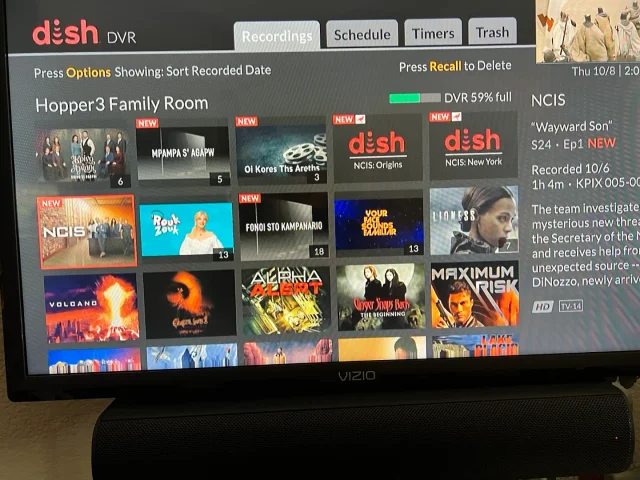
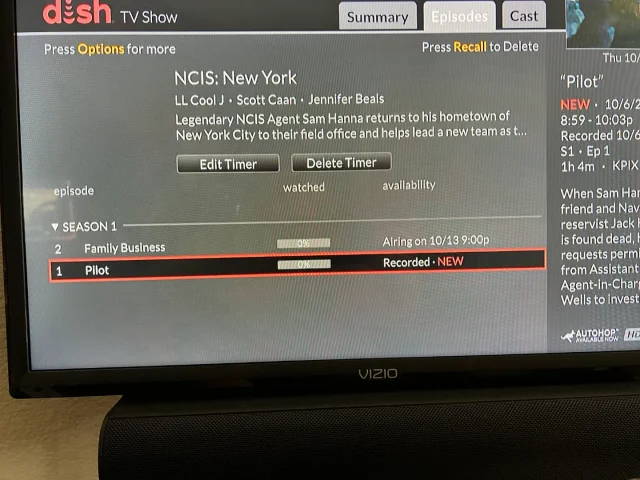
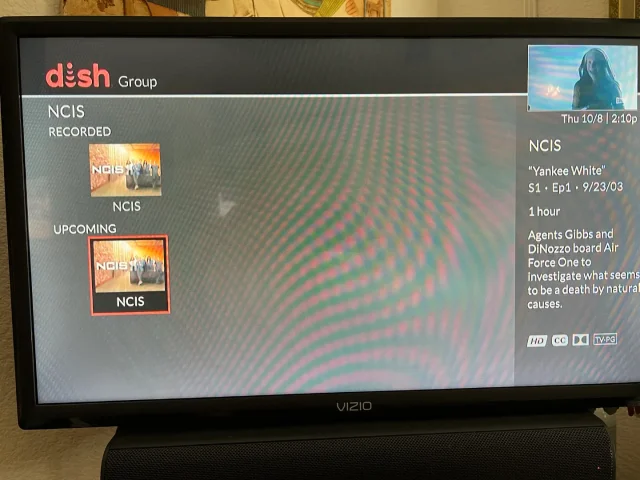
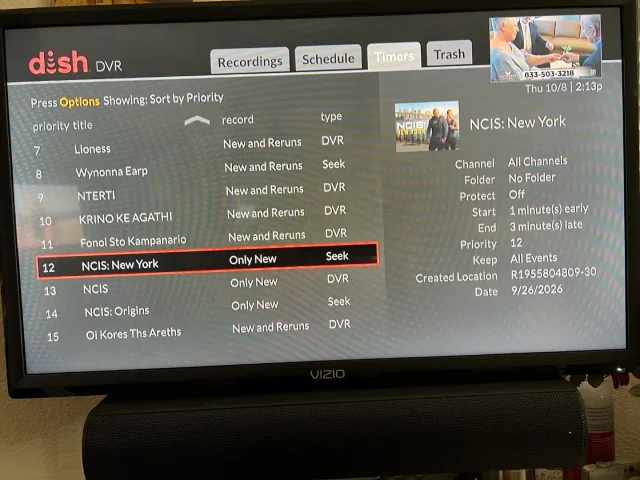
On Tuesday, I recorded the first episodes of the new season's NCIS shows on CBS (Dish provided, not OTA). The new New York series and Origins will both do Auto Skip, but the original, now season 24 does not. What's stranger, when I do a search for NCIS, Origins and New York show the current recording and the next episode it will record, but the original show only shows the current recording and some other channel showing the very first episode of season one. It makes no sense. When I set up the timers, I was able to use search for Origins and New York, but for the original, I had to scroll ahead in the guide until last Tuesday when the show was airing. Then set the timer from there. You can see its timer type is DVR where the other two are Seek. What am I missing?
Thanks!
Thanks!
20 Replies
·
376 views


Pub Member / Supporter
Cutting Edge
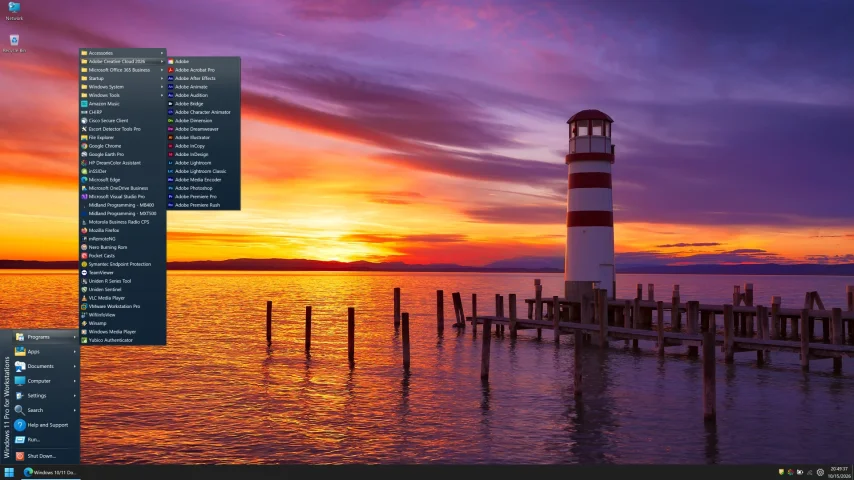
I created this thread on the original Edgecutter Cutting Edge Forums site. It's simply a place for those to review the latest software available for those using Windows 10 and Windows 11. To date it has received 112,559 views. I have been asked by staff to continue this thread here.
520 Replies
·
47156 views



Staff member
HERE TO HELP YOU!
Hard getting used to the new younger Gibbs, Mark Harmons son had the right look but I understand he didn't want the role.
Still I'm enjoying, pretty good job with Franks.
Still I'm enjoying, pretty good job with Franks.
66 Replies
·
4205 views

Pub Member / Supporter
0 Replies
·
13 views

Staff member
HERE TO HELP YOU!
Cutting Edge
Sometimes a thread gets so many posts in it that is can cause issues for the server so that why today we introduce The Song Name Game Part 3!
So let the game continue!
The last song was added by Bobby who posted...
One Meat Ball - Andrews Sisters
CONTINUE ON AND HAVE FUN! WELCOME HOME TO SATELLITEGUYS.US!
Here are the original rules for the game as posted by WebbyDude back in 2006. http://www.satelliteguys.us/threads/68645-Song-Name-Game
Just name a song title and the band who performed it. The next person does the same thing, but needs to list a song title or band name which includes a word from the previous entry. Pick songs from any genre.
Example:
Long Live Rock and Roll -- Rainbow
Rainbow in the Dark -- Dio
Another example:
Ride the Lightning -- Metallica
Lightning Strikes -- Ozzy Osbourne
Get it?
An additional note: we all know that song titles, sometimes, use profane words. Because this is a family friendly website it is advised that you clean up that title up a bit. This is accomplished by using something like sh!t instead of the real word. Thanks....
So let the game continue!
The last song was added by Bobby who posted...
One Meat Ball - Andrews Sisters
CONTINUE ON AND HAVE FUN! WELCOME HOME TO SATELLITEGUYS.US!
Here are the original rules for the game as posted by WebbyDude back in 2006. http://www.satelliteguys.us/threads/68645-Song-Name-Game
Just name a song title and the band who performed it. The next person does the same thing, but needs to list a song title or band name which includes a word from the previous entry. Pick songs from any genre.
Example:
Long Live Rock and Roll -- Rainbow
Rainbow in the Dark -- Dio
Another example:
Ride the Lightning -- Metallica
Lightning Strikes -- Ozzy Osbourne
Get it?
An additional note: we all know that song titles, sometimes, use profane words. Because this is a family friendly website it is advised that you clean up that title up a bit. This is accomplished by using something like sh!t instead of the real word. Thanks....
68494 Replies
·
2670366 views


Pub Member / Supporter
Lifetime Supporter
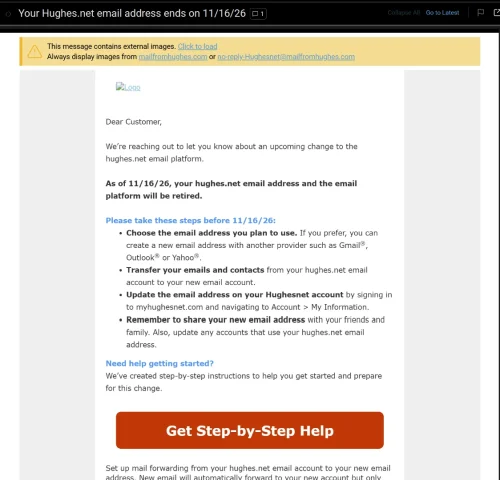
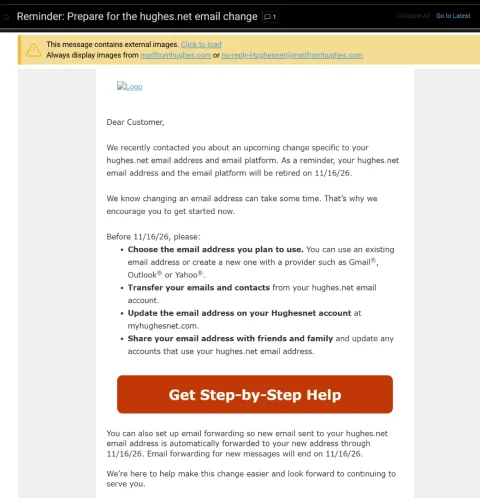
Wasn't exactly sure where to post this. Just had a customer come in inquiring about internet. He has HughesNet and had heard good things about mine. He asked if we provided email addresses and it kinda caught me off guard. I said he should be able to keep whatever email he had been using....my sister in law is still using a BellSouth email addy and they haven't been around here for many years. He said he had gotten a letter from HughesNet stating that they had until Nov 16th to save, move, forward, whatever, their Hughesnet emails because they would lose them after that date.
I have never heard of a company simply mass-deleting email accounts (the customer still has his HughesNet service). From what I understand, in the past, the company who was ditching their email service simply sold the customer base to a company like Google.
Anyone else getting this letter. He said he would show it to me tomorrow when I go out there and set up his internet.
I have never heard of a company simply mass-deleting email accounts (the customer still has his HughesNet service). From what I understand, in the past, the company who was ditching their email service simply sold the customer base to a company like Google.
Anyone else getting this letter. He said he would show it to me tomorrow when I go out there and set up his internet.
7 Replies
·
120 views



Lifetime Supporter
Starting a thread klang !
After an amazing first 2 seasons and an 8 episode 3rd season still coming this year, season 4 has now been greenlit.

After an amazing first 2 seasons and an 8 episode 3rd season still coming this year, season 4 has now been greenlit.
9 Replies
·
934 views


